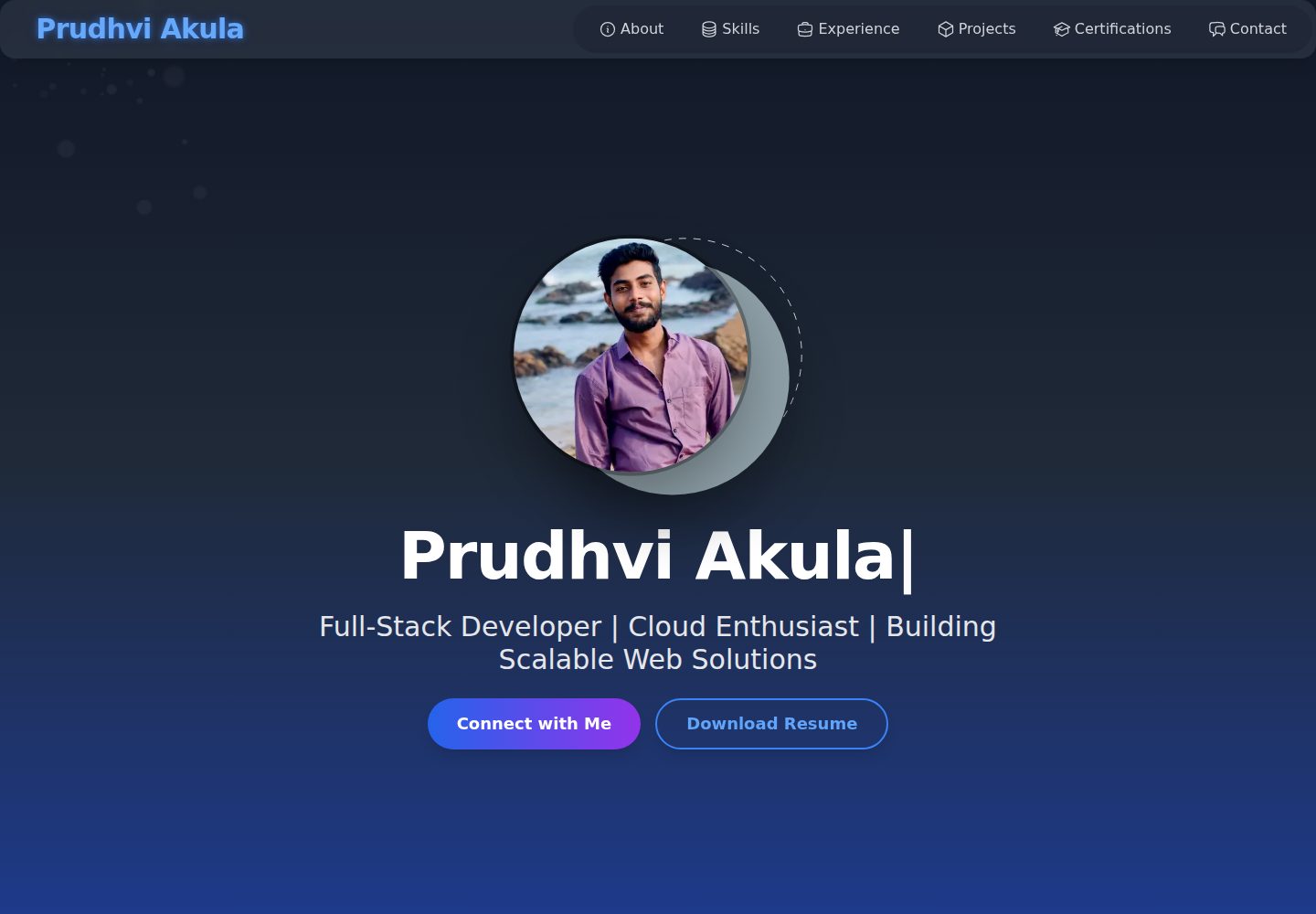
Includes portfolio sections such as About, Skills, Experience, Projects, Certifications, Leadership, Education, and Contact
Next.jsReactPortfolioCorporate Website
Prudhvi-Portfolio — Next.js Portfolio Template
By prudhvi1519
A personal portfolio website template built with Next.js, React, TypeScript, and Tailwind CSS that presents skills, internships, leadership, education, and contact details, and includes interactive elements such as a custom cursor, particle background, tilt cards, responsive navigation, and theme toggle.
Explore the design
Compare the page layouts and mobile experience. Open any screenshot for a closer look.
Desktop homepage1 / 2
Desktop captureTop of page
Actual screenshot captured by the server browser.
All pages & views 2
Screenshots show visual appearance; interactive behavior may differ.
Recorded 2026-10-13View source
What stands out
A quick read of the recorded project description.
Custom cursor supports hover morphing and click burst animation
Canvas particle background responds to mouse movement
Uses vanilla-tilt to create 3D tilt effects for images and project items
Fixed top navigation supports smooth scrolling, link highlighting, and a mobile toggle menu
Supports light and dark themes; the theme toggle switch is listed in the README as planned for the next version
Template Details
Prudhvi Portfolio is a personal portfolio website template for presenting Prudhvi Akula’s skills, internship experience, leadership, education, and contact details. The project is built with Next.js, React, TypeScript, and Tailwind CSS. The page is organized into sections such as About, Skills, Experience, Projects, Certifications, Leadership, Education, and Contact. Static assets (avatar, project screenshots, resume PDF) are placed in the public directory, and TypeScript interfaces are defined centrally in types.ts.
On the interaction side, it includes a custom cursor (hover morphing, click burst animation), a canvas-based mouse-responsive particle background, 3D tilted images using vanilla-tilt, a fixed top navigation with a mobile toggle menu, and light/dark theme support (the README states that the theme toggle switch is planned for the next version). The README also mentions Framer Motion for animations, Next Themes for theme management, and ESLint and PostCSS for code quality and styling.
Usage limitations: it is currently a pure front-end setup with no environment variables required; if integrating backend services such as a contact form, you need to create .env.local yourself. Third-party assets such as demo images, fonts, and icons must be checked separately under their respective licenses; the code’s MIT license does not cover these assets.
Next.jsReactPortfolioCorporate Website
Is it right for your project?
Use Cases
- Build a personal developer portfolio to centrally present skills, projects, and experience
- Use as an interactive page practice project for Next.js + TypeScript + Tailwind CSS
- Replace the existing content with personal details for job hunting or freelance showcases
- Refer to the implementation of interactive components such as the custom cursor, particle background, and tilt cards
Suitable For
- Developers who need to quickly build a personal portfolio page
- Users familiar with or willing to use Next.js, React, TypeScript, and Tailwind CSS
- Portfolio projects that want to add interactive effects such as cursor, particles, and tilt cards
- Users who accept using the code under the MIT license and will independently verify third-party asset licenses
Getting started & customization
Use these recorded setup notes alongside the repository instructions for your chosen version.
- 1
Requires Node.js v18 or higher and npm v9 or higher (Yarn is also acceptable)
- 2
After cloning the repository, run npm install or yarn install to install dependencies
- 3
It is currently a pure front-end setup with no environment variables required; if integrating backend services such as a contact form, create .env.local yourself
- 4
Run npm run dev or yarn dev and visit http://localhost:3000 to view
- 5
Third-party assets such as demo images, fonts, and icons must be checked under their respective licenses; the code’s MIT license does not cover these assets
License & source material
Usage conditions & limitations
Free to use · keep license noticeThis entry covers the free version in the public repository under the MIT license; the free scope is the code of that version and does not mean that external services or third-party assets are free.
Must comply with when using
- Permits free use, modification, commercial use, and distribution of that version’s code.
- When distributing copies or substantial portions of the code, retain the original author’s copyright notice and the complete MIT license notice.
- The code is provided as is; warranties and limitations of liability are governed by the original license and applicable law.
Additional costs & items to verify
- Demo images, fonts, icons, and other third-party assets must be checked under their respective licenses and cannot be judged solely by the code’s MIT license.
- External services such as domains, hosting, databases, payments, or AI may incur separate charges.
- It is currently a pure front-end setup with no environment variables required; if integrating backend services such as a contact form, you need to create .env.local yourself and configure the corresponding services.
- Light and dark theme support already includes theme detection, but the theme toggle switch is planned for the next version, so the current version may not allow manual switching.
View Original Text Basis
Permission is hereby granted, free of charge
Original License Text
<ol> <li> <strong>Clone the repository:</strong> <pre> git clone https://github.com/<your-username>/prudhvi-portfolio.git cd prudhvi-portfolio </pre> </li> <li> <strong>Install dependencies:</strong><br /> <strong>Using npm:</strong> <pre>npm install</pre> <strong>Or using Yarn:</strong> <pre>yarn install</pre> </li> <li> <strong>Set up environment variables (if needed):</strong> <ul> <li>Create a <code>.env.local</code> file if you add backend services (e.g., for contact form APIs).</li> <li><em>No environment variables are required for the current frontend-only setup.</em></li> </ul> </li> <li> <strong>Run the development server:</strong><br /> <strong>Using npm:</strong> <pre>npm run dev</pre> <strong>Or using Yarn:</strong> <pre>yarn dev</pre> </li> <li> <strong>Open the application:</strong><br /> Visit: <a href="http://localhost:3000" target="_blank">http://localhost:3000</a> in your browser. </li> </ol>
Original README
https://github.com/prudhvi1519/Prudhvi-Portfolio/blob/main/LICENSEhttps://github.com/prudhvi1519/Prudhvi-Portfolio/blob/main/README.md- **Dark/Light Mode Support**: Theme detection with CSS variables; toggle switch planned for next release.
Original README
Compiled by DeepSeek based on repository license and README ·2026-10-13. Results only cover the materials read; dependencies, images, fonts, and subsequent term changes are subject to their respective original texts.
Project checks & description sources
Template Information
- Source platforms
- GitHub
- Documentation and maintenance reference score
- More documented · 88 / 100
- Technologies
- Next.js · React
- Website type
- Portfolio · Corporate Website
How this score is calculated
Our heuristic uses license records (up to 30), a demo link (12), a preview (10), stars (15), recorded maintenance (15), description completeness (8), feature records (5) and classification data (5). It is not a code, security or performance test, or a Google score. A link does not establish tested functionality.
What to verify for this project
- Repository update recorded
- 2026-02-27
- Screenshot last checked
- 2026-10-13
A demo link is listed. Check it with your own content and viewport sizes; its presence does not confirm that forms, authentication or payments work.
The catalog identifies Next.js as the primary stack. Check the actual dependency manifest and lockfile for versions and hosting requirements. These notes use recorded metadata, not a code audit or a deployment test.
Use a selection guide →How this description was prepared
AI-assisted description based on catalog records and repository material. Repository authors are not automatically the reviewers of this description.
Review declaration: codex-user-requested-batch-review-20261015 · 2026-10-15
Inspect the recorded source material
SHA-256: d9130dd1e2cd3667c8619b07e823d0c52384e84c2a38939edbf92df9c31cf0ed
2026-10-13T01:15:04.090Z
Source file / repository# Prudhvi Portfolio     **A comprehensive Personal Portfolio** showcasing the journey of **Prudhvi Akula**, a Full-Stack Developer & Cloud Enthusiast. Built with **Next.js**, **React**, **TypeScript**, and **Tailwind CSS**, this site combines modern web design with interactive UI components to present skills, projects, and professional experience in a polished, responsive layout. --- 🔗 **Live Demo:** ➡️ [https://prudhvi-portfolio-website.vercel.app](https://prudhvi-portfolio-website.vercel.app) --- ## 📑Table of Contents - [Overview](#overview) - [Key Features](#key-features) - [Tech Stack](#%EF%B8%8F-tech-stack) - [Frameworks & Libraries](#frameworks--libraries) - [Styling & Animation](#styling--animation) - [Tooling & Quality](#tooling--quality) - [Project Structure](#project-structure) - [Installation](#installation) - [Usage & Demo](#usage--demo) - [Contributing](#contributing) - [License](#license) - [Contact](#contact) --- ## 📝Project Overview Prudhvi Portfolio is a **Next.js** application built to highlight: - **About Me**: A concise personal and professional bio. - **Skills**: Detailed breakdown of languages, frameworks, and tools mastered. - **Projects**: Live demos, source-code links, and walkthroughs for each major project. - **Certifications & Education**: Academic credentials and specialized training. - **Leadership & Collaboration**: Team achievements, open-source contributions, and soft-skill highlights. - **Contact**: Direct messaging form and social links for networking. The site’s design philosophy centers on **performance**, **accessibility**, and **engagement**—with features like a custom cursor, dynamic particle background, tilt-effect cards, and dark/light mode support. Every component is fully responsive, ensuring a seamless experience on desktops, tablets, and mobile devices. --- ## ✨Key Features - **Interactive UI Components**: A bespoke cursor that transforms on hover and leaves a burst animation on click, enhancing interactivity. plus mirror reflective effects on "Download Resume" and "Connect Me" buttons for enhanced interactivity. - **Particle Background**: A canvas-powered, mouse‐responsive particle system that brings subtle motion to the hero section. - **Responsive Navigation**: A fixed top nav bar with smooth scrolling, animated link highlighting, and a mobile toggle menu for small screens. - **Portfolio Sections**: Dedicated sections for *About*, *Skills*, *Experience*, *Projects*, *Certifications*, *Leadership*, *Education*, and *Contact*. - **Tilt-Effect Images**: Portfolio items and images tilt in 3D when hovered, using the lightweight *vanilla-tilt* library. - **Dark/Light Mode Support**: Theme detection with CSS variables; toggle switch planned for next release. - **TypeScript Integration**: Type-safe development with interfaces defined in `types.ts` for structured data. - **Accessible Design**: ARIA labels, keyboard focus states, and semantic HTML to support all users. - **Static Assets**: Profile picture, project images, and resume PDF served from the `public/` directory. --- ## 🛠️Tech Stack ### 📚Frameworks & Libraries: - Next.js: A React-based framework for server-side rendering and static site generation. - React: JavaScript library for building dynamic user interfaces. - TypeScript: A statically typed superset of JavaScript for enhanced code reliability. ### 🎨Styling & Animation: - Tailwind CSS: Utility-first CSS framework for rapid and custom styling. - Framer Motion: Animation library for smooth transitions and effects. - Vanilla Tilt: JavaScript library for 3D tilt effects on images. ### 🔧Tooling & Quality: - Next Themes: Theme management for dark/light mode support. - PostCSS: CSS transformation tool with Autoprefixer for browser compatibility. - ESLint: Static code analysis for maintaining code quality. --- ## 📂Project Structure The project is organized for modularity and maintainability, following Next.js App Router conventions: ```bash ├── public # Static assets (images, PDFs) ├── src # Source code ├── config files # Tool/framework configurations └── README.md # Project documentation ``` For a more detailed breakdown of the project structure, see the full directory tree in the expanded section below. <details> <summary>Full Directory Structure (Click to Expand)</summary> ```bash prudhvi-portfolio/ ├── public/ # Static assets (images, resume PDF) │ ├── profile-pic.jpg │ ├── pins-studio.png │ ├── python-compiler.png │ ├── weather-dashboard.png │ ├── prudhvi_resume.pdf ├── src/ │ ├── app/ │ │ ├── components/ │ │ │ ├── sections/ # Page sections (About, Skills, Projects, etc.) │ │ │ ├── CustomCursor.tsx # Custom cursor with hover and burst effects │ │ │ ├── Icons.tsx # SVG icon components │ │ │ ├── ParticlesBackground.tsx # Canvas-based particle background │ │ │ └── TiltImage.tsx # Image component with tilt effect │ │ ├── globals.css # Global styles with Tailwind CSS │ │ ├── types.ts # TypeScript interfaces │ │ ├── layout.tsx # Root layout with theme provider │ │ └── page.tsx # Main page with navigation and sections ├── .gitignore # Git ignore file ├── .eslintrc.json # ESLint configuration ├── next.config.ts # Next.js configuration ├── package.json # Dependencies and scripts ├── postcss.config.mjs # PostCSS configuration ├── tailwind.config.js # Tailwind CSS configuration ├── tsconfig.json # TypeScript configuration ├── next-env.d.ts # Next.js TypeScript definitions └── README.md # Project documentation ``` </details> --- ## 🚀Installation Follow these steps to set up the **Prudhvi Portfolio** locally. ### ✅Prerequisites Ensure you have the following installed: - **Node.js**: v18 or higher - **npm**: v9 or higher (or **Yarn**, optional) <ol> <li> <strong>Clone the repository:</strong> <pre> git clone https://github.com/<your-username>/prudhvi-portfolio.git cd prudhvi-portfolio </pre> </li> <li> <strong>Install dependencies:</strong><br /> <strong>Using npm:</strong> <pre>npm install</pre> <strong>Or using Yarn:</strong> <pre>yarn install</pre> </li> <li> <strong>Set up environment variables (if needed):</strong> <ul> <li>Create a <code>.env.local</code> file if you add backend services (e.g., for contact form APIs).</li> <li><em>No environment variables are required for the current frontend-only setup.</em></li> </ul> </li> <li> <strong>Run the development server:</strong><br /> <strong>Using npm:</strong> <pre>npm run dev</pre> <strong>Or using Yarn:</strong> <pre>yarn dev</pre> </li> <li> <strong>Open the application:</strong><br /> Visit: <a href="http://localhost:3000" target="_blank">http://localhost:3000</a> in your browser. </li> </ol> --- ## 🎬Usage & Demo After installation, you can: - Explore sections like *About*, *Skills*, *Projects*, *Contact*, etc. - Experience the **Custom Cursor** with hover effects and click animations. - View the particle background with mouse interaction. - Watch images tilt in 3D on hover. - Navigate using the **responsive menu** (mobile-friendly toggle). - Download the resume PDF from the Hero section. --- ## 🤝Contributing We love contributions from the community! Please refer to our detailed [CONTRIBUTING.md](CONTRIBUTING.md) guide for steps on how to contribute to this project. Contributions are welcome! To contribute to Prudhvi Portfolio: 1. **Fork** the repository. 2. **Create a feature branch** (`git checkout -b feature/your-feature-name`). 3. **Make your changes** and **commit** (git commit -m "Add your feature"). 4. **Push** to the branch (git push origin feature/your-feature). 5. **Open a pull request** with a clear description of your changes. Please ensure your code follows the project’s ESLint rules and TypeScript conventions. For major changes, open an issue first to discuss. --- ## 📜License This project is licensed under the **MIT License**. See the [LICENSE](LICENSE) file for the full details. --- ## 📬Contact - GitHub Repository: [prudhvi-portfolio](https://github.com/prudhvi1519/Prudhvi-Portfolio) - Issues and Feature Requests: [GitHub Issues](https://github.com/prudhvi1519/Prudhvi-Portfolio/issues) - GitHub: **[prudhvi1519](https://github.com/prudhvi1519)** - LinkedIn: **[prudhvi1519](https://www.linkedin.com/in/prudhvi1519)** --- *Portfolio Owner*: [***Prudhvi Akula***](https://prudhvi-portfolio-website.vercel.app)
Explore similar templates
Compare previews and descriptions within the same stack and category.

SaaS-Boilerplate
SaaS-Boilerplate is an open-source SaaS starter template built with Next.js App Router, React 19, TypeScript, Tailwind CSS, and Shadcn UI.
Next.js · SaaS

react-resume-template
A personal resume website template for software developers, built with Next.js, React, and TypeScript and styled with Tailwind CSS. Site content is driven by a single data file at /src/data/data.tsx, with types in dataDef.ts and images in src/images/.
Next.js · Portfolio

Next-JS-Landing-Page-Starter-Template
A free Next.js landing page starter template written in Tailwind CSS and TypeScript, featuring built-in navbar, hero, features, CTA banner, and footer sections.
Next.js · Corporate Website

next-saas-starter
A free Next.js SaaS marketing landing page template from Blazity, using static generation and styled-components with no extra UI library.
Next.js · SaaS

startup-nextjs
Startup is a free, MIT-licensed Next.js template from NextJSTemplates for SaaS startups and corporate landing pages.
Next.js · SaaS

shadcn-landing-page
A Next.js landing page template built with Shadcn, TypeScript, and Tailwind, converted from a Shadcn-Vue version. It includes sections such as Navbar, mobile Sidebar, Hero, Pricing, FAQ, and Footer, and highlights responsive design, navigation, and dark mode.
Next.js · Corporate Website