Built with Bootstrap 4, with design referencing the Prisma blog
HugoHTMLBlog
hugo-theme-chunky-poster — Hugo Blog Template
By puresyntax71
A Bootstrap 4-based Hugo blog theme inspired by the Prisma blog, supporting multiple authors, image processing, basic i18n, Prism code highlighting, LazyLoad, Commento comments, and image galleries.
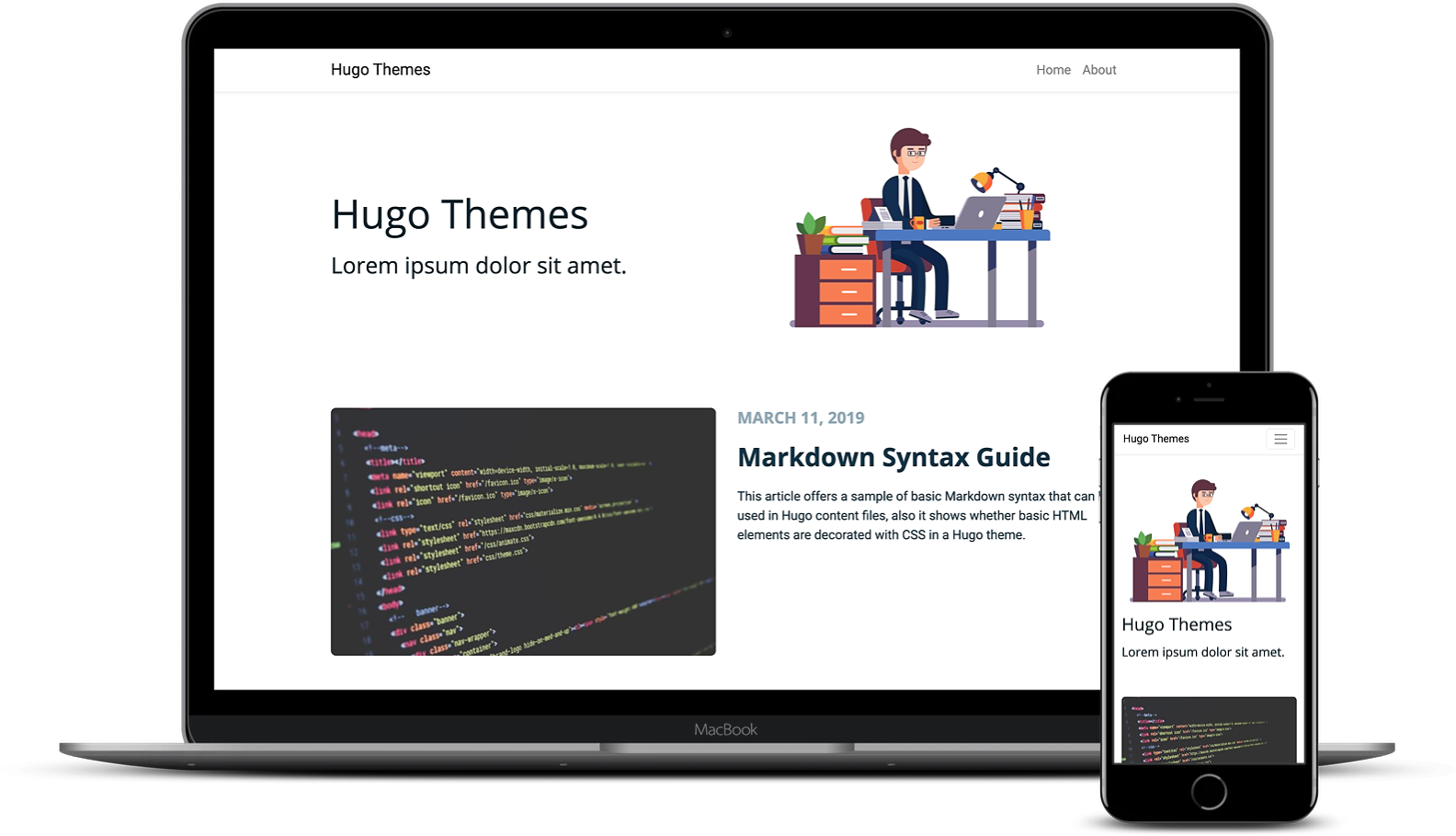
Explore the design
Compare the page layouts and mobile experience. Open any screenshot for a closer look.
Author preview
Author-provided preview
Preview provided in the project README.
One original preview is available. Open the full image to inspect the design.
Screenshots show visual appearance; interactive behavior may differ.
Recorded 2026-09-30View source
What stands out
A quick read of the recorded project description.
Supports multiple authors via Hugo's author taxonomy, with author avatars taken from the first image in the author page resources
Content images are stored centrally in content/images, and the first image in the images list in article front matter serves as the cover
Supports Prism code highlighting, LazyLoad, Commento comments, and basic i18n
Image gallery implemented based on ekko-lightbox and the figure shortcode
Provides src/js and src/scss source code, allowing customization of styles and scripts via yarn watch / yarn build
Template Details
Chunky Poster is a Hugo blog theme built with Bootstrap 4, with its overall structure and design referencing the Prisma blog. The theme targets personal or team blogs focused on article content, offering multiple authors, image processing, basic i18n, Prism code highlighting, LazyLoad, Commento comments, and image galleries.
The author system is implemented through Hugo's author taxonomy: enable the author taxonomy in the configuration, create author pages with hugo new authors/john-doe/_index.md, configure twitter and images in the author metadata, store images as author page resources, and use the first image in the list as the avatar and author page display; associate authors in article front matter via the authors field. Content images are placed under content/images, and a content/images/index.md with headless: true is created; the images field in article front matter references image paths, and the first image in the list serves as the article cover.
Code highlighting is configured via params.prismJS, setting enable to true and optionally theme; comments are configured via params.commento, setting enable and url; sharing is controlled by params.share, and can also be disabled per article by setting share: false in the front matter. The image gallery is based on ekko-lightbox and the figure shortcode, as a simple implementation of that library.
The theme's styles and scripts must be built yourself: the repository provides src/js/app.js as the JavaScript entry point and src/scss/style.scss as the main SCSS entry; Bootstrap variables can be overridden in _variables.scss, and theme styles are located in src/scss/chunky-poster.scss; run yarn watch during development and yarn build for production builds. The repository includes .nvmrc to facilitate Node version management with nvm.
The theme is released under the MIT license, allowing free use, modification, commercial use, and distribution of this version of the code, provided the copyright notice and the full MIT license notice are retained when distributing. Demo images come from Unsplash and Freepik; third-party assets such as fonts and icons must be checked separately under their respective licenses.
HugoHTMLBlog
Is it right for your project?
Use Cases
- Building a personal blog focused on article lists and article details
- A team blog where multiple authors publish together and display author avatars and author pages
- A technical blog that wants to use Prism to highlight code blocks in articles
- A site that needs to set cover images for articles and use a lightbox image gallery
- A blog that uses Commento as its comment system and needs per-article control of the share toggle
Suitable For
- Users familiar with Hugo and willing to configure the site via config.toml and front matter
- Blog maintainers who need multiple authors and an author page structure
- Developers who want to customize styles themselves based on Bootstrap 4 and SCSS
- Projects that accept using yarn to build front-end assets
Getting started & customization
Use these recorded setup notes alongside the repository instructions for your chosen version.
- 1
After cloning the repository, configure the Hugo site by referring to exampleSite/config.toml.
- 2
Create author pages with hugo new authors/<name>/_index.md, and enable the author taxonomy in the configuration.
- 3
Place content images under content/images, and create a content/images/index.md with headless: true.
- 4
Configure Prism, Commento, and sharing in params.prismJS, params.commento, and params.share respectively.
- 5
When customizing styles or scripts, run yarn watch for development and yarn build to generate production assets; the repository provides .nvmrc.
License & source material
Usage conditions & limitations
Free to use · keep license noticeThis entry covers the free version under the MIT license in the public repository; the free scope is this version of the code and does not mean that external services or third-party assets are free.
Must comply with when using
- Free use, modification, commercial use, and distribution of this version of the code are permitted.
- When distributing copies or substantial portions of the code, retain the original author's copyright notice and the full MIT license notice.
- The code is provided as is; warranties and limitations of liability are governed by the original license and applicable law.
Additional costs & items to verify
- The comment feature depends on the third-party service Commento; you must register and configure its service URL to enable it; without configuration, there is no comment feature.
- The image gallery depends on the third-party library ekko-lightbox; that library and its assets must be checked separately under their own license.
- Demo images come from Unsplash and Freepik and must comply with their respective platform licenses; they cannot be directly regarded as covered by the theme's MIT license.
- Styles and scripts must be built via yarn (yarn watch / yarn build) before production use, requiring a Node/yarn environment.
- Demo images, fonts, icons, and other third-party assets must be checked under their respective licenses and cannot be judged solely by the code's MIT license.
- External services such as domains, hosting, databases, payments, or AI may incur additional charges.
View Original Text Basis
Permission is hereby granted, free of charge
Original License Text
Configure [Commento](https://commento.io/) under `[params.commento]`. Set `enable` to `true` and add the URL at `url`:
Original README
The image gallery feature uses the [`ekko-lightbox`](https://github.com/ashleydw/lightbox/) and `figure` shortcode.
Original README
Images from [Unsplash](https://unsplash.com/) and [Freepik](https://www.freepik.com/).
Original README
https://github.com/puresyntax71/hugo-theme-chunky-poster/blob/master/LICENSEhttps://github.com/puresyntax71/hugo-theme-chunky-poster/blob/master/README.mdFor production, you can run `yarn build` for the assets to be updated.
Original README
Compiled by DeepSeek based on repository license and README ·2026-10-01. Results only cover the materials read; dependencies, images, fonts, and subsequent term changes are subject to their respective original texts.
Project checks & description sources
Template Information
- Source platforms
- GitHub
- Documentation and maintenance reference score
- More documented · 81 / 100
- Technologies
- Hugo · HTML
- Website type
- Blog
How this score is calculated
Our heuristic uses license records (up to 30), a demo link (12), a preview (10), stars (15), recorded maintenance (15), description completeness (8), feature records (5) and classification data (5). It is not a code, security or performance test, or a Google score. A link does not establish tested functionality.
What to verify for this project
- Repository update recorded
- 2023-01-05
- Screenshot last checked
- 2026-10-01
A demo link is listed. Check it with your own content and viewport sizes; its presence does not confirm that forms, authentication or payments work.
The catalog identifies Hugo as the primary stack. Check the actual dependency manifest and lockfile for versions and hosting requirements. These notes use recorded metadata, not a code audit or a deployment test.
Use a selection guide →How this description was prepared
AI-assisted description based on catalog records and repository material. Repository authors are not automatically the reviewers of this description.
Automatically checked against source and license rules; no manual editorial review.
Inspect the recorded source material
SHA-256: 0652b8e8b94354b382c4c089838a2a67308ca0e09846b178f17db9dc012e0afb
2026-10-01T14:28:21.554Z
Source file / repository# Chunky poster
[](https://circleci.com/gh/puresyntax71/hugo-theme-chunky-poster/tree/master)
A simple, bootstrap 4 based blog theme. The structure and design is based on the [Prisma blog](https://www.prisma.io/blog/).
[Demo](https://hugo-theme-chunky-poster.netlify.com) | [Demo 2](https://themes.gohugo.io/theme/hugo-theme-chunky-poster)
# Screenshot

# Features
* Multi-author
* Image processing
* Basic i18n
* Prism
* LazyLoad
* Commento
* Image gallery
# Usage
```shell
git clone https://github.com/puresyntax71/hugo-theme-chunky-poster.git
```
Check out the configuration at [`exampleSite/config.toml`](exampleSite/config.toml) for configuring your Hugo site.
## Authors
The authors structure is based on this [blog post](https://www.netlify.com/blog/2018/07/24/hugo-tips-how-to-create-author-pages/).
1. Add the taxonomy ["author"](exampleSite/config.toml#L28).
2. `hugo new authors/john-doe/_index.md`
3. Configure the author metadata `twitter`.
4. Configure the author metadata `images`. First image on the list will be used as the avatar and on the profile page. Images are page resources under the author e.g. `content/authors/john-doe/image.png`.
5. Assign the author to a content:
```yaml
---
authors: ["John Doe"]
---
```
## Content images
The images structure is based on this [blog post](https://forestry.io/blog/how-to-use-hugo-s-image-processing-with-forestry/).
Upload the images that will be used on content pages under `content/images` and create the file `content/images/index.md` with the front matter:
```yaml
---
headless: true
---
```
Set the path to the image in a `post` content under the `images` property:
```yaml
---
images: ["/images/image.png"]
---
```
The first image on the list will be used as the "cover" image on a post.
## Prism
Configure [Prism](https://prismjs.com/) under `[params.prismJS]` and set `enable` to `true`. Change the theme under `theme`.
```toml
[params]
[params.prismJS]
enable = true
theme = "okaidia"
```
## Commento
Configure [Commento](https://commento.io/) under `[params.commento]`. Set `enable` to `true` and add the URL at `url`:
```toml
[params]
[params.commento]
enable = true
url = "https://somename.commento.io"
```
## Share
Enable sharing under `params` with `share` set to `true` and disable per-post sharing by setting `share` to `false` in the front matter.
```toml
[params]
share = true
```
```yaml
---
share: false
---
```
## Image gallery
The image gallery feature uses the [`ekko-lightbox`](https://github.com/ashleydw/lightbox/) and `figure` shortcode. This is just a simple implementation of the lightbox gallery feature from the library.
# Customization
Fork the project and run `yarn watch` during development.
> The project has an `.nvmrc` if you wish to use [`nvm`](https://github.com/nvm-sh/nvm).
The application javascript file is located at `src/js/app.js`.
For customizing SCSS, the main entrypoint is at `src/scss/style.scss`. Bootstrap variables can be overridden in the `_variables.scss` file. The theme's styles are located at `src/scss/chunky-poster.scss`.
For production, you can run `yarn build` for the assets to be updated.
# Credits
* [Victor Hugo](https://github.com/netlify-templates/victor-hugo)
* [hugo-theme-even](https://github.com/olOwOlo/hugo-theme-even)
* [Blank](https://github.com/vimux/blank/)
* [CleanWhite](https://github.com/zhaohuabing/hugo-theme-cleanwhite)
Images from [Unsplash](https://unsplash.com/) and [Freepik](https://www.freepik.com/).
# License
This theme is released under the [MIT license](LICENSE).
Explore similar templates
Compare previews and descriptions within the same stack and category.

hugo-PaperMod
A fast, clean, responsive Hugo theme for blogs and lightweight portfolios, with three layout modes (Regular, Home-Info, Profile), automatic and manual light/dark themes, Fuse.js client-side search, multilingual support, and built-in Open Graph, Twitter Cards, and Schema.org data.
Hugo · Portfolio

LoveIt
LoveIt is a clean, elegant, and feature-rich Hugo blog theme derived from LeaveIt and KeepIt, MIT-licensed. It offers light/dark modes, responsive layout, multilingual support, and search via Lunr.js or Algolia.
Hugo · Blog

hugo-coder
hugo-coder is a minimalist Hugo blog theme maintained by luizdepra under the MIT license. It provides a clean, text-focused blog appearance, configuration documentation in the docs directory, and a complete exampleSite with hugo.toml.
Hugo · Blog

blowfish
Blowfish is a Hugo personal website and blog theme built with Tailwind CSS 4, focused on lightness, simplicity, and content-first presentation.
Hugo · Blog

hugo-paper
hugo-paper is a simple, clean, and customizable Hugo blog theme configured through config.toml or hugo.toml.
Hugo · Blog

hextra
Hextra is a Hugo theme for documentation and blog sites, built on Hugo and Tailwind CSS with design referencing Nextra.
Hugo · Documentation