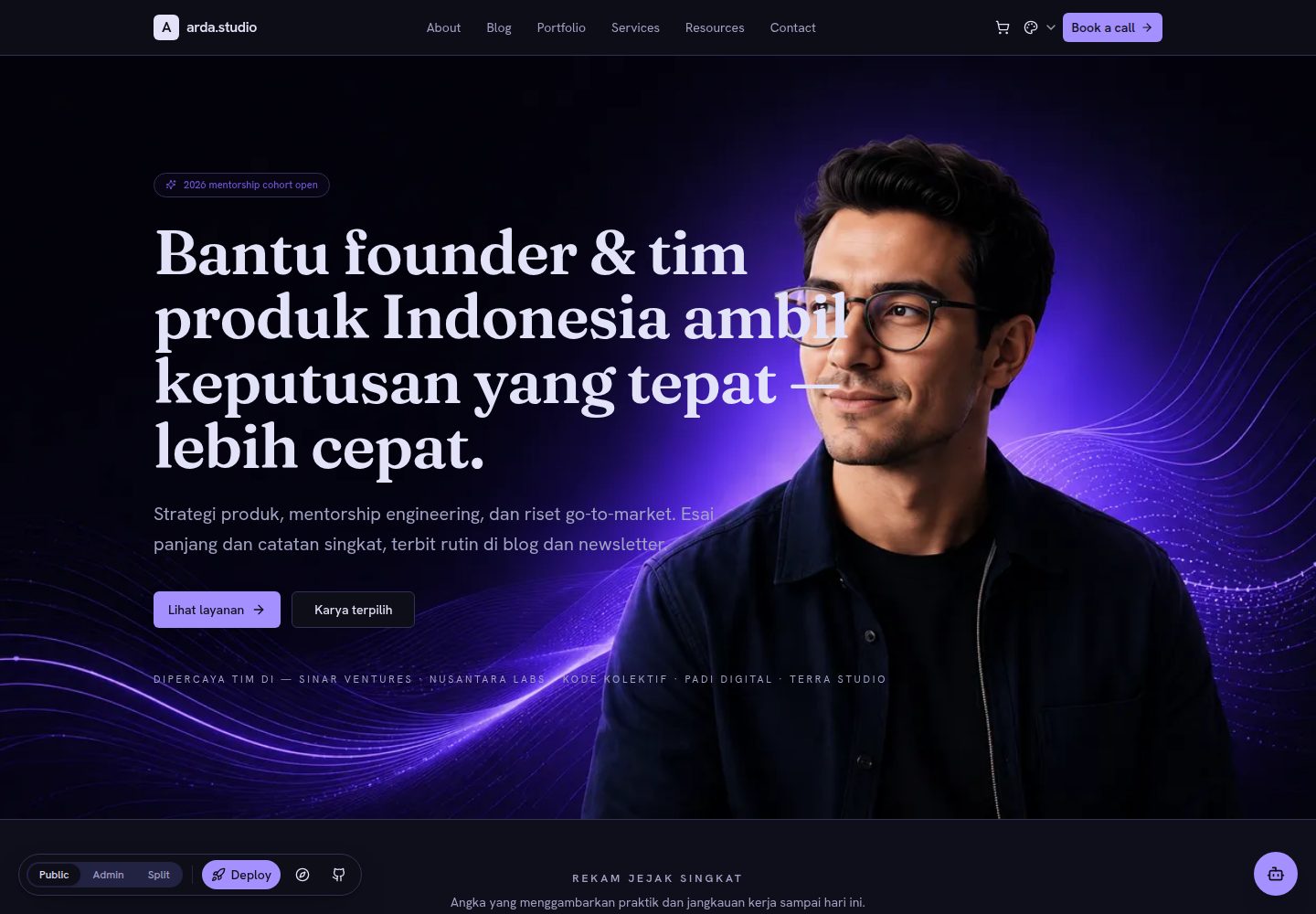
Headless CMS with content centralized in Convex: articles, portfolio, services, resources, pages, landing page sections, leads, comments, subscribers, and chat can all be edited from /admin
Next.jsReactAdmin dashboardPortfolioBlog
template-personal-brand-os — Next.js Admin dashboard Template
By rahmanef63
A personal brand website template built on Next.js and Convex that lets you manage blog, portfolio, services, leads, and subscriptions from a single admin dashboard. The code is MIT licensed.
Explore the design
Compare the page layouts and mobile experience. Open any screenshot for a closer look.
Desktop homepage1 / 3
Desktop captureTop of page
Actual screenshot captured by the server browser.
All pages & views 3
Screenshots show visual appearance; interactive behavior may differ.
Recorded 2026-09-30View source
What stands out
A quick read of the recorded project description.
The dashboard lets you configure site name, tagline, logo, favicon, brand colors, and light/dark/system theme, applied site-wide at runtime
A unified image picker supports four sources: gallery, upload, paste link, and Unsplash
The first account to visit /admin automatically becomes owner; registration closes afterward, with optional invite key or environment variables to create admins
The /setup page shows deployment and configuration status as a checklist and links to the corresponding fix steps
Supports exporting all content as a JSON backup and re-importing it, with no terminal operations required
Template Details
This is a "clone and own" personal brand website template: after deploying the repository to your own Vercel and connecting your own Convex database, you can manage blog posts, portfolio, services, resources, pages, landing page sections, leads, comments, subscribers, and chat from the /admin dashboard. The frontend is stateless by design; all content is stored in Convex, and editing content does not modify frontend code.
The dashboard provides brand settings (site name, tagline, logo, favicon, brand colors, light/dark/system theme), a unified image picker (gallery, upload, paste link, Unsplash), one-click sample content seeding, JSON backup and restore, version update notifications with one-click rebuild, and role-based permissions (the first account is owner, invited admins are editors). On first visit to /admin you can claim ownership; registration closes afterward. You can also invite via ADMIN_SIGNUP_KEY or automatically create an owner via ADMIN_EMAIL / ADMIN_PASSWORD.
Before use, understand its external dependencies: content and authentication rely on Convex Cloud, deployment relies on Vercel, and environment variables are split across the Vercel and Convex consoles; JWT_PRIVATE_KEY, JWKS, and SITE_URL are automatically written to Convex at build time. The Next.js, React, and Tailwind version numbers given in the README were not verified against the dependency manifest and are not listed here. The template code is MIT licensed, but third-party assets such as demo images, fonts, and icons require separate license verification; external services like domains, hosting, and databases may incur costs.
Next.jsReactAdmin dashboardPortfolioBlog
Is it right for your project?
Use Cases
- Individual developers or freelancers building a personal brand site with a blog, portfolio, and service descriptions
- Collecting potential customer leads, comments, and email subscribers through the dashboard and managing them centrally
- Cloning the template to your own Vercel and Convex to avoid hosting content on third-party platforms
- Site projects that need a headless CMS with real-time data and want to keep the frontend stateless
Suitable For
- Users who want full control over code and data and are willing to maintain their own Vercel and Convex deployments
- Personal brand operators who need to manage blog, portfolio, services, and leads from one dashboard
- Developers who accept configuring through environment variables and external consoles
- Teams looking for an MIT-licensed, modifiable, and commercially usable Next.js admin-style site template
Getting started & customization
Use these recorded setup notes alongside the repository instructions for your chosen version.
- 1
Click Deploy with Vercel to clone the repository, connect GitHub, add the Convex integration, and deploy
- 2
Open /admin to claim ownership (first account), then you can seed sample content with one click
- 3
Environment variables are split across the Vercel and Convex consoles: NEXT_PUBLIC_CONVEX_URL and CONVEX_DEPLOY_KEY on Vercel; JWT_PRIVATE_KEY, JWKS, and SITE_URL are automatically written to Convex at build time
- 4
For local development, run npm install --legacy-peer-deps, copy .env.example to .env.local and set NEXT_PUBLIC_CONVEX_URL, then run npx convex dev --once and npm run dev
- 5
Third-party assets such as demo images, fonts, and icons must be checked against their respective licenses; external services like domains, hosting, and databases may incur separate charges
License & source material
Usage conditions & limitations
Free to use · keep license noticeThis entry covers the free version in the public repository under the MIT license; the free scope is the code of that version and does not imply that external services or third-party assets are free.
Must comply with when using
- You may use, modify, commercialize, and distribute the code of this version for free.
- When distributing copies or substantial portions of the code, retain the original copyright notice and the full MIT license notice.
- The code is provided as is; warranties and limitations of liability are governed by the original license and applicable law.
Additional costs & items to verify
- Using this template requires connecting to the Convex Cloud service; content and authentication data are hosted in Convex, and you must register and maintain your own Convex account and deployment.
- Environment variables must be configured separately in the Vercel and Convex consoles; deployment and operations depend on these two external platforms.
- At build time, a Convex deploy key with deploy, env:view, and env:write permissions must be provided in Vercel; otherwise functions and schema cannot be deployed automatically.
- Inviting additional admins requires setting the ADMIN_SIGNUP_KEY invite key on the Convex side.
- If you want to automatically create an owner account on first load, you must configure ADMIN_EMAIL and ADMIN_PASSWORD on the Convex side.
- The Unsplash gallery in the image picker relies on the third-party Unsplash service; its asset licensing must be verified separately.
- The "forgot password" flow in the roadmap is an optional feature that requires integrating the third-party Resend email service.
- The roadmap shows that the core modules do not yet cover the remaining 7 templates; those capabilities are still planned rather than delivered.
- Demo images, fonts, icons, and other third-party assets must be checked against their respective licenses; you cannot judge solely by the code's MIT license.
- External services such as domains, hosting, databases, payments, or AI may incur additional charges.
View Original Text Basis
Permission is hereby granted, free of charge
Original License Text
add the **Convex** integration → Deploy
Original README
Variables live in **two** dashboards.
Original README
`CONVEX_DEPLOY_KEY` | Vercel | ✅ | deploys functions + schema at build — needs capabilities `deploy` + `env:view` + `env:write` (or full access)
Original README
`ADMIN_SIGNUP_KEY` | Convex | – | invite key for extra admins
Original README
`ADMIN_EMAIL` / `ADMIN_PASSWORD` | Convex | – | auto-create the owner on first load
Original README
curated Unsplash
Original README
Optional Resend "forgot password" flow
Original README
https://github.com/rahmanef63/template-personal-brand-os/blob/main/LICENSEhttps://github.com/rahmanef63/template-personal-brand-os/blob/main/README.mdRoll the core across the other 7 templates
Original README
Compiled by DeepSeek based on repository license and README ·2026-09-30. Results only cover the materials read; dependencies, images, fonts, and subsequent term changes are subject to their respective original texts.
Project checks & description sources
Template Information
- Source platforms
- GitHub
- Documentation and maintenance reference score
- More documented · 88 / 100
- Technologies
- Next.js · React
- Website type
- Admin dashboard · Portfolio · Blog
How this score is calculated
Our heuristic uses license records (up to 30), a demo link (12), a preview (10), stars (15), recorded maintenance (15), description completeness (8), feature records (5) and classification data (5). It is not a code, security or performance test, or a Google score. A link does not establish tested functionality.
What to verify for this project
- Repository update recorded
- 2026-09-09
- Screenshot last checked
- 2026-09-30
A demo link is listed. Check it with your own content and viewport sizes; its presence does not confirm that forms, authentication or payments work.
The catalog identifies Next.js as the primary stack. Check the actual dependency manifest and lockfile for versions and hosting requirements. These notes use recorded metadata, not a code audit or a deployment test.
Use a selection guide →How this description was prepared
AI-assisted description based on catalog records and repository material. Repository authors are not automatically the reviewers of this description.
Automatically checked against source and license rules; no manual editorial review.
Inspect the recorded source material
SHA-256: 6fd0cf6017d540aa63285828c1a3ef7be355bde6c0bf48572204acebca892b21
2026-09-30T09:00:59.785Z
Source file / repository<div align="center"> # Personal Brand OS **A 100% headless personal-brand website you fully own.** Clone it to your own Vercel + Convex, sign in, and run everything — blog, portfolio, services, leads, newsletter — from one admin dashboard. No code required. [](https://vercel.com/new/clone?repository-url=https://github.com/rahmanef63/template-personal-brand-os)      [**Live demo**](https://personal-brand-os-ten.vercel.app) · [**User guide (ID)**](docs/USER-GUIDE.md) · [**AI-assisted setup**](docs/AI-SETUP.md) </div> --- ## What is this? A **clone-to-own** website template. Deploy it to **your** infrastructure and you get a full personal-brand site whose content lives in **your** Convex database — managed entirely from the admin panel. The frontend is stateless, so updates never touch your data. - 🧑💻 **For visitors** — a fast, SEO-ready public site (blog, portfolio, services, resources). - 🛠️ **For you** — an admin dashboard to edit everything, with zero coding. - 🔒 **Yours** — your repo, your Vercel, your Convex. No vendor lock-in. ## ✨ Features - **Headless CMS on Convex** — posts, portfolio, services, resources, pages, landing sections, leads, comments, subscribers, chat. Realtime, edited from `/admin`. - **Zero-touch setup** — deploy → open `/admin` → claim owner → one-click sample content. No env editing, no terminal. Auth keys auto-provision at build. - **Branding from the dashboard** — site name, tagline, logo, **favicon**, brand colour, light/dark/system theme. All stored in Convex and applied across the site at runtime. - **One-button image picker** everywhere — gallery · upload · paste-URL · curated Unsplash. - **Secure admin** — keyless first-owner claim, then signup auto-closes; optional invite key (`ADMIN_SIGNUP_KEY`) or auto-admin from env (`ADMIN_EMAIL` / `ADMIN_PASSWORD`). - **`/setup` health page** — a plain-language checklist of what's done and what's left, each step linking to its fix. No log-reading. - **In-app updates** — admin sees current vs latest version and rebuilds in one click. - **Backup & restore** — download / re-import all your content as JSON, no terminal. - **Real team & roles** — dashboard shows the actual signed-in admin; first account is owner, invited admins are editors. - **Production Next.js** — SSR metadata, true HTTP 404s, error/loading boundaries, branded not-found, a splash loader until data is ready. - **Demo / clone stages** — a "Deploy your own" button shows on the demo only. - **Tested clones** — `npm run smoke` checks a clone can deploy (local, no CI cost). ## 🚀 Quick start (non-coder) 1. Click **[Deploy with Vercel](https://vercel.com/new/clone?repository-url=https://github.com/rahmanef63/template-personal-brand-os)** → connect GitHub → add the **Convex** integration → Deploy. 2. Open `https://your-site.vercel.app/admin` → **"Daftar sebagai pemilik"** (first account = owner). 3. In the dashboard, click **"Isi konten contoh"** to fill the site. Done. Need hand-holding? Open [`docs/AI-SETUP.md`](docs/AI-SETUP.md) — copy one prompt into ChatGPT/Claude and it walks you through every click. Full manual: [`docs/USER-GUIDE.md`](docs/USER-GUIDE.md). ## 💻 Local development ```bash npm install --legacy-peer-deps cp .env.example .env.local # set NEXT_PUBLIC_CONVEX_URL npx convex dev --once # generates convex/_generated npm run dev # http://localhost:3000 ``` ## 🔐 Environment — two places Variables live in **two** dashboards. The Deploy/clone button only fills the Vercel ones; set the Convex ones in the Convex dashboard (or let the build do it). | Variable | Where | Required | Purpose | |----------|-------|----------|---------| | `NEXT_PUBLIC_CONVEX_URL` | Vercel | ✅ | Convex deployment URL (`.convex.cloud`) | | `CONVEX_DEPLOY_KEY` | Vercel | ✅ | deploys functions + schema at build — needs capabilities `deploy` + `env:view` + `env:write` (or full access) | | `JWT_PRIVATE_KEY` / `JWKS` / `SITE_URL` | Convex | ✅ | login signing — **auto-set at build** (or `npx @convex-dev/auth`) | | `ADMIN_SIGNUP_KEY` | Convex | – | invite key for extra admins | | `ADMIN_EMAIL` / `ADMIN_PASSWORD` | Convex | – | auto-create the owner on first load | | `NEXT_PUBLIC_DEMO` | Vercel | – | demo only — shows the "Deploy your own" button | > `vercel.json` runs `convex deploy` automatically when `CONVEX_DEPLOY_KEY` is present — > no manual build-command change needed. ## 🧱 Tech stack | Layer | Tech | |-------|------| | Framework | Next.js 16 (App Router) | | UI | React 19 · Tailwind CSS 4 · shadcn/ui | | Backend / DB | Convex (Cloud) — realtime | | Auth | `@convex-dev/auth` (Password) | | Theme | next-themes (light / dark / system) | | Images | `image-picker` slice (gallery · upload · link · Unsplash) | ## 🗂️ Project structure ``` app/ (public)/ public site — home, blog, portfolio, services, … (+ loading/error/404) dashboard/admin/ admin CMS (gated) icon.tsx default favicon components/ image-picker/ portable one-button image chooser image-field.tsx Convex-wired adapter onboarding/ setup wizard public-chrome.tsx nav/footer with branding from siteSettings admin-gate.tsx · site-loader.tsx · brand-head.tsx · demo-ribbon.tsx convex/ schema.ts auth + content + siteSettings auth.ts setup.ts settings.ts files.ts seed.ts …function modules scripts/setup-auth.mjs build-time JWT key provisioning docs/ USER-GUIDE.md · AI-SETUP.md ``` ## 🗺️ Roadmap - [x] **headless-core** module + version manifest (`lib/headless-core/`) - [x] One-click **"Update available"** in admin - [x] One-click **backup / restore** - [x] Roles (owner / editor) — derived, surfaced in dashboard + Team settings - [x] **`/setup`** health page + clone **smoke-test** - [ ] Roll the core across the other 7 templates (see [`docs/CORE-ADOPTION.md`](docs/CORE-ADOPTION.md)) - [ ] Viewer role tier + per-action RBAC - [ ] Optional Resend "forgot password" flow ## 🤝 Contributing See [`CONTRIBUTING.md`](CONTRIBUTING.md). Issues and PRs welcome. ## 📄 License [MIT](LICENSE) © Rahman ([rahmanef.com](https://rahmanef.com)) <div align="center"><sub>Built with <a href="https://resource.rahmanef.com">rahman-resources</a>.</sub></div>
Explore similar templates
Compare previews and descriptions within the same stack and category.

tailwind-nextjs-starter-blog
A Next.js and Tailwind CSS blog starter template using Contentlayer for Markdown/MDX, with built-in SEO, code highlighting, and tags. It targets personal technical blogs and migration from Jekyll/Hugo to React, and supports one-click Vercel deployment.
Next.js · Blog

next-shadcn-dashboard-starter
An MIT-licensed admin dashboard starter built with Next.js 16, shadcn/ui, Tailwind CSS v4, and TypeScript.
Next.js · Admin dashboard

Studio Admin · Radix UI
Studio Admin is an admin dashboard template built with Next.js 16, TypeScript, Tailwind CSS v4, and Shadcn UI.
Next.js · Admin dashboard

free-nextjs-admin-dashboard
A free, open-source admin dashboard template built on Next.js 16, React 19, TypeScript, and Tailwind CSS v4. It provides a collapsible sidebar, charts, tables, authentication forms, modals, dropdowns, and dark mode, with internationalization and RTL support since version 2.4.0.
Next.js · Admin dashboard

react-resume-template
A personal resume website template for software developers, built with Next.js, React, and TypeScript and styled with Tailwind CSS. Site content is driven by a single data file at /src/data/data.tsx, with types in dataDef.ts and images in src/images/.
Next.js · Portfolio

materio-mui-nextjs-admin-template-free
Materio Free is a Next.js admin dashboard template based on App Router and MUI, integrating Tailwind CSS and available in TypeScript and JavaScript versions.
Next.js · Admin dashboard