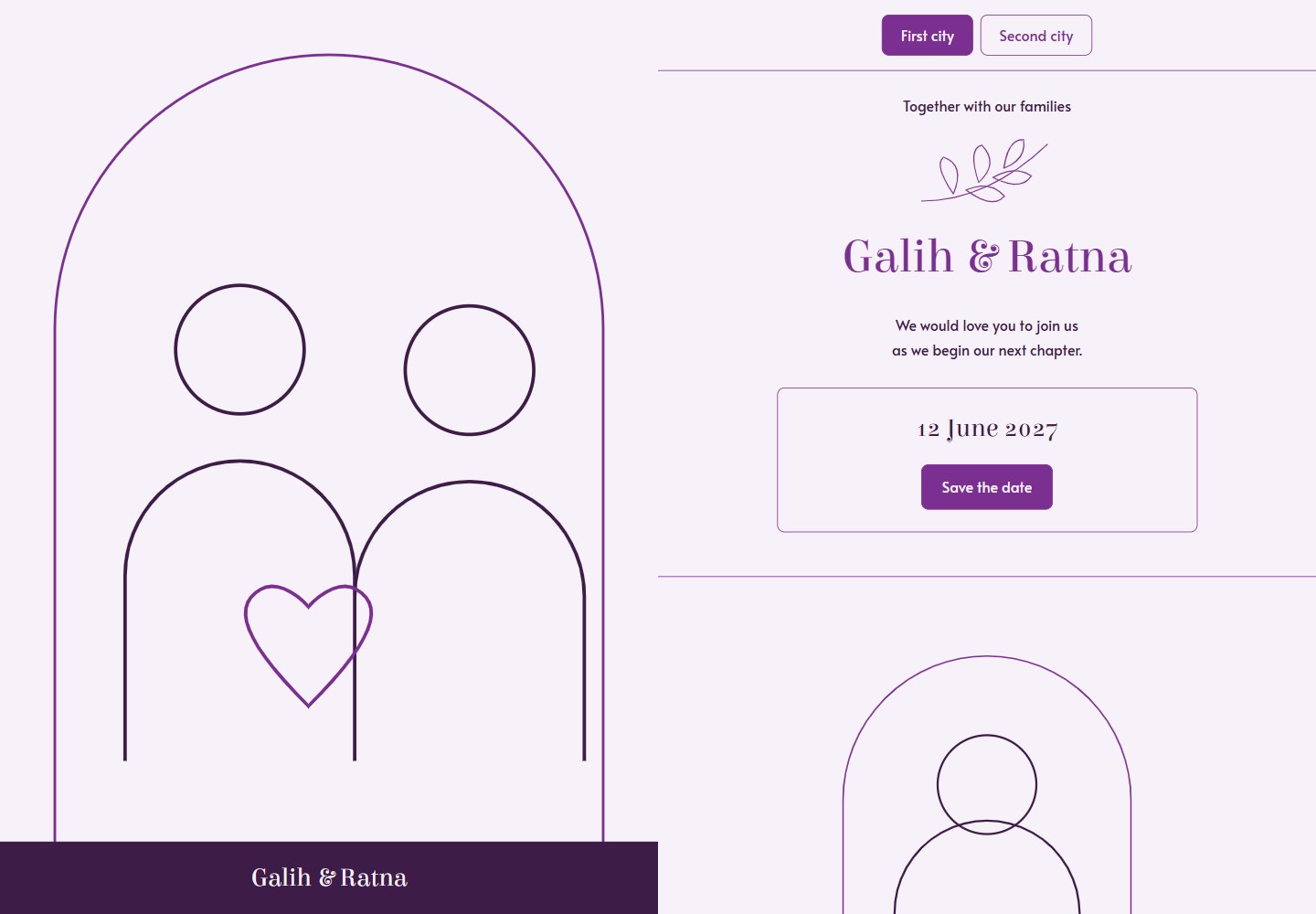
Configure names, dates, locations and media paths through the single wedding.json file, with no need to modify JSX or HTML
HTMLStarter
wed — HTML Starter Template
By rezaprama
A wedding invitation website template built on Cloudflare Workers, customized by editing wedding.json and uploading photos, with bilingual support, multi-city paths and an optional guestbook.
Explore the design
Compare the page layouts and mobile experience. Open any screenshot for a closer look.
Desktop homepage1 / 2
Desktop captureTop of page
Actual browser screenshot of the verified live demo.
All pages & views 2
Screenshots show visual appearance; interactive behavior may differ.
Recorded 2026-10-21View source
What stands out
A quick read of the recorded project description.
Includes two sample cities and two audience paths, and supports generating personalized links for different guest groups
Provides a /send/ page to create links with guest names, with guest names kept in the browser
Optional local background music, gift information and a moderated guestbook based on Cloudflare D1
Includes a responsive layout, keyboard-friendly dialogs, reduced motion, two fonts, three text sizes and three solid-color UI palettes
Provides a real 404 page, canonical URLs, robots settings and a sitemap
Template Details
wed is a free, open-source wedding invitation website template. The code uses the MIT license, and the fonts use the SIL Open Font License. It is deployed through GitHub and Cloudflare Workers; the default site requires no database, API keys or terminal operations, making it suitable for users unfamiliar with development. The template provides a responsive invitation page with a cover, couple introduction, event details, map, photo album and calendar links. All content is configured through one readable wedding.json file, with no need to edit JSX or HTML. The template includes two sample cities and two audience paths (lowercase paths for the couple's guests, uppercase paths for parents' guests), and provides a /send/ page to generate personalized links. Optional features include local background music, gift information and a moderated guestbook based on Cloudflare D1 (with a protected /admin/ page). The README emphasizes that the names, dates, venues and placeholder images in the examples must be replaced before sending invitations, and that a private repository does not hide a published website; allowIndexing: false only asks search engines not to index the site and is not password protection.
HTMLStarter
Is it right for your project?
Use Cases
- Couples who want to quickly build a free wedding invitation website without buying a domain or subscribing to a service
- Weddings that need separate invitation links for different cities or different guest groups (the couple's guests and parents' guests)
- Situations where personalized invitation links are sent to each guest via channels such as WhatsApp
- Weddings that need an optional guestbook feature and want to review messages
- Users who want to use AI prompts to help modify content or add features
Suitable For
- Couples unfamiliar with GitHub or Cloudflare who are willing to follow step-by-step guides
- Users who need a bilingual (English and Indonesian) invitation
- Users who want to host the invitation on the Cloudflare Workers Free plan
- Wedding invitation scenarios that need basic features such as a responsive design, photo album, map and calendar links
Getting started & customization
Use these recorded setup notes alongside the repository instructions for your chosen version.
- 1
Click the Deploy to Cloudflare button or generate a copy from the template; on first deployment, keep the Worker name as wed, the build command as npm run build, the deploy command as npm run deploy, and the Node.js version as 24
- 2
In the GitHub copy, edit wedding.json to replace names, dates and locations, set demo to false, set language to "en" or "id", and keep the quote and comma formatting
- 3
Upload photos to the public/media directory and change the corresponding .svg paths in wedding.json to the new file names
- 4
Before uploading private photos or gift information, set your own copy to private; however, the published website remains visible to anyone with the link, and allowIndexing: false is not password protection
- 5
The optional guestbook must be enabled on Cloudflare D1, and the protected /admin/ page is used to review messages
License & source material
Usage conditions & limitations
Free to use · keep license noticeThis listing covers the free version in the public repository under the MIT license; the free scope is the code of that version and does not mean external services or third-party assets are free.
Must comply with when using
- The code of this version may be used, modified, used commercially and distributed free of charge.
- When distributing copies or substantial portions of the code, retain the original author's copyright notice and the complete MIT license notice.
- The code is provided as is; warranties and limitations of liability are governed by the original license and applicable law.
Additional costs & items to verify
- Demo images, fonts, icons and other third-party assets must be checked against their respective licenses and cannot be judged solely by the code's MIT license.
- External services such as domains, hosting, databases, payments or AI may incur separate charges.
- The original template must remain public; before uploading private photos or gift information, you should set your own copy to private. A private repository only hides the source files; the published website remains visible to anyone with the link; allowIndexing: false only asks search engines not to index the site and is not password protection.
- Cloudflare Workers and D1 free allowances are account limits, not unlimited hosting: Workers allows 100,000 (10 × 10,000) requests per day, and D1 allows 5 million (500 × 10,000) rows read per day, 100,000 (10 × 10,000) rows written per day and 5 GB of storage; check current pricing and GitHub plan limits before a large event. A custom domain or music licensing may require additional payment.
- The code and placeholder images use the MIT license, and the fonts use their own SIL Open Font License; commercial use and customization must comply with these licenses.
- The names, families, dates and venues in the examples are samples, and the placeholder images are not real couple photos; they must be replaced before sending invitations.
- The guestbook is an optional feature that must be enabled on Cloudflare D1 and reviewed through the protected /admin/ page.
- Background music is an optional local file that you must provide yourself; the README notes that music licensing may incur costs.
- Running locally as a developer requires Node.js 24 or later.
- On first deployment, keep the Cloudflare Worker name as wed, use the Free plan, use the build command npm run build, use the deploy command npm run deploy, and select Node.js 24.
- Deployment requires logging in to your own Cloudflare and GitHub accounts and creating a repository copy in your account.
- To share a link, copy the actual workers URL from the Cloudflare dashboard; personalized links are generated through the /send/ page.
- Path case is significant; the homepage uses the first occasion, city navigation retains the guest name and audience, and after the guestbook is enabled, each audience has a separate message stream.
- The perfect PageSpeed score applies only to the sample demo measured on a specific date; your own photos and added features may change the result.
View Original Text Basis
Permission is hereby granted, free of charge
Original License Text
**Keep the original template public. Make your own copy private before uploading private photos or gift details.** A private repository hides source files, but the published website is still visible to anyone with its link. `allowIndexing: false` asks search engines not to list it; it is not a password.
Original README
Cloudflare offers a Free plan for Workers and optional D1. The current Workers allowance includes 100,000 Worker requests per day. D1 includes 5 million rows read and 100,000 rows written per day, with 5 GB total storage. These are account limits, not unlimited hosting. This template runs the Worker for site requests, so plan capacity using that allowance. Check current [Workers pricing](https://developers.cloudflare.com/workers/platform/pricing/), [D1 pricing](https://developers.cloudflare.com/d1/platform/pricing/) and [GitHub plan limits](https://docs.github.com/en/billing/concepts/product-billing/github-actions) before a large event. A custom domain or music license may have its own cost.
Original README
The code and placeholder artwork use the **MIT license**. The fonts use their own included **SIL Open Font License**. Commercial use and customization are welcome; follow those licenses.
Original README
The demo names, families, dates and venues are examples. The artwork is a placeholder, not a photo of a real couple. Replace these before sending your invitation.
Original README
- Optional moderated wishes on Cloudflare D1, with a protected `/admin/` page. [Enable it later](docs/guestbook.md).
Original README
- Optional local background music that starts when the invitation opens. One button pauses/resumes it. No YouTube player or third-party scripts on first load.
Original README
Use Node.js 24 or newer.
Original README
2. **Deploy the sample.** Your repository can have any short name, such as `our-wedding`. Keep the Cloudflare **Worker name** as `wed` for the first deploy. Use the Free plan. Build command: `npm run build`. Deploy command: `npm run deploy`. Choose Node.js 24 (`NODE_VERSION=24` if needed). Deploy once to see your sample website. [Want another Worker name?](docs/setup.md#2-deploy-the-sample)
Original README
1. **Make a copy.** Click **Deploy to Cloudflare** above. Sign in to your own Cloudflare and GitHub accounts. The setup makes a repository in your account. Alternatively, [Use this template](https://github.com/rezaprama/wed/generate), then connect that copy through Cloudflare → Workers & Pages → Create application → Import a repository.
Original README
5. **Share your website.** Cloudflare rebuilds after each saved change. Copy the working URL from its dashboard. Open `/send/` to make a link for each guest. Example: `https://your-site.workers.dev/one/?to=Your%20Guest`.
Original README
The home page uses the first occasion. City navigation preserves the guest name and audience. Each audience has its own wish feed when the guestbook is enabled. Letter case matters.
Original README
https://github.com/rezaprama/wed/blob/main/LICENSEhttps://github.com/rezaprama/wed/blob/main/README.mdThe sample demo scored **100 in all four PageSpeed categories on mobile and desktop** on 20 October 2026. [Reports and measurement context](docs/performance.md). Your photos and added features can change the results.
Original README
Compiled by DeepSeek based on repository license and README ·2026-10-20. Results only cover the materials read; dependencies, images, fonts, and subsequent term changes are subject to their respective original texts.
Project checks & description sources
Template Information
- Source platforms
- GitHub
- Documentation and maintenance reference score
- More documented · 83 / 100
- Technologies
- HTML
- Website type
- Starter
How this score is calculated
Our heuristic uses license records (up to 30), a demo link (12), a preview (10), stars (15), recorded maintenance (15), description completeness (8), feature records (5) and classification data (5). It is not a code, security or performance test, or a Google score. A link does not establish tested functionality.
What to verify for this project
- Repository update recorded
- 2026-10-20
- Screenshot last checked
- 2026-10-21
A demo link is listed. Check it with your own content and viewport sizes; its presence does not confirm that forms, authentication or payments work.
The catalog identifies HTML as the primary stack. Check the actual dependency manifest and lockfile for versions and hosting requirements. These notes use recorded metadata, not a code audit or a deployment test.
Use a selection guide →How this description was prepared
AI-assisted description based on catalog records and repository material. Repository authors are not automatically the reviewers of this description.
Review declaration: codex-user-requested-batch-review-20261021 · 2026-10-21
Inspect the recorded source material
SHA-256: fc71e85cd1fde5ed7e297d55e1950f0dee678220bdfcd600893be2267a5d2635
2026-10-20T13:26:33.345Z
Source file / repository<div align="center"> # wed **Your day. Your website.** Make your own wedding invitation website. Free template, simple English and Indonesian guides, GitHub and Cloudflare Free. [Live demo](https://wed.rezaprama.workers.dev) · [Bahasa Indonesia](README.id.md) · [Photo guide](docs/photos.md) · [Setup help](docs/setup.md) [](https://deploy.workers.cloudflare.com/?url=https://github.com/rezaprama/wed) [](https://github.com/rezaprama/wed/actions/workflows/check.yml) [](LICENSE) </div> Change the names. Add your photos. Send the link. **Never used GitHub or Cloudflare? [Start here, from creating your accounts](docs/setup.md).** Every required button and term is explained. Prefer to ask an AI? [Copy a prompt for ChatGPT, Gemini or Claude](docs/ai.md). You can paste its answer into GitHub. [Change colors, text sizes and extra sections](docs/customize.md) in the same file. [Add a feature](docs/features.md) with shared AI rules and automated checks. **No WordPress. No paid theme. No subscription to this template.** The default site needs no database, API key or terminal. Hosting can stay at $0 within Cloudflare's Free limits. You receive a free `workers.dev` address; buying your own domain is optional.  <details><summary>See the mobile preview</summary> <img src="docs/preview-mobile.png" width="390" alt="wed sample invitation on a mobile screen"> </details> The sample demo scored **100 in all four PageSpeed categories on mobile and desktop** on 20 October 2026. [Reports and measurement context](docs/performance.md). Your photos and added features can change the results. ## Make it yours, one small step at a time 1. **Make a copy.** Click **Deploy to Cloudflare** above. Sign in to your own Cloudflare and GitHub accounts. The setup makes a repository in your account. Alternatively, [Use this template](https://github.com/rezaprama/wed/generate), then connect that copy through Cloudflare → Workers & Pages → Create application → Import a repository. 2. **Deploy the sample.** Your repository can have any short name, such as `our-wedding`. Keep the Cloudflare **Worker name** as `wed` for the first deploy. Use the Free plan. Build command: `npm run build`. Deploy command: `npm run deploy`. Choose Node.js 24 (`NODE_VERSION=24` if needed). Deploy once to see your sample website. [Want another Worker name?](docs/setup.md#2-deploy-the-sample) 3. **Change the words.** In your GitHub copy, open **`wedding.json`**, click the pencil, and replace the names, dates and places. Keep the quotation marks and commas. Set `demo` to `false`. Set `language` to `"en"` or `"id"`. Click **Commit changes**. This saves your changes. 4. **Add your photos.** Open **`public/media`** → **Add file** → **Upload files**. Upload `couple.jpg`, `person-one.jpg`, `person-two.jpg` and your gallery photos. In `wedding.json`, change each matching `.svg` path to your new filename. For example, `"/media/couple.jpg"`. [See the exact photo map](docs/photos.md). 5. **Share your website.** Cloudflare rebuilds after each saved change. Copy the working URL from its dashboard. Open `/send/` to make a link for each guest. Example: `https://your-site.workers.dev/one/?to=Your%20Guest`. That is enough for an invitation. Music, gifts and a guestbook are optional. The [full guide](docs/setup.md) covers the same steps with common fixes. **Keep the original template public. Make your own copy private before uploading private photos or gift details.** A private repository hides source files, but the published website is still visible to anyone with its link. `allowIndexing: false` asks search engines not to list it; it is not a password. ## What you get - A responsive invitation, a cover, two people, event details, maps, a gallery and calendar links. - One readable settings file, **`wedding.json`**. No JSX or HTML edits needed for normal personalization. - Two sample cities and two audiences. Lowercase paths invite the couple's guests. Uppercase paths invite the parents' guests. Rename the city slugs or remove an event in the settings file. - A `/send/` page to create personalized links. Guest names stay in your browser; sending a WhatsApp message is your choice. - Optional local background music that starts when the invitation opens. One button pauses/resumes it. No YouTube player or third-party scripts on first load. - Optional gift details and profile links. Empty settings produce no empty cards. - Optional moderated wishes on Cloudflare D1, with a protected `/admin/` page. [Enable it later](docs/guestbook.md). - Original SVG placeholder artwork, local licensed fonts, automatic responsive WebP photos and no browser framework. - Keyboard-friendly dialogs, reduced motion, two fonts, three text sizes and three solid UI colors. - A real 404 page, canonical URLs that follow your deployed hostname, robots settings and a sitemap. The demo names, families, dates and venues are examples. The artwork is a placeholder, not a photo of a real couple. Replace these before sending your invitation. ## Four sample links | Occasion | Couple's guests | Parents' guests | | --- | --- | --- | | First city | `/one/` | `/ONE/` | | Second city | `/two/` | `/TWO/` | The home page uses the first occasion. City navigation preserves the guest name and audience. Each audience has its own wish feed when the guestbook is enabled. Letter case matters. ## What is free? The code and placeholder artwork use the **MIT license**. The fonts use their own included **SIL Open Font License**. Commercial use and customization are welcome; follow those licenses. Cloudflare offers a Free plan for Workers and optional D1. The current Workers allowance includes 100,000 Worker requests per day. D1 includes 5 million rows read and 100,000 rows written per day, with 5 GB total storage. These are account limits, not unlimited hosting. This template runs the Worker for site requests, so plan capacity using that allowance. Check current [Workers pricing](https://developers.cloudflare.com/workers/platform/pricing/), [D1 pricing](https://developers.cloudflare.com/d1/platform/pricing/) and [GitHub plan limits](https://docs.github.com/en/billing/concepts/product-billing/github-actions) before a large event. A custom domain or music license may have its own cost. ## For developers Use Node.js 24 or newer. ```sh npm ci npm run dev ``` Open `http://127.0.0.1:8788`. Local preview creates ignored local secrets and a local SQLite file. It never uses a production database. `npm run dev:cloudflare` uses the official Wrangler simulator instead. ```sh npm run typegen npm run check npm run deploy:dry-run npx wrangler login npm run deploy npm run smoke -- https://your-site.workers.dev ``` The default deployment needs no secret. For automatic updates, use Cloudflare's GitHub integration; the included GitHub Actions workflow validates pushes and pull requests without needing a deployment token. [Architecture and performance](docs/performance.md) explains the design and measurements. ```text wedding.json Your names, dates, places and media paths public/media/ Your photos and optional music src/ Template, browser code, styles and Worker scripts/ Build, validation, preview and optional setup migrations/ Optional guestbook schema tests/ Config, routing, privacy and database checks docs/ Small, focused guides ``` ## Make changes with AI Use the [content prompt](prompts/personalize.en.txt) for names, dates, photos, three colors, three sizes and extra content sections. Use the [feature prompt](prompts/feature.en.txt) for code changes. Shared `AGENTS.md`, `CLAUDE.md` and `GEMINI.md` rules plus `npm run verify` keep the workflow clear. These checks cover defined constraints; they do not guarantee every AI answer is correct. ## Help make the next wedding easier Found a problem? [Open an issue](https://github.com/rezaprama/wed/issues/new/choose). Want to improve the template? Read [CONTRIBUTING.md](CONTRIBUTING.md). Small fixes, clear docs and new language support are welcome. If wed helps you, a star helps another couple find it. Share only screenshots you have permission to publish.
Explore similar templates
Compare previews and descriptions within the same stack and category.

startbootstrap-simple-sidebar
A Bootstrap off-canvas sidebar navigation HTML starter template from Start Bootstrap. It provides directly editable HTML and CSS in the dist directory, while the source uses Pug, SCSS, and JavaScript with npm build scripts for live preview and compilation.
HTML · Starter

adminkit
AdminKit is a free, MIT-licensed HTML admin and dashboard template built on Bootstrap 5. The free version includes 15 demo pages, 1 plugin, and 1 color scheme, with hundreds of UI components, forms, tables, charts, and icons.
HTML · Admin dashboard

Landing-Page
A general-purpose landing page HTML template maintained by Tailwind Toolbox, written in pure HTML and loading the complete Tailwind CSS via CDN.
HTML · Corporate Website

light-bootstrap-dashboard
Light Bootstrap Dashboard is a free, MIT-licensed admin dashboard template from Creative Tim, built on Bootstrap with a responsive static HTML structure.
HTML · Admin dashboard

sing-app
Sing App Lite is a free, open-source admin dashboard template from Flatlogic, built with Bootstrap 4.5 and SCSS. It provides a responsive layout, dashboard examples, typography, tables, notifications, basic charts, icons, maps, and a hover sidebar, along with styled Bootstrap components.
HTML · Admin dashboard

startbootstrap-modern-business
Modern Business is a multipurpose Bootstrap full-site HTML template from Start Bootstrap with 17 standalone pages covering home, about, services, portfolio, pricing, blog, FAQ, and contact.
HTML · Starter