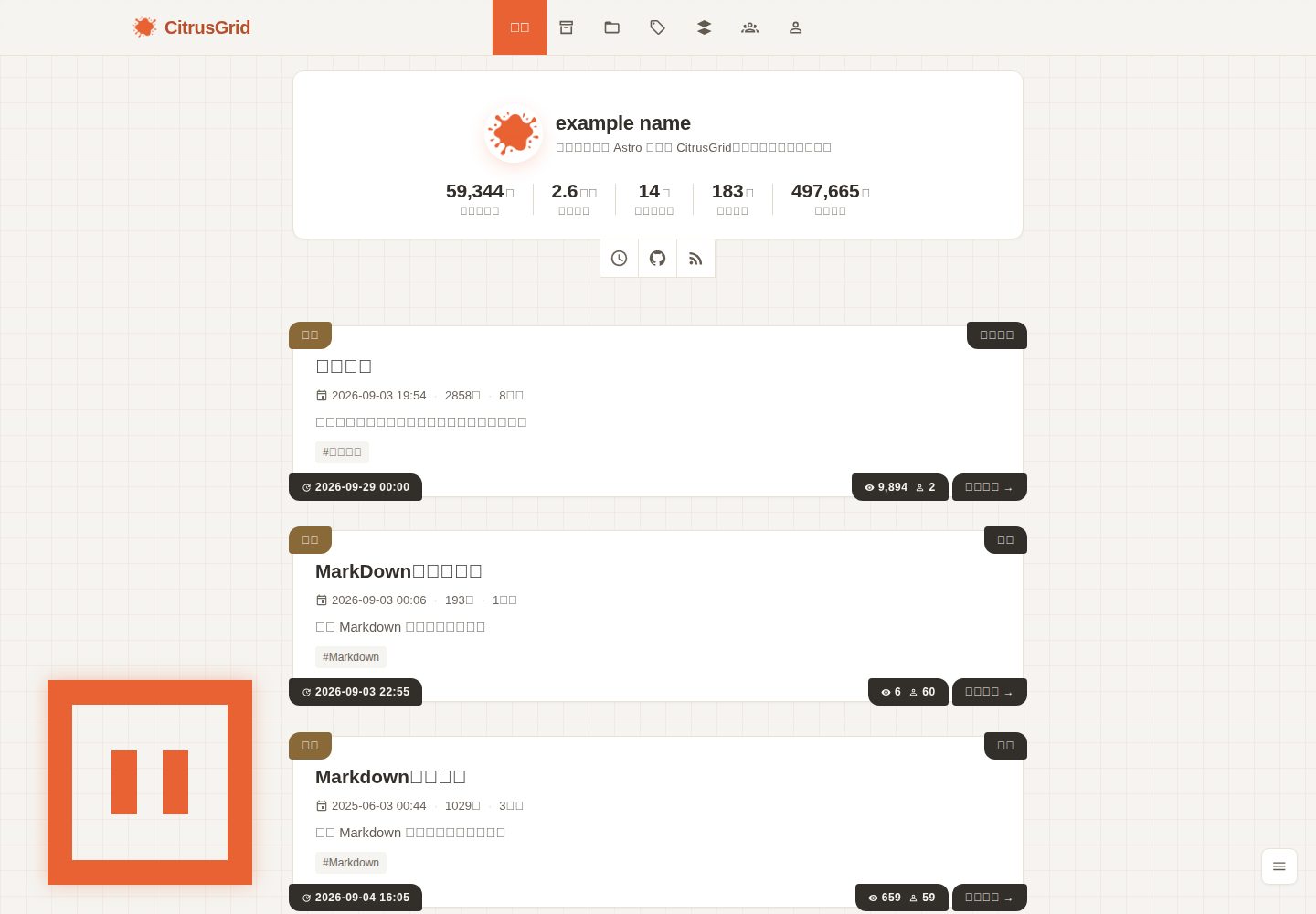
An Astro-based static blog theme visually characterized by citrus colors and a grid graph-paper background
AstroBlog
citrus-grid — Astro Blog Template
By rightdoor
CitrusGrid is a lightweight static blog theme built on Astro, visually characterized by citrus colors and a grid graph-paper background, supporting Markdown writing and multilingual sites.
Explore the design
Compare the page layouts and mobile experience. Open any screenshot for a closer look.
Desktop homepage1 / 3
Desktop captureTop of page
Actual screenshot captured by the server browser.
All pages & views 3
Screenshots show visual appearance; interactive behavior may differ.
Recorded 2026-10-02View source
What stands out
A quick read of the recorded project description.
Built-in i18n for zh, en, and ja, with a script to validate consistency of language pack key sets
Supports GFM syntax and KaTeX math formulas; code highlighting is completed at build time with zero client-side JS
Integrates pagefind site search, RSS subscription, friends links, and light/dark theme switching
Pluggable comment system, currently adapted for utterances; statistics reserves an interface and includes the visitor-stats plugin
Includes secondary development documentation covering project structure, components, theme customization, and the plugin system
Template Details
CitrusGrid is an open-source Astro static blog theme by rightdoor. Its primary color is citrus orange (#E86233), its background uses a grid graph-paper style, and it is positioned as a lightweight Markdown blog. The theme includes built-in i18n for Chinese, English, and Japanese, supports GFM syntax and KaTeX math formulas, and provides light/dark theme switching, pagefind-based site search, RSS subscription, and a friends-links page. Posts are managed with Markdown plus frontmatter, with fields including title, slug, index, description, category, tags, published, updated, and draft. When index is greater than 0, the post is pinned, and a larger value places it higher; updated can be written automatically by a script based on file modification time. On the content side, it also includes code highlighting and copy buttons, PhotoSwipe image lightbox with LQIP placeholders, automatic conversion of relative post links, a music player component, and a toggleable pet animation in the lower-left corner. The comment system currently adapts utterances, the statistics feature reserves an interface, and the bundled visitor-stats plugin requires deploying a statistics service on Cloudflare Workers yourself. The theme comes with secondary development documentation covering project structure, component descriptions, theme style customization, the plugin system, and troubleshooting, making it easier to modify the primary color, layout, or integrate comments and statistics. Before use, note the following: the runtime requires specified minimum versions of Node.js and Astro, dependency installation is enforced with pnpm, third-party assets such as demo images, fonts, and icons must have their licenses checked separately, and external services such as domains and hosting may incur costs.
AstroBlog
Is it right for your project?
Use Cases
- Writing and publishing a personal technical or lifestyle blog with Markdown
- Building a static site that needs Chinese, English, and Japanese multilingual presentation
- Displaying math formulas, code snippets, and image lightbox effects in posts
- Integrating comments via utterances, or replacing them with a custom comment system according to the plugin contract
- Counting site-wide and per-post PV/UV after deploying the visitor-stats service on Cloudflare Workers
Suitable For
- Developers familiar with Markdown and Astro basics who want to quickly build a static blog
- Individuals or small teams that need a multilingual blog site and are willing to maintain language packs
- Secondary developers planning to change the theme's colors, modify the layout, or integrate comments and statistics
Getting started & customization
Use these recorded setup notes alongside the repository instructions for your chosen version.
- 1
The environment requires Node.js and Astro to meet the minimum versions specified in the README; dependency installation is enforced with pnpm (preinstall runs only-allow pnpm)
- 2
After cloning the repository, run pnpm install, and customize blog settings in src/site.config.ts
- 3
For local development, run pnpm dev and access http://localhost:4321 by default; for deployment, use pnpm build and publish the dist directory to the target platform
- 4
Before submitting a post, first run pnpm format-post-meta and pnpm build (the build rewrites md to complete slug), then run pnpm check
- 5
Comments and statistics are pluggable plugins; before using utterances or self-deployed visitor-stats, configure them according to their respective usage rules
License & source material
Usage conditions & limitations
Free to use · keep license noticeThis entry covers the free version under the MIT license in the public repository; the free scope is the code of this version and does not mean that external services or third-party assets are free.
Must comply with when using
- Free use, modification, commercial use, and distribution of this version's code are permitted.
- When distributing copies or substantial portions of the code, retain the original author's copyright notice and the complete MIT license notice.
- The code is provided as is; warranties and limitations of liability are governed by the original license and applicable law.
Additional costs & items to verify
- When using the bundled visitor-stats statistics plugin, you must deploy the statistics service on Cloudflare Workers yourself, which involves external services and account configuration.
- The comment feature currently adapts utterances and depends on GitHub-related services and corresponding configuration to work.
- Dependency installation is enforced with pnpm; preinstall runs only-allow pnpm, so installation with npm or yarn will be rejected.
- The runtime requires Node.js version no lower than 22.14.0; lower versions cannot build or develop normally.
- The runtime requires Astro version no lower than 7.2.9; lower versions may fail to build normally.
- Demo images, fonts, icons, and other third-party assets must be checked against their respective licenses and cannot be judged solely by the code's MIT license.
- External services such as domains, hosting, databases, payments, or AI may incur additional charges.
View Original Text Basis
Permission is hereby granted, free of charge
Original License Text
需要在cloudflare worker中自行部署统计服务
Original README
当前适配 utterances 评论系统
Original README
本项目使用 pnpm 安装依赖,如果没有安装请先安装
Original README
Node.js ≥ 22.14.0
Original README
https://github.com/rightdoor/citrus-grid/blob/main/LICENSE.txthttps://github.com/rightdoor/citrus-grid/blob/main/README.mdAstro ≥ 7.2.9
Original README
Compiled by DeepSeek based on repository license and README ·2026-10-03. Results only cover the materials read; dependencies, images, fonts, and subsequent term changes are subject to their respective original texts.
Project checks & description sources
Template Information
- Source platforms
- GitHub
- Documentation and maintenance reference score
- More documented · 83 / 100
- Technologies
- Astro
- Website type
- Blog
How this score is calculated
Our heuristic uses license records (up to 30), a demo link (12), a preview (10), stars (15), recorded maintenance (15), description completeness (8), feature records (5) and classification data (5). It is not a code, security or performance test, or a Google score. A link does not establish tested functionality.
What to verify for this project
- Repository update recorded
- 2026-09-30
- Screenshot last checked
- 2026-10-03
A demo link is listed. Check it with your own content and viewport sizes; its presence does not confirm that forms, authentication or payments work.
The catalog identifies Astro as the primary stack. Check the actual dependency manifest and lockfile for versions and hosting requirements. These notes use recorded metadata, not a code audit or a deployment test.
Use a selection guide →How this description was prepared
AI-assisted description based on catalog records and repository material. Repository authors are not automatically the reviewers of this description.
Review declaration: [email protected] · 2026-10-04
Inspect the recorded source material
SHA-256: 2ac189ac5d97e56c44983139f34b11ec843af830ac82511f914333478b46314a
2026-10-03T10:18:51.657Z
Source file / repository<div align="center">
<img src="./docs/logo.webp" alt="Logo 图片" />
<h1 align="center">CitrusGrid 柑橘格子</h1>
<p>基于 Astro 的轻量级静态博客主题,以<strong>柑橘色(#E86233)</strong>为主色调,方格草稿纸为背景样式,带来轻量级的 markdown 博客需求。</p>
<img src="https://img.shields.io/badge/Node.js-%3E%3D22.14.0-brightgreen" alt="Node Version">
<img src="https://img.shields.io/badge/Astro-%3E%3D7.2.9-brightgreen" alt="Astro Version">
<img src="https://img.shields.io/github/license/rightdoor/citrus-grid" alt="GitHub License">
<br>
<a href="https://citrusgrid.pages.dev">Demo</a> | <a href="./docs/README.en.md">English</a> | <a href="./docs/README.ja.md">日本語</a> | <a href="https://dev.citrusgrid.pages.dev">Dev Demo</a>
</div>
---
<table width="100%" align="center" cellpadding="8" cellspacing="0">
<tr>
<th colspan="2" align="center">暗夜模式</th>
</tr>
<tr>
<td align="center"><img src="./docs/dark.webp" alt="暗夜模式"><br>暗夜模式</td>
<td align="center"><img src="./docs/light.webp" alt="白天模式"><br>白天模式</td>
</tr>
<tr>
<td align="center"><img src="./docs/dark-post.webp" alt="暗夜模式"><br>暗夜模式文章</td>
<td align="center"><img src="./docs/light-post.webp" alt="白天模式"><br>白天模式文章</td>
</tr>
<tr>
<th colspan="2" align="center">PageSpeed Insights 性能测试</th>
</tr>
<tr>
<td align="center"><img src="./docs/pagespeed-desktop.webp" alt="桌面端性能"><br>桌面端性能</td>
<td align="center"><img src="./docs/pagespeed-mobile.webp" alt="手机性能"><br>手机性能</td>
</tr>
</table>
---
## 快速开始
### 环境要求
- Node.js ≥ 22.14.0
- Astro ≥ 7.2.9
### 本地开发部署
1. 克隆仓库:
```bash
git clone https://github.com/rightdoor/citrus-grid.git
cd citrus-grid
```
2. 安装依赖
```bash
# 本项目使用 pnpm 安装依赖,如果没有安装请先安装
npm install -g pnpm
pnpm install
```
3. 配置博客:
编辑 `src/site.config.ts` 自定义博客设置
4. 启动开发服务器:
```bash
pnpm dev
```
访问 `http://localhost:4321` 即可查看博客效果
### 平台托管部署
- [Astro 部署指南](https://docs.astro.build/guides/deploy/)
- 网页部署请使用 `pnpm build` 命令构建网站,随后将 `dist` 目录部署至目标平台。
## 配置说明
详细内容请查看配置文件 [site.config.ts](src/site.config.ts)。
## 文章 Frontmatter
```markdown
---
title: example
slug: example
index: 0
description: example description
category: example
tags: [example, example1]
published: 2026-01-01 00:01:02
updated: 2026-01-01 00:01:03
draft: false
---
```
| 字段 | 是否必填 | 示例 | 描述 |
| --- | --- | --- | --- |
| `title` | 是 | "example" | 文章标题 |
| `slug` | 是 | example | 运行时自动生成,可手动填写,使用`-`分隔单词 |
| `index` | 是 | 0 | 默认为0不置顶,大于0的整数置顶,数值越大越靠前 |
| `description` | 是 | "展示 Markdown 语法的各种类型和示例" | 文章描述 |
| `category` | 是 | "示例" | 文章分类 |
| `tags` | 是 | [Markdown] | 文章标签,多个标签用逗号隔开 |
| `published` | 是 | 2026-01-01 00:01:02 | 文章发布时间,格式为`YYYY-MM-DD HH:mm:ss`,脚本生成自带 |
| `updated` | 否 | 2026-01-01 00:01:03 | 文章更新时间,格式为`YYYY-MM-DD HH:mm:ss`,启动和构建时由脚本按文件修改时间自动写入(可在 `site.config.ts` 关闭) |
| `draft` | 否 | false | 是否草稿,不自动生成 |
## 命令说明
| 命令 | 作用 |
| --- | --- |
| `pnpm dev` / `start` | 启动开发服务器 |
| `pnpm build` | 生产构建,随后自动注入 `modulepreload`、压缩内联脚本,并执行 `pagefind` 生成站内搜索索引 |
| `pnpm preview` | 预览 `dist` 构建产物 |
| `pnpm check` | Astro 类型检查(`astro check`) |
| `pnpm type-check` | TypeScript 类型检查(`tsc --noEmit`,覆盖 `src` 与 `scripts`) |
| `pnpm check-i18n` | 校验 zh / ja / en 语言包键集合一致 |
| `pnpm check-swup-ignore` | 校验 `shouldIgnoreSwup` 内联正则与 `ASSET_EXT_RE` / `RESERVED_PATH_RE` 常量一致 |
| `pnpm new-post [slug]` | 新建文章模板 `src/content/posts/<slug>.md`(省略 slug 时按当天日期命名) |
| `pnpm format-post-meta` | 统一重排所有文章 frontmatter 字段顺序 |
| `pnpm format` | Biome 格式化 `src` |
| `pnpm format:all` | Biome 检查并修复全项目代码(src、scripts、根目录配置文件) |
| `pnpm lint` | Biome 检查并修复 `src` |
| `preinstall` | 自动执行 `only-allow pnpm`,强制使用 pnpm |
## 提交前检查
*文章写完提交前(`pnpm build` 会改写 md 补全 `slug`,必须在 commit 之前执行):
```bash
pnpm format-post-meta
pnpm build
pnpm check
```
代码改完提交前:
```bash
pnpm format:all
pnpm check
pnpm type-check
```
- 改了 i18n 文案加跑 `pnpm check-i18n`;改了 `src/lib/url.ts` 加跑 `pnpm check-swup-ignore`。
## 功能
- [x] i18n 支持(zh、en、ja三语)
- [x] 支持 GFM 语法
- [x] 支持 KaTeX 数学公式
- [x] 明暗主题切换
- [x] 搜索功能(pagefind)
- [x] 评论功能(评论系统可插拔,当前适配 utterances)
- [x] 目录功能(桌面端侧边固定 + 移动端弹窗)
- [x] RSS 订阅功能
- [x] 友链功能
- [x] 代码高亮(Prism 构建期高亮,客户端零 JS)与代码复制按钮
- [x] 图片灯箱(PhotoSwipe)与 LQIP 渐变占位骨架
- [x] 阅读统计(已预留接口)
- [x] 文章相对链接自动转换
- [x] 音乐播放器组件
- [x] 左下角宠物(视线跟随 / 眨眼 / 休眠,可在配置中开关)
## 插件
### 评论插件
当前适配 utterances 评论系统,支持自定义评论插件。
支持自定义评论插件,详细参考 [评论插件](src/comments/使用规则.md)。
### 统计插件
支持全局和文章PV/UV统计,已预留接口。
当前自带统计插件有 `visitor-stats.ts`,项目地址为 [visitor-stats](https://github.com/rightdoor/visitor-stats)。需要在cloudflare worker中自行部署统计服务。
支持自定义统计插件,详细参考 [统计插件](src/stats/使用规则.md)。
## 二次开发文档
需要改造主题(换主色、改布局、加组件、接入评论/统计、排查构建问题)请查阅 [`src/content/posts/all/00-index.md`](src/content/posts/all/00-index.md):
| 文档 | 内容 |
| --- | --- |
| [00-index.md](src/content/posts/all/00-index.md) | 总览与二次开发任务索引 |
| [01-项目结构.md](src/content/posts/all/01-项目结构.md) | 目录树、技术栈、构建流水线、数据流 |
| [02-组件说明.md](src/content/posts/all/02-组件说明.md) | 全部组件 Props 表、DOM 结构、事件协议、图标系统 |
| [03-主题与样式定制.md](src/content/posts/all/03-主题与样式定制.md) | `--wp-*` 变量全表、暗色模式、换肤步骤 |
| [04-站点配置.md](src/content/posts/all/04-站点配置.md) | `site.config.ts` 等 6 个配置文件的参数表 |
| [05-内容与Markdown.md](src/content/posts/all/05-内容与Markdown.md) | Frontmatter 表、markdown 插件链、图片与相对链接 |
| [06-构建与脚本.md](src/content/posts/all/06-构建与脚本.md) | 6 个构建脚本、产物结构、部署 |
| [07-页面与路由.md](src/content/posts/all/07-页面与路由.md) | 路由表、SEO、i18n 现状与扩展 |
| [08-插件系统.md](src/content/posts/all/08-插件系统.md) | 评论 / 统计插件契约、音乐播放器 |
| [09-常见改造与排错.md](src/content/posts/all/09-常见改造与排错.md) | 任务式改造速查、FAQ、自检清单 |
> 基于 `DeepSeek-V4.1-Flash` 检索生成+手动修改,仅供参考。
## 贡献者
<a href="https://github.com/rightdoor/citrus-grid/graphs/contributors">
<img src="https://contrib.rocks/image?repo=rightdoor/citrus-grid" />
</a>
## License
本项目使用 [MIT License](LICENSE.txt) 开源。详细条款请参阅项目根目录下的 `LICENSE.txt` 文件。
Explore similar templates
Compare previews and descriptions within the same stack and category.

astrowind
AstroWind is a free, open-source Astro starter theme using Astro and Tailwind CSS, released under the MIT license.
Astro · Blog

astro-paper
AstroPaper is a minimal, responsive, accessible, and SEO-friendly Astro blog theme. Articles are stored as Markdown/MDX in src/content/posts/, with subdirectories affecting URLs.
Astro · Blog

fuwari
Fuwari is a static blog template built with Astro and Tailwind CSS for personal blogs. It manages posts as Markdown files in src/content/posts/, with frontmatter for title, date, description, cover, tags, categories, draft status, and language.
Astro · Blog

Firefly
Firefly is a clean personal blog theme forked from Astro and Fuwari, offering four background modes, single/double sidebar and list/grid layouts, Pagefind client-side full-text search, and a six-language UI.
Astro · Blog

astro-theme-cactus
Astro Cactus is an Astro-based blog and portfolio theme that uses Markdown/MDX content collections to manage posts, notes, and tags, with frontmatter type-checked by a schema.
Astro · Portfolio

astrofy
Astrofy is a free and open-source personal portfolio website template built with Astro and TailwindCSS, with built-in blog, CV timeline, project showcase, store, and RSS feed modules.
Astro · Portfolio