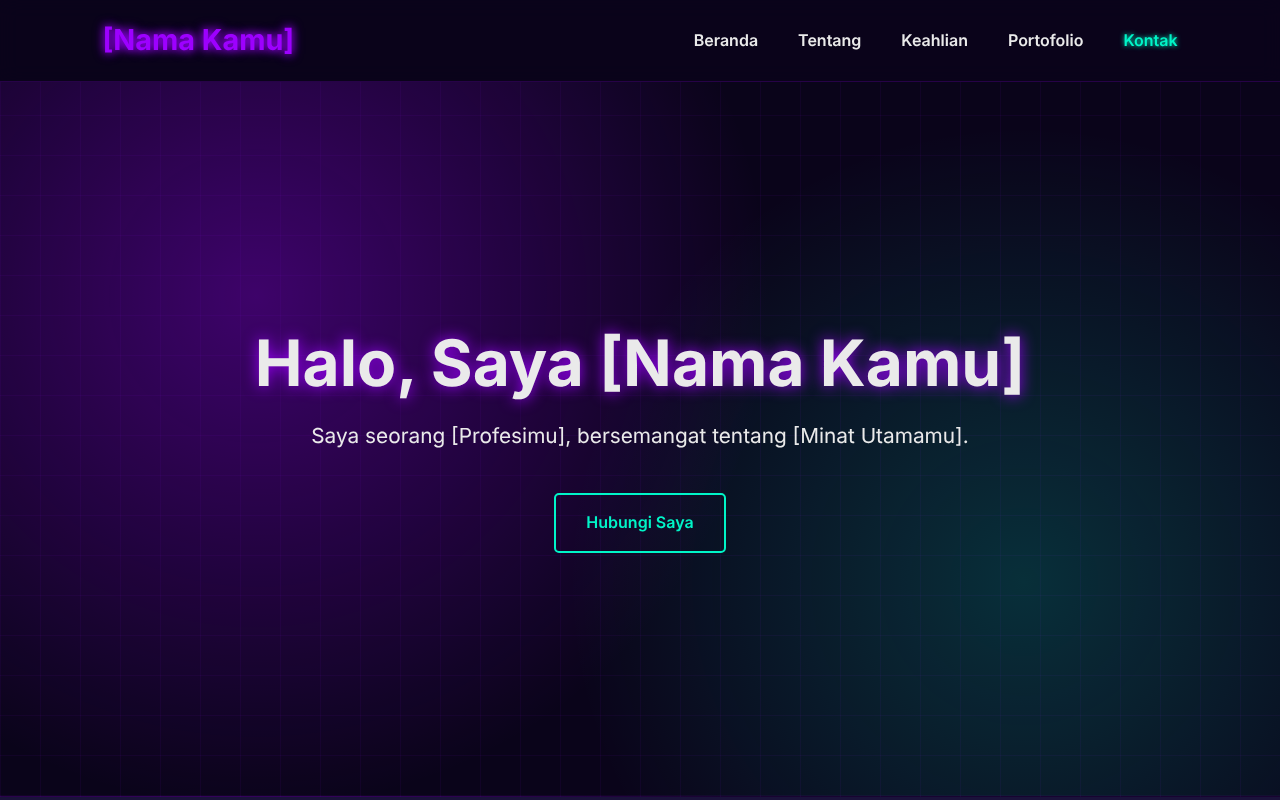
Single-page structure with five sections: Home, About, Skills, Portfolio, and Contact
HTMLStarter
personal-profile-website — HTML Starter Template
By rizky-916
A single-page personal profile website template built with pure HTML and CSS, no JavaScript, no frameworks, no external dependencies, using a neon purple theme.
Explore the design
Compare the page layouts and mobile experience. Open any screenshot for a closer look.
Author preview
Author-provided preview
Preview provided in the project README.
One original preview is available. Open the full image to inspect the design.
Screenshots show visual appearance; interactive behavior may differ.
Recorded 2026-10-04View source
What stands out
A quick read of the recorded project description.
Pure HTML and CSS, no JavaScript, no frameworks, no external dependencies
Uses system fonts; hero background drawn with CSS, no third-party requests
Strict CSP via <meta>, allowing only same-origin CSS and images, blocking scripts, forms, plugins, and <base>
Accessibility support: skip-to-content link, keyboard focus indicators, alt text, prefers-reduced-motion
Built-in lightweight SVG placeholders, total size under 5 KB
Template Details
This template is a single-page personal profile website with five sections: Home, About, Skills, Portfolio, and Contact, using a neon purple theme. The entire project consists of index.html and an assets directory (CSS stylesheets and SVG placeholder images). It uses no JavaScript, frameworks, or external dependencies. Fonts are system fonts, and the hero background is drawn with CSS, so the page makes no third-party requests.
For responsiveness, the template covers small screens from 320px up to desktop widths. For accessibility, it provides a "skip to content" link, visible keyboard focus indicators, image alt text, and supports prefers-reduced-motion. For security, it sets a strict Content-Security-Policy via <meta>, allowing only same-origin CSS and images, and blocking scripts, forms, plugins, and <base>; external links use rel="noopener noreferrer". The template intentionally omits a contact form to avoid handling visitor data.
To use it, download or clone and open index.html directly; no installation or build step is required. Personalization requires manually replacing all bracketed placeholders in index.html (name, profession, interests, skills, project names, year, email, and social links), replacing images in assets/images/ and updating the src attributes, and adjusting colors via the CSS variables at the top of assets/css/style.css. The page copy is in Indonesian; the English documentation notes to translate it yourself if needed.
For deployment, the README provides GitHub Pages steps (Settings → Pages, select Deploy from a branch, main branch, / (root) directory). Because GitHub Pages does not support custom response headers, frame-ancestors, X-Content-Type-Options, Strict-Transport-Security, etc., cannot be set via <meta>; the README offers _headers examples for Netlify or Cloudflare Pages as alternatives.
HTMLLauncher
Is it right for your project?
Use Cases
- Individual developers or freelancers building a single-page self-introduction page
- As a reference project for learning pure HTML/CSS layout and responsive design
- Scenarios requiring a static personal homepage published without JavaScript or external dependencies
- Deploying a static site via GitHub Pages, Netlify, or Cloudflare Pages
Suitable For
- Developers who want to maintain a personal profile page with pure HTML/CSS
- Privacy-sensitive scenarios requiring no third-party requests and no scripts
- Users who accept manually editing HTML and CSS variables for personalization
- Users preparing to publish a single-page site with static hosting such as GitHub Pages
Getting started & customization
Use these recorded setup notes alongside the repository instructions for your chosen version.
- 1
Clone or download the repository and open index.html directly; no installation or build required
- 2
Replace all bracketed placeholders in index.html (name, profession, interests, skills, projects, year, contact info); page copy is in Indonesian, translate it yourself if needed
- 3
Replace images in assets/images/ and update the src attributes; compress images and remove EXIF/GPS metadata before uploading, and ensure you have the rights to use the images
- 4
Adjust colors via the CSS variables at the top of assets/css/style.css (e.g., --neon-purple, --accent-cyan)
- 5
If you need response headers such as frame-ancestors, X-Content-Type-Options, or HSTS, switch to hosting that supports custom headers and refer to the _headers examples in the README
License & source material
Usage conditions & limitations
Free to use · keep license noticeThis entry covers the free version under the MIT license in the public repository; the free scope is the code of this version and does not mean external services or third-party assets are free.
Must comply with when using
- You may use, modify, commercially use, and distribute the code of this version for free.
- When distributing copies or substantial portions of the code, retain the original author's copyright notice and the full MIT license notice.
- The code is provided as-is; warranties and limitations of liability are governed by the original license and applicable law.
Additional costs & items to verify
- Demo images, fonts, icons, and other third-party assets must be checked against their respective licenses; they cannot be judged solely by the code's MIT license.
- External services such as domains, hosting, databases, payments, or AI may incur separate charges.
- Before using personal photos, EXIF/GPS metadata must be removed; otherwise, privacy information such as shooting location may be leaked.
- When replacing images, users must ensure they have the rights or appropriate licenses for the images used; the template does not include image licensing.
- If you add JavaScript yourself, it must be placed in a separate .js file; inline scripts are prohibited, and the CSP script-src must be updated accordingly.
- When adding external fonts or images, the corresponding domains must be declared individually in the CSP; wildcard * is prohibited.
- If a contact form is needed, you must use a third-party service that supports POST, HTTPS, and spam protection, and update the CSP form-action.
- Response headers such as frame-ancestors, X-Content-Type-Options, and HSTS cannot be set via meta, and GitHub Pages does not support custom headers; switch to hosting such as Netlify or Cloudflare Pages.
- The page copy is in Indonesian; if targeting users of other languages, you must translate it yourself.
View Original Text Basis
Permission is hereby granted, free of charge
Original License Text
**Hapus metadata EXIF/GPS** dari foto pribadi sebelum di-upload, karena metadata ini bisa membocorkan lokasi.
Original README
Pastikan Anda memiliki hak atau lisensi atas setiap gambar yang dipakai.
Original README
Kalau Anda menambahkan JavaScript nanti, simpan di file `.js` terpisah (jangan inline), lalu tambahkan `script-src 'self'` ke CSP.
Original README
Kalau Anda menambahkan font atau gambar eksternal, tambahkan domainnya ke CSP secara spesifik. Jangan memakai `*`.
Original README
Kalau Anda ingin form, gunakan layanan dengan metode `POST` + HTTPS + proteksi spam, dan perbarui `form-action` di CSP.
Original README
Kalau Anda membutuhkannya, gunakan hosting seperti Netlify atau Cloudflare Pages dan buat file `_headers`:
Original README
https://github.com/rizky-916/personal-profile-website/blob/main/LICENSEhttps://github.com/rizky-916/personal-profile-website/blob/main/README.mdThe site text is in Indonesian, so translate it if you need to.
Original README
Compiled by DeepSeek based on repository license and README ·2026-10-04. Results only cover the materials read; dependencies, images, fonts, and subsequent term changes are subject to their respective original texts.
Project checks & description sources
Template Information
- Source platforms
- GitHub
- Documentation and maintenance reference score
- Partly documented · 68 / 100
- Technologies
- HTML
- Website type
- Starter
How this score is calculated
Our heuristic uses license records (up to 30), a demo link (12), a preview (10), stars (15), recorded maintenance (15), description completeness (8), feature records (5) and classification data (5). It is not a code, security or performance test, or a Google score. A link does not establish tested functionality.
What to verify for this project
- Repository update recorded
- 2026-10-04
- Screenshot last checked
- 2026-10-04
No demo link is recorded. Use the repository instructions to evaluate the project locally; the screenshot alone cannot establish interactive behavior.
The catalog identifies HTML as the primary stack. Check the actual dependency manifest and lockfile for versions and hosting requirements. These notes use recorded metadata, not a code audit or a deployment test.
Use a selection guide →How this description was prepared
AI-assisted description based on catalog records and repository material. Repository authors are not automatically the reviewers of this description.
Review declaration: [email protected] · 2026-10-04
Inspect the recorded source material
SHA-256: bac1c580d489e052a96a86fe1194b44ac8a9e22fd6dad9d15a496945c2e3c3b0
2026-10-04T16:08:29.968Z
Source file / repository# Personal Profile Website [🇮🇩 Bahasa Indonesia](#-bahasa-indonesia) · [🇬🇧 English](#-english)  Template website profil pribadi satu halaman bertema *neon purple*, dibangun murni dengan **HTML & CSS** tanpa JavaScript, tanpa framework, dan tanpa dependensi eksternal. A single-page personal profile website template with a *neon purple* theme, built with pure **HTML & CSS**: no JavaScript, no framework, no external dependencies. --- ## 🇮🇩 Bahasa Indonesia ### Fitur - Satu halaman dengan bagian Beranda, Tentang, Keahlian, Portofolio, dan Kontak - Responsif dari layar 320px hingga desktop - **Tanpa JavaScript** dan **tanpa request ke pihak ketiga** (font sistem, latar hero dibuat dengan CSS) - Content-Security-Policy yang ketat - Aksesibel: tautan "lewati ke konten", indikator fokus keyboard, teks `alt`, dan mendukung `prefers-reduced-motion` - Gambar placeholder SVG yang ringan (total < 5 KB) ### Struktur ``` . ├── index.html ├── assets/ │ ├── css/style.css │ └── images/ # profile.svg, project-1..3.svg, favicon.svg ├── docs/preview.png ├── LICENSE └── README.md ``` ### Cara Menggunakan 1. **Clone / unduh** repository ini: ```bash git clone https://github.com/<username>/<nama-repo>.git cd <nama-repo> ``` 2. **Buka** `index.html` langsung di browser. Tidak perlu instalasi atau build apa pun. 3. **Personalisasi.** Ganti semua teks dalam kurung siku di `index.html`: | Placeholder | Ganti dengan | |---|---| | `[Nama Kamu]` | Nama Anda (judul tab, logo, hero, footer) | | `[Profesimu]`, `[Minat Utamamu]` | Profesi & minat Anda | | `[Bidang Keahlian 1..3]` | Keahlian Anda | | `Nama Proyek 1..3` | Proyek Anda | | `[Tahun]` | Tahun hak cipta | | `[email protected]`, `github.com/username`, `linkedin.com/in/username` | Kontak Anda | 4. **Ganti gambar** di `assets/images/` dengan milik Anda (misalnya `profile.jpg`), lalu sesuaikan atribut `src` di `index.html`. - Kompres gambar dulu (misalnya dengan [Squoosh](https://squoosh.app)). Ukuran ±500px untuk foto profil dan ±800px untuk gambar proyek sudah cukup. - **Hapus metadata EXIF/GPS** dari foto pribadi sebelum di-upload, karena metadata ini bisa membocorkan lokasi. - Pastikan Anda memiliki hak atau lisensi atas setiap gambar yang dipakai. 5. **Ganti warna** lewat variabel CSS di bagian atas `assets/css/style.css` (`--neon-purple`, `--accent-cyan`, dan lainnya). ### Publikasi dengan GitHub Pages 1. Push ke GitHub, lalu buka **Settings → Pages**. 2. Pada *Source*, pilih **Deploy from a branch**, branch `main`, folder `/ (root)`. 3. Situs akan tersedia di `https://<username>.github.io/<nama-repo>/`. ### Catatan Keamanan - CSP diatur lewat `<meta>` di `index.html`. Halaman hanya boleh memuat CSS dan gambar dari domain sendiri. Script, form, plugin, dan `<base>` diblokir. - Kalau Anda menambahkan JavaScript nanti, simpan di file `.js` terpisah (jangan inline), lalu tambahkan `script-src 'self'` ke CSP. - Kalau Anda menambahkan font atau gambar eksternal, tambahkan domainnya ke CSP secara spesifik. Jangan memakai `*`. - Tautan eksternal memakai `rel="noopener noreferrer"` untuk mencegah *reverse tabnabbing*. - Situs ini **tidak memakai form kontak** dengan sengaja, supaya tidak ada data pengunjung yang diproses atau bocor. Kalau Anda ingin form, gunakan layanan dengan metode `POST` + HTTPS + proteksi spam, dan perbarui `form-action` di CSP. - Beberapa header keamanan tidak bisa dipasang lewat `<meta>` (`frame-ancestors`, `X-Content-Type-Options`, `Strict-Transport-Security`). GitHub Pages tidak mendukung header kustom. Kalau Anda membutuhkannya, gunakan hosting seperti Netlify atau Cloudflare Pages dan buat file `_headers`: ``` /* Content-Security-Policy: default-src 'none'; style-src 'self'; img-src 'self'; base-uri 'none'; form-action 'none'; object-src 'none'; frame-ancestors 'none' X-Content-Type-Options: nosniff Referrer-Policy: strict-origin-when-cross-origin Permissions-Policy: camera=(), microphone=(), geolocation=() ``` --- ## 🇬🇧 English ### Features - Single page with Home, About, Skills, Portfolio and Contact sections - Responsive from 320px screens up to desktop - **No JavaScript** and **no third-party requests** (system fonts, CSS-only hero background) - Strict Content-Security-Policy - Accessible: skip link, visible keyboard focus, `alt` text, and `prefers-reduced-motion` support - Lightweight SVG placeholder images (< 5 KB total) ### Usage 1. **Clone / download** this repository: ```bash git clone https://github.com/<username>/<repo-name>.git cd <repo-name> ``` 2. **Open** `index.html` in your browser. No install or build step needed. 3. **Personalize** it by replacing every bracketed placeholder in `index.html` (`[Nama Kamu]` = your name, `[Profesimu]` = your profession, `[Minat Utamamu]` = your main interest, `[Tahun]` = year), plus the skills, projects and contact links. The site text is in Indonesian, so translate it if you need to. 4. **Replace the images** in `assets/images/` and update the `src` attributes. - Compress images first. - **Strip EXIF/GPS metadata** from personal photos. - Only use images you have the rights to. 5. **Change the colors** via the CSS variables at the top of `assets/css/style.css`. ### Deploy to GitHub Pages Go to **Settings → Pages**, choose *Deploy from a branch*, select `main` and `/ (root)`. Your site will be live at `https://<username>.github.io/<repo-name>/`. ### Security Notes - CSP is set through a `<meta>` tag: only same-origin CSS and images are allowed, and scripts, forms, plugins and `<base>` are blocked. - If you add JavaScript, put it in an external `.js` file and add `script-src 'self'`. Never use inline scripts or `unsafe-inline`. - External links use `rel="noopener noreferrer"`. - There is intentionally **no contact form**, so no visitor data is processed. - Headers such as `frame-ancestors`, `X-Content-Type-Options` and HSTS can't be set via `<meta>`, and GitHub Pages doesn't support custom headers. Use Netlify or Cloudflare Pages with the `_headers` example above if you need them. --- ## License [MIT](LICENSE) © 2026 Rizky Maulana Hafis
Explore similar templates
Compare previews and descriptions within the same stack and category.

startbootstrap-simple-sidebar
A Bootstrap off-canvas sidebar navigation HTML starter template from Start Bootstrap. It provides directly editable HTML and CSS in the dist directory, while the source uses Pug, SCSS, and JavaScript with npm build scripts for live preview and compilation.
HTML · Starter

adminkit
AdminKit is a free, MIT-licensed HTML admin and dashboard template built on Bootstrap 5. The free version includes 15 demo pages, 1 plugin, and 1 color scheme, with hundreds of UI components, forms, tables, charts, and icons.
HTML · Admin dashboard

Landing-Page
A general-purpose landing page HTML template maintained by Tailwind Toolbox, written in pure HTML and loading the complete Tailwind CSS via CDN.
HTML · Corporate Website

light-bootstrap-dashboard
Light Bootstrap Dashboard is a free, MIT-licensed admin dashboard template from Creative Tim, built on Bootstrap with a responsive static HTML structure.
HTML · Admin dashboard

sing-app
Sing App Lite is a free, open-source admin dashboard template from Flatlogic, built with Bootstrap 4.5 and SCSS. It provides a responsive layout, dashboard examples, typography, tables, notifications, basic charts, icons, maps, and a hover sidebar, along with styled Bootstrap components.
HTML · Admin dashboard

startbootstrap-modern-business
Modern Business is a multipurpose Bootstrap full-site HTML template from Start Bootstrap with 17 standalone pages covering home, about, services, portfolio, pricing, blog, FAQ, and contact.
HTML · Starter