microCMS integration: article and tag fetching is centralized in src/lib/api.ts, and an adapter maps API structures to in-app types
Next.jsReactPortfolioBlog
nextjs-portfolio-blog-template — Next.js Portfolio Template
By rymetry
A Portfolio & Blog template built on Next.js App Router and microCMS, including article listing, search, tag filtering, related articles, draft preview, SEO metadata, JSON-LD, RSS, sitemap, and CSP report-only mode.
Explore the design
Compare the page layouts and mobile experience. Open any screenshot for a closer look.
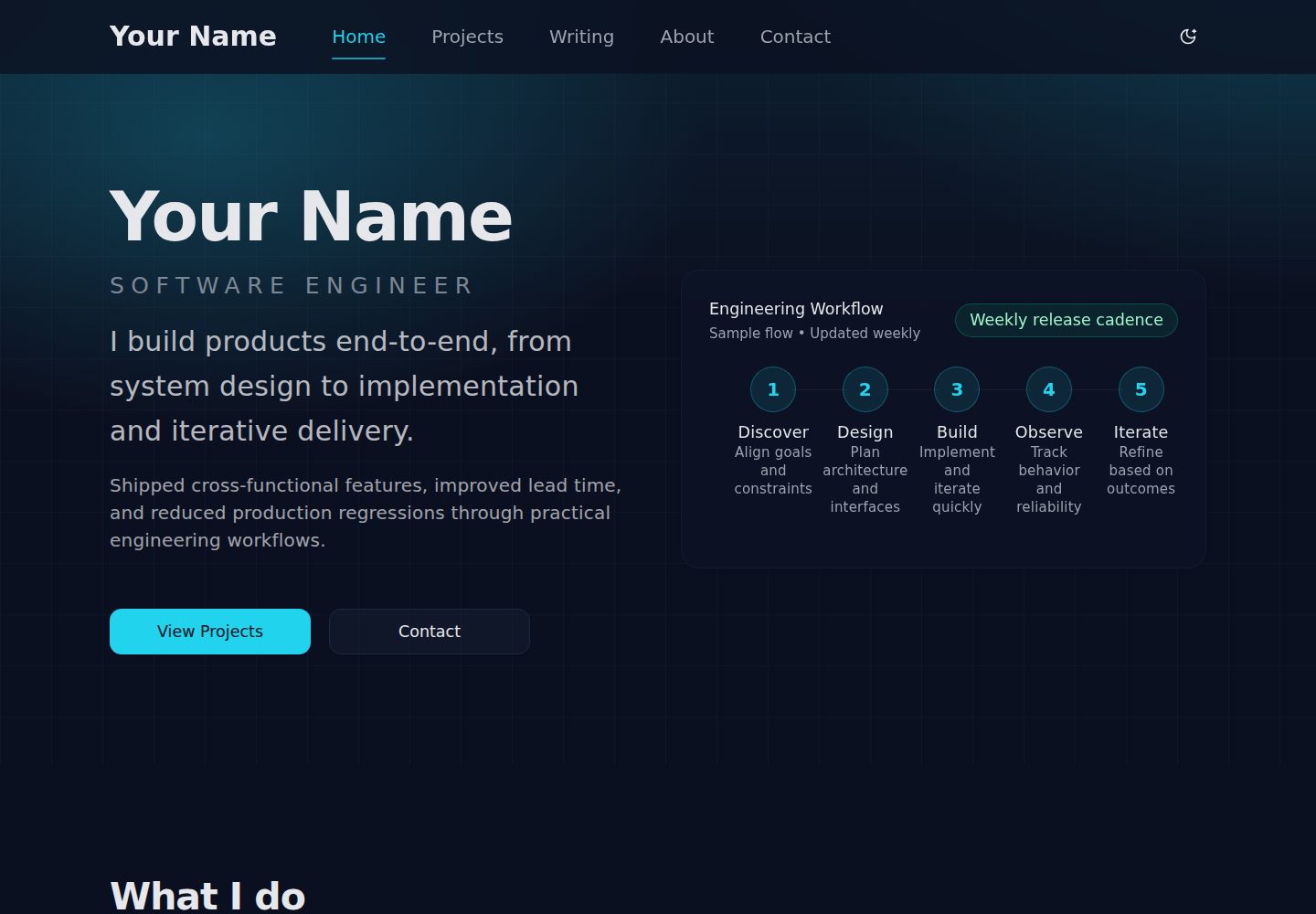
Desktop homepage1 / 3
Desktop captureTop of page
Actual screenshot captured by the server browser.
All pages & views 3
Screenshots show visual appearance; interactive behavior may differ.
Recorded 2026-10-14View source
What stands out
A quick read of the recorded project description.
Blog features: the article list supports search, tag filtering, and pagination; the detail page includes author, date, tags, table of contents, related articles, and previous/next navigation
SEO and distribution: generateMetadata generates title/description/canonical/OGP/Twitter cards, automatically outputs JSON-LD, and provides sitemap, robots, and RSS 2.0 feed.xml
Draft Mode preview: works with api/draft/enable|disable and the microCMS preview API, displays a banner when enabled, and fetches draft content immediately
Caching strategy: regular pages use 'use cache' with cacheLife/cacheTag, with a revalidation interval of 300 seconds; Draft Mode paths use no-store
Security headers and CSP: CSP defaults to report-only and can be switched to enforce via CSP_MODE; HSTS is enabled in production, and Permissions-Policy disables some browser features
Template Details
This template targets sites that need both a portfolio and a blog, built with Next.js 16 App Router, React 19.2, Tailwind CSS v4, and the microCMS headless CMS. The README states it includes a homepage Hero, Projects list, About/Contact pages, as well as an article list (search, tag filtering, pagination), article detail (author, date, tags, table of contents, related articles, previous/next navigation), HTML content sanitization, code highlighting, and line numbers. Data fetching is centralized in src/lib/api.ts, and an adapter maps microCMS API structures to in-app types; portfolio-config.ts and projects.ts are used to replace profile and project data.
For SEO and distribution, the template uses generateMetadata/Metadata API to generate title, description, canonical, OGP, and Twitter cards, automatically outputs JSON-LD for Article, Breadcrumb, and Blog, provides sitemap.ts, robots.ts, and an RSS 2.0 feed.xml route, and optimizes images with next/image. Draft Mode preview works with api/draft/enable|disable and the microCMS preview API, displays a banner when enabled, and fetches the latest content with no-store on draftKey/contentId paths; regular pages use 'use cache' with cacheLife/cacheTag, with a revalidation interval of 300 seconds.
Note the limitations explicitly stated in the README: the Contact form is currently only a UI mock and is not connected to a storage endpoint; microCMS Webhook instant invalidation (such as revalidateTag) must be added by the user; CSP defaults to report-only and must be switched to enforce following the steps; HSTS only takes effect in production. Regarding environment variables, if NEXT_PUBLIC_SITE_URL is not set, production falls back to VERCEL_URL, otherwise the build fails; SITE_URL is not supported; ALLOW_LOCALHOST_SITE_URL_FOR_BUILD is only for local verification.
Next.jsPortfolioBlog
Is it right for your project?
Use Cases
- Personal or team sites that need to showcase both a portfolio and a blog, and want to manage articles and tags with microCMS
- Projects that need blog browsing experiences such as article search, tag filtering, pagination, related articles, and previous/next navigation
- Projects that need Draft Mode to preview microCMS draft content and display a preview status notice on the page
- Sites that need automatically generated SEO metadata, JSON-LD, sitemap, and RSS 2.0 feeds
- Deployments that need to gradually introduce CSP in report-only mode and configure security headers such as HSTS and Permissions-Policy
Suitable For
- Developers using Next.js App Router who are willing to integrate microCMS as a content source
- Sites that need portfolio pages with replaceable profile and project data (portfolio-config.ts / projects.ts)
- Blogs that need article list search, tag filtering, pagination, and article detail table of contents, related articles, and previous/next navigation
- Projects that need distribution capabilities such as draft preview, SEO metadata, JSON-LD, RSS, and sitemap
- Teams that need to configure environment variables on standard Next.js deployment flows such as Vercel and gradually enable CSP
Getting started & customization
Use these recorded setup notes alongside the repository instructions for your chosen version.
- 1
Create .env.local in the root directory and set at least MICROCMS_API_KEY, MICROCMS_ARTICLES, and MICROCMS_TAGS; set MICROCMS_PREVIEW_SECRET when using preview; set NEXT_PUBLIC_GA_MEASUREMENT_ID when using GA4
- 2
NEXT_PUBLIC_SITE_URL is used to generate canonical/OGP/RSS URLs; if not set in production, it falls back to VERCEL_URL, otherwise the build fails; SITE_URL is not supported and will cause an error if set
- 3
ALLOW_LOCALHOST_SITE_URL_FOR_BUILD=1 is only for local verification, and using it together with VERCEL=1 or CI will fail-fast
- 4
Initial customization can modify src/lib/portfolio-config.ts (name, title, bio, SNS, focus areas), src/lib/projects.ts (project card content), and public/placeholder*.{svg,png,jpg} placeholder images
- 5
The Contact form is currently a UI mock and must be connected to a Route Handler or external form service; microCMS Webhook instant invalidation (such as revalidateTag) must be implemented as needed
License & source material
Usage conditions & limitations
Free to use · keep license noticeThis entry covers the free version under the MIT license in the public repository; the free scope is the code of this version and does not mean external services or third-party assets are free.
Must comply with when using
- Free use, modification, commercial use, and distribution of this version's code are permitted.
- When distributing copies or substantial portions of the code, retain the original author's copyright notice and the full MIT license notice.
- The code is provided as is; warranties and limitations of liability are governed by the original license and applicable law.
Additional costs & items to verify
- Demo images, fonts, icons, and other third-party assets must be checked against their respective licenses and cannot be judged solely by the code's MIT license.
- External services such as domains, hosting, databases, payments, or AI may incur additional charges.
- You must create .env.local in the root directory and configure microCMS-related environment variables (API Key, article and tag endpoint URLs) to run.
- Using the Draft Mode preview feature requires additionally setting MICROCMS_PREVIEW_SECRET and configuring Web Preview on the microCMS side.
- If GA4 analytics is needed, you must provide NEXT_PUBLIC_GA_MEASUREMENT_ID yourself.
- In production, NEXT_PUBLIC_SITE_URL must be set, otherwise it falls back to VERCEL_URL; if both are missing, the build fails.
- The SITE_URL environment variable is not supported and will cause an error at startup if set.
- ALLOW_LOCALHOST_SITE_URL_FOR_BUILD=1 is only for local verification, and using it together with VERCEL=1 or CI will fail-fast.
- The test script runs bun test, so Bun must be installed even when using npm test.
- In production, if microCMS fetching fails, it fail-fasts and does not silently output empty data.
- CSP defaults to report-only mode, which only collects violations without blocking; you must manually switch to enforce to actually block.
- Strict-Transport-Security only takes effect in the production environment.
- Before enabling includeSubDomains, confirm that all subdomains are running over HTTPS.
- The Contact form is currently only a UI mock and does not save submissions; you must connect it to a Route Handler or external form service yourself.
- microCMS Webhook instant invalidation (such as revalidateTag) must be implemented as needed.
View Original Text Basis
Permission is hereby granted, free of charge
Original License Text
ルートに `.env.local` を作成し、最低限以下を設定します。
Original README
MICROCMS_PREVIEW_SECRET=your-preview-secret
Original README
NEXT_PUBLIC_GA_MEASUREMENT_ID=G-XXXXXXXXXX # GA4 を利用する場合のみ
Original README
- `NEXT_PUBLIC_SITE_URL` を指定すると canonical / OGP / RSS URL が正しく生成されます。production で未設定の場合は `VERCEL_URL` を自動利用し、それも無い場合は fail-fast でビルドエラーになります。
Original README
- `SITE_URL` は非サポートです。設定しても利用されず、起動時にエラーになります。
Original README
- `ALLOW_LOCALHOST_SITE_URL_FOR_BUILD=1` はローカル検証専用です。`VERCEL=1` または truthy `CI`(`true|1|yes`)と併用すると fail-fast します。
Original README
- `test` スクリプトは `bun test` を実行するため、`npm test` を使う場合も Bun が必要です。
Original README
- 本番環境では microCMS 取得失敗時に fail-fast で検知し、空データを静かに配信しない方針です。
Original README
- `report-only`(デフォルト): ブロックせず違反を収集
Original README
- `Strict-Transport-Security` は production のみ有効です(`max-age=15552000; includeSubDomains`)。
Original README
- `includeSubDomains` を有効にする前に、全サブドメインが HTTPS で運用されていることを確認してください。
Original README
- **Contact フォーム送信が保存されない**: 現在は UI モック実装です。送信先API(Route Handler / 外部フォームサービス)を別途接続してください。
Original README
https://github.com/rymetry/nextjs-portfolio-blog-template/blob/main/LICENSEhttps://github.com/rymetry/nextjs-portfolio-blog-template/blob/main/README.md- microCMS Webhook 連携による即時無効化(`revalidateTag` など)は必要に応じて追加実装してください。
Original README
Compiled by DeepSeek based on repository license and README ·2026-10-14. Results only cover the materials read; dependencies, images, fonts, and subsequent term changes are subject to their respective original texts.
Project checks & description sources
Template Information
- Source platforms
- GitHub
- Documentation and maintenance reference score
- More documented · 85 / 100
- Technologies
- Next.js · React
- Website type
- Portfolio · Blog
How this score is calculated
Our heuristic uses license records (up to 30), a demo link (12), a preview (10), stars (15), recorded maintenance (15), description completeness (8), feature records (5) and classification data (5). It is not a code, security or performance test, or a Google score. A link does not establish tested functionality.
What to verify for this project
- Repository update recorded
- 2026-03-14
- Screenshot last checked
- 2026-10-14
A demo link is listed. Check it with your own content and viewport sizes; its presence does not confirm that forms, authentication or payments work.
The catalog identifies Next.js as the primary stack. Check the actual dependency manifest and lockfile for versions and hosting requirements. These notes use recorded metadata, not a code audit or a deployment test.
Use a selection guide →How this description was prepared
AI-assisted description based on catalog records and repository material. Repository authors are not automatically the reviewers of this description.
Review declaration: codex-user-requested-batch-review-20261015 · 2026-10-15
Inspect the recorded source material
SHA-256: fd37d16cc1bded0f067e652390899be32abd05fc926e19bb487b1474655671e2
2026-10-14T12:02:27.171Z
Source file / repositoryPortfolio & Blog Template (Next.js + microCMS)
=================================================
Next.js 16 / React 19.2 / Tailwind CSS v4 で構築した、**Portfolio & Blog** 向けテンプレートです。microCMS をヘッドレス CMS として採用し、記事一覧・検索・タグ絞り込み・関連記事・前後記事ナビゲーションなどのブログ機能に加え、Projects / About / Contact を含むポートフォリオ導線を備えています。App Router ベースで SEO とパフォーマンス最適化(ISR、メタデータ、構造化データ、RSS など)を実装済みです。
主な機能
--------
- microCMS 連携
- 記事 / タグの取得を `src/lib/api.ts` に集約
- アダプターで API スキーマをアプリ内型へマッピング
- ポートフォリオ UI
- Home のヒーロー、フォーカス領域、CTA
- Projects 一覧(カード表示)
- About / Contact ページ
- `src/lib/portfolio-config.ts` / `src/lib/projects.ts` によるプロフィール・実績の差し替え
- ブログ UI
- 最新記事カード(トップページ)
- 記事一覧(検索、タグフィルタ、ページネーション)
- 記事詳細(著者 / 公開・更新日 / タグ / 目次 / 関連記事 / 前後記事ナビ)
- 記事本文の HTML サニタイズ、コードハイライト、行番号表示
- SEO と配信
- `generateMetadata` / `Metadata` API を活用した title / description / canonical / OGP / Twitter カード
- JSON-LD(Article / Breadcrumb / Blog)を自動出力
- `truncateForSEO` でメタディスクリプション長を制御
- `app/sitemap.ts` と `app/robots.ts` によるサイトマップ / robots.txt
- `app/feed.xml/route.ts` で RSS 2.0 フィードを配信
- `next/image` による OGP・本文画像の最適化
- Draft Mode プレビュー
- microCMS プレビュー API と連携する `api/draft/enable|disable`
- Draft Mode 有効時のバナー表示と `draftKey`/`contentId` 対応
- パフォーマンス
- `'use cache'` + `cacheLife` / `cacheTag` によるデータキャッシュ(再検証間隔 300 秒)
- Draft Mode(`draftKey`/`contentId`)経路は `no-store` で常に最新を取得
- フォールバック時の例外処理と `notFound` ハンドリング
- UI / スタイル
- Tailwind CSS v4(Typography プラグイン)
- shadcn/ui コンポーネント
- `next-themes` によるダークモード
- 日本語最適化フォント
- **Noto Sans JP**(CSSフォントスタック): サイト全体(本文・見出し・UI)
- **PlemolJP HS版**(`next/font/local`): 記事詳細ページのコード表示向け
- clamp() による流動的なフォントサイズでレスポンシブ対応
- 日本語イタリック問題への対策済み
- アクセシビリティ対応(Skip Link、ARIA 属性など)
技術スタック
------------
- Next.js 16 (App Router)
- React 19.2
- Node.js >= 20.9.0
- Tailwind CSS v4 / `@tailwindcss/typography`
- microcms-js-sdk
- rss (RSS 2.0 フィード生成)
- shadcn/ui
- next-themes
- Bun / Node.js (任意のパッケージマネージャに対応)
ディレクトリ概要
----------------
- `src/app`
- `page.tsx` トップページ
- `projects` ポートフォリオ一覧
- `articles/` 一覧・記事詳細ルート
- `about` / `contact` / `not-found`
- `layout.tsx` 共通レイアウト(メタデータ、テーマ、ヘッダー/フッター、GA、RSSリンク)
- `api/draft/*` Draft Mode エンドポイント
- `sitemap.ts` / `robots.ts` / `feed.xml/route.ts`
- `src/components` UI コンポーネント、ページ専用コンポーネント
- `src/lib`
- `portfolio-config.ts` プロフィール表示設定
- `projects.ts` プロジェクトデータ
- `microcms.ts` microCMS クライアント
- `api.ts` データ取得ラッパー
- `metadata.ts` サイト定数と URL ユーティリティ
- `metadata-helpers.ts` ページ/記事用メタデータ生成ヘルパー
- `structured-data.ts` JSON-LD ユーティリティ
- `toc.ts` 記事本文の TOC / コードブロック処理
- `utils.ts` 共通ヘルパー(`cn`, `formatDate`, `truncateForSEO`, `stripHtml` など)
- `src/types` ドメイン型定義
- `public` 静的アセット(プレースホルダー画像など)
セットアップ
------------
ルートに `.env.local` を作成し、最低限以下を設定します。
```env
MICROCMS_API_KEY=your-api-key
MICROCMS_ARTICLES=https://your-service.microcms.io/api/v1/articles
MICROCMS_TAGS=https://your-service.microcms.io/api/v1/tags
# サイトURL契約(推奨)
NEXT_PUBLIC_SITE_URL=https://example.com
# Optional: Vercel が production build/deploy 時に自動付与
# VERCEL_URL=your-project.vercel.app
MICROCMS_PREVIEW_SECRET=your-preview-secret
NEXT_PUBLIC_GA_MEASUREMENT_ID=G-XXXXXXXXXX # GA4 を利用する場合のみ
# ローカル検証専用(CI / Vercel では禁止)
# ALLOW_LOCALHOST_SITE_URL_FOR_BUILD=1
```
- `MICROCMS_*` エンドポイント URL は API リスト画面からコピーしてください。
- プレビュー機能を使う場合は microCMS 側で Web プレビューに上記 `MICROCMS_PREVIEW_SECRET` と Draft Mode エンドポイントを設定します。
- `NEXT_PUBLIC_SITE_URL` を指定すると canonical / OGP / RSS URL が正しく生成されます。production で未設定の場合は `VERCEL_URL` を自動利用し、それも無い場合は fail-fast でビルドエラーになります。
- `SITE_URL` は非サポートです。設定しても利用されず、起動時にエラーになります。
- `ALLOW_LOCALHOST_SITE_URL_FOR_BUILD=1` はローカル検証専用です。`VERCEL=1` または truthy `CI`(`true|1|yes`)と併用すると fail-fast します。
初期カスタマイズ:
- `src/lib/portfolio-config.ts`: 名前、肩書き、自己紹介、SNSリンク、注力領域を更新
- `src/lib/projects.ts`: プロジェクトカード内容(概要、役割、成果、リンク)を更新
- `public/placeholder*.{svg,png,jpg}`: プロフィール・OGP・ロゴのプレースホルダーを差し替え
任意のパッケージマネージャを利用できます。例として Bun:
```sh
bun install
```
その他:
```sh
npm install
# または
pnpm install
yarn install
```
開発サーバーを起動:
```sh
bun run dev
# もしくは
npm run dev
```
ブラウザで <http://localhost:3000> を開きます。
スクリプト
----------
- `bun run dev` / `npm run dev` 開発サーバー (Turbopack)
- `bun run lint` / `npm run lint` ESLint
- `bun run build` / `npm run build` 本番ビルド
- `bun test` / `npm test` テスト実行
- `bun run test:e2e` Playwright E2E テスト(CSP ポリシー検証 + 違反ゼロ確認)
- `bun run start` / `npm run start` 本番サーバー
- `bun run format` Prettier による整形(`.prettierrc` を参照)
- `bun run perf:urls` 対象URLリストを `.perf/urls-all.txt` に生成
- `bun run perf:lh:mobile` Lighthouse(mobile)を実行し `.perf/lh-mobile/` に保存
- `bun run perf:lh:desktop` Lighthouse(desktop)を実行し `.perf/lh-desktop/` に保存
- `bun run perf:assert` Lighthouse サマリに対してスコア閾値を検証
補足:
- `test` スクリプトは `bun test` を実行するため、`npm test` を使う場合も Bun が必要です。
コンテンツモデリング / microCMS API スキーマ
--------------------------------------------
以下は microCMS のスキーマ定義JSON(`2026-02-20` 取得)に基づく構成です。
Articles API(`MICROCMS_ARTICLES`)
| fieldId | kind | required | 備考 |
| --- | --- | --- | --- |
| `title` | `text` | yes | 記事タイトル |
| `slug` | `text` | yes | 一意。バリデーション: `^[a-z0-9]+(?:-[a-z0-9]+)*$` |
| `ogpImage` | `media` | yes | OGP / カバー画像 |
| `authors` | `relation` | yes | Authors API への単一リレーション |
| `tags` | `relationList` | yes | Tags API への複数リレーション |
| `content` | `custom` | yes | カスタムフィールド(`articleBody`) |
| `excerpt` | `text` | yes | 概要文 |
Articles API `content`(custom: `articleBody`)
| fieldId | kind | required | 備考 |
| --- | --- | --- | --- |
| `showToc` | `boolean` | no | 目次表示フラグ |
| `body` | `richEditorV2` | yes | 本文(カスタムクラス対応) |
| `relatedArticles` | `relationList` | no | Articles API への関連記事リレーション |
Authors API(記事の `authors` リレーション先)
| fieldId | kind | required | 備考 |
| --- | --- | --- | --- |
| `name` | `text` | yes | 著者名 |
| `profileImage` | `media` | yes | プロフィール画像 |
Tags API(`MICROCMS_TAGS`)
| fieldId | kind | required | 備考 |
| --- | --- | --- | --- |
| `name` | `text` | yes | タグ名 |
| `slug` | `text` | yes | 検索・URL用スラッグ |
実装側の互換フォールバック(旧スキーマ対応):
- 本文: `custom_body.article_body` / `custom_body.body` / `content.body`
- 目次: `custom_body.toc_visible` / `content.showToc`
- 関連記事: `custom_body.related_articles` / `content.relatedArticles`
- OGP画像: `ogp_image` / `ogpImage`
SEO / 配信設定
--------------
- `createPageMetadata` / `createArticleMetadata` でページ種別に応じたメタデータと OGP/Twitter カードを一元生成します。description は自動で 160 文字にトリミングされます。
- JSON-LD は `JsonLd` コンポーネント経由で出力。記事には `Article`、一覧には `BreadcrumbList` / `Blog` を付与。
- RSS フィード: `/feed.xml`(`layout.tsx` で `<link rel="alternate">` も登録済み)
- サイトマップ: `/sitemap.xml` は静的ページと記事を包含
- robots: `/robots.txt`
- 通常ページは `'use cache'` により 5 分間隔で再検証されます。
- Draft Mode プレビュー時は `no-store` で取得し、下書き内容を即時反映します。
- 本番環境では microCMS 取得失敗時に fail-fast で検知し、空データを静かに配信しない方針です。
- `next.config.ts` では `NEXT_PUBLIC_SITE_URL` の `env` 注入を行いません。環境変数はデプロイ先の設定値を直接参照します。
セキュリティヘッダー / CSP 運用
-------------------------------
- CSP は proxy(`src/proxy.ts`)で HTML ナビゲーションにのみ適用します。`unsafe-inline` ベースのポリシーを採用し、nonce は使用しません。`script-src-attr 'none'` により inline event handler はブロックされます。
- `CSP_MODE` でモードを切り替えます。
- `report-only`(デフォルト): ブロックせず違反を収集
- `enforce`: 違反を実際にブロック
- 不正値は `report-only` にフォールバックし、warn を 1 回だけ出力します。
- 段階移行の推奨手順:
1. `CSP_MODE=report-only` で違反レポートを収集
2. 外部スクリプト・インラインスクリプトを整理
3. `CSP_MODE=enforce` に切り替え
- レポート送信ヘッダー:
- `report-uri` と `report-to` を併用
- `Report-To` の `max_age` は `86400`(1日)
- `Strict-Transport-Security` は production のみ有効です(`max-age=15552000; includeSubDomains`)。
- `includeSubDomains` を有効にする前に、全サブドメインが HTTPS で運用されていることを確認してください。
- production 向けビルド成果物を別環境へ再利用する場合、HSTS 適用差異で動作が変わる点に注意してください。
- `Permissions-Policy` で不要なブラウザ機能(camera / microphone / geolocation など)を無効化しています。
Draft Mode プレビュー
----------------------
microCMS でプレビュー用 URL に以下を設定:
```text
https://your-domain/api/draft/enable?secret=MICROCMS_PREVIEW_SECRET&contentId=...&draftKey=...&path=/articles/slug
```
上記リンクからアクセスすると Draft Mode が有効になり、最新の下書きデータでページが表示されます。画面右下のバナー(`DraftModeIndicator`)から `/api/draft/disable` を呼び出して終了できます。
品質管理
--------
- ESLint (flat config) + TypeScript による静的解析を `bun run lint` で実行
- 本番ビルド確認: `bun run build`
- RSS やサイトマップはビルド時に生成されるため、デプロイ前に実ファイルをブラウザ / バリデータで確認すると安心です。
トラブルシューティング
----------------------
- **microCMS のデータが取得できない**: 環境変数のエンドポイント URL や API Key が正しいか確認してください。
- **Prettier で `prettier-plugin-organize-imports` が見つからない**: `bun add -d prettier-plugin-organize-imports` で追加するか `.prettierrc` から plugins を削除してください。
- **Draft Mode が有効にならない**: `MICROCMS_PREVIEW_SECRET` と microCMS 側のプレビュー設定を再確認してください。
- **Contact フォーム送信が保存されない**: 現在は UI モック実装です。送信先API(Route Handler / 外部フォームサービス)を別途接続してください。
デプロイ
--------
- Vercel など標準的な Next.js デプロイフローに対応しています。
- 本番環境にも `.env.local` と同じ環境変数を設定してください。
- microCMS Webhook 連携による即時無効化(`revalidateTag` など)は必要に応じて追加実装してください。
ライセンス
----------
このテンプレートの利用条件はリポジトリのポリシーに従います。
Explore similar templates
Compare previews and descriptions within the same stack and category.

tailwind-nextjs-starter-blog
A Next.js and Tailwind CSS blog starter template using Contentlayer for Markdown/MDX, with built-in SEO, code highlighting, and tags. It targets personal technical blogs and migration from Jekyll/Hugo to React, and supports one-click Vercel deployment.
Next.js · Blog

react-resume-template
A personal resume website template for software developers, built with Next.js, React, and TypeScript and styled with Tailwind CSS. Site content is driven by a single data file at /src/data/data.tsx, with types in dataDef.ts and images in src/images/.
Next.js · Portfolio

Nextjs-tailwindcss-blog-template
A Next.js blog styled with Tailwind CSS. The current branch processes Markdown with Velite; the earlier Contentlayer setup is retained in a separate historical branch.
Next.js · Blog

Next-js-Blog-Boilerplate
A blog starter built on Next.js 12 and Tailwind CSS 3, integrating TypeScript, ESLint, Prettier, and PostCSS.
Next.js · Blog

nextjs-blog-theme
A Next.js 15 and Tailwind CSS 4.x blog starter by Netlify, designed by Bejamas, with MDX support, dark/light theme switching, and environment-variable configuration. It includes a visual setup wizard for deploying to Netlify and manages content via local .mdx files.
Next.js · Blog

blog
A personal blog forked from Timlrx's tailwind-nextjs-starter-blog, built with Next.js, React, and Tailwind CSS. Content is stored as Markdown/MDX under data/, with site, author, navigation, and project data in separate files.
Next.js · Blog