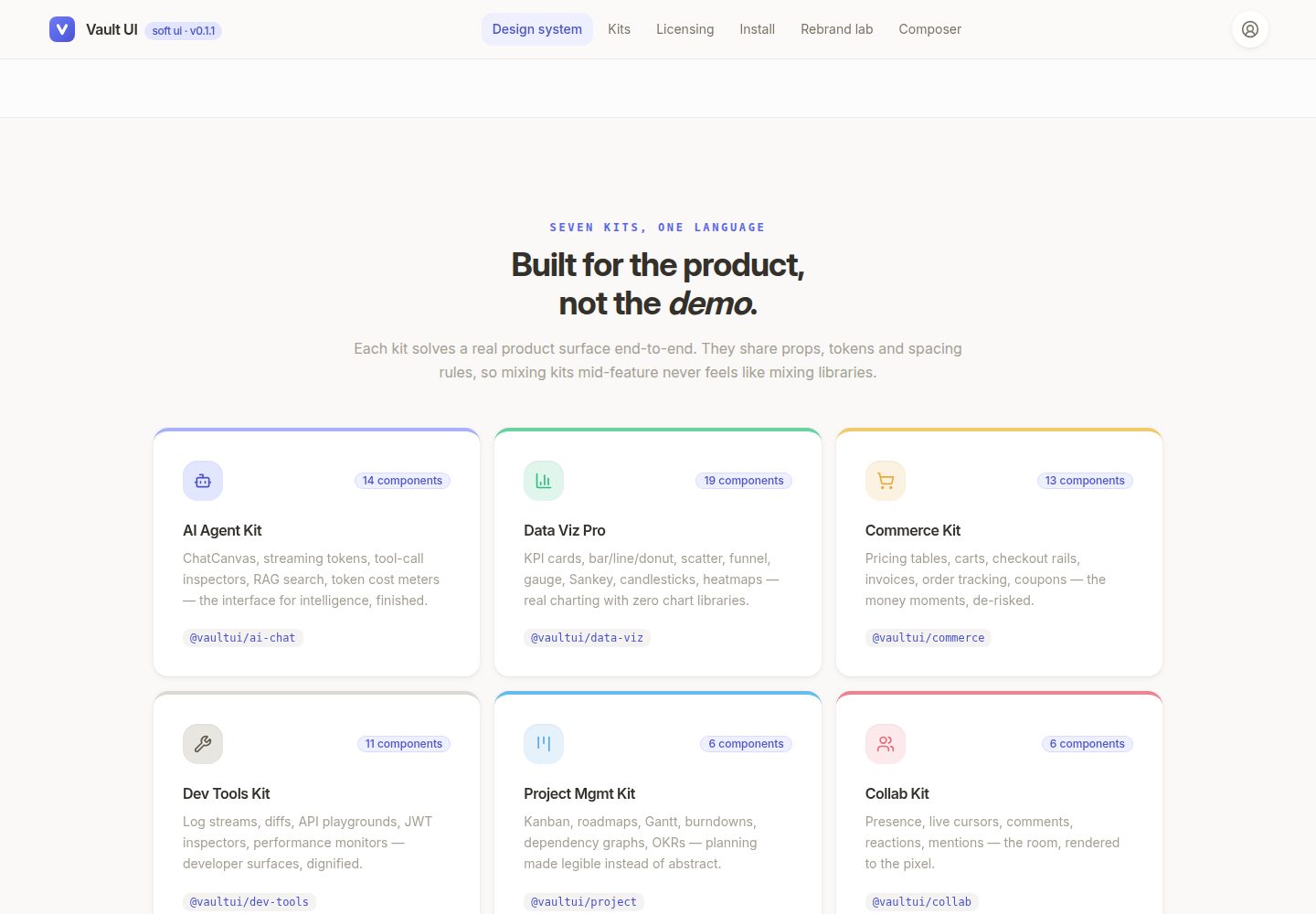
Turborepo monorepo structure with a Storybook showcase app and multiple component packages split by kit
ReactAdmin dashboard
vaultui — React Admin dashboard Template
By SAGARBABU123
Vault UI is a Turborepo-based React component library monorepo containing multiple packages split by kit, a design token theme engine, and a Storybook app for showcasing components.
Explore the design
Compare the page layouts and mobile experience. Open any screenshot for a closer look.
Desktop homepage1 / 2
Desktop captureTop of page
Actual screenshot captured by the server browser.
All pages & views 2
Screenshots show visual appearance; interactive behavior may differ.
Recorded 2026-10-06View source
What stands out
A quick read of the recorded project description.
Free-tier components published to npm under package names such as @vaultui/ui, installable via npm, yarn, pnpm, and bun
Provides a design token/theme engine package @vaultui/tokens, based on Tailwind v4 CSS-first
Includes multiple component kit packages such as ai-chat, commerce, data-viz, dev-tools, and project
Uses pnpm workspace and turbo commands for development, build, and type checking
The free tier uses the MIT license, with an additional commercial license file
Template Details
Vault UI is a monorepo organized with Turborepo, aimed at providing components for React + Tailwind projects. The repository structure shows it contains a Storybook app (apps/showroom) and multiple packages divided by kit: ai-chat (11 components), commerce (5 components), data-viz (5 components), dev-tools (4 components), project (3 components), as well as tokens (design tokens/theme engine, Tailwind v4 CSS-first), utils (cn() and shared helper functions), and ui (free-tier components, MIT licensed). The README states the free tier is published to npm under the package names @vaultui/ui, @vaultui/tokens, and @vaultui/utils, installable via npm, yarn, pnpm, or bun. The repository uses a pnpm workspace and provides commands such as turbo typecheck, turbo dev, turbo build, and pnpm storybook to start Storybook (port 6006). The README also mentions a roadmap document (component-marketplace-roadmap.md) but does not elaborate on specific phase contents in the README. The README does not provide specific feature descriptions for each kit's components, browser compatibility, performance data, or production readiness.
ReactAdmin panel
Is it right for your project?
Use Cases
- Install and use components and design tokens provided by @vaultui/ui and @vaultui/tokens in a React + Tailwind project
- Start Storybook locally via pnpm storybook to browse and debug components
- Run commands such as turbo typecheck and turbo build in the monorepo for type checking and building
- Refer to the repository structure to understand how component packages are organized by kit
Suitable For
- Frontend developers using React and Tailwind
- Projects that need to import components by kit (such as AI chat, data visualization, e-commerce, etc.)
- Teams looking to unify themes based on design tokens
- Developers managing multi-package projects with Turborepo or pnpm workspace
Getting started & customization
Use these recorded setup notes alongside the repository instructions for your chosen version.
- 1
Install dependencies: pnpm install
- 2
Type checking: turbo typecheck or pnpm typecheck
- 3
Start Storybook: pnpm storybook, default port 6006
- 4
Install component packages: npm i @vaultui/ui @vaultui/tokens (or use the corresponding commands for yarn, pnpm, bun)
- 5
The README does not provide detailed configuration steps or environment requirements
License & source material
Usage conditions & limitations
Free to use · keep license noticeThis entry covers the free version under the MIT license in the public repository; the free scope is the code of this version and does not mean external services or third-party assets are free.
Must comply with when using
- Permits free use, modification, commercial use, and distribution of this version's code.
- When distributing copies or substantial portions of the code, retain the original author's copyright notice and the full MIT license notice.
- The code is provided as-is; warranties and limitations of liability are governed by the original license and applicable law.
Additional costs & items to verify
- Demo images, fonts, icons, and other third-party assets must be checked against their respective licenses and cannot be judged solely by the code's MIT license.
- External services such as domains, hosting, databases, payments, or AI may incur separate charges.
- The ui package is only the free tier (MIT teaser); the other kit packages (ai-chat, commerce, data-viz, dev-tools, project) fall under commercial licensing and are not included in the free code.
- The repository contains COMMERCIAL-LICENSE.md; commercial kits are subject to separate commercial license terms.
- The license badge is marked as MIT + Commercial, with the free tier under MIT and commercial kits under a commercial license.
View Original Text Basis
Permission is hereby granted, free of charge
Original License Text
│ └── ui/ # free-tier components (MIT teaser)
Original README
├── COMMERCIAL-LICENSE.md
Original README
https://github.com/SAGARBABU123/vaultui/blob/main/LICENSEhttps://github.com/SAGARBABU123/vaultui/blob/main/README.md[](./LICENSE)
Original README
Compiled by DeepSeek based on repository license and README ·2026-10-06. Results only cover the materials read; dependencies, images, fonts, and subsequent term changes are subject to their respective original texts.
Project checks & description sources
Template Information
- Source platforms
- GitHub
- Documentation and maintenance reference score
- More documented · 80 / 100
- Technologies
- React
- Website type
- Admin dashboard
How this score is calculated
Our heuristic uses license records (up to 30), a demo link (12), a preview (10), stars (15), recorded maintenance (15), description completeness (8), feature records (5) and classification data (5). It is not a code, security or performance test, or a Google score. A link does not establish tested functionality.
What to verify for this project
- Repository update recorded
- 2026-10-06
- Screenshot last checked
- 2026-10-06
A demo link is listed. Check it with your own content and viewport sizes; its presence does not confirm that forms, authentication or payments work.
The catalog identifies React as the primary stack. Check the actual dependency manifest and lockfile for versions and hosting requirements. These notes use recorded metadata, not a code audit or a deployment test.
Use a selection guide →How this description was prepared
AI-assisted description based on catalog records and repository material. Repository authors are not automatically the reviewers of this description.
Review declaration: codex-user-requested-batch-review-20261017 · 2026-10-16
Inspect the recorded source material
SHA-256: 81154c151fc2e7ba47377bfc073c8fe96a61c974ab1c2ad8c1fc8dcf314ff87c
2026-10-06T13:06:20.078Z
Source file / repository# 💎 Vault UI [](https://www.npmjs.com/package/@vaultui/ui) [](https://www.npmjs.com/package/@vaultui/ui) [](https://bun.sh/) [](./LICENSE) [](https://github.com/SAGARBABU123/vaultui/actions/workflows/ci.yml) **Premium React + Tailwind components — the ones you can't find elsewhere.** A Turborepo monorepo: docs-explorer app, package-per-kit, token-driven theme engine, and a free tier published once to **npm** — installable with **npm, yarn, pnpm, or bun** (`@vaultui/ui`, `@vaultui/tokens`, `@vaultui/utils`). > ⚠️ **Working name.** Renaming later = one find-replace of `@vault` / `vault-ui`. ## Structure ``` vault-ui/ ├── apps/ │ └── showroom/ # Storybook — the storefront ├── packages/ │ ├── ai-chat/ # 🤖 AI Agent Kit — 11 components │ ├── commerce/ # 🛒 Commerce Kit — 5 components │ ├── configs/ # shared tsconfig │ ├── data-viz/ # 📈 Data Viz Pro — 5 components │ ├── dev-tools/ # 🧰 Dev Tools Kit — 4 components │ ├── project/ # 🗂️ Project Mgmt Kit — 3 components │ ├── tokens/ # design tokens / theme engine (Tailwind v4 CSS-first) │ ├── utils/ # cn() + shared helpers │ └── ui/ # free-tier components (MIT teaser) ├── LICENSE # MIT (free tier) ├── COMMERCIAL-LICENSE.md ├── RELEASE.md # release guide + consumer smoke tests └── pnpm-workspace.yaml ``` ## Getting started ```bash pnpm install turbo typecheck # or: pnpm typecheck pnpm storybook # opens Storybook on :6006 ``` ## Install the components One package, one registry (npm) — pick your package manager: ```bash # npm npm i @vaultui/ui @vaultui/tokens # yarn yarn add @vaultui/ui @vaultui/tokens # pnpm pnpm add @vaultui/ui @vaultui/tokens # bun (installs the same npm tarball — no separate bun registry) bun add @vaultui/ui @vaultui/tokens ``` ## Roadmap See [`../component-marketplace-roadmap.md`](../component-marketplace-roadmap.md) for the full phased plan (Phase 0–6). ## Commands (Turborepo) | Command | What it does | | -------------- | ---------------------------- | | `turbo dev` | run all dev tasks | | `turbo build` | build all (cached by turbo) | | `turbo typecheck` | typecheck all packages | | `pnpm storybook` | showroom only |
Explore similar templates
Compare previews and descriptions within the same stack and category.
ant-design-pro
Ant Design Pro is an enterprise-grade React admin scaffold built on React 19, Umi Max 4, and antd 6 with TypeScript.
React · Admin dashboard

coreui-free-react-admin-template
CoreUI's free React admin template, built on React and the CoreUI component library, provides dashboard layouts, sidebar navigation, routing, and example views. It includes .cursorrules, ARCHITECTURE.md, and DEVELOPMENT.md context files, plus JSDoc comments and PropTypes, to support AI-assisted development.
React · Admin dashboard

fastapi-react
A Cookiecutter template for FastAPI + React (TypeScript) full-stack projects, integrating PostgreSQL, SQLAlchemy, Alembic, Celery, Redis, JWT authentication, a react-admin admin panel, and a Docker Compose development environment with Nginx reverse proxy.
React · Admin dashboard

react-antd-admin-template
A React + Ant Design admin template for mid- and back-office products, with built-in login/logout, dynamic routing, permission checks, and user management.
React · Admin dashboard

react-saas-template
A React and Material-UI template for SaaS or admin websites, offering dashboard, chart, blog, payment, and file upload components. It uses Create-React-App, React-Router, Recharts, React-Stripe-js, React-Dropzone, and React-Cropper, with theme colors centralized in src/theme.js.
React · Admin dashboard

react-material-admin
React Material Admin is an MIT-licensed React admin template by Flatlogic, built on Material-UI. It provides dashboards, charts, tables, authentication, profile, and notification pages, with three color themes and responsive layouts.
React · Admin dashboard