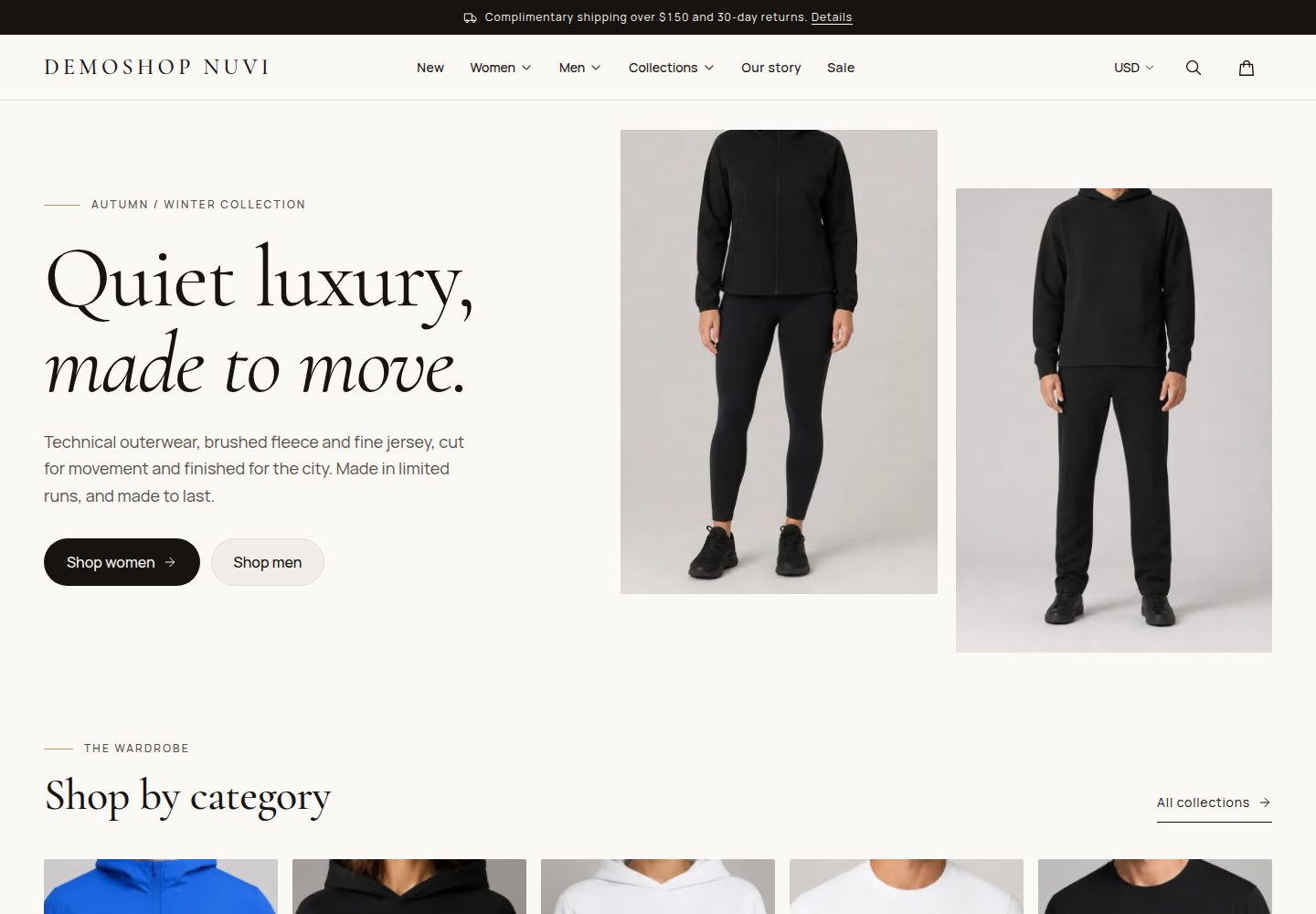
Builds the full storefront interface with the nuvui component library, including mega menus, drawers, carousels, a size selector and toasts
Next.jsReactE-commerceBlog
nextjs-ecommerce-shop-demo — Next.js Ecommerce Template
By sajanv88
An e-commerce storefront template built on Next.js 16 and the nuvui component library, with product browsing, a shopping bag, multi-currency display and SEO configuration; product data is local sample data.
Explore the design
Compare the page layouts and mobile experience. Open any screenshot for a closer look.
Desktop homepage1 / 3
Desktop captureTop of page
Actual screenshot captured by the server browser.
All pages & views 3
Screenshots show visual appearance; interactive behavior may differ.
Recorded 2026-10-19View source
What stands out
A quick read of the recorded project description.
Bag state is stored in the browser, synced across tabs and shows free-shipping progress
Supports switching price display among 6 currencies: USD, EUR, GBP, CAD, AUD and JPY; the choice is remembered
Provides per-page SEO metadata, a sitemap, robots.txt and structured data for products, collections, breadcrumbs and FAQ
Includes a strict content security policy, input validation, keyboard operation support and reduced-motion adaptation
Ships with a Dockerfile, a Helm chart and a GitHub Actions workflow for self-hosted deployment
Template Details
This template is an e-commerce storefront front-end demo for Next.js. It builds its interface with the nuvui component library, themes it with design tokens and supports dark mode. Pages cover the homepage, collection pages with filtering and sorting, product pages with an image gallery and size selection, search, the shopping bag (both a drawer and a standalone page), a brand story page and policy pages with an FAQ. Bag state is stored in the browser and synced across tabs, and it shows free-shipping progress. Prices can switch among 6 currencies: USD, EUR, GBP, CAD, AUD and JPY. The choice is remembered, but the README states that the demo converts at fixed rates for display only and that pricing is always in USD. For SEO, it provides per-page titles, descriptions, canonical links, share images, a sitemap with images, robots.txt, a real 404, and structured data for products, collections, breadcrumbs and FAQ. Security and accessibility include a strict content security policy, input validation, keyboard-friendly menus and drawers, visible focus and reduced-motion support. Product data lives in local files under src/lib/catalog; the README notes that connecting Shopify, a headless CMS or your own API requires rewriting a few functions in that directory. The checkout button component reserves a place for a Shopify checkout link or a Stripe Checkout session. The template also ships with a Dockerfile, a Helm chart and a GitHub Actions workflow for self-hosting. Product names, descriptions and images come from Vercel's public demo store; confirm copyright or replace them with your own assets before use.
Next.jsReactE-commerceBlog
Is it right for your project?
Use Cases
- Need to quickly build an e-commerce front-end demo or prototype with an editorial visual style
- Want a Next.js project to customize with a brand theme based on the nuvui component library
- Need a storefront front-end driven by local product data that can later be swapped for Shopify or your own API
- Plan to deploy to Vercel and configure a custom domain and canonical links for an e-commerce site
Suitable For
- Front-end developers familiar with Next.js and pnpm
- Teams that want to quickly customize the storefront look using a component library and design tokens
- E-commerce projects that need to demonstrate multi-currency display and shopping bag interaction
Getting started & customization
Use these recorded setup notes alongside the repository instructions for your chosen version.
- 1
Requires Node.js 24 or newer and pnpm; after installation, run pnpm dev to start the local development server
- 2
When deploying to Vercel, set the root directory to apps/ecommerce-shop-demo and keep the Node.js version at 24.x
- 3
After connecting a custom domain, set the SITE_URL environment variable and redeploy to update canonical links, the sitemap and structured data
- 4
Product data lives in local files under src/lib/catalog; connecting a real backend requires rewriting the read functions in that directory
- 5
Demo product images and copy come from Vercel's public demo store; confirm copyright or replace them with your own assets before commercial use
License & source material
Usage conditions & limitations
Free to use · keep license noticeThis listing covers the free version under the MIT license in the public repository; the free scope is that version's code and does not mean external services or third-party assets are free.
Must comply with when using
- You may use, modify, use commercially and distribute this version's code free of charge.
- When distributing copies or substantial portions of the code, retain the original author's copyright notice and the full MIT license notice.
- The code is provided as is; warranties and limitations of liability are governed by the original license and applicable law.
Additional costs & items to verify
- Demo images, fonts, icons and other third-party assets must be checked against their own licenses; the code's MIT license alone cannot determine this.
- External services such as domains, hosting, databases, payments or AI may incur separate charges.
- The demo's multi-currency display converts at fixed rates for display only, and pricing is always in USD; real multi-currency pricing requires exchange rates from a commercial platform.
- The checkout button is only a reserved placeholder; you must connect a Shopify checkout link or a Stripe Checkout session yourself, and the template itself does not include a real checkout flow.
- Policy pages are template copy and should be reviewed before accepting real orders.
- Star ratings and user reviews are sample content, not real reviews.
- Demo product names, descriptions and images come from Vercel's public demo store; confirm usage rights or replace them with your own assets before commercial use.
- The MIT license covers only the code; demo images and product copy are outside its scope.
- Product images are processed by Vercel image optimization and count toward the usage plan you choose; watch usage with large catalogs.
- In preview deployments, the Vercel Toolbar script is blocked by the browser due to the CSP nonce and produces CSP errors; the toolbar can be turned off in settings.
- After connecting a custom domain, set the SITE_URL environment variable and redeploy to update canonical links, the sitemap and structured data.
View Original Text Basis
Permission is hereby granted, free of charge
Original License Text
- **Currencies:** `src/lib/currency.ts`. The demo converts at fixed rates for display only and always charges in USD. For real multi-currency pricing, take the rates from your commerce platform.
Original README
- **Checkout:** `src/components/cart/checkout-button.tsx` is where a Shopify checkout link or a Stripe Checkout session goes.
Original README
- **Policies:** `src/lib/policies.ts`. This is template copy, so have it reviewed before you take real orders.
Original README
The star ratings and testimonials are sample content. They're deliberately kept out of the structured data, so search engines never see made-up reviews.
Original README
The demo catalog's product names, descriptions and studio shots come from Vercel's public demo store at [template.vercel.shop](https://template.vercel.shop), and the on-model photos are cropped versions of its images. Make sure you have the rights to use them before you put the store in front of customers, or swap in your own: drop them into `public/products/<handle>/` and update the paths in `products.ts`.
Original README
The license covers the code. The demo photos and product copy aren't part of it; see [About the photos](#about-the-photos).
Original README
- **Image optimization.** Product photos go through Vercel's image optimization, which counts toward your plan's usage. A demo store sits comfortably inside the free allowance, but keep an eye on it if you load in a large catalog.
Original README
- **The Vercel Toolbar on previews.** The store sends a strict, nonce-based Content Security Policy, and the toolbar's script doesn't carry the nonce, so the browser blocks it on preview deployments and logs a CSP error. If you want a clean console on previews, turn the toolbar off under **Settings → General → Vercel Toolbar**. Production isn't affected.
Original README
https://github.com/sajanv88/nextjs-ecommerce-shop-demo/blob/main/LICENSEhttps://github.com/sajanv88/nextjs-ecommerce-shop-demo/blob/main/README.md1. Go to **Settings → Environment Variables** and add `SITE_URL` with your full address, such as `https://shop.example.com`, for the Production environment.
Original README
Compiled by DeepSeek based on repository license and README ·2026-10-19. Results only cover the materials read; dependencies, images, fonts, and subsequent term changes are subject to their respective original texts.
Project checks & description sources
Template Information
- Source platforms
- GitHub
- Documentation and maintenance reference score
- More documented · 85 / 100
- Technologies
- Next.js · React
- Website type
- E-commerce · Blog
How this score is calculated
Our heuristic uses license records (up to 30), a demo link (12), a preview (10), stars (15), recorded maintenance (15), description completeness (8), feature records (5) and classification data (5). It is not a code, security or performance test, or a Google score. A link does not establish tested functionality.
What to verify for this project
- Repository update recorded
- 2026-10-19
- Screenshot last checked
- 2026-10-19
A demo link is listed. Check it with your own content and viewport sizes; its presence does not confirm that forms, authentication or payments work.
The catalog identifies Next.js as the primary stack. Check the actual dependency manifest and lockfile for versions and hosting requirements. These notes use recorded metadata, not a code audit or a deployment test.
Use a selection guide →How this description was prepared
AI-assisted description based on catalog records and repository material. Repository authors are not automatically the reviewers of this description.
Review declaration: codex-user-requested-batch-review-20261021 · 2026-10-21
Inspect the recorded source material
SHA-256: fde3d9f933ac7e5643ed666b5a50029b32acc9cb7dfa461e9bc26deb4125b872
2026-10-19T08:39:38.070Z
Source file / repository# DemoShop Nuvi A quiet, editorial storefront for Next.js. Think warm ivory pages, a serif headline face, big photography and a bag that slides in from the side. It's built with **Next.js 16** and **[nuvui](https://nuvui.nuvraxis.com)**, and every piece of interface you see, from the mega menu to the size picker, is a nuvui component themed with design tokens. Dark mode comes along for free. [](https://vercel.com/new/clone?repository-url=https%3A%2F%2Fgithub.com%2Fsajanv88%2Fnextjs-ecommerce-shop-demo&root-directory=apps%2Fecommerce-shop-demo&project-name=demoshop-nuvi&repository-name=demoshop-nuvi) [](LICENSE) > ✨ **Built with [nuvui](https://nuvui.nuvraxis.com).** Every button, menu, drawer and carousel in this store comes from nuvui, an open-source React component library with polished, accessible components that you theme with design tokens. If you like how this template looks and feels, you'll love building with it. **[Explore nuvui →](https://nuvui.nuvraxis.com)** ## What you get - **A full shop.** Home page, collections with filters and sorting, product pages with a photo gallery and sizes, search, a bag (as a drawer and as a page), an "our story" page and policy pages with an FAQ. - **A bag that just works.** It lives in the browser, stays in sync across tabs, and shows how close the shopper is to free shipping. - **Prices in six currencies.** Shoppers can switch between USD, EUR, GBP, CAD, AUD and JPY from the header, and every price on the page rolls over to the new one. The choice is remembered on the next visit. - **SEO that's done properly.** Titles, descriptions and canonical URLs on every page, share images, a sitemap with images, `robots.txt`, real 404s, and structured data for products, collections, breadcrumbs and the FAQ. - **Fast by default.** Photos are served as AVIF or WebP, the first screen is preloaded, and pages stream in behind skeletons, so clicking around feels instant. - **Secure and accessible.** A strict Content Security Policy, validated input everywhere, keyboard-friendly menus and drawers, visible focus, and reduced-motion support. ## Built on nuvui This template is a showcase for **[nuvui](https://nuvui.nuvraxis.com)**, and it's the reason the store came together so quickly. The whole storefront, from the mega menu, sheets, carousels and accordions to the size picker, toasts and animated prices, uses nuvui components out of the box. The luxury look is a single theme file of design tokens, so there's no fighting component styles. - **Polished components** for real products: navigation, forms, overlays, data display and more - **Accessible by default**, with keyboard support, focus management and ARIA wired up for you - **Themeable with tokens**, so light and dark modes and your brand colors live in one place - **Made for Next.js**, working nicely with Server Components and a strict Content Security Policy 👉 **Browse the components, docs and ready-made blocks at [nuvui.nuvraxis.com](https://nuvui.nuvraxis.com).** ## Run it on your machine You'll need **Node.js 24 or newer** (the repo pins 26 in `.node-version`) and **pnpm**. If you don't have pnpm yet, `corepack enable` sets up the right version for you. ```sh pnpm install pnpm dev ``` Then open [http://localhost:3000](http://localhost:3000). Before you push anything, run the same checks CI runs: ```sh pnpm typecheck && pnpm lint && pnpm build ``` ## Deploy it to Vercel ### The quick way Click **Deploy with Vercel** above. Vercel copies the repo into your GitHub account, points the project at the right folder and deploys it. You don't need to fill anything in. A couple of minutes later you have a live store. ### Importing it yourself If you've already forked or cloned the repo: 1. In Vercel, choose **Add New → Project** and import your repository. 2. Set **Root Directory** to `apps/ecommerce-shop-demo`. This is the one setting that matters, because the store lives in a monorepo. 3. Leave the framework, build command and install command on their defaults. Vercel spots Next.js, pnpm and Turborepo by itself. 4. Keep **Node.js Version** on **24.x** (the default) under **Settings → Build and Deployment**. 5. Click **Deploy**. ### When you add your own domain Out of the box, the store uses your Vercel production address (`your-project.vercel.app`) for canonical URLs, the sitemap and structured data. Once you connect a custom domain: 1. Go to **Settings → Environment Variables** and add `SITE_URL` with your full address, such as `https://shop.example.com`, for the Production environment. 2. **Redeploy.** Many pages are prerendered at build time, so a new value only shows up after a fresh build. Preview deployments keep pointing their canonical URLs at production, which is what you want: search engines won't index your previews as separate sites. ### Good to know - **The Vercel Toolbar on previews.** The store sends a strict, nonce-based Content Security Policy, and the toolbar's script doesn't carry the nonce, so the browser blocks it on preview deployments and logs a CSP error. If you want a clean console on previews, turn the toolbar off under **Settings → General → Vercel Toolbar**. Production isn't affected. - **Image optimization.** Product photos go through Vercel's image optimization, which counts toward your plan's usage. A demo store sits comfortably inside the free allowance, but keep an eye on it if you load in a large catalog. ## Settings | Variable | Do you need it? | What it does | | --- | --- | --- | | `SITE_URL` | Once you have a custom domain | Your store's public address. Canonical URLs, the sitemap, `robots.txt` and structured data are built from it. On Vercel it falls back to your production `.vercel.app` address. | | `OTEL_SERVICE_NAME` | No | The service name on OpenTelemetry traces. Defaults to `ecommerce-shop-demo`. | For local development, copy `apps/ecommerce-shop-demo/.env.example` to `apps/ecommerce-shop-demo/.env.local` and edit it there. ## Make it yours - **Name, tagline, email and navigation:** `src/lib/site.ts`. - **Colors, fonts and corner radii:** `src/styles/base/_theme.scss`. These are nuvui tokens, with the light and dark values side by side, so a rebrand is mostly a matter of changing a handful of lines. - **Products and collections:** `src/lib/catalog/products.ts` and `collections.ts`. Everything reads through `src/lib/catalog/index.ts`, so hooking up Shopify, a headless CMS or your own API means rewriting those few functions and nothing else. - **Currencies:** `src/lib/currency.ts`. The demo converts at fixed rates for display only and always charges in USD. For real multi-currency pricing, take the rates from your commerce platform. - **Checkout:** `src/components/cart/checkout-button.tsx` is where a Shopify checkout link or a Stripe Checkout session goes. - **Policies:** `src/lib/policies.ts`. This is template copy, so have it reviewed before you take real orders. The star ratings and testimonials are sample content. They're deliberately kept out of the structured data, so search engines never see made-up reviews. ## About the photos The demo catalog's product names, descriptions and studio shots come from Vercel's public demo store at [template.vercel.shop](https://template.vercel.shop), and the on-model photos are cropped versions of its images. Make sure you have the rights to use them before you put the store in front of customers, or swap in your own: drop them into `public/products/<handle>/` and update the paths in `products.ts`. ## Hosting it yourself The repo also ships a Dockerfile, a Helm chart and GitHub Actions workflows that build and publish a container image. [CLAUDE.md](CLAUDE.md) walks through the whole pipeline. ## Where things live ``` apps/ecommerce-shop-demo/ src/app/ pages, metadata, sitemap, robots and share images src/components/ one folder per component, each with its own stylesheet src/lib/catalog/ the product data, its types and the cached readers src/lib/currency.ts display currencies and their rates src/lib/seo.ts structured data builders src/styles/ theme tokens, element defaults and page layout public/products/ three or four photos per product packages/tsconfig/ the shared TypeScript config charts/ the Helm chart ``` ## License Free and open source under the [MIT License](LICENSE), © 2026 [sajanv88](https://github.com/sajanv88). Use it, fork it and build your own store with it, commercially or otherwise. A star on the repo or a link back to [nuvui](https://nuvui.nuvraxis.com) is always appreciated, but never required. The license covers the code. The demo photos and product copy aren't part of it; see [About the photos](#about-the-photos).
Explore similar templates
Compare previews and descriptions within the same stack and category.

Next.js Commerce
Vercel's officially maintained Next.js App Router ecommerce starter with deep Shopify integration, offering a complete product catalog, cart, and checkout flow. Core logic is modular for swapping backends, and community provider versions exist for BigCommerce, Medusa, and Saleor.
Next.js · E-commerce

tailwind-nextjs-starter-blog
A Next.js and Tailwind CSS blog starter template using Contentlayer for Markdown/MDX, with built-in SEO, code highlighting, and tags. It targets personal technical blogs and migration from Jekyll/Hugo to React, and supports one-click Vercel deployment.
Next.js · Blog

Nextjs-tailwindcss-blog-template
A Next.js blog styled with Tailwind CSS. The current branch processes Markdown with Velite; the earlier Contentlayer setup is retained in a separate historical branch.
Next.js · Blog

Next-js-Blog-Boilerplate
A blog starter built on Next.js 12 and Tailwind CSS 3, integrating TypeScript, ESLint, Prettier, and PostCSS.
Next.js · Blog

nextjs-blog-theme
A Next.js 15 and Tailwind CSS 4.x blog starter by Netlify, designed by Bejamas, with MDX support, dark/light theme switching, and environment-variable configuration. It includes a visual setup wizard for deploying to Netlify and manages content via local .mdx files.
Next.js · Blog

blog
A personal blog forked from Timlrx's tailwind-nextjs-starter-blog, built with Next.js, React, and Tailwind CSS. Content is stored as Markdown/MDX under data/, with site, author, navigation, and project data in separate files.
Next.js · Blog