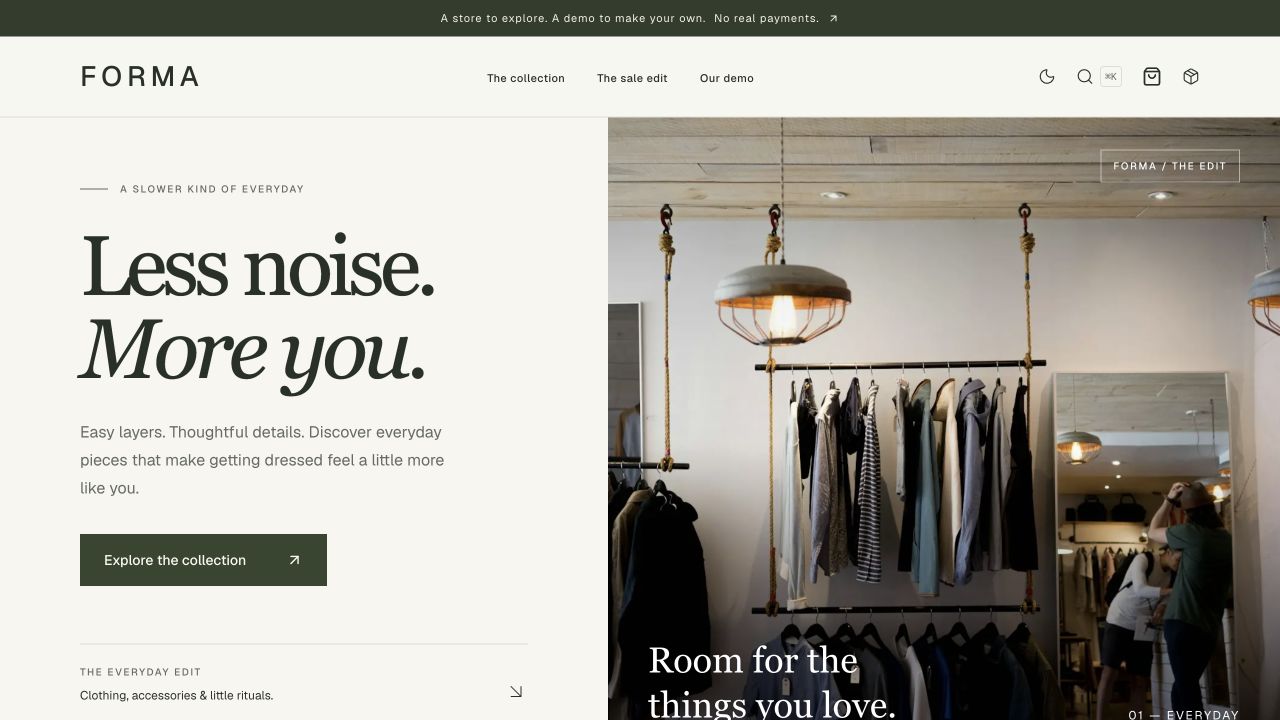
The homepage, search, filtered listing, sale page, 12 product detail pages and sitemap all share the same product data.
Next.jsReactE-commercePortfolio
forma-commerce — Next.js Ecommerce Template
By SakuraUltra
FORMA is a boutique ecommerce storefront template built with Next.js, React and TypeScript. It includes product filters, a persistent cart, guest demo checkout and order tracking, with all data stored locally in the browser and no API keys or database required.
Explore the design
Compare the page layouts and mobile experience. Open any screenshot for a closer look.
Author preview
Author-provided preview
Preview provided in the project README.
One original preview is available. Open the full image to inspect the design.
Screenshots show visual appearance; interactive behavior may differ.
Recorded 2026-10-09View source
What stands out
A quick read of the recorded project description.
Category, color, price and sorting are reflected in the URL, so links such as /products?sort=newest can be shared directly.
The cart stores quantities per variant and persists across refreshes, with integer validation, handling for unavailable items and per-variant stock caps.
Guest demo checkout recalculates prices from the product catalog and handles empty carts and storage error feedback.
Orders are saved as snapshots in the browser, including a unique ID, item and price records, order history and simulated delivery steps.
Brand information, currency, shipping thresholds and canonical URLs are centralized in a config file, and product data is centralized in a catalog file.
Template Details
FORMA is an example brand in the repository SakuraUltra/forma-commerce, positioned as a portfolio project and a reusable Next.js, React and TypeScript ecommerce template. It presents a complete guest shopping flow with warm ivory, deep olive green and an editorial layout, and runs locally without API keys or a database.
The template covers the path from browsing to saving a demo order: the homepage, search, filtered product listing, sale items, 12 product detail pages and the sitemap all share the same product data; category, color, price and sorting are reflected in the URL, so links can be shared directly. The cart stores quantities per variant and persists across refreshes. Checkout is a guest demo flow, orders are saved as snapshots in browser storage, and simulated delivery steps are supported.
It should be clear that this is a front-end ecommerce demo, not a production transaction system. It does not accept payments, register accounts, send emails or ship goods; cart and order data live in the visitor's browser, browser storage can be edited or cleared, and it does not constitute an authentication or security boundary. Stock limits apply only to a single cart, and placing an order does not reserve shared inventory; shipping is simulated and taxes are not calculated. The prisma/schema.prisma file in the repository serves only as a reference for the original relational design; Prisma, Stripe and authentication are not wired into the app. Sample images come from Unsplash and are not provided under the code's MIT license.
Next.jsReactEcommercePortfolio
Is it right for your project?
Use Cases
- Run locally and experience the complete guest shopping flow from browsing and filtering to adding items and saving a demo order.
- Use as a learning or portfolio reference project for a Next.js, React and TypeScript ecommerce storefront.
- Replace the product catalog, brand configuration and visual tokens to build your own front-end ecommerce demo.
- Study front-end state handling such as cart persistence, price recalculation, stock boundaries and order snapshots.
Suitable For
- Developers who want a reference for a Next.js App Router ecommerce storefront structure.
- Portfolio authors who need a locally runnable demo of a shopping flow without a backend.
- Front-end teams planning to add server-side validation and payments on top of a front-end demo.
Getting started & customization
Use these recorded setup notes alongside the repository instructions for your chosen version.
- 1
Requires Node.js 22.22 or later; Node 22 LTS is recommended.
- 2
After cloning the repository, run npm ci to install dependencies, then npm run dev to start; the default address is localhost:3000.
- 3
No .env, database, seed command, payment keys or account are required; an internet connection is needed to install dependencies, load Google Fonts during build and display remote product images.
- 4
At checkout, use the provided fictional address and do not enter real information.
- 5
Before deployment, run npm run build and set NEXT_PUBLIC_SITE_URL to the actual public address.
License & source material
Usage conditions & limitations
Free to use · keep license noticeThis entry covers the free version under the MIT license in the public repository; the free scope applies to that version's code and does not mean external services or third-party assets are free.
Must comply with when using
- You may use, modify, commercialize and distribute this version's code free of charge.
- When distributing copies or substantial portions of the code, retain the original author's copyright notice and the full MIT license notice.
- The code is provided as is; warranties and limitations of liability are governed by the original license and applicable law.
Additional costs & items to verify
- Demo images, fonts, icons and other third-party assets must be checked against their own licenses; the code's MIT license alone cannot be used to judge them.
- External services such as domains, hosting, databases, payments or AI may incur separate charges.
- This project is only a demo storefront: it does not process payments, register accounts, send emails or ship goods; cart and order data exist only in the visitor's browser, and checkout must use a fictional address.
- This is a front-end ecommerce demo, not a production transaction system; browser storage can be edited or cleared and does not constitute an authentication or security boundary; stock limits are calculated per cart only, and placing an order does not reserve shared inventory; shipping is simulated and taxes are not calculated.
- prisma/schema.prisma serves only as a reference for the original relational design; Prisma, Stripe and authentication are not wired into the app and it cannot be used directly for production transactions.
- Sample images come from Unsplash and are not provided under the app code's license; replace them and confirm image rights before commercial use.
- If you want to present the template as your own commercial storefront, replace the sample images and brand information first.
- An internet connection is required to install dependencies, load Google Fonts during build and display remote product images.
View Original Text Basis
Permission is hereby granted, free of charge
Original License Text
This is a **demo storefront**. It does not accept payments, register accounts, send emails or ship products. Cart and order data live in the visitor's browser. Use the fictional address provided at checkout.
Original README
This is a frontend commerce demo, not a production transaction system. Browser storage can be edited or cleared and is not an authentication or security boundary. Inventory limits apply per cart; placing orders does not reserve shared stock. Shipping is simulated and taxes are not calculated.
Original README
`prisma/schema.prisma` preserves the original relational design **as a reference only**. Prisma, Stripe and authentication are not connected to the app.
Original README
Sample imagery is served from Unsplash; photographs are not included under the application's code license.
Original README
Replace imagery and branding before presenting the template as your own commercial store.
Original README
https://github.com/SakuraUltra/forma-commerce/blob/main/LICENSEhttps://github.com/SakuraUltra/forma-commerce/blob/main/README.mdInternet access is needed for dependency installation, Google fonts at build time and remote product photographs.
Original README
Compiled by DeepSeek based on repository license and README ·2026-10-09. Results only cover the materials read; dependencies, images, fonts, and subsequent term changes are subject to their respective original texts.
Project checks & description sources
Template Information
- Source platforms
- GitHub
- Documentation and maintenance reference score
- Partly documented · 73 / 100
- Technologies
- Next.js · React
- Website type
- E-commerce · Portfolio
How this score is calculated
Our heuristic uses license records (up to 30), a demo link (12), a preview (10), stars (15), recorded maintenance (15), description completeness (8), feature records (5) and classification data (5). It is not a code, security or performance test, or a Google score. A link does not establish tested functionality.
What to verify for this project
- Repository update recorded
- 2026-10-09
- Screenshot last checked
- 2026-10-09
No demo link is recorded. Use the repository instructions to evaluate the project locally; the screenshot alone cannot establish interactive behavior.
The catalog identifies Next.js as the primary stack. Check the actual dependency manifest and lockfile for versions and hosting requirements. These notes use recorded metadata, not a code audit or a deployment test.
Use a selection guide →How this description was prepared
AI-assisted description based on catalog records and repository material. Repository authors are not automatically the reviewers of this description.
Review declaration: [email protected] · 2026-10-09
Inspect the recorded source material
SHA-256: 095680948b56889ac66182cf71cb8693668183ddd0cf1a0bf8c88be409471bcd
2026-10-09T01:24:04.215Z
Source file / repository# FORMA — Next.js Ecommerce Template
[](LICENSE)
[](https://github.com/SakuraUltra/forma-commerce/actions/workflows/storefront-checks.yml)
**A boutique ecommerce storefront, from first browse to saved demo order.**
FORMA is the sample brand inside **forma-commerce**: a portfolio project and reusable **Next.js, React and TypeScript** template. Warm ivory, deep olive and an editorial layout frame a complete guest shopping journey—no API keys or database setup required.
[Run locally](#quick-start) · [Project case study](docs/showcase.md) · [v0.1.0 release](https://github.com/SakuraUltra/forma-commerce/releases/tag/v0.1.0) · [中文说明](docs/README.zh-CN.md)
> This is a **demo storefront**. It does not accept payments, register accounts, send emails or ship products. Cart and order data live in the visitor's browser. Use the fictional address provided at checkout.
## Preview
[](https://github.com/SakuraUltra/forma-commerce/releases/tag/v0.1.0)
[Watch the MP4 walkthrough](docs/media/storefront-walkthrough.mp4) · [Explore the design and engineering decisions](docs/showcase.md)
The GIF and video are montages of captured screens from the working interface, not real-time screen recordings. Run the project locally to try the interactions.
[Download the offline showcase kit](https://github.com/SakuraUltra/forma-commerce/releases/download/v0.1.0/forma-v0.1.0-showcase.zip): extract the ZIP and open `index.html` for a static presentation with images and video. Interactive shopping requires [running the project locally](#quick-start).
<details>
<summary>View desktop, mobile and order screenshots</summary>

| Mobile storefront | Saved demo order |
| ---------------------------------------------------------------------------------- | --------------------------------------------------------------------------------------------------------------- |
| <img src="docs/media/mobile-home.jpg" alt="FORMA mobile storefront" width="260" /> | <img src="docs/media/demo-order.jpg" alt="A saved FORMA demo order with item and amount details" width="640" /> |
</details>
## Quick start
Use Node.js **22.22+** (Node 22 LTS recommended).
```bash
git clone --branch v0.1.0 https://github.com/SakuraUltra/forma-commerce.git
cd forma-commerce
npm ci
npm run dev
```
This checks out the **v0.1.0** release. Omit `--branch v0.1.0` to work with the latest `main` branch.
Open [localhost:3000](http://localhost:3000). No `.env`, database, seed command, payment key or account is required. Internet access is needed for dependency installation, Google fonts at build time and remote product photographs.
## Try the complete journey
1. Open **The collection**, filter by category/colour/price, or search with **⌘K / Ctrl+K**.
2. Choose a product colour and size. Unavailable variants cannot be added.
3. Open the cart, adjust quantities and continue to checkout.
4. Keep the example shipping address and select **Place demo order**. There is no card form.
5. View the saved order, refresh the page, then open **Explore demo delivery**.
6. Advance the simulated delivery steps. The orders page keeps your history and lets you clear it.
## Features
- **One catalog, everywhere:** home, search, filtered listings, sale items, all 12 product pages and sitemap share one data source.
- **Shareable discovery:** category, colour, price and sorting are reflected in the URL; direct links such as `/products?sort=newest` preserve the **Newest** sort order.
- **Persistent cart:** variant quantities survive reloads; integer validation, unavailable-product handling and per-variant stock limits.
- **Guest checkout:** catalog-based price recalculation, consistent shipping thresholds, empty-cart protection and useful storage-error feedback.
- **Saved demo orders:** unique IDs, item and price snapshots, order history, missing-order states and interactive simulated delivery.
- **Boutique visual identity:** an editorial home page, warm neutral surfaces, olive accents and a responsive layout with dark/light themes.
- **Accessible interactions:** labelled controls, keyboard search, a skip link, mobile navigation and filters.
- **Configurable branding:** store name, description, currency, shipping and canonical URL in one file.
- **Validation:** domain and component tests plus lint, TypeScript and production build checks; GitHub Actions configuration lives alongside the code.
## Make it your own
| Change | File |
| -------------------------------------------------------------------- | ------------------------------------------- |
| Store name, currency, locale, shipping threshold and repository link | `src/lib/store-config.ts` |
| Products, images, categories, colours, prices and sample stock | `src/lib/catalog.ts` |
| Home page copy and sections | `src/components/home/` |
| Theme and visual tokens | `src/app/globals.css` |
| Allowed external image hosts | `next.config.ts` |
| Public canonical URL | `NEXT_PUBLIC_SITE_URL` (see `.env.example`) |
All monetary values are **integer cents**. The initial catalog is priced in USD. Changing `currency` changes presentation, **not exchange rates**; update catalog prices, price-filter thresholds and shipping amounts for a different market. Product photos illustrate the sample catalog and do not change when selecting a colour.
## Development
```bash
npm run lint
npm run test:run
npm run build
npm run start
```
`npm run test` starts watch mode. `npm run typecheck` performs a separate type check (the production build also checks types). The [Storefront checks workflow](.github/workflows/storefront-checks.yml) installs locked dependencies, lints, tests and builds on pull requests and pushes to `main`. It can also be run manually from GitHub Actions. It uses a read-only repository token and does not deploy the site. Check the [Actions page](https://github.com/SakuraUltra/forma-commerce/actions/workflows/storefront-checks.yml) for the status of a particular commit.
Tests cover stock and quantity limits, duplicate and stale cart data, price recalculation, shipping boundaries, unique order IDs, persistence, malformed saved orders, failed storage, missing orders and the guest checkout UI.
## Architecture and boundaries
Next.js App Router · React · TypeScript · Tailwind CSS · Base UI · Zustand · Vitest
```text
Shared catalog → browsing / search / product detail
↓
persistent variant cart
↓
validate catalog prices and quantities
↓
order snapshot saved to browser storage
↓
order history / demo delivery
```
This is a frontend commerce demo, not a production transaction system. Browser storage can be edited or cleared and is not an authentication or security boundary. Inventory limits apply per cart; placing orders does not reserve shared stock. Shipping is simulated and taxes are not calculated.
`prisma/schema.prisma` preserves the original relational design **as a reference only**. Prisma, Stripe and authentication are not connected to the app. The unused SDK wrappers and outdated database seed were removed from the default installation; adding production commerce requires server-side ownership and validation. See the [extension guide](docs/architecture.md).
## Optional deployment
The project can be explored through this README, the release assets and a local installation. To host your own copy, run `npm run build` and deploy to a host supporting Next.js. Set `NEXT_PUBLIC_SITE_URL` to the actual public address before the production build. Full instructions and post-deployment checks are in [docs/deployment.md](docs/deployment.md).
## Images and licensing
Sample imagery is served from Unsplash; photographs are not included under the application's code license. Updated images: [candle by Jack Baxter](https://unsplash.com/photos/a-lit-candle-in-a-glass-jar-on-a-table-fCe0oFccURY), [tote by Rahul Bhogal](https://unsplash.com/photos/white-tote-bag-lihCTIOP28U), and [watch by Lucas Kepner](https://unsplash.com/photos/a-watch-sitting-on-top-of-a-black-table-KqmdTLEji08). Replace imagery and branding before presenting the template as your own commercial store.
Application code is available under the [MIT License](LICENSE).
Explore similar templates
Compare previews and descriptions within the same stack and category.

Next.js Commerce
Vercel's officially maintained Next.js App Router ecommerce starter with deep Shopify integration, offering a complete product catalog, cart, and checkout flow. Core logic is modular for swapping backends, and community provider versions exist for BigCommerce, Medusa, and Saleor.
Next.js · E-commerce

react-resume-template
A personal resume website template for software developers, built with Next.js, React, and TypeScript and styled with Tailwind CSS. Site content is driven by a single data file at /src/data/data.tsx, with types in dataDef.ts and images in src/images/.
Next.js · Portfolio

nxt-lnk
nxt-lnk is a Next.js-based bio link page template that manages personal information and links via BioData.js and LinksData.js, positioned as a self-hosted alternative to Linktree. It groups links by type, supports enabling/disabling individual links, and offers hexagonal or oval avatars.
Next.js · Portfolio

sylph
Sylph is a minimal portfolio and blog template built on Next.js, supporting MDX/Markdown writing, light/dark themes, and automatic OG image generation. It includes sitemap, robots.txt, metadata, and syntax highlighting, with automatic blog timestamps.
Next.js · Portfolio
commerceplate
A free Shopify e-commerce starter template built with Next.js 16, Tailwind CSS 4, and TypeScript, using the Shopify Storefront API (GraphQL).
Next.js · E-commerce

sleek-portfolio
A modern, responsive portfolio template built with Next.js 15, TypeScript, Tailwind CSS, and Shadcn UI. It includes an MDX blog, project showcase, work experience timeline, and a contact form that receives messages via Telegram Bot.
Next.js · Portfolio