Purely static HTML templates with no build tools, frameworks or backend required
HTMLStarter
webarray-starter — HTML Starter Template
By shahbazb
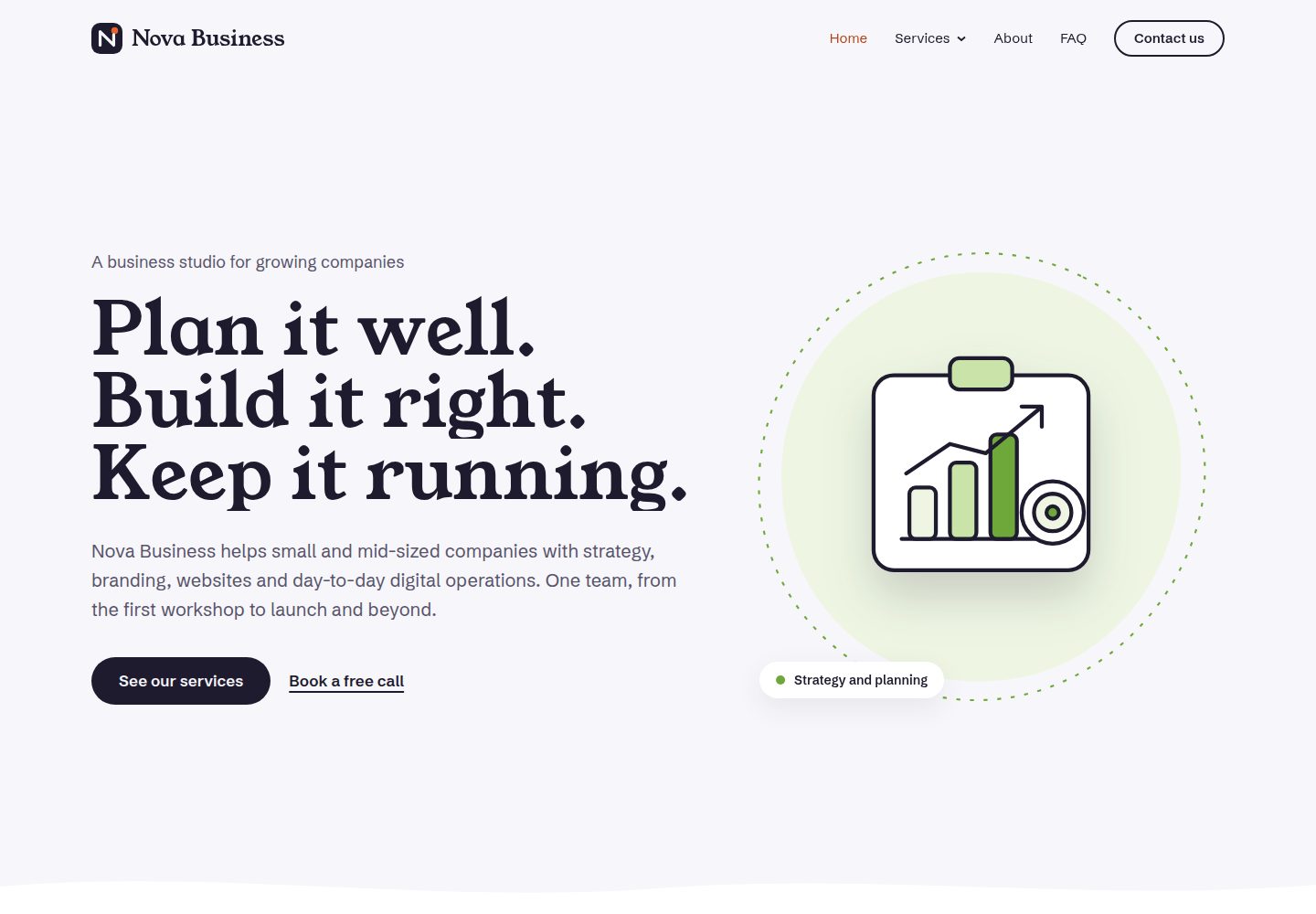
WebArray Starter is an open-source collection of static HTML website templates, including the Nova Business corporate template and the Ember & Anise food-service template, with no build tools, frameworks or backend required.
Explore the design
Compare the page layouts and mobile experience. Open any screenshot for a closer look.
Desktop homepage1 / 3
Desktop captureTop of page
Actual screenshot captured by the server browser.
All pages & views 3
Screenshots show visual appearance; interactive behavior may differ.
Recorded 2026-10-19View source
What stands out
A quick read of the recorded project description.
Includes two self-contained templates: Nova Business and Ember & Anise
Each template folder comes with its own README covering installation, customization and deployment
Root directory provides a template listing page and a site-wide 404 page
Code and template images use the MIT license; third-party components are listed separately within each template
Template Details
This repository is published by WebArray and provides free, open-source HTML website templates. Each template is a purely static site: open index.html directly in a browser to view it, and edit it in any text editor; the README explicitly states that no build tools, frameworks or backend are required.
The repository currently contains two templates: Nova Business, aimed at agencies, studios, professional services, small businesses and startups; and Ember & Anise, aimed at restaurants, cafes, taverns, wine bars and food-service businesses. Each template folder is self-contained and has its own README.md describing installation, customization and deployment steps. The root index.html is a landing page listing all templates, served via GitHub Pages, and there is also a 404.html as a site-wide error page.
To use a template, download the ZIP, copy the desired template folder, open its index.html, and follow its README. To publish a template as a standalone site, place the contents of that folder at the top level of a new repository and enable GitHub Pages. The README does not provide specific framework versions, performance metrics or production-readiness statements; the business names, people, quotes and contact details in the demos are fictional.
HTMLStarter
Is it right for your project?
Use Cases
- Build a static showcase site for an agency, studio or small business
- Create static promotional pages for a restaurant, cafe or bar
- Download a template and customize and deploy it according to each folder's README
- Place a template folder's contents in a new repository and publish via GitHub Pages
Suitable For
- Static website projects that require direct HTML editing
- Developers who want to avoid build tools and backend dependencies
- Showcase pages for agencies, professional services, small businesses and startups
- Pages for restaurants, cafes, taverns, wine bars and other food-service businesses
Getting started & customization
Use these recorded setup notes alongside the repository instructions for your chosen version.
- 1
Download the ZIP from the repository's Code button, or use the direct download link in the README
- 2
After extracting, copy the desired template folder, for example nova-business/
- 3
Open that folder's index.html in a browser and follow its README.md
- 4
To publish independently, place the template folder's contents at the top level of a new repository and enable GitHub Pages
- 5
Licenses for third-party components (such as GSAP and Google Fonts) are in each template's LICENSE.txt
License & source material
Usage conditions & limitations
Free to use · keep license noticeThis entry covers the free version under the MIT license in the public repository; the free scope is the code of this version and does not mean external services or third-party assets are free.
Must comply with when using
- The code of this version may be used, modified, used commercially and distributed free of charge.
- When distributing copies or substantial portions of the code, retain the original author's copyright notice and the full MIT license notice.
- The code is provided as is; warranties and limitations of liability are governed by the original license and applicable law.
Additional costs & items to verify
- Demo images, fonts, icons and other third-party assets must be checked against their respective licenses; the code's MIT license alone is not sufficient to determine this.
- External services such as domains, hosting, databases, payments or AI may incur separate charges.
- Code and template images use the MIT license; each template folder's LICENSE.txt lists the loaded third-party components (such as GSAP and Google Fonts), which are subject to their own licenses and must be complied with separately.
- The business names, people, quotes and contact details in the demos are fictional and must not be used as real information.
- The templates are purely static sites with no build tools, frameworks or backend; dynamic functionality must be implemented by the user.
- To publish a template as a standalone site, the contents of that folder must be placed at the top level of a new repository and GitHub Pages enabled.
View Original Text Basis
Permission is hereby granted, free of charge
Original License Text
Code and template images are released under the [MIT License](LICENSE). Each template folder also includes a `LICENSE.txt` listing the third-party components it loads (such as GSAP and Google Fonts), which have their own licenses.
Original README
All business names, people, quotes and contact details in the demos are fictional.
Original README
Every template is a plain static website: open `index.html` in a browser and edit it with any text editor. No build tools, no frameworks, no backend.
Original README
https://raw.githubusercontent.com/shahbazb/webarray-starter/6b8883b2ce77c5c43b7b33f1cc2135cbe76f74da/LICENSEhttps://raw.githubusercontent.com/shahbazb/webarray-starter/6b8883b2ce77c5c43b7b33f1cc2135cbe76f74da/README.mdTo publish a template as its own site, put the *contents* of its folder at the top level of a new repository and enable GitHub Pages. Each template README explains how.
Original README
Compiled by DeepSeek based on repository license and README ·2026-10-21. Results only cover the materials read; dependencies, images, fonts, and subsequent term changes are subject to their respective original texts.
Project checks & description sources
Template Information
- Source platforms
- GitHub
- Documentation and maintenance reference score
- More documented · 80 / 100
- Technologies
- HTML
- Website type
- Starter
How this score is calculated
Our heuristic uses license records (up to 30), a demo link (12), a preview (10), stars (15), recorded maintenance (15), description completeness (8), feature records (5) and classification data (5). It is not a code, security or performance test, or a Google score. A link does not establish tested functionality.
What to verify for this project
- Repository update recorded
- 2026-10-19
- Screenshot last checked
- 2026-10-19
A demo link is listed. Check it with your own content and viewport sizes; its presence does not confirm that forms, authentication or payments work.
The catalog identifies HTML as the primary stack. Check the actual dependency manifest and lockfile for versions and hosting requirements. These notes use recorded metadata, not a code audit or a deployment test.
Use a selection guide →How this description was prepared
AI-assisted description based on catalog records and repository material. Repository authors are not automatically the reviewers of this description.
Review declaration: codex-user-requested-batch-review-20261021 · 2026-10-21
Inspect the recorded source material
SHA-256: b5ecfc412b37408946688471f8f38c5397153f2d6ed5314f13fede2853dbf32c
2026-10-19T13:07:42.958Z
Source file / repository# WebArray Starter Free, open-source HTML website templates by [WebArray](https://webarray.net). Every template is a plain static website: open `index.html` in a browser and edit it with any text editor. No build tools, no frameworks, no backend. **Browse and preview the templates:** https://shahbazb.github.io/webarray-starter/ ## Templates | Template | Live demo | Good for | | --- | --- | --- | | [Nova Business](nova-business/) | [View demo](https://shahbazb.github.io/webarray-starter/nova-business/) | Agencies, studios, professional services, small businesses, startups | | [Ember & Anise](ember-anise/) | [View demo](https://shahbazb.github.io/webarray-starter/ember-anise/) | Restaurants, cafes, bistros, wine bars, food businesses | Each template folder has its own `README.md` with setup, customization and deployment instructions. ## Download a template 1. Click the green **Code** button on this page, then **Download ZIP** (or [download it directly](https://github.com/shahbazb/webarray-starter/archive/refs/heads/main.zip)). 2. Unzip it and copy the folder of the template you want, for example `nova-business/`. 3. Open that folder's `index.html` in your browser, then follow its `README.md`. To publish a template as its own site, put the *contents* of its folder at the top level of a new repository and enable GitHub Pages. Each template README explains how. ## Repository structure ``` webarray-starter/ ├── index.html Landing page listing all templates (served by GitHub Pages) ├── 404.html "Page not found" page for the whole site ├── nova-business/ Nova Business template (self-contained) ├── ember-anise/ Ember & Anise restaurant template (self-contained) ├── LICENSE └── README.md ``` Adding a template: create a new folder with the template's files, then add a card to `index.html` and a row to the table above. ## License Code and template images are released under the [MIT License](LICENSE). Each template folder also includes a `LICENSE.txt` listing the third-party components it loads (such as GSAP and Google Fonts), which have their own licenses. All business names, people, quotes and contact details in the demos are fictional.
Explore similar templates
Compare previews and descriptions within the same stack and category.

startbootstrap-simple-sidebar
A Bootstrap off-canvas sidebar navigation HTML starter template from Start Bootstrap. It provides directly editable HTML and CSS in the dist directory, while the source uses Pug, SCSS, and JavaScript with npm build scripts for live preview and compilation.
HTML · Starter

adminkit
AdminKit is a free, MIT-licensed HTML admin and dashboard template built on Bootstrap 5. The free version includes 15 demo pages, 1 plugin, and 1 color scheme, with hundreds of UI components, forms, tables, charts, and icons.
HTML · Admin dashboard

Landing-Page
A general-purpose landing page HTML template maintained by Tailwind Toolbox, written in pure HTML and loading the complete Tailwind CSS via CDN.
HTML · Corporate Website

light-bootstrap-dashboard
Light Bootstrap Dashboard is a free, MIT-licensed admin dashboard template from Creative Tim, built on Bootstrap with a responsive static HTML structure.
HTML · Admin dashboard

sing-app
Sing App Lite is a free, open-source admin dashboard template from Flatlogic, built with Bootstrap 4.5 and SCSS. It provides a responsive layout, dashboard examples, typography, tables, notifications, basic charts, icons, maps, and a hover sidebar, along with styled Bootstrap components.
HTML · Admin dashboard

startbootstrap-modern-business
Modern Business is a multipurpose Bootstrap full-site HTML template from Start Bootstrap with 17 standalone pages covering home, about, services, portfolio, pricing, blog, FAQ, and contact.
HTML · Starter