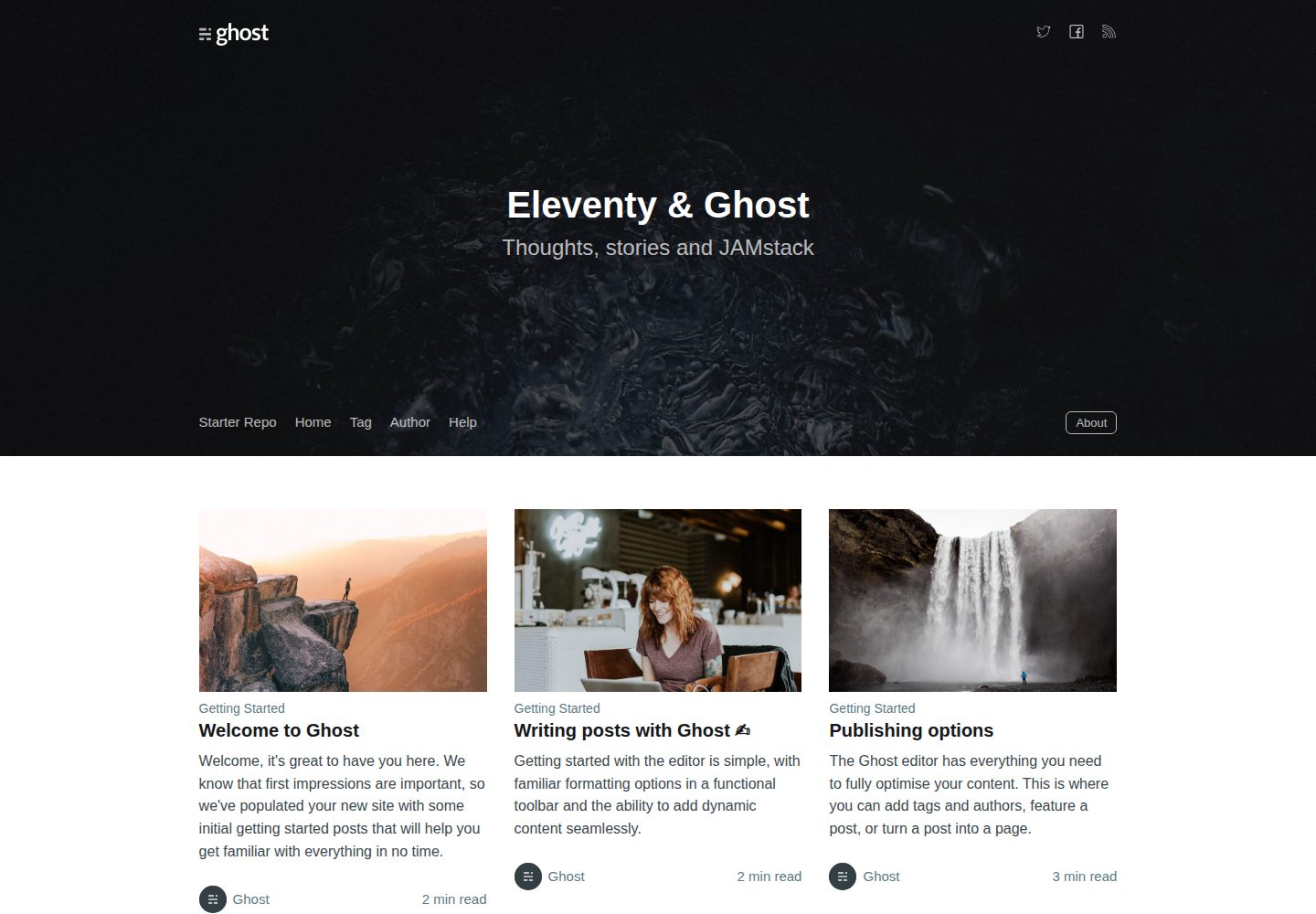
Eleventy builds pure static pages, with content fetched at build time via the Ghost Content API
EleventyStarter
eleventy-starter-ghost — Eleventy Starter Template
By shivanshu814
A static site starter based on Eleventy and Ghost that pulls content via the Ghost Content API and generates pure static pages at build time.
Explore the design
Compare the page layouts and mobile experience. Open any screenshot for a closer look.
Desktop homepage1 / 3
Desktop captureTop of page
Actual screenshot captured by the server browser.
All pages & views 3
Screenshots show visual appearance; interactive behavior may differ.
Recorded 2026-10-02View source
What stands out
A quick read of the recorded project description.
Connects to Ghost's official demo site by default; after configuring contentApiKey in .env, you can switch to your own Ghost instance
Includes three Netlify deployment-related configurations: netlify.toml, headers.njk, and redirects.njk
Supports triggering rebuilds on content changes via the Ghost and Netlify integration using a deploy hook
You can enable site privatization in Ghost, disabling the default theme frontend and outputting noindex, with the Eleventy frontend handling SEO
Template Details
This is a starter template for building a fully static website, with content sourced from Ghost (as a headless CMS) and page generation handled by Eleventy. By default, the template reads content from Ghost's official default site (eleventy.ghost.io), so you can get the workflow running without setting up your own Ghost instance; to connect your own content, you need to fill in Ghost Content API credentials in the .env configuration file, where the contentApiKey can be obtained from the Integrations page in the Ghost admin. The README states that using this starter requires Ghost version 2.10.0 or higher.
The repository includes three Netlify-oriented configuration files: netlify.toml for build settings, headers.njk which generates default security response headers (output to /_headers), and redirects.njk for custom domain redirects (output to /_redirects). After deployment, you can use the Ghost and Netlify integration to trigger Netlify rebuilds via Ghost's deploy hook, syncing data changes in Ghost to the static site.
The template also offers an optimization option: enabling "Make this site private" in Ghost settings disables Ghost's default Handlebars theme frontend and adds a noindex meta tag, making the Eleventy-generated frontend the sole public entry point. Local development uses yarn start, and building uses yarn build. The code is released under the MIT license, copyright Ghost Foundation.
EleventyStarter
Is it right for your project?
Use Cases
- Blogs or content sites that use Ghost as a content backend and output pure static sites externally
- Deploying existing Ghost content to Netlify in a static manner
- Static sites that need custom security response headers and redirect rules
- Teams that want content editors to work in Ghost while the publishing process goes through static builds
Suitable For
- Developers familiar with Eleventy and Node build workflows
- Sites already using or planning to use Ghost as a headless CMS
- Projects intended for deployment to Netlify that need build and redirect configuration
- Those needing freely modifiable static site starter code under the MIT license
Getting started & customization
Use these recorded setup notes alongside the repository instructions for your chosen version.
- 1
After cloning the repository, run yarn to install dependencies, yarn start to launch the development server, and yarn build for a local build
- 2
Fill in your own Ghost credentials in .env; the contentApiKey is obtained from the Integrations page in the Ghost admin
- 3
When using a self-hosted Ghost, the version must be 2.10.0 or higher
- 4
To deploy to Netlify, you can use the deploy button in the repository or configure the build according to netlify.toml
- 5
If you do not want to commit the Content API Key, you can remove that entry from .env and use Netlify environment variables instead
License & source material
Usage conditions & limitations
Free to use · keep license noticeThis entry covers the free version under the MIT license in the public repository; the free scope is the code of this version and does not imply that external services or third-party assets are free.
Must comply with when using
- You are allowed to freely use, modify, commercialize, and distribute the code of this version.
- When distributing copies or substantial portions of the code, retain the original author's copyright notice and the full MIT license notice.
- The code is provided as is; warranties and limitations of liability are governed by the original license and applicable law.
Additional costs & items to verify
- By default, content is pulled from Ghost's official demo site https://eleventy.ghost.io, requiring internet access to this external service to run the default workflow.
- Connecting your own content requires a self-hosted or existing Ghost instance and filling in credentials in .env; the contentApiKey must be obtained from the Integrations page in the Ghost admin.
- When using a self-hosted Ghost, the version must not be lower than 2.10.0, otherwise issues may occur.
- The deployment process relies on a Netlify account and platform services, requiring registration and authorization with Netlify.
- Automatic rebuilds require additional configuration of the Ghost and Netlify integration and a deploy hook, which is external service configuration.
- Enabling this optimization requires turning on the "Make this site private" flag in Ghost settings, which enables password protection and outputs noindex.
- Demo images, fonts, icons, and other third-party assets must be checked against their respective licenses and cannot be judged solely by the code's MIT license.
- External services such as domains, hosting, databases, payments, or AI may incur additional charges.
View Original Text Basis
Permission is hereby granted, free of charge
Original License Text
By default, the starter will populate content from a default Ghost install located at https://eleventy.ghost.io.
Original README
To use your own install, edit the `.env` config file with your credentials. You can find your `contentApiKey` in the "Integrations" screen in Ghost Admin.
Original README
The minimum required version for Ghost is `2.10.0` in order to use this starter without issues.
Original README
To deploy to your Netlify account, hit the button below.
Original README
you can set up a [Ghost + Netlify Integration](https://docs.ghost.org/integrations/netlify/) to use deploy hooks from Ghost to trigger Netlify rebuilds
Original README
https://github.com/shivanshu814/eleventy-starter-ghost/blob/main/LICENSEhttps://github.com/shivanshu814/eleventy-starter-ghost/blob/main/README.mdYou can disable the default Ghost Handlebars Theme front-end by enabling the `Make this site private` flag within your Ghost settings.
Original README
Compiled by DeepSeek based on repository license and README ·2026-10-02. Results only cover the materials read; dependencies, images, fonts, and subsequent term changes are subject to their respective original texts.
Project checks & description sources
Template Information
- Source platforms
- GitHub
- Documentation and maintenance reference score
- More documented · 83 / 100
- Technologies
- Eleventy
- Website type
- Starter
How this score is calculated
Our heuristic uses license records (up to 30), a demo link (12), a preview (10), stars (15), recorded maintenance (15), description completeness (8), feature records (5) and classification data (5). It is not a code, security or performance test, or a Google score. A link does not establish tested functionality.
What to verify for this project
- Repository update recorded
- 2025-12-18
- Screenshot last checked
- 2026-10-02
A demo link is listed. Check it with your own content and viewport sizes; its presence does not confirm that forms, authentication or payments work.
The catalog identifies Eleventy as the primary stack. Check the actual dependency manifest and lockfile for versions and hosting requirements. These notes use recorded metadata, not a code audit or a deployment test.
Use a selection guide →How this description was prepared
AI-assisted description based on catalog records and repository material. Repository authors are not automatically the reviewers of this description.
Automatically checked against source and license rules; no manual editorial review.
Inspect the recorded source material
SHA-256: 43639da60cfca92a5e8985a3b56b51353b61c600bb83d1958bbcc7219dd0cb82
2026-10-02T11:15:57.316Z
Source file / repository# Eleventy Starter Ghost A starter template to build completely static websites with [Ghost](https://ghost.org) & [Eleventy](https://www.11ty.io) **Demo:** https://eleventy.ghost.org  # Installing ```bash # From Source git clone https://github.com/TryGhost/eleventy-starter-ghost.git cd eleventy-starter-ghost ``` Then install dependencies ```bash yarn ``` # Running Start the development server ```bash yarn start ``` You now have a completely static site pulling content from Ghost running as a headless CMS. By default, the starter will populate content from a default Ghost install located at https://eleventy.ghost.io. To use your own install, edit the `.env` config file with your credentials. You can find your `contentApiKey` in the "Integrations" screen in Ghost Admin. The minimum required version for Ghost is `2.10.0` in order to use this starter without issues. # Deploying with Netlify The starter contains three config files specifically for deploying with Netlify. A `netlify.toml` file for build settings, a `headers.njk` file with default security headers set for all routes (builds to `/_headers` path), and `redirects.njk` to set Netlify custom domain redirects (builds to `/_redirects` path). To deploy to your Netlify account, hit the button below. [](https://app.netlify.com/start/deploy?repository=https://github.com/TryGhost/eleventy-starter-ghost) Content API Keys are generally not considered to be sensitive information, they exist so that they can be changed in the event of abuse; so most people commit it directly to their `.env` config file. If you prefer to keep this information out of your repository you can remove this config and set [Netlify ENV variables](https://www.netlify.com/docs/continuous-deployment/#build-environment-variables) for production builds instead. Once deployed, you can set up a [Ghost + Netlify Integration](https://docs.ghost.org/integrations/netlify/) to use deploy hooks from Ghost to trigger Netlify rebuilds. That way, any time data changes in Ghost, your site will rebuild on Netlify. # Optimising You can disable the default Ghost Handlebars Theme front-end by enabling the `Make this site private` flag within your Ghost settings. This enables password protection in front of the Ghost install and sets `<meta name="robots" content="noindex" />` so your Eleventy front-end becomes the source of truth for SEO. # Extra options ```bash # Build the site locally yarn build ``` # Copyright & License Copyright (c) 2013-2022 Ghost Foundation - Released under the [MIT license](LICENSE).
Explore similar templates
Compare previews and descriptions within the same stack and category.

eleventy-base-blog
The officially maintained Eleventy blog starter template, MIT licensed, includes posts, tag pages, archives, an about page, a 404 page, an Atom feed, and sitemap.xml, with per-page CSS bundling, syntax highlighting, and image optimization.
Eleventy · Blog

eleventy-garden
An Eleventy-based digital garden starter template for building a personal knowledge site organized through hyperlinks. It supports Roam-style double-bracket links, backlink display, and hover cards for backlinks.
Eleventy · Starter

eleventastic
Eleventastic is an Eleventy starter kit by Max Böck, used as the base for new 11ty projects. It integrates Sass, Webpack, SVG icon sprites, critical CSS, and HTML minification into the 11ty build without external steps.
Eleventy · Starter

neat-starter
An Eleventy-based static site starter template integrating Netlify CMS, Alpine.js, and Tailwind CSS. It provides a ready-to-run example site, a one-click Netlify deploy button, and an MIT-licensed codebase.
Eleventy · Starter

Eleventy-Starter-Boilerplate
An Eleventy-based blog starter template with Tailwind CSS, Webpack, PostCSS, ESLint, and Prettier, optional Netlify CMS, and built-in SEO metadata, sitemap, and 404 page.
Eleventy · Blog

eleventy-plus-vite
A static site starter combining Eleventy and Vite, with a live-reloading development server, Vite-based production post-processing, a PostCSS pipeline with Autoprefixer and cssnano, critical CSS inlining and asynchronous CSS loading, a web font loading strategy example, fluid typography, basic dark mode, an…
Eleventy · Starter