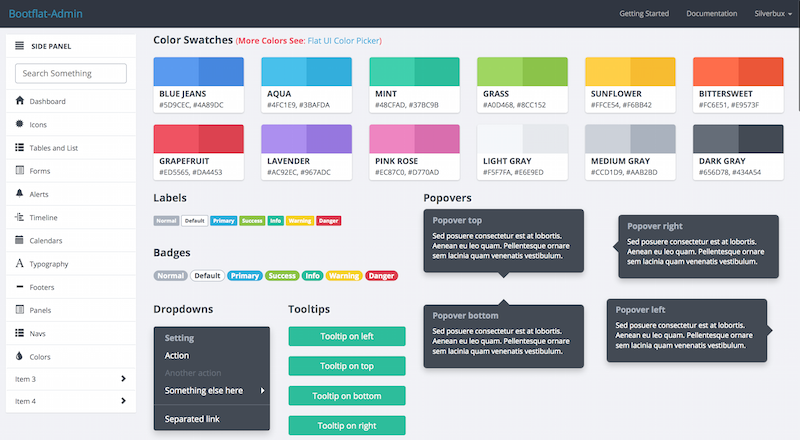
Flat admin interface built on Bootflat and Bootstrap
HTMLAdmin dashboard
bootflat-admin — HTML Admin dashboard Template
By silverbux
A flat admin template based on Bootstrap and Bootflat, offering HTML pages, Sass, and a Grunt build workflow under the MIT license.
Explore the design
Compare the page layouts and mobile experience. Open any screenshot for a closer look.
Author preview
Author-provided preview
Preview provided in the project README.
One original preview is available. Open the full image to inspect the design.
Screenshots show visual appearance; interactive behavior may differ.
Recorded 2026-10-02View source
What stands out
A quick read of the recorded project description.
Provides HTML pages, Sass source files, CSS and JavaScript source code
Configures CSS/JS files to concatenate via csscomb.json and jscomb.json
Grunt watch monitors source changes and automatically concatenates and minifies into the dist directory
The dist directory contains css, fonts, js, and img, ready for deployment
Released under the MIT open-source license, permitting use, modification, commercial use, and distribution
Template Details
Bootflat-Admin is an open-source admin interface template with a flat UI style, built on the Bootflat and Bootstrap CSS frameworks. The repository is primarily composed of HTML pages, accompanied by Sass source files, CSS and JavaScript source code, and a Grunt workflow for concatenating, minifying, and cleaning assets.
The template source resides in the bootflat-admin directory and includes two configuration files, csscomb.json and jscomb.json, which declare the CSS and JS files to be concatenated. Styles can be written in bootflat-admin/css/site.css or in Sass files under the scss directory, while scripts go in bootflat-admin/js/application.js. Build output is written to the dist directory, containing css, fonts, js, and img subdirectories; the README states that dist is the directory actually needed by an application or website.
Before use, you need to install Node dependencies and run grunt watch, which watches sass, css, and js files for changes and automatically concatenates and minifies them into dist/css/site.min.css and dist/js/site.min.js. If you modify Sass, you also need to install Ruby and Sass. The project was last updated in 2014 and depends on the Bootstrap and Bootflat versions of that time; it does not provide modern front-end build or framework integration options.
HTMLAdmin panel
Is it right for your project?
Use Cases
- Building a flat-style admin interface prototype
- Introducing Bootflat components and styles into an existing HTML project
- Customizing an admin theme's colors and component styles based on Sass
- Concatenating and minifying front-end static assets via a Grunt workflow
Suitable For
- Developers who need a flat admin interface reference or starting point
- Front-end projects using an HTML, CSS, Sass, and Grunt stack
- Projects that want to freely modify and distribute under the MIT license
Getting started & customization
Use these recorded setup notes alongside the repository instructions for your chosen version.
- 1
After cloning the repository, enter the directory and run npm install to install dependencies
- 2
Run grunt watch to monitor and automatically concatenate and minify sass, css, and js files
- 3
Before modifying Sass, install Ruby and run gem install sass
- 4
The CSS/JS concatenation lists are maintained in bootflat-admin/csscomb.json and jscomb.json
- 5
For deployment, use the dist directory, which contains css, fonts, js, and img
License & source material
Usage conditions & limitations
Free to use · keep license noticeThis entry covers the free version in the public repository under the MIT license; the free scope applies to that version's code and does not imply that external services or third-party assets are free.
Must comply with when using
- You may use, modify, commercially use, and distribute this version's code for free.
- When distributing copies or substantial portions of the code, retain the original author's copyright notice and the full MIT license notice.
- The code is provided as is; warranties and limitations of liability are governed by the original license and applicable law.
Additional costs & items to verify
- Before modifying Sass source files, you must install Ruby and run gem install sass; Sass compilation depends on an external Ruby environment, so it is not a pure front-end, zero-dependency setup.
- Before using the template, you must run npm install in the project directory to install Node dependencies; the build workflow depends on external npm packages.
- You need to run grunt watch to monitor and automatically concatenate and minify sass, css, and js files; the build depends on the Grunt toolchain.
- Demo images, fonts, icons, and other third-party assets must be checked against their respective licenses; the code's MIT license alone cannot be used to judge them.
- External services such as domains, hosting, databases, payments, or AI may incur separate charges.
View Original Text Basis
Permission is hereby granted, free of charge
Original License Text
After installing Ruby execute `gem install sass` to install SASS
Original README
Go inside the folder and Install Requirements: `npm install`
Original README
https://github.com/silverbux/bootflat-admin/blob/master/LICENSEhttps://github.com/silverbux/bootflat-admin/blob/master/README.mdRun Grunt Watch: `grunt watch`
Original README
Compiled by DeepSeek based on repository license and README ·2026-10-02. Results only cover the materials read; dependencies, images, fonts, and subsequent term changes are subject to their respective original texts.
Project checks & description sources
Template Information
- Source platforms
- GitHub
- Documentation and maintenance reference score
- Partly documented · 64 / 100
- Technologies
- HTML
- Website type
- Admin dashboard
How this score is calculated
Our heuristic uses license records (up to 30), a demo link (12), a preview (10), stars (15), recorded maintenance (15), description completeness (8), feature records (5) and classification data (5). It is not a code, security or performance test, or a Google score. A link does not establish tested functionality.
What to verify for this project
- Repository update recorded
- 2014-10-22
- Screenshot last checked
- 2026-10-02
No demo link is recorded. Use the repository instructions to evaluate the project locally; the screenshot alone cannot establish interactive behavior.
The catalog identifies HTML as the primary stack. Check the actual dependency manifest and lockfile for versions and hosting requirements. These notes use recorded metadata, not a code audit or a deployment test.
Use a selection guide →How this description was prepared
AI-assisted description based on catalog records and repository material. Repository authors are not automatically the reviewers of this description.
Automatically checked against source and license rules; no manual editorial review.
Inspect the recorded source material
SHA-256: 4f6073f9b19b001d5dd69e5f5810ad5fbf38abf5ad73d7786bf5d8e4b65b1f65
2026-10-02T14:24:40.004Z
Source file / repository# What is Bootflat-Admin? BOOTFLAT-ADMIN is an open source Flat UI KIT specialized for admin template, based on BOOTFLAT and Bootstrap 3.2.0 CSS framework. # Preview 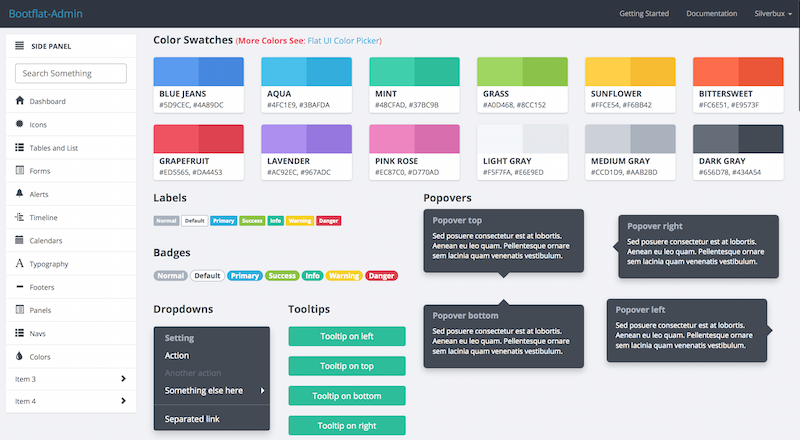 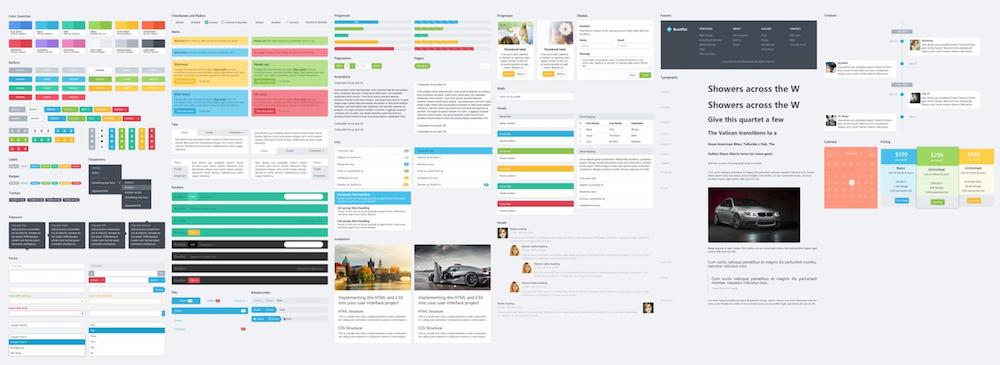 For the designers, BOOTFLAT offer a [free PSD](https://github.com/bootflat/Bootflat.UI.Kit.PSD) file for you, it including a set of beautiful and pure components, which you can use to create startup projects, websites or iOS/Android Apps. # Installation * Clone the repo: `git clone https://github.com/silverbux/bootflat-admin.git` * Go inside the folder and Install Requirements: `npm install` * Run Grunt Watch: `grunt watch` #Customize / Modify / Workflow `grunt watch` will monitor any changes to sass, css and js files and automatically combine, minify and clean all files to **dist/css/site.min.css** and **dist/js/site.min.js** ###CSS and JS Settings Add or Remove css/js sources or packages from **bootflat-admin/csscomb.json** and **bootflat-admin/jscomb.json** ###CSS Add your css rules under **bootflat-admin/css/site.css** ###SASS FILES You can also modify SASS files under folder **/bootflat-admin/scss** folder. ###JS FILES Add your javascript codes under **bootflat-admin/js/application.js**. #Folder Structure ```bash Root Folder ├──bootflat-admin │ ├── csscomb.json # json file containing all css files to combine │ ├── jscomb.json # json file containing all js files to combine │ ├── css # source files for css │ ├── js # source files for js │ ├── sass # sass files │ └── tmp # temp folder for csscomb │ │──dist # the only folder you need for your app/website/template │ ├── css │ ├── fonts │ ├── js └──└── img ``` # MORE INFO ## Installing Ruby and Sass * https://www.ruby-lang.org/en/installation/ *(for windows user dont forget to check "Add Ruby executables to your PATH" option)* * After installing Ruby execute `gem install sass` to install SASS ## CREDITS Bootflat-Admin is simply a modified copy of Bootflat with extra magic stuff in it. All necessary credits are given to [Bootflat](http://bootflat.github.io/) authors. ## LICENSE Bootflat-Admin is licensed under the MIT Open Source license. For more information, please see the LICENSE file in this repository.
Explore similar templates
Compare previews and descriptions within the same stack and category.

gentelella
Gentelella v4 is a free, open-source admin dashboard template maintained by Colorlib, built with vanilla JavaScript, SCSS, and Vite 8 without Bootstrap or jQuery.
HTML · Admin dashboard

coreui-free-bootstrap-admin-template
A free Bootstrap admin template maintained by CoreUI, built on CoreUI's own UI component library. It provides compiled HTML pages and Pug template source code, covering dashboards, authentication, forms, components, icons, and error pages.
HTML · Admin dashboard

dashboards
A collection of responsive dashboard HTML templates open-sourced by Keen IO, built on CSS Grid, offering multiple prebuilt admin data interface layouts.
HTML · Admin dashboard

SB Admin 2
SB Admin 2 is a classic Bootstrap admin template from Start Bootstrap, offering dashboards, charts, tables, and common management pages.
HTML · Admin dashboard

Adminator-admin-dashboard
Adminator 4 is a vanilla HTML, CSS and JavaScript admin dashboard template with a CSS-variable token design system, built-in light and dark themes, no jQuery or Bootstrap dependency, and 18 pages covering dashboards, mail, calendar, charts, forms, tables and error pages.
HTML · Admin dashboard

SB Admin
SB Admin is a lightweight, open-source Bootstrap admin template from Start Bootstrap. It offers a sidebar-and-top-bar layout with data tables, forms, and stat cards, plus responsive design.
HTML · Admin dashboard