Implemented in vanilla HTML/CSS/JS, with no build step or dependency installation
HTMLPortfolio
portfolio-simonecandido — HTML Portfolio Template
By SimoneMoreWare
Simone Pio Candido's personal portfolio website, built with vanilla HTML/CSS/JS, featuring a particle background, typing animation, scroll reveal, and IT/EN language toggle, hosted on GitHub Pages.
Explore the design
Compare the page layouts and mobile experience. Open any screenshot for a closer look.
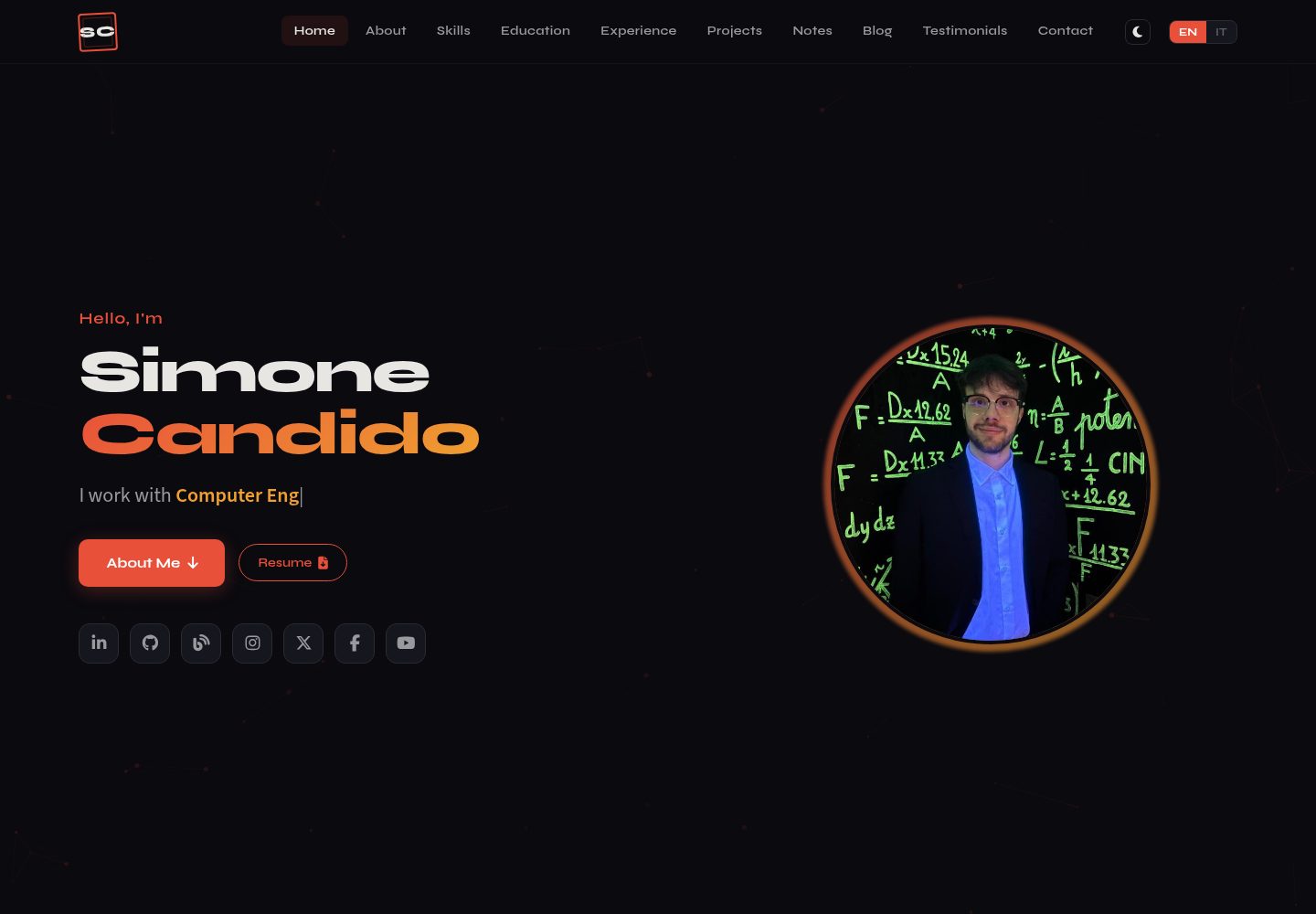
Desktop homepage1 / 2
Desktop captureTop of page
Actual screenshot captured by the server browser.
All pages & views 2
Screenshots show visual appearance; interactive behavior may differ.
Recorded 2026-10-13View source
What stands out
A quick read of the recorded project description.
One-click IT/EN bilingual toggle, with dates formatted according to the current language
Integrates particles.js particle background and typed.js typing animation
Scroll reveal animations and responsive layout for mobile, tablet, and desktop
Blog section dynamically pulls the latest articles via the WordPress REST API
Contact form sends via Web3Forms, including a honeypot anti-spam field
Template Details
This is a portfolio website template for personal job seeking and showcasing, organized around the identity of a computer engineer, IoT and full-stack developer. The page consists of index.html and HTML fragments in the sections directory: about, blog, contact, education, experience, notes, projects, skills, testimonials, etc. Styles are split by section in the style directory, and interaction logic is centralized in scripts/script.js.
Functionally, the site offers a one-click IT/EN toggle, particles.js particle background, typed.js role typing effect, scroll reveal animations, a skills section organized by category and icons, education history with school logos, timeline-style work experience, and a responsive layout. The contact form submits via Web3Forms, and the blog section pulls the latest articles from moreware.org via the WordPress REST API and supports date formatting by language.
Usage limitations: The project has no build step; simply open index.html for local preview. The blog and contact form depend on external services (moreware.org's WordPress REST API and Web3Forms), which need to be replaced with your own account or site address. The licensing of third-party assets such as demo images, fonts, and icons must be verified separately.
HTMLPortfolio
Is it right for your project?
Use Cases
- Computer engineering or full-stack developers building a personal portfolio and resume site
- Showcase websites that need bilingual switching beyond Chinese and English (e.g., Italian/English)
- Static sites hosted on GitHub Pages without a backend or build process
- Automatically syncing articles from a WordPress blog to the portfolio homepage
Suitable For
- Developers familiar with HTML/CSS/JS who prefer to edit code directly
- Individuals needing a lightweight static portfolio deployed to GitHub Pages
- Users with a WordPress blog who want to aggregate articles on their personal site
- Personal projects that need a contact form but do not want to build a backend
Getting started & customization
Use these recorded setup notes alongside the repository instructions for your chosen version.
- 1
For local preview, open index.html directly; no dependency installation or build command is required.
- 2
The contact form requires registering with Web3Forms to obtain an access key and replacing the value in the form's hidden field.
- 3
The blog section requests moreware.org's WordPress REST API by default; replace it with your own site address, and you can filter by author using the author parameter.
- 4
When deploying to GitHub Pages, the repository's .github/workflows/static.yml triggers automatic deployment after pushing to the main branch.
- 5
Third-party assets such as demo images, fonts, and icons must be verified separately under their respective licenses; they cannot be judged solely by the code's MIT license.
License & source material
Usage conditions & limitations
Free to use · keep license noticeThis entry covers the free version under the MIT license in the public repository; the free scope is the code of this version and does not imply that external services or third-party assets are free.
Must comply with when using
- Free use, modification, commercial use, and distribution of this version's code are permitted.
- When distributing copies or substantial portions of the code, retain the original author's copyright notice and the full MIT license notice.
- The code is provided as-is; warranties and limitations of liability are governed by the original license and applicable law.
Additional costs & items to verify
- Demo images, fonts, icons, and other third-party assets must be verified under their respective licenses; they cannot be judged solely by the code's MIT license.
- External services such as domains, hosting, databases, payments, or AI may incur additional charges.
- The contact form relies on the third-party service Web3Forms; you must register an account to obtain an access key and replace the hidden field value in the form, otherwise the form cannot send emails.
- Using the contact form feature requires first registering an account at web3forms.com and obtaining an access key via email, which is an external account and key dependency.
- The blog section requests moreware.org's WordPress REST API by default; you must replace it with your own WordPress site address, otherwise it displays the original author's blog content.
- When the page loads, it makes an external network request to moreware.org to fetch articles; this API address should be modified before deploying to your own site.
View Original Text Basis
Permission is hereby granted, free of charge
Original License Text
The contact form uses [Web3Forms](https://web3forms.com/) — a free service that sends form submissions directly to your email. No backend required.
Original README
1. Sign up at [web3forms.com](https://web3forms.com/) with your email address 2. You receive an **access key** via email
Original README
The portfolio dynamically fetches and displays the latest articles from [moreware.org](https://www.moreware.org/wp/) using the WordPress REST API
Original README
https://github.com/SimoneMoreWare/portfolio-simonecandido/blob/main/LICENSEhttps://github.com/SimoneMoreWare/portfolio-simonecandido/blob/main/README.md1. On page load, a `fetch()` call is made to `https://www.moreware.org/wp/wp-json/wp/v2/posts?per_page=6&_embed`
Original README
Compiled by DeepSeek based on repository license and README ·2026-10-13. Results only cover the materials read; dependencies, images, fonts, and subsequent term changes are subject to their respective original texts.
Project checks & description sources
Template Information
- Source platforms
- GitHub
- Documentation and maintenance reference score
- More documented · 80 / 100
- Technologies
- HTML
- Website type
- Portfolio
How this score is calculated
Our heuristic uses license records (up to 30), a demo link (12), a preview (10), stars (15), recorded maintenance (15), description completeness (8), feature records (5) and classification data (5). It is not a code, security or performance test, or a Google score. A link does not establish tested functionality.
What to verify for this project
- Repository update recorded
- 2026-09-07
- Screenshot last checked
- 2026-10-13
A demo link is listed. Check it with your own content and viewport sizes; its presence does not confirm that forms, authentication or payments work.
The catalog identifies HTML as the primary stack. Check the actual dependency manifest and lockfile for versions and hosting requirements. These notes use recorded metadata, not a code audit or a deployment test.
Use a selection guide →How this description was prepared
AI-assisted description based on catalog records and repository material. Repository authors are not automatically the reviewers of this description.
Review declaration: [email protected] · 2026-10-13
Inspect the recorded source material
SHA-256: 6afdac8fb8c9ff4e3e5c881734c783eed3f41cf1f36afd0b50b1e7a12f5a55ed
2026-10-13T07:25:40.188Z
Source file / repository# Portfolio — Simone Pio Candido Personal portfolio website — Computer Engineer, IoT & Full-Stack Developer. **Live Demo:** [simonemoreware.github.io/portfolio-simonecandido](https://simonemoreware.github.io/portfolio-simonecandido/)     ## Features - Bilingual support (IT / EN) with one-click language toggle - Animated particle background (particles.js) - Typing effect for roles (typed.js) - Scroll reveal animations - Fully responsive (mobile, tablet, desktop) - Dark theme with geometric SC monogram logo - Skills organized by category with icons - Education section with university logos - Timeline-based experience section - Working contact form via Web3Forms ## Project Structure ``` . ├── .github/ │ └── workflows/ │ └── static.yml ├── assets/ │ ├── images/ │ │ ├── blog/ │ │ ├── exp/ │ │ ├── notes/ │ │ ├── projects/ │ │ ├── eurecomlogo.png │ │ ├── favicon.png │ │ ├── politologo.png │ │ ├── profile.png │ │ └── wallpaper.jpg │ └── pdf/ ├── scripts/ │ └── script.js ├── sections/ │ ├── about.html │ ├── blog.html │ ├── contact.html │ ├── education.html │ ├── experience.html │ ├── notes.html │ ├── projects.html │ ├── skills.html │ └── testimonials.html ├── style/ │ ├── about.css │ ├── base.css │ ├── blog.css │ ├── contact.css │ ├── education.css │ ├── experience.css │ ├── header.css │ ├── home.css │ ├── notes.css │ ├── projects.css │ ├── responsive.css │ ├── skills.css │ └── testimonials.css ├── .gitignore ├── index.html ├── LICENSE └── README.md ``` ## Contact Form Setup The contact form uses [Web3Forms](https://web3forms.com/) — a free service that sends form submissions directly to your email. No backend required. **How it works:** 1. Sign up at [web3forms.com](https://web3forms.com/) with your email address 2. You receive an **access key** via email 3. The key is placed in a hidden input field inside the form 4. On submit, the form data is sent to the Web3Forms API via `fetch()` 5. Web3Forms forwards the message to your email **Spam protection:** A hidden honeypot checkbox field (`botcheck`) is included — bots that auto-fill all fields get blocked. Web3Forms also applies server-side rate limiting. > The access key is safe to expose in public code — it only allows sending emails **to** the registered address, not reading or accessing anything. ## Blog Articles Integration The portfolio dynamically fetches and displays the latest articles from [moreware.org](https://www.moreware.org/wp/) using the WordPress REST API, which is exposed by default on any WordPress site. **How it works:** 1. On page load, a `fetch()` call is made to `https://www.moreware.org/wp/wp-json/wp/v2/posts?per_page=6&_embed` 2. The `_embed` parameter includes featured images (thumbnails) in the response 3. The JSON response is parsed and rendered as blog cards with title, date, excerpt, and thumbnail 4. Dates are formatted according to the currently selected language (EN/IT) 5. If the API is unreachable, a fallback message is displayed **Why this approach:** - No backend or third-party service required — the WordPress REST API supports CORS out of the box - No API key needed — the endpoint is public and read-only - Articles update automatically whenever new content is published on the blog - The `_embed` parameter avoids extra API calls for media attachments **Filtering by author:** To show only articles from a specific author, find your author ID via `https://www.moreware.org/wp/wp-json/wp/v2/users?search=simone` and append `&author=ID` to the API URL. ## Quick Start (Local) Just open `index.html` in a browser. No build step, no dependencies to install. ## Deployment Hosted on GitHub Pages. Any push to `main` triggers automatic deployment. ## Credits - [particles.js](https://vincentgarreau.com/particles.js/) — Particle background - [typed.js](https://mattboldt.com/demos/typed-js/) — Typing animation - [Font Awesome](https://fontawesome.com/) — Icons - [Web3Forms](https://web3forms.com/) — Contact form API - [icons8](https://icons8.com/) / [devicon](https://devicon.dev/) — Skill icons ## License This project is open source. Feel free to fork and adapt for your own portfolio.
Explore similar templates
Compare previews and descriptions within the same stack and category.

simplefolio
Simplefolio is a minimal single-page portfolio template for developers, built with HTML, Bootstrap, SCSS, and Parcel under the MIT license. It includes Hero, About, Projects, Contact, and Footer sections, with content edited in /src/index.html and theme colors controlled by two SCSS variables.
HTML · Portfolio

Freelancer
A bright, single-page Bootstrap portfolio template for freelancers, designers, and small studios. It includes a responsive portfolio grid with modal detail windows and an SB Forms contact form that requires an API token.
HTML · Portfolio

Resume
A single-page resume and CV template from Start Bootstrap, built on Bootstrap with a fixed sidebar and content sections.
HTML · Portfolio

Creative
A single-page marketing template by Start Bootstrap for creative agencies and product services, built on Bootstrap with SCSS, featuring a portfolio grid and call-to-action sections. It includes pre-set SB Forms markers for form integration and npm build scripts for source customization.
HTML · Corporate Website

Grayscale
A dark single-page Bootstrap template from Start Bootstrap for photography, events and brand storytelling, with a large hero and clearly separated sections.
HTML · Corporate Website

startbootstrap-stylish-portfolio
A one-page Bootstrap portfolio theme from Start Bootstrap with multiple content sections and an off-canvas navigation menu. Basic use means editing HTML/CSS under dist and opening index.html; advanced use relies on npm with Pug and SCSS build scripts.
HTML · Portfolio