Posts support Markdown and MDX, and Astro components can be used directly in the content
AstroBlog
abo-astro-blog-theme — Astro Blog Template
By skywalker23241
An Astro-based personal blog template supporting Markdown/MDX, KaTeX math formulas, light and dark themes, and RSS subscription, deployable to Netlify.
Explore the design
Compare the page layouts and mobile experience. Open any screenshot for a closer look.
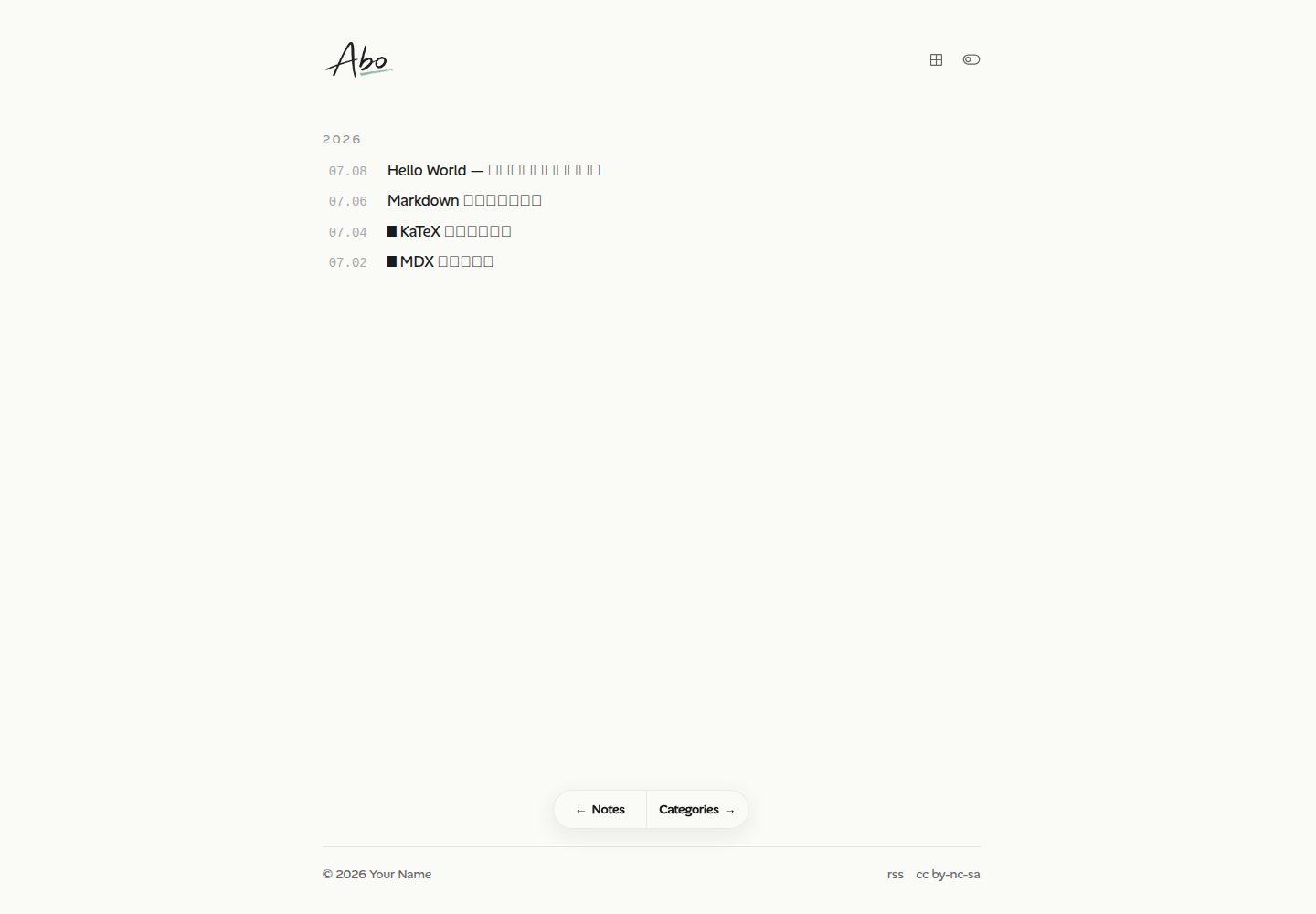
Desktop homepage1 / 2
Desktop captureTop of page
Actual screenshot captured by the server browser.
All pages & views 2
Screenshots show visual appearance; interactive behavior may differ.
Recorded 2026-10-12View source
What stands out
A quick read of the recorded project description.
KaTeX math formulas can be enabled per post via the hasMath field in frontmatter
Light and dark themes follow the system and support manual switching
Bare links are automatically rendered as link cards with previews, and code blocks include syntax highlighting and one-click copy
Built-in RSS/Atom subscription, Sitemap, and automatic Open Graph image generation
Provides an optional AI summary component for posts based on Gemini
Template Details
This is an Astro blog template for personal writing, with code hosted on GitHub under the MIT license. Posts are stored in the src/content/posts/ directory and support both .md and .mdx formats. The frontmatter can declare the title, publication date, update date, summary, cover image, and whether to enable KaTeX math formulas. The template includes several sample posts covering Markdown syntax, math formulas, and MDX component usage; you can delete them once you are familiar with the setup.
Site configuration is centralized in src/config.ts, including options for site title, author, domain, language, layout width, theme switching, table of contents, reading time, link cards, and more, with type checking. The About page is located at src/content/about/about.mdx. The template provides a pnpm new command to create new posts; filenames starting with _ are treated as unpublished drafts.
In terms of features, the template includes light and dark themes (following the system and supporting manual switching), automatic rendering of bare links as preview cards, code block syntax highlighting with one-click copy, click-to-zoom image viewing, as well as RSS/Atom subscription, Sitemap, and automatic Open Graph image generation. There is also an optional AI summary component for posts based on Gemini.
The deployment path is primarily Netlify: the template uses the @astrojs/netlify adapter (SSR), with configuration in netlify.toml. After importing the repository, the build command and output directory are read automatically. After deployment, you need to change site.website in src/config.ts to your official domain. Local development requires Node.js 18+ and pnpm.
Limitations and notes: The AI summary relies on the external Gemini service and is an optional feature. The licenses for third-party assets such as demo images, fonts, and icons must be checked separately and cannot be determined solely from the code's MIT license. External services such as domains and hosting may incur costs. Descriptions in the README regarding performance and deployment convenience are the original author's statements and have not been independently verified in this material.
AstroBlog
Is it right for your project?
Use Cases
- Building a personal tech blog and continuously publishing Markdown or MDX posts
- Writing notes or tutorials that include LaTeX math formulas
- An independent writing site that needs RSS subscription and Sitemap
- Deploying an Astro blog with an SSR adapter on Netlify
Suitable For
- Developers who are used to writing in Markdown/MDX and managing the content directory themselves
- Technical blog authors who need math formula typesetting
- Individual users who want to deploy the site on Netlify
- Users willing to modify src/config.ts directly to complete site configuration
Getting started & customization
Use these recorded setup notes alongside the repository instructions for your chosen version.
- 1
Local development requires Node.js 18+ and pnpm. After installing dependencies, run pnpm dev to preview at http://localhost:4321 by default
- 2
Use pnpm new "title" to create a post; a filename starting with _ indicates an unpublished draft
- 3
Site title, author, domain, language, and more are centralized in src/config.ts for modification; the About page is at src/content/about/about.mdx
- 4
When deploying to Netlify, simply import the repository; the build command and output directory are read from netlify.toml. After going live, change site.website to your official domain
- 5
The AI summary is an optional feature that relies on the external Gemini service; third-party assets such as demo images, fonts, and icons must be checked against their respective licenses
License & source material
Usage conditions & limitations
Free to use · keep license noticeThis entry covers the free version under the MIT license in the public repository; the free scope is the code of this version and does not mean that external services or third-party assets are free.
Must comply with when using
- You are allowed to use, modify, commercialize, and distribute the code of this version for free.
- When distributing copies or substantial portions of the code, retain the original author's copyright notice and the complete MIT license notice.
- The code is provided as is; warranties and limitations of liability are governed by the original license and applicable law.
Additional costs & items to verify
- Demo images, fonts, icons, and other third-party assets must be checked against their respective licenses and cannot be determined solely from the code's MIT license.
- External services such as domains, hosting, databases, payments, or AI may incur additional charges.
- The AI summary is an optional feature that relies on the external Gemini service; using this feature requires integrating the Gemini service yourself.
- The template uses the Netlify SSR adapter, and the deployment path is primarily Netlify, requiring the use of Netlify hosting services.
- Local development requires Node.js 18+ and the pnpm package manager.
- After going live, you need to prepare and configure an official domain yourself.
View Original Text Basis
Permission is hereby granted, free of charge
Original License Text
🤖 **AI 摘要**(可选)— 基于 Gemini 的文章摘要组件
Original README
本模板使用 `@astrojs/netlify` 适配器(SSR),配置见 `netlify.toml`。
Original README
需要 Node.js 18+ 和 [pnpm](https://pnpm.io/)。
Original README
https://github.com/skywalker23241/abo-astro-blog-theme/blob/main/LICENSEhttps://github.com/skywalker23241/abo-astro-blog-theme/blob/main/README.md部署完成后,把 `src/config.ts` 中的 `site.website` 改成你的正式域名
Original README
Compiled by DeepSeek based on repository license and README ·2026-10-12. Results only cover the materials read; dependencies, images, fonts, and subsequent term changes are subject to their respective original texts.
Project checks & description sources
Template Information
- Source platforms
- GitHub
- Documentation and maintenance reference score
- More documented · 80 / 100
- Technologies
- Astro
- Website type
- Blog
How this score is calculated
Our heuristic uses license records (up to 30), a demo link (12), a preview (10), stars (15), recorded maintenance (15), description completeness (8), feature records (5) and classification data (5). It is not a code, security or performance test, or a Google score. A link does not establish tested functionality.
What to verify for this project
- Repository update recorded
- 2026-07-20
- Screenshot last checked
- 2026-10-12
A demo link is listed. Check it with your own content and viewport sizes; its presence does not confirm that forms, authentication or payments work.
The catalog identifies Astro as the primary stack. Check the actual dependency manifest and lockfile for versions and hosting requirements. These notes use recorded metadata, not a code audit or a deployment test.
Use a selection guide →How this description was prepared
AI-assisted description based on catalog records and repository material. Repository authors are not automatically the reviewers of this description.
Review declaration: [email protected] · 2026-10-13
Inspect the recorded source material
SHA-256: cb6e668e4914786443a3a24c627e358a71e635df6a01f82101465b649fbf271b
2026-10-12T23:47:42.816Z
Source file / repository# Astro Blog Template 一个简洁、快速的个人博客模板,基于 **Astro 5** 构建,支持 MDX、KaTeX 数学公式,一键部署到 Netlify。 ## ✨ 特性 - ⚡ **Astro 5** — 极致的加载性能,默认零 JS - 📝 **Markdown / MDX** — 在文章里直接使用 Astro 组件 - 🧮 **KaTeX** — 完整的 LaTeX 数学公式支持 - 🌗 **深浅色主题** — 跟随系统,支持手动切换 - 🔗 **链接卡片** — 裸链接自动渲染为带预览的卡片 - 📋 **代码块** — 语法高亮 + 一键复制 - 🖼️ **图片查看器** — 点击放大浏览 - 📡 **RSS / Atom 订阅** + Sitemap + Open Graph 图片自动生成 - 🤖 **AI 摘要**(可选)— 基于 Gemini 的文章摘要组件 - 🔤 **中英文皆宜** — 通过 `src/config.ts` 一处切换语言 ## 🚀 使用本模板 1. 点击本仓库右上角的 **「Use this template」→「Create a new repository」** 2. 克隆你的新仓库并安装依赖: ```bash git clone https://github.com/<你的用户名>/<你的仓库名>.git cd <你的仓库名> pnpm install pnpm dev ``` 访问 `http://localhost:4321` 即可预览。 > 需要 Node.js 18+ 和 [pnpm](https://pnpm.io/)。 ## 📝 写作 ```bash pnpm new "我的第一篇文章" # 创建新文章 pnpm new "_我的草稿" # 创建草稿(文件名以 _ 开头,不会公开) ``` 文章存放在 `src/content/posts/`,支持 `.md` 和 `.mdx`。frontmatter 字段: ```yaml --- title: 文章标题 # 必填 pubDate: '2026-07-08' # 必填 updatedDate: '2026-07-09' # 可选 description: 摘要 # 可选 image: /og/cover.png # 可选,封面图 hasMath: true # 可选,启用 KaTeX --- ``` 模板自带几篇示例文章(Markdown 语法、数学公式、MDX 组件用法),熟悉之后删掉即可。更详细的写作说明见 [USAGE.md](./USAGE.md)。 ## ⚙️ 配置 所有站点配置集中在 **`src/config.ts`**:站点标题、作者、域名、语言、布局宽度、主题切换、目录、阅读时间、链接卡片等,均有类型检查。 「关于」页面在 `src/content/about/about.mdx`。 ## 📦 常用命令 | 命令 | 作用 | | ------------------- | -------------------------- | | `pnpm dev` | 启动开发服务器 | | `pnpm build` | 构建生产版本到 `dist/` | | `pnpm preview` | 本地预览构建产物 | | `pnpm new <标题>` | 创建新文章 | | `pnpm lint` | ESLint 检查 | | `pnpm format` | Prettier 格式化 | ## ☁️ 部署到 Netlify 本模板使用 `@astrojs/netlify` 适配器(SSR),配置见 `netlify.toml`。 1. 把仓库推送到 GitHub 2. 在 [Netlify](https://app.netlify.com/) 中 **Add new site → Import an existing project**,选择你的仓库 3. 构建命令和输出目录会自动从 `netlify.toml` 读取,直接部署即可 4. 部署完成后,把 `src/config.ts` 中的 `site.website` 改成你的正式域名 ## 📂 目录结构 ``` src/ ├── config.ts # 站点配置(从这里开始改) ├── content/ │ ├── posts/ # 博客文章(.md / .mdx) │ └── about/ # 关于页面 ├── pages/ # 路由(文章页、RSS、API 等) ├── components/ # Astro / React 组件 ├── layouts/ # 页面布局 ├── plugins/ # remark / rehype 插件 └── styles/ # 全局样式 scripts/ # 建文章、切换代理等脚本 ``` ## 📄 License [MIT](./LICENSE)
Explore similar templates
Compare previews and descriptions within the same stack and category.

astrowind
AstroWind is a free, open-source Astro starter theme using Astro and Tailwind CSS, released under the MIT license.
Astro · Blog

astro-paper
AstroPaper is a minimal, responsive, accessible, and SEO-friendly Astro blog theme. Articles are stored as Markdown/MDX in src/content/posts/, with subdirectories affecting URLs.
Astro · Blog

fuwari
Fuwari is a static blog template built with Astro and Tailwind CSS for personal blogs. It manages posts as Markdown files in src/content/posts/, with frontmatter for title, date, description, cover, tags, categories, draft status, and language.
Astro · Blog

Firefly
Firefly is a clean personal blog theme forked from Astro and Fuwari, offering four background modes, single/double sidebar and list/grid layouts, Pagefind client-side full-text search, and a six-language UI.
Astro · Blog

astro-theme-cactus
Astro Cactus is an Astro-based blog and portfolio theme that uses Markdown/MDX content collections to manage posts, notes, and tags, with frontmatter type-checked by a schema.
Astro · Portfolio

astrofy
Astrofy is a free and open-source personal portfolio website template built with Astro and TailwindCSS, with built-in blog, CV timeline, project showcase, store, and RSS feed modules.
Astro · Portfolio