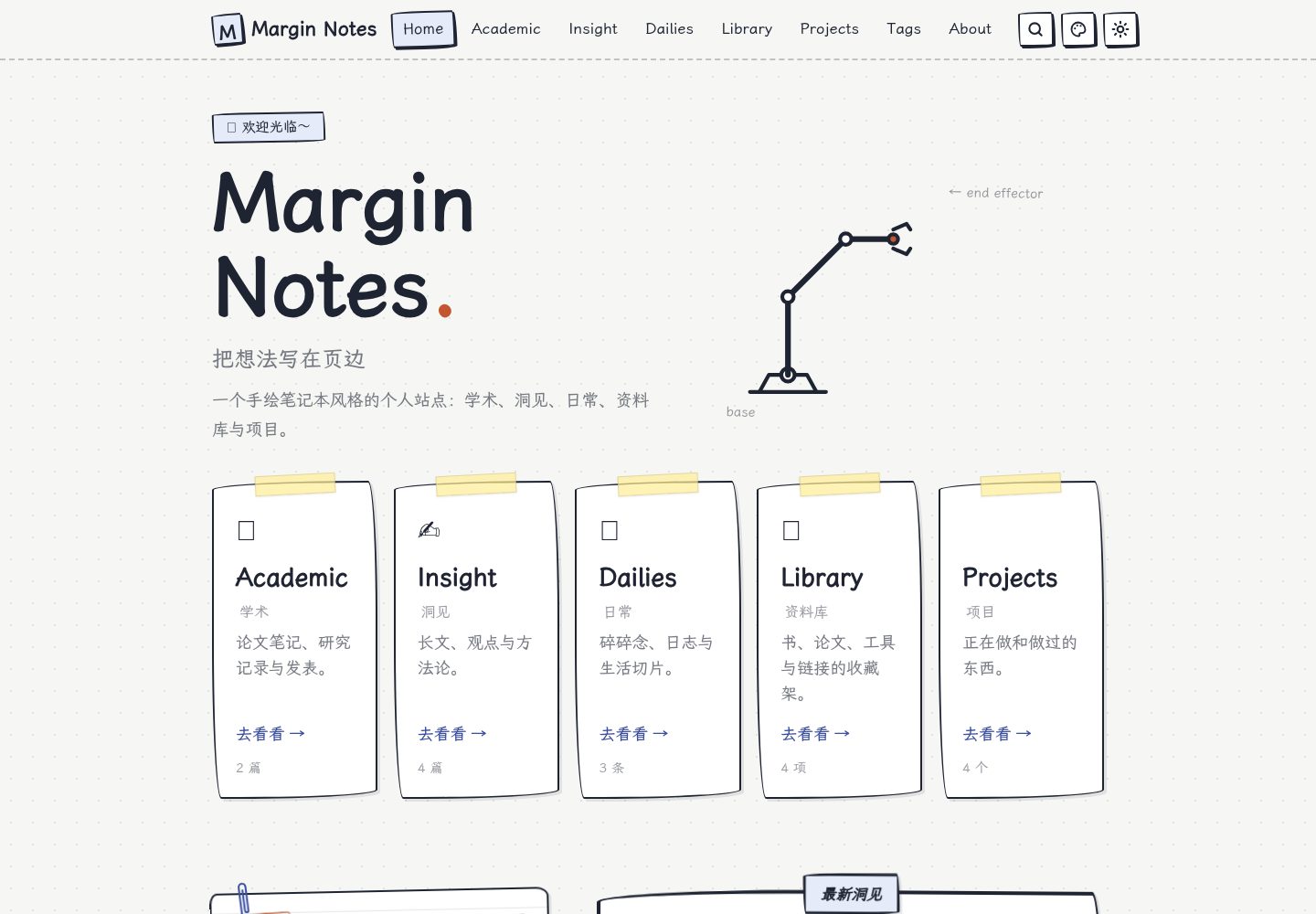
Hand-drawn notebook visuals: paper, sticky notes, margin annotations, and a robotic arm that follows the mouse
AstroBlog
astro-margin-notes — Astro Blog Template
By slackkai
Margin Notes is a hand-drawn notebook-style Astro personal website theme with five sections—Academic, Insight, Dailies, Library, and Projects—plus a Sveltia visual CMS and automatic GitHub Pages deployment.
Explore the design
Compare the page layouts and mobile experience. Open any screenshot for a closer look.
Desktop homepage1 / 3
Desktop captureTop of page
Actual screenshot captured by the server browser.
All pages & views 3
Screenshots show visual appearance; interactive behavior may differ.
Recorded 2026-09-30View source
What stands out
A quick read of the recorded project description.
Five content sections: Academic, Insight, Dailies, Library, Projects
Hand-drawn style Markdown directives: annotations, highlighters, stamps, sticky notes, photos, videos, embedded pages, etc.
Sveltia visual CMS for editing articles, images, site information, Now cards, and the about page
Pagefind static full-text search, tags / archives / full-text RSS, and sitemap
GitHub Actions automatically builds and deploys to GitHub Pages, compatible with root domains and repository subpaths
Template Details
Margin Notes is an Astro-based personal website theme that visually mimics a hand-drawn notebook, organizing content with paper, sticky notes, margin annotations, and a robotic arm that follows the mouse. It is aimed at people who need to store research notes, long-form articles, daily records, collections, and projects together. By default, it provides five sections: Academic, Insight, Dailies, Library, and Projects, each with its own index and content structure.
Content is written in Markdown / MDX, supports KaTeX math formulas and code highlighting, and additionally provides a set of hand-drawn style Markdown directives, such as margin annotations, highlighters, red pen, stamps, sticky notes, photos, fold-outs, steps, videos, and embedded HTML pages. Attachments are stored alongside articles: each article has a folder, next to which is an attachments/ directory. Images, videos, PDFs, and embedded pages are published according to source paths, and attachments of drafts are not published.
The site includes a Sveltia visual CMS for editing articles, images, site information, Now cards, and the about page. Uploaded images are automatically compressed to WebP. After content is saved to the repository, GitHub Actions automatically builds and deploys it to GitHub Pages, compatible with both root domains and repository subpaths.
There are some clear limitations in use: the theme's default copy is in Chinese, and src/i18n/ only provides Chinese and English dictionaries for part of the interface; full page language customization still requires editing page copy and section descriptions. Disabling a section removes its navigation, homepage entry, articles, RSS, and tags, but the section index page remains as an empty page marked noindex. Guestbook messages are sent via Web3Forms email, requiring you to fill in a public access key; when left blank, the submit button is disabled. The online demo CMS can only be edited by the repository maintainer.
AstroBlog
Is it right for your project?
Use Cases
- Build a personal academic notes site to record paper notes, research records, publication lists, and BibTeX
- Publish long-form articles, pinned posts, covers, and collection navigation
- Record daily life with a timeline, images, and a daily heatmap
- Organize collections such as books, courses, and tools, with filtering, search, and sorting
- Showcase project status, tech stack, links, and image or video covers
Suitable For
- Individuals who are used to writing in Markdown / MDX and want to keep a plain-text workflow
- Personal website authors who need to store research, writing, daily life, and project content together
- Astro users who want to edit content through a visual CMS without building their own database
- Individual developers or researchers preparing to deploy the site to GitHub Pages
Getting started & customization
Use these recorded setup notes alongside the repository instructions for your chosen version.
- 1
Requires Node.js ≥ 22.12, Node.js 24 recommended; install dependencies with npm ci, and use npm run dev for local development
- 2
You can create a repository via GitHub's Use this template, or use npm create astro@latest -- --template slackkai/astro-margin-notes
- 3
When deploying to GitHub Pages, set Source to GitHub Actions in the repository Settings → Pages, and manually run the Deploy to GitHub Pages workflow once
- 4
The guestbook feature requires filling in the Web3Forms public access key in src/config.ts under guestbook.web3formsKey; when left blank, the submit button is disabled
- 5
The included articles are all theme examples and should be replaced with your own content before formal use; third-party assets such as demo images, fonts, and icons must be checked against their respective licenses
License & source material
Usage conditions & limitations
Free to use · keep license noticeThis entry covers the free version under the MIT license in the public repository; the free scope is the code of that version and does not mean external services or third-party assets are free.
Must comply with when using
- You may use, modify, commercialize, and distribute the code of this version for free.
- When distributing copies or substantial portions of the code, retain the original author's copyright notice and the full MIT license notice.
- The code is provided as is; warranties and limitations of liability are governed by the original license and applicable law.
Additional costs & items to verify
- The guestbook feature relies on the third-party service Web3Forms; you must register yourself and fill in a public access key. If not filled in, the submit button is disabled and the guestbook cannot be used.
- The CMS on the online demo site can only be edited by the repository maintainer; visitors cannot modify content through the demo CMS. You must create your own repository before using the CMS.
- The visual CMS requires connecting a GitHub token to save content, involving a GitHub account and authorization configuration.
- The default interface is in Chinese, and i18n only covers part of the interface; for complete other languages, you must manually edit page copy and section descriptions.
- After disabling a section, its index page remains as an empty page marked noindex and is not completely removed; you must manually delete the corresponding page directory.
- Although drafts are not published to the site, if the repository is public, draft source files are still visible externally; be mindful of private content.
- Third-party resources such as fonts and Sveltia CMS are subject to their respective licenses (OFL, MIT, etc.), and their terms must be followed when using and redistributing them.
- Demo images, fonts, icons, and other third-party assets must be checked against their respective licenses; they cannot be judged solely by the code's MIT license.
- External services such as domains, hosting, databases, payments, or AI may incur additional charges.
View Original Text Basis
Permission is hereby granted, free of charge
Original License Text
留言通过 Web3Forms 发送邮件。将自己的公开 access key 填入 `src/config.ts` 的 `guestbook.web3formsKey`;留空时提交按钮禁用。
Original README
在线演示后台只能由仓库维护者编辑;使用模板创建自己的仓库后,部署会自动指向你自己的仓库。
Original README
首次连接 GitHub token 后,选板块、编辑正文、上传图片、保存。
Original README
默认站点文案为中文。`src/i18n/` 提供部分界面的中英文字典,完整页面语言定制还需要编辑页面文案与板块描述。
Original README
禁用板块会移除其导航、首页入口、文章、RSS 与标签;板块索引页保留为空页面并标记 noindex。
Original README
草稿不出现在网站上,但公开仓库的源文件仍然公开。
Original README
https://github.com/slackkai/astro-margin-notes/blob/main/LICENSEhttps://github.com/slackkai/astro-margin-notes/blob/main/README.md字体为 [霞鹜文楷 Screen](https://github.com/lxgw/LxgwWenKai-Screen),使用其 OFL 许可;[Sveltia CMS](https://github.com/sveltia/sveltia-cms) 的 MIT 许可随后台资源一同分发。第三方依赖保留各自许可证。
Original README
Compiled by DeepSeek based on repository license and README ·2026-10-01. Results only cover the materials read; dependencies, images, fonts, and subsequent term changes are subject to their respective original texts.
Project checks & description sources
Template Information
- Source platforms
- GitHub
- Documentation and maintenance reference score
- More documented · 83 / 100
- Technologies
- Astro
- Website type
- Blog
How this score is calculated
Our heuristic uses license records (up to 30), a demo link (12), a preview (10), stars (15), recorded maintenance (15), description completeness (8), feature records (5) and classification data (5). It is not a code, security or performance test, or a Google score. A link does not establish tested functionality.
What to verify for this project
- Repository update recorded
- 2026-09-28
- Screenshot last checked
- 2026-10-01
A demo link is listed. Check it with your own content and viewport sizes; its presence does not confirm that forms, authentication or payments work.
The catalog identifies Astro as the primary stack. Check the actual dependency manifest and lockfile for versions and hosting requirements. These notes use recorded metadata, not a code audit or a deployment test.
Use a selection guide →How this description was prepared
AI-assisted description based on catalog records and repository material. Repository authors are not automatically the reviewers of this description.
Automatically checked against source and license rules; no manual editorial review.
Inspect the recorded source material
SHA-256: 5e27ce11cd87a68b7d5594f65b701e8fc104ec00ba2d68ed51234cca222b29a5
2026-10-01T14:30:46.633Z
Source file / repository# Margin Notes · 页边笔记
一个手绘笔记本风格的 Astro 个人网站主题。用纸张、便利贴、页边批注和一条会跟随鼠标的机械臂,收纳研究、想法与日常。
**[在线演示](https://slackkai.github.io/astro-margin-notes/) · [内容管理后台](https://slackkai.github.io/astro-margin-notes/admin/) · [更新网站指南](docs/CONTENT-EDITING.md) · [笔记本语法](docs/SYNTAX.md)**

## 使用主题
点击 GitHub 的 **Use this template → Create a new repository**,在自己的账号下创建仓库。也可以通过 Astro CLI 使用:
```sh
npm create astro@latest -- --template slackkai/astro-margin-notes
```
要求 Node.js ≥ 22.12,推荐 Node.js 24。
```sh
npm ci
npm run dev
```
打开终端显示的本地地址。附带文章都是主题示例,请在成为个人网站前替换成自己的内容。
## 包含什么
- **Academic**:论文笔记、研究记录、发表列表、BibTeX。
- **Insight**:长文、置顶、封面与合集导航。
- **Dailies**:时间线、图片、日常热力图。
- **Library**:书 / 课程 / 工具等收藏,可筛选、搜索、排序。
- **Projects**:项目状态、技术栈、链接、图片或视频封面。
- Markdown / MDX、KaTeX 数学公式、代码高亮,加一组手绘风格的笔记本语法:页边批注、荧光笔、红笔、印章、便利贴、相片、折页、步骤、版式、视频、嵌入 HTML 页面、链接卡,后台工具栏有同名按钮([语法速查](docs/SYNTAX.md))。原生 Markdown 也重绘成手绘样式:圈号列表、铅笔任务框、带出处的引用、代码块语言标签。
- 附件跟着文章走:学术、洞见、项目每篇一个文件夹加 `attachments/`,项目里还能放文档;图片、视频、PDF 和嵌入页面按源码路径发布,草稿的附件不发布。
- 深浅色与四套配色、响应式菜单、目录、阅读进度、相关文章。
- Pagefind 静态全文搜索、五个板块的标签 / 归档 / 全文 RSS、sitemap。
- Sveltia 可视化后台:文章、图片、站点信息、Now 卡片和整个关于页;列表按日期排序、草稿筛选,上传图片自动压缩为 WebP。
- GitHub Actions 自动检查并部署到 GitHub Pages,兼容根域名与仓库子路径。
## 日常更新:打开后台即可
访问自己网站的 `/admin/`,首次连接 GitHub token 后,选板块、编辑正文、上传图片、保存。内容存入仓库,GitHub Actions 自动发布。
新文章默认是草稿。发布时关闭“草稿”开关,再保存。草稿不出现在网站上,但公开仓库的源文件仍然公开。
本地也能使用后台:启动 `npm run dev`,在 Chrome / Edge 的 `/admin/` 选择 **Work with Local Repository**,选择项目根目录。编辑后通过 GitHub Desktop 或 Git 提交推送。
详细步骤、权限设置、MDX 边界和协作方式见 [可视化更新指南](docs/CONTENT-EDITING.md)。在线演示后台只能由仓库维护者编辑;使用模板创建自己的仓库后,部署会自动指向你自己的仓库。
## 配置入口
| 内容 | 位置 |
| --- | --- |
| 站名、作者、简介、联系链接、页脚结束语 | 后台“站点设置”,或 `src/data/site.json` |
| 板块开关、功能、默认配色、机械臂、研究方向 | `src/config.ts` |
| 导航自动隐藏、giscus 评论开关与仓库配置 | 后台“站点设置 → 导航与评论”,或 `src/data/interactions.json`;见 [评论配置](docs/COMMENTS.md) |
| 五个板块正文与附件 | 后台五个板块,或 `src/content/<板块>/`(每篇一个文件夹,附件在旁边的 `attachments/`) |
| 最近在做 / 在读 / 在听 | 后台“最近在做”,或 `src/content/now/now.md` |
| 关于页:自我介绍、“这个站点有什么”、工作台 | 后台“站点设置 → 关于页”,或 `src/content/about/about.md` |
| 关于页版式 | `src/pages/about.astro` |
| 字体、颜色和样式 | `src/styles/global.css`、共用设计变量 `src/styles/tokens.css` |
| 后台字段、列表排序与筛选、上传压缩 | `cms.config.mjs` |
| 后台编辑器组件(批注 / 便利贴 / 相片 / 视频 / 嵌入 …) | `public/admin/components.js`(预览样式由 `scripts/prepare-cms.mjs` 从站点样式生成) |
| Markdown 指令的渲染与样式 | `src/markdown/directives.mjs`、`src/styles/markdown.css`,说明见 `docs/SYNTAX.md` |
| 附件的开发时访问与发布 | `src/integrations/attachments.mjs` |
| 内容校验规则 | `src/content.config.ts` |
默认站点文案为中文。`src/i18n/` 提供部分界面的中英文字典,完整页面语言定制还需要编辑页面文案与板块描述。
禁用板块会移除其导航、首页入口、文章、RSS 与标签;板块索引页保留为空页面并标记 noindex。若需彻底移除,可再删除对应 `src/pages/<板块>/`。
## 部署到 GitHub Pages
1. 创建自己的仓库,并将代码推送到 `main`。
2. 仓库 **Settings → Pages → Build and deployment → Source** 选择 **GitHub Actions**。
3. 在 **Actions → Deploy to GitHub Pages → Run workflow** 运行首次部署。以后推送到 `main`(包括后台保存)自动部署。
工作流从 GitHub Pages 自动获取站点域名和仓库路径,同时生成后台的目标仓库配置。通常无需手动修改 `astro.config.mjs`。
`username.github.io` 仓库使用根路径;普通仓库使用 `/仓库名/`。设置自定义域名时,按 [GitHub 官方文档](https://docs.github.com/en/pages/configuring-a-custom-domain-for-your-github-pages-site) 配置 DNS 与仓库 Pages 自定义域名,然后重新部署。站点基本信息中的 `url` 用于本地或非 GitHub 构建;Pages 工作流以实际 Pages 配置为准。
本地模拟仓库子路径(PowerShell):
```powershell
$env:SITE_URL = 'https://your-name.github.io'
$env:BASE_PATH = '/your-repo'
npm run build
npm run verify
npm run preview
```
普通站内链接和 Markdown 图片会自动补部署前缀;新写 Astro 组件时,使用 `src/utils/url.ts` 的 `withBase('/path/')`。外部链接、锚点和相对链接不会被改写。
## 写作功能
新建 Markdown:
```sh
npm run new -- insight my-first-post "我的第一篇文章"
```
在 `src/content/insight/my-first-post/index.md` 中写正文,图片等附件放进旁边的 `attachments/`,正文里写 `./attachments/文件名`。frontmatter 示例:
```yaml
---
title: 我的第一篇文章
date: 2026-09-19
description: 一句话摘要
tags: [writing]
draft: true
---
```
系列文章在 Academic / Insight 中添加:
```yaml
series:
name: 我的研究笔记
order: 1
```
页边批注、便利贴、相片等都是普通 Markdown 指令,后台工具栏有对应按钮,富文本与 Markdown 模式可无损切换:
```md
正文中的 :mark[一个重点]{green},:pen[圈出来的词],:stamp[待验证]。:note[这里是一条页边批注,支持 **加粗**、链接和 $d_k$ 公式。]
:::postit[标题]{tip}
便利贴里的内容。
:::
:::photos{cols=2}


:::
::video[说明]{src=./attachments/demo.mp4 loop}
::embed[说明]{page=./attachments/demo}
```
全部家族、参数和原生 Markdown 的手绘样式见 [笔记本语法](docs/SYNTAX.md);示例站的《笔记本语法演示》项目把它们全部用了一遍。MDX 文件里也可以继续使用 `<Mark>` / `<Note>` 组件,渲染结果相同。从旧的平铺布局(`insight/<slug>.md` 加 `public/uploads/`)迁移时运行 `node scripts/migrate-bundles.mjs`,先加 `--dry-run` 看计划。
`/drafts/` 和 `/lab/` 仅本地开发可见。公开搜索只索引已发布内容详情页,避免列表与标签页重复命中。
## 常用命令
| 命令 | 用途 |
| --- | --- |
| `npm run dev` | 启动写作预览,显示草稿并生成后台资源 |
| `npm run dev:full` | 先生成一次搜索索引,再启动写作预览 |
| `npm run build` | 构建静态网站、后台与 Pagefind 索引 |
| `npm run preview` | 预览生产构建,验证真实搜索 |
| `npm run preview:site` | 构建 + 链接检查 + 生产预览,发布前完整预览 |
| `npm run preview -- stop` | 停止 Astro 的后台预览服务 |
| `npm run check` | 类型和 Astro 检查 |
| `npm test` | 轻量回归测试 |
| `npm run test:production` | 真实构建回归,验证草稿、附件、项目文档、Markdown 指令和配置开关;结束后重新构建 |
| `npm run verify` | 检查构建后的站内链接、资源、锚点和部署产物 |
开发时搜索索引不会实时更新。需要验证搜索时运行 `npm run build` 后使用 `npm run preview`;`npm run search:dev` 可以把一次构建的搜索索引复制到开发服务器,但它会随内容编辑过期。搜索索引刷新、后台仓库选择(`CMS_REPOSITORY`)及评论/留言的本地边界见 [本地预览与外部服务](docs/LOCAL-DEVELOPMENT.md)。
## 留言与许可
留言通过 Web3Forms 发送邮件。将自己的公开 access key 填入 `src/config.ts` 的 `guestbook.web3formsKey`;留空时提交按钮禁用。演示不接收邮件。
主题采用 [MIT](LICENSE)。字体为 [霞鹜文楷 Screen](https://github.com/lxgw/LxgwWenKai-Screen),使用其 OFL 许可;[Sveltia CMS](https://github.com/sveltia/sveltia-cms) 的 MIT 许可随后台资源一同分发。第三方依赖保留各自许可证。
修复清单、验收方式与已知边界见 [检查报告](docs/REVIEW.md)。
Explore similar templates
Compare previews and descriptions within the same stack and category.

astrowind
AstroWind is a free, open-source Astro starter theme using Astro and Tailwind CSS, released under the MIT license.
Astro · Blog

astro-paper
AstroPaper is a minimal, responsive, accessible, and SEO-friendly Astro blog theme. Articles are stored as Markdown/MDX in src/content/posts/, with subdirectories affecting URLs.
Astro · Blog

fuwari
Fuwari is a static blog template built with Astro and Tailwind CSS for personal blogs. It manages posts as Markdown files in src/content/posts/, with frontmatter for title, date, description, cover, tags, categories, draft status, and language.
Astro · Blog

Firefly
Firefly is a clean personal blog theme forked from Astro and Fuwari, offering four background modes, single/double sidebar and list/grid layouts, Pagefind client-side full-text search, and a six-language UI.
Astro · Blog

astro-theme-cactus
Astro Cactus is an Astro-based blog and portfolio theme that uses Markdown/MDX content collections to manage posts, notes, and tags, with frontmatter type-checked by a schema.
Astro · Portfolio

astrofy
Astrofy is a free and open-source personal portfolio website template built with Astro and TailwindCSS, with built-in blog, CV timeline, project showcase, store, and RSS feed modules.
Astro · Portfolio