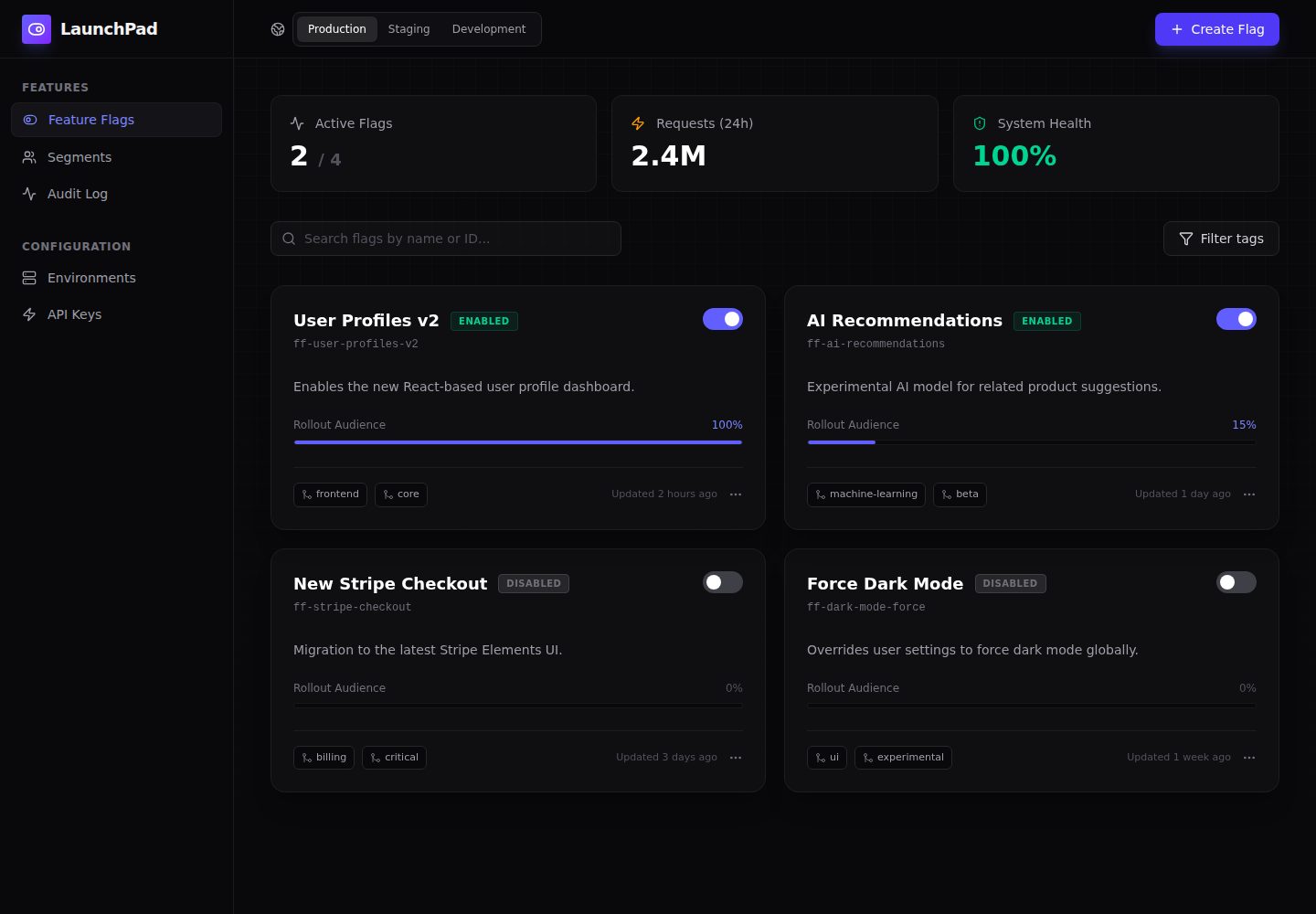
Client-side dashboard template built with Preact 10, TypeScript, Tailwind CSS, and Vite
ViteAdmin dashboardSaaS
preact-feature-flag-manager — Vite Admin dashboard Template
By smart-developer1791
A front-end template for a feature flag management dashboard built with Preact, TypeScript, Tailwind CSS, and Vite, using mock data to display flags, gradual rollouts, and environment interfaces.
Explore the design
Compare the page layouts and mobile experience. Open any screenshot for a closer look.
Desktop homepage1 / 2
Desktop captureTop of page
Actual screenshot captured by the server browser.
All pages & views 2
Screenshots show visual appearance; interactive behavior may differ.
Recorded 2026-10-15View source
What stands out
A quick read of the recorded project description.
Dark theme interface with custom CSS grid background, radial gradients, and micro-interactions
Tailwind components implemented from scratch, including animated switches and gradual rollout progress bars, without relying on heavyweight UI libraries
Interface changes with flag states: inactive elements are grayed out, enabled features highlighted in indigo
Mobile-first layout with a collapsible sidebar and responsive grid cards
Repository includes vercel.json configuration for Vite static SPA deployment
Template Details
This template is a client-side front-end interface for a feature flag management dashboard, built with Preact, TypeScript, Tailwind CSS, and Vite. The README states that the interface is currently populated with mock data, primarily for layout testing; the code is concentrated in two files: src/main.tsx (application entry) and src/app.tsx (dashboard layout, mock data, and custom UI components).
In terms of interface, the README describes a dark theme with a custom grid background and radial gradients, and provides Tailwind components implemented from scratch, such as animated toggle switches and gradual rollout progress bars, without relying on heavyweight external UI libraries. The layout is mobile-first, with a collapsible sidebar and responsive grid cards.
Functionally, the README explicitly states that this is a front-end template: to make it truly usable, the toggleFlag function and initial flags state in app.tsx need to be connected to a real API (for example, updating a PostgreSQL database or Redis store via fetch). The README does not provide further information on authentication, permissions, data persistence, testing, or performance.
ViteBackendSaaS
Is it right for your project?
Use Cases
- As an interface prototype for a feature flag management backend, to validate layout and interactions
- Before connecting to a real API, demonstrate the interface effects of flags, gradual rollouts, and environment switching using mock data
- As a reference for Preact + Tailwind project structure, to see how custom components and dark theme are implemented
- Deploy to static hosting platforms like Vercel as a pure front-end demo page
Suitable For
- Developers who need a starting point for a feature flag management interface and plan to connect their own backend API
- Front-end projects using the Preact, TypeScript, and Tailwind CSS stack
- Developers looking for references on dark SaaS dashboard layouts and custom component implementations
Getting started & customization
Use these recorded setup notes alongside the repository instructions for your chosen version.
- 1
Local run: execute npm install, then run npm run dev, and view the dashboard at http://localhost:5173
- 2
Build and preview: execute npm run build and npm run preview
- 3
The interface currently uses mock data; to actually use it, connect the toggleFlag function and initial flags state in app.tsx to a real API
- 4
The background grid is defined in src/index.css; adjust background-size or opacity to change grid density
- 5
The repository includes vercel.json, configured for the Vite framework, build command npm run build, output directory dist, and rewriting all paths to index.html
License & source material
Usage conditions & limitations
Free to use · keep license noticeThis entry covers the free version under the MIT license in a public repository; the free scope applies to that version's code and does not imply that external services or third-party assets are free.
Must comply with when using
- Free use, modification, commercial use, and distribution of this version's code are permitted.
- When distributing copies or substantial portions of the code, retain the original author's copyright notice and the full MIT license notice.
- The code is provided as-is; warranties and limitations of liability are governed by the original license and applicable law.
Additional costs & items to verify
- Demo images, fonts, icons, and other third-party assets must be checked against their respective licenses; they cannot be judged solely by the code's MIT license.
- External services such as domains, hosting, databases, payments, or AI may incur additional charges.
- This template is only a front-end interface; you must connect the toggleFlag function and initial flags state in app.tsx to a real API (such as PostgreSQL or Redis) before it can actually be used.
- The interface currently uses mock data for layout testing only and does not have real data functionality.
View Original Text Basis
Permission is hereby granted, free of charge
Original License Text
- **NOTE: Backend Integration:** This project is designed as a frontend template. To make it functional, the `toggleFlag` function and the initial `flags` state inside `app.tsx` should be connected to a real API (e.g., using `fetch` to update a PostgreSQL database or a Redis store).
Original README
https://github.com/smart-developer1791/preact-feature-flag-manager/blob/master/LICENSEhttps://github.com/smart-developer1791/preact-feature-flag-manager/blob/master/README.mdOpen `http://localhost:5173` to view the dashboard in your browser. The UI is currently populated with mock data for immediate layout testing.
Original README
Compiled by DeepSeek based on repository license and README ·2026-10-15. Results only cover the materials read; dependencies, images, fonts, and subsequent term changes are subject to their respective original texts.
Project checks & description sources
Template Information
- Source platforms
- GitHub
- Documentation and maintenance reference score
- More documented · 85 / 100
- Technologies
- Vite
- Website type
- Admin dashboard · SaaS
How this score is calculated
Our heuristic uses license records (up to 30), a demo link (12), a preview (10), stars (15), recorded maintenance (15), description completeness (8), feature records (5) and classification data (5). It is not a code, security or performance test, or a Google score. A link does not establish tested functionality.
What to verify for this project
- Repository update recorded
- 2026-06-19
- Screenshot last checked
- 2026-10-15
A demo link is listed. Check it with your own content and viewport sizes; its presence does not confirm that forms, authentication or payments work.
The catalog identifies Vite as the primary stack. Check the actual dependency manifest and lockfile for versions and hosting requirements. These notes use recorded metadata, not a code audit or a deployment test.
Use a selection guide →How this description was prepared
AI-assisted description based on catalog records and repository material. Repository authors are not automatically the reviewers of this description.
Review declaration: codex-user-requested-batch-review-20261017 · 2026-10-16
Inspect the recorded source material
SHA-256: c8c7edbf2ac533c05ed2ab0a2a306eb20fab35f7c3ae91ec6ee90550d486286f
2026-10-15T09:06:51.751Z
Source file / repository<div align="center">
# ✦ Preact Feature Flag Manager
**A premium, client-side SaaS dashboard template for managing feature toggles, rollouts, and environments.**





[](https://vercel.com/new)
</div>
---
## ✨ Highlights
- **Premium SaaS UI:** Features a meticulously crafted dark mode aesthetic with custom grid backgrounds, radial gradients, and micro-interactions.
- **Custom Components:** Includes from-scratch Tailwind components like animated toggle switches and dynamic rollout progress bars without relying on heavy external UI libraries.
- **State-Driven Design:** The interface instantly reacts to feature toggles, graying out inactive elements and highlighting live features with vibrant indigo accents.
- **Responsive Layout:** A mobile-first approach with a collapsible sidebar and fluid grid cards that scale perfectly from phones to ultrawide monitors.
## 🧱 Project Structure
```text
src/
|-- main.tsx # Application entry point
`-- app.tsx # Main dashboard layout, mock data, and custom UI components
```
## 🛠️ Tech Stack
- Preact 10 with Vite 6
- Tailwind CSS 4 for utility-first styling
- `lucide-preact` for clean, scalable iconography
## 🚀 Local Development
```bash
npm install
npm run dev
```
Open `http://localhost:5173` to view the dashboard in your browser. The UI is currently populated with mock data for immediate layout testing.
## 🔌 Extension Notes & Nuances
- **NOTE: Backend Integration:** This project is designed as a frontend template. To make it functional, the `toggleFlag` function and the initial `flags` state inside `app.tsx` should be connected to a real API (e.g., using `fetch` to update a PostgreSQL database or a Redis store).
- **NOTE: CSS Grid Pattern:** The custom background grid is defined purely in CSS inside `src/index.css`. You can adjust the `background-size` or opacity to change the "density" of the engineering grid.
## 🧪 Build & Checks
```bash
npm run build
npm run preview
```
## 🌐 Vercel Deployment
The repository includes a highly optimized `vercel.json` for Vite static SPA deployment, ensuring perfect client-side routing.
```json
{
"$schema": "https://openapi.vercel.sh/vercel.json",
"framework": "vite",
"buildCommand": "npm run build",
"outputDirectory": "dist",
"rewrites": [
{
"source": "/(.*)",
"destination": "/index.html"
}
]
}
```
## 📄 License
MIT License. See [LICENSE](./LICENSE).
Explore similar templates
Compare previews and descriptions within the same stack and category.

cove
Cove is a minimal TanStack Start starter template maintained by mugnavo, integrating React, TanStack Router/Query, Tailwind CSS, shadcn/ui, Drizzle ORM with PostgreSQL, Better Auth, Vite Plus, and Nitro.
Vite · SaaS

kiaalap
Kiaalap is a free, open-source admin template from Colorlib for education, online courses, and school management.
Vite · Admin dashboard

react-vite-admin
A backend management starter built on Vite and React, integrating Recoil, React Query, TypeScript, and Axios, with Ant Design-style interface screenshots. Suitable as a starting point for management-side projects, licensed under MIT, with Chinese documentation and common scripts.
Vite · Admin dashboard
admin-antd-react
A Vite + React 18 admin template using Ant Design and Recoil, with login, logout, and registration flows; page, button, and permission configuration verification; internationalization; dynamic sidebar and breadcrumbs; Svg Sprite icons; Mock data; and list, form, and detail page examples.
Vite · Admin dashboard

arco-admin-template
A Vite + React mid-to-back-office template using Arco Design, react-router-dom v6, mockjs, and less, with internationalization, theme customization, and light/dark switching. Includes login, dashboard, resource, component examples, settings, and 404 pages.
Vite · Admin dashboard
super-admin
A React, Vite, and Antd admin template that implements multi-tab route caching similar to Vue keepalive and route-based permission control.
Vite · Admin dashboard