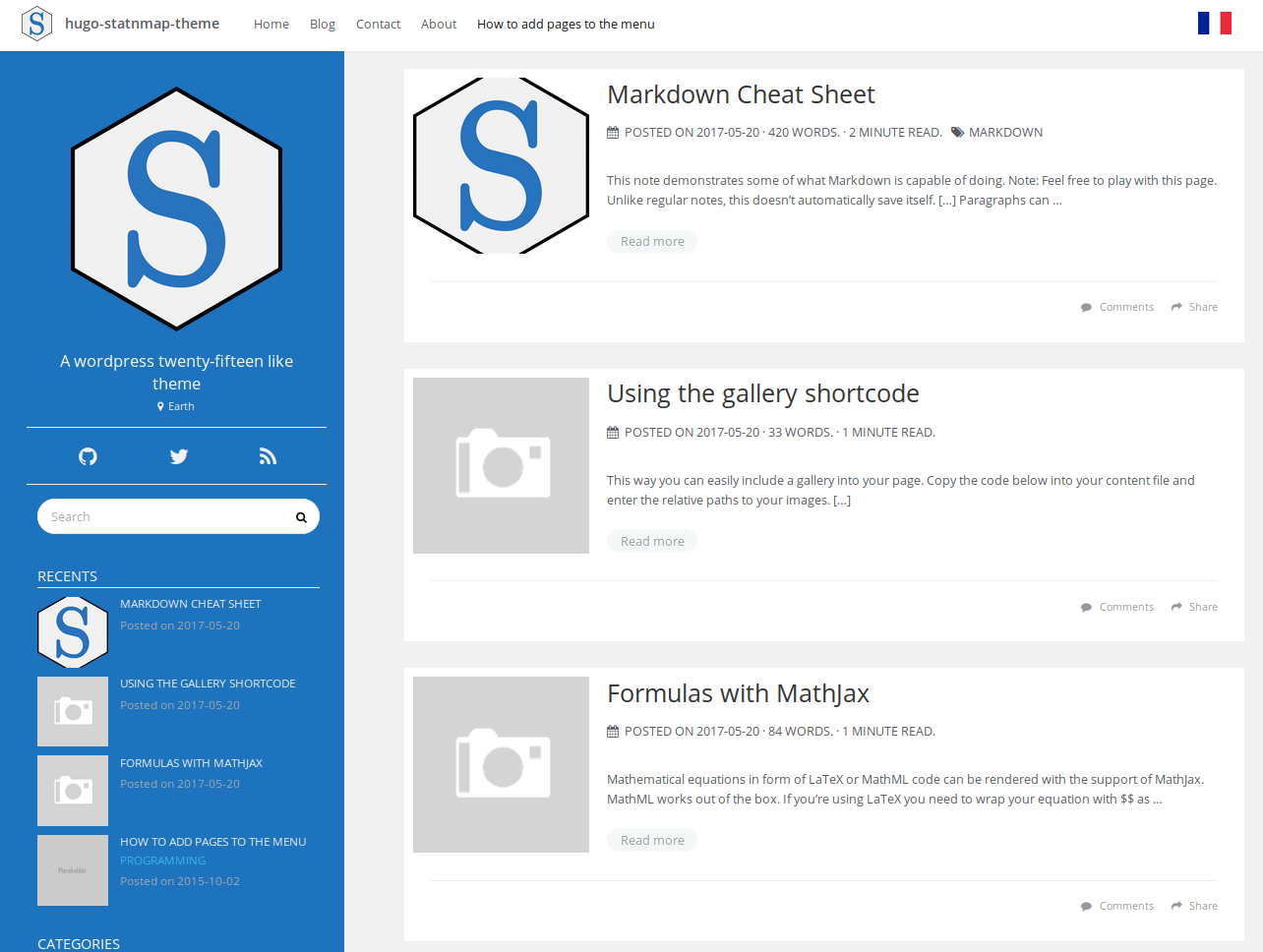
Multilingual support and language switcher, with translations extended through i18n language files
HugoBlog
hugo-statnmap-theme — Hugo Blog Template
By statnmap
A Hugo multilingual blog template adapted from the Icarus theme, including comments, code highlighting and folding, quote cards, a contact form, and sidebar widgets.
Explore the design
Compare the page layouts and mobile experience. Open any screenshot for a closer look.
Author preview
Author-provided previewTop of page
Preview provided in the project README.
One original preview is available. Open the full image to inspect the design.
Screenshots show visual appearance; interactive behavior may differ.
Recorded 2026-10-02View source
What stands out
A quick read of the recorded project description.
Utterances comment system, which can be disabled in individual posts
highlight.js syntax highlighting and code folding, with multilingual support for the fold button
Quote cards and related posts sections at the bottom of articles
Sidebar widgets: recent posts, categories, tags, tag cloud
Contact form sends email through the Formspree proxy
Template Details
hugo-statnmap-theme is a Hugo theme for blogs and freelancer personal sites. It was ported from the Icarus (Hexo) theme via hugo-icarus-theme and substantially restyled, with a visual appearance referencing WordPress Twenty Fifteen. The theme provides multilingual support and a language switcher, integrates the Utterances comment system, supports syntax highlighting, code folding, and LaTeX/MathML formula rendering in post content, can display quote cards and related posts at the bottom of articles, and includes a contact form and optional sidebar widgets.
In use, the theme requires Hugo version higher than v0.139.2. The exampleSite in the repository uses a custom themesDir pointing to the parent directory for independent preview; if its config.toml is copied to the root directory of a regular Hugo site, themesDir must be commented out, otherwise Hugo will not find the theme. Multilingual support is extended through language files in the i18n directory, and the language switcher requires placing a flag image named lang.png in static/flags for languages other than English and French.
Feature toggles are mostly concentrated in config.toml and post frontmatter: comments, the date line, previous/next links, MathJax, highlight.js, code folding, and quote cards can be disabled, and the left profile or right widgets can also be disabled on a single page. The contact form relies on Formspree as the email proxy for static sites, requiring you to fill in the endpoint and complete confirmation; the French menu in the example site may point to 404 pages due to missing .fr.md content.
HugoBlog
Is it right for your project?
Use Cases
- Building a personal multilingual blog or freelancer portfolio site
- Writing technical articles with code blocks and formulas that require highlighting, folding, and MathJax rendering
- A static blog that wants to use GitHub Issues as comment storage
- A personal site that needs a standalone contact page and accepts visitor messages
Suitable For
- Bloggers using Hugo with version higher than v0.139.2
- Sites that need Chinese-English or multilingual content and a language switcher
- Users who accept using external services such as Utterances and Formspree
- Writers who prefer a layout with a left profile and right widgets
Getting started & customization
Use these recorded setup notes alongside the repository instructions for your chosen version.
- 1
git clone the theme repository into the themes directory of a Hugo site
- 2
Copy config.toml and files such as i18n from exampleSite to the site root; for production, comment out the themesDir property
- 3
For comments, fill in the GitHub repository handle/repo corresponding to Utterances in config.toml
- 4
For the contact form, fill in the Formspree endpoint in contact/index.md and complete email confirmation
- 5
For languages other than English and French, place a flag image named lang.png in static/flags
License & source material
Usage conditions & limitations
Free to use · keep license noticeThis entry covers the free version under the MIT license in the public repository; the free scope is the code of this version and does not mean that external services or third-party assets are free.
Must comply with when using
- The code of this version may be used, modified, used commercially, and distributed free of charge.
- When distributing copies or substantial portions of the code, retain the original author's copyright notice and the complete MIT license notice.
- The code is provided as is; warranties and limitations of liability are governed by the original license and applicable law.
Additional costs & items to verify
- The README mentions the Formspree form service; actual submissions require configuring a service endpoint, and its usage quotas and fees must be checked separately.
- Demo images, fonts, icons, and other third-party assets must be checked against their respective licenses and cannot be judged solely by the code's MIT license.
- External services such as domains, hosting, databases, payments, or AI may incur additional charges.
- Using this theme requires Hugo version higher than v0.139.2; lower versions cannot run it properly.
- If the exampleSite config.toml is copied to the root directory of a regular Hugo site, the themesDir property must be commented out, otherwise Hugo cannot find the theme and it cannot be used in production.
- The comment feature depends on the third-party service Utterances and requires a GitHub repository handle/repo to sync comments.
- The contact form depends on the third-party service Formspree to proxy email sending, with a free quota of up to one thousand emails per month.
- Using the Formspree contact form requires sending a test email yourself and completing account confirmation.
- Language switching for languages other than English and French requires placing a flag image named lang.png in the static/flags directory.
- The example site lacks .fr.md content, so French menu items may lead to 404 pages.
- Mathematical formula rendering depends on the external MathJax CDN, and the CDN and version must be configured in config.toml.
- Code syntax highlighting depends on the external highlight.js library, and the version, CDN, and theme can be configured in config.toml.
- The code folding feature depends on the external Bootstrap JavaScript library.
- Enabling SEO requires manually adding parameters such as Google Analytics, robots, and canonifyURLs in config.toml or config.yaml.
- SEO configuration requires logging into Google Search Console and verifying site ownership.
- SEO configuration also requires logging into Bing Webmaster Console to add and verify the site.
View Original Text Basis
Permission is hereby granted, free of charge
Original License Text
*Requires Hugo version > v0.139.2*
Original README
**Due to the customized `themesDir` path Hugo will fail to find themes if you copied the `config.toml` into the root directory of a regular Hugo website.** Make sure you comment out the `themesDir` property if you use the theme in production.
Original README
The optional comment system is powered by Utterances. Enter the GitHub repository `"handle/repo"` where comments will be synced.
Original README
Since this page will be static, you can use formspree.io as proxy to send the actual email. Each month, visitors can send you up to one thousand emails without incurring extra charges.
Original README
Send a dummy email yourself to confirm your account
Original README
You can add png images of flags named ‘lang.png’ in ‘static/flags’ folder, for new languages other than English and French.
Original README
However, as no posts, itemized or contacts are saved with `.fr.md` extension in this exampleSite, menu items may redirect to the `404 not found` page.
Original README
MathJax CDN and versions can be modified in the `config.toml` file:
Original README
Syntax highlighting for code is allowed with `highlight.js`.
Original README
It uses somes javascript libraries of [bootstrap](https://getbootstrap.com/docs/3.3/javascript/).
Original README
If you wish to enable SEO on this theme, follow these instructions: 1. To include the following parameters in your *config.toml* or *config.yaml*
Original README
Add your website to Google Search Console:
Original README
https://github.com/statnmap/hugo-statnmap-theme/blob/master/LICENSE.mdhttps://github.com/statnmap/hugo-statnmap-theme/blob/master/README.mdAdd your website to Bing
Original README
Compiled by DeepSeek based on repository license and README ·2026-10-04. Results only cover the materials read; dependencies, images, fonts, and subsequent term changes are subject to their respective original texts.
Project checks & description sources
Template Information
- Source platforms
- GitHub
- Documentation and maintenance reference score
- Partly documented · 65 / 100
- Technologies
- Hugo
- Website type
- Blog
How this score is calculated
Our heuristic uses license records (up to 30), a demo link (12), a preview (10), stars (15), recorded maintenance (15), description completeness (8), feature records (5) and classification data (5). It is not a code, security or performance test, or a Google score. A link does not establish tested functionality.
What to verify for this project
- Repository update recorded
- 2025-04-06
- Screenshot last checked
- 2026-10-04
No demo link is recorded. Use the repository instructions to evaluate the project locally; the screenshot alone cannot establish interactive behavior.
The catalog identifies Hugo as the primary stack. Check the actual dependency manifest and lockfile for versions and hosting requirements. These notes use recorded metadata, not a code audit or a deployment test.
Use a selection guide →How this description was prepared
AI-assisted description based on catalog records and repository material. Repository authors are not automatically the reviewers of this description.
Review declaration: [email protected] · 2026-10-04
Inspect the recorded source material
SHA-256: 76661c8442d219961d67f1879a60ac8c085dde275771f55118e3af4ec9e0e83c
2026-10-04T11:20:19.260Z
Source file / repository
# StatnMap Hugo theme
StatnMap theme is issued from [hugo-icarus-theme by
digitalcraftsman](https://github.com/digitalcraftsman/hugo-icarus-theme),
but I thought visual changes were to big to keep it as a fork. This is a
responsive and customizable theme for bloggers and freelancers. It’s
originally a port of the Icarus theme for [Hexo](//hexo.io) made by
[Ruipeng Zhang](https://github.com/ppoffice). The theme has been
revamped to look like wordpress twenty-fifteen theme.
Noteworthy features of this Hugo theme are the integration of a
comment-system powered by **Utterances**, **multilingual** support and
**language switch**, **syntax highlighting** and **code folding** for
source code, **how-to-cite card** and **related articles** sections on
bottom of articles, **contact form** and optional widgets for the
sidebar.

*Requires Hugo version > v0.139.2* You can see a live example here:
<https://statnmap.com>
## Table of Contents
<!-- TOC depthFrom:2 depthTo:6 withLinks:1 updateOnSave:1 orderedList:0 -->
- [Table of Contents](#table-of-contents)
- [Get the theme](#get-the-theme)
- [Setup](#setup)
- [Comments](#comments)
- [Menu](#menu)
- [Sidebars](#sidebars)
- [Tell me who you are](#tell-me-who-you-are)
- [Widgets](#widgets)
- [Date line](#date-line)
- [Multilanguage](#multilingual)
- [Contact form](#contact-form)
- [Linking thumbnails](#linking-thumbnails)
- [Mathematical equations](#mathematical-equations)
- [Syntax highlighting](#syntax-highlighting)
- [Code Folding](#code-folding)
- [Sticky list pages](#sticky-list-pages)
- [Gallery shortcode](#gallery-shortcode)
- [Citation card](#citation)
- [Related articles](#related-articles)
- [Website SEO](#website-seo)
- [Nearly finished](#nearly-finished)
- [Contributing](#contributing)
- [License](#license)
- [Acknowledgements](#acknowledgements)
## Get the theme
I assume you’ve Git installed. Inside the folder of your Hugo site run
$ cd themes
$ git clone https://github.com/statnmap/hugo-statnmap-theme.git
You should see a folder called `hugo-statnmap-theme` inside the `themes`
directory that we created a few moments ago. For more information read
the official [setup guide](https://gohugo.io/overview/installing/) of
Hugo.
## Setup
Next, navigate to the `exampleSite` folder at
`themes/hugo-type-theme/exampleSite/`. In order to get your site
running, you need to copy `config.toml` and all the content of all
relevant subfolders such as `i18n/en.toml` into the root folders.
To turn the `exampleSite` folder in a standalone demo site the
`themesDir` property has been set to `../..`. This way you can preview
this theme by running `hugo server` inside `exampleSite` folder.
**Due to the customized `themesDir` path Hugo will fail to find themes
if you copied the `config.toml` into the root directory of a regular
Hugo website.** Make sure you comment out the `themesDir` property if
you use the theme in production.
## The config file
Now, let us take a look into the `config.toml`. Feel free to play around
with the settings.
### Comments
The optional comment system is powered by Utterances. Enter the GitHub repository `"handle/repo"` where comments will be synced.
utteranceGitHubRepo = ""
Tip: you can disable the comment section for a single page in its
frontmatter:
``` toml
+++
disable_comments = true
+++
```
### Menu
You can also define the items menu entries as you like. First, let us
link a post that you’ve written. We can do this in the frontmatter of
the post’s content file by setting `menu` to `main`.
+++
menu = "main"
+++
Furthermore, we can add entries that don’t link to posts. Back in the
`config.toml` you’ll find a section for the menus:
[[params.menu]]
before = true
label = "Home"
link = "/"
Define a label and enter the URL to resource you want to link. With
`before` you can decide whether the link should appear before **or**
after all linked posts in the menu. Therefore, `Home` appears before the
linked post.
### Sidebars
In order to use the full width of the website you can disable the
profile on the left and / or the widgets on the right for a single page
in the frontmatter:
``` toml
+++
disable_profile = true
disable_widgets = true
+++
```
### Tell me who you are
This theme also provides a profile section on the left. Add your social
network accounts to the profile section on the left by entering your
username under `params.social`. The links to your account will be created
automatically.
### Widgets
Beside the profile section you can add widgets on the right sidebar. The
following widgets are available:
- recent articles
- category list
- tag list
- tag cloud
You can deactivate them under `params.widgets`:
[params.widgets]
recent_articles = false
categories = true
tags = true
tag_cloud = true
### Date line
The date line includes: post date, \# of words, approximate reading,
time tags and categories. However, if you want certain pages to omit the
date line, simply put `nodateline = true` in the front matter for that
page.
### Disable Previous / next article links
To disable the inclusion of a previous/next article link at the bottom
of the page, add `noprevnext = true` to the front matter. This feature,
along with `nodateline` can be used to create standalone pages that are
less “blog-like”
## Multilingual
You don’t blog in English and you want to translate the theme into
different language? No problem. Take a look in the `i18n` folder and
you’ll find a file `en.toml`. It contains all strings related to the
theme. Copy this file, change the name so that it reflects the
translation language (like `fr.toml`) and modify the strings needed.
A language switcher is also available with multilingual website
activated. You can add png images of flags named ‘lang.png’ in
‘static/flags’ folder, for new languages other than English and French.
The `config.toml` file in `exampleSite` proposes menus for a second
language (French). However, as no posts, itemized or contacts are saved
with `.fr.md` extension in this exampleSite, menu items may redirect to
the `404 not found` page.
If you only have one language for your website, you can remove every
`Languages`, `Languages.en` and `Languages.fr` occurrences. Simple
`[menu.main]` have to be used instead.
Credit: [statnmap](https://github.com/statnmap)
## Contact form
Since this page will be static, you can use formspree.io as proxy to
send the actual email. Each month, visitors can send you up to one
thousand emails without incurring extra charges. Begin the setup by
following the steps below:
1. Enter your formspree endpoint with email address under ‘emailservice’ in contact/index.md file
2. Fill the other `contactxx` fields in the frontmatter of the contact page
3. Send a dummy email yourself to confirm your account
4. Click the confirm link in the email from formspree.io
5. You’re done. Happy mailing!
Credit: [statnmap](https://github.com/statnmap)
## Linking thumbnails
After creating a new post you can define a banner by entering the
relative path to the image.
banner = "banners/placeholder.png"
Credit: [digitalcraftsman](//github.com/digitalcraftsman)
A thumbnail will be used for the recent\_articles list in the sidebar as
well as in the normal list of articles. If you want a specific thumbnail
instead of the banner croped, you can define it by entering the relative
path to the thumbnail.
thumbnail = "banners/thumbnail.png"
This way you can store them either next to the content file or in the
`static` folder.
Credit: [statnmap](https://github.com/statnmap)
## Mathematical equations
Mathematical equations in form of LaTeX or MathML code can be rendered
with the support of [MathJax](https://www.mathjax.org). MathML works out
of the box. If you’re using LaTeX you need to wrap your equation with
`$$`.
You can also print formulas inline. In this case wrap the formula only
once with `$`.
If you don’t need equations, you can disable MathJax but putting
`disable_mathjax = true` in your config.toml. This will prevent clients
from unnecessarily downloading the MathJax library.
MathJax CDN and versions can be modified in the `config.toml` file:
MathJaxCDN = "//cdn.bootcss.com"
MathJaxVersion = "2.7.1"
## Syntax highlighting
Syntax highlighting for code is allowed with `highlight.js`. This can be
disabled in the `config.toml`. Version, additional languages, CDN and
theme can also be modified.
disable_highlight = false
highlightjsVersion = "9.11.0"
highlightjsCDN = "//cdn.bootcss.com"
highlightjsLang = ["r", "yaml"]
highlightjsTheme = "github"
Credit: [yihui](https//github.com/yihui)
[statnmap](https://github.com/statnmap)
## Code folding
Code folding is enabled by default with `disable_codefolding = false` in
parameters of the `config` file. It uses somes javascript libraries of
[bootstrap](https://getbootstrap.com/docs/3.3/javascript/). Code folding
(multilingual) buttons only appear when there is code in the document
rendered from `Rmd` in blogdown. `disable_codefolding` can also be used
in each article config header. Similarly, you can define if code blocks
are shown or hidden by default using `codefolding_show = "hide"` in the
config file or in each article config.
The list of `<pre>` blocks on which to apply code folding is defined in
the `config` file:
`codeblocks = ["pre.sourceCode", "pre.r", "pre.python"]`
Credit: [statnmap](https://github.com/statnmap)
## Sticky list pages
A special kind of posts list is implemented. This allows to show the
first article completely and the other articles as a list with
summaries. For that, we use the implemented template
`list_first_plain_sticky.html` in `partial`. You can use it in two ways:
1. With Taxonomy This is implemented in the `exampleSite`.
- Create a new taxonomy like ‘sticky’:
<!-- -->
[Taxonomies]
tag = "tags"
category = "categories"
sticky = "stickies"
- Create a folder `layout` > `taxonomy`
- Create a html file named `sticky.html` with this code:
<!-- -->
{{ define "main" }}
{{ if isset .Site.Taxonomies "sticky" }}
{{ partial "list_first_plain_sticky" . }}
{{ end }}
{{ end }}
- Add taxonomy `stickies` in a post or a page. The newest page or
the page with `weight = 1` will be shown entirely before the
other of the same taxonomy (that will only show a summary). In
the exampleSite, pages in `sticky_pages` have this taxonomy.
2. With special pages
- Create a folder `layout` > `sticky_pages` for instance
- Create a html file named `list.html` with this code:
<!-- -->
{{ define "main" }}
{{ partial "list_first_plain_sticky" . }}
{{ end }}
- Create a folder `content` > `sticky_pages` (This is done in
the `exampleSite`)
- Add a page. The newest page or the page with `weight = 1` will
be shown entirely before the other of the same taxonomy (that
will only show a summary)
Credit: [statnmap](https://github.com/statnmap)
## Citation
As for [Radix](https://rstudio.github.io/radix/), a citation field can
be added to blog posts. Citation is enabled by default with
`disable_citation = false` in parameters of the `config` file. It can
also be enabled or disabled in each blog post with `disable_citation` in
the post YAML / TOML. By default author comes from blog `author` field
in the article header but `citation_author` overrides this field if
another writing is needed. `citation_author` can be specified globally
in `config` file but also for each blog post.
Code is adapted from: Yihan Wu. (2018-12-21). “Blogdown - shortcode for
radix-like Bibtex”. Retrieved from
<https://www.yihanwu.ca/post/blogdown-shortcode-generation-for-bibtex/>.
Credit: [statnmap](https://github.com/statnmap)
## Gallery shortcode
This shortcode you to easily include a gallery into your pages. Copy the
code below into your content file and enter the relative paths to your
images.
{{< gallery
"/banners/placeholder.png"
"/banners/placeholder.png"
"/banners/placeholder.png"
>}}
## Related articles
You can define parameters for related articles at the bottom of blog
posts.
[related]
# Only include matches with rank >= threshold. This is a normalized rank between 0 and 100.
threshold = 50
# To get stable "See also" sections we, by default, exclude newer related pages.
includeNewer = true
# Will lower case keywords in both queries and in the indexes.
toLower = true
[[related.indices]]
name = "keywords"
weight = 150
[[related.indices]]
name = "author"
toLower = true
weight = 30
[[related.indices]]
name = "tags"
weight = 100
[[related.indices]]
name = "date"
weight = 10
pattern = "2006"
See <https://gohugo.io/content-management/related/> for more
informations.
Credit: [statnmap](https://github.com/statnmap)
## Website SEO
This theme support SEO elements for your website. It was adapted and
integrated thanks to the following guide:
<https://keithpblog.org/post/hugo-website-seo/>
If you wish to enable SEO on this theme, follow these instructions: 1.
To include the following parameters in your *config.toml* or
*config.yaml*
# .config.toml
...
[services]
[services.googleAnalytics]
id = 'G-XXXXXXXXXX'
enableRobotsTXT = true
canonifyURLs = true
# and if you think your md file names or locations might change:
[permalinks]
post = "/blog/:title/"
...
2. Add your website to Google Search Console:
- Login to the [Google Search
Console](https://www.google.com/webmasters/tools/home)
- Add your website as property
- Add the html page as required by google to verify ownership
- Submit the sitemap (/sitemap.xml) for indexing
- Wait
3. Add your website to Bing
- Login to the [Bing Webmaster
Console](https://www.bing.com/toolbox/webmaster/)
- Add your site, details and verify
- From the 3 option, we recommend adding the xml file to you
website
## Nearly finished
In order to see your site in action, run Hugo’s built-in local server.
$ hugo server
Now enter [`localhost:4321`](http://localhost:4321) in the address bar
of your browser.
## Contributing
Have you found a bug or got an idea for a new feature? Feel free to use
the [issue tracker](//github.com/statnmap/hugo-statnmap-theme/issues) to
let me know. Or make directly a [pull
request](//github.com/statnmap/hugo-statnmap-theme/pulls).
## License
This theme is released under the MIT license. For more information read
the
[license](https://github.com/digitalcraftsman/hugo-icarus-theme/blob/master/LICENSE.md).
## Acknowledgements
Thanks to
- [Digitalcraftsman](//github.com/digitalcraftsman/hugo-icarus-theme)
for the original Hugo-icarus-theme
- [Ruipeng Zhang](//github.com/ppoffice) for creating this theme
- [Steve Francia](//github.com/spf13) for creating Hugo and the
awesome community around the project
Explore similar templates
Compare previews and descriptions within the same stack and category.

hugo-PaperMod
A fast, clean, responsive Hugo theme for blogs and lightweight portfolios, with three layout modes (Regular, Home-Info, Profile), automatic and manual light/dark themes, Fuse.js client-side search, multilingual support, and built-in Open Graph, Twitter Cards, and Schema.org data.
Hugo · Portfolio

LoveIt
LoveIt is a clean, elegant, and feature-rich Hugo blog theme derived from LeaveIt and KeepIt, MIT-licensed. It offers light/dark modes, responsive layout, multilingual support, and search via Lunr.js or Algolia.
Hugo · Blog

hugo-coder
hugo-coder is a minimalist Hugo blog theme maintained by luizdepra under the MIT license. It provides a clean, text-focused blog appearance, configuration documentation in the docs directory, and a complete exampleSite with hugo.toml.
Hugo · Blog

blowfish
Blowfish is a Hugo personal website and blog theme built with Tailwind CSS 4, focused on lightness, simplicity, and content-first presentation.
Hugo · Blog

hugo-paper
hugo-paper is a simple, clean, and customizable Hugo blog theme configured through config.toml or hugo.toml.
Hugo · Blog

hextra
Hextra is a Hugo theme for documentation and blog sites, built on Hugo and Tailwind CSS with design referencing Nextra.
Hugo · Documentation