Astro-based static landing page template with pages and components organized under Astro's default directory conventions
AstroCorporate Website
atom-astro — Astro Business Template
By Tailus-UI
An Astro landing page template from Tailus UI, built with Tailwind CSS and Tailus Themer, aimed at startup and product websites, under the MIT license.
Explore the design
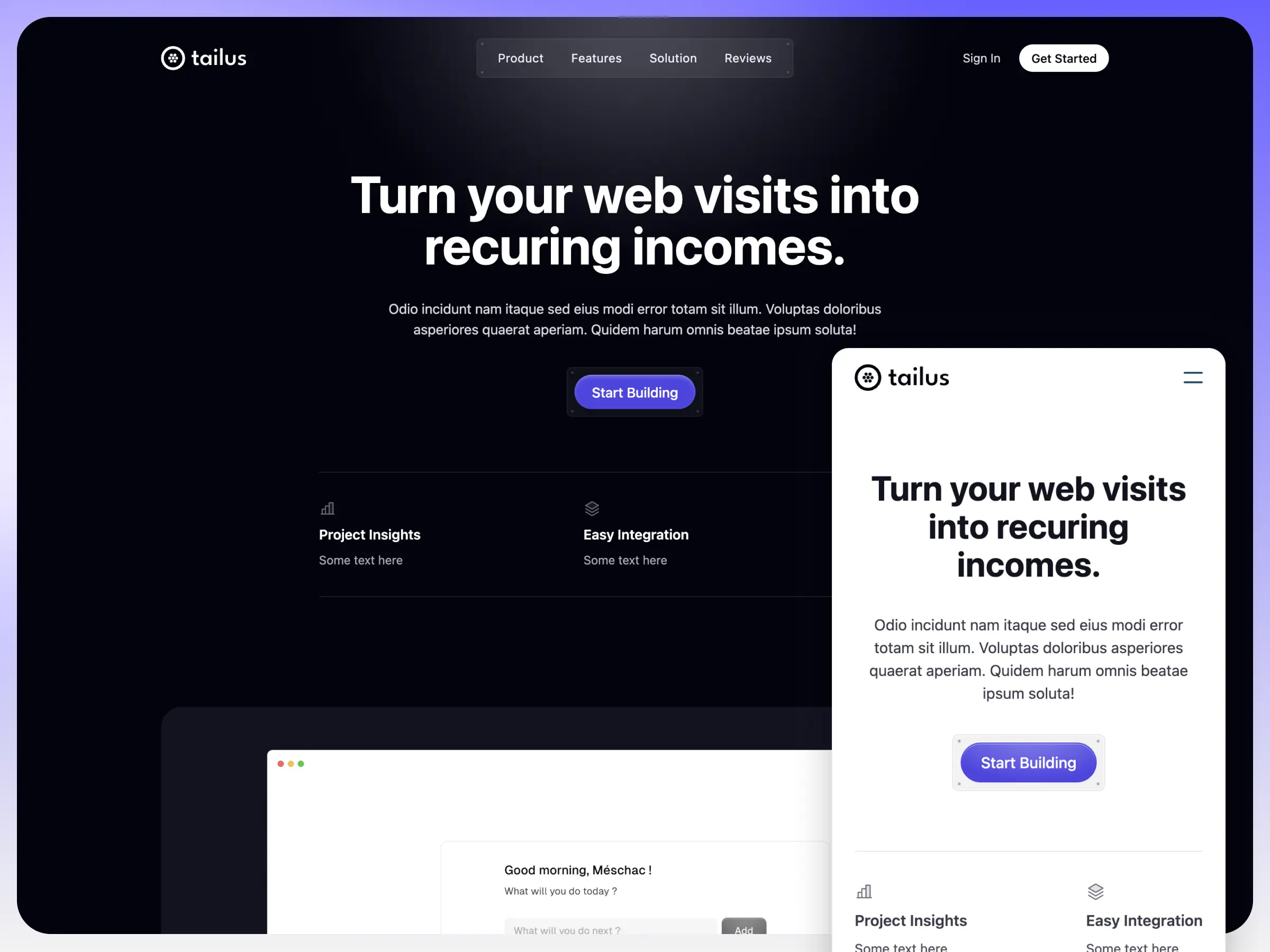
Compare the page layouts and mobile experience. Open any screenshot for a closer look.
Author preview
Author-provided previewTop of page
Preview provided in the project README.
One original preview is available. Open the full image to inspect the design.
Screenshots show visual appearance; interactive behavior may differ.
Recorded 2026-09-30View source
What stands out
A quick read of the recorded project description.
Uses Tailwind CSS with themes and styles managed through Tailus Themer
The repository provides an MIT license file, permitting free use, modification, commercial use, and distribution
The README gives complete local development, build, and preview commands
Includes an author preview image and an online demo link, so you can see the result before deciding whether to use it
Template Details
Atom is an Astro-based landing page template maintained by Tailus UI, positioned as a modern corporate/product landing page for startups. The styling layer uses Tailwind CSS, with themes and design tokens organized through Tailus Themer; both dependencies are explicitly mentioned in the repository description.
The project structure follows Astro's default conventions: pages live in src/pages/, components in src/components/ (the example includes Card.astro), layouts in src/layouts/ (Layout.astro), and static assets such as images in public/. The directory example in the README is fairly minimal, indicating this is a lightweight starter template rather than a full site with many pages and business modules.
Usage follows the standard Astro workflow: npm install to install dependencies, npm run dev to start the local development server on port 3000, npm run build to output to ./dist/, and npm run preview to preview the build locally before deployment; the Astro CLI can also be invoked via npm run astro. The README does not describe any backend API, CMS, or data source, so content is primarily static pages.
Regarding licensing, the repository includes an MIT license file, permitting free use, modification, commercial use, and distribution of this version of the code, provided the copyright and license notice are retained when redistributing. Note that MIT covers only the code itself; demo images, fonts, icons, and other third-party assets must be checked separately under their own licenses, and external services such as domains and hosting may incur costs.
AstroCorporate website
Is it right for your project?
Use Cases
- Building a single-page landing page for a startup or product to introduce the product and key selling points
- Using it as a starter scaffold for an Astro + Tailwind CSS project and extending pages on top of it
- When you need a free corporate website template that can be freely modified and used commercially
- For learning Astro's directory structure, layouts, and component organization
Suitable For
- Front-end developers familiar with or willing to learn Astro and Tailwind CSS
- Startup teams that need to quickly build a product landing page
- Sites that accept a primarily static page approach and will integrate their own content and deployment solution
Getting started & customization
Use these recorded setup notes alongside the repository instructions for your chosen version.
- 1
Run npm install in the project root to install dependencies
- 2
npm run dev starts the local development server, by default at localhost:3000
- 3
npm run build generates a production build to ./dist/, and npm run preview lets you preview it locally before deployment
- 4
The Astro CLI can be invoked via npm run astro, for example astro add and astro preview
- 5
Before use, check the licenses of third-party assets such as demo images, fonts, and icons separately; MIT covers only the code
License & source material
Usage conditions & limitations
Free to use · keep license noticeThis entry covers the free version in the public repository under the MIT license; the free scope is the code of this version and does not mean external services or third-party assets are free.
Must comply with when using
- Free use, modification, commercial use, and distribution of this version of the code are permitted.
- When distributing copies or substantial portions of the code, retain the original author's copyright notice and the complete MIT license notice.
- The code is provided as is; warranties and limitations of liability are governed by the original license and applicable law.
Additional costs & items to verify
- Demo images, fonts, icons, and other third-party assets must be checked under their own licenses and cannot be judged solely by the code's MIT license.
- External services such as domains, hosting, databases, payments, or AI may incur additional charges.
View Original Text Basis
https://github.com/Tailus-UI/atom-astro/blob/main/LICENCE.mdhttps://github.com/Tailus-UI/atom-astro/blob/main/README.mdPermission is hereby granted, free of charge
Original License Text
Compiled by DeepSeek based on repository license and README ·2026-10-01. Results only cover the materials read; dependencies, images, fonts, and subsequent term changes are subject to their respective original texts.
Project checks & description sources
Template Information
- Source platforms
- GitHub
- Documentation and maintenance reference score
- Partly documented · 72 / 100
- Technologies
- Astro
- Website type
- Corporate Website
How this score is calculated
Our heuristic uses license records (up to 30), a demo link (12), a preview (10), stars (15), recorded maintenance (15), description completeness (8), feature records (5) and classification data (5). It is not a code, security or performance test, or a Google score. A link does not establish tested functionality.
What to verify for this project
- Repository update recorded
- 2024-04-04
- Screenshot last checked
- 2026-10-01
A demo link is listed. Check it with your own content and viewport sizes; its presence does not confirm that forms, authentication or payments work.
The catalog identifies Astro as the primary stack. Check the actual dependency manifest and lockfile for versions and hosting requirements. These notes use recorded metadata, not a code audit or a deployment test.
Use a selection guide →How this description was prepared
AI-assisted description based on catalog records and repository material. Repository authors are not automatically the reviewers of this description.
Automatically checked against source and license rules; no manual editorial review.
Inspect the recorded source material
SHA-256: 89df99a6d85244740c53d5365732f38d7406e4f56c2690813b48f097b69f34f7
2026-10-01T13:55:16.344Z
Source file / repository# Atom Modern free Tailwind CSS, Astro landing page template for startups | built with Tailus Themer  ## 🚀 Project Structure Inside of your Astro project, you'll see the following folders and files: ``` / ├── public/ │ └── favicon.svg ├── src/ │ ├── components/ │ │ └── Card.astro │ ├── layouts/ │ │ └── Layout.astro │ └── pages/ │ └── index.astro └── package.json ``` Astro looks for `.astro` or `.md` files in the `src/pages/` directory. Each page is exposed as a route based on its file name. There's nothing special about `src/components/`, but that's where we like to put any Astro/React/Vue/Svelte/Preact components. Any static assets, like images, can be placed in the `public/` directory. ## 🧞 Commands All commands are run from the root of the project, from a terminal: | Command | Action | | :--------------------- | :------------------------------------------------- | | `npm install` | Installs dependencies | | `npm run dev` | Starts local dev server at `localhost:3000` | | `npm run build` | Build your production site to `./dist/` | | `npm run preview` | Preview your build locally, before deploying | | `npm run astro ...` | Run CLI commands like `astro add`, `astro preview` | | `npm run astro --help` | Get help using the Astro CLI | ## 👀 Want to learn more? Feel free to check [our documentation](https://docs.astro.build) or jump into our [Discord server](https://astro.build/chat).
Explore similar templates
Compare previews and descriptions within the same stack and category.

astrowind
AstroWind is a free, open-source Astro starter theme using Astro and Tailwind CSS, released under the MIT license.
Astro · Blog

astro-landing-page
An Astro + Tailwind CSS landing page example template with theme variables, dark mode, responsive layout, and Open Graph tags, under the MIT license, suitable as a starting point for single-page product, event, or corporate homepage sites.
Astro · Corporate Website

Tailcast
Tailcast is a dark-themed corporate website template built with Astro and Tailwind CSS for a fictional startup.
Astro · Corporate Website

Positivus
Positivus is an Astro and Tailwind CSS landing page theme for digital marketing agencies, maintained by manulthanura with a demo on Vercel.
Astro · Corporate Website

qwind
Qwind is a free and open-source website template built on Qwik and Tailwind CSS, featuring directory-based routing via QwikCity, a Markdown blog, dark mode, and static deployment configuration.
Astro · Tool Site

agency-landing-page-Astrojs
A single-page digital agency landing page template built with Astro and Tailwind CSS, featuring light and dark themes and a modular component directory. Suitable for static showcase pages, with MIT-licensed code and third-party assets requiring separate license verification.
Astro · Corporate Website