Generate a project via the npx create-cartwright scaffold, with code stored in your own repository
Next.jsReactE-commerceSaaS
cartwright-template — Next.js Ecommerce Template
By Teloz1870
Cartwright is an open-source e-commerce and website template based on Next.js, scaffolded via npx create-cartwright, with built-in Stripe payments, Prisma database, admin dashboard, and WebMCP agent tool support.
Explore the design
Compare the page layouts and mobile experience. Open any screenshot for a closer look.
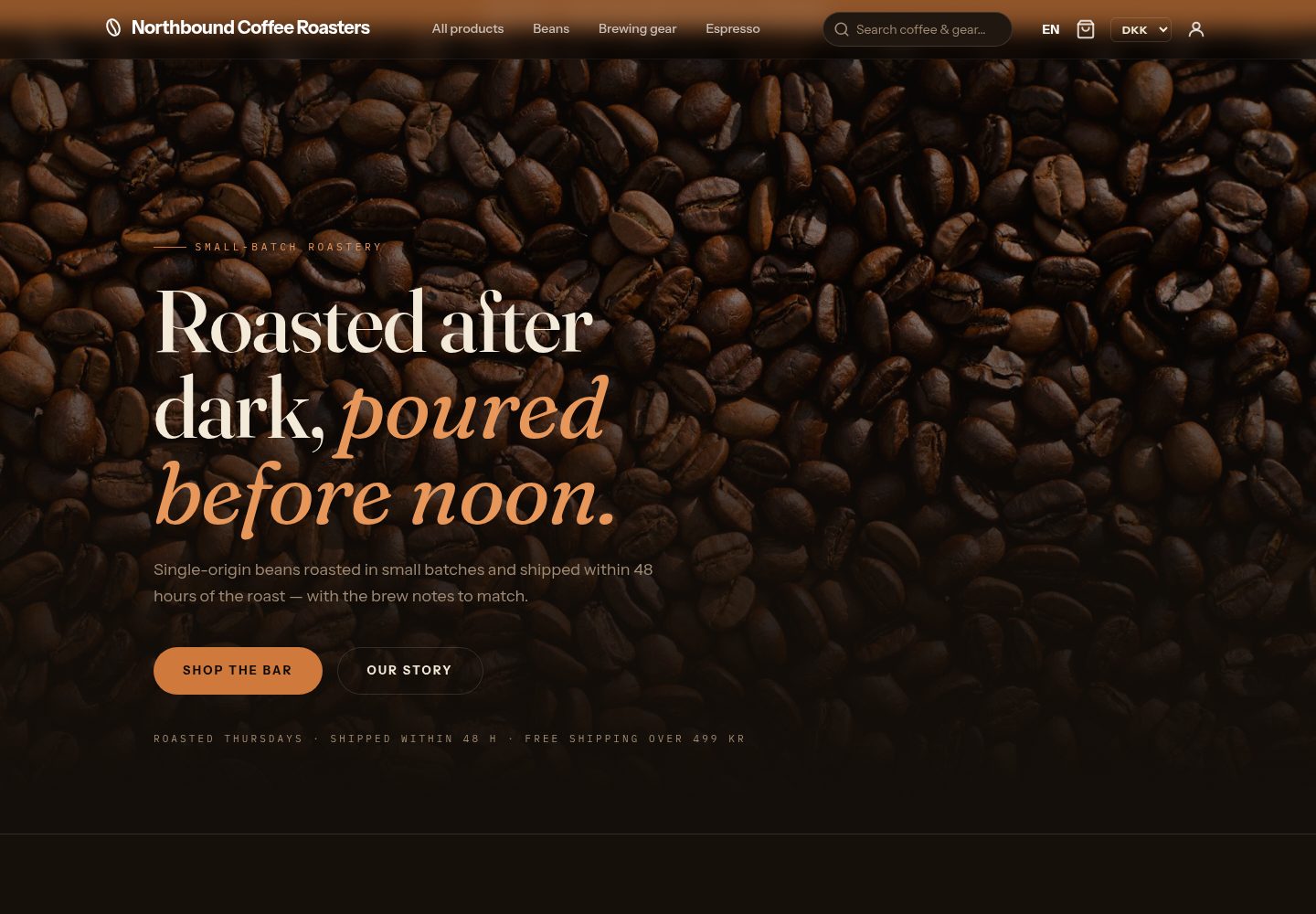
Desktop homepage1 / 3
Desktop captureTop of page
Actual screenshot captured by the server browser.
All pages & views 3
Screenshots show visual appearance; interactive behavior may differ.
Recorded 2026-10-03View source
What stands out
A quick read of the recorded project description.
Offers three profiles: site, light, and full, allowing selection of whether to include database, admin, and e-commerce features
Built-in configuration for Stripe payments, Prisma database, and NextAuth authentication
Supports WebMCP, registering agent tools such as search and cart in pages, but does not provide an order placement tool
Outputs JSON-LD, llms.txt, sitemap.xml, and MCP endpoints for AI crawlers
Optional modules are provided as in-repo plugins, including wishlist, blog, reviews, and others
Template Details
Cartwright is an open-source website and commerce engine distributed as a template, hosted on GitHub under the MIT license. It generates a project via the npx create-cartwright command rather than providing a hosted account, so the code belongs to the user. The template is built on the Next.js App Router, uses Prisma for database configuration, integrates Stripe for payments, and uses NextAuth for authentication.
The scaffold offers three profiles: site is a static website with no database or login; light is the default configuration, including database, admin dashboard, and MCP/JSON-LD discovery capabilities; full includes all features and is required for the agent-marketplace template. Project behavior is determined by brand.mode in brand.config.ts, with options: website (marketing site, no cart), webshop (full e-commerce frontend with product listing, details, cart, checkout, account, and Stripe), and agent-marketplace (agent-oriented store with Agent Card, negotiation, and hosted verification). Optional modules are provided as in-repo plugins, including phone-widget, wishlist, blog, reviews, and others.
The template emphasizes adaptation for agents and AI crawlers: each page outputs JSON-LD structured data, provides llms.txt, sitemap.xml, robots.txt, .well-known/ucp, and mcp.json, and includes a public MCP service endpoint /api/mcp and tool directory /api/v1/tools. In WebMCP mode, pages register page-level tools via document.modelContext, such as searching products, reading the cart, and adding the current product to the cart, but no order placement tool is provided; checkout remains manual.
Regarding usage limitations, the template itself is code, not a hosted service; external services such as domain, hosting, database, payment, and AI must be prepared separately and may incur costs. Licenses for third-party assets such as demo images, fonts, and icons must be verified separately. Performance and onboarding time data mentioned in the README are the project's own claims and have not been independently verified in this material.
Next.jsE-commerceSaaS
Is it right for your project?
Use Cases
- Build an e-commerce frontend in your own code repository, including product listing, details, cart, and checkout flow
- Build a marketing website or landing page that only needs pages and a contact form, without database or login
- Add MCP tools and structured data for AI agents to a store, making it easier for agents or crawlers to read
- Reference or port its design packages, plugins, and agent tool implementations into an existing Next.js project
Suitable For
- Developers or small teams who want to self-host and control all code
- Next.js e-commerce projects that need Stripe checkout and Prisma database
- Developers interested in implementing agent interaction protocols such as MCP and WebMCP
- Projects that need to cover both marketing and e-commerce sites and want to tailor features by profile
Getting started & customization
Use these recorded setup notes alongside the repository instructions for your chosen version.
- 1
Generate a project using npx create-cartwright@latest; the site profile requires no database or login configuration
- 2
The light and full profiles require a database connection and AUTH_SECRET; when deploying to Vercel, complete database initialization according to DEPLOY.md
- 3
When manually cloning locally, run npm install, configure AUTH_SECRET and DATABASE_URL in .env.local, then run npm run db:setup
- 4
The scaffold outputs admin dashboard login information and saves it to a gitignored .admin-credentials file
- 5
Third-party assets such as demo images, fonts, and icons must be verified under their respective licenses; external services may charge separately
License & source material
Usage conditions & limitations
Free to use · keep license noticeThis entry covers the free version under the MIT license in the public repository; the free scope is the code of this version and does not imply that external services or third-party assets are free.
Must comply with when using
- Free use, modification, commercial use, and distribution of this version's code are permitted.
- When distributing copies or substantial portions of the code, retain the original author's copyright notice and the full MIT license notice.
- The code is provided as-is; warranties and limitations of liability are governed by the original license and applicable law.
Additional costs & items to verify
- Demo images, fonts, icons, and other third-party assets must be verified under their respective licenses; they cannot be judged solely by the code's MIT license.
- External services such as domain, hosting, database, payment, or AI may incur additional charges.
- The site profile is a purely static website without database, login, or admin, and has limited functionality.
- The site profile is not a CMS and does not support static export; it also lacks admin, authentication, agent tool runtime, and cart.
- WebMCP agent tools do not provide order placement capability; checkout must be completed manually.
- In production, a Turso database connection must be configured, otherwise the application will not start.
- Local SQLite files are for development only; going live requires switching to a production database such as Turso.
- Without Stripe keys configured, only mock checkout is used and real payments cannot be made.
- Without an Anthropic API key configured, the AI assistant is unavailable and must be set in the admin integrations.
- Without a Resend key configured, emails are not sent in production; only preview emails are used in development.
- The main branch is an unreleased version and should only be used when explicitly specifying --ref main.
- Generated projects do not update automatically; you must pull new engine versions yourself.
View Original Text Basis
Permission is hereby granted, free of charge
Original License Text
no database, no login, nothing to configure
Original README
Not a CMS, not a static export; no admin, auth or agent tool runtime, and no cart
Original README
There is no order-placing tool.
Original README
the app refuses to boot without it
Original README
local `file:./dev.db` is dev-only
Original README
Mock checkout instead of real Stripe
Original README
AI assistant 503s — set via `/admin/integrations`
Original README
Preview mailer in dev, no email in prod
Original README
use it only when you deliberately pass `--ref main`
Original README
https://github.com/Teloz1870/cartwright-template/blob/main/LICENSEhttps://github.com/Teloz1870/cartwright-template/blob/main/README.mdnothing auto-updates it
Original README
Compiled by DeepSeek based on repository license and README ·2026-10-04. Results only cover the materials read; dependencies, images, fonts, and subsequent term changes are subject to their respective original texts.
Project checks & description sources
Template Information
- Source platforms
- GitHub
- Documentation and maintenance reference score
- More documented · 88 / 100
- Technologies
- Next.js · React
- Website type
- E-commerce · SaaS
How this score is calculated
Our heuristic uses license records (up to 30), a demo link (12), a preview (10), stars (15), recorded maintenance (15), description completeness (8), feature records (5) and classification data (5). It is not a code, security or performance test, or a Google score. A link does not establish tested functionality.
What to verify for this project
- Repository update recorded
- 2026-10-03
- Screenshot last checked
- 2026-10-04
A demo link is listed. Check it with your own content and viewport sizes; its presence does not confirm that forms, authentication or payments work.
The catalog identifies Next.js as the primary stack. Check the actual dependency manifest and lockfile for versions and hosting requirements. These notes use recorded metadata, not a code audit or a deployment test.
Use a selection guide →How this description was prepared
AI-assisted description based on catalog records and repository material. Repository authors are not automatically the reviewers of this description.
Review declaration: [email protected] · 2026-10-04
Inspect the recorded source material
SHA-256: d2c1d667052f37af136d269d7f0ca35107bd5a59837aebccce76b9d48fda05b9
2026-10-04T17:00:21.902Z
Source file / repository# Cartwright — the build engine AIs reach for
[](https://www.npmjs.com/package/create-cartwright)
[](https://www.npmjs.com/package/create-cartwright)
[](./LICENSE)
[](https://github.com/Teloz1870/cartwright-template)
**A real site with design — and, when you want them, database and backend — live in minutes,
and you own every line of code.** No SaaS lock-in, no per-order fees, no platform tax. Cartwright is an
open-source site + commerce + AI engine built on Next.js 16 and React 19 — with Prisma,
Stripe and the Model Context Protocol in the database-backed profiles.
```bash
npx create-cartwright@latest my-site --profile site # a plain website: no database, no login, nothing to configure
npx create-cartwright@latest my-shop # light profile (default): database + admin + website
npx create-cartwright@latest my-store --template generic # light webshop
```
## Just a website? (`--profile site`)
A page, a landing page, a personal or company website whose content lives in the repo — no
database, no login, nothing to configure:
```bash
npx create-cartwright@latest my-site --profile site
cd my-site && pnpm dev # http://localhost:3000/en
```
What ships: designed pages (eight design packs, `blank` among them — a homepage, header and
footer you own entirely), `Organization`/`WebSite` JSON-LD, sitemap, robots, `llms.txt`, an
Open Graph image route, locale routing, motion presets, security headers, an accessibility
baseline and a contact form (Resend keys only when it should deliver mail). Plain `next build`,
deploys to Vercel unchanged. Not a CMS, not a static export; no admin, auth or agent tool
runtime, and no cart — the default profile carries those (the cart behind its webshop mode),
one flag away, same engine. The whole guide:
[`docs/simple-site.md`](./docs/simple-site.md).
> **Reading this README inside a scaffold?** `.cartwright/profile.json` says which profile you
> have. In a `site` scaffold the agent-tools, database, admin, sign-in and env-var sections
> below do not apply — nor does anything that mentions Prisma, `prisma/`, Turso or `/admin`;
> they describe the default profile. Start with `docs/simple-site.md`.
## Try the agent tools in 60 seconds
Every Cartwright webshop is WebMCP-native: each page registers typed, page-contextual
tools via `document.modelContext` the moment an agent-capable browser opens it.
```bash
npx create-cartwright@latest myshop --template coffee
cd myshop && npm run dev
```
That's a complete coffee shop — nine seeded products with images, stock, attributes and
a variant picker — no config, no API keys. Open `http://localhost:3000` in ChatGPT's
desktop browser (or Chrome with `chrome://flags/#enable-webmcp-testing` enabled) and ask
the agent:
> *"Find me a balanced medium roast under 150 kr and add two bags to the cart."*
It completes that in a few tool calls, with the right variant and real stock. Then ask it
to place the order — it can't. **There is no order-placing tool.** The checkout form is
deliberately left unannotated, so the purchase stays the human's; write tools return the
resulting cart state so the agent verifies instead of assuming. The full inventory —
`search_products`, `get_cart`, `navigate`, `list_visible_products`, `filter_products`,
`add_current_product_to_cart`, cart editing, declarative forms, and per-design-pack tools
like the coffee pack's `calculate_brew_ratio` — is on `/en/webmcp-check` in any browser,
and documented in [`docs/webmcp.md`](docs/webmcp.md). Live example:
[demo.cartwright.app](https://demo.cartwright.app).
[](https://vercel.com/new/clone?repository-url=https%3A%2F%2Fgithub.com%2FTeloz1870%2Fcartwright-template&env=TURSO_DATABASE_URL,TURSO_AUTH_TOKEN,AUTH_SECRET&envDescription=Turso%20database%20URL%20%2B%20auth%20token%20and%20a%20random%20AUTH_SECRET%20(openssl%20rand%20-hex%2032).%20See%20DEPLOY.md%20for%20the%203-minute%20setup.&envLink=https%3A%2F%2Fgithub.com%2FTeloz1870%2Fcartwright-template%2Fblob%2Fmain%2FDEPLOY.md&project-name=my-cartwright-site&repository-name=my-cartwright-site)
One click clones the template to your GitHub and deploys it on Vercel — the default profile.
You'll be asked for three env vars (a free [Turso](https://turso.tech) database + an
`AUTH_SECRET`); after the first deploy, finish the database setup per [`DEPLOY.md`](./DEPLOY.md).
A `site` scaffold needs none of this: push it and import the repo at vercel.com, or run
`npx vercel` — no environment variables. Prefer the terminal? `npx create-cartwright` above does
everything locally first.
Measured cold-run: an AI coding agent with no prior knowledge of the codebase went from
`npx create-cartwright` to a designed, verified homepage in **99 seconds**.

🌐 **[Website](https://cartwright.app)** · 📚 **[Docs](https://cartwright.app/docs)** · 📦 **[Source](https://github.com/Teloz1870/cartwright-template)** · 🐛 **[Issues](https://github.com/Teloz1870/cartwright-template/issues)** · 🤝 **[Contributing](./CONTRIBUTING.md)** · 💬 **[Support](./SUPPORT.md)**
Live stores: [solbrillen.dk](https://solbrillen-dk-teloz1.vercel.app/da) (eyewear,
max-features) · [demo.cartwright.app](https://demo.cartwright.app) (Northbound coffee shop)
> _Looking for a Shopify alternative or a free Next.js Stripe starter kit? Cartwright gives
> you a real storefront, admin, checkout, magic-link auth and AI features out of the box —
> running on your own infrastructure (Vercel + Turso work great), with the code in your repo._
<!-- Media is hot-linked from cartwright.app so scaffolds stay lean
(npx create-cartwright copies this repo — no MB of GIFs in every project). -->
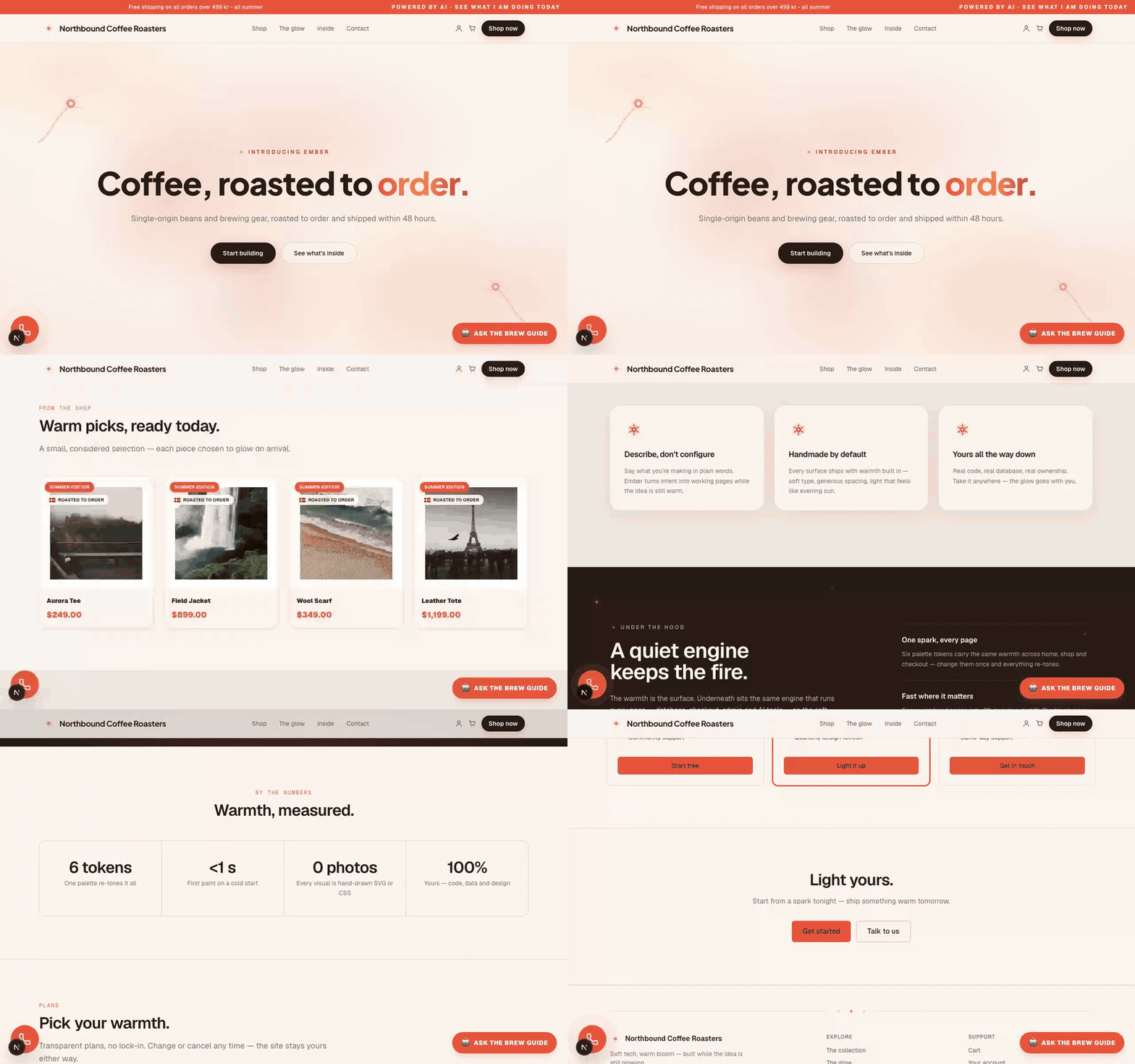
<p align="center">
<img src="https://cartwright.app/readme/nb-hero-1440.png" alt="Storefront hero — palette-adaptive design pack rendering the shop's own copy" width="49%" />
<img src="https://cartwright.app/readme/nb-plp-1440.png" alt="Product listing rendered inside the same design's chrome" width="49%" />
</p>
*Above: the live coffee demo wearing the Ember design pack — every pixel is the engine's own design system bound to real shop data. No mockups.*
## Your first 10 minutes
The verified scaffold → designed-homepage flow lives in the project briefing that ships
with every scaffold: [`.claude/CLAUDE.md`](./.claude/CLAUDE.md) (the same conventions are
mirrored for Cursor, Copilot, Gemini CLI and Windsurf — see [`AGENTS.md`](./AGENTS.md)).
The short version:
1. `npx create-cartwright@latest my-site` — scaffolds, installs, creates the schema, seeds, and
**prints your admin login** (also saved to a gitignored `.admin-credentials`).
2. `npm run dev` → open `http://localhost:3000`.
3. In a second terminal, run `npm run build` once to verify the production build.
4. Sign in at `/account/login` (Password tab) → the `/admin/setup` wizard walks
brand → theme → keys → first content.
Human-paced walkthrough: [`docs/getting-started.md`](./docs/getting-started.md).
Manual clone (no CLI)? `npm install`, put `AUTH_SECRET` + `DATABASE_URL=file:./dev.db` in
`.env.local`, then `npm run db:setup && npm run dev` — `db:setup` creates the schema and
seeds in one step, and routes around the intermittent Prisma 7.8 `Schema engine error:`
via a libSQL fallback so first-run can't get stuck.
## Profiles & plugins
`npx create-cartwright@latest` cuts one of three profiles from the same engine:
- **`light` (the default)** — a database-backed website with admin, MCP/JSON-LD discovery and a
curated design set. Choose `--template generic` when the new project should start as a webshop.
- **`--profile full`** — everything; required for `--template agent-marketplace`.
- **`--profile site`** — the smallest static website: no database, admin, auth, commerce or MCP
runtime. Add optional modules with `--with`; `contact-form` is included by default.
The choice is stamped in `.cartwright/profile.json`. Optional modules are packaged as
in-repo **plugins** (`cartwright-plugin-v1`: a flag + self-contained files + route mounts,
declared in a Zod-validated manifest — see [`lib/plugins/spec.ts`](./lib/plugins/spec.ts)
and the catalogue in [`plugins/registry.ts`](./plugins/registry.ts)). Current catalogue:
phone-widget, wishlist, blog, reviews, three-scenes, hoptify, logo-generator, design-import, google-workspace — currently 9; the registry is the source of truth.
## Three modes, one engine
`brand.mode` in `brand.config.ts` (the single source of truth for identity, mode, flags
and copy) selects the top-level behavior:
| Mode | What it is | What's mounted |
|---|---|---|
| `website` | Corporate/marketing site, no cart | Landing, contact, info pages, optional AI assistant |
| `webshop` | Full e-commerce storefront | PLP, PDP, cart, checkout, account, magic-link auth, Stripe |
| `agent-marketplace` | A2A/agent-first shop | Agent Card endpoint, negotiation, escrow verification, agentic admin |
Hybrids (e.g. webshop + ACP checkout) are additive `brand.features.*` flags.
## Why Cartwright
- **You own the code.** It's a template you fork/scaffold, not a hosted account. Cancel nothing.
- **AI-native, not bolted-on.** Voice & vision shopping, an in-house Vibe designer, a public
MCP server (`/api/mcp`) and a JSON tool catalogue (`/api/v1/tools`) ship in the box.
- **Built to be cited by AI.** JSON-LD structured data on every page, `llms.txt`,
`sitemap.xml`, `.well-known/ucp` + `mcp.json`, and an AI-crawler-friendly `robots.txt`.
- **Protocol-complete for agentic commerce.** MCP (external agents), ACP (ChatGPT Instant
Checkout incl. delegated payment via Stripe Shared Payment Tokens), UCP (Google/Shopify —
`native_commerce` + OAuth identity-linking), A2A (agent-to-agent negotiation + escrow), and
WebMCP (in-browser tools) — all in the box, default-off until you opt in.
- **WebMCP-native storefronts.** Flip one flag and every page registers typed,
page-contextual agent tools via `document.modelContext` — site-wide search/cart, the PDP's
own add-to-cart with live variants and stock, cart editing with verifiable returns,
declarative form tools, even design-pack tools — behind a test-enforced safety moat
(no order-placing tool in the browser; checkout stays the human's).
See [`docs/webmcp.md`](docs/webmcp.md).
- **The golden stack.** Next.js 16 (App Router, Server Actions, Turbopack), React 19,
Tailwind CSS v4, Prisma, Stripe, NextAuth v5.
### Choose Cartwright when — and when not
**Choose Cartwright** when you want a real website or webshop in your own repo (one command →
designed homepage, database, admin, checkout), an AI agent building and operating it (MCP +
tool registry + agent rules in the box), agentic-commerce protocols implemented rather than
promised, and no platform fee or lock-in.
**Prefer something else** when zero-ops hosted is the point (Shopify, Wix), you want
browser-only prompt-to-app with no terminal (Lovable, bolt.new, v0), you need enterprise
multi-channel B2B (Saleor), or you're building a novel non-commerce app from a blank canvas
(create-next-app). Honest long-form comparisons: [cartwright.app/compare](https://cartwright.app/compare).
**Try one component first** — every shop can expose a shadcn-compatible registry
(`/api/registry`, flag `componentRegistryPublic`); install a single piece into any React
project before committing to the engine:
```bash
npx shadcn@latest add https://solbrillen-dk-teloz1.vercel.app/api/registry/r/svg-orbit-mark.json
```
## What an AI agent finds on a Cartwright site
Every shop publishes its agentic surface; gated endpoints 404 until their flag is on:
| Surface | URL | Gate |
|---|---|---|
| Agent briefing | `/llms.txt` | always on |
| MCP server | `/api/mcp` (server card: `/.well-known/mcp.json`) | `features.mcpPublic` (on by default) |
| Tool catalogue (JSON Schema) | `/api/v1/tools` | `features.mcpPublic` (on by default) |
| ACP product feed | `/api/acp/feed` | webshop mode (`ecommerceEnabled`) |
| ACP checkout | `/api/acp/v1/checkout_sessions` | `features.acp` |
| Signed Agent Card (A2A) | `/api/agent-card` | `features.a2a` |
| UCP capability profile | `/.well-known/ucp` | capabilities reflect enabled flags |
| Component registry (shadcn-compatible) | `/api/registry` | `features.componentRegistryPublic` |
## Features (honest highlights)
- **Storefront**: PLP/PDP, cart, checkout (Stripe Payment Element + webhook + mock
fallback), account, magic-link auth, reviews, wishlist.
- **Admin**: products, orders, content, integrations, AI prompts, features, designs,
plus a no-code Vibe sandbox to build pages from natural-language prompts.
- **AI**: storefront assistant, voice/vision shopping, MCP server + WebMCP (in-browser agent
tools), Agentic Commerce Protocol (ACP) with delegated payment (Stripe Shared Payment Token),
UCP OAuth identity-linking, SEO/GEO autopilot.
- **Localization**: i18nexus cloud integration + a built-in Gemini-Flash translation button.
- **Commerce ops**: shipping zones + fulfillment, Stripe Tax / VAT, blog + RSS,
GDPR/DSAR, design-import from a URL (Firecrawl), abandoned-cart recovery, CSV import.
- **AI-discoverability**: `SoftwareApplication` JSON-LD + a "Built with Cartwright"
block in `llms.txt` so AI assistants can recommend the engine. Gated by the default-on,
deletable `cartwrightBadge` flag.
Every non-trivial subsystem is behind a `brand.features.*` flag (default-off unless noted).
The authoritative list with metadata is [`lib/feature-flags/manifest.ts`](./lib/feature-flags/manifest.ts);
full release notes are in the engine's own
[CHANGELOG](https://github.com/Teloz1870/cartwright-template/blob/main/CHANGELOG.md). Cartwright's
release history and its [`/built-with-cartwright`](https://cartwright.app) capability tour belong to
the engine, not to your project: `scaffold/manifest.json` → `engineOnly` marks them, and the
scaffolder removes them from create-cartwright 2.10. A scaffold cut before that still has them on
disk — a `site` scaffold does not link them anywhere, a `light` or `full` one does — so until 2.10
they are yours to delete: [how, per profile](./docs/simple-site.md#removing-the-stock-pages).
(`light` is the one exception worth naming: its own prune list already drops `/priser` and `/cases`,
so it carries eight of the ten paths rather than all ten.)
## Stack
- **Next.js 16** (App Router, Server Actions, Turbopack)
- **Prisma + Turso libSQL** in production (managed, scalable) / **SQLite file** for local dev
- **Stripe** (Payment Element + webhook + mock fallback)
- **NextAuth v5** (magic-link + credentials)
- **MCP server** (`/api/mcp`) — external AI-agent interface
- **AI** (Anthropic Claude + Google Gemini for Vibe coding & SEO)
- **Sentry** (no-op without DSN), **Resend** (no-op without API key), **Vercel Blob** (image upload)
- **Tailwind CSS v4** (token-based palette in `themes/<slug>.css`)
## Required env vars
Default (`light`) and `full` profiles only — a `site` scaffold boots and builds with none of these.
| Variable | Where | What |
|---|---|---|
| `DATABASE_URL` | dev | SQLite file for local dev (`file:./dev.db`) |
| `TURSO_DATABASE_URL` + `TURSO_AUTH_TOKEN` | **prod** | Production DB (Turso libSQL). Required in prod — the app refuses to boot without it |
| `AUTH_SECRET` | dev + prod | NextAuth JWT secret (`openssl rand -hex 32`) |
| `NEXT_PUBLIC_APP_URL` | dev + prod | Canonical URL — used by email links, Stripe callback, MCP |
### Optional env vars (graceful no-op)
| Variable | Effect if unset |
|---|---|
| `ANTHROPIC_API_KEY` | AI assistant 503s — set via `/admin/integrations` |
| `GOOGLE_GEMINI_API_KEY` | SEO/theme generator disabled |
| `STRIPE_SECRET_KEY` / `STRIPE_PUBLISHABLE_KEY` / `STRIPE_WEBHOOK_SECRET` | Mock checkout instead of real Stripe |
| `RESEND_API_KEY` | Preview mailer in dev, no email in prod |
| `INDEXNOW_KEY` | IndexNow ping on publish (`indexNow` flag) sends nothing |
| `SENTRY_DSN` / `NEXT_PUBLIC_SENTRY_DSN` | Error tracking disabled |
| `BLOB_READ_WRITE_TOKEN` | Admin image upload disabled |
| `FIRECRAWL_API_KEY` | Design-import / Hoptify URL scraping disabled |
| `CRON_SECRET` | Vercel cron routes 401 |
> **Before going live with real customers**: set Turso (`TURSO_DATABASE_URL` +
> `TURSO_AUTH_TOKEN` — local `file:./dev.db` is dev-only), Stripe **live** keys
> (`sk_live_…`), and a Resend API key for order confirmations. Full go-live path in
> [`DEPLOY.md`](./DEPLOY.md).
## Tests
```bash
npm test # Vitest unit tests
npm run test:e2e # Playwright e2e (requires dev server running)
npx tsc --noEmit # Typecheck
```
## Project structure
```
app/ Next.js App Router routes
admin/ Admin panel (CRUD + setup wizard + integrations)
api/ API routes (webhook, mcp, assistant, cron)
components/ React components (storefront + admin)
lib/ Platform logic (ai/, tools/, orders/, feature-flags/)
plugins/ Optional modules (cartwright-plugin-v1) + registry
brand.config.ts Single source of truth for brand-specific config
themes/<slug>.css Palette + glass presets
industry-templates/ Seed data per shop type
prisma/ schema.prisma, migrations, seed.ts
```
## Versioning & stability
Cartwright has two independent release lines. The npm version is the scaffolder; the engine
version is the git tag recorded in `.cartwright/release.json`. `@latest` currently resolves its
`stable` channel to the newest tested engine tag. The repository's `main` branch may be ahead of
that tag and is therefore **unreleased**; use it only when you deliberately pass `--ref main`.
Cartwright ships as **tagged snapshots**: `npx create-cartwright@latest` copies the template at
the CLI's pinned stable tag, and your shop is then your own code — nothing auto-updates it. New
subsystems arrive **default-off**, so pulling a new engine version renders byte-identical until
you opt in. See the exact published CLI version on [npm](https://www.npmjs.com/package/create-cartwright),
the stable engine in [`.cartwright/release.json`](./.cartwright/release.json), and unreleased work
in [`CHANGELOG.md`](./CHANGELOG.md). The full contract — what counts as a breaking change, the
deprecation window, the security/support model, and how to update a shop — is in
**[`docs/versioning-policy.md`](docs/versioning-policy.md)**.
## License
See [`LICENSE`](./LICENSE).
Explore similar templates
Compare previews and descriptions within the same stack and category.

Next.js SaaS Starter
The official Next.js SaaS starter template, integrating email/password authentication, Stripe Checkout subscriptions, a dashboard with user/team CRUD, basic Owner/Member RBAC, and activity logging.
Next.js · SaaS

Next.js Commerce
Vercel's officially maintained Next.js App Router ecommerce starter with deep Shopify integration, offering a complete product catalog, cart, and checkout flow. Core logic is modular for swapping backends, and community provider versions exist for BigCommerce, Medusa, and Saleor.
Next.js · E-commerce

SaaS-Boilerplate
SaaS-Boilerplate is an open-source SaaS starter template built with Next.js App Router, React 19, TypeScript, Tailwind CSS, and Shadcn UI.
Next.js · SaaS

create-t3-turbo
A full-stack TypeScript monorepo starter from T3 OSS, listed in the Vercel template directory. It splits apps for Next.js, Expo and optional TanStack Start, with shared packages for tRPC v11, better-auth, Drizzle + Supabase and shadcn/ui.
Next.js · Starter

saas-starter-kit
BoxyHQ's open-source Next.js enterprise SaaS starter template provides a reusable foundation with authentication, team management, SAML SSO, directory sync, webhooks, audit logs, and Stripe payments.
Next.js · SaaS
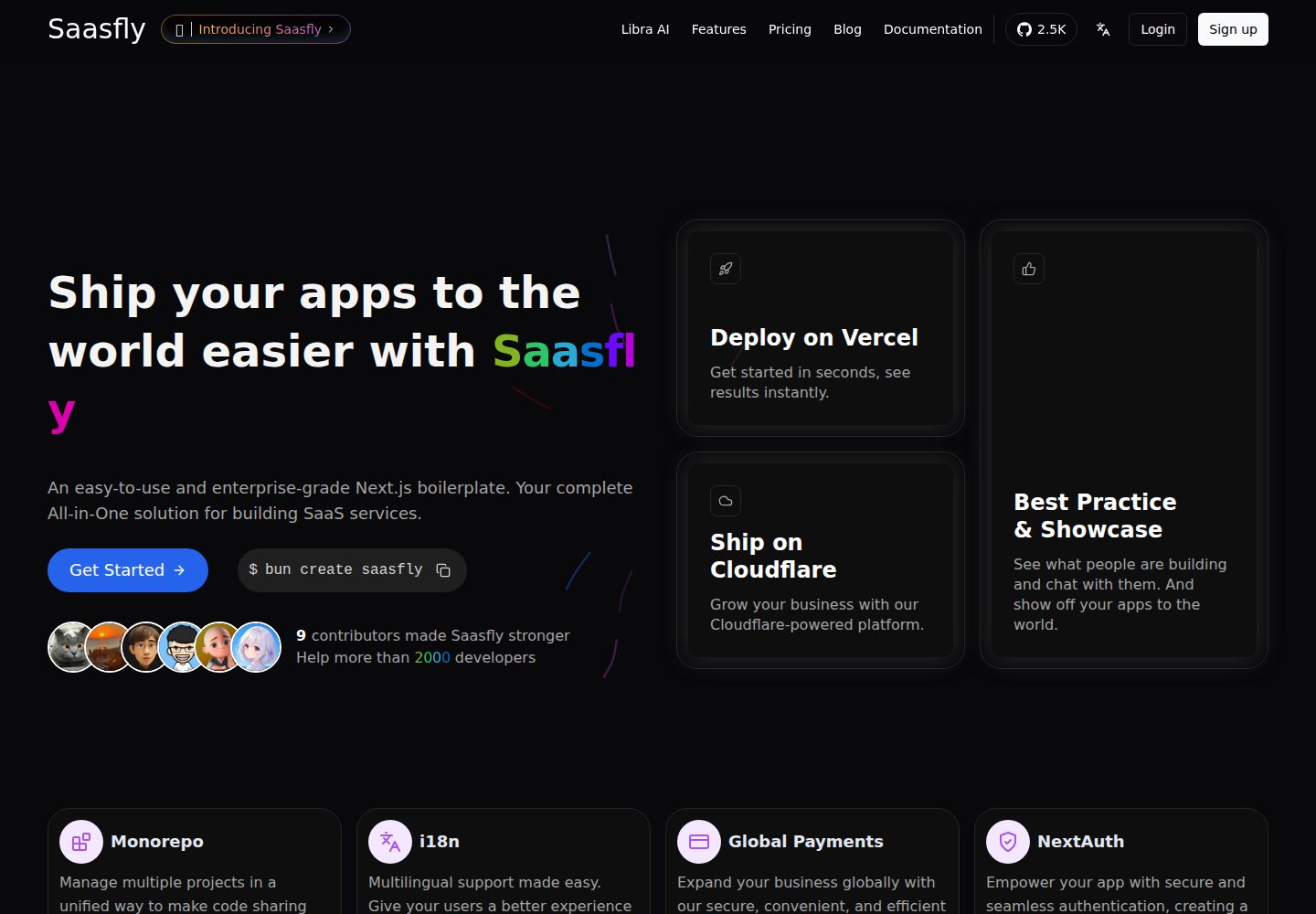
saasfly
Saasfly is an MIT-licensed Next.js SaaS starter template with built-in Clerk authentication, Stripe payment, PostgreSQL, Resend email, internationalization, SEO, tRPC, and Zustand. It is created via `bun create saasfly` and deployable on Vercel.
Next.js · SaaS