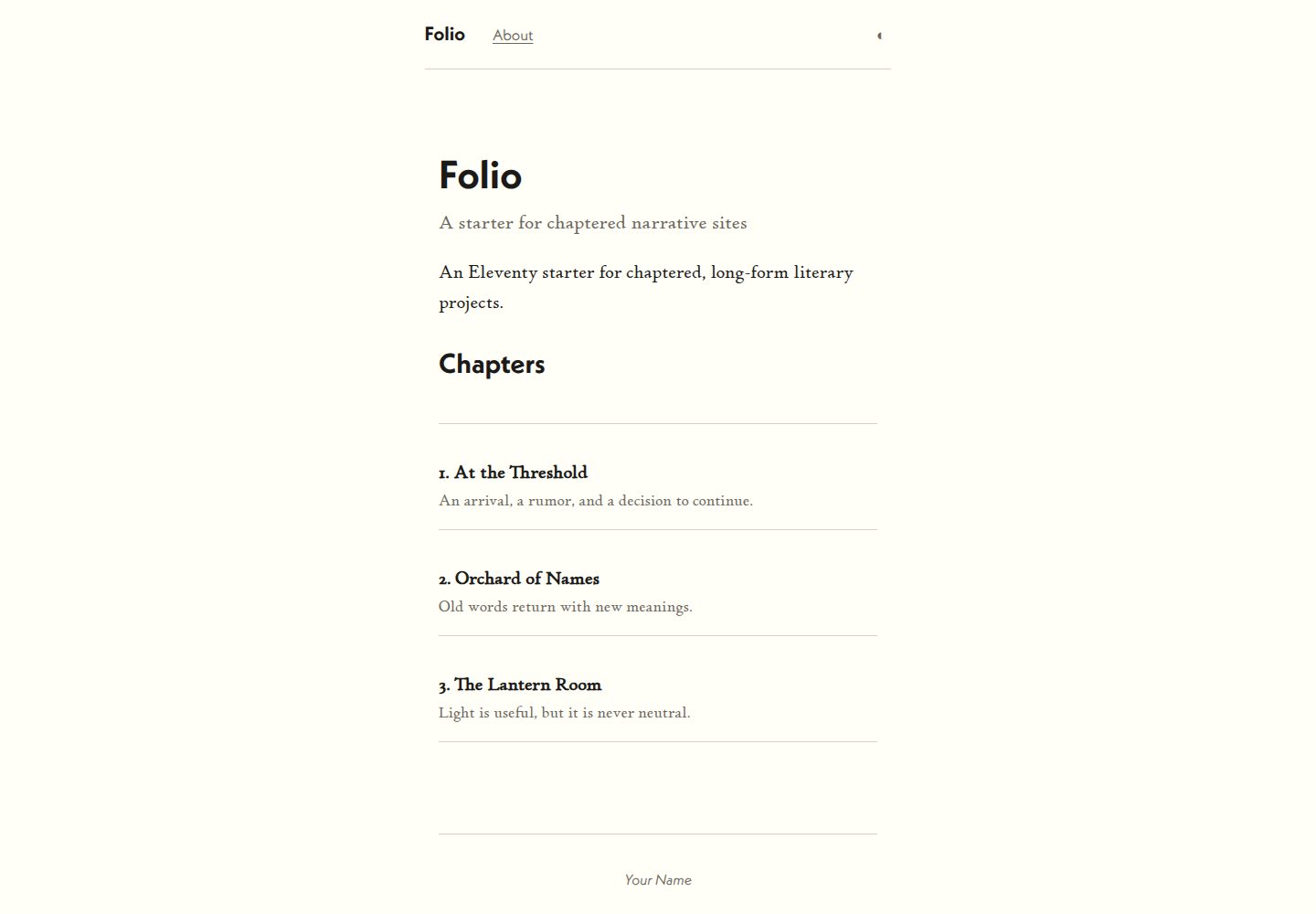
Chapters are sorted by the order field, falling back to 999 when missing, then by filename
EleventyStarter
eleventy-folio — Eleventy Starter Template
By tepiton
An Eleventy-based starter for chaptered literary sites, offering chapter ordering, previous/next chapter navigation, and a portable content directory.
Explore the design
Compare the page layouts and mobile experience. Open any screenshot for a closer look.
Desktop homepage1 / 3
Desktop captureTop of page
Actual screenshot captured by the server browser.
All pages & views 3
Screenshots show visual appearance; interactive behavior may differ.
Recorded 2026-09-30View source
What stands out
A quick read of the recorded project description.
Chapter pages include a numbered header and previous/next navigation, with an automatically generated table of contents
The content/ directory is self-contained and can be migrated among eleventy-pamphlet, eleventy-chapbook, and eleventy-folio
Deleting content/chapters/ switches to single-page work mode
Colors and fonts are adjusted centrally via CSS custom properties at the top of css/index.css
Includes a GitHub Pages workflow that builds and deploys on pushes to main and detects the path prefix
Template Details
eleventy-folio is an Eleventy starter for chaptered literary works, described in the repository as "chaptered literary sites." It belongs to a set of interoperable templates (eleventy-pamphlet, eleventy-chapbook, eleventy-folio) that share the same content/ directory structure, so switching templates changes the presentation without altering the content.
The template provides three page types by default: home, about, and chapter pages. Chapter files go under content/chapters/, and the order field in front matter controls the ordering in the table of contents and previous/next chapter navigation (when missing, it falls back to 999, then sorts by filename for determinism). An optional dek field displays a one-line subtitle in the table of contents. Chapter pages have a numbered header and previous/next chapter navigation. If the work is a single page, delete the content/chapters/ directory; index.md then becomes the entire work and inherits the base layout, with no chapter navigation or table of contents.
Site metadata is centralized in content/_data/metadata.js, including title, subtitle, URL, language, description, and author information; this keeps the content/ directory self-contained and easy to migrate between the three templates. Appearance is controlled via CSS custom properties at the top of css/index.css, including background, paper, body text, secondary text, divider, and accent colors, as well as font stacks for body and heading fonts. The template references Adobe Fonts' p22-stickley-pro-text and neue-kabel by default, with the kit ID in _includes/layouts/base.njk; replacing fonts requires updating both that file and the CSS variables.
For development, npm run start launches a development server with live reload at localhost:8084, npm run build outputs to _site/, and npm run debug includes Eleventy debug output. The repository includes .github/workflows/pages.yml, which builds and deploys to GitHub Pages on pushes to main and detects the repository name to set the path prefix automatically.
Limitations: the template does not state licensing for third-party fonts, images, or other assets in the provided information; these must be checked separately under their respective licenses. The code is MIT-licensed, allowing use, modification, commercial use, and distribution, provided the copyright and license notice are retained when distributing.
EleventyStarter
Is it right for your project?
Use Cases
- Building a serialized literary work site organized by chapters with a table of contents and previous/next navigation
- Creating a short work site with a single page of body text while reusing the same layout
- Switching presentation among multiple Eleventy literary templates while keeping the same content
- Quickly changing colors and fonts by modifying CSS custom properties to create different reading appearances
Suitable For
- Authors of literary sites who need to publish in chapters with table-of-contents navigation
- Eleventy users who want content and presentation separated for easy template switching
- Front-end developers who accept using Adobe Fonts or are willing to replace the font source themselves
Getting started & customization
Use these recorded setup notes alongside the repository instructions for your chosen version.
- 1
After cloning the repository, run npm install, then preview with npm run start at localhost:8084
- 2
Edit site title, subtitle, URL, language, description, and author information in content/_data/metadata.js
- 3
Place chapter files in content/chapters/; front matter must include title and order, with dek optional
- 4
Default fonts come from Adobe Fonts; the kit ID is in _includes/layouts/base.njk, and replacing fonts requires updating the CSS variables as well
- 5
npm run build outputs to _site/; pushing to main triggers .github/workflows/pages.yml to deploy to GitHub Pages
License & source material
Usage conditions & limitations
Free to use · keep license noticeThis entry covers the free version under the MIT license in the public repository; the free scope is the code of this version and does not mean external services or third-party assets are free.
Must comply with when using
- You may freely use, modify, commercially use, and distribute the code of this version.
- When distributing copies or substantial portions of the code, retain the original author's copyright notice and the full MIT license notice.
- The code is provided as is; warranties and limitations of liability are governed by the original license and applicable law.
Additional costs & items to verify
- The template's default fonts come from Adobe Fonts (Typekit) and require the Adobe Fonts service and its kit ID; if you do not subscribe or want to change fonts, you must replace the Typekit link in base.njk and update the CSS font variables yourself.
- The built-in deployment workflow relies on GitHub Pages and triggers a build and deployment on pushes to the main branch; using other hosting requires adjusting or removing the workflow.
- Demo images, fonts, icons, and other third-party assets must be checked under their respective licenses; the code's MIT license alone cannot be used to judge them.
- External services such as domains, hosting, databases, payments, or AI may incur separate charges.
View Original Text Basis
Permission is hereby granted, free of charge
Original License Text
This template uses `p22-stickley-pro-text` and `neue-kabel` from Adobe Fonts. The kit IDs are baked into `_includes/layouts/base.njk`.
Original README
https://github.com/tepiton/eleventy-folio/blob/main/LICENSEhttps://github.com/tepiton/eleventy-folio/blob/main/README.mdThe included `.github/workflows/pages.yml` builds and deploys to GitHub Pages on push to `main`.
Original README
Compiled by DeepSeek based on repository license and README ·2026-10-01. Results only cover the materials read; dependencies, images, fonts, and subsequent term changes are subject to their respective original texts.
Project checks & description sources
Template Information
- Source platforms
- GitHub
- Documentation and maintenance reference score
- More documented · 80 / 100
- Technologies
- Eleventy
- Website type
- Starter
How this score is calculated
Our heuristic uses license records (up to 30), a demo link (12), a preview (10), stars (15), recorded maintenance (15), description completeness (8), feature records (5) and classification data (5). It is not a code, security or performance test, or a Google score. A link does not establish tested functionality.
What to verify for this project
- Repository update recorded
- 2026-09-12
- Screenshot last checked
- 2026-10-01
A demo link is listed. Check it with your own content and viewport sizes; its presence does not confirm that forms, authentication or payments work.
The catalog identifies Eleventy as the primary stack. Check the actual dependency manifest and lockfile for versions and hosting requirements. These notes use recorded metadata, not a code audit or a deployment test.
Use a selection guide →How this description was prepared
AI-assisted description based on catalog records and repository material. Repository authors are not automatically the reviewers of this description.
Automatically checked against source and license rules; no manual editorial review.
Inspect the recorded source material
SHA-256: 7589bf8995909a59b845f9ed06375e4e7ef067396f92747a4c393bb9bd60dd91
2026-10-01T15:18:05.924Z
Source file / repository# eleventy-folio
An Eleventy v3 starter for chaptered literary sites. Polished defaults, extra features.
Part of a family of interoperable templates:
- **eleventy-pamphlet** - minimal, single layout
- **eleventy-chapbook** - separate layouts, feature-rich
- **eleventy-folio** (this) - polished, with extras
The `content/` directory is portable across all three. Swap templates to change the presentation without touching your content.
## Quick start
```
git clone <this-repo> my-project
cd my-project
npm install
npm run start
```
Then open `http://localhost:8084`.
## Customization
### Site metadata
Edit `content/_data/metadata.js`:
```js
export default {
title: "Your Literary Work",
subtitle: "A subtitle or tagline",
url: "https://example.com/",
language: "en",
description: "A description of this work.",
author: {
name: "Your Name",
email: "[email protected]",
url: "https://example.com/"
}
}
```
Note: `metadata.js` lives inside `content/_data/` so the entire `content/` directory is self-contained and portable.
### Single-page vs multi-chapter
**Multi-chapter works:** Add files to `content/chapters/`. Each needs front matter:
```yaml
---
title: The Title of This Chapter
order: 1
dek: Optional one-line subtitle shown in the TOC
---
```
- `order` controls sort order in the TOC and prev/next navigation
- `dek` is optional
- Filename determines the URL: `01-threshold.md` → `/chapters/01-threshold/`
- Chapter pages get a numbered header and prev/next navigation
**Chapter sorting:** Chapters are sorted by `order` property (ascending, fallback to 999 if missing), then by filename alphabetically for determinism.
**Single-page works:** Delete the `content/chapters/` directory entirely. Your `index.md` becomes the whole work. It inherits the base layout with no chapter navigation or TOC.
### Home page
Edit `content/index.md`. The chapter list is generated automatically.
### About page
Edit `content/about.md`.
### Fonts, colors, and styles
Colors are CSS custom properties at the top of `css/index.css`:
```css
:root {
--bg: #faf6ee; /* page background */
--paper: #fffdf8; /* main content column */
--ink: #1c1a18; /* body text */
--muted: #6d685f; /* secondary text, captions */
--rule: #d6d0c6; /* borders and dividers */
--accent: #8d3f2b; /* links */
}
```
Change any of these to retheme the site without touching the rest of the stylesheet.
**Body font:** The body font stack uses CSS custom properties in `css/index.css`:
```css
:root {
--font-body: p22-stickley-pro-text, neue-kabel, Palatino, Georgia, serif;
--font-heading: neue-kabel, 'Gill Sans', 'Helvetica Neue', sans-serif;
}
```
**Adobe Fonts (Typekit):** This template uses `p22-stickley-pro-text` and `neue-kabel` from Adobe Fonts. The kit IDs are baked into `_includes/layouts/base.njk`. To use different fonts, replace the Typekit `<link>` tags and update the CSS variables.
**Other web fonts:** Add a `<link>` to your font provider in `_includes/layouts/base.njk` and update the `--font-body` and `--font-heading` variables in `css/index.css` to match.
## Project structure
```
content/
_data/
metadata.js # Title, subtitle, author, URL
index.md # Home page
about.md # About / colophon
chapters/
chapters.11tydata.js # Layout for all chapters
01-threshold.md
02-orchard.md
...
_includes/
layouts/
base.njk # HTML shell
home.njk # Home page layout
chapter.njk # Chapter layout with prev/next
css/
index.css # All styles
```
The `content/` directory is designed to be portable. Copy it to eleventy-pamphlet or eleventy-chapbook to get a different presentation with the same content.
## npm scripts
| Command | Description |
|:--------|:------------|
| `npm run start` | Dev server at `localhost:8084` with live reload |
| `npm run build` | Production build to `_site/` |
| `npm run debug` | Build with Eleventy debug output |
## Deploy
The included `.github/workflows/pages.yml` builds and deploys to GitHub Pages on push to `main`. No configuration needed for custom domains — the workflow detects the repo name and sets the path prefix automatically.
Explore similar templates
Compare previews and descriptions within the same stack and category.

eleventy-base-blog
The officially maintained Eleventy blog starter template, MIT licensed, includes posts, tag pages, archives, an about page, a 404 page, an Atom feed, and sitemap.xml, with per-page CSS bundling, syntax highlighting, and image optimization.
Eleventy · Blog

eleventy-garden
An Eleventy-based digital garden starter template for building a personal knowledge site organized through hyperlinks. It supports Roam-style double-bracket links, backlink display, and hover cards for backlinks.
Eleventy · Starter

eleventastic
Eleventastic is an Eleventy starter kit by Max Böck, used as the base for new 11ty projects. It integrates Sass, Webpack, SVG icon sprites, critical CSS, and HTML minification into the 11ty build without external steps.
Eleventy · Starter

neat-starter
An Eleventy-based static site starter template integrating Netlify CMS, Alpine.js, and Tailwind CSS. It provides a ready-to-run example site, a one-click Netlify deploy button, and an MIT-licensed codebase.
Eleventy · Starter

Eleventy-Starter-Boilerplate
An Eleventy-based blog starter template with Tailwind CSS, Webpack, PostCSS, ESLint, and Prettier, optional Netlify CMS, and built-in SEO metadata, sitemap, and 404 page.
Eleventy · Blog

eleventy-plus-vite
A static site starter combining Eleventy and Vite, with a live-reloading development server, Vite-based production post-processing, a PostCSS pipeline with Autoprefixer and cssnano, critical CSS inlining and asynchronous CSS loading, a web font loading strategy example, fluid typography, basic dark mode, an…
Eleventy · Starter