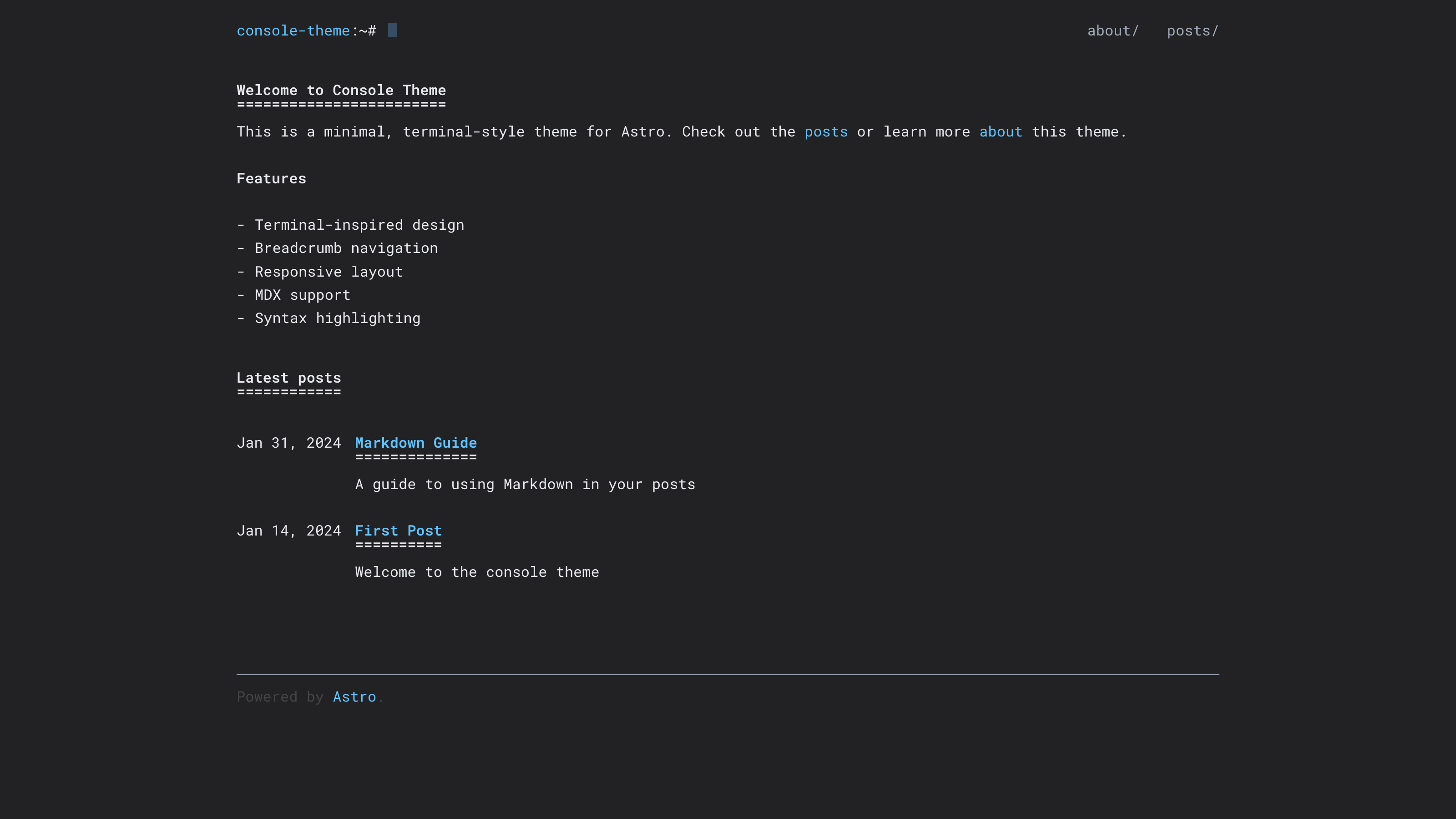
Minimal terminal-style design, ported from hugo-theme-console to Astro
AstroBlog
astro-theme-console — Astro Blog Template
By thaske
astro-theme-console is a developer-focused Astro blog theme with a terminal-style design, offering breadcrumb navigation, responsive layout, and MDX support. It is ported from hugo-theme-console.
Explore the design
Compare the page layouts and mobile experience. Open any screenshot for a closer look.
Author preview
Author-provided preview
Preview provided in the project README.
One original preview is available. Open the full image to inspect the design.
Screenshots show visual appearance; interactive behavior may differ.
Recorded 2026-10-04View source
What stands out
A quick read of the recorded project description.
Provided as Astro components including Layout, Header, Footer, and PostListItem, with shared metadata centralized in src/consts.ts
Blog posts placed in src/content/blog/, supporting .md and .mdx, with frontmatter containing title, description, pubDate, tags, and draft
Built-in breadcrumb navigation, responsive layout, and post list with dates
SEO meta tags and Shiki syntax highlighting
Optional Google Analytics, enabled by passing analyticsId to Layout
Template Details
astro-theme-console is an Astro blog theme maintained by thaske. The README describes it as a "minimal terminal-style theme for developers" and notes that it is ported from hugo-theme-console. The theme is provided as components, including Astro components such as Layout, Header, Footer, and PostListItem. Shared metadata such as site title, description, and analytics ID is centralized in src/consts.ts.
For content organization, the theme expects blog posts to be placed in the src/content/blog/ directory, supporting .md and .mdx files. Each post provides title, description, pubDate, tags, and draft fields via frontmatter. In terms of features, the README lists: terminal-style design, breadcrumb navigation, responsive layout, post list with dates, MDX support, SEO meta tags, Shiki syntax highlighting, and optional Google Analytics (enabled by passing analyticsId to Layout). The repository's example directory provides a complete, runnable example site.
Regarding usage limitations, the theme is installed from the GitHub repository via bun add github:thaske/astro-theme-console; the README does not provide an npm package name or version release information. The repository has 0 stars, and the materials do not include information about maintenance activity, browser compatibility range, or accessibility support. The license is MIT, allowing free use, modification, commercial use, and distribution, but third-party assets such as demo images, fonts, and icons must be checked separately under their respective licenses, and external services such as domains and hosting may incur additional charges.
AstroBlog
Is it right for your project?
Use Cases
- Building a personal developer blog with posts written in Markdown or MDX
- Wanting a site with a terminal/console visual style rather than conventional magazine-style layout
- Needing a post list that displays dates and tags, along with breadcrumb navigation
- Referencing theme components directly in an Astro project and organizing page structure yourself
- Using the repository's example directory to quickly understand the theme's full usage
Suitable For
- Developers using Astro and familiar with component-based development
- Personal blog authors who prefer a minimal, terminal-style interface
- Technical content creators who write in Markdown/MDX and need syntax highlighting
- Users who want to freely modify and distribute the theme code under the MIT license
Getting started & customization
Use these recorded setup notes alongside the repository instructions for your chosen version.
- 1
Install from the GitHub repository via bun add github:thaske/astro-theme-console; the README does not provide an npm package name
- 2
Posts must be placed in the src/content/blog/ directory, with frontmatter using title, description, pubDate, tags, and draft fields
- 3
Shared metadata such as site title, description, and analytics ID is recommended to be centralized in src/consts.ts
- 4
Enabling Google Analytics requires passing analyticsId to the Layout component
- 5
The repository's example directory provides a complete, runnable example site that can serve as a configuration reference
License & source material
Usage conditions & limitations
Free to use · keep license noticeThis entry covers the free version under the MIT license from the public repository; the free scope applies to that version's code and does not imply that external services or third-party assets are free.
Must comply with when using
- The code of this version may be used, modified, used commercially, and distributed free of charge.
- When distributing copies or substantial portions of the code, retain the original author's copyright notice and the full MIT license notice.
- The code is provided as is; warranties and limitations of liability are governed by the original license and applicable law.
Additional costs & items to verify
- Google Analytics is an optional feature; enabling it requires passing analyticsId to Layout and depends on Google's external services and account.
- The README only provides installation from the GitHub repository and does not provide an npm package name or version release information.
- Demo images, fonts, icons, and other third-party assets must be checked under their respective licenses and cannot be judged solely by the code's MIT license.
- External services such as domains, hosting, databases, payments, or AI may incur additional charges.
View Original Text Basis
Permission is hereby granted, free of charge
Original License Text
Google Analytics support (optional)
Original README
https://github.com/thaske/astro-theme-console/blob/master/LICENSEhttps://github.com/thaske/astro-theme-console/blob/master/README.mdbun add github:thaske/astro-theme-console
Original README
Compiled by DeepSeek based on repository license and README ·2026-10-04. Results only cover the materials read; dependencies, images, fonts, and subsequent term changes are subject to their respective original texts.
Project checks & description sources
Template Information
- Source platforms
- GitHub
- Documentation and maintenance reference score
- Partly documented · 68 / 100
- Technologies
- Astro
- Website type
- Blog
How this score is calculated
Our heuristic uses license records (up to 30), a demo link (12), a preview (10), stars (15), recorded maintenance (15), description completeness (8), feature records (5) and classification data (5). It is not a code, security or performance test, or a Google score. A link does not establish tested functionality.
What to verify for this project
- Repository update recorded
- 2025-10-16
- Screenshot last checked
- 2026-10-04
No demo link is recorded. Use the repository instructions to evaluate the project locally; the screenshot alone cannot establish interactive behavior.
The catalog identifies Astro as the primary stack. Check the actual dependency manifest and lockfile for versions and hosting requirements. These notes use recorded metadata, not a code audit or a deployment test.
Use a selection guide →How this description was prepared
AI-assisted description based on catalog records and repository material. Repository authors are not automatically the reviewers of this description.
Review declaration: [email protected] · 2026-10-04
Inspect the recorded source material
SHA-256: 18250d60e07fbd6d502f17a9cd1ffba377222954519e98013ad5257d02264de4
2026-10-04T00:26:20.628Z
Source file / repository# Astro Theme Console
A minimal, terminal-style theme for Astro. Features a clean, console-inspired design with breadcrumb navigation and responsive layout. Ported from [hugo-theme-console](https://github.com/mrmierzejewski/hugo-theme-console).
## Features
- Terminal-inspired design
- Breadcrumb navigation
- Responsive layout
- Blog post listing with dates
- MDX support
- SEO-friendly meta tags
- Syntax highlighting with Shiki
- Google Analytics support (optional)
## Screenshots
<div style="display: flex; flex-direction: column; gap: 1rem;">
<img src="images/home.png" alt="Home Screenshot" width="500" />
<img src="images/about.png" alt="About Screenshot" width="500" />
<img src="images/posts.png" alt="Posts Screenshot" width="500" />
<img src="images/post.png" alt="Post Screenshot" width="500" />
</div>
## Installation
```bash
bun add github:thaske/astro-theme-console
```
## Usage
### Using Components
Import components directly from the theme, and centralize shared metadata in a `src/consts.ts` file (just like the example project):
```astro
---
import Layout from "@thaske/astro-theme-console/layouts/Layout.astro";
import Header from "@thaske/astro-theme-console/components/Header.astro";
import Footer from "@thaske/astro-theme-console/components/Footer.astro";
import PostListItem from "@thaske/astro-theme-console/components/PostListItem.astro";
import { ANALYTICS_ID, SITE_DESCRIPTION, SITE_TITLE } from "../consts";
---
<Layout
title={SITE_TITLE}
description={SITE_DESCRIPTION}
analyticsId={ANALYTICS_ID}
>
<h1>Hello World</h1>
</Layout>
```
Example `src/consts.ts`:
```ts
export const SITE_TITLE = "mysite";
export const SITE_DESCRIPTION = "A minimal, terminal-style blog";
export const ANALYTICS_ID = "G-XXXXXXXXXX";
```
### Configuration
The theme expects the following structure for blog posts:
```
src/
content/
blog/
post-1.md
post-2.mdx
```
Each blog post should have frontmatter like:
```yaml
---
title: "Post Title"
description: "Post description"
pubDate: 2024-01-01
tags: ["tag1", "tag2"]
draft: false
---
```
### Google Analytics
To enable Google Analytics, pass your tracking ID to the Layout component:
```astro
<Layout analyticsId="G-XXXXXXXXXX">
<!-- content -->
</Layout>
```
## Example Site
See the `example` directory for a complete working example.
## License
MIT
Explore similar templates
Compare previews and descriptions within the same stack and category.

astrowind
AstroWind is a free, open-source Astro starter theme using Astro and Tailwind CSS, released under the MIT license.
Astro · Blog

astro-paper
AstroPaper is a minimal, responsive, accessible, and SEO-friendly Astro blog theme. Articles are stored as Markdown/MDX in src/content/posts/, with subdirectories affecting URLs.
Astro · Blog

fuwari
Fuwari is a static blog template built with Astro and Tailwind CSS for personal blogs. It manages posts as Markdown files in src/content/posts/, with frontmatter for title, date, description, cover, tags, categories, draft status, and language.
Astro · Blog

Firefly
Firefly is a clean personal blog theme forked from Astro and Fuwari, offering four background modes, single/double sidebar and list/grid layouts, Pagefind client-side full-text search, and a six-language UI.
Astro · Blog

astro-theme-cactus
Astro Cactus is an Astro-based blog and portfolio theme that uses Markdown/MDX content collections to manage posts, notes, and tags, with frontmatter type-checked by a schema.
Astro · Portfolio

astrofy
Astrofy is a free and open-source personal portfolio website template built with Astro and TailwindCSS, with built-in blog, CV timeline, project showcase, store, and RSS feed modules.
Astro · Portfolio