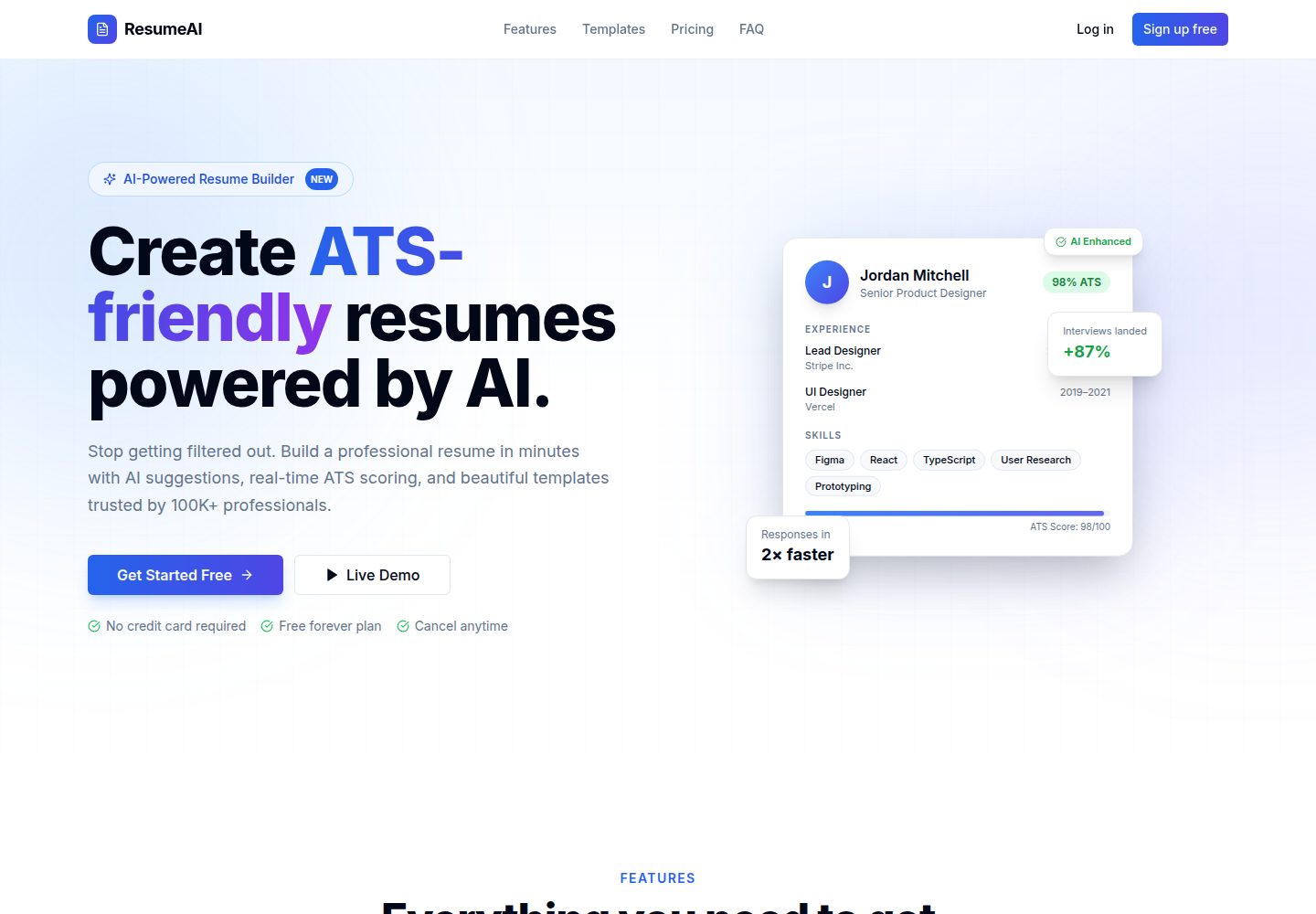
Drag-and-drop resume editor with 6+ built-in templates and live preview
Next.jsReactPortfolioSaaS
ResumeAI — Next.js Portfolio Template
By theclashers696-bot
ResumeAI is an AI resume builder based on Next.js 14 and TypeScript, offering a drag-and-drop editor, Gemini content generation, ATS analysis, resume import, cover letter generation, career insights, interview preparation, analytics, and PDF/DOCX export, using PostgreSQL and Prisma for data storage.
Explore the design
Compare the page layouts and mobile experience. Open any screenshot for a closer look.
Desktop homepage1 / 2
Desktop captureTop of page
Actual screenshot captured by the server browser.
All pages & views 2
Screenshots show visual appearance; interactive behavior may differ.
Recorded 2026-10-14View source
What stands out
A quick read of the recorded project description.
AI autofill and content improvement powered by Google Gemini 2.5 Flash
ATS analysis against job descriptions with scoring
Resume import by uploading PDF, DOCX, TXT, or JSON files
AI-generated cover letters with tone matching, plus role-based interview questions
PDF / DOCX export, share link analytics, and dark mode
Template Details
ResumeAI is an AI-powered resume builder. Its README describes features including a drag-and-drop resume editor, 6+ templates, live preview, autofill and content improvement powered by Google Gemini, ATS analysis against job descriptions, PDF/DOCX/TXT/JSON resume import, AI-generated cover letters with tone matching, career intelligence such as salary ranges and skill gaps, role-based interview questions, view/download/share link analytics, PDF and DOCX export, and dark mode. The tech stack is Next.js 14 App Router, TypeScript (strict), PostgreSQL with Prisma ORM, better-auth (email + Google + GitHub OAuth), Google Gemini 2.5 Flash, Cloudinary image storage, Tailwind CSS + Radix UI, and Framer Motion. The project structure includes authentication pages, a dashboard, API routes, public resume share pages, editor components, an import flow, an autosave recovery dialog, global search, AI integrations and prompts, a resume parser, and an in-memory rate limiter. The README also mentions a virus scanning architecture stub. For deployment, Vercel is recommended, Neon can be used for the database, and Cloudinary must be configured. The README does not provide information about performance, concurrency capacity, or production readiness.
Next.jsReactPortfolioSaaS
Is it right for your project?
Use Cases
- Job seekers who need to quickly generate or optimize resume content
- Users who want to check their resume's ATS match against a specific job description
- Scenarios where an existing PDF, DOCX, TXT, or JSON resume needs to be converted into an editable format
- Job application preparation that requires a cover letter and interview questions for a specific role
- Users who want to view view and download data for resume share links
Suitable For
- Developers with a Node.js 20+, pnpm 8+, and PostgreSQL environment who want to self-deploy
- Teams that need a Google Gemini API key and a Cloudinary account to enable AI and image storage features
- Projects that want to build on the Next.js 14, TypeScript, Prisma, and better-auth stack for secondary development
Getting started & customization
Use these recorded setup notes alongside the repository instructions for your chosen version.
- 1
Environment requirements: Node.js 20+, pnpm 8+, a PostgreSQL database (such as Neon), a Google Gemini API key, and a Cloudinary account.
- 2
After cloning the repository, run pnpm install, copy .env.example to .env.local, and fill in all environment variables.
- 3
Required environment variables include DATABASE_URL, BETTER_AUTH_SECRET, BETTER_AUTH_URL, NEXT_PUBLIC_APP_URL, GEMINI_API_KEY, and three CLOUDINARY_* variables; Google and GitHub OAuth credentials are optional.
- 4
Run pnpm exec prisma generate and pnpm exec prisma db push to initialize the database, then run pnpm dev; the app runs at http://localhost:5000 by default.
- 5
The README recommends deploying with Vercel and notes to set BETTER_AUTH_URL and NEXT_PUBLIC_APP_URL to the Vercel deployment address.
License & source material
Usage conditions & limitations
Free to use · keep license noticeThis entry covers the free version under the MIT license in the public repository; the free scope is the code of that version and does not mean external services or third-party assets are free.
Must comply with when using
- Free use, modification, commercial use, and distribution of that version's code are permitted.
- When distributing copies or substantial portions of the code, retain the original author's copyright notice and the full MIT license notice.
- The code is provided as is; warranties and limitations of liability are governed by the original license and applicable law.
Additional costs & items to verify
- Demo images, fonts, icons, and other third-party assets must be checked against their respective licenses and cannot be judged solely by the code's MIT license.
- External services such as domains, hosting, databases, payments, or AI may incur separate charges.
- Using features such as AI autofill, content improvement, cover letter generation, and interview question generation requires applying for and configuring your own Google Gemini API key.
- Image storage functionality depends on a Cloudinary account, and you must register and configure the relevant credentials yourself.
- Running this project requires providing your own PostgreSQL database (for example, Neon) and configuring the connection string.
- GEMINI_API_KEY is a required environment variable; without this key, AI features that depend on Gemini cannot be used.
- CLOUDINARY_CLOUD_NAME is a required environment variable; without Cloudinary configuration, image storage functionality cannot be used.
- DATABASE_URL is a required environment variable; a PostgreSQL connection string must be provided to run.
- Cloudinary requires creating an account (the README states a free account can be created) and obtaining credentials before image storage can be used.
- The database requires creating a project on a platform such as Neon and obtaining a connection string.
View Original Text Basis
Permission is hereby granted, free of charge
Original License Text
- Google Gemini API key
Original README
- Cloudinary account
Original README
- PostgreSQL database (e.g. [Neon](https://neon.tech))
Original README
| `GEMINI_API_KEY` | ✅ | Google Gemini API key |
Original README
| `CLOUDINARY_CLOUD_NAME` | ✅ | Cloudinary cloud name |
Original README
| `DATABASE_URL` | ✅ | PostgreSQL connection string |
Original README
1. Create a free account at [cloudinary.com](https://cloudinary.com)
Original README
https://github.com/theclashers696-bot/ResumeAI/blob/main/LICENSEhttps://github.com/theclashers696-bot/ResumeAI/blob/main/README.md1. Create a project at [neon.tech](https://neon.tech)
Original README
Compiled by DeepSeek based on repository license and README ·2026-10-14. Results only cover the materials read; dependencies, images, fonts, and subsequent term changes are subject to their respective original texts.
Project checks & description sources
Template Information
- Source platforms
- GitHub
- Documentation and maintenance reference score
- More documented · 85 / 100
- Technologies
- Next.js · React
- Website type
- Portfolio · SaaS
How this score is calculated
Our heuristic uses license records (up to 30), a demo link (12), a preview (10), stars (15), recorded maintenance (15), description completeness (8), feature records (5) and classification data (5). It is not a code, security or performance test, or a Google score. A link does not establish tested functionality.
What to verify for this project
- Repository update recorded
- 2026-07-04
- Screenshot last checked
- 2026-10-14
A demo link is listed. Check it with your own content and viewport sizes; its presence does not confirm that forms, authentication or payments work.
The catalog identifies Next.js as the primary stack. Check the actual dependency manifest and lockfile for versions and hosting requirements. These notes use recorded metadata, not a code audit or a deployment test.
Use a selection guide →How this description was prepared
AI-assisted description based on catalog records and repository material. Repository authors are not automatically the reviewers of this description.
Review declaration: codex-user-requested-batch-review-20261015 · 2026-10-15
Inspect the recorded source material
SHA-256: abc4af3b2365ef1ca2b0722cfcf106bdb2a8d9332686323d83f376e8f3654ca0
2026-10-14T22:56:24.235Z
Source file / repository# ResumeAI — Build Your Perfect Resume > AI-powered resume builder with ATS optimization, beautiful templates, and intelligent career insights. [](https://www.typescriptlang.org/) [](https://nextjs.org/) [](https://www.prisma.io/) --- ## Features | Feature | Description | |---|---| | **Resume Builder** | Drag-and-drop editor, 6+ templates, real-time preview | | **AI Autofill** | Gemini-powered content generation and improvement | | **ATS Analysis** | Score your resume against job descriptions | | **Resume Import** | Upload PDF, DOCX, TXT or JSON and convert instantly | | **Cover Letters** | AI-generated, tone-matched cover letters | | **Career Intelligence** | Salary ranges, skill gaps, learning roadmap | | **Interview Prep** | AI-generated question sets per role | | **Analytics** | View counts, downloads, share link performance | | **PDF / DOCX Export** | High-fidelity one-click export | | **Dark Mode** | Full system/manual dark mode support | <img width="1280" height="720" alt="17831799398824751706160592746534" src="https://github.com/user-attachments/assets/a93efe90-e441-4f21-adcd-52633d4dbbbd" /> <img width="1280" height="720" alt="17831799645353934490582315865487" src="https://github.com/user-attachments/assets/c31b08f1-2bd8-42eb-ac90-c94a37cdd091" /> <img width="1280" height="720" alt="17831799953323199151599915476132" src="https://github.com/user-attachments/assets/d9d187f9-3004-4eba-949f-3616dbd1f16c" /> <img width="1280" height="720" alt="17831800212186828716270617262540" src="https://github.com/user-attachments/assets/adc5e3f8-a382-40fe-b2bf-0bc33af30cc1" /> --- ## Tech Stack - **Framework**: Next.js 14 (App Router) - **Language**: TypeScript (strict) - **Database**: PostgreSQL via Prisma ORM - **Auth**: better-auth (email + Google + GitHub OAuth) - **AI**: Google Gemini 2.5 Flash - **Storage**: Cloudinary (images) - **Styling**: Tailwind CSS + Radix UI - **Animations**: Framer Motion --- ## Getting Started ### Prerequisites - Node.js 20+ - pnpm 8+ - PostgreSQL database (e.g. [Neon](https://neon.tech)) - Google Gemini API key - Cloudinary account ### Installation ```bash # 1. Clone the repository git clone https://github.com/your-org/resumeai.git cd resumeai # 2. Install dependencies pnpm install # 3. Copy environment variables cp .env.example .env.local # 4. Fill in your .env.local values (see Environment Variables section) # 5. Generate Prisma client and push schema pnpm exec prisma generate pnpm exec prisma db push # 6. Start the development server pnpm dev ``` The app runs on [http://localhost:5000](http://localhost:5000). --- ## Environment Variables Copy `.env.example` to `.env.local` and fill in every value. See the file for descriptions. | Variable | Required | Description | |---|---|---| | `DATABASE_URL` | ✅ | PostgreSQL connection string | | `BETTER_AUTH_SECRET` | ✅ | 32+ char secret (generate with `openssl rand -base64 32`) | | `BETTER_AUTH_URL` | ✅ | Your app's public URL | | `NEXT_PUBLIC_APP_URL` | ✅ | Same as above (public) | | `GEMINI_API_KEY` | ✅ | Google Gemini API key | | `CLOUDINARY_CLOUD_NAME` | ✅ | Cloudinary cloud name | | `CLOUDINARY_API_KEY` | ✅ | Cloudinary API key | | `CLOUDINARY_API_SECRET` | ✅ | Cloudinary API secret | | `GOOGLE_CLIENT_ID` | ☑️ | Google OAuth (optional) | | `GOOGLE_CLIENT_SECRET` | ☑️ | Google OAuth (optional) | | `GITHUB_CLIENT_ID` | ☑️ | GitHub OAuth (optional) | | `GITHUB_CLIENT_SECRET` | ☑️ | GitHub OAuth (optional) | --- ## Database ```bash # Push schema to database pnpm exec prisma db push # Open Prisma Studio (database browser) pnpm exec prisma studio # Generate client after schema changes pnpm exec prisma generate ``` --- ## Deployment ### Vercel (recommended) 1. Push to GitHub 2. Import project in [Vercel](https://vercel.com) 3. Set all environment variables in Vercel dashboard 4. Deploy > **Important**: Set `BETTER_AUTH_URL` and `NEXT_PUBLIC_APP_URL` to your Vercel deployment URL. ### Database (Neon) 1. Create a project at [neon.tech](https://neon.tech) 2. Copy the connection string to `DATABASE_URL` 3. Run `pnpm exec prisma db push` against the production database ### Cloudinary 1. Create a free account at [cloudinary.com](https://cloudinary.com) 2. Find your credentials in the Dashboard 3. Set `CLOUDINARY_CLOUD_NAME`, `CLOUDINARY_API_KEY`, `CLOUDINARY_API_SECRET` --- ## Project Structure ``` src/ ├── app/ │ ├── (auth)/ # Login, register pages │ ├── (dashboard)/ # All authenticated pages │ ├── api/ # API routes │ ├── r/ # Public resume share pages │ ├── layout.tsx # Root layout + metadata │ ├── sitemap.ts # Dynamic sitemap │ ├── robots.ts # Robots.txt │ └── manifest.ts # PWA manifest ├── components/ │ ├── editor/ # Resume editor panels │ ├── import/ # Import flow components │ ├── layout/ # Shell, sidebar, nav │ ├── recovery/ # Autosave recovery dialog │ ├── resume/ # Resume preview + templates │ ├── search/ # Global search │ └── ui/ # Design system components ├── hooks/ # React hooks ├── lib/ │ ├── ai/ # Gemini integration + prompts │ ├── auth.ts # better-auth config │ ├── db.ts # Prisma client │ ├── rate-limit.ts # In-memory rate limiter │ ├── resume-parser.ts # PDF/DOCX/TXT/JSON parser │ └── virus-scan.ts # Virus scan architecture stub └── types/ # Shared TypeScript types ``` --- ## Scripts ```bash pnpm dev # Start development server (port 5000) pnpm build # Production build pnpm start # Start production server pnpm lint # ESLint check pnpm db:push # Push Prisma schema to database pnpm db:generate # Regenerate Prisma client ``` --- ## License MIT — see [LICENSE](LICENSE) for details.
Explore similar templates
Compare previews and descriptions within the same stack and category.

Next.js SaaS Starter
The official Next.js SaaS starter template, integrating email/password authentication, Stripe Checkout subscriptions, a dashboard with user/team CRUD, basic Owner/Member RBAC, and activity logging.
Next.js · SaaS

SaaS-Boilerplate
SaaS-Boilerplate is an open-source SaaS starter template built with Next.js App Router, React 19, TypeScript, Tailwind CSS, and Shadcn UI.
Next.js · SaaS

create-t3-turbo
A full-stack TypeScript monorepo starter from T3 OSS, listed in the Vercel template directory. It splits apps for Next.js, Expo and optional TanStack Start, with shared packages for tRPC v11, better-auth, Drizzle + Supabase and shadcn/ui.
Next.js · Starter

saas-starter-kit
BoxyHQ's open-source Next.js enterprise SaaS starter template provides a reusable foundation with authentication, team management, SAML SSO, directory sync, webhooks, audit logs, and Stripe payments.
Next.js · SaaS
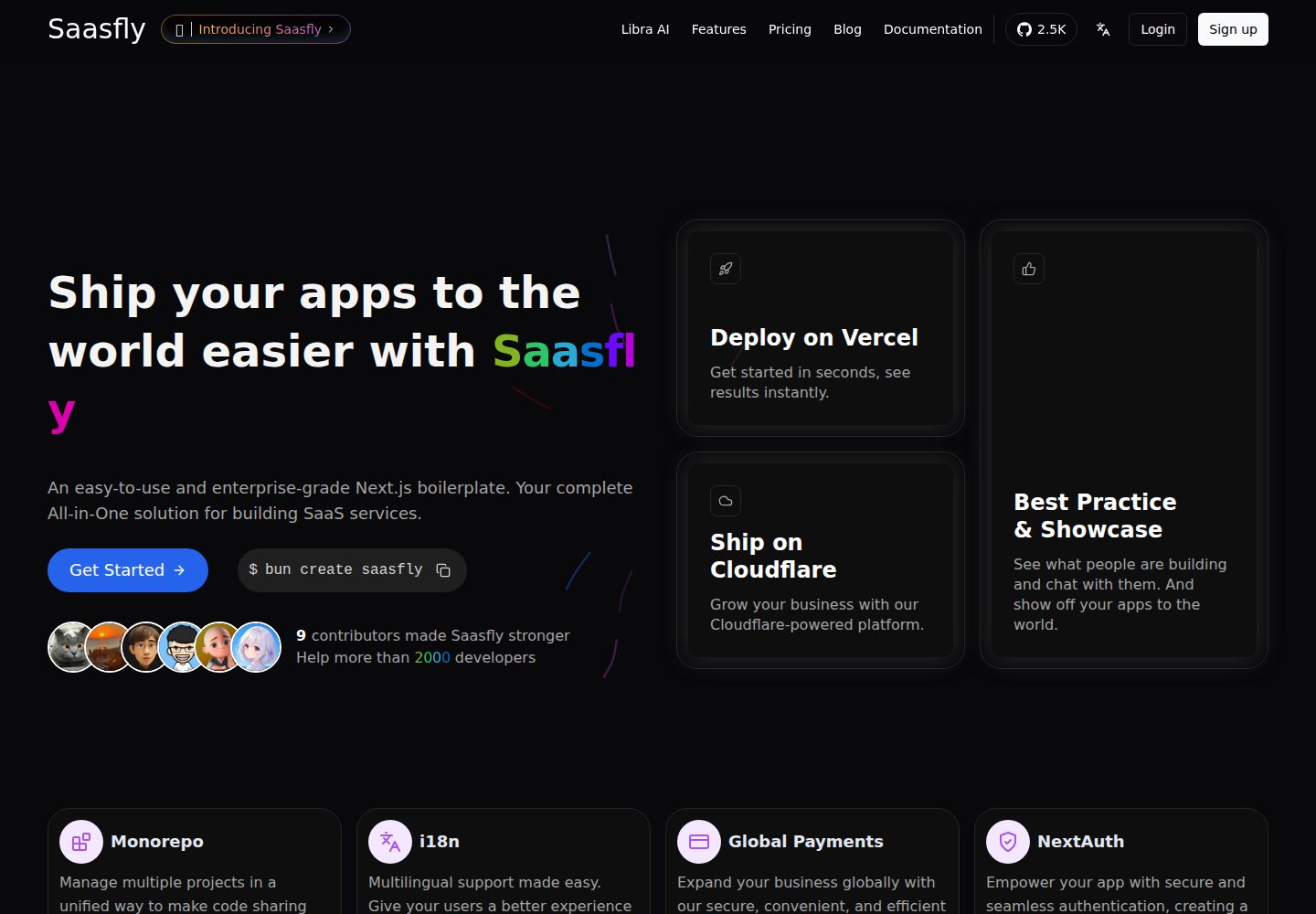
saasfly
Saasfly is an MIT-licensed Next.js SaaS starter template with built-in Clerk authentication, Stripe payment, PostgreSQL, Resend email, internationalization, SEO, tRPC, and Zustand. It is created via `bun create saasfly` and deployable on Vercel.
Next.js · SaaS

react-resume-template
A personal resume website template for software developers, built with Next.js, React, and TypeScript and styled with Tailwind CSS. Site content is driven by a single data file at /src/data/data.tsx, with types in dataDef.ts and images in src/images/.
Next.js · Portfolio