Bootstrap-based HTML admin template providing dashboards and multiple layout pages
HTMLAdmin dashboard
sneat-bootstrap-html-admin-template-free — HTML Admin dashboard Template
By themeselection
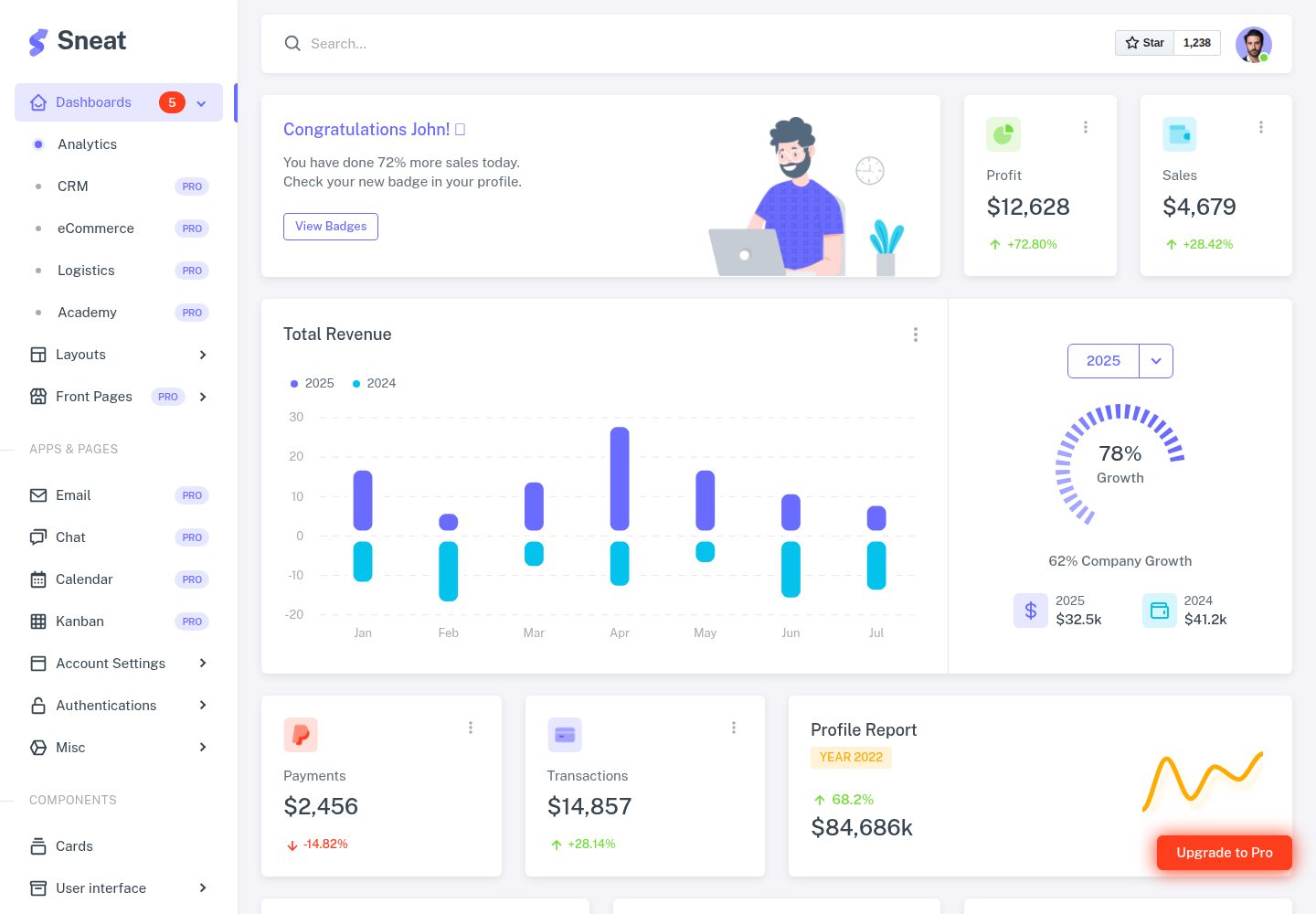
Sneat Free is a Bootstrap-based HTML admin dashboard template that provides dashboards, multiple layouts, login and registration pages, and common UI components. It can be customized directly with HTML or used with an optional Gulp workflow.
Explore the design
Compare the page layouts and mobile experience. Open any screenshot for a closer look.
Desktop homepage1 / 2
Desktop captureTop of page
Actual screenshot captured by the server browser.
All pages & views 2
Screenshots show visual appearance; interactive behavior may differ.
Recorded 2026-10-01View source
What stands out
A quick read of the recorded project description.
Includes basic pages such as login, registration, forgot password, error pages, and maintenance pages
Covers Bootstrap components, form elements, form layouts, tables, and cards
Integrates Boxicons icons and extended UI such as Perfect Scrollbar and Text Divider
Provides an optional Gulp workflow for local server, code watching, and build
Template Details
Sneat Free is an HTML admin dashboard template for developers. The repository is released under the MIT license, and the code can be downloaded and used directly. The template provides a dashboard page, multiple layouts (no menu, no navbar, container, fluid, blank), account settings, login, registration, forgot password, error pages, and maintenance pages, and covers Bootstrap components, form elements, form layouts, tables, cards, Boxicons icons, and extended UI such as Perfect Scrollbar and Text Divider.
In terms of usage, the template itself is HTML and can be modified directly without build tools; the repository also provides an optional Gulp-based workflow for starting a local server, watching code, and generating build artifacts. Node, Webpack, and Gulp are not required. The README states that there are feature differences between the free and paid versions. The paid version includes horizontal menu, dark and semi-dark themes, more dashboards, application pages such as calendar/invoice/user list, form validation and wizard, advanced tables, maps, multiple chart libraries, RTL, and internationalization; this entry only includes the free version code and does not include paid upgrade content. Third-party assets such as demo images, fonts, and icons must be checked separately under their respective licenses. External services such as domain, hosting, and database may incur additional charges.
HTMLAdmin
Is it right for your project?
Use Cases
- Quickly building HTML prototypes for admin interfaces
- Introducing ready-made dashboard and login/registration pages into an existing project
- Using as a starting point for customizing a Bootstrap admin interface, modifying layouts and components as needed
- Developing admin pages for demos or internal tools
Suitable For
- Front-end developers who need a ready-made HTML admin template
- Projects using Bootstrap to build admin interfaces
- Teams that want to edit HTML directly or use the optional Gulp workflow
- Scenarios that need a quick start with basic pages such as login, registration, and dashboards
Getting started & customization
Use these recorded setup notes alongside the repository instructions for your chosen version.
- 1
HTML files can be used directly; Node, Webpack, and Gulp are optional
- 2
Using the Gulp workflow requires installing Node LTS and gulp-cli first
- 3
Run npm install --legacy-peer-deps or yarn in the project root to install dependencies
- 4
Run npm run serve or yarn serve to start the local server, default address http://localhost:3000/
- 5
Build with npm run build, and specify development or production environment via --env
License & source material
Usage conditions & limitations
Free to use · keep license noticeThis entry includes the free version from the public repository under the MIT license; the free scope is the code of this version and does not mean external services or third-party assets are free.
Must comply with when using
- The code of this version may be used, modified, used commercially, and distributed for free.
- When distributing copies or substantial portions of the code, retain the original author's copyright notice and the full MIT license notice.
- The code is provided as is; warranties and limitations of liability are governed by the original license and applicable law.
Additional costs & items to verify
- When using this free template, attribution must be retained: paste the ThemeSelection link (<a href="https://themeselection.com/">ThemeSelection</a>) in the webpage or project footer.
- The free version only provides GitHub issues community support; dedicated support requires upgrading to the paid Premium version and is not included in the free version.
- If you submit contributions to this project, you agree to grant ThemeSelection a non-exclusive license to use the contribution in any scenario it deems appropriate.
- When contributing or using third-party content, you must ensure it is licensed under a suitable open-source license.
- Project materials mention optional paid versions or features; this entry only includes the public free code and does not include paid upgrades.
- Demo images, fonts, icons, and other third-party assets must be checked under their respective licenses and cannot be judged solely by the code's MIT license.
- External services such as domain, hosting, database, payment, or AI may incur additional charges.
View Original Text Basis
Permission is hereby granted, free of charge
Original License Text
We just need an attribution from your end. Copy the below link and paste it at the footer of your web application or project.
Original README
For free products, enjoy community support via GitHub issues. Upgrade to Premium for dedicated support from our expert team.
Original README
When you contribute, you agree to give a non-exclusive license to ThemeSelection to use that contribution in any context as we (ThemeSelection) see appropriate.
Original README
https://github.com/themeselection/sneat-bootstrap-html-admin-template-free/blob/main/LICENSEhttps://github.com/themeselection/sneat-bootstrap-html-admin-template-free/blob/main/README.mdIf you use content provided by another party, it must be appropriately licensed using an open source license.
Original README
Compiled by DeepSeek based on repository license and README ·2026-10-01. Results only cover the materials read; dependencies, images, fonts, and subsequent term changes are subject to their respective original texts.
Project checks & description sources
Template Information
- Source platforms
- GitHub
- Documentation and maintenance reference score
- More documented · 95 / 100
- Technologies
- HTML
- Website type
- Admin dashboard
How this score is calculated
Our heuristic uses license records (up to 30), a demo link (12), a preview (10), stars (15), recorded maintenance (15), description completeness (8), feature records (5) and classification data (5). It is not a code, security or performance test, or a Google score. A link does not establish tested functionality.
What to verify for this project
- Repository update recorded
- 2026-03-20
- Screenshot last checked
- 2026-10-01
A demo link is listed. Check it with your own content and viewport sizes; its presence does not confirm that forms, authentication or payments work.
The catalog identifies HTML as the primary stack. Check the actual dependency manifest and lockfile for versions and hosting requirements. These notes use recorded metadata, not a code audit or a deployment test.
Use a selection guide →How this description was prepared
AI-assisted description based on catalog records and repository material. Repository authors are not automatically the reviewers of this description.
Automatically checked against source and license rules; no manual editorial review.
Inspect the recorded source material
SHA-256: 231a964d1dec5627d5d9176a339b4fb7a511ceb9403c67527c5094f3cc1312dd
2026-10-01T01:40:56.853Z
Source file / repository<p align="center">
<a href="https://themeselection.com/item/sneat-free-bootstrap-html-admin-template/" target="_blank">
<img src="https://user-images.githubusercontent.com/749684/150333149-805037bc-8874-4a1f-876a-61a9683f8ef5.png" alt="sneat-logo" width="30px" height="auto">
</a>
</p>
<h1 align="center">
<a href="https://themeselection.com/item/sneat-free-bootstrap-html-admin-template/" target="_blank" align="center">
Sneat - Free Bootstrap 5 HTML Admin Template
</a>
</h1>
<p align="center">Most Powerful & Comprehensive Free Bootstrap 5 HTML Admin Dashboard Template built for developers!</p>
    
<kbd>[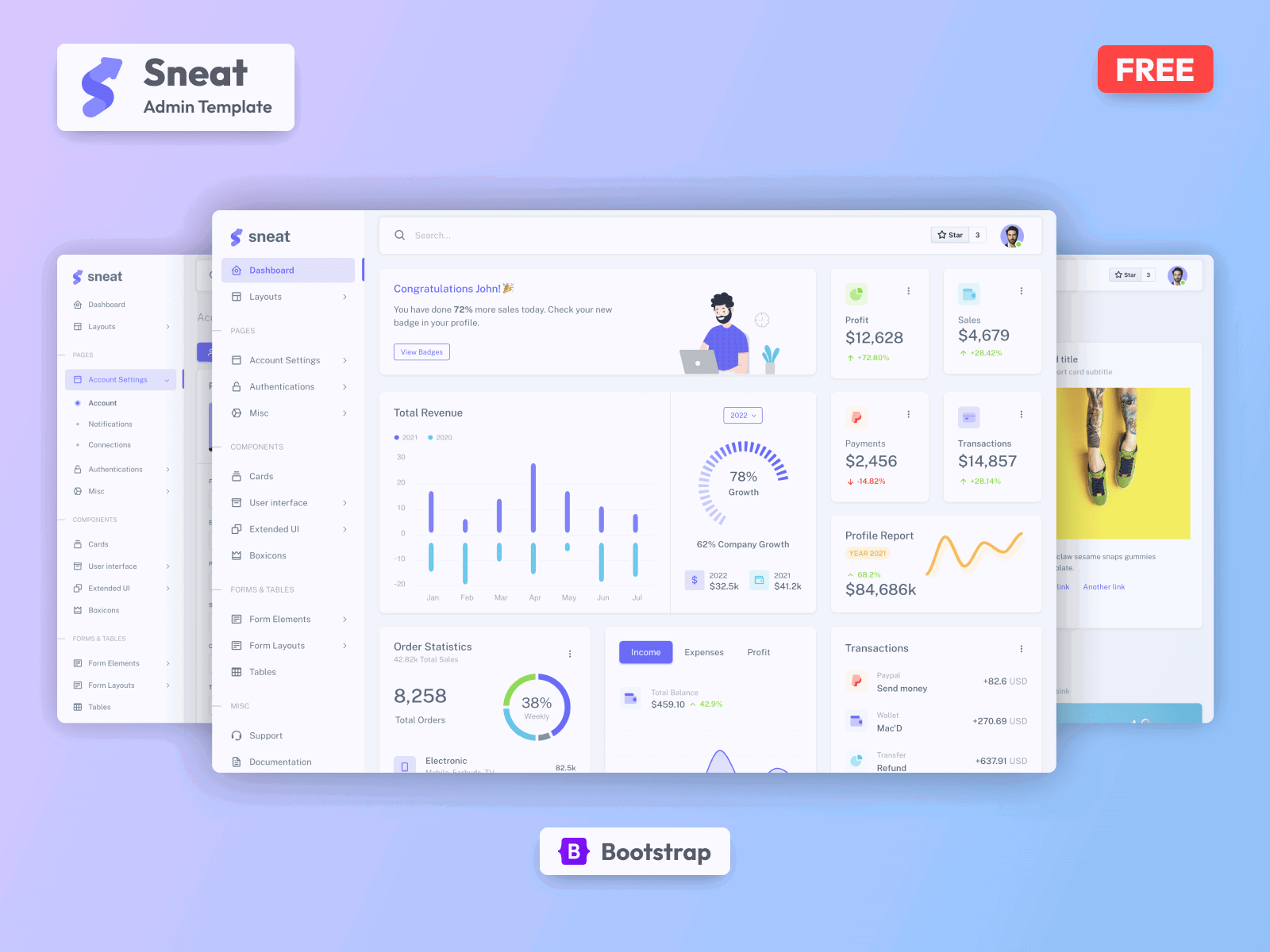](https://themeselection.com/item/sneat-dashboard-free-bootstrap/)</kbd>
## Introduction 🚀
If you’re a developer looking for the most Powerful & comprehensive [**Free Bootstrap 5 HTML Admin Template**](https://themeselection.com/item/sneat-free-bootstrap-html-admin-template/) built for developers, rich with features, and highly customizable look no further than Sneat. We’ve followed the highest industry standards to bring you the very best admin template that is not only fast and easy to use but highly scalable. Offering ultimate convenience and flexibility, you’ll be able to build whatever application you want with very little hassle.
Build premium quality applications with ease. Use our innovative [bootstrap admin template](https://themeselection.com/item/category/bootstrap-admin-templates/) to create eye-catching, high-quality WebApps. Your apps will be completely responsive, ensuring they’ll look stunning and function flawlessly on desktops, tablets, and mobile devices.
[View Demo](https://demos.themeselection.com/sneat-bootstrap-html-admin-template-free/html/)
## Installation ⚒️
Automate time-consuming or repetitive tasks in your development workflow using Gulp 🥤
> Please note, that the use of Node, Webpack & Gulp, and their advanced settings are totally optional. You can use and customize the template without using them too.
Installing Node & Gulp and running it is super easy in Sneat, please follow these steps and you should be ready to rock 🤘
1. First of all, make sure you have installed [Node](https://nodejs.org/en/) (LTS). If Node.js is already installed in your system, make sure the installed version is `LTS` and jump to step 2
2. Install the Gulp CLI: Open Terminal/Command Prompt and run the following command and wait until it finishes. If you have already installed Gulp CLI, you can skip this step and jump to step 3.
```bash
npm install --global gulp-cli
```
3. Navigate to the Sneat root directory and run the following command to install our local dependencies listed in `package.json`. You can use `npm` OR `yarn` as per your preference.
> It is recommended to use Yarn
```bash
# For npm
npm install --legacy-peer-deps
# For Yarn
yarn
```
4. Now, that you are ready to run `npm` tasks, the below command will start the server and watch the code using [browsersync](https://browsersync.io/). Open [http://localhost:3000/](http://localhost:3000/) to check your development 🚀.
```bash
# npm
npm run serve
# yarn
yarn serve
```
## Available Tasks 🧑💻
Open the console/terminal, go to the Sneat root directory, and run `npm run {task_name}`.i.e. To generate a build run `npm run build`.
Run a task with the specified environment(development/production) just execute the task with the `--env={environment}` option, i.e. `npm run build --env=production`.
> **Tip:** Use the `npm run` command to list all predefined npm tasks from the `package.json` file.
## What's Included 📦
- Dashboard
- Layouts
- Without menu
- Without Navbar
- Container
- Fluid
- Blank
- Pages
- Account Settings
- Login
- Register
- Forgot Password
- Error
- Under Maintenance
- Cards
- User Interface
- **All Bootstrap Components**
- Extended UI
- Perfect Scrollbar
- Text Divider
- Boxicons
- Form Elements
- Basic Inputs
- Input Groups
- Form Layout
- Vertical Form
- Horizontal Form
- Tables
## What's in Premium Version 💎
| Sneat Free Version | Sneat Premium Version |
| ----------------------------------------------------------------------------------------- | ---------------------------------------------------------------------------------------------------------------------------------- |
| [Demo](https://themeselection.com/demo/sneat-bootstrap-html-admin-template-free/html/) | [Demo](https://themeselection.com/demo/sneat-bootstrap-html-admin-template/html/vertical-menu-template/) |
| [Download](https://themeselection.com/products/sneat-free-bootstrap-html-admin-template/) | [Purchase](https://themeselection.com/products/sneat-bootstrap-html-admin-template/) |
| Single vertical Menu | Vertical Menu + Horizontal Menu |
| Simple Light Style | Light & Dark Style |
| Default Theme | Default, Semi Dark & Bordered Themes |
| Fixed Layout(Menu) | Fixed & Static Layout(Menu) |
| 1 Simple Dashboard | 3 Niche Dashboards |
| - | Multiple Ready Applications like Calendar, Invoice, Users List, Users View, Roles and Permission, etc. |
| Simple From Elements | Advance form elements, validation & form wizard |
| Basic Cards | Basic, Advance, Statistics, Analytics, Gamification and Actions Cards |
| Basic User Interface(Components) | Advance and Custom User Interfaces(Components) |
| Two Extended Components | Twelve Ready to use Extended Components |
| - | Quick Search - Quickly navigate between pages (w/ hotkey support) |
| Basic Pages | Authentication Pages in 2 Variants + Ready-to-use pages like User Profile, Account Settings, FAQ, Help Center, Pricing, Misc, etc. |
| - | 3D Characters + Illustrations |
| Basic tables | Advanced tables |
| - | Quick customization using theme config file |
| - | Leaflet Maps |
| 1 Chart Library | 2 Chart Libraries |
| - | Multiple Navbar & Menu Options |
| - | Starter-kit |
| - | Internationalization support |
| - | RTL Support |
| Regular Support | Priority Support |
| Detailed Documentation | Detailed Documentation |
## Documentation 📜
<!-- If you have docs in wiki then use below line -->
Check GitHub [Wiki](https://github.com/themeselection/sneat-bootstrap-html-admin-template-free/wiki) of this repository.
Check out our live [Documentation](https://themeselection.com/demo/sneat-bootstrap-html-admin-template/documentation/)
## Browser Support 🖥️


\*_It also supports other browser which implemented latest CSS standards_
## Contributing 🦸
Contributions are always welcome and recommended! Here is how:
- Fork the repository ([here is the guide](https://docs.github.com/en/get-started/quickstart/fork-a-repo)).
- Clone to your machine `git clone https://github.com/YOUR_USERNAME/REPO_URL` Make your changes
- Create a pull request
### Contribution Requirements 🧰
- When you contribute, you agree to give a non-exclusive license to ThemeSelection to use that contribution in any context as we (ThemeSelection) see appropriate.
- If you use content provided by another party, it must be appropriately licensed using an open source license.
- Contributions are only accepted through Github pull requests.
- Finally, contributed code must work in all supported browsers (see above for browser support).
## Changelog 📆
Please refer to the [CHANGELOG](https://github.com/themeselection/sneat-bootstrap-html-admin-template-free/blob/main/CHANGELOG.md) file. We will add detailed release notes to each new release.
## Support 🧑🏻💻
For free products, enjoy community support via GitHub issues. Upgrade to Premium for dedicated support from our expert team.
## License ©
- Copyright © [ThemeSelection](https://themeselection.com/)
- Licensed under [MIT](LICENSE)
- All our free items are Open Source and licensed under MIT. You can use our free items for personal as well as commercial purposes. We just need an attribution from your end. Copy the below link and paste it at the footer of your web application or project.
```html
<a href="https://themeselection.com/">ThemeSelection</a>
```
## Also Available In
<p>
<!-- Figma -->
<a href="{pro_figma_version_item_page_link_on_themeselection}" target="_blank"><picture><source width="auto" height="74px" media="(prefers-color-scheme: dark)" srcset="https://github.com/microsoft/vscode/assets/47495003/0318a6c8-4f9b-4cf6-af5e-d357f909ea2b"><source width="auto" height="74px" media="(prefers-color-scheme: light)" srcset="https://github.com/microsoft/vscode/assets/47495003/47f21dfe-c1fc-4a7d-859e-4d98f8cdded1"><img width="auto" height="74px" alt="html" src="https://github.com/microsoft/vscode/assets/47495003/47f21dfe-c1fc-4a7d-859e-4d98f8cdded1"></picture></img></a>
<!-- HTML -->
<a href="{pro_html_version_item_page_link_on_themeselection}" target="_blank"><picture><source width="auto" height="74px" media="(prefers-color-scheme: dark)" srcset="https://github.com/microsoft/vscode/assets/47495003/5fe77c46-2e4c-475a-8dec-e30e2badddee"><source width="auto" height="74px" media="(prefers-color-scheme: light)" srcset="https://github.com/microsoft/vscode/assets/47495003/3f5decd8-cd99-4ed3-aa76-528ca061385b"><img width="auto" height="74px" alt="html" src="https://github.com/microsoft/vscode/assets/47495003/3f5decd8-cd99-4ed3-aa76-528ca061385b"></picture></img></a>
<!-- HTML + Laravel -->
<a href="{pro_html_laravel_version_item_page_link_on_themeselection}" target="_blank"><picture><source width="auto" height="74px" media="(prefers-color-scheme: dark)" srcset="https://github.com/microsoft/vscode/assets/47495003/efe420e4-9863-41b7-9eda-47ea94f21a62"><source width="auto" height="74px" media="(prefers-color-scheme: light)" srcset="https://github.com/microsoft/vscode/assets/47495003/be3b86e0-4d5e-4736-bf89-4267fb4d6710"><img width="auto" height="74px" alt="html_laravel" src="https://github.com/microsoft/vscode/assets/47495003/be3b86e0-4d5e-4736-bf89-4267fb4d6710"></picture></img></a>
<!-- HTML + Django -->
<a href="{pro_html_django_version_item_page_link_on_themeselection}" target="_blank"><picture><source width="auto" height="74px" media="(prefers-color-scheme: dark)" srcset="https://github.com/microsoft/vscode/assets/47495003/3c87d33b-1223-4aaa-a652-388dcb714c98"><source width="auto" height="74px" media="(prefers-color-scheme: light)" srcset="https://github.com/microsoft/vscode/assets/47495003/51db1947-eac1-466f-87fd-5a209010fe9c"><img width="auto" height="74px" alt="html_django" src="https://github.com/microsoft/vscode/assets/47495003/51db1947-eac1-466f-87fd-5a209010fe9c"></picture></img></a>
<!-- .Net Core -->
<a href="{pro_net_core_version_item_page_link_on_themeselection}" target="_blank"><picture><source width="auto" height="74px" media="(prefers-color-scheme: dark)" srcset="https://github.com/microsoft/vscode/assets/47495003/6327fd7b-9c54-4189-a852-28551ad0e002"><source width="auto" height="74px" media="(prefers-color-scheme: light)" srcset="https://github.com/microsoft/vscode/assets/47495003/9856e9d5-021f-4573-902a-702e80dd0102"><img width="auto" height="74px" alt="net_core" src="https://github.com/microsoft/vscode/assets/47495003/9856e9d5-021f-4573-902a-702e80dd0102"></picture></img></a>
<!-- NextJS -->
<a href="{pro_nextjs_version_item_page_link_on_themeselection}" target="_blank"><picture><source width="auto" height="74px" media="(prefers-color-scheme: dark)" srcset="https://github.com/microsoft/vscode/assets/47495003/66344629-6d21-4f92-9078-f479b39cb34e"><source width="auto" height="74px" media="(prefers-color-scheme: light)" srcset="https://github.com/microsoft/vscode/assets/47495003/e1daf4e1-3fa5-4a44-969a-6143ddd67310"><img width="auto" height="74px" alt="next.js" src="https://github.com/microsoft/vscode/assets/47495003/e1daf4e1-3fa5-4a44-969a-6143ddd67310"></picture></img></a>
<!-- React -->
<a href="{pro_react_version_item_page_link_on_themeselection}" target="_blank"><picture><source width="auto" height="74px" media="(prefers-color-scheme: dark)" srcset="https://github.com/microsoft/vscode/assets/47495003/3877046e-c652-4b3d-99e9-2e134da1d6cf"><source width="auto" height="74px" media="(prefers-color-scheme: light)" srcset="https://github.com/microsoft/vscode/assets/47495003/8c8c940e-d8f9-4213-a7f7-f8bc4968f169"><img width="auto" height="74px" alt="react" src="https://github.com/microsoft/vscode/assets/47495003/8c8c940e-d8f9-4213-a7f7-f8bc4968f169"></picture></img></a>
<!-- Vue -->
<a href="{pro_vue_version_item_page_link_on_themeselection}" target="_blank"><picture><source width="auto" height="74px" media="(prefers-color-scheme: dark)" srcset="https://github.com/microsoft/vscode/assets/47495003/881bbbb8-d1c9-421c-9bce-4ea43dfa9e6e"><source width="auto" height="74px" media="(prefers-color-scheme: light)" srcset="https://github.com/microsoft/vscode/assets/47495003/b02d6473-0345-42c2-be58-e648806104fa"><img width="auto" height="74px" alt="vue" src="https://github.com/microsoft/vscode/assets/47495003/b02d6473-0345-42c2-be58-e648806104fa"></picture></img></a>
<!-- Vue + Laravel -->
<a href="{pro_vue_laravel_version_item_page_link_on_themeselection}" target="_blank"><picture><source width="auto" height="74px" media="(prefers-color-scheme: dark)" srcset="https://github.com/microsoft/vscode/assets/47495003/20b6428e-3fa5-4f80-a389-9e4cd732c2de"><source width="auto" height="74px" media="(prefers-color-scheme: light)" srcset="https://github.com/microsoft/vscode/assets/47495003/3008d3eb-7b5b-4d9c-8563-837744a901da"><img width="auto" height="74px" alt="vue_laravel" src="https://github.com/microsoft/vscode/assets/47495003/3008d3eb-7b5b-4d9c-8563-837744a901da"></picture></img></a>
<!-- Nuxt -->
<a href="{pro_nuxt_version_item_page_link_on_themeselection}" target="_blank"><picture><source width="auto" height="74px" media="(prefers-color-scheme: dark)" srcset="https://github.com/microsoft/vscode/assets/47495003/d9d3cf2e-4dc5-49fe-b146-b80ef010cb57"><source width="auto" height="74px" media="(prefers-color-scheme: light)" srcset="https://github.com/microsoft/vscode/assets/47495003/f18ba562-6bba-4a55-83ac-962ecefa636f"><img width="auto" height="74px" alt="nuxt" src="https://github.com/microsoft/vscode/assets/47495003/f18ba562-6bba-4a55-83ac-962ecefa636f"></picture></img></a>
<!-- Angular -->
<a href="{pro_angular_version_item_page_link_on_themeselection}" target="_blank"><picture><source width="auto" height="74px" media="(prefers-color-scheme: dark)" srcset="https://github.com/microsoft/vscode/assets/47495003/da7f0abe-9f83-4205-b691-bc8d2ffef59b"><source width="auto" height="74px" media="(prefers-color-scheme: light)" srcset="https://github.com/microsoft/vscode/assets/47495003/9ebeb520-442a-4047-9000-5b13d0e6c000"><img width="auto" height="74px" alt="angular" src="https://github.com/microsoft/vscode/assets/47495003/9ebeb520-442a-4047-9000-5b13d0e6c000"></picture></img></a>
</p>
<!-- Add other pro variants here. You can get the logo URL from here: https://icones.js.org/collection/logos -->
## Looking For Premium Admin Templates ?? 👀
**[ThemeSelection](https://themeselection.com/)** provides Selected high quality, modern design, professional and easy-to-use **Fully Coded Dashboard Templates & UI Kits** to create your applications faster!
- [Bootstrap Admin Templates](https://themeselection.com/products/category/bootstrap-admin-templates/)
- [VueJS Admin Templates](https://themeselection.com/products/category/vuejs-admin-templates/)
- [Laravel Admin Templates](https://themeselection.com/products/category/laravel-admin-templates/)
- [Django Admin Templates](https://themeselection.com/item/category/django-admin-template/)
- [React (NextJS) Admin Templates](https://themeselection.com/item/category/next-js-admin-template/)
- [ASP.Net Core Admin Templates](https://themeselection.com/item/category/asp-net-dashboard/)
- [Free UI Kits](https://themeselection.com/products/category/free-ui-kits/)
If you want to [Free Admin Templates](https://themeselection.com/item/category/free-admin-templates/) like Materio then do visit [ThemeSelection](https://themeselection.com/).
## Useful Links 🎁
- [Vue CheatSheet](https://vue-cheatsheet.themeselection.com/)
- [Freebies](https://themeselection.com/item/category/freebies/)
- [Free Admin Templates](https://themeselection.com/item/category/free-admin-templates/)
- [Bootstrap 5 CheatSheet](https://bootstrap-cheatsheet.themeselection.com/)
- [FlyonUI](https://flyonui.com/)
- [JetShip](https://demos.themeselection.com/jetship-laravel-starter-kit/)
## Social Media :earth_africa:
- [Twitter](https://twitter.com/Theme_Selection)
- [Facebook](https://www.facebook.com/ThemeSelections/)
- [Pinterest](https://pinterest.com/themeselect/)
- [Instagram](https://www.instagram.com/themeselection/)
- [Discord](https://discord.gg/kBHkY7DekX)
- [YouTube](https://www.youtube.com/channel/UCuryo5s0CW4aP83itLjIdZg)
Explore similar templates
Compare previews and descriptions within the same stack and category.

gentelella
Gentelella v4 is a free, open-source admin dashboard template maintained by Colorlib, built with vanilla JavaScript, SCSS, and Vite 8 without Bootstrap or jQuery.
HTML · Admin dashboard

coreui-free-bootstrap-admin-template
A free Bootstrap admin template maintained by CoreUI, built on CoreUI's own UI component library. It provides compiled HTML pages and Pug template source code, covering dashboards, authentication, forms, components, icons, and error pages.
HTML · Admin dashboard

dashboards
A collection of responsive dashboard HTML templates open-sourced by Keen IO, built on CSS Grid, offering multiple prebuilt admin data interface layouts.
HTML · Admin dashboard

SB Admin 2
SB Admin 2 is a classic Bootstrap admin template from Start Bootstrap, offering dashboards, charts, tables, and common management pages.
HTML · Admin dashboard

Adminator-admin-dashboard
Adminator 4 is a vanilla HTML, CSS and JavaScript admin dashboard template with a CSS-variable token design system, built-in light and dark themes, no jQuery or Bootstrap dependency, and 18 pages covering dashboards, mail, calendar, charts, forms, tables and error pages.
HTML · Admin dashboard

SB Admin
SB Admin is a lightweight, open-source Bootstrap admin template from Start Bootstrap. It offers a sidebar-and-top-bar layout with data tables, forms, and stat cards, plus responsive design.
HTML · Admin dashboard