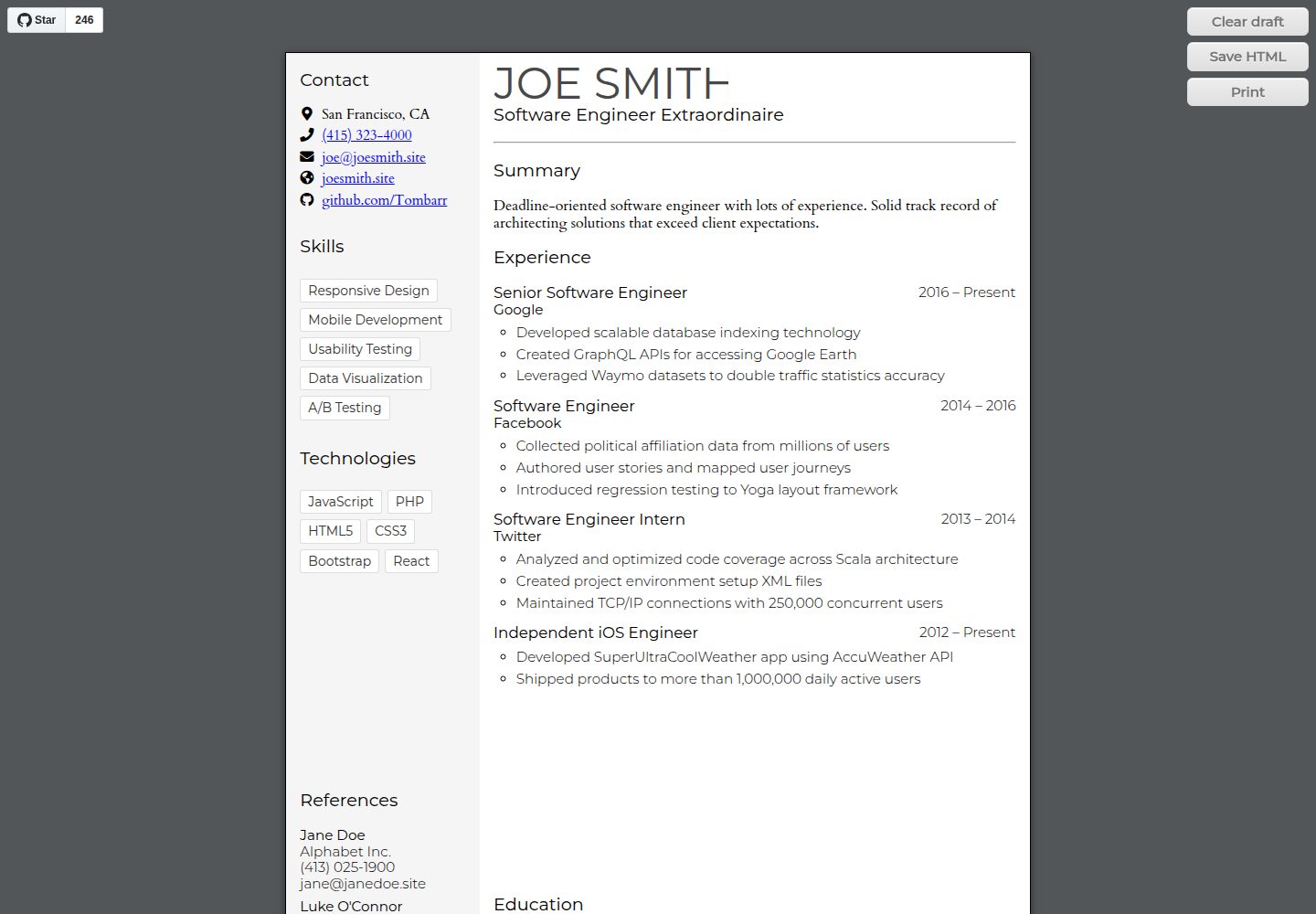
The entire page becomes editable via document.designMode, with changes automatically saved in the browser's local storage
HTMLPortfolio
html-resume-template — HTML Portfolio Template
By Tombarr
A single-page resume template for software engineers and web developers, built with HTML, CSS, and JS, editable directly in the browser and exportable to PDF.
Explore the design
Compare the page layouts and mobile experience. Open any screenshot for a closer look.
Desktop homepage1 / 2
Desktop captureTop of page
Actual screenshot captured by the server browser.
All pages & views 2
Screenshots show visual appearance; interactive behavior may differ.
Recorded 2026-10-02View source
What stands out
A quick read of the recorded project description.
Supports Command/CTRL + B/I for bold and italic, Shift + Enter to insert a line break, and Enter to append a list item at the end
HTML and CSS can be edited directly, allowing you to replace the overall layout and visual style
Dependencies are loaded via CDN links for normalize.css, Google Fonts, and Font Awesome, with no package manager or build tools required
No data is sent to or synced with a server; all data is stored locally in localStorage
Template Details
This is a single-page resume template written in HTML, CSS, and JavaScript. The page can be viewed in a browser and exported to PDF. The template is aimed at software engineers and web developers, a group the author belongs to as well.
Editing is the template's main feature: the entire page is made editable via document.designMode, and changes are automatically saved in the browser's local storage. In most browsers, Command/CTRL + B/I applies bold or italic; Shift + Enter inserts a <br> within the current element, while Enter behaves contextually and appends a list item when pressed after the last character.
Layout and styles can be changed directly in the HTML and CSS, similar to the CSS Zen Garden approach, allowing you to replace the overall layout and visual style. Dependencies are loaded via CDN links, including normalize.css, Google Fonts, and Font Awesome icons, with no package manager or build tools required.
For compatibility, the author tested on macOS (10.13.5) with Chrome (67) and Firefox (61), using localStorage, template, flexbox, and custom properties, targeting modern browsers. The app does not communicate with or sync to a server; data is stored locally. If localStorage is disabled, saving may fail. The README's TODO lists unfinished items: no feedback on successful or failed saves, the saved HTML filename is not customizable, and Prince is not yet supported.
HTMLPortfolio
Is it right for your project?
Use Cases
- A software engineer or web developer creating a personal online resume
- Editing resume content directly in the browser with immediate preview
- Exporting the resume page to PDF for applications or printing
- Replacing the layout based on the existing HTML/CSS to customize a personal resume page
Suitable For
- Software engineers who need a single-page resume and want to edit it directly in the browser
- Web developers familiar with HTML and CSS who want to adjust the layout and styles themselves
- Static page authors who prefer no build tools and dependencies loaded via CDN
Getting started & customization
Use these recorded setup notes alongside the repository instructions for your chosen version.
- 1
No package manager or build tools are required; dependencies are loaded via CDN links
- 2
Uses localStorage, template, flexbox, and custom properties, targeting modern browsers
- 3
If the browser disables localStorage, edited content may not be saved
- 4
The README's TODO states: there is currently no feedback on successful or failed saves, the saved HTML filename is not customizable, and Prince is not yet supported
- 5
The project is under the Apache-2.0 license; distribution requires including the license and retaining attribution notices; third-party assets such as fonts and icons must be checked against their respective licenses
License & source material
Usage conditions & limitations
Free to use · keep license noticeThis entry covers the free version under the Apache-2.0 license in the public repository; the free scope applies to that version's code and does not mean external services or third-party assets are free.
Must comply with when using
- Free use, modification, commercial use, and distribution are permitted; distribution requires including the Apache-2.0 license.
- Modified files must prominently indicate changes and retain relevant copyright, patent, trademark, and attribution notices.
- If the original project includes a NOTICE file, distribution of derivative works must retain the applicable attribution notices from it.
- The license includes an applicable contributor patent grant; initiating patent litigation as described in the license terminates that patent grant, and no trademark rights are granted.
- The code is provided as-is; warranties and limitations of liability are governed by the original license and applicable law.
Additional costs & items to verify
- The project relies on third-party resources loaded via CDN links: normalize.css, Google Fonts, and Font Awesome icons. These assets are subject to their own licenses, not Apache-2.0; check and comply with their license terms separately before distribution or commercial use.
- Dependencies are loaded via CDN links, so page operation and font/icon display depend on the availability of external CDN services; offline or when the CDN is unreachable, related resources may fail to load.
- Uses localStorage, template, flexbox, and custom properties, targeting only modern browsers; older browsers may not display or save edited content correctly.
- If the browser disables localStorage, in-browser edits may not be saved, posing a risk of data loss.
- The README's TODO indicates that PDF export tools such as Prince are not yet supported; for more complete PDF export, you may need to integrate it yourself or use third-party (possibly paid) tools.
- Demo images, fonts, icons, and other third-party assets must be checked against their respective licenses; the code's Apache-2.0 license alone is not sufficient to determine this.
- External services such as domains, hosting, databases, payments, or AI may incur additional fees.
View Original Text Basis
no-charge, royalty-free, irrevocable copyright license
Original License Text
This project uses [normalize.css](https://github.com/necolas/normalize.css), fonts from [Google Fonts](https://fonts.google.com/), and icons from [Font Awesome](https://fortawesome.github.io/Font-Awesome/).
Original README
Dependencies are managed as links to CDNs, no package managers or build tools required.
Original README
This software uses `localStorage`, `template`, flexbox, and custom properties and is intended for modern browsers.
Original README
It may not be able to save if `localStorage` is disabled for any reason.
Original README
https://github.com/Tombarr/html-resume-template/blob/master/LICENSEhttps://github.com/Tombarr/html-resume-template/blob/master/README.md- Support [Prince](https://www.princexml.com/)
Original README
Compiled by DeepSeek based on repository license and README ·2026-10-02. Results only cover the materials read; dependencies, images, fonts, and subsequent term changes are subject to their respective original texts.
Project checks & description sources
Template Information
- Source platforms
- GitHub
- Documentation and maintenance reference score
- More documented · 76 / 100
- Technologies
- HTML
- Website type
- Portfolio
How this score is calculated
Our heuristic uses license records (up to 30), a demo link (12), a preview (10), stars (15), recorded maintenance (15), description completeness (8), feature records (5) and classification data (5). It is not a code, security or performance test, or a Google score. A link does not establish tested functionality.
What to verify for this project
- Repository update recorded
- 2023-11-08
- Screenshot last checked
- 2026-10-02
A demo link is listed. Check it with your own content and viewport sizes; its presence does not confirm that forms, authentication or payments work.
The catalog identifies HTML as the primary stack. Check the actual dependency manifest and lockfile for versions and hosting requirements. These notes use recorded metadata, not a code audit or a deployment test.
Use a selection guide →How this description was prepared
AI-assisted description based on catalog records and repository material. Repository authors are not automatically the reviewers of this description.
Automatically checked against source and license rules; no manual editorial review.
Inspect the recorded source material
SHA-256: 35dc11f22838baad71c47b29be0e8535b87cfca898c8601bb9b07426f70be59d
2026-10-02T08:18:59.787Z
Source file / repository# html-resume-template Single-page resume template built using HTML, CSS, and JS that can be viewed on the web or exported to a PDF. A live demo is available at [tombarr.github.io/html-resume-template](https://tombarr.github.io/html-resume-template/). ## Editing This template has the ability to edit, and automatically save, inside the browser! The entire page is marked editable with [`document.designMode`](https://developer.mozilla.org/en-US/docs/Web/API/Document/designMode). The below example is from Firefox (61): adding several list items then refreshing the page.  In most browsers, you can use `Command/CTRL + B/I` to make text bold or italic.  There are also two types of returns, `Shift + Enter`, which adds a `<br>` within the current element:  And `Enter`, which is somewhat contextual. If focused after the last character, it can be used to append list elements:  ## Sample  ## Flexibility This template can be editted both in HTML and CSS. Just like with [CSS Zen Garden](http://www.csszengarden.com/), you can fully customize the layout and style to suit your needs. ## TODO - Add feedback when page is saved (or an error occurs) - Allow custom file names for saved HTML - Support [Prince](https://www.princexml.com/) ## Acknowledgements This project uses [normalize.css](https://github.com/necolas/normalize.css), fonts from [Google Fonts](https://fonts.google.com/), and icons from [Font Awesome](https://fortawesome.github.io/Font-Awesome/). Dependencies are managed as links to CDNs, no package managers or build tools required. Built by me, [Tom Barrasso](https://barrasso.me). ## Compatibility Tested on Chrome (67) and Firefox (61) on mac OS (10.13.5). This software uses `localStorage`, `template`, flexbox, and custom properties and is intended for modern browsers. ## Security & Privacy This application does not communicate or sync with a server, and all data is saved locally. It may not be able to save if `localStorage` is disabled for any reason.
Explore similar templates
Compare previews and descriptions within the same stack and category.

simplefolio
Simplefolio is a minimal single-page portfolio template for developers, built with HTML, Bootstrap, SCSS, and Parcel under the MIT license. It includes Hero, About, Projects, Contact, and Footer sections, with content edited in /src/index.html and theme colors controlled by two SCSS variables.
HTML · Portfolio

Freelancer
A bright, single-page Bootstrap portfolio template for freelancers, designers, and small studios. It includes a responsive portfolio grid with modal detail windows and an SB Forms contact form that requires an API token.
HTML · Portfolio

Resume
A single-page resume and CV template from Start Bootstrap, built on Bootstrap with a fixed sidebar and content sections.
HTML · Portfolio

Creative
A single-page marketing template by Start Bootstrap for creative agencies and product services, built on Bootstrap with SCSS, featuring a portfolio grid and call-to-action sections. It includes pre-set SB Forms markers for form integration and npm build scripts for source customization.
HTML · Corporate Website

Grayscale
A dark single-page Bootstrap template from Start Bootstrap for photography, events and brand storytelling, with a large hero and clearly separated sections.
HTML · Corporate Website

startbootstrap-stylish-portfolio
A one-page Bootstrap portfolio theme from Start Bootstrap with multiple content sections and an off-canvas navigation menu. Basic use means editing HTML/CSS under dist and opening index.html; advanced use relies on npm with Pug and SCSS build scripts.
HTML · Portfolio