Single-page structure for showcase scenarios in interior design, architecture, and home furnishing
HTMLStarter
one-space-away-html — HTML Starter Template
By truedaniyyel
A single-page HTML template for interior designers, architects, and home furnishing stylists, built with Astro, featuring responsive layout, local font optimization, and security response header configuration.
Explore the design
Compare the page layouts and mobile experience. Open any screenshot for a closer look.
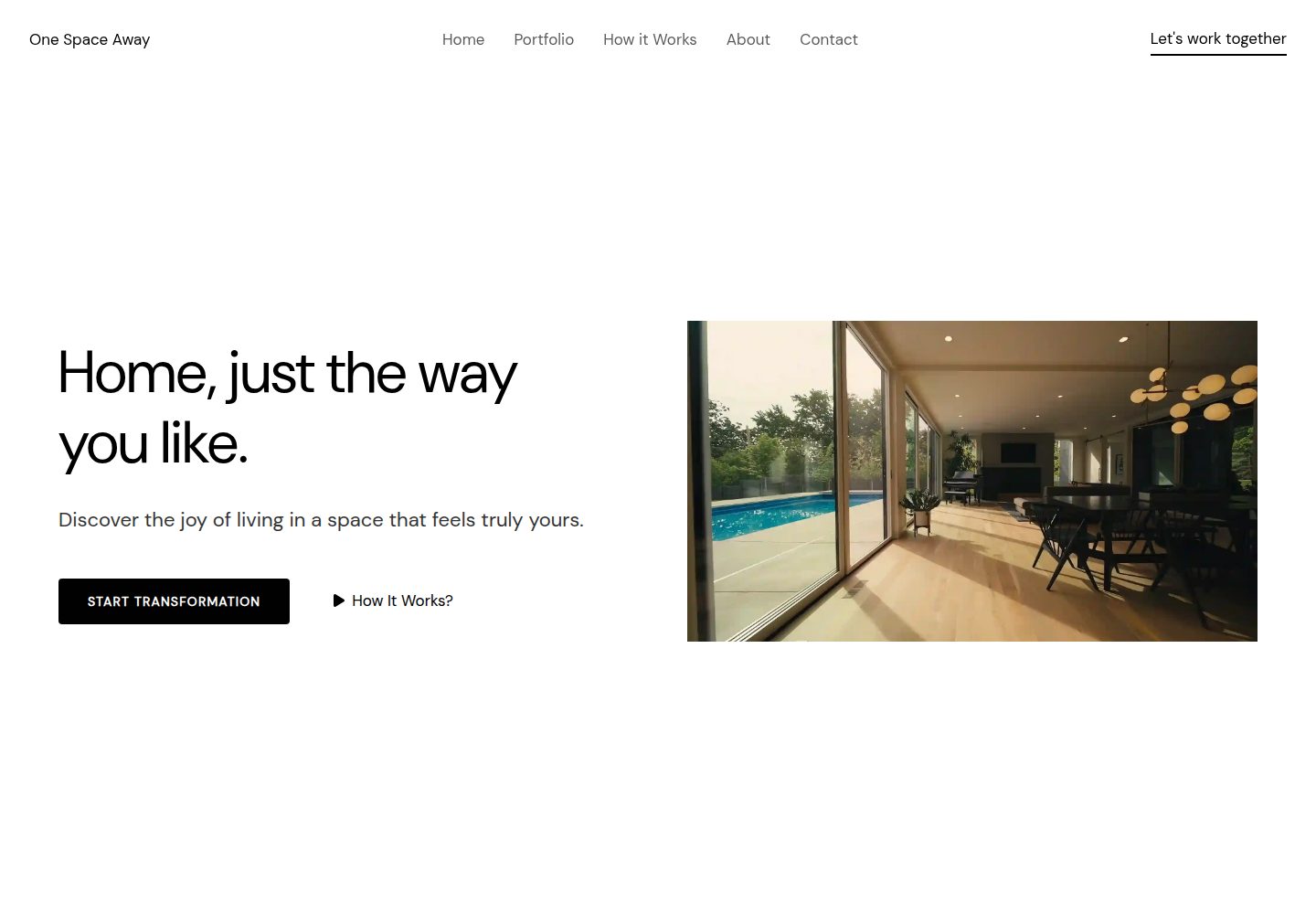
Desktop homepage1 / 2
Desktop captureTop of page
Actual screenshot captured by the server browser.
All pages & views 2
Screenshots show visual appearance; interactive behavior may differ.
Recorded 2026-10-03View source
What stands out
A quick read of the recorded project description.
Built with Astro using HTML, CSS, and JS, with few dependencies
Built-in image optimization, by default via Astro Image component for WebP/AVIF conversion and scaling
Local font solution: font files placed in src/assets/fonts/ and registered via astro.config.mjs
public directory provides a _headers file with preconfigured CSP and security response header rules
Carousel uses Swiper.js, with initialization logic centralized in utils/initSwiper.ts
Template Details
One Space Away is a single-page website template positioned as a showcase site for interior design, architecture, and home furnishing. The page structure revolves around displaying works and processes; the README provides an image reference example for an interior design consultation section, indicating the template includes reusable image-text blocks.
Technically, the template is built with Astro (HTML, CSS, JS) and has few dependencies. Images are optimized locally by default via Astro's built-in Image component, including WebP/AVIF conversion and resizing; alternatively, astro-cloudinary can be used to integrate Cloudinary for image processing as documented. Fonts are stored in src/assets/fonts/, registered via the local font provider in astro.config.mjs, and referenced with corresponding CSS variables in src/styles/_reset.css. The carousel is powered by Swiper.js, with initialization logic in utils/initSwiper.ts.
For deployment, the _headers file in the public directory carries CSP and XSS protection rules, primarily targeting Cloudflare; when deploying to Vercel or Netlify, these rules need to be migrated to vercel.json or netlify.toml. The template is responsive, covering mobile, tablet, and desktop. The repository uses the MIT license, with free use limited to this version's code; third-party assets such as demo images, fonts, and icons require separate license verification.
HTMLLauncher
Is it right for your project?
Use Cases
- Interior designers building a single-page portfolio and business introduction page
- Architects or home furnishing stylists creating a static site to present projects and design processes
- Lightweight showcase websites requiring local image optimization and local font hosting
- Projects using Cloudflare as the primary hosting platform and needing preconfigured security response headers
Suitable For
- Individuals or small studios in interior design, architecture, and home furnishing
- Developers who prefer Astro and static HTML output and want to reduce dependencies
- Showcase sites that need a single-page structure rather than a multi-page content system
- Users who can adjust fonts, images, and deployment configuration according to the documentation
Getting started & customization
Use these recorded setup notes alongside the repository instructions for your chosen version.
- 1
When deploying to platforms other than Cloudflare, migrate the CSP and security rules from public/_headers to vercel.json or netlify.toml
- 2
To change fonts, place .woff2 files in src/assets/fonts/, update the font provider in astro.config.mjs, and synchronously modify the font variables in src/styles/_reset.css
- 3
To use Cloudinary, install astro-cloudinary as documented and replace the Image component with CldImage
- 4
Carousel initialization logic is in utils/initSwiper.ts; adjusting carousel behavior requires modifying that file
- 5
Code is under MIT license; retain copyright notice and license text when distributing; third-party assets such as demo images, fonts, and icons require separate license verification
License & source material
Usage conditions & limitations
Free to use · keep license noticeThis entry covers the free version under the MIT license in the public repository; the free scope is limited to this version's code and does not imply that external services or third-party assets are free.
Must comply with when using
- Free use, modification, commercial use, and distribution of this version's code are permitted.
- When distributing copies or substantial portions of the code, retain the original author's copyright notice and the full MIT license notice.
- Code is provided as-is; warranties and limitations of liability are governed by the original license and applicable law.
Additional costs & items to verify
- Cloudinary image optimization is an optional external service requiring your own Cloudinary account and API credentials; without it, the template defaults to Astro local image optimization, which does not affect free use.
- The CSP and security response header rules in public/_headers primarily target Cloudflare; when deploying to Vercel or Netlify, you must migrate them to vercel.json or netlify.toml, otherwise the security headers will not take effect.
- Demo images, fonts, icons, and other third-party assets require license verification according to their respective licenses; they cannot be judged solely based on the code's MIT license.
- External services such as domain, hosting, database, payment, or AI may incur additional charges.
View Original Text Basis
Permission is hereby granted, free of charge
Original License Text
For top-tier loading speeds and high-resolution assets, you can easily swap to [Astro-Cloudinary](https://docs.astro.build/en/guides/media/cloudinary/).
Original README
https://github.com/truedaniyyel/one-space-away-html/blob/main/LICENSEhttps://github.com/truedaniyyel/one-space-away-html/blob/main/README.mdThis file handles the Content Security Policy (CSP) and XSS protections mainly for Cloudflare.
Original README
Compiled by DeepSeek based on repository license and README ·2026-10-03. Results only cover the materials read; dependencies, images, fonts, and subsequent term changes are subject to their respective original texts.
Project checks & description sources
Template Information
- Source platforms
- Astro Themes
- Documentation and maintenance reference score
- More documented · 75 / 100
- Technologies
- HTML
- Website type
- Starter
How this score is calculated
Our heuristic uses license records (up to 30), a demo link (12), a preview (10), stars (15), recorded maintenance (15), description completeness (8), feature records (5) and classification data (5). It is not a code, security or performance test, or a Google score. A link does not establish tested functionality.
What to verify for this project
- Repository update recorded
- 2026-04-13
- Screenshot last checked
- 2026-10-03
A demo link is listed. Check it with your own content and viewport sizes; its presence does not confirm that forms, authentication or payments work.
The catalog identifies HTML as the primary stack. Check the actual dependency manifest and lockfile for versions and hosting requirements. These notes use recorded metadata, not a code audit or a deployment test.
Use a selection guide →How this description was prepared
AI-assisted description based on catalog records and repository material. Repository authors are not automatically the reviewers of this description.
Review declaration: [email protected] · 2026-10-04
Inspect the recorded source material
SHA-256: db28b6d31ea927ba6372f908206bfffb1d450fbbceed353912a19d961cd9834b
2026-10-03T15:57:24.817Z
Source file / repository# One Space Away - Interior Design Template
**One Space Away** is single-page template built for interior designers, architects, and home stylists.
<img width="1910" height="915" alt="PageSpeed Insights" src="https://github.com/user-attachments/assets/8b3bd9cf-6e91-4624-bda5-aa5cf71e950b" />
**Features**
- Astro 6.0 Ready:
- Native Font Optimization
- Pre-configured CSP (Content Security Policy) and security headers (optimized for Cloudflare, easily adaptable for Vercel or Netlify).
<img width="1910" height="915" alt="HTTP Observatory" src="https://github.com/user-attachments/assets/4a38f8c3-c851-4239-a0b5-73f80fe8be57" />
- Responsive: mobile, tablet, and desktop devices.
- Stack: Astro (HTML, CSS, and JS) with minimal dependencies.
## Deployment
You will find a `_headers `file located in the `/public` folder. This file handles the Content Security Policy (CSP) and XSS protections mainly for Cloudflare.
If you are deploying to Vercel or Netlify, simply move these rules to a `vercel.json` or `netlify.toml` file respectively.
## Media & Image Optimization
### Local Optimization (Default)
By default, the template uses Astro’s built-in `<Image />` component for automatic optimization (WebP/AVIF conversion, resizing).
```astro
import consultationImage from '/src/assets/images/consultation.jpg';
<div class="process-step-image-wrapper">
<Image
src={consultationImage}
alt="Interior Design Consultation"
class="media"
/>
</div>
```
### Cloudinary Integration (Optional)
For top-tier loading speeds and high-resolution assets, you can easily swap to [Astro-Cloudinary](https://docs.astro.build/en/guides/media/cloudinary/).
```
pnpm add astro-cloudinary
```
```astro
import { CldImage } from 'astro-cloudinary';
<CldImage
src="your-public-id"
width="800"
height="600"
alt="Project Transformation"
/>
```
## Fonts
All local fonts are stored in `src/assets/fonts/`. To add or change fonts:
1. Drop your `.woff2` files into the fonts folder.
2. Update the `astro.config.mjs` font provider:
```mjs
fonts: [
{
provider: fontProviders.local(),
name: "YourFontName",
cssVariable: "--font-custom",
options: {
variants: [{
src: ["./src/assets/fonts/YourFont.woff2"],
weight: "normal",
style: "normal",
}],
},
},
],
```
3. Update the variable in `src/styles/_reset.css`:
```css
font-family: var(--font-custom), system-ui, sans-serif;
```
*For more info on using remote fonts (Google Fonts, etc.), check the [Astro Font Provider Reference](https://docs.astro.build/en/reference/font-provider-reference/).*
## Technical Details
Carousels: Powered by **Swiper.js.** Initialization logic is in `utils/initSwiper.ts`.
Explore similar templates
Compare previews and descriptions within the same stack and category.

startbootstrap-simple-sidebar
A Bootstrap off-canvas sidebar navigation HTML starter template from Start Bootstrap. It provides directly editable HTML and CSS in the dist directory, while the source uses Pug, SCSS, and JavaScript with npm build scripts for live preview and compilation.
HTML · Starter

adminkit
AdminKit is a free, MIT-licensed HTML admin and dashboard template built on Bootstrap 5. The free version includes 15 demo pages, 1 plugin, and 1 color scheme, with hundreds of UI components, forms, tables, charts, and icons.
HTML · Admin dashboard

Landing-Page
A general-purpose landing page HTML template maintained by Tailwind Toolbox, written in pure HTML and loading the complete Tailwind CSS via CDN.
HTML · Corporate Website

light-bootstrap-dashboard
Light Bootstrap Dashboard is a free, MIT-licensed admin dashboard template from Creative Tim, built on Bootstrap with a responsive static HTML structure.
HTML · Admin dashboard

sing-app
Sing App Lite is a free, open-source admin dashboard template from Flatlogic, built with Bootstrap 4.5 and SCSS. It provides a responsive layout, dashboard examples, typography, tables, notifications, basic charts, icons, maps, and a hover sidebar, along with styled Bootstrap components.
HTML · Admin dashboard

startbootstrap-modern-business
Modern Business is a multipurpose Bootstrap full-site HTML template from Start Bootstrap with 17 standalone pages covering home, about, services, portfolio, pricing, blog, FAQ, and contact.
HTML · Starter