React-based admin interface template
ReactAdmin dashboard
jadmin — React Admin dashboard Template
By umanda
jadmin is a React and MUI-based admin interface template, initialized with Create React App, and the repository is under the MIT license.
Explore the design
Compare the page layouts and mobile experience. Open any screenshot for a closer look.
Author preview
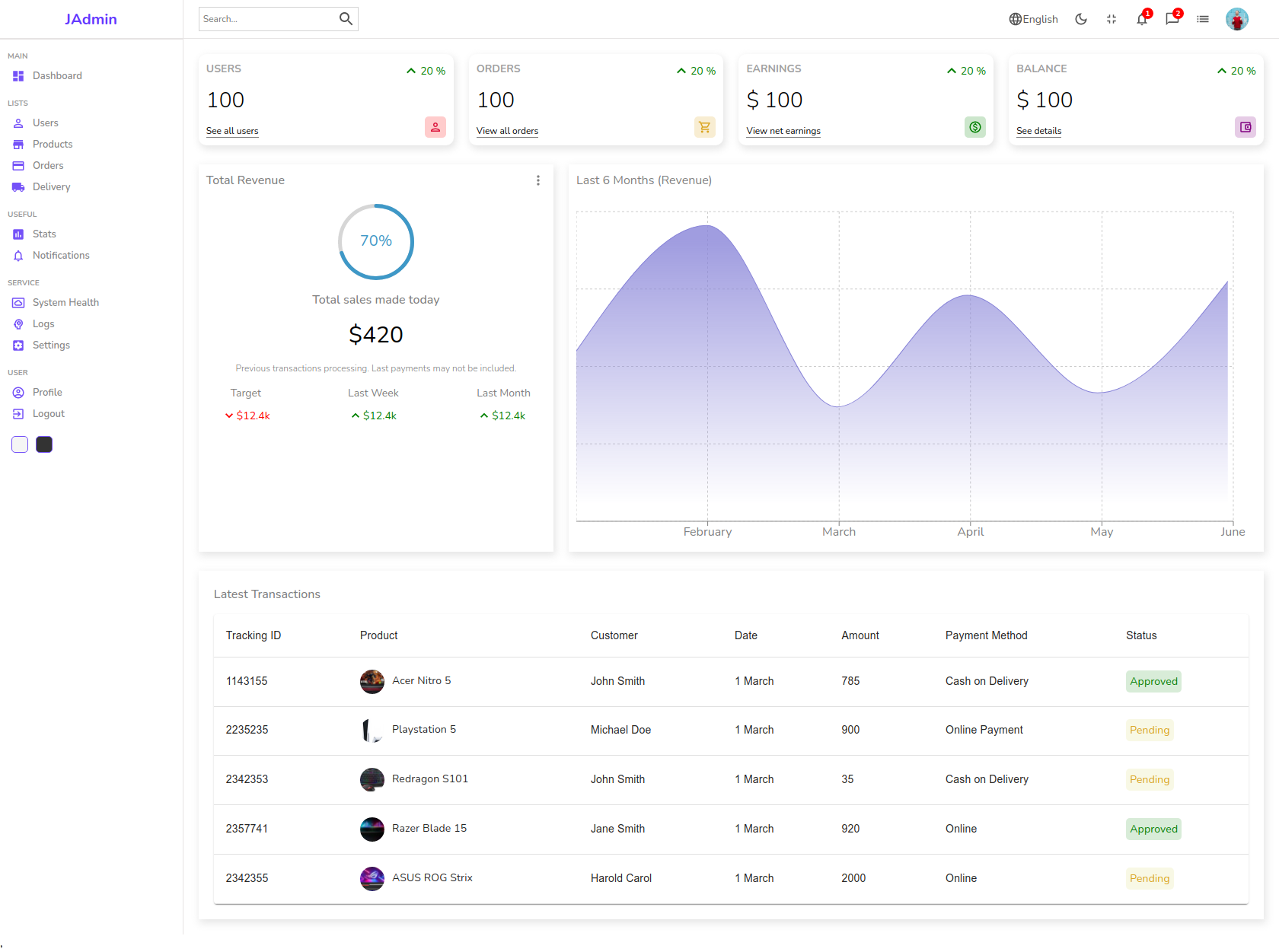
Author-provided previewTop of page
Preview provided in the project README.
One original preview is available. Open the full image to inspect the design.
Screenshots show visual appearance; interactive behavior may differ.
Recorded 2026-10-03View source
What stands out
A quick read of the recorded project description.
Interface uses the MUI component library
Initialized with Create React App
Provides yarn and yarn start development scripts
Repository is under the MIT license
Template Details
jadmin is a React admin interface template. The project description calls it a React Js Admin UI with MUI, with an interface style oriented toward data dashboards. The repository README shows the project was initialized with Create React App and provides two scripts: yarn and yarn start. After installing dependencies, run it in development mode and view it in the browser at http://localhost:3000. The README includes a dashboard screenshot as a preview.
The repository is under the MIT license, allowing free use, modification, commercial use, and distribution of this version of the code. When distributing copies or substantial portions of the code, the original author's copyright notice and the full MIT license notice must be retained. The code is provided as is. Third-party assets such as demo images, fonts, and icons must be checked separately under their respective licenses. External services such as domains, hosting, databases, payments, or AI may incur additional charges. The README does not provide further details on routing, state management, component lists, build and deployment, or testing; these aspects should be based on the actual repository code.
ReactAdmin
Is it right for your project?
Use Cases
- Building the interface skeleton for a React admin system
- As a starting point for data dashboard-style pages
- Adjusting admin interface styles on top of MUI
- Learning how a Create React App project is organized
Suitable For
- Developers who need a React admin interface foundation
- Projects using MUI to build management-side pages
- Internal management tools that want to start from MIT-licensed code
Getting started & customization
Use these recorded setup notes alongside the repository instructions for your chosen version.
- 1
Run yarn in the project directory to install dependencies
- 2
Run yarn start to launch development mode
- 3
Visit http://localhost:3000 in the browser to view the page
- 4
Third-party assets such as demo images, fonts, and icons must have their licenses checked separately
License & source material
Usage conditions & limitations
Free to use · keep license noticeThis entry covers the free version under the MIT license in the public repository; the free scope is the code of this version and does not mean external services or third-party assets are free.
Must comply with when using
- Free use, modification, commercial use, and distribution of this version of the code are permitted.
- When distributing copies or substantial portions of the code, retain the original author's copyright notice and the full MIT license notice.
- The code is provided as is; warranties and limitations of liability are governed by the original license and applicable law.
Additional costs & items to verify
- Demo images, fonts, icons, and other third-party assets must be checked under their respective licenses and cannot be judged solely by the code's MIT license.
- External services such as domains, hosting, databases, payments, or AI may incur additional charges.
View Original Text Basis
https://github.com/umanda/jadmin/blob/master/LICENSEhttps://github.com/umanda/jadmin/blob/master/README.mdPermission is hereby granted, free of charge
Original License Text
Compiled by DeepSeek based on repository license and README ·2026-10-03. Results only cover the materials read; dependencies, images, fonts, and subsequent term changes are subject to their respective original texts.
Project checks & description sources
Template Information
- Source platforms
- GitHub
- Documentation and maintenance reference score
- Less documented · 45 / 100
- Technologies
- React
- Website type
- Admin dashboard
How this score is calculated
Our heuristic uses license records (up to 30), a demo link (12), a preview (10), stars (15), recorded maintenance (15), description completeness (8), feature records (5) and classification data (5). It is not a code, security or performance test, or a Google score. A link does not establish tested functionality.
What to verify for this project
- Repository update recorded
- 2022-03-14
- Screenshot last checked
- 2026-10-03
No demo link is recorded. Use the repository instructions to evaluate the project locally; the screenshot alone cannot establish interactive behavior.
The catalog identifies React as the primary stack. Check the actual dependency manifest and lockfile for versions and hosting requirements. These notes use recorded metadata, not a code audit or a deployment test.
Use a selection guide →How this description was prepared
AI-assisted description based on catalog records and repository material. Repository authors are not automatically the reviewers of this description.
Review declaration: [email protected] · 2026-10-04
Inspect the recorded source material
SHA-256: d08f10152acf9dfafd79f4ddca5ec14b9938a8c1a32a68a448f9ccc2403b0866
2026-10-03T21:13:28.796Z
Source file / repository# React Js Admin UI with MUI This project was bootstrapped with [Create React App](https://github.com/facebook/create-react-app). ## Available Scripts In the project directory, you can run: ### `yarn` ### `yarn start` Runs the app in the development mode.\ Open [http://localhost:3000](http://localhost:3000) to view it in your browser. ## Preview <p align="center"> <img src="https://raw.githubusercontent.com/umanda/jadmin/master/screen-shots/dashboard.png" width="400" alt="Preview of Frontend" /> </p>
Explore similar templates
Compare previews and descriptions within the same stack and category.
ant-design-pro
Ant Design Pro is an enterprise-grade React admin scaffold built on React 19, Umi Max 4, and antd 6 with TypeScript.
React · Admin dashboard

coreui-free-react-admin-template
CoreUI's free React admin template, built on React and the CoreUI component library, provides dashboard layouts, sidebar navigation, routing, and example views. It includes .cursorrules, ARCHITECTURE.md, and DEVELOPMENT.md context files, plus JSDoc comments and PropTypes, to support AI-assisted development.
React · Admin dashboard

fastapi-react
A Cookiecutter template for FastAPI + React (TypeScript) full-stack projects, integrating PostgreSQL, SQLAlchemy, Alembic, Celery, Redis, JWT authentication, a react-admin admin panel, and a Docker Compose development environment with Nginx reverse proxy.
React · Admin dashboard

react-antd-admin-template
A React + Ant Design admin template for mid- and back-office products, with built-in login/logout, dynamic routing, permission checks, and user management.
React · Admin dashboard

react-saas-template
A React and Material-UI template for SaaS or admin websites, offering dashboard, chart, blog, payment, and file upload components. It uses Create-React-App, React-Router, Recharts, React-Stripe-js, React-Dropzone, and React-Cropper, with theme colors centralized in src/theme.js.
React · Admin dashboard

react-material-admin
React Material Admin is an MIT-licensed React admin template by Flatlogic, built on Material-UI. It provides dashboards, charts, tables, authentication, profile, and notification pages, with three color themes and responsive layouts.
React · Admin dashboard