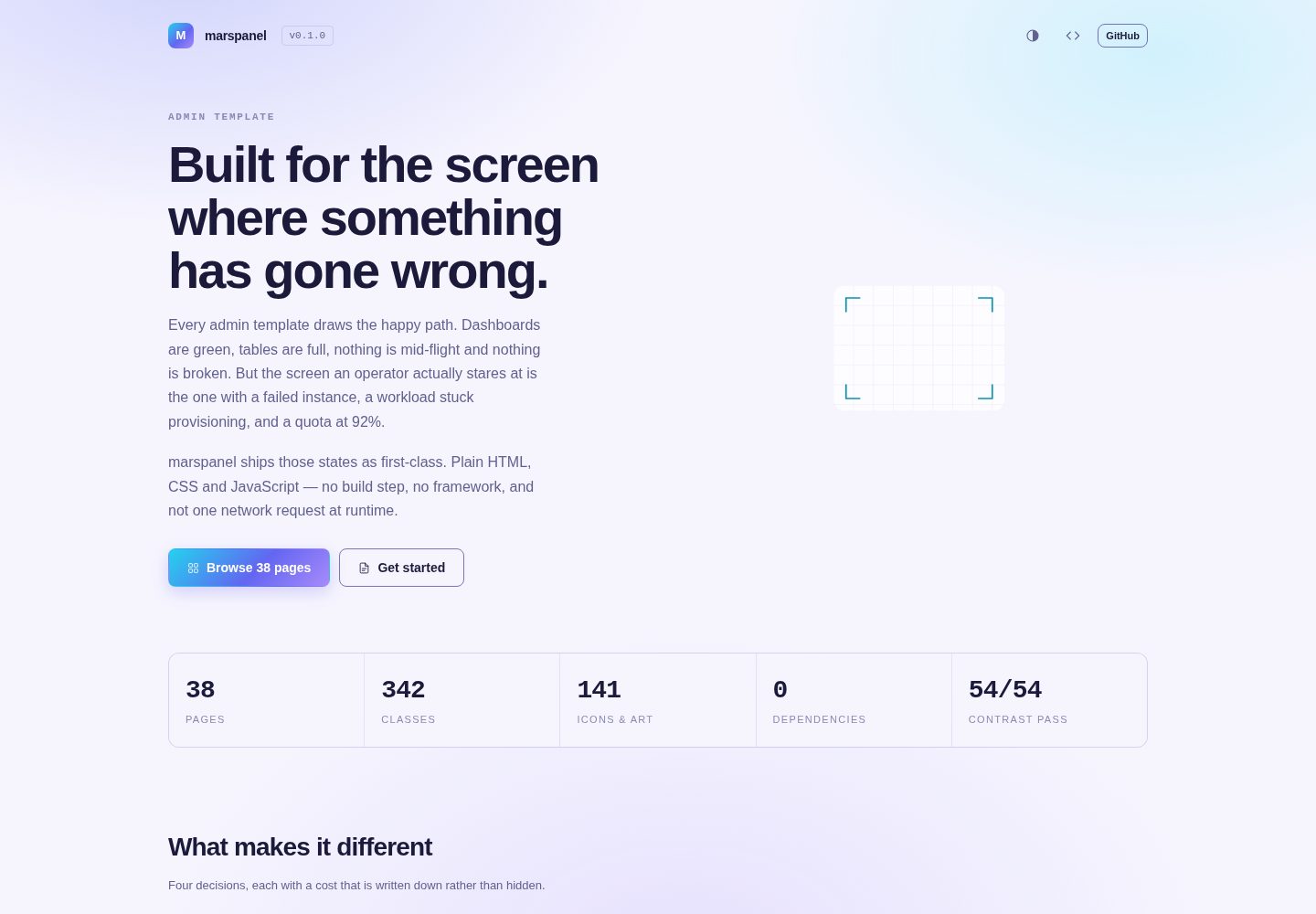
Implemented in plain HTML, CSS and JavaScript, with no framework, no build step and no runtime network requests
HTMLAdmin dashboard
marspanel — HTML Admin dashboard Template
By umars28
marspanel is an admin template for infrastructure consoles, built with plain HTML, CSS and JavaScript, with no framework and no runtime network requests, defaulting to the Aurora dark theme and containing 38 demo pages.
Explore the design
Compare the page layouts and mobile experience. Open any screenshot for a closer look.
Desktop homepage1 / 2
Desktop captureTop of page
Actual screenshot captured by the server browser.
All pages & views 2
Screenshots show visual appearance; interactive behavior may differ.
Recorded 2026-10-15View source
What stands out
A quick read of the recorded project description.
Default Aurora dark theme using a cyan, indigo and purple three-color system, with brand colors and status colors kept separate in responsibility
Six status vocabularies applied uniformly through mpn-is-* classes to components such as pills, banners, log lines, timelines, calendars, kanban boards and topology nodes
Design tokens split into three layers: primitive, semantic and component; components do not reference raw tokens directly, and the build script validates this
Includes RTL and print styles; dir="rtl" switches direction, and print styles repeat table headers and avoid breaking rows across pages
Provides 38 demo pages, 342 classes, 141 icons and illustrations, plus contrast audit documentation
Template Details
marspanel is an infrastructure console admin template written in plain HTML, CSS and JavaScript. It depends on no framework and makes no network requests at runtime. The default theme is Aurora, primarily dark, layering translucent surfaces over soft radial gradients and using a three-color system of cyan, indigo and purple. The template contains 38 demo pages covering common console interfaces such as dashboards, tables, forms, charts, logs and topology.
The template treats abnormal states as first-class citizens: failed instances, workloads stuck in provisioning, volumes detaching for a long time, backups failing due to bucket quota, 92% quota usage, and clusters that no longer satisfy N+1. It emphasizes console readability under failure scenarios.
Installation is done by copying the dist/ directory into a project and including the CSS, theme script, sprite sheet and main script in order; it can also be installed via npm and the CSS imported. The theme script must be placed in the head and executed synchronously so the dark or light theme is determined before first paint. JavaScript has no importable API; the CSS classes and data-mpn-* attributes are the interface. The README provides documentation, build, RTL, print, contrast audit, security policy and architecture decision record notes.
HTMLAdmin panel
Is it right for your project?
Use Cases
- Building infrastructure consoles that need to show abnormal states such as failed instances, stuck provisioning and quota alerts
- Deploying admin interfaces in offline or air-gapped environments where no external fonts, icon fonts or CDN resources may be loaded
- Backend systems that need RTL support or print-friendly styles
- Admin panel projects based on plain HTML/CSS/JS that do not introduce a frontend framework
Suitable For
- Console interfaces that need to display infrastructure abnormal states and operational details
- Projects that want to avoid framework dependencies and build steps and use the dist files directly by copying them
- Admin panels that need dark-first, switchable themes and support for RTL and printing
- Deployment environments with strict restrictions on runtime network requests
Getting started & customization
Use these recorded setup notes alongside the repository instructions for your chosen version.
- 1
Copy the dist/ directory into the project and include marspanel.min.css, marspanel-theme.js, sprites.js and marspanel.js in the order specified by the README
- 2
marspanel-theme.js must be placed in the head and executed synchronously, otherwise the first paint will show a theme flash
- 3
It can also be installed via npm install marspanel and then import "marspanel/css"; there is no JavaScript API to import
- 4
starter/index.html is a skeleton page that can be copied and trimmed down
- 5
Build with node build/index.mjs and serve locally with node build/serve.mjs; no npm install is required
License & source material
Usage conditions & limitations
Free to use · keep license noticeThis entry covers the free version under the MIT license in the public repository; the free scope is the code of this version and does not mean that external services or third-party assets are free.
Must comply with when using
- The code of this version may be used, modified, used commercially and distributed free of charge.
- When distributing copies or substantial portions of the code, retain the original author's copyright notice and the full MIT license notice.
- The code is provided as is; warranties and limitations of liability are governed by the original license and applicable law.
Additional costs & items to verify
- Demo images, fonts, icons and other third-party assets must be checked against their respective licenses and cannot be judged solely by the code's MIT license.
- External services such as domains, hosting, databases, payments or AI may incur separate charges.
View Original Text Basis
https://github.com/umars28/marspanel/blob/main/LICENSEhttps://github.com/umars28/marspanel/blob/main/README.mdPermission is hereby granted, free of charge
Original License Text
Compiled by DeepSeek based on repository license and README ·2026-10-15. Results only cover the materials read; dependencies, images, fonts, and subsequent term changes are subject to their respective original texts.
Project checks & description sources
Template Information
- Source platforms
- GitHub
- Documentation and maintenance reference score
- More documented · 80 / 100
- Technologies
- HTML
- Website type
- Admin dashboard
How this score is calculated
Our heuristic uses license records (up to 30), a demo link (12), a preview (10), stars (15), recorded maintenance (15), description completeness (8), feature records (5) and classification data (5). It is not a code, security or performance test, or a Google score. A link does not establish tested functionality.
What to verify for this project
- Repository update recorded
- 2026-09-13
- Screenshot last checked
- 2026-10-15
A demo link is listed. Check it with your own content and viewport sizes; its presence does not confirm that forms, authentication or payments work.
The catalog identifies HTML as the primary stack. Check the actual dependency manifest and lockfile for versions and hosting requirements. These notes use recorded metadata, not a code audit or a deployment test.
Use a selection guide →How this description was prepared
AI-assisted description based on catalog records and repository material. Repository authors are not automatically the reviewers of this description.
Review declaration: codex-user-requested-batch-review-20261017 · 2026-10-16
Inspect the recorded source material
SHA-256: 503e4ef809ca6be5ef27ae6ca62197c97c6c31ec3544b2bac9c34ec51c81c671
2026-10-15T13:27:04.315Z
Source file / repository# marspanel [](https://github.com/umars28/marspanel/actions/workflows/ci.yml) [](LICENSE) [](package.json) [](docs/accessibility.md) [](https://umars28.github.io/marspanel/) Admin template for infrastructure consoles. Plain HTML, CSS and JavaScript — no build step for consumers, no framework, and not one network request at runtime. **[Live demo →](https://umars28.github.io/marspanel/)** The default theme is **Aurora**: dark-first, layered translucency over a soft radial wash, with a cyan → indigo → violet identity. ``` 38 pages · 342 classes · 141 icons and illustrations · 0 dependencies · 54/54 contrast pairs pass ``` ## Why another admin template Every widely used admin template draws the happy path. Dashboards are green, tables are full, nothing is mid-flight and nothing is broken. But the screen an operator actually stares at is the one where something has gone wrong. marspanel ships the ugly states as first-class: a failed instance, a workload stuck provisioning, a volume that has been detaching for an hour, a backup that died on bucket quota, a quota at 92 %, a cluster that is no longer N+1. If a template cannot render those legibly, it cannot render the job. ## Install Copy `dist/` into your project. Four files, and the order matters. ```html <link rel="stylesheet" href="/dist/marspanel.min.css"> <script src="/dist/marspanel-theme.js"></script> <!-- in <head>, synchronous --> <body class="mpn-root"> <script src="/dist/sprites.js"></script> <div class="mpn-app">…</div> <script src="/dist/marspanel.js"></script> </body> ``` `marspanel-theme.js` belongs in the head because it resolves dark or light **before first paint** — move it lower and you get a flash of the wrong theme. `starter/index.html` is this skeleton with a working shell; copy it and start deleting. Or `npm install marspanel`, then `import "marspanel/css"`. There is no JavaScript API to import; the CSS classes and the `data-mpn-*` attributes are the interface. ## Documentation | | | |---|---| | [Getting started](docs/getting-started.md) | install, layout, breakpoints, building from source | | [Theming](docs/theming.md) | the three token layers and how to write another theme | | [JavaScript](docs/javascript.md) | every `data-mpn-*` attribute | | [RTL and print](docs/rtl-and-print.md) | logical properties, the paper stylesheet | | [Contrast audit](docs/accessibility.md) | generated by the build, not asserted by hand | | [ADR 0001](docs/adr/0001-visual-direction.md) | the nine visual directions Aurora was chosen against | | [ADR 0002](docs/adr/0002-packaging-and-structure.md) | why `dist/` is committed and the build has no dependencies | | [Security](SECURITY.md) | scope, reporting, and a CSP that works | Live pages: open `index.html`, or `pages/index.html` for the full list. ## The rule that makes it a system Three hues, three jobs. Brand colour never argues with status colour. | Hue | Token | Role | Where | |---|---|---|---| | Cyan `#22D3EE` | `--mpn-focus` | *pointing* | focus ring, active tab underline | | Indigo `#6366F1` | `--mpn-accent` | *acting* | primary button, link, anything clickable | | Violet `#A78BFA` | `--mpn-pending` | *in flight* | provisioning, reconciling, draining | A focus ring is never the accent colour. A primary button is never cyan. ## One status vocabulary Six states, one class, read by every stateful component: ```html <span class="mpn-pill mpn-is-ok">running</span> <div class="mpn-banner mpn-is-warn">…</div> <div class="mpn-log-line mpn-is-danger">…</div> ``` `mpn-is-warn` works identically on a pill, a banner, a timeline dot, a calendar event, a board card, an info box, a log line, a topology node and a donut segment — because each reads `--mpn-state` and `--mpn-state-tint` rather than hard-coding a colour. Map your own nouns onto the six: `running`, `bound`, `granted`, `paid` and `shipped` are all `ok`. ## Tokens are three layers deep, and the order is enforced ``` tokens/primitive.css --mpn-indigo-500: #6366F1 tokens/semantic.css --mpn-accent: var(--mpn-indigo-500) components/button.css background: var(--mpn-accent) ``` **Components never reference primitives.** That single constraint is what makes an alternate theme a block of variables instead of a hunt through twenty stylesheets, and `build/verify.mjs` fails the build if it is broken. ## Component coverage | Group | Classes | |---|---| | Actions | `mpn-btn` (primary, solid, ghost, danger, sm, lg, block, group), `mpn-icon-btn`, `mpn-avatar` | | Status | `mpn-pill`, `mpn-dot`, `mpn-tag`, `mpn-chip`, `mpn-env` | | Surfaces | `mpn-card` (+head, body, foot, quiet, state), `mpn-infobox`, `mpn-stat-*`, `mpn-meter`, `mpn-kv` | | Feedback | `mpn-banner`, `mpn-toast`, `mpn-progress`, `mpn-spinner`, `mpn-dots`, `mpn-skeleton`, `mpn-empty` | | Data | `mpn-table` (striped, bordered, compact, fixed, flat, quiet, stack), sort, filter, bulk select, `mpn-pagination` | | Forms | input, select, textarea, checkbox, radio, switch, range, OTP, tags, addon, drop zone, choice grid, validation states, date picker, searchable select, colour picker | | Navigation | sidebar nav with collapsible groups, `mpn-tabs`, `mpn-crumbs`, `mpn-stepper`, `mpn-accordion`, `mpn-tree` | | Overlays | `mpn-modal`, `mpn-drawer`, `mpn-menu`, `mpn-popover`, `mpn-palette`, `mpn-tooltip` | | Charts | area, line, spark, bars, donut, gauge, stacked bar, heat matrix, meter rows — all hand-drawn SVG | | Content | `mpn-list`, `mpn-media`, `mpn-comment`, `mpn-file-row`, `mpn-feed`, `mpn-timeline` | | Code | `mpn-code`, `mpn-term`, `mpn-log`, `mpn-diff` | | Workspace | `mpn-cal`, `mpn-board`, `mpn-chat`, `mpn-topo`, `mpn-split` | ## Right-to-left and print `dir="rtl"` on `<html>` is the whole switch. Every directional rule is a logical property, so `base/rtl.css` only has to fix what has no logical form — transforms, inset shadows, asymmetric radii, the select arrow. The verifier fails the build on any `margin-left` or `border-right` outside that file. `base/print.css` relights the theme for paper, drops chrome and overlays, repeats table headers on every page and keeps rows from breaking mid-way. Test it on `pages/invoice.html`. ## Structure ``` src/css/ tokens/ base/ components/ · the stylesheets src/js/ theme.js ui.js widgets.js src/sprites/ icons.svg illustrations.svg build/ six Node scripts, standard library only dist/ what you copy: bundled css, js, sprites pages/ 38 demo pages starter/ minimal copy-me page docs/ guides and decision records ``` ``` node build/index.mjs # build everything node build/serve.mjs # http://localhost:8777 ``` There is nothing to `npm install`. Keeping it that way is a design constraint, not an accident. `build/verify.mjs` runs on every build and in CI. It fails on an undeclared token, a class used but never defined, a missing icon symbol, a broken link, a page missing its theme script, or a physical CSS property that would break RTL. Fix the cause, never the check. ## No webfonts, no icon font, no CDN System font stack for prose; monospace for anything a machine produced or a human has to type — identifiers, states, addresses, sizes, durations. Icons are an inline SVG sprite. This is not minimalism for its own sake. A console that fetches nothing renders identically when it is served from a single binary on an air-gapped node. ## Contributing See [CONTRIBUTING.md](CONTRIBUTING.md). The public API is the set of `mpn-*` classes, `--mpn-*` tokens and `data-mpn-*` attributes; renaming any of them is a breaking change. ## License [MIT](LICENSE)
Explore similar templates
Compare previews and descriptions within the same stack and category.

AdminLTE
An HTML admin dashboard built with Bootstrap 5 and vanilla JavaScript. Astro builds the documentation; React, Vue and Angular editions live in separate repositories.
HTML · Admin dashboard

gentelella
Gentelella v4 is a free, open-source admin dashboard template maintained by Colorlib, built with vanilla JavaScript, SCSS, and Vite 8 without Bootstrap or jQuery.
HTML · Admin dashboard

coreui-free-bootstrap-admin-template
A free Bootstrap admin template maintained by CoreUI, built on CoreUI's own UI component library. It provides compiled HTML pages and Pug template source code, covering dashboards, authentication, forms, components, icons, and error pages.
HTML · Admin dashboard

dashboards
A collection of responsive dashboard HTML templates open-sourced by Keen IO, built on CSS Grid, offering multiple prebuilt admin data interface layouts.
HTML · Admin dashboard

SB Admin 2
SB Admin 2 is a classic Bootstrap admin template from Start Bootstrap, offering dashboards, charts, tables, and common management pages.
HTML · Admin dashboard

Adminator-admin-dashboard
Adminator 4 is a vanilla HTML, CSS and JavaScript admin dashboard template with a CSS-variable token design system, built-in light and dark themes, no jQuery or Bootstrap dependency, and 18 pages covering dashboards, mail, calendar, charts, forms, tables and error pages.
HTML · Admin dashboard