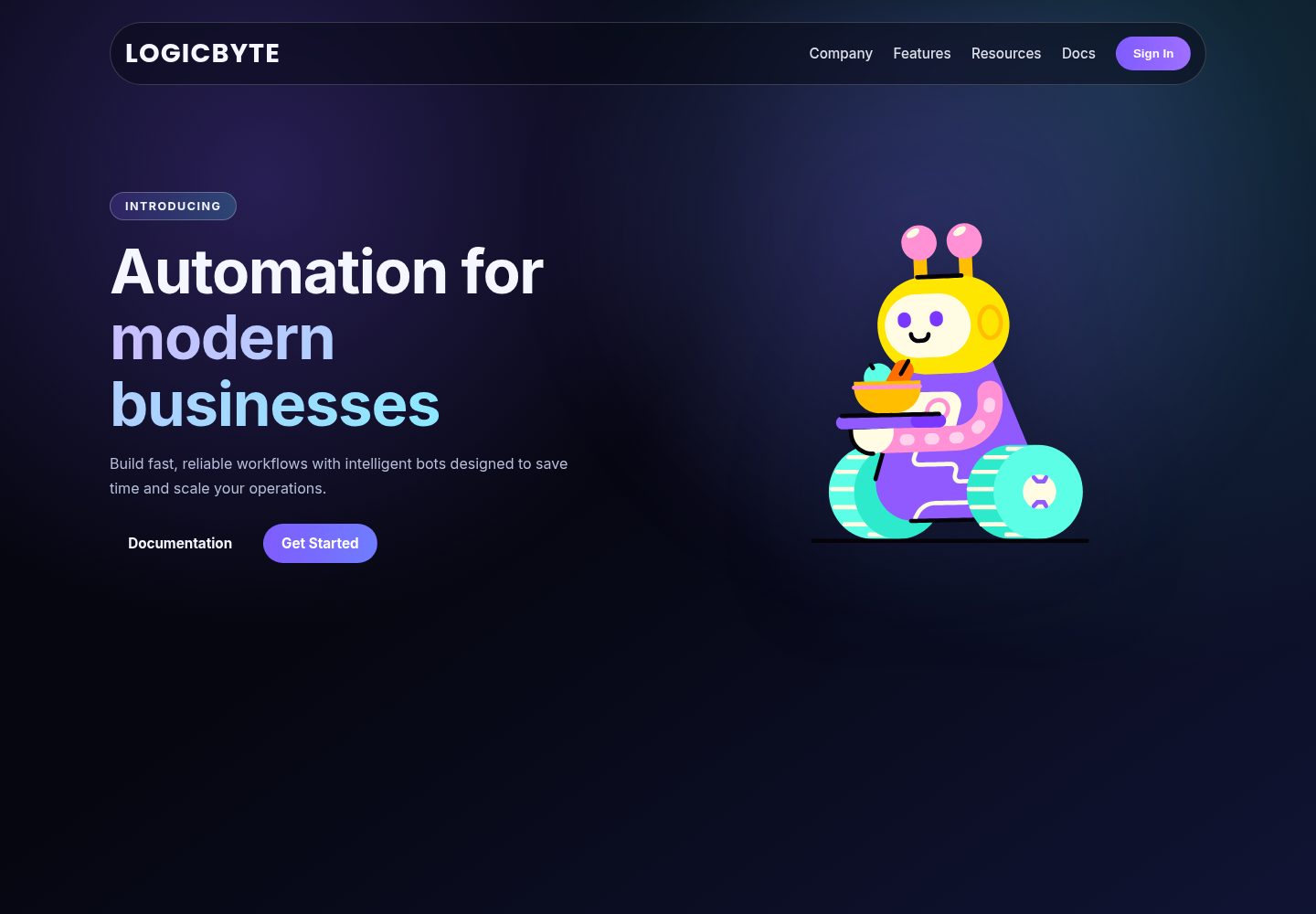
Dark theme design: black background, white text, and purple accent colors
HTMLCorporate Website
LOGICBYTE_WEBSITE — HTML Business Template
By Vansh27189
LOGICBYTE is a dark-themed corporate landing page template for showcasing BOTS-based business automation services, featuring a Rive robot animation and responsive layout.
Explore the design
Compare the page layouts and mobile experience. Open any screenshot for a closer look.
Desktop homepage1 / 2
Desktop captureTop of page
Actual screenshot captured by the server browser.
All pages & views 2
Screenshots show visual appearance; interactive behavior may differ.
Recorded 2026-10-13View source
What stands out
A quick read of the recorded project description.
Rive robot animation loaded via canvas and @rive-app/canvas
Responsive layout, adapting to desktop, tablet, and mobile
Includes two call-to-action buttons: Get Started and Documentation
Uses the Poppins font for headings and body text
Implemented in pure HTML, CSS, and JavaScript with no build step
Template Details
This template is the front-end code for the LOGICBYTE company landing page, written in pure HTML, CSS, and JavaScript. The page uses a dark theme with a black background, white text, and purple accent colors to present BOTS-based business automation solutions.
The page includes a modern UI, a Rive-powered robot animation, a responsive layout across desktop and mobile, and two call-to-action buttons: "Get Started" and "Documentation". The font used is Poppins. The Rive animation is loaded via a canvas element and @rive-app/canvas, and requires a newrobot.riv file in the project root directory to display correctly.
The project structure is simple, consisting mainly of three files: index.html, style.css, and newrobot.riv. Opening index.html directly in a browser allows you to view it, making it suitable as a starting point for a single-page corporate website.
HTMLCorporate website
Is it right for your project?
Use Cases
- Building a single-page website for a business automation or robotic process automation company
- Serving as a visual and structural reference for a dark-themed corporate landing page
- An example of integrating a Rive interactive animation into a page
- Quickly presenting a product and guiding users to click call-to-action buttons
Suitable For
- Front-end developers who need a single-page corporate website
- Web projects that want to use Rive animations
- Showcase pages for business automation or BOTS-related products
- Developers who prefer a framework-free, pure static HTML implementation
Getting started & customization
Use these recorded setup notes alongside the repository instructions for your chosen version.
- 1
Clone the repository and enter the project directory
- 2
Ensure the newrobot.riv file is in the project root directory, otherwise the animation will not load
- 3
Open index.html directly in a browser to run it; no build tools are required
- 4
Access it using a modern browser (Chrome, Firefox, Edge, or Safari)
License & source material
Usage conditions & limitations
Free to use · keep license noticeThis entry covers the free version under the MIT license in a public repository; the free scope applies to that version's code and does not mean external services or third-party assets are free.
Must comply with when using
- You may use, modify, commercially use, and distribute this version's code for free.
- When distributing copies or substantial portions of the code, retain the original author's copyright notice and the full MIT license notice.
- The code is provided as is; warranties and limitations of liability are governed by the original license and applicable law.
Additional costs & items to verify
- Demo images, fonts, icons, and other third-party assets must be checked against their respective licenses and cannot be judged solely by the code's MIT license.
- External services such as domains, hosting, databases, payments, or AI may incur separate charges.
- When using this template, the Rive animation file newrobot.riv must be placed in the project root directory, otherwise the robot animation on the page will not load or display.
- Before running the project, you need to manually place the newrobot.riv file in the project root directory, then open index.html directly in a browser to view the page properly.
View Original Text Basis
Permission is hereby granted, free of charge
Original License Text
The Rive asset (`newrobot.riv`) must be present in the project root for the animation to load.
Original README
https://github.com/Vansh27189/LOGICBYTE_WEBSITE/blob/main/LICENSEhttps://github.com/Vansh27189/LOGICBYTE_WEBSITE/blob/main/README.mdPlace `newrobot.riv` in the project root, then open `index.html` in your browser:
Original README
Compiled by DeepSeek based on repository license and README ·2026-10-13. Results only cover the materials read; dependencies, images, fonts, and subsequent term changes are subject to their respective original texts.
Project checks & description sources
Template Information
- Source platforms
- GitHub
- Documentation and maintenance reference score
- More documented · 80 / 100
- Technologies
- HTML
- Website type
- Corporate Website
How this score is calculated
Our heuristic uses license records (up to 30), a demo link (12), a preview (10), stars (15), recorded maintenance (15), description completeness (8), feature records (5) and classification data (5). It is not a code, security or performance test, or a Google score. A link does not establish tested functionality.
What to verify for this project
- Repository update recorded
- 2026-04-11
- Screenshot last checked
- 2026-10-13
A demo link is listed. Check it with your own content and viewport sizes; its presence does not confirm that forms, authentication or payments work.
The catalog identifies HTML as the primary stack. Check the actual dependency manifest and lockfile for versions and hosting requirements. These notes use recorded metadata, not a code audit or a deployment test.
Use a selection guide →How this description was prepared
AI-assisted description based on catalog records and repository material. Repository authors are not automatically the reviewers of this description.
Review declaration: [email protected] · 2026-10-13
Inspect the recorded source material
SHA-256: 872510daf6fd6b2e325403ca09674668c3ba91b2466df8cd4e5acfd88d8b5dcf
2026-10-13T06:22:14.590Z
Source file / repositoryGot it 👍 You want your README to feel **polished, professional, and easy to read** while keeping all the important details. Here’s a refined version with improved formatting, readability, and some extras (badges, sections, tables, and consistent Markdown style): --- # 🚀 LOGICBYTE: Business Automation Landing Page This repository contains the **front-end code** for the **LOGICBYTE landing page**, a sleek dark-themed website designed to showcase **business automation solutions using BOTS**. The page features: ✨ A modern UI, 🤖 A dynamic Rive-based robot animation, 📱 Full responsiveness, 🎯 Clear calls-to-action to engage users. --- ## ✨ Features * **Dark Mode Design** → Professional aesthetic with black background, white text, and purple accents. * **Rive Integration** → Dynamic robot animation (`newrobot.riv`) rendered using `<canvas>` + [`@rive-app/canvas`](https://www.npmjs.com/package/@rive-app/canvas). * **Responsive Layout** → Works seamlessly across desktop, tablet, and mobile. * **Calls-to-Action (CTA)** → Bold **“Get Started”** and **“Documentation”** buttons. * **Modern Typography** → Powered by the **Poppins** font for a clean, bold look. --- ## 🛠️ Tech Stack | Technology | Purpose | | -------------- | -------------------------------------- | | **HTML5** | Page structure & content | | **CSS3** | Styling, layout & responsiveness | | **JavaScript** | Initialize & resize the Rive animation | | **Rive** | Custom interactive robot animation | > ⚠️ **Note**: The Rive asset (`newrobot.riv`) must be present in the project root for the animation to load. --- ## 💻 Getting Started ### Prerequisites * A modern web browser (Chrome, Firefox, Edge, or Safari). * The `newrobot.riv` animation file in the root folder. ### Installation ```bash # Clone the repository git clone https://github.com/Vansh27189/LOGICBYTE_WEBSITE.git # Navigate into the project cd LOGICBYTE_WEBSITE ``` ### Run the Project Place `newrobot.riv` in the project root, then open `index.html` in your browser: ```bash # macOS open index.html # Windows start index.html ``` --- ## 📂 Project Structure | File | Description | | -------------- | --------------------------------------------------------------- | | `index.html` | Main HTML structure (header, sections, Rive canvas integration) | | `style.css` | Styling rules (dark theme, responsiveness, animations) | | `newrobot.riv` | Rive animation file | --- ## 🤝 Contribution Contributions are welcome! 🎉 * Fork the repo * Create a new branch (`git checkout -b feature/your-feature`) * Commit changes (`git commit -m 'Add new feature'`) * Push to your branch (`git push origin feature/your-feature`) * Submit a Pull Request 🚀 --- ## 📜 License This project is **open-source** and available under the [MIT License](LICENSE). --- 👉 Pro tip: You can also add **preview screenshots** of your landing page (or a short GIF of the robot animation) to make the README more engaging. ---
Explore similar templates
Compare previews and descriptions within the same stack and category.

mazer
Mazer is a free and open-source Bootstrap 5 admin dashboard and landing page template that does not depend on jQuery. It provides prebuilt releases, source builds, and CDN inclusion, and includes dark mode, perfect-scrollbar, and ApexCharts examples.
HTML · Admin dashboard

Freelancer
A bright, single-page Bootstrap portfolio template for freelancers, designers, and small studios. It includes a responsive portfolio grid with modal detail windows and an SB Forms contact form that requires an API token.
HTML · Portfolio

Creative
A single-page marketing template by Start Bootstrap for creative agencies and product services, built on Bootstrap with SCSS, featuring a portfolio grid and call-to-action sections. It includes pre-set SB Forms markers for form integration and npm build scripts for source customization.
HTML · Corporate Website

startbootstrap-agency
Agency is a one-page Bootstrap portfolio theme from Start Bootstrap, MIT licensed. It includes a responsive portfolio grid with modal details and a preconfigured SB Forms contact form that requires an API token.
HTML · Corporate Website

startbootstrap-landing-page
A general-purpose Bootstrap landing page template from Start Bootstrap, MIT licensed, with a Pug/SCSS/npm build pipeline.
HTML · Corporate Website

Landing-Page
A general-purpose landing page HTML template maintained by Tailwind Toolbox, written in pure HTML and loading the complete Tailwind CSS via CDN.
HTML · Corporate Website