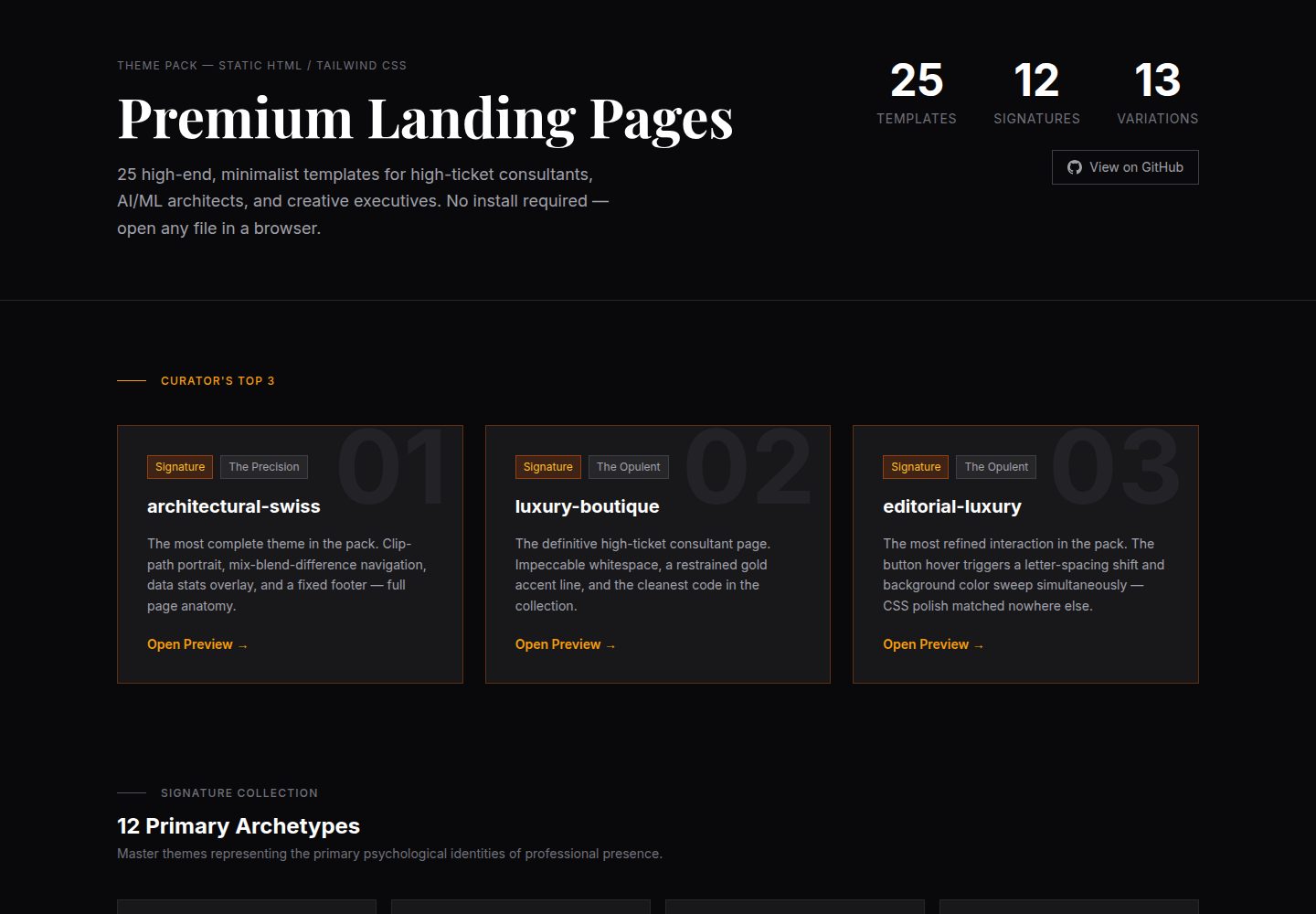
25 static HTML landing page templates, divided into 12 signature main themes and 13 variations
HTMLCorporate Website
landing-page-theme-pack — HTML Business Template
By varunnjbehera
25 static HTML landing page templates for high-ticket consultants and AI/ML architects, built on Tailwind CSS CDN, with no installation required—open directly in a browser to preview and edit.
Explore the design
Compare the page layouts and mobile experience. Open any screenshot for a closer look.
Desktop homepage1 / 2
Desktop captureTop of page
Actual screenshot captured by the server browser.
All pages & views 2
Screenshots show visual appearance; interactive behavior may differ.
Recorded 2026-10-03View source
What stands out
A quick read of the recorded project description.
Built on Tailwind CSS CDN, zero installation, open index.html directly in a browser to preview
Unified asymmetric split layout: high-impact typography on the left, portrait display on the right
Images transition from grayscale to color on hover, a consistent interactive detail across the pack
Uses a max-w-screen-xl safe area to prevent stretching on ultrawide monitors
Each theme includes a README.md describing the primary color and font pairing, making it easy to adjust the visual by replacing Tailwind class names
Template Details
This is a collection of static HTML landing page templates maintained by varunnjbehera, comprising 25 templates aimed at high-ticket consultants, AI/ML architects, and creative managers. All pages are pure HTML files, with styles loaded via Tailwind CSS CDN, so no build tools or local installation are required—simply open index.html in a browser to view the result.
The templates are divided into two tiers: 12 main themes in the signature directory, categorized by professional identity tone into directions such as luxury, corporate, precision, bold, experimental, and natural; and 13 supplementary themes in the variations directory, offering different color schemes, layout tweaks, and style variants. Each theme follows three shared design elements: an asymmetric left-right split (typography on the left, portrait on the right), images that transition from grayscale to color on hover, and a max-w-screen-xl safe area to prevent stretching on ultrawide monitors.
Content customization is straightforward: open the selected theme's index.html in a text editor, replace the portrait <img> src, modify the name, title, and value proposition in the <h1> and <p> tags, and update the navigation and footer links. Each theme includes a README.md with visual identity guidelines describing the primary color and font pairing, which can be adjusted by modifying Tailwind class names (e.g., changing text-indigo-600 to text-emerald-600). Fonts use Google Fonts, icons use FontAwesome, and placeholder images come from Unsplash.
Note that the code is under the MIT license, allowing free use, modification, commercial use, and distribution, but the copyright and license notice must be retained when distributing; third-party assets such as demo images, fonts, and icons must be checked separately under their respective licenses. The templates are static pages and do not include backend, database, or form processing logic; deployment requires connecting your own hosting and external services.
HTMLCorporate website
Is it right for your project?
Use Cases
- High-ticket consultants or AI/ML architects building a personal brand landing page to showcase their title, value proposition, and portrait
- Quickly previewing multiple visual styles (luxury, corporate, precision, bold, experimental, natural) to determine personal positioning
- Replacing content and previewing directly by opening HTML files in a browser without build tools or a local development environment
- Using as a static page template foundation to later connect your own hosting, forms, or external services
Suitable For
- Independent consultants, AI/ML architects, creative managers, and other professionals who need a personal brand page
- Developers who prefer pure HTML and Tailwind CSS CDN and do not want to introduce a build process
- Designers or content staff who need to quickly compare multiple visual directions and choose a style
Getting started & customization
Use these recorded setup notes alongside the repository instructions for your chosen version.
- 1
No installation required: browse the signature or variations directories and open any index.html in a browser to preview
- 2
Customize content: in a text editor, replace the <img> src (recommended portrait ratio 4:5), the name, title, and value proposition in the <h1> and <p> tags, and update the links in the nav and footer
- 3
Adjust visuals: refer to each theme's README.md visual identity guidelines and change the primary color and font pairing by modifying Tailwind class names
- 4
Asset licensing: demo images come from Unsplash, fonts from Google Fonts, and icons from FontAwesome; check their respective licenses separately before commercial use
- 5
Static limitations: the templates do not include backend, database, or form processing logic; deployment requires connecting your own hosting and external services
License & source material
Usage conditions & limitations
Free to use · keep license noticeThis entry covers the free version under the MIT license in the public repository; the free scope applies to that version's code and does not imply that external services or third-party assets are free.
Must comply with when using
- The code in this version may be used, modified, used commercially, and distributed for free.
- When distributing copies or substantial portions of the code, retain the original author's copyright notice and the full MIT license notice.
- The code is provided as is; warranties and limitations of liability are governed by the original license and applicable law.
Additional costs & items to verify
- Demo images, fonts, icons, and other third-party assets must be checked under their respective licenses and cannot be judged solely by the code's MIT license.
- External services such as domains, hosting, databases, payments, or AI may incur additional charges.
- Styles depend on loading the Tailwind CSS CDN; offline or when the CDN is unreachable, page styles will fail, and you must switch to a local build or self-hosting.
- Fonts are loaded via the external Google Fonts service; in network environments where that service is unreachable, fonts will fall back, and you must check font licensing yourself before commercial use.
- Icons use FontAwesome 6.4, a third-party resource, and must be checked separately under its own license terms before commercial use.
- Placeholder images come from the external Unsplash image host, a third-party asset, and must be checked separately under the Unsplash license and replaced with your own images before commercial use.
View Original Text Basis
Permission is hereby granted, free of charge
Original License Text
**Styling:** [Tailwind CSS](https://tailwindcss.com/) (via CDN for zero-install portability).
Original README
**Typography:** Google Fonts (Featuring *Playfair Display*, *Inter*, *Outfit*, and *Plus Jakarta Sans*).
Original README
**Icons:** [FontAwesome 6.4](https://fontawesome.com/).
Original README
https://github.com/varunnjbehera/landing-page-theme-pack/blob/main/LICENSEhttps://github.com/varunnjbehera/landing-page-theme-pack/blob/main/README.md**Assets:** High-resolution placeholders via Unsplash.
Original README
Compiled by DeepSeek based on repository license and README ·2026-10-04. Results only cover the materials read; dependencies, images, fonts, and subsequent term changes are subject to their respective original texts.
Project checks & description sources
Template Information
- Source platforms
- GitHub
- Documentation and maintenance reference score
- More documented · 80 / 100
- Technologies
- HTML
- Website type
- Corporate Website
How this score is calculated
Our heuristic uses license records (up to 30), a demo link (12), a preview (10), stars (15), recorded maintenance (15), description completeness (8), feature records (5) and classification data (5). It is not a code, security or performance test, or a Google score. A link does not establish tested functionality.
What to verify for this project
- Repository update recorded
- 2026-05-28
- Screenshot last checked
- 2026-10-04
A demo link is listed. Check it with your own content and viewport sizes; its presence does not confirm that forms, authentication or payments work.
The catalog identifies HTML as the primary stack. Check the actual dependency manifest and lockfile for versions and hosting requirements. These notes use recorded metadata, not a code audit or a deployment test.
Use a selection guide →How this description was prepared
AI-assisted description based on catalog records and repository material. Repository authors are not automatically the reviewers of this description.
Review declaration: [email protected] · 2026-10-05
Inspect the recorded source material
SHA-256: 3effc473b55ab492b44ee6a062a533284019d34418537da0ac68c240cc9f7899
2026-10-04T19:30:23.661Z
Source file / repository# 💎 Premium Landing Page Theme Pack [](https://opensource.org/licenses/MIT) [](https://tailwindcss.com/) [](https://github.com) A curated collection of **25 high-end, minimalist landing page templates** designed specifically for high-ticket consultants, AI/ML architects, and creative executives. This pack moves beyond basic templates, providing a sophisticated "Design DNA" that balances typographic authority with modern interaction design. --- ## 🎯 The Design Philosophy Every theme in this pack is built on three non-negotiable technical pillars: 1. **The Asymmetric Split:** A balanced but dynamic layout that prioritizes high-impact typography on the left and a powerful portrait presence on the right. 2. **Interactive Presence:** All themes implement a sophisticated **Grayscale → Color** transition on image hover, creating a sense of "awakening" the page as the user interacts. 3. **Ultrawide Stability:** Unlike standard templates that stretch or distort on large monitors, these themes use a strict `max-w-screen-xl` safe-zone, ensuring a flawless experience from a mobile phone to a 49" ultrawide display. ## 🏆 Curator's Top 3 Picks If you're not sure where to start, these three themes represent the peak of the collection's versatility: 1. **`architectural-swiss`** — The most technically complete theme in the pack. A clip-path portrait, a mix-blend-difference navigation that inverts against page content, a data-rich stats overlay, and a fixed footer. The only theme with a full page anatomy. Start here if you want to see what this pack is capable of. 2. **`luxury-boutique`** — The definitive "high-ticket consultant" page. Impeccable whitespace, a restrained gold accent line, and the cleanest code in the collection. It doesn't try to impress — it simply is impressive. 3. **`editorial-luxury`** — The most refined interaction in the pack. The `.btn-luxury` hover triggers a simultaneous letter-spacing shift and background color sweep — a level of CSS polish matched nowhere else in the collection. The editorial serif/sans pairing and the 3D offset image frame give it a collector's-edition feel that the other themes don't reach. --- ## 📦 The Collection The pack is organized into two distinct tiers to help you find the right identity quickly: ### 🌟 The Signature Collection (`/signature`) 12 master themes representing the primary psychological archetypes of professional identity. - **The Opulent:** `luxury-boutique`, `editorial-luxury` - **The Enterprise:** `corporate-elite`, `ethereal-glass` - **The Precision:** `architectural-swiss`, `zen-minimalist` - **The Bold:** `industrial-brutalism`, `bold-pop` - **The Experimental:** `artistic-avant-garde`, `cyber-noir` - **The Natural:** `organic-modern`, `academic-prestige` ### 🎨 The Variation Gallery (`/variations`) 13 supplementary themes that provide alternative color palettes, layout refinements, and stylistic shifts. Ideal for those who love a specific Signature identity but want a different accent, weight, or layout approach. --- ## 🛠 Technical Stack - **Styling:** [Tailwind CSS](https://tailwindcss.com/) (via CDN for zero-install portability). - **Typography:** Google Fonts (Featuring *Playfair Display*, *Inter*, *Outfit*, and *Plus Jakarta Sans*). - **Icons:** [FontAwesome 6.4](https://fontawesome.com/). - **Assets:** High-resolution placeholders via Unsplash. --- ## 🚀 Getting Started ### 1. Choose Your Identity Browse the `/signature` folder and open any `index.html` file in your browser to preview the theme. ### 2. Customize Your Content Open the `index.html` of your chosen theme in any text editor: - **Portrait:** Find the `<img>` tag and replace the `src` with your own portrait (Recommended aspect ratio: 4:5). - **Copy:** Update the `<h1>` and `<p>` tags with your name, title, and value proposition. - **Links:** Update the navigation and social media links in the `nav` and `footer` sections. ### 3. Tweak the Visuals Every theme includes a `README.md` with a **Visual Identity Guide**, detailing the primary colors and font pairings used. You can easily swap these by changing the Tailwind classes (e.g., change `text-indigo-600` to `text-emerald-600`). --- ## 📄 License This project is released under the MIT License. Feel free to use, modify, and distribute it for personal or commercial projects.
Explore similar templates
Compare previews and descriptions within the same stack and category.

mazer
Mazer is a free and open-source Bootstrap 5 admin dashboard and landing page template that does not depend on jQuery. It provides prebuilt releases, source builds, and CDN inclusion, and includes dark mode, perfect-scrollbar, and ApexCharts examples.
HTML · Admin dashboard

Freelancer
A bright, single-page Bootstrap portfolio template for freelancers, designers, and small studios. It includes a responsive portfolio grid with modal detail windows and an SB Forms contact form that requires an API token.
HTML · Portfolio

Creative
A single-page marketing template by Start Bootstrap for creative agencies and product services, built on Bootstrap with SCSS, featuring a portfolio grid and call-to-action sections. It includes pre-set SB Forms markers for form integration and npm build scripts for source customization.
HTML · Corporate Website

startbootstrap-agency
Agency is a one-page Bootstrap portfolio theme from Start Bootstrap, MIT licensed. It includes a responsive portfolio grid with modal details and a preconfigured SB Forms contact form that requires an API token.
HTML · Corporate Website

startbootstrap-landing-page
A general-purpose Bootstrap landing page template from Start Bootstrap, MIT licensed, with a Pug/SCSS/npm build pipeline.
HTML · Corporate Website

Landing-Page
A general-purpose landing page HTML template maintained by Tailwind Toolbox, written in pure HTML and loading the complete Tailwind CSS via CDN.
HTML · Corporate Website