Built with the Astro static site generator and TailwindCSS, with components split by section
AstroCorporate Website
energy-template — Astro Business Template
By vbartalis
A green energy corporate website template built with Astro and TailwindCSS, offering homepage section components and light/dark theme switching, under the MIT license.
Explore the design
Compare the page layouts and mobile experience. Open any screenshot for a closer look.
Desktop homepage1 / 2
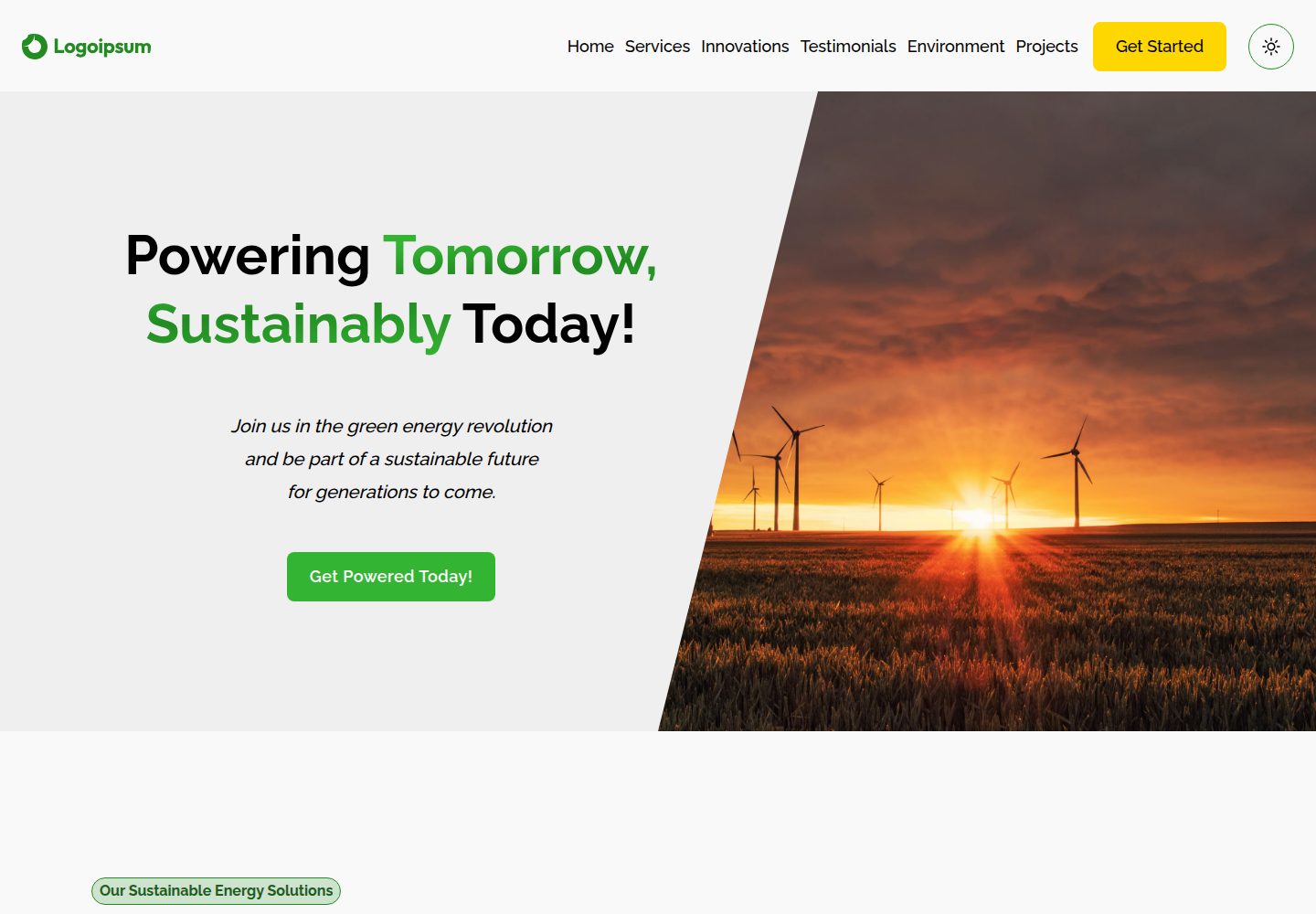
Desktop captureTop of page
Actual screenshot captured by the server browser.
All pages & views 2
Screenshots show visual appearance; interactive behavior may differ.
Recorded 2026-10-04View source
What stands out
A quick read of the recorded project description.
The homepage includes sections for hero, services, innovations, testimonials, environmental impact, featured projects, and call to action
Each section provides a data.ts data file for centralized replacement of copy and entries
Built-in light/dark theme switching, plus contact and subscription form interfaces
The repository uses the MIT license and includes a LICENSE file
Template Details
This is a corporate website template for green energy companies, using Astro as the static site generator, TailwindCSS for styling, and TypeScript. The repository includes a complete homepage structure, split by section into directories such as hero, services, innovations, testimonials, environment, featured, and cta. Each section provides a data.ts data file, making it easy to replace service items, company information, customer testimonials, and project cases. The layout layer includes Navbar, Footer, and Layout components, with the page entry at src/pages/index.astro. The template includes built-in light/dark theme switching and provides static interfaces for contact and subscription forms.
For usage, the README offers two development paths: clone the repository via VS Code Dev Container with automatic dependency installation, or install Node.js 20.11.0 or higher locally and run npm install and npm run dev, with the development server running on port 4321 by default. Build and preview use npm run build and npm run preview respectively.
In terms of limitations, the template currently contains only a single homepage with no other routes or content collections listed; the contact and subscription forms exist only as interface components in the repository, and the README does not explain backend submission or third-party service integration. Licenses for third-party assets such as demo images, fonts, and icons must be verified separately and cannot be assumed based solely on the code's MIT license.
AstroCorporate website
Is it right for your project?
Use Cases
- Building a showcase homepage for a green energy or renewable energy company
- Referencing how to organize components and data files by section in an Astro project
- A starting template for corporate sites that need light/dark theme switching and responsive layout
- Replacing existing section data to quickly generate services, cases, and testimonial content
Suitable For
- Frontend developers familiar with Astro and TailwindCSS
- Teams needing a starting point for a green energy industry website
- Projects that want to drive homepage section content with data files
Getting started & customization
Use these recorded setup notes alongside the repository instructions for your chosen version.
- 1
Local development requires Node.js 20.11.0 or higher, and npm or yarn installed
- 2
After cloning the repository, run npm install, then start the development server with npm run dev, default address http://localhost:4321
- 3
You can use the VS Code Dev Container to clone the repository into a container volume, with automatic dependency installation
- 4
Use npm run build for production builds, and npm run preview to preview the build result
- 5
Before replacing demo images, fonts, and icons, verify their license terms separately
License & source material
Usage conditions & limitations
Free to use · keep license noticeThis entry covers the free version under the MIT license in the public repository; the free scope is the code of this version and does not mean external services or third-party assets are free.
Must comply with when using
- Free use, modification, commercial use, and distribution of this version's code are permitted.
- When distributing copies or substantial portions of the code, retain the original author's copyright notice and the complete MIT license notice.
- The code is provided as is; warranties and liability limitations are governed by the original license and applicable law.
Additional costs & items to verify
- Demo images, fonts, icons, and other third-party assets must be checked against their respective licenses and cannot be assumed based solely on the code's MIT license.
- External services such as domains, hosting, databases, payments, or AI may incur additional charges.
View Original Text Basis
https://github.com/vbartalis/energy-template/blob/master/LICENSEhttps://github.com/vbartalis/energy-template/blob/master/README.mdPermission is hereby granted, free of charge
Original License Text
Compiled by DeepSeek based on repository license and README ·2026-10-04. Results only cover the materials read; dependencies, images, fonts, and subsequent term changes are subject to their respective original texts.
Project checks & description sources
Template Information
- Source platforms
- Astro Themes
- Documentation and maintenance reference score
- More documented · 87 / 100
- Technologies
- Astro
- Website type
- Corporate Website
How this score is calculated
Our heuristic uses license records (up to 30), a demo link (12), a preview (10), stars (15), recorded maintenance (15), description completeness (8), feature records (5) and classification data (5). It is not a code, security or performance test, or a Google score. A link does not establish tested functionality.
What to verify for this project
- Repository update recorded
- 2025-10-21
- Screenshot last checked
- 2026-10-04
A demo link is listed. Check it with your own content and viewport sizes; its presence does not confirm that forms, authentication or payments work.
The catalog identifies Astro as the primary stack. Check the actual dependency manifest and lockfile for versions and hosting requirements. These notes use recorded metadata, not a code audit or a deployment test.
Use a selection guide →How this description was prepared
AI-assisted description based on catalog records and repository material. Repository authors are not automatically the reviewers of this description.
Review declaration: [email protected] · 2026-10-04
Inspect the recorded source material
SHA-256: 61705a0cdd96be6f94b6d506db7ee6729c8d7492cc01f14cb8a5754593c51990
2026-10-04T17:15:12.747Z
Source file / repository# 🌱 Green Energy Astro Template A modern, responsive website template for green energy companies built with Astro and TailwindCSS. This template provides a complete solution for renewable energy businesses to showcase their services, innovations, and environmental impact. ## 🚀 Demo **[🔗 View Live Demo](https://energy-template.vbartalis.dev/)** - **[Mirror](https://vbartalis.github.io/energy-template/)** **[🎨 Get Template on Astro](https://astro.build/themes/details/energy-company-template/)** [](https://energy-template.vbartalis.dev/) [](https://astro.build/themes/details/energy-company-template/) ## 🖼️ Screenshots ### Light Theme  ### Dark Theme  ## ✨ Features - **🎨 Modern Design**: Clean, professional design optimized for green energy companies - **📱 Fully Responsive**: Mobile-first approach ensuring perfect display on all devices - **⚡ Lightning Fast**: Built with Astro for optimal performance and SEO - **🎯 Conversion Focused**: Strategic call-to-action placements throughout the site - **♿ Accessible**: Following web accessibility best practices - **🌙 Theme Support**: Built-in theme switching capabilities - **📧 Contact Forms**: Ready-to-use contact and newsletter signup forms - **🔧 Easy Customization**: Well-structured components for easy modification ## 📋 Sections Included - **Hero Section**: Eye-catching landing area with compelling headline - **Key Services**: Overview of main green energy services - **Latest Innovations**: Showcase of cutting-edge technology and solutions - **Customer Testimonials**: Social proof from satisfied clients - **Environmental Impact**: Data-driven impact visualization - **Featured Projects**: Case studies and success stories - **Get Involved**: Call-to-action section for user engagement ## 🛠️ Built With - **[Astro](https://astro.build/)** - Static site generator - **[TailwindCSS](https://tailwindcss.com/)** - Utility-first CSS framework - **[TypeScript](https://www.typescriptlang.org/)** - Type safety and better development experience ## 🚀 Quick Start You can get started with this template in two ways: ### Option 1: Using Dev Container (Recommended) For the best development experience, especially on Windows, clone directly into a dev container: 1. **Open VS Code** 2. **Use Command Palette** (`Ctrl+Shift+P` / `Cmd+Shift+P`) 3. **Run**: "Dev Containers: Clone Repository in Container Volume..." 4. **Enter repository URL**: `https://github.com/vbartalis/energy-template.git` 5. **Wait for container setup** (automatic dependency installation) 6. **Start development** ```bash npm run dev ``` This approach ensures: - ✅ Optimal file system performance - ✅ Fast live reloading on all platforms - ✅ Pre-configured development environment - ✅ No local Node.js installation required ### Option 2: Local Development #### Prerequisites - Node.js 20.11.0 or higher - npm or yarn package manager **💡 Tip**: This project uses [Volta](https://volta.sh/) for Node.js version management. If you have Volta installed, it will automatically use the correct Node.js version (20.11.0) when you enter the project directory. #### Installation 1. **Clone the repository** ```bash git clone https://github.com/vbartalis/energy-template.git cd energy-template ``` 2. **Install dependencies** ```bash npm install ``` *Note: If using Volta, the correct Node.js version will be automatically selected.* 3. **Start development server** ```bash npm run dev ``` 4. **Open your browser** Navigate to `http://localhost:4321` to see your site ### Build for Production ```bash npm run build ``` ### Preview Production Build ```bash npm run preview ``` ## 📁 Project Structure ``` / ├── public/ │ └── style/ │ └── custom.css ├── src/ │ ├── components/ │ │ ├── blocks/ │ │ ├── sections/ │ │ │ ├── cta/ │ │ │ ├── environment/ │ │ │ ├── featured/ │ │ │ ├── hero/ │ │ │ ├── innovations/ │ │ │ ├── services/ │ │ │ └── testimonials/ │ │ └── shared/ │ ├── layouts/ │ │ ├── Footer.astro │ │ ├── Layout.astro │ │ └── Navbar.astro │ └── pages/ │ └── index.astro ├── astro.config.mjs ├── tailwind.config.mjs └── package.json ``` ## 🎨 Customization ### Colors and Styling Modify the TailwindCSS configuration in `tailwind.config.mjs` to match your brand colors. ### Content Update the data files in each section folder (`src/components/sections/*/data.ts`) to customize: - Service offerings - Company information - Testimonials - Project showcases ### Images Replace images in the `assets` folders within each section to match your brand and projects. ## 📝 Available Scripts | Command | Description | |---------|-------------| | `npm run dev` | Start development server with host binding | | `npm run start` | Start development server | | `npm run build` | Build for production with type checking | | `npm run preview` | Preview production build | | `npm run astro` | Run Astro CLI commands | ## 🤝 Contributing Contributions are welcome! Feel free to: 1. Fork the repository 2. Create your feature branch (`git checkout -b feature/AmazingFeature`) 3. Commit your changes (`git commit -m 'Add some AmazingFeature'`) 4. Push to the branch (`git push origin feature/AmazingFeature`) 5. Open a Pull Request ## 📄 License This project is licensed under the MIT License - see the [LICENSE](LICENSE) file for details. ## 🙏 Acknowledgments - Thanks to the Astro team for creating an amazing static site generator - TailwindCSS for the utility-first CSS framework - The open-source community for inspiration and best practices ## 📧 Contact **Vilmos Bartalis** - [@vbartalis](https://github.com/vbartalis) Project Link: [https://github.com/vbartalis/energy-template](https://github.com/vbartalis/energy-template) --- ⭐ If you found this template helpful, please consider giving it a star!
Explore similar templates
Compare previews and descriptions within the same stack and category.

astrowind
AstroWind is a free, open-source Astro starter theme using Astro and Tailwind CSS, released under the MIT license.
Astro · Blog

astro-landing-page
An Astro + Tailwind CSS landing page example template with theme variables, dark mode, responsive layout, and Open Graph tags, under the MIT license, suitable as a starting point for single-page product, event, or corporate homepage sites.
Astro · Corporate Website

Tailcast
Tailcast is a dark-themed corporate website template built with Astro and Tailwind CSS for a fictional startup.
Astro · Corporate Website

Positivus
Positivus is an Astro and Tailwind CSS landing page theme for digital marketing agencies, maintained by manulthanura with a demo on Vercel.
Astro · Corporate Website

qwind
Qwind is a free and open-source website template built on Qwik and Tailwind CSS, featuring directory-based routing via QwikCity, a Markdown blog, dark mode, and static deployment configuration.
Astro · Tool Site

agency-landing-page-Astrojs
A single-page digital agency landing page template built with Astro and Tailwind CSS, featuring light and dark themes and a modular component directory. Suitable for static showcase pages, with MIT-licensed code and third-party assets requiring separate license verification.
Astro · Corporate Website