Single-file index.html containing layout, styles and logic, with no build tools
HTMLAdmin dashboard
atlas — HTML Admin dashboard Template
By wa7181633-rgb
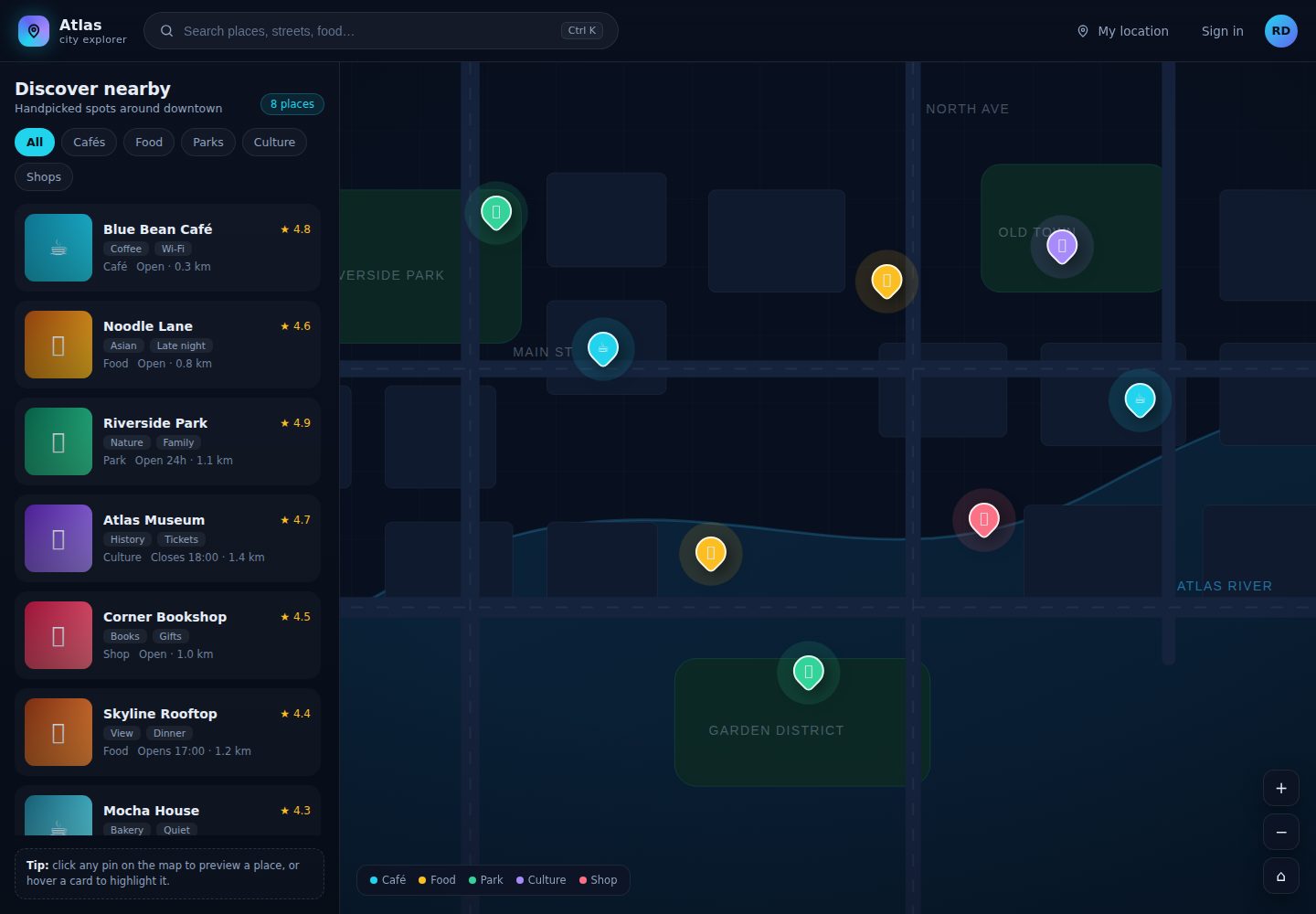
Atlas is a single-file interactive map dashboard template with a dark interface, live search and category filters, stat cards and a detail side panel; it runs directly in the browser.
Explore the design
Compare the page layouts and mobile experience. Open any screenshot for a closer look.
Desktop homepage1 / 2
Desktop captureTop of page
Actual screenshot captured by the server browser.
All pages & views 2
Screenshots show visual appearance; interactive behavior may differ.
Recorded 2026-10-19View source
What stands out
A quick read of the recorded project description.
Interactive map area with themed markers and hover states
Live search and category filters that update results instantly
Stat cards showing figures such as total, active and average
Detail side panel showing information for the selected item
Dark interface using design tokens such as --accent, --panel and --radius, adapted to mobile widths
Template Details
Atlas is a single-file map dashboard template: all layout, styling and logic sit in one index.html, with no npm, bundler, framework or API key required — open it in a browser and it runs. The README states that it includes an interactive map area with themed markers and hover states, live search and category filters that update results instantly, stat cards showing figures such as total, active and average, and a detail side panel for the selected item; the interface is dark, uses a design-token palette, and adapts to mobile widths.
The template's data comes from a plain array inside the file; the README example includes name, category and latitude/longitude fields, which can be replaced with your own records or changed to fetch from an API. All colors are centralized in the :root variable block at the top of the file for easy recoloring. The README does not provide the map basemap source, the specific map library, a real data integration implementation, or operating notes for a production deployment; the preview screenshot only shows that the page exists, not that specific features work.
HTMLBackend
Is it right for your project?
Use Cases
- Real estate or property listing display: map, filters and detail panel combined
- Front-end prototype for delivery or fleet tracking interfaces
- Location category browsing for tourism and travel operators
- Local business directory: search and category filters, no backend required
Suitable For
- Single-page map dashboard projects that want quick recoloring and easy replacement of sample data
- Environments that need a dependency-free static page deployable to static hosting such as GitHub Pages
- Map filtering and detail interaction interfaces for demos or prototypes
Getting started & customization
Use these recorded setup notes alongside the repository instructions for your chosen version.
- 1
After cloning the repository, open index.html directly in a browser; no dependency install or build step is needed
- 2
Colors are changed in the :root variable block at the top of the file, such as --accent, --accent-2 and --green
- 3
Data lives in the places array and can be replaced with your own records, or changed to fetch from an API as described in the README
- 4
To deploy to GitHub Pages, select the main branch and the /root directory under the repository's Settings → Pages
- 5
You can also drag the folder to Netlify Drop, or connect the repository on Cloudflare Pages with no build command and / as the output directory
License & source material
Usage conditions & limitations
Free to use · keep license noticeThis listing covers the free version under the MIT license in the public repository; the free scope is that version's code and does not mean external services or third-party assets are free.
Must comply with when using
- The code of this version may be used, modified, used commercially and distributed free of charge.
- When distributing copies or substantial portions of the code, retain the original author's copyright notice and the full MIT license notice.
- The code is provided as is; warranties and limitations of liability are governed by the original license and applicable law.
Additional costs & items to verify
- Demo images, fonts, icons and other third-party assets must be checked against their own licenses; the code's MIT license alone is not sufficient to judge them.
- External services such as domains, hosting, databases, payments or AI may incur separate charges.
View Original Text Basis
https://github.com/wa7181633-rgb/atlas/blob/main/LICENSEhttps://github.com/wa7181633-rgb/atlas/blob/main/README.mdPermission is hereby granted, free of charge
Original License Text
Compiled by DeepSeek based on repository license and README ·2026-10-19. Results only cover the materials read; dependencies, images, fonts, and subsequent term changes are subject to their respective original texts.
Project checks & description sources
Template Information
- Source platforms
- GitHub
- Documentation and maintenance reference score
- More documented · 80 / 100
- Technologies
- HTML
- Website type
- Admin dashboard
How this score is calculated
Our heuristic uses license records (up to 30), a demo link (12), a preview (10), stars (15), recorded maintenance (15), description completeness (8), feature records (5) and classification data (5). It is not a code, security or performance test, or a Google score. A link does not establish tested functionality.
What to verify for this project
- Repository update recorded
- 2026-10-19
- Screenshot last checked
- 2026-10-19
A demo link is listed. Check it with your own content and viewport sizes; its presence does not confirm that forms, authentication or payments work.
The catalog identifies HTML as the primary stack. Check the actual dependency manifest and lockfile for versions and hosting requirements. These notes use recorded metadata, not a code audit or a deployment test.
Use a selection guide →How this description was prepared
AI-assisted description based on catalog records and repository material. Repository authors are not automatically the reviewers of this description.
Review declaration: codex-user-requested-batch-review-20261021 · 2026-10-21
Inspect the recorded source material
SHA-256: 840e05067cf4c4bdc59d2148bc2ea7b4d82087da52dc252c985c5a10a9495541
2026-10-19T17:08:13.461Z
Source file / repository# Atlas — interactive map dashboard template
A **single-file** map dashboard you can rebrand in an afternoon. Dark UI, live filtering, stat cards and a detail panel — the kind of screen property, delivery, travel and local-service businesses pay for.
<p align="left">
<img alt="HTML" src="https://img.shields.io/badge/HTML-single%20file-E34F26?style=flat-square&logo=html5&logoColor=white" />
<img alt="No build" src="https://img.shields.io/badge/build-none-34d399?style=flat-square" />
<img alt="License" src="https://img.shields.io/badge/license-MIT-22d3ee?style=flat-square" />
</p>
## What it is
One `index.html` containing everything: layout, styles and logic. Open it in a browser and it runs. No npm, no bundler, no framework, no API key.
## Features
- **Interactive map area** with themed markers and hover states
- **Live search + category filters** that update results instantly
- **Stat cards** for headline numbers (total, active, average)
- **Detail side panel** for the selected item
- **Dark, product-grade UI** with a proper design-token palette (`--accent`, `--panel`, `--radius`)
- **Responsive** down to mobile widths
- **Zero dependencies** — deploys free on GitHub Pages, Netlify or Cloudflare Pages
## Quick start
```bash
git clone https://github.com/farmoz/atlas
cd atlas
# just open the file
start index.html # Windows
open index.html # macOS
```
## Rebranding (5 minutes)
All colours sit in one block at the top of the file:
```css
:root{
--bg:#070d18;
--panel:rgba(13,20,36,.86);
--accent:#22d3ee; /* primary */
--accent-2:#a78bfa; /* secondary */
--green:#34d399;
}
```
Data lives in a plain array — swap it for your own records or fetch it from an API:
```js
const places = [
{ name: 'Sample location', category: 'retail', lat: 24.86, lng: 67.01 },
];
```
## Good for
| Use case | Why it fits |
|---|---|
| Property / real-estate listings | Map + filters + detail panel is the standard pattern |
| Delivery or fleet tracking | Stat cards + marker list |
| Travel and tour operators | Category filters and location previews |
| Local directories | Search + categories, no backend needed |
## Deploy
**GitHub Pages:** push the repo → Settings → Pages → Source `main` / `/root`.
**Netlify:** drag the folder onto https://app.netlify.com/drop.
**Cloudflare Pages:** connect the repo, no build command, output directory `/`.
## Custom work
Need it wired to a real database, live GPS feed or your own API? That's what I do — see my profile or open an issue.
## License
MIT — free for personal and commercial use.
Explore similar templates
Compare previews and descriptions within the same stack and category.

AdminLTE
An HTML admin dashboard built with Bootstrap 5 and vanilla JavaScript. Astro builds the documentation; React, Vue and Angular editions live in separate repositories.
HTML · Admin dashboard

gentelella
Gentelella v4 is a free, open-source admin dashboard template maintained by Colorlib, built with vanilla JavaScript, SCSS, and Vite 8 without Bootstrap or jQuery.
HTML · Admin dashboard

coreui-free-bootstrap-admin-template
A free Bootstrap admin template maintained by CoreUI, built on CoreUI's own UI component library. It provides compiled HTML pages and Pug template source code, covering dashboards, authentication, forms, components, icons, and error pages.
HTML · Admin dashboard

dashboards
A collection of responsive dashboard HTML templates open-sourced by Keen IO, built on CSS Grid, offering multiple prebuilt admin data interface layouts.
HTML · Admin dashboard

SB Admin 2
SB Admin 2 is a classic Bootstrap admin template from Start Bootstrap, offering dashboards, charts, tables, and common management pages.
HTML · Admin dashboard

Adminator-admin-dashboard
Adminator 4 is a vanilla HTML, CSS and JavaScript admin dashboard template with a CSS-variable token design system, built-in light and dark themes, no jQuery or Bootstrap dependency, and 18 pages covering dashboards, mail, calendar, charts, forms, tables and error pages.
HTML · Admin dashboard