Static export: output: "export", the output is plain HTML/CSS/JS and can be deployed to any static space
Next.jsReactBlog
nextjs-blog-template — Next.js Blog Template
By wanrenhuifu
A Chinese static blog template based on the Next.js App Router, supporting static export, dual themes, MDX writing and build-time full-text search; it builds without configuring environment variables.
Explore the design
Compare the page layouts and mobile experience. Open any screenshot for a closer look.
Desktop homepage1 / 3
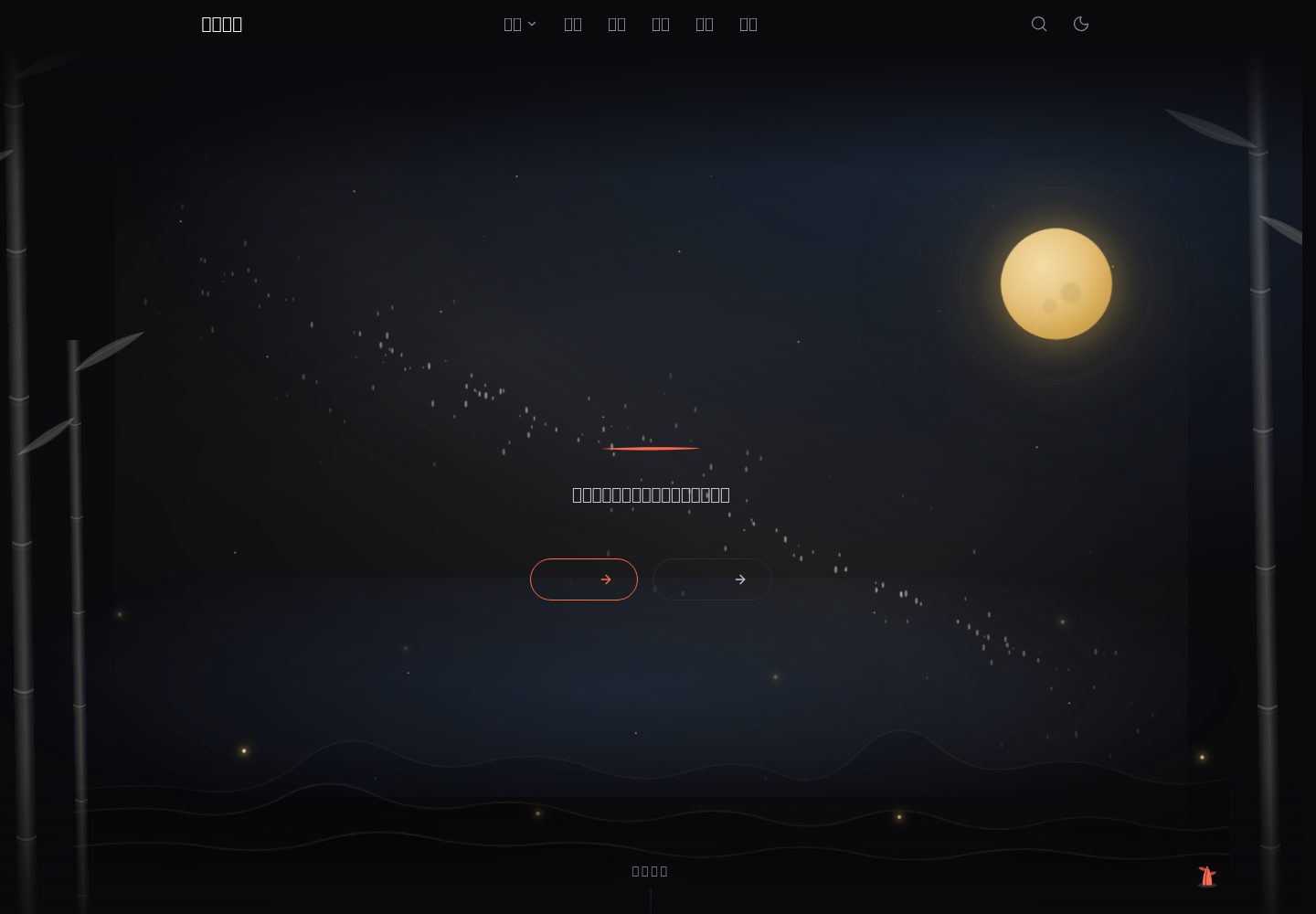
Desktop captureTop of page
Actual screenshot captured by the server browser.
All pages & views 3
Screenshots show visual appearance; interactive behavior may differ.
Recorded 2026-10-14View source
What stands out
A quick read of the recorded project description.
Dual themes: daytime bamboo grove (rice-white xuan paper with vermilion) and nighttime stars and moon (near-black neutral base with warm golden starlight), switched automatically by local time and also switchable manually
MDX writing: supports GFM tables, KaTeX formulas, Shiki code highlighting, an automatic table of contents and reading time
A full-text search index is generated at build time; the front end performs case-insensitive substring matching, invoked with Ctrl/Cmd + K
Site identity is centralized in site.config.mjs, with page titles, SEO meta, RSS, sitemap, header and footer taking values from it uniformly
Comes with a GitHub Pages deployment workflow; pushing to main builds and publishes automatically, with the site address and basePath derived automatically
Template Details
This template targets Chinese personal blogs, uses the Next.js App Router and is configured for static export (output: "export"); the build output is plain HTML/CSS/JS and can be hosted on any static space. Content is written in MDX, with each post at content/blog/<slug>/index.mdx, supporting GFM tables, KaTeX formulas, Shiki code highlighting, an automatic table of contents and reading time. The template provides two themes, daytime "bamboo grove" and nighttime "stars and moon", switched automatically according to the visitor's local time, and also switchable manually. The search index is generated at build time, and the front end performs case-insensitive substring matching, invoked with Ctrl/Cmd + K. Site identity is centralized in site.config.mjs, from which page titles, SEO meta, RSS, sitemap, header and footer all take their values. The README states that the template builds out of the box and builds successfully without configuring any environment variables, but recommends filling in NEXT_PUBLIC_SITE_URL to avoid canonical, sitemap and RSS pointing to the default https://example.com. The comment feature depends on a self-hosted Waline backend; when it is not configured, the comment area shows a notice. Friend-link avatars can be downloaded from GitHub via a script, otherwise they fall back to the first letter of the name. The README also records a known discrepancy on Windows where a batch of 404s appears when previewing after a local build, and explains that this issue only affects client-side prefetching and does not affect navigation functionality.
Next.jsBlog
Is it right for your project?
Use Cases
- Building a personal Chinese technical blog or life-record site
- Blog deployment that needs static hosting and does not depend on a server runtime
- Wanting to write in MDX while retaining layout capabilities such as formulas, code highlighting and a table of contents
- Needing to browse posts aggregated by tag, type and year
- Personal sites wanting optional comments and a friend-links page
Suitable For
- Blog authors using the Next.js App Router who want static export
- Chinese content creators who prefer MDX writing and need formulas and code highlighting
- Users planning to deploy to GitHub Pages, Cloudflare Pages, Netlify, Vercel or object storage
- Sites needing dual themes, full-text search and basic SEO capabilities (RSS, sitemap, robots, Open Graph, JSON-LD)
Getting started & customization
Use these recorded setup notes alongside the repository instructions for your chosen version.
- 1
Requires Node ≥ 20.19 (see engines in package.json).
- 2
After npm install, run npm run dev to start the development server; npm run build generates the static output to out/.
- 3
Site identity is modified in site.config.mjs; for the site address, copy .env.example to .env.local and fill in at least NEXT_PUBLIC_SITE_URL.
- 4
After changing the site name, you must rerun npm run og to regenerate the share image, otherwise the image still shows the old site name; icons can be regenerated with npm run icons.
- 5
Before deploying to GitHub Pages, enable Actions on the Actions tab and set Source to "GitHub Actions" under Settings → Pages; project-page deployment requires setting both NEXT_PUBLIC_SITE_URL and NEXT_PUBLIC_BASE_PATH correctly.
License & source material
Usage conditions & limitations
Free to use · keep license noticeThis entry covers the free version under the MIT license in the public repository; the free scope is the code of that version and does not mean that external services or third-party assets are free.
Must comply with when using
- Free use, modification, commercial use and distribution of that version's code are permitted.
- When distributing copies or substantial portions of the code, retain the original author's copyright notice and the complete MIT license notice.
- The code is provided as is; warranties and limitations of liability are governed by the original license and applicable law.
Additional costs & items to verify
- Demo images, fonts, icons and other third-party assets must be checked against their respective licenses and cannot be judged solely by the code's MIT license.
- External services such as domains, hosting, databases, payments or AI may incur separate charges.
- The comment feature depends on a self-hosted Waline backend, which must be deployed yourself; when it is not configured, the comment area only shows a not-configured notice.
- When NEXT_PUBLIC_WALINE_SERVER_URL is not set, the comment area shows "comment system not configured" and comments are unavailable.
- Comments require a self-hosted Waline backend (which can be deployed on the Vercel + Supabase free tier); when it is not configured, the comment area shows a not-configured notice.
- When deploying to GitHub Pages, a secret named WALINE_SERVER_URL must be created in the repository Secrets for comments to work.
- When NEXT_PUBLIC_SITE_URL is not filled in, canonical/sitemap/RSS/JSON-LD fall back to https://example.com and a build warning is printed.
- Subpath deployment (project pages) requires setting NEXT_PUBLIC_BASE_PATH, otherwise asset paths are wrong.
- Missing BASE_PATH in project-page deployment causes the whole site to go blank, and inconsistent values between the two variables make canonical/sitemap links point to the wrong location.
- When new code references assets under public/, it must be wrapped with publicUrl(), otherwise it silently 404s under subpath deployment.
- BASE_PATH is only read when SITE_URL is also set; setting only BASE_PATH is silently ignored.
- The build output uses trailingSlash: true, so the host must handle directory-level URLs correctly.
- Friend-link avatars require running npm run avatars to download them from GitHub, otherwise the avatar slot falls back to the first letter of the name.
- During the build, the Waline backend is pinged once to avoid the free-tier database being paused after about 7 days of inactivity; a failure only prints a warning and does not block the build.
- On Windows, a batch of 404s appears in the console when previewing after a local build (RSC payload filename differences), affecting only client-side prefetching.
- After changing the site name, you must rerun npm run og to regenerate the share image, otherwise the image still shows the old site name.
- Forked repositories do not have Actions enabled by default; you must enable them manually on the Actions tab, otherwise no workflow run is produced after pushing.
View Original Text Basis
Permission is hereby granted, free of charge
Original License Text
| 评论 | Waline,自建后端 | 需自建 |
Original README
| `NEXT_PUBLIC_WALINE_SERVER_URL` | Waline 评论后端地址 | 评论区显示「评论系统未配置」 |
Original README
| 评论 | 自建 [Waline](https://waline.js.org/) 后端(可部署在 Vercel + Supabase 免费层) | 评论区显示未配置提示 |
Original README
> 部署到 GitHub Pages 时,让评论生效需要在仓库 Secrets 里创建名为
Original README
| `NEXT_PUBLIC_SITE_URL` | 站点根地址,用于 canonical / sitemap / RSS / JSON-LD | 回退到 `https://example.com` 并打印构建警告 |
Original README
| `NEXT_PUBLIC_BASE_PATH` | 子路径前缀,仅项目页部署需要 | 视为部署在根路径 |
Original README
> 漏了 `BASE_PATH` 会**整站白屏**(CSS/JS 去根路径找)。两个值不一致则会让
Original README
> **新增代码时若引用 `public/` 下的资源,请同样用它包一层**,否则子路径部署下会静默 404。
Original README
> 只有同时设置了 `SITE_URL` 时 `BASE_PATH` 才会被读取;只设 `BASE_PATH` 会被静默忽略。
Original README
对象存储等。注意 `trailingSlash: true`,托管方需正确处理目录级 URL。
Original README
| 友链头像 | 无 —— `npm run avatars` 从 GitHub 下载 | 头像位回退为名称首字母 |
Original README
`scripts/keepalive-waline.mjs` 会在构建时 ping 一次 Waline 后端,避免免费层数据库
Original README
**在 Windows 上 `npm run build` 后本地预览时,控制台会出现一批 404**
Original README
npm run og # → public/og-default.png(改站名后必须重跑)
Original README
https://github.com/wanrenhuifu/nextjs-blog-template/blob/main/LICENSEhttps://github.com/wanrenhuifu/nextjs-blog-template/blob/main/README.md1. fork 出来的仓库默认**不启用 Actions** —— 到 Actions 标签页点一下启用
Original README
Compiled by DeepSeek based on repository license and README ·2026-10-14. Results only cover the materials read; dependencies, images, fonts, and subsequent term changes are subject to their respective original texts.
Project checks & description sources
Template Information
- Source platforms
- GitHub
- Documentation and maintenance reference score
- More documented · 83 / 100
- Technologies
- Next.js · React
- Website type
- Blog
How this score is calculated
Our heuristic uses license records (up to 30), a demo link (12), a preview (10), stars (15), recorded maintenance (15), description completeness (8), feature records (5) and classification data (5). It is not a code, security or performance test, or a Google score. A link does not establish tested functionality.
What to verify for this project
- Repository update recorded
- 2026-09-15
- Screenshot last checked
- 2026-10-14
A demo link is listed. Check it with your own content and viewport sizes; its presence does not confirm that forms, authentication or payments work.
The catalog identifies Next.js as the primary stack. Check the actual dependency manifest and lockfile for versions and hosting requirements. These notes use recorded metadata, not a code audit or a deployment test.
Use a selection guide →How this description was prepared
AI-assisted description based on catalog records and repository material. Repository authors are not automatically the reviewers of this description.
Review declaration: codex-user-requested-batch-review-20261017 · 2026-10-16
Inspect the recorded source material
SHA-256: c079a84daad12aeaa64fd8fd2d251618afb18a0f60558f10b42581d3fb4cf60b
2026-10-14T21:07:24.735Z
Source file / repository# Next.js 静态博客模板
[English](./README.en.md) · **中文**
[](https://nextjs.org)
[](https://react.dev)
[](https://tailwindcss.com)
[](./LICENSE)
一个可以直接拿来用的中文个人博客框架:静态导出、双主题、MDX 写作、全文搜索,外加工坊小工具。
**开箱即可构建** —— 不配任何环境变量也能跑起来。
> **在线示例** —— [wanrenhuifu.github.io](https://wanrenhuifu.github.io) 是这个框架的线上形态。
> 它是本站的「完整版」:除了模板自带的内容,还额外写了文章、加了雷达(AI 模型排行 + 天气预警)
> 与更多工具。模板本体只保留一个示例工具,其余按需自取。
- **日间主题**:竹林风 — 宣纸米白底色(`#FAFAF8`)配朱红主色(`#C43A1B`)
- **夜间主题**:星月夜 — 近黑中性底(`#0A0A0D`)配暖金星辉与提亮朱红;蓝色只出现在夜空辉光层,底色本身保持中性
- 主题按访问者的**本地时间**自动切换(06:00–17:59 为日间),也可手动切换
## 功能
| 功能 | 说明 | 是否需要额外配置 |
|------|------|------------------|
| 静态导出 | `output: "export"`,产物是纯 HTML/CSS/JS,可托管在任何静态空间 | — |
| 双主题 | 日间竹林 / 夜间星月,CSS 变量驱动,无闪白 | — |
| MDX 写作 | GFM 表格、KaTeX 公式、Shiki 代码高亮、自动目录、阅读时间 | — |
| 全文搜索 | 构建期生成索引,前端做大小写不敏感的子串匹配,`Ctrl/Cmd + K` 唤起 | — |
| 三种聚合视图 | 按标签、按类型、按年份归档 | — |
| SEO | RSS、sitemap、robots、Open Graph、JSON-LD 结构化数据 | 建议填站点地址 |
| 分享图 / 图标 | 脚本生成 OG 图与图标,改站名后重跑即可换品牌 | — |
| 工坊 | 一个示例工具(随机数生成器),纯前端、不上传数据;按同一形状可自行添加 | — |
| 评论 | Waline,自建后端 | 需自建 |
| 友链 | 卡片列表 + 申请说明 | — |
| 小彩蛋 | 右下角竹苗随访问次数成长;切走标签页时标题变化 | — |
## 快速开始
需要 **Node ≥ 20.19**(见 `package.json` 的 `engines`)。
```bash
npm install
npm run dev # → http://localhost:3000
```
构建静态产物到 `out/`:
```bash
npm run build
```
其它命令:
```bash
npm run build:verify # 只构建、不跑构建链上的其它步骤,本地快速验证用
npm start # 本地预览 out/(等价于 npx serve out)
npm run lint # ESLint
npx tsc --noEmit # 类型检查
npm test # 单元测试(vitest)
```
> `npm run dev` 会先经 `predev` 生成搜索索引,所以开发模式下搜索可以直接用;
> 索引本身是构建产物、不入库(见 `.gitignore`)。
## 改成你自己的
按顺序做完这几步,站点就是你的了。
### 1. 站点身份 —— 改 `site.config.mjs`
站名、作者、标语、简介、语言 locale、GitHub 用户名都在这一个文件里。
页面标题、SEO meta、RSS、sitemap、页头页脚、首页标题、友链页的「本站信息」
全部从它取值,改一处即可全站生效。
```js
export const siteConfig = {
name: "示例博客", // → 页面标题、页头页脚、首页大标题
tagline: "记录技术、思考与生活", // → 首页副标题、分享图标题行
description: "一个记录技术、思考与生活的个人博客。", // → meta description、友链页「本站信息」
author: "示例博主", // → meta 的 author/creator、文章页 JSON-LD
github: "", // → 留空则页脚与 about 页的 GitHub 入口自动隐藏
// …
};
```
> 首页的大标题是**逐字动画**,字数不限 —— 它按 `Array.from(site.name)` 驱动,不必是四个字。
>
> 注意 `author` 只影响 meta 与结构化数据,**页面上没有可见的作者署名**。
### 2. 站点地址 —— 复制 `.env.example` 为 `.env.local`
```bash
cp .env.example .env.local
```
至少要填 `NEXT_PUBLIC_SITE_URL`。不填也能构建,但 canonical / sitemap / RSS
会指向 `https://example.com`(构建期会打印一条警告提醒你)。
### 3. 品牌图 —— 重跑生成脚本
```bash
npm run og # → public/og-default.png(改站名后必须重跑)
npm run icons # → public/favicon.svg + apple-touch-icon.png(图标不含文字,通常不用重跑)
```
**站名是烧进 PNG 像素的** —— 改了 `site.config.mjs` 之后不重跑 `npm run og`,
分享图上的还是旧站名。这是最容易漏的一步:其它地方的站名会自动更新,只有图片不会。
脚本与 `next build` 一样会读 `.env.local`(经 `scripts/load-env.mjs`),所以配好之后
直接 `npm run og` 即可。CI 等场景下传入的真实环境变量优先级更高,不会被仓库里的文件覆盖。
### 4. 内容
- 删掉 `content/blog/hello-world/`,或者把它改成你的第一篇。
- 保留 `content/blog/syntax-test/`:它覆盖了全部 Markdown/MDX 渲染路径,
升级依赖后能一眼看出哪条路径坏了。详见 `content/AGENTS.md`。
- 文章配图放 `public/blog/<slug>/`,正文用绝对路径引用。
### 5. 其余可选项
| 要改什么 | 改哪里 |
|----------|--------|
| 友链 | `data/friends.json`(3 条占位数据待替换) |
| 工坊里的工具 | `lib/tools.ts` |
| 「关于」页 | `app/about/page.tsx`(文案刻意写成通用描述,不改也能看) |
| 导航菜单 | `components/layout/nav-data.ts` |
| 站点图标 | `scripts/generate-icons.mjs` 里的墨竹几何 |
| 许可协议里的署名 | `LICENSE` 第 3 行(模板署名为 wanrenhuifu,换成你自己的名字或 ID) |
## 环境变量
全部都是**可选的** —— 一个都不配也能 `npm run build` 成功。
完整说明见 [`.env.example`](./.env.example)。
| 变量 | 作用 | 缺省行为 |
|------|------|----------|
| `NEXT_PUBLIC_SITE_URL` | 站点根地址,用于 canonical / sitemap / RSS / JSON-LD | 回退到 `https://example.com` 并打印构建警告 |
| `NEXT_PUBLIC_BASE_PATH` | 子路径前缀,仅项目页部署需要 | 视为部署在根路径 |
| `NEXT_PUBLIC_WALINE_SERVER_URL` | Waline 评论后端地址 | 评论区显示「评论系统未配置」 |
## 部署到 GitHub Pages
仓库自带 `.github/workflows/deploy.yml`,推送到 `main` 即自动构建并发布。
**首次部署前要做两件事**:
1. fork 出来的仓库默认**不启用 Actions** —— 到 Actions 标签页点一下启用
(不启用时推送后不会产生任何 workflow 运行,也没有报错提示)
2. 到 **Settings → Pages**,把 **Source 设为 "GitHub Actions"**
第 2 步没做也不会出红叉:工作流会检测到 Pages 未启用,**跳过部署并打印一条提示**
告诉你差这一步(构建与检查照常跑完)。
站点地址与 basePath 会**自动推导**,两种情况都无需配置:
- **用户站点**(仓库名为 `<你的用户名>.github.io`)→ 地址在根,无 basePath
- **项目页**(仓库名是别的,比如 fork 出来的这个模板)→ 自动用
`https://<用户名>.github.io/<仓库名>` 并设好 basePath
> ### ⚠️ 项目页部署的坑
>
> 如果你的站点在**子路径**下(项目页),必须让这两个变量同时正确:
>
> ```
> NEXT_PUBLIC_SITE_URL=https://<用户名>.github.io/<仓库名>
> NEXT_PUBLIC_BASE_PATH=/<仓库名>
> ```
>
> 漏了 `BASE_PATH` 会**整站白屏**(CSS/JS 去根路径找)。两个值不一致则会让
> canonical / sitemap 里的链接指向错误位置。
>
> 另外,Next.js **不会**自动改写裸字符串写法的资源引用 —— `<link href="/favicon.svg">`、
> `fetch("/search-index.json")`、正文里手写的 `<img src="/...">` 都属于这一类。
> 本项目已经把这类引用统一交给 `lib/site.ts` 的 `publicUrl()` 处理;
> **新增代码时若引用 `public/` 下的资源,请同样用它包一层**,否则子路径部署下会静默 404。
>
用自定义域名时,在仓库的 **Settings → Secrets and variables → Actions → Variables**
里设置(注意是 Variables 不是 Secrets):
- `SITE_URL`,如 `https://blog.example.com`
- `BASE_PATH`,自定义域名下通常留空
> 只有同时设置了 `SITE_URL` 时 `BASE_PATH` 才会被读取;只设 `BASE_PATH` 会被静默忽略。
### 其它静态托管
构建产物是 `out/` 目录,纯静态,可直接部署到 Cloudflare Pages、Netlify、Vercel、
对象存储等。注意 `trailingSlash: true`,托管方需正确处理目录级 URL。
## 无障碍
- 日间/夜间两套配色均满足 WCAG AA 对比度
- 全站键盘可达:跳转主内容链接、可见焦点环、44px 触摸目标
- 表单控件都有可访问名称;工具页出错时错误行带 `role="alert"`,`aria-invalid` 只标在真正出错的那个控件上
- 浮层(搜索弹窗、移动端抽屉)有 `role="dialog"` + `aria-modal`,焦点被限制在内部,关闭后归还给打开它的按钮
- `prefers-reduced-motion` 下关闭所有循环动画与入场编排,内容直出
- 脚本被禁用时:入场动画的初态由 `<noscript>` 样式接管,首屏文字与列表照常可见
## 可选功能与依赖
| 功能 | 依赖 | 不配置时 |
|------|------|----------|
| 评论 | 自建 [Waline](https://waline.js.org/) 后端(可部署在 Vercel + Supabase 免费层) | 评论区显示未配置提示 |
| 友链头像 | 无 —— `npm run avatars` 从 GitHub 下载 | 头像位回退为名称首字母 |
`scripts/keepalive-waline.mjs` 会在构建时 ping 一次 Waline 后端,避免免费层数据库
因约 7 天无活动被暂停。它是**永不阻断构建**的:任何失败只打印警告。
> 部署到 GitHub Pages 时,让评论生效需要在仓库 Secrets 里创建名为
> **`WALINE_SERVER_URL`** 的 secret(`deploy.yml` 按这个名字读取,再赋给环境变量
> `NEXT_PUBLIC_WALINE_SERVER_URL`)。
## 删掉不需要的页面
路由是文件式的,删除即下线。删完记得同步三处:
1. `app/sitemap.ts` 里的静态路由清单(否则 sitemap 会指向 404)
2. `components/layout/nav-data.ts` 的导航项
3. `app/about/page.tsx` 的模块导览,以及 `app/page.tsx` 底部的 `ENTRIES`
常被删掉的:`app/friends/`、`app/guestbook/`(需要 Waline 后端)。
## 已知差异:Windows 本地构建
**在 Windows 上 `npm run build` 后本地预览时,控制台会出现一批 404**
(形如 `/blog/__next.blog.__PAGE__.txt`)。已在 Next 16.2.6 上核实:
| 构建环境 | 产出的 RSC 载荷文件名 |
|----------|----------------------|
| Linux(含 GitHub Actions) | `__next.blog.__PAGE__.txt`(扁平文件)—— 客户端预取请求的正是这个 |
| Windows | `__next.blog/__PAGE__.txt`(目录形式) |
这些文件用于**客户端预取**。缺失的后果仅限于预取落空、点击链接时退化为整页跳转 ——
导航功能本身正常(已实测:各入口的客户端跳转均正常,只是多一次整页加载)。
**不需要处理**:仓库的部署走 GitHub Actions(`ubuntu-latest`),CI 构建产出的是扁平文件,
与预期一致。若你希望在 Windows 本地预览时也消除这批 404,用 `npm run dev` 即可。
> 这条记录于模板化时的实测。上游修好后可以删掉本节。
## 项目结构
### 代码
```
app/ # 路由页面(App Router)
├── layout.tsx # 根布局(元数据、主题种子脚本、Header/GlobalUI)
├── page.tsx # 首页(Hero 3D 场景 + 纯文字文章目录)
├── blog/[slug]/ # 文章详情(SSG)
├── tags/ types/ archive/ # 三种聚合视图
├── tools/ # 工坊
├── friends/ # 友链
├── guestbook/ # 留言
├── about/ # 关于本站
└── sitemap.ts / robots.ts / rss.xml/route.ts
components/ # React 组件(按功能域分组)
├── layout/ # Header / DesktopNav / MobileDrawer / Footer / PageShell
│ # SearchModal / ThemeToggle / TimeThemeController
│ # GlobalUI / ErrorFallback / FarewellTitle / JsonLd / nav-data
├── blog/ # PostCard / PostCardSkeleton / MdxContent
│ # TableOfContents / WalineComments
├── home/ # HeroSection(构图与时序)/ HeroScenery(场景绘制)
├── tools/ # RandomNumber(模板自带的示例工具)
└── ui/ # FadeUp / GlowCard / BambooSprout / CopyCodeButton
# BackToTop / ScrollProgress
lib/ # 核心业务逻辑(无 JSX、无浏览器 API)
├── content.ts # 内容读取与处理(含正文图片尺寸读取与校验)
├── data.ts # 统一数据层(JSON 读取 + Zod 校验 + 降级兜底)
├── site.ts # 站点身份的出口(读 site.config.mjs,派生逐字数组等)
├── schemas.ts # Zod 校验模式
├── types.ts # 全局类型
├── constants.ts # 文章分类等常量
├── mdx.ts # MDX 编译配置(插件链)
├── readingTime.ts # 阅读时间计算
├── timeTheme.ts # 按本地时间切换日/夜主题
├── bamboo.ts # 竹苗彩蛋的阶段计算
├── random.ts # 随机数算法
├── tools.ts # 工坊的工具配置数据
└── a11y.ts # 可访问性工具
site.config.mjs # ★ 站点身份的唯一来源(Node 脚本与应用共用)
```
### 内容与数据
```
content/blog/<slug>/ # MDX 文章源文件(纯文本,不含图片)
data/
└── friends.json # 友链(唯一的数据文件,人工维护)
public/ # 静态资源(静态导出下唯一会被服务的位置)
├── blog/<slug>/ # 文章配图 —— 约定见 public/AGENTS.md
├── cursors/ # 自定义光标(日间竹叶 / 夜间星星)
└── friends/avatars/ # 友链头像(npm run avatars 生成,不入库)
```
### 样式与脚本
```
styles/ # 全局样式(由 app/globals.css 统一导入)
├── theme.css # 设计令牌与双主题变量(单一来源)
├── hero-scene.css # Hero 场景:SVG 绘制 + CSS 3D 纵深
└── components.css / animations.css / print.css
# waline.css 单独由 WalineComments 导入
scripts/ # 构建链与手动资源生成器
├── keepalive-waline.mjs / generate-search-index.mjs # 构建链上(不阻断构建)
├── generate-og.mjs / generate-icons.mjs / fetch-avatars.mjs # 手动按需
└── audit/ # 开发期校验工具(截图 / 性能),只手动跑
```
### 文档
除了本文件,仓库还带了几份说明,这是它相对一般模板的主要差别:
| 文件 | 内容 |
|------|------|
| `DESIGN.md` | 设计令牌与视觉规范的单一来源 |
| `CLAUDE.md` | 架构约定、编码规范、代码与文档的同步映射 |
| `app/` `components/` `lib/` `content/` `data/` `scripts/` `styles/` `public/` 下的 `AGENTS.md` | 各目录的细粒度规则与踩坑记录 |
| `test/fixtures/blog/README.md` | 测试夹具说明 |
改动代码后请同步对应文档 —— 具体映射见 `CLAUDE.md` 的「代码与文档同步」一节。
## 写作
一篇文章 = 一个目录 + 一个 `index.mdx`:
```
content/blog/my-first-post/index.mdx
```
```mdx
---
title: "文章标题"
pubDate: 2026-01-01
description: "文章摘要"
tags: ["标签1", "标签2"]
category: 随笔
tocDepth: 2
---
正文……
```
全部 frontmatter 字段、配图约定与排版规范见 [`content/AGENTS.md`](./content/AGENTS.md)。
## 技术栈
| 层级 | 技术 |
|------|------|
| 框架 | Next.js 16.2.6(App Router,静态导出) |
| 运行时 | React 19.2.4 |
| 样式 | Tailwind CSS v4(CSS 优先,无 `tailwind.config.js`)+ `@tailwindcss/typography` |
| 字体 | 全部走系统字体栈,不加载网络字体(中文 webfont 体积代价过高,实测移除后 LCP 从 5.5s 降到 1.7s) |
| 主题 | `next-themes`,`attribute="data-theme"` |
| MDX | `next-mdx-remote` + remark-gfm + remark-math + rehype-slug + rehype-pretty-code(Shiki)+ rehype-katex |
| 动画 | Framer Motion |
| 图标 | Lucide React |
| 校验 | Zod |
| 测试 | Vitest |
| 评论 | Waline(可选) |
## 许可
[MIT](./LICENSE)。拿去用、改、商用都可以,保留版权声明即可。
Explore similar templates
Compare previews and descriptions within the same stack and category.

tailwind-nextjs-starter-blog
A Next.js and Tailwind CSS blog starter template using Contentlayer for Markdown/MDX, with built-in SEO, code highlighting, and tags. It targets personal technical blogs and migration from Jekyll/Hugo to React, and supports one-click Vercel deployment.
Next.js · Blog

Nextjs-tailwindcss-blog-template
A Next.js blog styled with Tailwind CSS. The current branch processes Markdown with Velite; the earlier Contentlayer setup is retained in a separate historical branch.
Next.js · Blog

Next-js-Blog-Boilerplate
A blog starter built on Next.js 12 and Tailwind CSS 3, integrating TypeScript, ESLint, Prettier, and PostCSS.
Next.js · Blog

nextjs-blog-theme
A Next.js 15 and Tailwind CSS 4.x blog starter by Netlify, designed by Bejamas, with MDX support, dark/light theme switching, and environment-variable configuration. It includes a visual setup wizard for deploying to Netlify and manages content via local .mdx files.
Next.js · Blog

blog
A personal blog forked from Timlrx's tailwind-nextjs-starter-blog, built with Next.js, React, and Tailwind CSS. Content is stored as Markdown/MDX under data/, with site, author, navigation, and project data in separate files.
Next.js · Blog

tailnext
Tailnext is a free, open-source template built on the Next.js 14 App Router and Tailwind CSS, created by the onWidget team.
Next.js · Blog