Uses Next.js static site generation to output static HTML, deployable to Firebase or any static hosting service
Next.jsReactBlog
blog-template-using-nextjs-typescript-tailwindcss — Next.js Blog Template
By webexpe13
A static blog template built with Next.js, TypeScript, and Tailwind CSS that uses SSG to generate static HTML, with support for multiple authors, light/dark themes, and SEO metadata.
Explore the design
Compare the page layouts and mobile experience. Open any screenshot for a closer look.
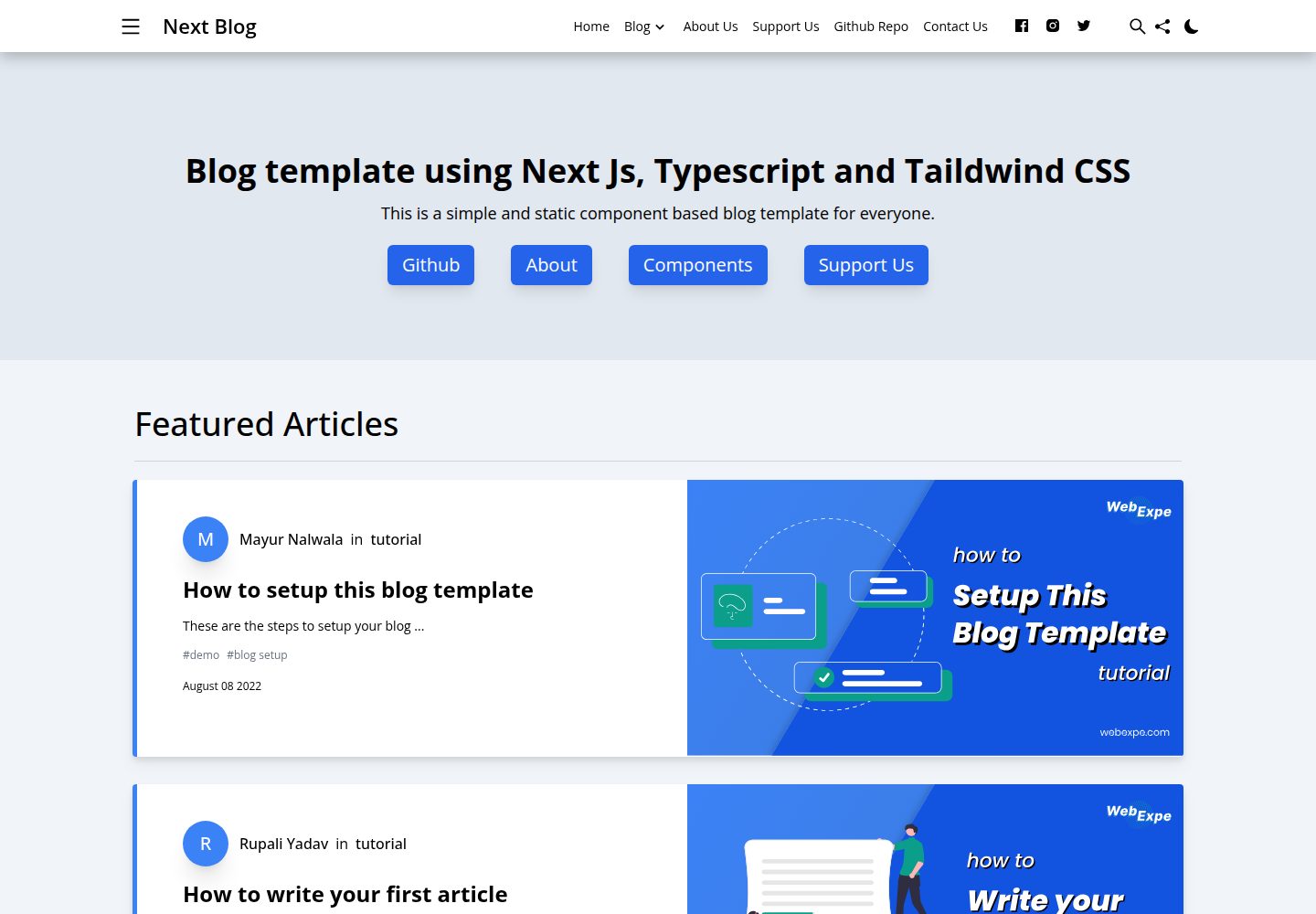
Desktop homepage1 / 3
Desktop captureTop of page
Actual screenshot captured by the server browser.
All pages & views 3
Screenshots show visual appearance; interactive behavior may differ.
Recorded 2026-10-02View source
What stands out
A quick read of the recorded project description.
Tailwind CSS styling for easy appearance customization
Supports multiple authors, light/dark themes, and default and centered layouts and components
Integrates Google Analytics and provides metadata and Open Graph tags via Next SEO
Code is written in TypeScript, and the repository uses the MIT license
Template Details
This template is aimed at personal or team blogs that write in Markdown. It uses Next.js static site generation (SSG) to output static HTML and can be deployed to Firebase or any static hosting service without needing a self-hosted backend or server. The styling layer uses Tailwind CSS for easy appearance adjustments; the code is written in TypeScript.
Functionally, it provides multi-author support, light/dark themes, default and centered layouts and components, and integrates Google Analytics along with metadata and Open Graph tags based on Next SEO. The README also mentions Firebase integration, but enabling related dynamic features requires configuring it yourself and checking Firebase quotas and billing.
Before use, you need Node.js, NPM, and VS Code; follow the README's quick start to run npm install and npm start, with the local default running on port 3000. Third-party assets such as demo images, fonts, and icons must be checked against their respective licenses and cannot be judged solely by the code's MIT license.
Next.jsReactBlog
Is it right for your project?
Use Cases
- Personal technical blog or writing site, primarily Markdown articles with static hosting needs
- Migrating from Jekyll, Hugo, or WordPress to a Next.js static blog
- Blog projects requiring multiple authors to collaboratively maintain content
- Display-oriented blogs needing light/dark themes and SEO metadata, Open Graph tags
Suitable For
- Developers familiar with or willing to use Node.js, NPM, and VS Code
- Bloggers who want static deployment without maintaining a backend service
- Blog projects requiring multi-author support and light/dark themes
- Teams wanting to adjust styles and layouts based on Tailwind CSS
Getting started & customization
Use these recorded setup notes alongside the repository instructions for your chosen version.
- 1
Requires Node.js, NPM, and VS Code for editing articles
- 2
Follow the README to run npm install, then npm start; the local default address is http://localhost:3000
- 3
The README mentions Firebase integration; enabling related dynamic features requires configuring it yourself and checking Firebase quotas and billing
- 4
Third-party assets such as demo images, fonts, and icons must be checked against their respective licenses and cannot be judged solely by the code's MIT license
- 5
When distributing copies or substantial portions of the code, retain the original author's copyright notice and the full MIT license notice
License & source material
Usage conditions & limitations
Free to use · keep license noticeThis entry covers the free version under the MIT license in a public repository; the free scope is the code of this version and does not mean external services or third-party assets are free.
Must comply with when using
- Free use, modification, commercial use, and distribution of this version's code are permitted.
- When distributing copies or substantial portions of the code, retain the original author's copyright notice and the full MIT license notice.
- The code is provided as is; warranties and limitations of liability are governed by the original license and applicable law.
Additional costs & items to verify
- The README states a hope for a small attribution/acknowledgment when using the template, which is a polite request rather than a mandatory license condition; the MIT license itself does not require attribution, but when distributing copies or substantial portions of the code, the copyright notice and license notice must be retained.
- The template integrates Google Analytics; once enabled, you must provide your own Google Analytics account and tracking ID and comply with Google's terms of service and data processing requirements.
- Deploying to Firebase or other static hosting services requires registering an account on the respective platform and bearing any potential costs and quota limits.
- The README recommends installing VS Code extensions such as Path Intellisense and Tailwind CSS IntelliSense; these are third-party tools and must be used under their respective licenses.
- The README mentions Firebase integration; enabling related dynamic features requires configuring it yourself and checking Firebase quotas and billing.
- Demo images, fonts, icons, and other third-party assets must be checked against their respective licenses and cannot be judged solely by the code's MIT license.
- External services such as domains, hosting, databases, payments, or AI may incur additional charges.
View Original Text Basis
Permission is hereby granted, free of charge
Original License Text
a little credit will be much appreciated
Original README
Google analytics support
Original README
hosted on firebase or any static site hosting service
Original README
https://github.com/webexpe13/blog-template-using-nextjs-typescript-tailwindcss/blob/main/LICENSEhttps://github.com/webexpe13/blog-template-using-nextjs-typescript-tailwindcss/blob/main/README.mdImp VS Code plugins
Original README
Compiled by DeepSeek based on repository license and README ·2026-10-02. Results only cover the materials read; dependencies, images, fonts, and subsequent term changes are subject to their respective original texts.
Project checks & description sources
Template Information
- Source platforms
- GitHub
- Documentation and maintenance reference score
- More documented · 81 / 100
- Technologies
- Next.js · React
- Website type
- Blog
How this score is calculated
Our heuristic uses license records (up to 30), a demo link (12), a preview (10), stars (15), recorded maintenance (15), description completeness (8), feature records (5) and classification data (5). It is not a code, security or performance test, or a Google score. A link does not establish tested functionality.
What to verify for this project
- Repository update recorded
- 2023-09-16
- Screenshot last checked
- 2026-10-02
A demo link is listed. Check it with your own content and viewport sizes; its presence does not confirm that forms, authentication or payments work.
The catalog identifies Next.js as the primary stack. Check the actual dependency manifest and lockfile for versions and hosting requirements. These notes use recorded metadata, not a code audit or a deployment test.
Use a selection guide →How this description was prepared
AI-assisted description based on catalog records and repository material. Repository authors are not automatically the reviewers of this description.
Automatically checked against source and license rules; no manual editorial review.
Inspect the recorded source material
SHA-256: af30431d6a73c5bf063e58fe4c1dd419461c4a3f57fd2a75e99d92e47220e845
2026-10-02T09:31:32.028Z
Source file / repository # Starter blog template using Nextjs, Typescript and Tailwind CSS. This is a [Next.js](https://nextjs.org/), [Tailwind CSS](https://tailwindcss.com/) blogging starter template. Probably the most feature-rich Next.js markdown blogging template out there. Comes out of the box configured with the latest technologies to make technical writing a breeze. Easily configurable and customizable. Perfect as a replacement to existing Jekyll and Hugo individual blogs. This is a starter blog template using [Next.js](https://nextjs.org/), [Typescript](https://www.typescriptlang.org/) and [Tailwind CSS](https://tailwindcss.com/), a feature-rich Next.js component based blogging template. This template is configured with the latest technologies and has many versatile component which allows you to write your article with ease and also provide some design customization. Easily to configure and setup and it is completely static so there is no need to setup a server just export the project to create static file and deploy it on any static site hosting service. A good replacement to existing heavy wordpress or blogger websites. Check out the [demo website](https://nextjs-simple-blog-template.web.app/) for all the required documentation to get started. Feel free to open a new issue if none has been posted previously. Feature request? feel free to start a new discussion thread. We are open for all ideas and suggestions! ## Motivation We wanted to create and start a blog with as little investment as possible and the criteria was that it should be fast, static, easy to work on and no backend or server required, so we started working on a blog for ourself and in the middle we thought of making it in such a way that it is easy for others also including non techies to just simply download the code and start their own blog. We wanted to make it as feature rich as medium or dev.to, so we took some design ideas and inspirations from them and tried to make a template which suits our need and might help others too. In this template we have used Next.js SSG to create static HTML files which can be hosted on firebase or any static site hosting service. There is also options like vercel for hosting Next.js dynamic webistes but we wanted this template to be easy to use for any non techie person too, so we explored the option of static site generation. ## Examples - [demo website](https://nextjs-simple-blog-template.web.app/) - this template - [webexpe.com](https://webexpe.com/) If you are using the template it will be great if you create a PR and add your blog to this list in readme file. It will motivate us to create more such projects. ## Features - Easy styling customization with [Tailwind CSS](https://tailwindcss.com/). - Near perfect lighthouse and page speed insights score. - Fully responsive and mobile friendly. - Light and dark theme. - Support for multiple authors. - Minimilistic Blog templates, Default and Centered Layout and Components. You can check all the list of components [here](https://nextjs-simple-blog-template.web.app/tutorial/all-components/). - Static site generation. - Google analytics support. - SEO friendly including metadata, Open Graph tags with Next SEO. ## Requirements - Node.js - NPM - VS Code for editing and writing your articles. - Imp VS Code plugins:[Path Intellisense](https://marketplace.visualstudio.com/items?itemName=christian-kohler.path-intellisense) , [Tailwind CSS IntelliSense](https://marketplace.visualstudio.com/items?itemName=bradlc.vscode-tailwindcss) ## Quick Start Guide 1. Download /Install the template: 2. Run npm install ```bash npm install ``` 3. After installation is done run npm start ```bash npm start ``` 4. Open [http://localhost:3000](http://localhost:3000) with your browser to see the result. 5. Rest you can follow this article on [setting up your blog](https://nextjs-simple-blog-template.web.app/tutorial/how-to-setup-blog/). ## Support This is an open source project and everyone is welcome to contribute. Feel free to open an issue, if you have any questions or incase you find a bug. Create your versions of this template and help the community, also if you are using our template a little credit will be much appreciated. Created by **[Rupali Yadav](https://www.linkedin.com/in/rupali-yadav-087bb4112/)** and **[Mayur Nalwala](https://www.linkedin.com/in/mayur-nalwala/)** from [WebExpe](https://webexpe.com/) with ♥ <a href="https://www.buymeacoffee.com/webexpe13z" target="_blank"></a> ## Licence [MIT](https://github.com/webexpe13/blog-template-using-nextjs-typescript-tailwindcss/blob/main/LICENSE) © [Web Expe](https://www.webexpe.com)
Explore similar templates
Compare previews and descriptions within the same stack and category.

tailwind-nextjs-starter-blog
A Next.js and Tailwind CSS blog starter template using Contentlayer for Markdown/MDX, with built-in SEO, code highlighting, and tags. It targets personal technical blogs and migration from Jekyll/Hugo to React, and supports one-click Vercel deployment.
Next.js · Blog

Nextjs-tailwindcss-blog-template
A personal blog template built with Next.js and Tailwind CSS, using Velite to process Markdown content. It includes home, about, contact and article pages, with a demo site and a companion YouTube tutorial.
Next.js · Blog

Next-js-Blog-Boilerplate
A blog starter built on Next.js 12 and Tailwind CSS 3, integrating TypeScript, ESLint, Prettier, and PostCSS.
Next.js · Blog

nextjs-blog-theme
A Next.js 15 and Tailwind CSS 4.x blog starter by Netlify, designed by Bejamas, with MDX support, dark/light theme switching, and environment-variable configuration. It includes a visual setup wizard for deploying to Netlify and manages content via local .mdx files.
Next.js · Blog

blog
A personal blog forked from Timlrx's tailwind-nextjs-starter-blog, built with Next.js, React, and Tailwind CSS. Content is stored as Markdown/MDX under data/, with site, author, navigation, and project data in separate files.
Next.js · Blog

tailnext
Tailnext is a free, open-source template built on the Next.js 14 App Router and Tailwind CSS, created by the onWidget team.
Next.js · Blog