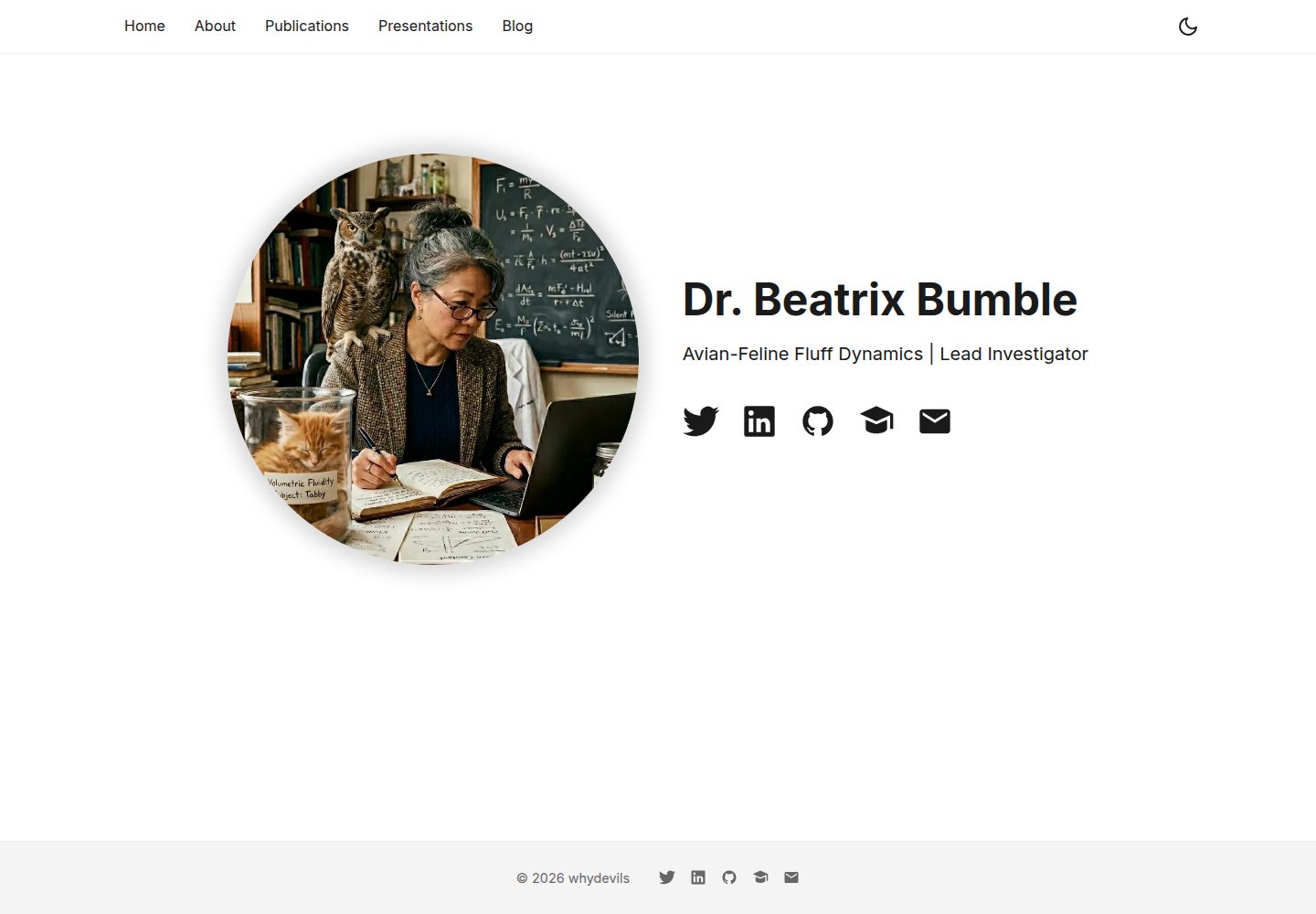
Includes common academic homepage pages: homepage, about, publications, talks, and blog
AstroStarter
astro-scholar — Astro Starter Template
By whydevils
An Astro-based academic personal homepage starter with bio, publications, talks, and blog pages, with data maintained in JSON and Markdown.
Explore the design
Compare the page layouts and mobile experience. Open any screenshot for a closer look.
Desktop homepage1 / 3
Desktop captureTop of page
Actual screenshot captured by the server browser.
All pages & views 3
Screenshots show visual appearance; interactive behavior may differ.
Recorded 2026-10-03View source
What stands out
A quick read of the recorded project description.
Publication data is centralized in src/data/publications.json, with filtering by author role and publication type
Blog posts are written in Markdown, and tags generate clickable filter entry points
Name, tagline, and social links are centralized in src/constants.ts; leaving fields empty hides them
Built-in GitHub Pages automatic deployment workflow; pushing to the main branch publishes
Theme colors and fonts are adjusted in src/styles/global.css
Template Details
astro-scholar is an academic personal homepage template built with Astro, aimed at researchers and scholars. It provides pages for the homepage, about (bio, positions, education, awards), publication list, talks, and blog. Publication data is stored in src/data/publications.json, blog posts are Markdown files, and the personal name, tagline, and social links are configured centrally in src/constants.ts. The template includes a GitHub Pages deployment workflow; pushing to the main branch publishes automatically. It also supports Netlify, Vercel, Cloudflare Pages, or building locally and uploading the dist directory. Before use, you need to update site and base in astro.config.mjs according to the deployment address, and set the Pages source to GitHub Actions in the repository settings. Local development requires Node.js 18 or later. The template is MIT licensed, but third-party assets such as demo images, fonts, and icons need separate license verification.
AstroStarter
Is it right for your project?
Use Cases
- Build a personal academic homepage to showcase bio, publications, talks, and blog
- Host an academic homepage for free on GitHub Pages without a local build environment
- Maintain a publication list with JSON and filter by author role and publication type
- Write research notes or method records in Markdown and categorize them by tags
Suitable For
- Researchers and scholars who need to quickly launch a personal homepage
- Users who want to manage a publication list with structured JSON
- Users who prefer writing in Markdown and pushing to GitHub to publish content
- Users using GitHub Pages or similar static hosting platforms
Getting started & customization
Use these recorded setup notes alongside the repository instructions for your chosen version.
- 1
Local preview or build requires Node.js 18 or later; run npm install then use npm run dev
- 2
Fill in name, tagline, and social links in src/constants.ts; leaving fields empty hides them
- 3
Replace src/assets/portrait.png with a personal photo; square and at least 400×400 pixels is recommended
- 4
When using GitHub Pages, set the source to GitHub Actions in repository Settings → Pages, and update site and base in astro.config.mjs according to the deployment address
- 5
Blog images go in public/images/blog/; paths referenced in Markdown must manually include the base prefix
License & source material
Usage conditions & limitations
Free to use · keep license noticeThis entry covers the free version in the public repository under the MIT license; the free scope is the code of this version and does not mean external services or third-party assets are free.
Must comply with when using
- Free use, modification, commercial use, and distribution of this version's code are permitted.
- When distributing copies or substantial portions of the code, retain the original author's copyright notice and the full MIT license notice.
- The code is provided as is; warranties and liability limitations are governed by the original license and applicable law.
Additional costs & items to verify
- Fonts are loaded via Google Fonts, which makes requests to Google's external services during build or access; for fully offline use or to avoid third-party requests, replace the font source yourself.
- When using GitHub Pages automatic deployment, you must change the Pages source to GitHub Actions in the repository settings; otherwise pushes will not trigger deployment.
- Before deployment, update site and base in astro.config.mjs according to the actual address; for subpath deployments, blog image paths also need the base prefix added manually.
- Local preview or build requires a Node.js 18 or later environment.
- Demo images, fonts, icons, and other third-party assets must be checked against their respective licenses; they cannot be judged solely by the code's MIT license.
- External services such as domains, hosting, databases, payments, or AI may incur additional charges.
View Original Text Basis
Permission is hereby granted, free of charge
Original License Text
The font is loaded from Google Fonts
Original README
in your repo go to **Settings → Pages → Build and deployment** and set the source to **GitHub Actions**
Original README
Edit `astro.config.mjs` to match your deployment URL
Original README
https://github.com/whydevils/astro-scholar/blob/main/LICENSEhttps://github.com/whydevils/astro-scholar/blob/main/README.mdyou'll need [Node.js 18+](https://nodejs.org/en/download)
Original README
Compiled by DeepSeek based on repository license and README ·2026-10-03. Results only cover the materials read; dependencies, images, fonts, and subsequent term changes are subject to their respective original texts.
Project checks & description sources
Template Information
- Source platforms
- Astro Themes
- Documentation and maintenance reference score
- More documented · 87 / 100
- Technologies
- Astro
- Website type
- Starter
How this score is calculated
Our heuristic uses license records (up to 30), a demo link (12), a preview (10), stars (15), recorded maintenance (15), description completeness (8), feature records (5) and classification data (5). It is not a code, security or performance test, or a Google score. A link does not establish tested functionality.
What to verify for this project
- Repository update recorded
- 2026-04-25
- Screenshot last checked
- 2026-10-03
A demo link is listed. Check it with your own content and viewport sizes; its presence does not confirm that forms, authentication or payments work.
The catalog identifies Astro as the primary stack. Check the actual dependency manifest and lockfile for versions and hosting requirements. These notes use recorded metadata, not a code audit or a deployment test.
Use a selection guide →How this description was prepared
AI-assisted description based on catalog records and repository material. Repository authors are not automatically the reviewers of this description.
Review declaration: [email protected] · 2026-10-04
Inspect the recorded source material
SHA-256: 0dc1619bc4cd1cf5bf402d1e41b10eb6dbd1dd18fa1e28279069091122fa4c13
2026-10-03T13:42:34.289Z
Source file / repository# Astro Scholar
**[Live demo](https://whydevils.github.io/astro-scholar)**
Built with [Astro](https://astro.build). Simple, fast, easy to configure and extend. Pages for introduction, publications, presentations, and a blog.
## 🚀 Getting started
**The fastest path** is to fork this repo, edit the files listed below, and push to GitHub. The site deploys automatically to GitHub Pages — no local setup needed.
If you want to preview or build locally, you'll need [Node.js 18+](https://nodejs.org/en/download):
```bash
npm install
npm run dev # http://localhost:4321
```
## ✏️ What to change
### 1. Your details — `src/constants.ts`
Name, tagline, and social links. Set any field to `""` to hide it.
### 2. Portrait — `src/assets/portrait.png`
Replace with your own photo. Ideally square, 400×400px or larger.
### 3. Pages — `src/pages/`
Each `.astro` file is a page. Edit them directly:
- `index.astro` — homepage
- `about.astro` — bio, positions, education, awards
- `publications.astro` — the filter UI (data is in `src/data/publications.json`)
- `presentations.astro` — talks and slides
### 4. Publications — `src/data/publications.json`
```json
{
"id": 1,
"title": "Paper Title",
"authors": "You, Coauthor A",
"journal": "Journal or Conference Name",
"year": 2025,
"link": "https://...",
"authorship": "first",
"abstract": "...",
"doi": "10.xxxx/xxxxx",
"publicationType": "Journal"
}
```
`authorship`: `"first"`, `"last"`, or `"other"`. Drives the authorship filter.
`publicationType`: any string — `"Journal"`, `"Conference"`, `"Preprint"`, `"Book Chapter"`, etc. Each unique value becomes a filter button.
See `src/data/README.md` for full field details.
### 5. Blog posts — `src/pages/blog/`
Add a `.md` file per post:
```markdown
---
layout: '../../layouts/BlogPost.astro'
title: 'Post Title'
date: '2025-06-01'
description: 'One sentence shown on the index.'
tags: ['methodology', 'field-notes']
---
Post content here.
```
Tags become clickable filters on the blog index. Keep them lowercase and hyphenated, and reuse them across posts so the filter is useful.
Images go in `public/images/blog/`. In markdown files you cannot use `BASE_URL`, so the path must include your base manually:
- Root deployment (`username.github.io`): `/images/blog/filename.png`
- Sub-path deployment (`username.github.io/repo-name`): `/repo-name/images/blog/filename.png`
### 6. Adding or removing pages
Any `.astro` file in `src/pages/` becomes a route. To add a page, copy an existing one and add a link in `src/components/Navigation.astro`. To remove one, delete the file and remove its nav link.
### 7. Colours and fonts
Accent colour and font are set in `src/styles/global.css`. The font is loaded from Google Fonts — swap the import and the `font-family` declaration to change it.
## 🌐 Deployment
### GitHub Pages
Push to `main` and GitHub Actions deploys automatically (workflow at `.github/workflows/deploy.yaml`).
**One-time setup:** in your repo go to **Settings → Pages → Build and deployment** and set the source to **GitHub Actions** (not "Deploy from a branch"). Without this, pushes will not trigger a deployment.
Edit `astro.config.mjs` to match your deployment URL:
**Root domain** (repo named `your-github-username.github.io` → `https://your-github-username.github.io`):
```javascript
export default defineConfig({
site: 'https://your-github-username.github.io',
});
```
**Sub-path** (any other repo name → `https://your-github-username.github.io/repo-name`):
```javascript
export default defineConfig({
site: 'https://your-github-username.github.io',
base: '/repo-name/',
});
```
### Other hosts
[Netlify](https://netlify.com), [Vercel](https://vercel.com), and [Cloudflare Pages](https://pages.cloudflare.com) all support Astro with minimal configuration. Or build with `npm run build` and upload `dist/` anywhere.
## 📁 Project structure
```
src/
├── constants.ts # Name, tagline, social links
├── assets/portrait.png # Profile picture
├── data/publications.json # Publications
├── pages/
│ ├── index.astro
│ ├── about.astro
│ ├── publications.astro
│ ├── presentations.astro
│ └── blog/
│ ├── index.astro
│ └── *.md
├── layouts/
│ ├── Layout.astro
│ └── BlogPost.astro
├── components/
└── styles/
public/
├── presentations/ # HTML slide decks
├── posters/
└── images/blog/ # Blog post images
```
## 📄 License
MIT — see [LICENSE](LICENSE).
Created by [whydevils](https://github.com/whydevils).
Explore similar templates
Compare previews and descriptions within the same stack and category.

astrowind
AstroWind is a free, open-source Astro starter theme using Astro and Tailwind CSS, released under the MIT license.
Astro · Blog
accessible-astro-starter
An accessibility-focused Astro 6 starter template with WCAG 2.2 AA practices, Tailwind CSS 4, TypeScript, Prettier, ESLint, form validation, blog and portfolio examples, and preference toggles for dark mode, high contrast, and reduced motion.
Astro · Blog

astro-erudite
astro-erudite is an opinionated, unstyled static blog template built with Astro and native CSS, with no UI or CSS framework and minimal dependencies.
Astro · Portfolio

astro-shopify
A lightweight Shopify headless ecommerce starter template built with Astro and Svelte, integrating the Shopify Storefront API for product and inventory data, with built-in cart state management and basic add-to-cart and checkout flow.
Astro · E-commerce

brutal
Brutal is a neobrutalism Astro starter theme from ElianCodes, derived from the author's personal site and generalized. It includes a Markdown blog collection, build-time RSS and sitemap, image optimization, Tailwind CSS styling, and Biome checks, with no JavaScript by default.
Astro · Starter

qwind
Qwind is a free and open-source website template built on Qwik and Tailwind CSS, featuring directory-based routing via QwikCity, a Markdown blog, dark mode, and static deployment configuration.
Astro · Tool Site