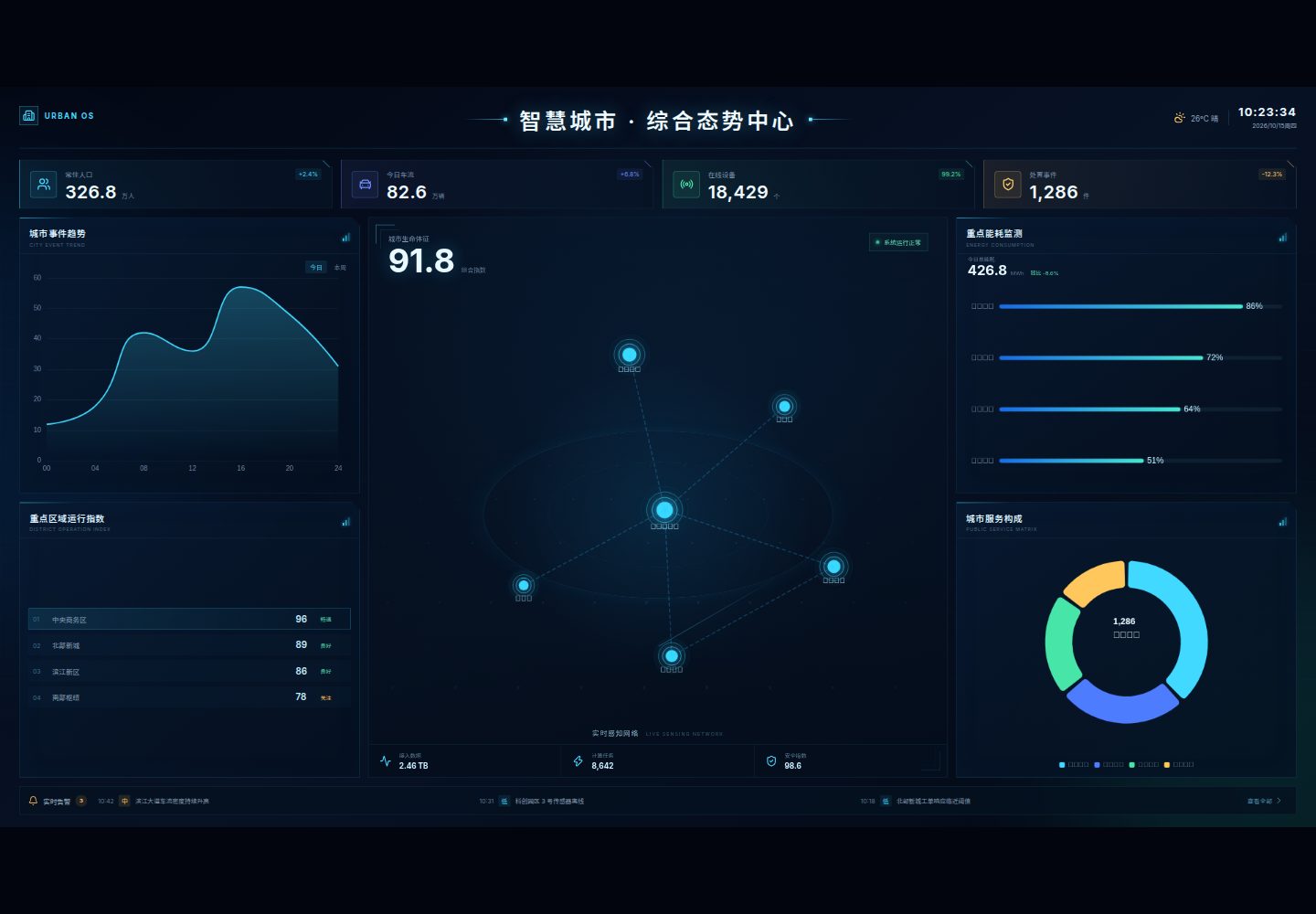
ScreenContainer uses 1920 × 1080 as the default design baseline, monitors container size via ResizeObserver and takes the smaller of the width and height scale ratios for proportional scaling, preserving design draft proportions and centering automatically
VueAdmin dashboard
datav-template-vue3 — Vue Admin dashboard Template
By woo-niu
A data visualization dashboard template built on Vue 3, TypeScript and ECharts, offering an adaptive container, generic panels and chart wrappers, plus modular business examples for adaptation to your own needs.
Explore the design
Compare the page layouts and mobile experience. Open any screenshot for a closer look.
Desktop homepage1 / 2
Desktop captureTop of page
Actual screenshot captured by the server browser.
All pages & views 2
Screenshots show visual appearance; interactive behavior may differ.
Recorded 2026-10-15View source
What stands out
A quick read of the recorded project description.
DataPanel provides a unified panel appearance and title structure, while ChartView wraps ECharts initialization, updates, size responsiveness and destruction logic
The dashboard directory splits components by business area, decoupling page layout from business data so they can be modified, deleted or recombined independently
Includes demo modules such as city operations core situation, core metrics overview, event trends, area operation index, energy consumption monitoring, service composition and real-time alerts
Uses Vue 3 Composition API and TypeScript, imports ECharts on demand, and supports prefers-reduced-motion
Template Details
This project is a data visualization dashboard development template built with Vue 3, TypeScript, Vite and ECharts, using Lucide Vue for icons and pnpm for dependency management. The template uses 1920 × 1080 as its default design baseline and handles dashboard scaling uniformly through the ScreenContainer component: it uses ResizeObserver to monitor container size, calculates width and height scale ratios and takes the smaller value for proportional scaling, so content keeps the design draft's proportions and is automatically centered horizontally and vertically; the design size can be adjusted via component props. Example pages are split by layers: "base container—generic panel—chart component—business module". DataPanel provides a unified panel appearance and title structure, ChartView wraps ECharts initialization, updates, size responsiveness and destruction logic, and the dashboard directory splits components by business area, decoupling page layout from business data. The template includes demo modules such as city operations core situation, core metrics overview cards, city event trend analysis, key area operation index, key energy consumption monitoring, city service composition, and a real-time alert information bar, along with a unified dark theme and micro-animations, and supports prefers-reduced-motion. The README does not provide information on performance, production readiness or backend interfaces; the example data is for demonstration and must be replaced.
VueAdmin
Is it right for your project?
Use Cases
- Data visualization dashboard projects that need to adapt to different screen resolutions according to a fixed design draft ratio
- Teams that want to reuse unified panels, chart wrappers and modular business components to quickly build business prototypes
- Dashboard development using the Vue 3 and TypeScript stack that needs to replace example data with real interfaces
- Dashboard development that needs to adjust theme styles or design draft dimensions to match in-house visual guidelines
Suitable For
- Frontend developers with a foundation in Vue 3 and TypeScript
- Teams that need to quickly adapt a data visualization dashboard template
- Projects that want to split charts and business components by module for easier maintenance
Getting started & customization
Use these recorded setup notes alongside the repository instructions for your chosen version.
- 1
Node.js 22 and pnpm 10 are recommended; run git clone, cd datav-template-vue3, pnpm install, pnpm dev in sequence, then visit http://localhost:5173 after startup
- 2
Common commands: pnpm dev starts the development server, pnpm build type-checks and builds the production version, pnpm preview previews the production build locally, pnpm typecheck runs TypeScript type checking
- 3
ScreenContainer's default design size is 1920 × 1080; custom design draft dimensions can be passed via the width and height props
- 4
For secondary development, you can add or remove modules or adjust the layout in src/App.vue, edit components under src/components/dashboard to replace data, and adjust the theme by modifying src/styles/main.css, panel styles and chartTheme.ts
- 5
When deploying to GitHub Pages, adjust base in vite.config.ts accordingly; the project depends on ResizeObserver, so ensure the target browser supports this API
License & source material
Usage conditions & limitations
Free to use · keep license noticeThis entry covers the free version under the MIT license in a public repository; the free scope is that version's code and does not mean external services or third-party assets are free.
Must comply with when using
- Free use, modification, commercial use and distribution of that version's code are permitted.
- When distributing copies or substantial portions of the code, retain the original author's copyright notice and the full MIT license notice.
- The code is provided as is; warranties and liability limitations are governed by the original license and applicable law.
Additional costs & items to verify
- Demo images, fonts, icons and other third-party assets must be checked against their respective licenses and cannot be judged solely by the code's MIT license.
- External services such as domains, hosting, databases, payments or AI may incur separate charges.
View Original Text Basis
https://github.com/woo-niu/datav-template-vue3/blob/main/LICENSEhttps://github.com/woo-niu/datav-template-vue3/blob/main/README.mdPermission is hereby granted, free of charge
Original License Text
Compiled by DeepSeek based on repository license and README ·2026-10-15. Results only cover the materials read; dependencies, images, fonts, and subsequent term changes are subject to their respective original texts.
Project checks & description sources
Template Information
- Source platforms
- GitHub
- Documentation and maintenance reference score
- More documented · 80 / 100
- Technologies
- Vue
- Website type
- Admin dashboard
How this score is calculated
Our heuristic uses license records (up to 30), a demo link (12), a preview (10), stars (15), recorded maintenance (15), description completeness (8), feature records (5) and classification data (5). It is not a code, security or performance test, or a Google score. A link does not establish tested functionality.
What to verify for this project
- Repository update recorded
- 2026-09-02
- Screenshot last checked
- 2026-10-15
A demo link is listed. Check it with your own content and viewport sizes; its presence does not confirm that forms, authentication or payments work.
The catalog identifies Vue as the primary stack. Check the actual dependency manifest and lockfile for versions and hosting requirements. These notes use recorded metadata, not a code audit or a deployment test.
Use a selection guide →How this description was prepared
AI-assisted description based on catalog records and repository material. Repository authors are not automatically the reviewers of this description.
Review declaration: codex-user-requested-batch-review-20261017 · 2026-10-16
Inspect the recorded source material
SHA-256: 36c26f00027b06fb85211494bdcc814f85652bf5f50f5cdb65f9b66a74cdbe7f
2026-10-15T10:24:17.848Z
Source file / repository# DataV Template Vue 3
一个基于 **Vue 3、TypeScript 与 ECharts** 构建的数据可视化大屏模板。项目提供自适应容器、通用图表封装和模块化页面示例,帮助开发者快速改造并生成符合自身需求的业务原型。
[](https://vuejs.org/)
[](https://www.typescriptlang.org/)
[](https://echarts.apache.org/)
[](./LICENSE)
> [在线预览:woo-niu.github.io/datav-template-vue3](https://woo-niu.github.io/datav-template-vue3/)
<p align="center">
<img src="./public/images/dashboard-preview.png" alt="智慧城市综合态势中心在线预览" width="960" />
</p>
## 项目介绍
> 本项目定位为**大屏开发模板**,重点提供自适应与模块化开发能力。页面中的城市运行数据和业务模块用于演示,可根据实际项目自由替换、增删与组合。
### 一套设计稿,自适应不同屏幕
项目默认以 **1920 × 1080** 为设计基准,通过 `ScreenContainer` 统一处理大屏缩放。当然,你也可以根据自己的设计稿传入自定义尺寸,详见[自适应容器用法](#自适应容器用法)。
- 使用 `ResizeObserver` 实时感知容器尺寸变化
- 同时计算宽度与高度缩放比,并取较小值进行等比缩放
- 始终保持设计稿比例,避免图表、文字和面板在不同分辨率下挤压变形
- 内容自动水平、垂直居中,剩余区域自然留白
- 支持浏览器窗口缩放、全屏切换及不同尺寸显示器
- 设计尺寸可通过组件参数调整,方便复用到其他大屏项目
```ts
const scale = Math.min(
viewportWidth / designWidth,
viewportHeight / designHeight,
);
```
这种方案保留了大屏设计稿的精确布局,无需为常见分辨率逐一编写媒体查询。
### 模块化开发,快速生成业务原型
示例页面按照“基础容器—通用面板—图表组件—业务模块”进行拆分。开发者可以保留整体视觉和自适应能力,仅替换所需模块的数据、图表配置与展示内容,快速搭建自己的业务原型。
- `ScreenContainer` 统一负责大屏自适应,无需业务模块重复处理缩放
- `DataPanel` 提供统一的面板外观与标题结构
- `ChartView` 封装 ECharts 初始化、更新、尺寸响应与销毁逻辑
- `dashboard` 目录按业务区域拆分组件,支持独立修改、删除或重新组合
- 页面布局与业务数据解耦,方便接入真实接口或状态管理方案
模板当前包含以下示例模块:
- 城市运行核心态势展示
- 核心指标概览卡片
- 城市事件趋势分析
- 重点区域运行指数
- 重点能耗监测
- 城市服务构成
- 实时告警信息栏
- 统一的科技感暗色主题与微动效
### 清晰、易扩展的工程结构
- 使用 Vue 3 Composition API 与 TypeScript
- ECharts 按需引入,统一封装图表生命周期与尺寸响应
- 自适应容器、通用面板、图表和业务模块分层拆分
- 支持 `prefers-reduced-motion`,尊重系统减少动态效果设置
## 技术栈
| 技术 | 用途 |
| ---------- | ------------------ |
| Vue 3 | 页面与组件开发 |
| TypeScript | 类型安全与开发体验 |
| Vite | 本地开发与生产构建 |
| ECharts | 数据图表与可视化 |
| Lucide Vue | 界面图标 |
| pnpm | 依赖管理 |
## 快速开始
建议使用 Node.js 22 与 pnpm 10。
```bash
# 克隆项目
git clone https://github.com/woo-niu/datav-template-vue3.git
# 进入项目
cd datav-template-vue3
# 安装依赖
pnpm install
# 启动开发环境
pnpm dev
```
启动后访问 [http://localhost:5173](http://localhost:5173)。
## 常用命令
```bash
pnpm dev # 启动开发服务器
pnpm build # 类型检查并构建生产版本
pnpm preview # 本地预览生产构建
pnpm typecheck # 执行 TypeScript 类型检查
```
## 自适应容器用法
默认设计尺寸为 `1920 × 1080`:
```vue
<template>
<ScreenContainer>
<YourDashboard />
</ScreenContainer>
</template>
```
也可以传入自定义设计稿尺寸:
```vue
<ScreenContainer :width="2560" :height="1440">
<YourDashboard />
</ScreenContainer>
```
业务内容只需按照设计稿尺寸进行开发,缩放、居中和容器监听均由 `ScreenContainer` 负责。
## 项目结构
```text
datav-template-vue3/
├─ .github/workflows/ # GitHub Pages 自动部署
├─ src/
│ ├─ components/
│ │ ├─ dashboard/ # 大屏业务模块
│ │ ├─ ChartView.vue # ECharts 通用封装
│ │ ├─ DataPanel.vue # 数据面板容器
│ │ └─ ScreenContainer.vue# 大屏自适应容器
│ ├─ styles/ # 全局样式
│ ├─ App.vue # 大屏页面布局
│ └─ main.ts # 应用入口
├─ package.json
└─ vite.config.ts
```
## 二次开发
- 组合业务原型:在 `src/App.vue` 中增删模块或调整页面布局
- 修改展示内容:编辑 `src/components/dashboard` 下对应的示例业务组件
- 接入真实接口:将组件中的示例数据替换为接口或状态管理中的数据
- 新增图表模块:复用 `DataPanel` 与 `ChartView`,仅需关注业务内容和 ECharts 配置
- 调整主题:修改 `src/styles/main.css`、面板样式及 `chartTheme.ts`
- 调整设计稿尺寸:通过 `ScreenContainer` 的 `width`、`height` 属性配置
- 修改部署仓库名:同步调整 `vite.config.ts` 中的 `base`
## 浏览器支持
推荐使用最新版 Chrome、Edge、Firefox 或 Safari。项目依赖 `ResizeObserver` 完成容器尺寸监听,请确保目标浏览器支持该 API。
## 参与贡献
欢迎提交 Issue 和 Pull Request。如果这个项目对你有帮助,也欢迎点一个 Star。
## 开源协议
本项目基于 [MIT License](./LICENSE) 开源,可自由用于个人或商业项目。
Explore similar templates
Compare previews and descriptions within the same stack and category.

vuestic-admin
Vuestic Admin is an open-source Vue 3 admin template maintained by Epicmax, built on Vuestic UI with Vite, Pinia, and Tailwind CSS. It provides a ready-to-run dashboard with a dark theme, global configuration, i18n internationalization, and responsive layout.
Vue · Admin dashboard

v3-admin-vite
v3-admin-vite is an AI-friendly Vue3 admin template built on Vue3, Vite, TypeScript, and Element Plus. It keeps a lean structure with detailed comments, supports backend-controlled dynamic route permissions, page-level and button-level permissions, multiple themes and layouts, and mobile compatibility.
Vue · Admin dashboard

vue-typescript-admin-template
A Vue 2.6 + TypeScript + Element UI admin template ported from vue-element-admin, offering type safety and enterprise features like permission authentication, internationalization, dynamic themes, editors, charts, Excel/PDF handling, and PWA support.
Vue · Admin dashboard

vue-antd-admin
Vue Antd Admin is the Vue implementation of Ant Design Pro, providing an out-of-the-box front-end and design solution for admin dashboards.
Vue · Admin dashboard

coreui-free-vue-admin-template
CoreUI's official free Vue admin template, MIT licensed, built on Vue 3 and the CoreUI component library with Vue Router, Pinia, and Vite.
Vue · Admin dashboard
nova-admin
Nova Admin is an admin template built on Vue3, Vite, TypeScript, and Naive UI, with Unocss for styling.
Vue · Admin dashboard