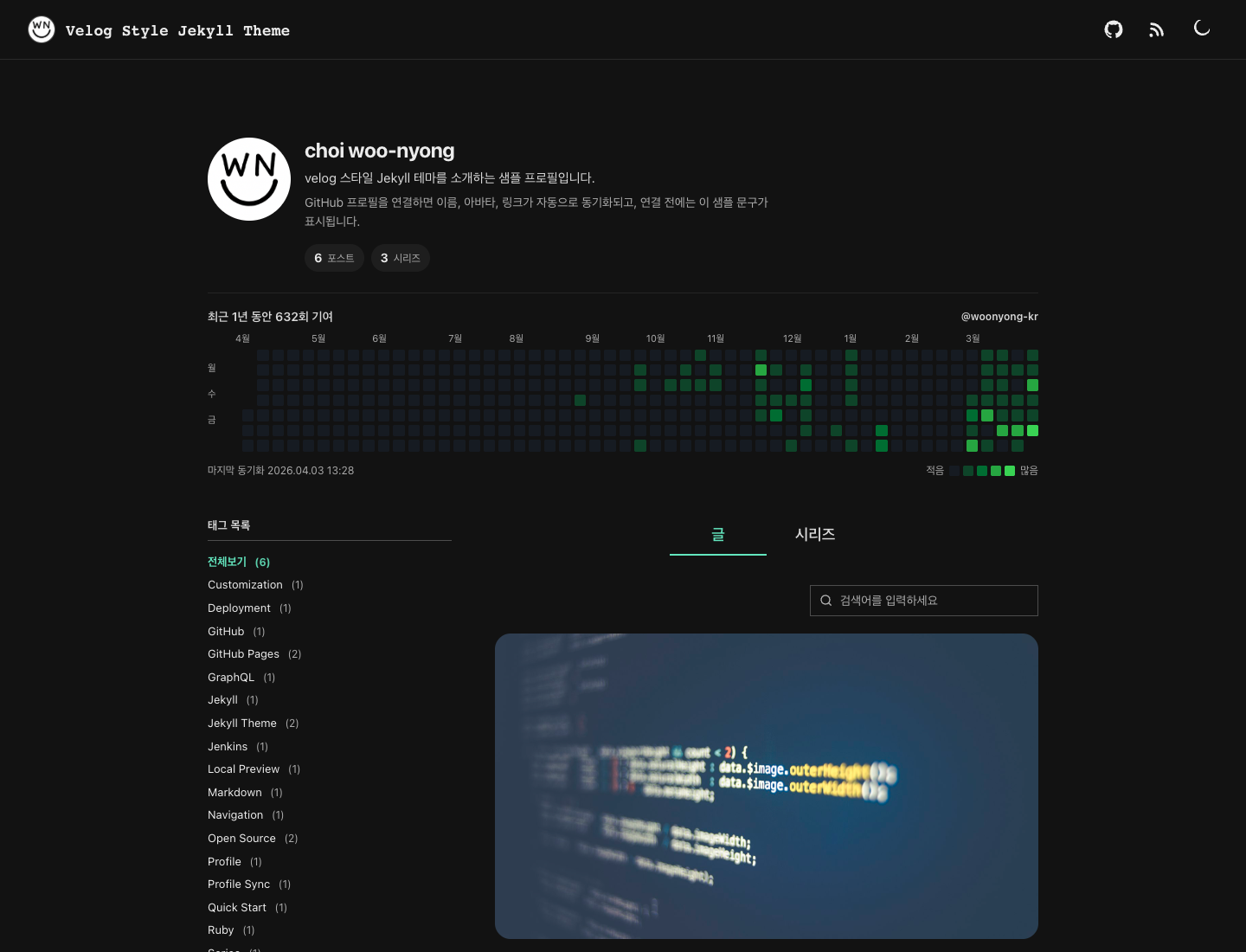
Centrally manage site information, interface toggles, and series definitions via _config.yml, _data/profile.yml, _data/theme.yml, and _data/series.yml
JekyllBlogStarter
jekyll-theme-velog — Jekyll Blog Template
By woonyong-choi
A Jekyll-based Velog-style blog template that manages site information, interface options, and series through configuration files, supports local search and dark mode, and provides a GitHub Pages Actions deployment workflow.
Explore the design
Compare the page layouts and mobile experience. Open any screenshot for a closer look.
Author preview
Author-provided previewTop of page
Preview provided in the project README.
One original preview is available. Open the full image to inspect the design.
Screenshots show visual appearance; interactive behavior may differ.
Recorded 2026-10-03View source
What stands out
A quick read of the recorded project description.
Built-in local search, tag filtering, series archives, and infinite scrolling
Supports light/dark theme switching, and provides RSS, sitemap, and SEO metadata
Optional integration with Giscus or Disqus comments, Algolia DocSearch, and Google Analytics
Optional sync of GitHub profile and contribution graph; no external API calls when not enabled
Provides a GitHub Actions deployment workflow, and checks HTML structure, internal links, and unreplaced placeholders during build
Template Details
This is a Jekyll blog template for GitHub Pages, with a visual style inspired by Velog. Site information, interface toggles, and series definitions are placed in _config.yml, _data/profile.yml, _data/theme.yml, and _data/series.yml, while posts are written in Markdown with front matter. The template includes local search, tag filtering, series archives, infinite scrolling, RSS, sitemap, and light/dark themes; comments, Algolia DocSearch, Google Analytics, GitHub profile and contribution graph sync are all optional and disabled by default.
For deployment, the repository provides a GitHub Actions workflow that builds and deploys to GitHub Pages on push to main, while pull requests only build and validate. The build process checks generated HTML structure, required artifacts, internal links, and unreplaced placeholders. Local running requires Ruby, Bundler, and Python 3; validation scripts depend on Python.
Usage limitations: The template code is under the MIT license, but third-party assets such as demo images, fonts, and icons require separate license verification; external services such as GitHub contribution graph sync, Giscus, Disqus, Algolia, and Google Analytics may involve additional configuration or costs. The template makes no performance or stability guarantees for production environments.
JekyllBlogStarter
Is it right for your project?
Use Cases
- Build a personal technical blog on GitHub Pages and organize posts by series and tags
- Static blog projects that need local search, dark mode, and RSS
- Control whether interface elements are displayed via configuration files without modifying template code
- Archive posts by series and reference only the series identifier in post front matter
- Automatically build, validate, and deploy the site via GitHub Actions
Suitable For
- Bloggers familiar with Markdown and the basic Jekyll directory structure
- Users hosting static sites on GitHub Pages and accepting the GitHub Actions deployment workflow
- Developers who need blog organization features such as series, tags, and local search
- Users who want to customize the interface and integrations through configuration files rather than code changes
Getting started & customization
Use these recorded setup notes alongside the repository instructions for your chosen version.
- 1
Click Use this template to create a new repository, then modify _config.yml, _data/profile.yml, and _data/theme.yml
- 2
In the repository Settings → Pages → Build and deployment → Source, select GitHub Actions
- 3
Local running requires Ruby, Bundler, and Python 3; after running bundle install, preview with bundle exec jekyll serve
- 4
Optional features such as comments, Algolia, Google Analytics, and GitHub contribution graph sync are disabled by default and must be explicitly enabled in configuration with credentials filled in
- 5
The deployment workflow automatically injects the repository address and path; manual setting of url in _config.yml is only needed for custom domains
License & source material
Usage conditions & limitations
Free to use · keep license noticeThis listing covers the free version under the MIT license in the public repository; the free scope is the code of this version and does not mean external services or third-party assets are free.
Must comply with when using
- Free use, modification, commercial use, and distribution of this version's code are permitted.
- When distributing copies or substantial portions of the code, retain the original author's copyright notice and the full MIT license notice.
- The code is provided as is; warranties and limitations of liability are governed by the original license and applicable law.
Additional costs & items to verify
- GitHub contribution graph sync is an optional feature, disabled by default; to include private repository contributions, you must additionally configure the repository secret GH_PAT, otherwise only public contribution data can be fetched.
- Using Giscus comments is an optional feature, disabled by default; before enabling, you must first enable Discussions in a public repository and install the giscus app, otherwise the comment script will not load.
- Algolia DocSearch is an optional feature, disabled by default; when configuring, only a search-only API key may be used, and placing an Admin API key with write permissions in a public repository is prohibited.
- Jenkins deployment is a separate optional path that requires separate credentials and uses the gh-pages branch as the source; it is not recommended to enable it simultaneously with the default GitHub Pages Actions workflow.
- The template code is under the MIT license, but the sources and licenses of third-party assets such as demo images are recorded separately in NOTICE.md and must be verified independently; they are not granted along with the code license.
- Demo images, fonts, icons, and other third-party assets must be verified under their respective licenses and cannot be judged solely by the code's MIT license.
- External services such as domains, hosting, databases, payments, or AI may incur additional charges.
View Original Text Basis
Permission is hereby granted, free of charge
Original License Text
private contribution을 포함하려면 저장소 secret `GH_PAT`를 추가합니다.
Original README
public 저장소의 Discussions와 [giscus 앱](https://github.com/apps/giscus)을 먼저 활성화해야 합니다.
Original README
쓰기 권한이 있는 Admin API key를 공개 저장소에 넣지 마세요.
Original README
Jenkins 배포는 별도 credential과 `gh-pages` source를 사용하는 독립 경로이며, 기본 GitHub Pages workflow와 동시에 사용하지 않는 것을 권장합니다.
Original README
https://github.com/woonyong-choi/jekyll-theme-velog/blob/main/LICENSEhttps://github.com/woonyong-choi/jekyll-theme-velog/blob/main/README.md이미지 출처와 고지는 [NOTICE.md](NOTICE.md)에 정리되어 있습니다.
Original README
Compiled by DeepSeek based on repository license and README ·2026-10-03. Results only cover the materials read; dependencies, images, fonts, and subsequent term changes are subject to their respective original texts.
Project checks & description sources
Template Information
- Source platforms
- GitHub
- Documentation and maintenance reference score
- More documented · 85 / 100
- Technologies
- Jekyll
- Website type
- Blog · Starter
How this score is calculated
Our heuristic uses license records (up to 30), a demo link (12), a preview (10), stars (15), recorded maintenance (15), description completeness (8), feature records (5) and classification data (5). It is not a code, security or performance test, or a Google score. A link does not establish tested functionality.
What to verify for this project
- Repository update recorded
- 2026-08-03
- Screenshot last checked
- 2026-10-03
A demo link is listed. Check it with your own content and viewport sizes; its presence does not confirm that forms, authentication or payments work.
The catalog identifies Jekyll as the primary stack. Check the actual dependency manifest and lockfile for versions and hosting requirements. These notes use recorded metadata, not a code audit or a deployment test.
Use a selection guide →How this description was prepared
AI-assisted description based on catalog records and repository material. Repository authors are not automatically the reviewers of this description.
Review declaration: [email protected] · 2026-10-04
Inspect the recorded source material
SHA-256: 704576d6638e9721ecd9b7a300585eb06c96e581749131c27bc086b5cd91d521
2026-10-03T17:58:53.854Z
Source file / repository# jekyll-theme-velog
[](https://github.com/woonyong-kr/jekyll-theme-velog/actions/workflows/deploy.yml)
[](https://woonyong-kr.github.io/jekyll-theme-velog/)
[](https://jekyllrb.com/)
[](LICENSE)
Velog-style Jekyll starter for GitHub Pages.
글·시리즈·태그·로컬 검색, 라이트/다크 테마, 선택형 GitHub 프로필 동기화와 댓글·검색 연동. 소유자 URL이나 저장소 경로를 코드에 고정하지 않고 GitHub Pages Actions가 배포 경로를 주입합니다.
[라이브 데모](https://woonyong-kr.github.io/jekyll-theme-velog/) · [설정 파일](#설정) · [배포](#github-pages-배포) · [검증](#검증)
## 미리보기
| 홈 | 시리즈 | 글 |
|---|---|---|
|  |  |  |
## 기능
- 글 카드, 시리즈, 태그 필터, 로컬 검색, 무한 스크롤
- 반응형 레이아웃, 라이트/다크 모드, RSS, sitemap, SEO metadata
- GitHub 프로필·기여 그래프 동기화(선택)
- Giscus 또는 Disqus 댓글(선택)
- Algolia DocSearch와 Google Analytics 연동(선택)
- GitHub Pages 공식 artifact 배포, pull request 빌드 검증
- 생성 HTML 구조, 필수 산출물, 내부 링크, 미치환 placeholder 자동 검사
## 빠른 시작
1. **Use this template**을 눌러 새 저장소를 만듭니다.
2. `_config.yml`, `_data/profile.yml`, `_data/theme.yml`을 수정합니다.
3. `Settings → Pages → Build and deployment → Source`에서 **GitHub Actions**를 선택합니다.
4. `main`에 push하고 **Actions → Pages**가 통과했는지 확인합니다.
프로젝트 페이지와 사용자 페이지 모두 기본 로컬 URL을 유지할 수 있습니다. 배포 workflow가 저장소 주소와 경로를 자동으로 적용합니다. 커스텀 도메인을 사용할 때만 `url`을 직접 지정합니다.
```yaml
# _config.yml
title: 내 블로그
description: 개발 기록
url: "http://localhost:4000"
baseurl: ""
```
커밋 이력을 유지한 채 upstream 변경을 추적하려면 fork를 사용해도 됩니다. 새 블로그에는 **Use this template**이 더 단순합니다.
## 로컬 실행
요구 환경: Ruby `3.4.10`, Bundler, Python 3(검증 스크립트)
```bash
bundle install
bundle exec jekyll doctor
bundle exec jekyll serve
```
기본 주소는 `http://127.0.0.1:4000/`입니다. 배포 경로까지 재현하려면 다음처럼 실행합니다.
```bash
bundle exec jekyll serve --baseurl /my-blog
# http://127.0.0.1:4000/my-blog/
```
## 설정
| 파일 | 책임 |
|---|---|
| `_config.yml` | 사이트 metadata, 댓글, 검색, 분석, 플러그인 |
| `_data/profile.yml` | 이름, 소개, avatar, GitHub 링크 fallback |
| `_data/theme.yml` | 헤더, 탭, 홈, 기여 그래프, footer UI |
| `_data/series.yml` | 시리즈 식별자, 표시 이름, 설명 |
### 프로필
```yaml
# _data/profile.yml
display_name: 이름
bio: 한 줄 소개
intro: 추가 정보
avatar: /assets/images/avatar-placeholder.svg
github: https://github.com/my-id
```
`github`이 비어 있으면 헤더의 GitHub 버튼은 렌더링하지 않습니다.
### 화면 옵션
```yaml
# _data/theme.yml
header:
show_github_link: true
show_rss_link: true
show_theme_toggle: true
tabs:
show_about: false
home:
initial_post_count: 12
```
각 boolean은 `false`를 그대로 보존합니다. 사용하지 않는 버튼이나 탭은 설정만으로 제거할 수 있습니다.
### 시리즈
```yaml
# _data/series.yml
data-engineering:
title: 데이터 엔지니어링
description: 수집·정규화·품질 검증 기록
```
포스트 front matter에는 시리즈 식별자만 사용합니다.
```yaml
series: data-engineering
```
## 포스트 작성
파일명: `_posts/YYYY-MM-DD-slug.md`
```markdown
---
title: 글 제목
description: 카드 설명
date: 2026-01-01 09:00:00 +0900
updated_at: 2026-01-02 21:00:00 +0900
thumbnail: /assets/images/posts/cover.png
series: data-engineering
tags: [Jekyll, GitHub Pages]
---
본문
```
미래 날짜의 포스트는 기본 빌드에서 제외됩니다. 이미지 경로는 `assets/images/` 아래 절대 경로 형식을 권장합니다.
## 선택 연동
기본값은 모두 비활성화되어 있으며, 필요한 기능만 설정합니다.
### GitHub 프로필·기여 그래프
```yaml
# _data/theme.yml
hero:
github_contributions:
enabled: true
username: my-id
profile:
github_sync:
enabled: true
```
workflow는 `GITHUB_TOKEN`을 기본 사용합니다. private contribution을 포함하려면 저장소 secret `GH_PAT`를 추가합니다. 로컬 갱신:
```bash
GITHUB_GRAPHQL_TOKEN=... ruby scripts/fetch_github_contributions.rb
```
동기화를 끈 상태에서는 외부 API를 호출하지 않고 fallback 프로필로 빌드합니다.
### Giscus
```yaml
# _config.yml
comments:
provider: giscus
giscus:
repo: owner/repository
repo_id: R_...
category: Announcements
category_id: DIC_...
```
public 저장소의 Discussions와 [giscus 앱](https://github.com/apps/giscus)을 먼저 활성화해야 합니다. 값이 하나라도 비어 있으면 댓글 스크립트를 로드하지 않습니다.
### Disqus
```yaml
comments:
provider: disqus
disqus:
shortname: my-shortname
```
### Algolia DocSearch
```yaml
search:
provider: algolia
algolia:
app_id: APP_ID
api_key: SEARCH_ONLY_API_KEY
index_name: INDEX_NAME
```
쓰기 권한이 있는 Admin API key를 공개 저장소에 넣지 마세요. 설정이 불완전하면 로컬 검색으로 자동 전환합니다.
### Google Analytics
```yaml
analytics:
google:
measurement_id: G-XXXXXXXXXX
```
production 빌드에서만 스크립트를 로드합니다.
## GitHub Pages 배포
`.github/workflows/deploy.yml`의 흐름:
```text
checkout
→ Pages 경로 계산
→ Jekyll build
→ 구조·링크·placeholder 검증
→ Pages artifact 업로드
→ github-pages 환경 배포
```
- `push main`: 빌드·검증·배포
- `pull_request`: 빌드·검증, 배포 없음
- `schedule`: 선택형 GitHub 프로필 데이터 갱신
- `workflow_dispatch`: 수동 배포
저장소 설정의 Pages source는 **GitHub Actions**여야 합니다. `gh-pages` 브랜치는 만들지 않습니다.
Jenkins 예시는 `Jenkinsfile`에 분리되어 있습니다. Jenkins 배포는 별도 credential과 `gh-pages` source를 사용하는 독립 경로이며, 기본 GitHub Pages workflow와 동시에 사용하지 않는 것을 권장합니다.
## 검증
```bash
bundle exec jekyll doctor
bundle exec jekyll build
python3 scripts/verify_site.py _site
node --check assets/js/site.js
```
Pages URL까지 재현하는 production 검증:
```bash
bundle exec ruby scripts/build_site.rb \
--url https://username.github.io \
--baseurl /repository
python3 scripts/verify_site.py _site \
--baseurl /repository \
--expected-origin https://username.github.io
```
`verify_site.py` 검사 범위:
- `index.html`, `404.html`, `feed.xml`, `sitemap.xml`, `posts.json`
- 페이지당 하나의 `<main>` landmark
- 내부 링크와 정적 asset target
- `posts.json` 형식
- 샘플 GitHub URL·댓글 ID의 미치환 노출
GitHub Actions 상태는 README 상단 **Pages** 배지에서 바로 확인할 수 있습니다.
## 구조
```text
_layouts/ 페이지 골격
_includes/ 재사용 UI와 외부 연동 경계
_data/ 사용자 설정과 선택형 캐시
assets/css/ 테마 스타일
assets/js/site.js 테마·검색·필터·무한 스크롤
scripts/ GitHub 동기화·빌드 검증
_posts/ 데모와 사용 가이드
.github/workflows/ 검증·배포
```
## 기여
버그 재현, 문서 교정, 접근성·반응형 개선과 설정 일반화를 받습니다. 변경 범위와 로컬 검증 절차는 [CONTRIBUTING.md](CONTRIBUTING.md)에서 확인할 수 있습니다.
## 라이선스
[MIT](LICENSE). 이미지 출처와 고지는 [NOTICE.md](NOTICE.md)에 정리되어 있습니다.
Explore similar templates
Compare previews and descriptions within the same stack and category.

al-folio
A Jekyll academic homepage theme for scholars and researchers, with a clean responsive design and out-of-the-box support for publication lists, project showcases, CVs, and blogs.
Jekyll · Portfolio

minimal-mistakes
Minimal Mistakes is a two-column Jekyll theme for personal sites, blogs, project documentation, or portfolios.
Jekyll · Portfolio

Beautiful Jekyll
Beautiful Jekyll is a mature, easy-to-use Jekyll blog theme maintained by Dean Attali since 2015, with over 50,000 users.
Jekyll · Blog

jekyll-TeXt-theme
A customizable Jekyll theme for personal sites, team sites, blogs, projects, and documentation.
Jekyll · Blog

startbootstrap-clean-blog-jekyll
The official Jekyll version of Start Bootstrap's Clean Blog theme, offering a blog home page, about page, contact page, and sample post pages, with a Formspree-powered contact form.
Jekyll · Blog

So Simple
A minimal reading-oriented Jekyll theme by Michael Rose for personal blogs, portfolios, and long-form reading. It offers multiple layouts, microformat markup, Disqus comments, Google Analytics, Jekyll SEO Tag, three skins, and aggregation by year, category, and tag with a grid view.
Jekyll · Blog