Minimalist black-and-white visuals, dark background by default, switchable to white
AstroBlog
PlainBlog — Astro Blog Template
By wutongyuonce
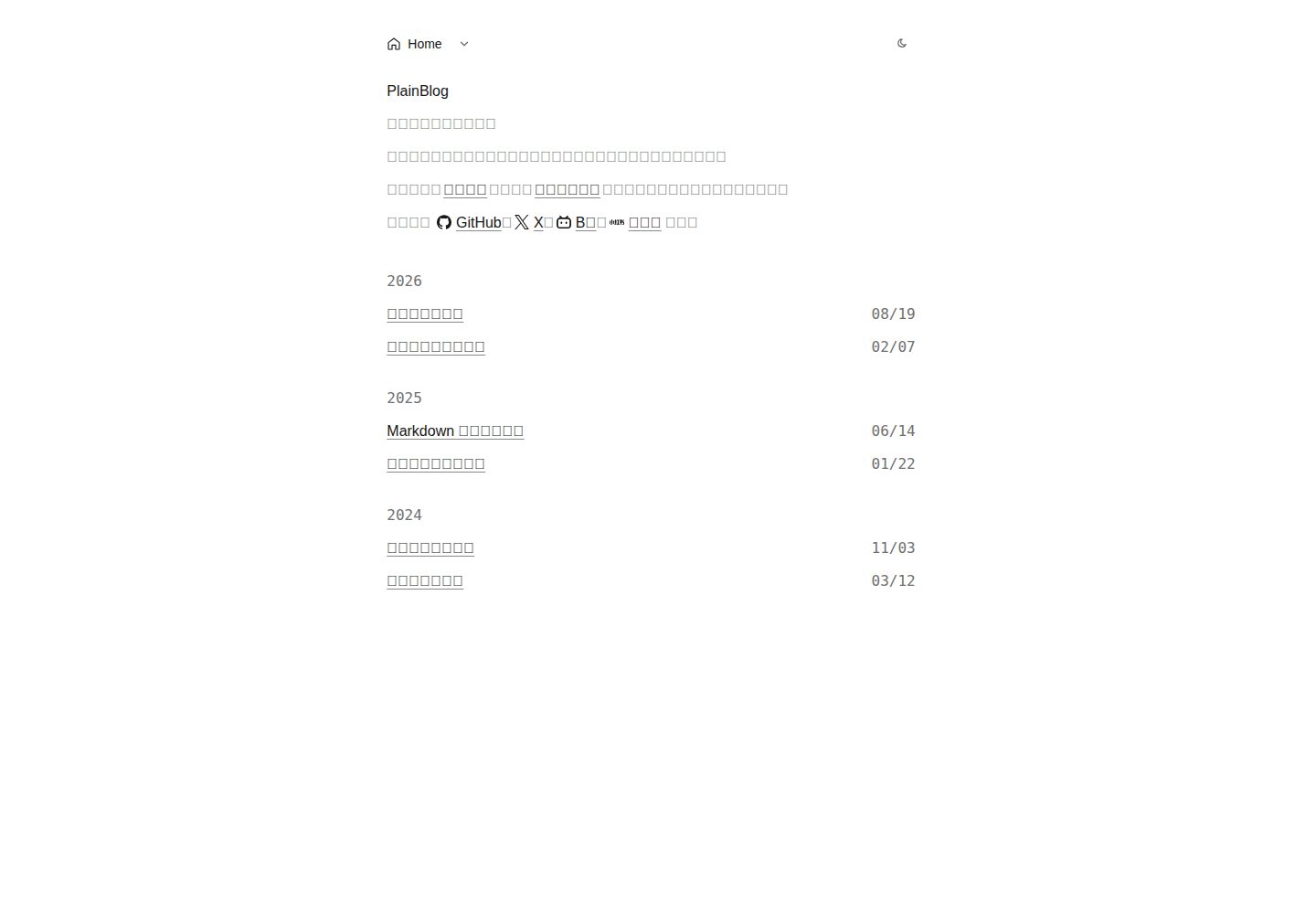
PlainBlog is a minimalist black-and-white static blog template built with Astro. The homepage lists posts by year, and it supports light/dark mode switching and compact Markdown typography.
Explore the design
Compare the page layouts and mobile experience. Open any screenshot for a closer look.
Desktop homepage1 / 3
Desktop captureTop of page
Actual screenshot captured by the server browser.
All pages & views 3
Screenshots show visual appearance; interactive behavior may differ.
Recorded 2026-10-05View source
What stands out
A quick read of the recorded project description.
Homepage lists posts by year; body text uses compact Markdown typography
Breadcrumb navigation and an on-demand table of contents; the TOC toggle does not rely on JavaScript
Posts are managed as Markdown files, with draft exclusion supported
The /rss.xml feed is generated automatically at build time; new posts require no manual changes
Includes a GitHub Pages deployment workflow that publishes automatically on push to main
Template Details
PlainBlog is a static blog template built with Astro. It has an overall minimalist black-and-white style, with a black background by default that can be switched to white. The homepage lists posts by year, and the body text uses compact Markdown typography; navigation consists of breadcrumbs without background boxes and a table of contents that expands on demand. All text and images in the repository are replaceable demo content.
The template configures the site name, description, dropdown table of contents, and homepage social links via src/config.ts; posts go under src/content/posts/ as single-level, all-lowercase kebab-case .md files. Frontmatter requires a non-empty title and a quoted YYYY-MM-DD date, and the body starts from ##. Posts with draft: true are excluded from the homepage and body output; future dates are not automatically hidden. Post images go in the src/assets/posts/<post filename>/ directory; missing relative images will cause the build to fail.
The build output is static files written to dist/, with no server, database, or runtime environment variables required. Canonical and absolute feed links are only output after SITE_URL is set; when deployed under a subpath, BASE_PATH must also be set. The repository includes a GitHub Pages deployment workflow that runs checks and publishes on push to main.
AstroBlog
Is it right for your project?
Use Cases
- Building a text-focused personal blog that values typography and reading experience
- A writing site that needs posts archived by year while keeping the page structure simple
- Scenarios where content is managed as Markdown files and deployed as a purely static site
- Blogs hosted on GitHub Pages that should build and publish automatically after a push
Suitable For
- Bloggers who prefer a minimalist black-and-white style and do not need complex visual components
- Individual developers familiar with Markdown and basic command-line operations
- Blog projects that need static output and no server-side dependencies
- Maintainers willing to adjust site information and navigation through configuration files
Getting started & customization
Use these recorded setup notes alongside the repository instructions for your chosen version.
- 1
Requires Node.js 22.12+ and pnpm 12.6; the versions are recorded in package.json
- 2
After installing dependencies, run pnpm dev to start local development, and pnpm build to generate static output in dist/
- 3
For production builds, set SITE_URL to an absolute HTTP(S) address, otherwise canonical is not output; when deploying under a subpath, also set BASE_PATH
- 4
Before using the repository's GitHub Pages workflow, set Source to GitHub Actions in the repository's Settings → Pages
- 5
Post images go in src/assets/posts/<post filename>/; do not put them in src/content/posts/. Missing relative images will cause the build to fail
License & source material
Usage conditions & limitations
Free to use · keep license noticeThis listing covers the free version under the MIT license in the public repository; the free scope is the code of that version and does not mean external services or third-party assets are free.
Must comply with when using
- You may use, modify, commercially use, and distribute the code of this version for free.
- When distributing copies or substantial portions of the code, retain the original author's copyright notice and the full MIT license notice.
- The code is provided as is; warranties and limitations of liability are governed by the original license and applicable law.
Additional costs & items to verify
- Demo images, fonts, icons, and other third-party assets must be checked against their respective licenses; they cannot be judged solely by the code's MIT license.
- External services such as domains, hosting, databases, payments, or AI may incur separate charges.
- The template's built-in social icon links point by default to the homepages of platforms such as GitHub, X, Bilibili, and Xiaohongshu; you must replace them with your own profile URLs before publishing.
- Before using the repository's GitHub Pages deployment workflow, set Source to GitHub Actions in the repository's Settings → Pages, otherwise automatic publishing will not work.
- For production builds, set SITE_URL to an absolute HTTP(S) address, otherwise canonical links are not output; this variable is an external configuration requirement at deployment time.
- If deployed under a site subpath, also set BASE_PATH (without a trailing slash); pages, static assets, canonical, and feed URLs will all include that prefix.
- Local development and builds require Node.js 22.12+ and pnpm 12.6; the version requirements are recorded in package.json.
- If relative images referenced by a post are missing, the build will fail; ensure the image files exist.
- markdown-field-guide.md also serves as a Markdown rendering example; if you delete that file, update the corresponding path in the tests as well.
View Original Text Basis
Permission is hereby granted, free of charge
Original License Text
现有 GitHub、X、B站、小红书指向各网站首页,发布前换成你自己的主页。
Original README
启用前需要在仓库 Settings → Pages 把 Source 设为 GitHub Actions。
Original README
生产域名确定后,在构建环境设置 `SITE_URL=https://your-domain.example/`(必须是绝对 HTTP(S) 地址),构建才会输出对应页面的 canonical;不设置时不输出 canonical。
Original README
部署在站点子路径时(例如项目页)再设置 `BASE_PATH=/your-sub-path`(不带尾斜线),页面、静态资源、canonical 与订阅地址都会带该前缀;`SITE_URL` 仍然只写源站。
Original README
需要 Node.js 22.12+ 和 pnpm 12.6(版本记录在 `package.json`)。
Original README
缺失的相对图片会让构建失败。
Original README
https://github.com/wutongyuonce/PlainBlog/blob/main/LICENSEhttps://github.com/wutongyuonce/PlainBlog/blob/main/README.md`markdown-field-guide.md` 同时是 Markdown 渲染样例。若移除它,请把测试里的该路径换成保留的排版样例。
Original README
Compiled by DeepSeek based on repository license and README ·2026-10-05. Results only cover the materials read; dependencies, images, fonts, and subsequent term changes are subject to their respective original texts.
Project checks & description sources
Template Information
- Source platforms
- Astro Themes
- Documentation and maintenance reference score
- Partly documented · 72 / 100
- Technologies
- Astro
- Website type
- Blog
How this score is calculated
Our heuristic uses license records (up to 30), a demo link (12), a preview (10), stars (15), recorded maintenance (15), description completeness (8), feature records (5) and classification data (5). It is not a code, security or performance test, or a Google score. A link does not establish tested functionality.
What to verify for this project
- Repository update recorded
- 2026-09-29
- Screenshot last checked
- 2026-10-05
A demo link is listed. Check it with your own content and viewport sizes; its presence does not confirm that forms, authentication or payments work.
The catalog identifies Astro as the primary stack. Check the actual dependency manifest and lockfile for versions and hosting requirements. These notes use recorded metadata, not a code audit or a deployment test.
Use a selection guide →How this description was prepared
AI-assisted description based on catalog records and repository material. Repository authors are not automatically the reviewers of this description.
Review declaration: [email protected] · 2026-10-06
Inspect the recorded source material
SHA-256: 4750cb7809ae5c1f25970491d8c48c1074235cc20fa01196cb066790e3f65eed
2026-10-05T20:55:35.378Z
Source file / repository# PlainBlog 黑色极简静态博客,也可切换为白底。首页按年份列出文章,正文使用紧凑的 Markdown 排版;导航是无背景框的面包屑和按需展开的目录。主题灵感来源来自 https://hyoban.cc 仓库里的文字和图片是可替换的演示内容。产品行为见 [规格](docs/SPEC.md)。 <img src="docs/previews/home-dark.png" alt="深色主题下的首页" style="zoom:40%;" /> <img src="docs/previews/home-light.png" alt="浅色主题下的首页" style="zoom:40%;" /> ## 开始 需要 Node.js 22.12+ 和 pnpm 12.6(版本记录在 `package.json`)。 ```sh pnpm install pnpm dev ``` 打开终端给出的本地地址。检查与构建: ```sh pnpm check pnpm format pnpm lint pnpm test pnpm build pnpm preview ``` `pnpm test` 会先构建无站点 URL 的 HTML,再用 Node 测试内容规则与实际产物。失败构建和改名测试使用临时项目副本,不改写作者内容或当前 `dist/`。`pnpm format:write` 可格式化项目文件。`lint` 与 `check` 都运行 Astro 诊断,不是独立的 ESLint。 ## 修改内容 - 编辑 `src/config.ts` 的站点名称、描述、下拉目录和首页社交地址。每条社交入口用 `icon` 字段指定图标,可用值见 `src/lib/social-icons.mjs`;现有 GitHub、X、B站、小红书指向各网站首页,发布前换成你自己的主页。Home 已固定在面包屑,不要再加入目录。新增独立页面时创建对应的 `src/pages/*.astro` 文件,再把入口加入导航数组;文章不需要加入目录。 - 在 `src/content/posts/` 新建单层、全小写 kebab-case 的 `.md` 文件,例如 `my-note.md`。Frontmatter 必须有非空 `title` 和引号包围的 `YYYY-MM-DD` 日期;正文从 `##` 开始。`draft: true` 会从首页和正文输出中排除;未写 draft 时默认公开。未来日期不会自动隐藏。 - 编辑 `src/content/pages/home.md` 修改首页介绍;`projects.md` 和 `about.md` 维护独立页面。页面标题由配置或对应 Astro 页面负责。 - `markdown-field-guide.md` 同时是 Markdown 渲染样例。若移除它,请把测试里的该路径换成保留的排版样例。新增普通文章不必修改测试清单。 - 文章配图放在 `src/assets/posts/<文章文件名>/`,用可读文件名,例如 ``。不要把图片放进 `src/content/posts/`,那里只放一层 Markdown。缺失的相对图片会让构建失败。 ## 部署 执行 `pnpm build`,把 `dist/` 发布到静态站点根路径。生产域名确定后,在构建环境设置 `SITE_URL=https://your-domain.example/`(必须是绝对 HTTP(S) 地址),构建才会输出对应页面的 canonical;不设置时不输出 canonical。部署在站点子路径时(例如项目页)再设置 `BASE_PATH=/your-sub-path`(不带尾斜线),页面、静态资源、canonical 与订阅地址都会带该前缀;`SITE_URL` 仍然只写源站。无需服务端、数据库或运行时环境变量。 仓库自带一个 GitHub Pages demo:`.github/workflows/deploy.yml` 在每次 push 到 `main` 时跑检查并发布到 `https://wutongyuonce.github.io/PlainBlog/`。启用前需要在仓库 Settings → Pages 把 Source 设为 GitHub Actions。这是仓库唯一的部署配置,其他平台按上面的环境变量自行接入。 配置主机把未知路径映射到 `dist/404.html`,并返回 HTTP 404。`/blog/` 没有汇总页面,也不会自动跳转。目录开关的原生功能不依赖 JavaScript。配色按钮会记住选择;没有 JavaScript 时跟随系统。订阅地址是 `/rss.xml`。它在每次构建时读取全部公开文章,新文章不用手改订阅源;草稿不会进入。设置 `SITE_URL` 后,订阅项和图片地址才会变成绝对链接。 ## 许可证 [MIT](LICENSE),版权归仓库作者。首页社交图标取自 [Simple Icons](https://simpleicons.org)(CC0 1.0),其中的品牌标识归各自所有者。
Explore similar templates
Compare previews and descriptions within the same stack and category.

astrowind
AstroWind is a free, open-source Astro starter theme using Astro and Tailwind CSS, released under the MIT license.
Astro · Blog

astro-paper
AstroPaper is a minimal, responsive, accessible, and SEO-friendly Astro blog theme. Articles are stored as Markdown/MDX in src/content/posts/, with subdirectories affecting URLs.
Astro · Blog

fuwari
Fuwari is a static blog template built with Astro and Tailwind CSS for personal blogs. It manages posts as Markdown files in src/content/posts/, with frontmatter for title, date, description, cover, tags, categories, draft status, and language.
Astro · Blog

Firefly
Firefly is a clean personal blog theme forked from Astro and Fuwari, offering four background modes, single/double sidebar and list/grid layouts, Pagefind client-side full-text search, and a six-language UI.
Astro · Blog

astro-theme-cactus
Astro Cactus is an Astro-based blog and portfolio theme that uses Markdown/MDX content collections to manage posts, notes, and tags, with frontmatter type-checked by a schema.
Astro · Portfolio

astrofy
Astrofy is a free and open-source personal portfolio website template built with Astro and TailwindCSS, with built-in blog, CV timeline, project showcase, store, and RSS feed modules.
Astro · Portfolio