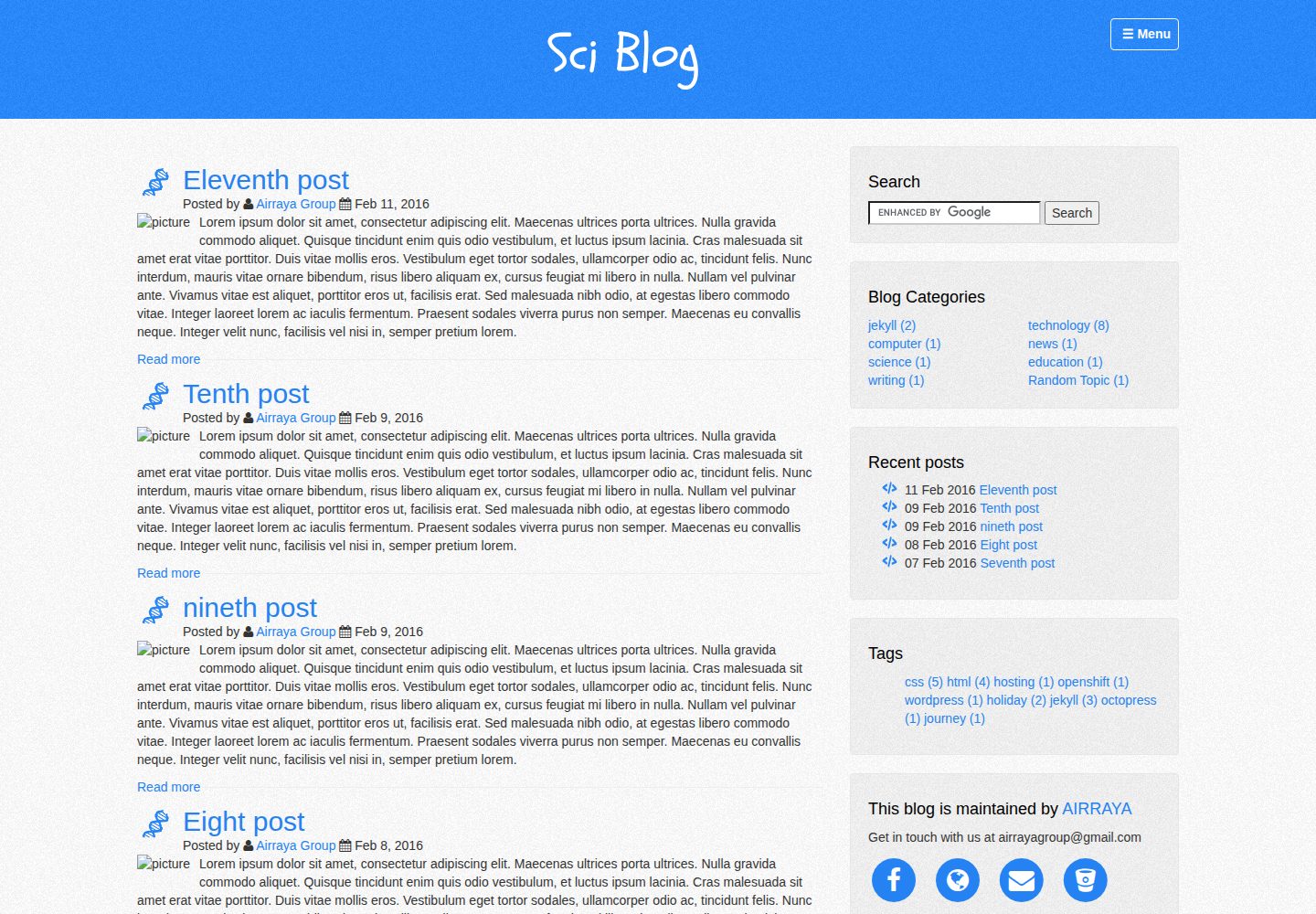
Jekyll-based blog theme with a GitHub Pages online demo included in the repository
JekyllBlog
sciblog — Jekyll Blog Template
By yourfreebies
sciblog is a Jekyll-based blog theme by Air Raya, released under the MIT license, with an online demo and Windows installation steps provided in the repository.
Explore the design
Compare the page layouts and mobile experience. Open any screenshot for a closer look.
Desktop homepage1 / 2
Desktop captureTop of page
Actual screenshot captured by the server browser.
All pages & views 2
Screenshots show visual appearance; interactive behavior may differ.
Recorded 2026-10-02View source
What stands out
A quick read of the recorded project description.
README provides step-by-step instructions for Windows, from installing Ruby to running jekyll serve
Supports downloading the zip, extracting it, and placing it directly into the blog directory, and requires installing the jekyll-paginate plugin
Theme code is under the MIT license, allowing use, modification, commercial use, and distribution
README credits free resources and inspiration from Bootstrap, Jekyll, startboostrap, and others
Template Details
sciblog is a Jekyll blog theme created by Air Raya, with the repository at yourfreebies/sciblog and a demo site published on GitHub Pages. The theme is positioned for blog use. The README states that it uses free resources such as Bootstrap, Jekyll, and startboostrap, and credits noisetexturegenerator and the yellow blue theme as sources of inspiration.
For installation, the README uses the Windows Command Prompt as an example, providing a complete workflow from installing Ruby (with the option to add Ruby executables to your PATH), running gem install jekyll, creating a site with jekyll new, to previewing locally with jekyll serve. It also supports downloading the repository zip, extracting it, and copying the contents into the blog directory, plus additionally installing the jekyll-paginate plugin.
Regarding licensing, the theme code is released under MIT, allowing free use, modification, commercial use, and distribution, provided the copyright notice and license notice are retained when distributing. However, third-party assets such as demo images, fonts, and icons must be checked separately under their respective licenses, and external services such as domains and hosting may incur costs. The README does not list specific dependency versions or describe production environment performance.
JekyllBlog
Is it right for your project?
Use Cases
- Building a personal technical or scientific blog with Jekyll
- Previewing the theme locally on Windows by following the README steps
- Downloading the theme code to modify styles and content as a foundation for your own blog
- Evaluating the theme's page structure by referring to its GitHub Pages demo
Suitable For
- Individual developers who want to blog using the Jekyll static site generator
- Users who need a blog theme under the MIT license that can be freely modified and distributed
- Beginners setting up a local Jekyll environment on Windows via command-line steps
Getting started & customization
Use these recorded setup notes alongside the repository instructions for your chosen version.
- 1
The README uses the Windows Command Prompt as an example; when installing Ruby, you need to check 'add ruby executables to your PATH'
- 2
You can run gem install jekyll and jekyll new my-awesome-site to create a site, then use jekyll serve to preview at http://localhost:4000
- 3
You can also download the repository zip, extract it, copy the contents into the blog directory, and additionally run gem install jekyll-paginate
- 4
The README does not list dependency versions; before actual use, it is advisable to check files such as the Gemfile in the repository
- 5
Third-party assets such as demo images, fonts, and icons must be checked separately under their respective licenses
License & source material
Usage conditions & limitations
Free to use · keep license noticeThis entry covers the free version under the MIT license in the public repository; the free scope applies to that version's code and does not mean external services or third-party assets are free.
Must comply with when using
- The code of this version may be used, modified, used commercially, and distributed for free.
- When distributing copies or substantial portions of the code, retain the original author's copyright notice and the full MIT license notice.
- The code is provided as is; warranties and limitations of liability are governed by the original license and applicable law.
Additional costs & items to verify
- The theme as a whole is released under the MIT license, but the README explicitly reserves an exception 'unless otherwise stated', meaning some bundled resources may not be covered by MIT and must be checked separately.
- The README credits third-party free resources such as Bootstrap, Jekyll, startboostrap, noisetexturegenerator, and the yellow blue theme; these assets are each subject to their original licenses and are not all licensed by this project's MIT.
- Using this theme requires additionally installing the jekyll-paginate plugin, which is an external dependency that you must obtain yourself and comply with its license.
- Demo images, fonts, icons, and other third-party assets must be checked under their respective licenses; they cannot be judged solely by the code's MIT license.
- External services such as domains, hosting, databases, payments, or AI may incur additional charges.
View Original Text Basis
Permission is hereby granted, free of charge
Original License Text
Unless otherwise noted, this theme is released under MIT licence.
Original README
Thank you so much for providing free resources and inspirations
Original README
https://github.com/yourfreebies/sciblog/blob/master/LICENSEhttps://github.com/yourfreebies/sciblog/blob/master/README.mdInstall jekyll-paginate
Original README
Compiled by DeepSeek based on repository license and README ·2026-10-02. Results only cover the materials read; dependencies, images, fonts, and subsequent term changes are subject to their respective original texts.
Project checks & description sources
Template Information
- Source platforms
- GitHub
- Documentation and maintenance reference score
- Partly documented · 64 / 100
- Technologies
- Jekyll
- Website type
- Blog
How this score is calculated
Our heuristic uses license records (up to 30), a demo link (12), a preview (10), stars (15), recorded maintenance (15), description completeness (8), feature records (5) and classification data (5). It is not a code, security or performance test, or a Google score. A link does not establish tested functionality.
What to verify for this project
- Repository update recorded
- 2022-12-17
- Screenshot last checked
- 2026-10-02
A demo link is listed. Check it with your own content and viewport sizes; its presence does not confirm that forms, authentication or payments work.
The catalog identifies Jekyll as the primary stack. Check the actual dependency manifest and lockfile for versions and hosting requirements. These notes use recorded metadata, not a code audit or a deployment test.
Use a selection guide →How this description was prepared
AI-assisted description based on catalog records and repository material. Repository authors are not automatically the reviewers of this description.
Automatically checked against source and license rules; no manual editorial review.
Inspect the recorded source material
SHA-256: 5e50e21b5dfec4ca56d33b2b578e6197c7ca037cab2b5d9780839fff2140bb4e
2026-10-02T10:52:11.224Z
Source file / repository# [Air Raya](http://www.airraya.com/) [Sci blog](https://yourfreebies.github.io/sciblog/) is jekyll theme created by [Air Raya](http://www.airraya.com/). [demo](https://yourfreebies.github.io/sciblog/) Unless otherwise noted, this theme is released under MIT licence. ## Credits Thank you so much for providing free resources and inspirations * [getbootstrap](http://getbootstrap.com/) * [jekyll](https://jekyllrb.com/) * [startboostrap](http://startbootstrap.com/) * [noisetexturegenerator](http://www.noisetexturegenerator.com/) * [yellow blue by Christos Alatzas](http://demo-yb.yellowblue.eu/) ## Getting Started To use this template, you can download it here. To install *jekyll* and *this theme* 1. type on search `cmd.exe` or command prompt 2. In `C:\Users\my pc\desktop\blog>` 3. Install ruby by going to `http://rubyinstaller.org/downloads/` to download 4. When installing ruby, make sure to check `add ruby executables to your PATH` 5. Install jekyll `C:\Users\my pc\desktop\blog\gem install jekyll` 6. Create jekyll theme `C:\Users\my pc\desktop\blog\jekyll new my-awesome-site` 7. Go to blog my-awesome-site `C:\Users\my pc\desktop\blog>cd my-awesome-site` 8. Preview your blog `C:\Users\my pc\desktop\blog\my-awesome-site>jekyll serve` 9. Now browse to `http://localhost:4000` 10. Alternatively, you can download my jekyll theme here `https://github.com/yourfreebies/sciblog` 11. click download zip and unzip it. 12. You can copy and paste everything inside to blog folder in desktop such as `C:\Users\my pc\desktop\blog>` 13. Install jekyll-paginate `C:\Users\my pc\desktop\blog>gem install jekyll-paginate` 14. Preview the blog and make changes `C:\Users\my pc\desktop\blog>jekyll serve` 15. Now browse to `http://localhost:4000` ## Bugs and Issues Have a bug or an issue with this template? Please contact our team [email protected] or fork and contribute. ## Creator Sci blog theme was created by and is maintained by **Air Raya**, at [Air Raya](http://www.airraya.com/). ## Support my project too - [Maple Learning](https://www.maplelearning.org/) - [iblogger](https://www.iblogger.ca) ## Copyright and License Copyright 2015 AIR RAYA GROUP. The work is licenced under MIT[](https://github.com/airrayagroupwebdesign/sciblog/blob/master/LICENSE) license.
Explore similar templates
Compare previews and descriptions within the same stack and category.

al-folio
A Jekyll academic homepage theme for scholars and researchers, with a clean responsive design and out-of-the-box support for publication lists, project showcases, CVs, and blogs.
Jekyll · Portfolio

minimal-mistakes
Minimal Mistakes is a two-column Jekyll theme for personal sites, blogs, project documentation, or portfolios.
Jekyll · Portfolio

Beautiful Jekyll
Beautiful Jekyll is a mature, easy-to-use Jekyll blog theme maintained by Dean Attali since 2015, with over 50,000 users.
Jekyll · Blog

jekyll-TeXt-theme
A customizable Jekyll theme for personal sites, team sites, blogs, projects, and documentation.
Jekyll · Blog

startbootstrap-clean-blog-jekyll
The official Jekyll version of Start Bootstrap's Clean Blog theme, offering a blog home page, about page, contact page, and sample post pages, with a Formspree-powered contact form.
Jekyll · Blog

So Simple
A minimal reading-oriented Jekyll theme by Michael Rose for personal blogs, portfolios, and long-form reading. It offers multiple layouts, microformat markup, Disqus comments, Google Analytics, Jekyll SEO Tag, three skins, and aggregation by year, category, and tag with a grid view.
Jekyll · Blog