Server side implemented with the Play Framework, using an MVC structure and compile-time dependency injection
HTMLAdmin dashboard
play-bootstrap4-admin — HTML Admin dashboard Template
By YouXiang-Wang
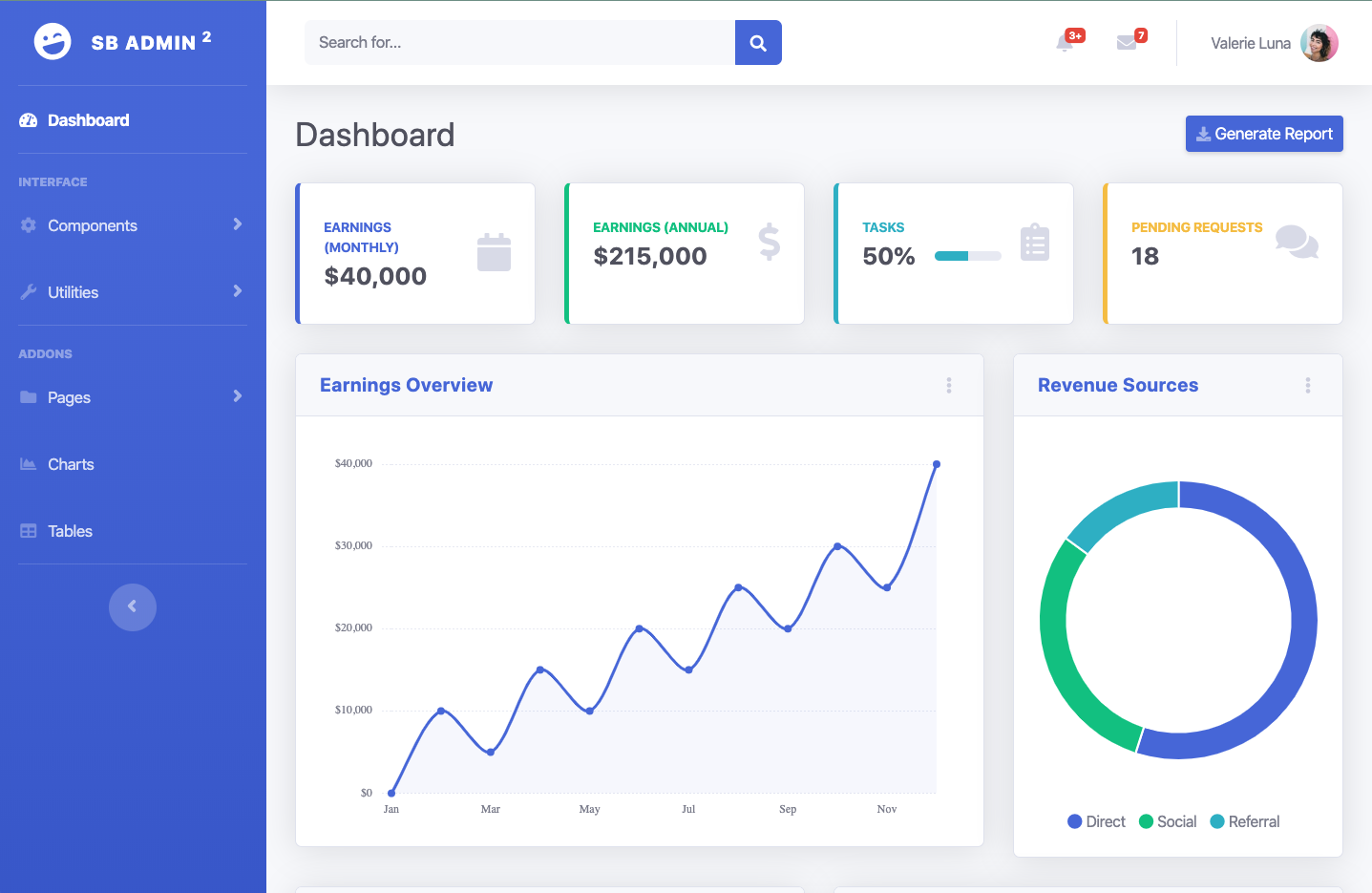
A Bootstrap 4 admin dashboard template built on the Play Framework, with an interface derived from SB Admin 2, including pages for charts and data tables.
Explore the design
Compare the page layouts and mobile experience. Open any screenshot for a closer look.
Author preview
Author-provided previewTop of page
Preview provided in the project README.
One original preview is available. Open the full image to inspect the design.
Screenshots show visual appearance; interactive behavior may differ.
Recorded 2026-10-03View source
What stands out
A quick read of the recorded project description.
Interface based on the Bootstrap 4 SB Admin 2 admin template
Client side integrates Chart.js, DataTables, jQuery, jQuery-easing, and Font Awesome
SCSS assets compiled with sbt-sassify and packaged uniformly by sbt
Front-end library dependencies managed via WebJars
Template Details
This project is a Bootstrap 4 admin template implemented with the Play Framework, with an interface based on the open-source SB Admin 2. The repository uses Scala for the server side, organizing components with compile-time dependency injection and Macwire macros. On the client side, Bootstrap 4, Chart.js, DataTables, jQuery, jQuery-easing, and Font Awesome are brought in via WebJars, and SCSS assets are processed with sbt-sassify.
The page structure is defined by views/main/main.scala.html for the base HTML and global CSS/JS references, and views/main/layout.scala.html for the overall layout including navigation, header, and footer. Routes are declared centrally in conf/routes, and each controller directly returns the corresponding view. The assets directory holds images, JS, and SCSS sources, which are processed by sbt at compile time.
To use it, clone the repository and run sbt run in the root directory, then visit http://localhost:9000/ by default to view the dashboard interface. You can also generate a deployment package with sbt dist, but you must provide an Application secret on the command line or configure it in advance. The project is under the Apache-2.0 license, and third-party assets such as demo images, fonts, and icons in the repository need to be checked separately for their respective licenses.
HTMLAdmin backend
Is it right for your project?
Use Cases
- Needing a starting point for a Play Framework-based admin interface
- Wanting to reference how components are organized with Scala compile-time dependency injection and Macwire
- Needing a Bootstrap 4 admin layout that includes chart and data table pages
- Using it to learn Play's ApplicationLoader, routing, and asset packaging workflow
Suitable For
- Developers familiar with Scala and sbt
- Projects building admin interfaces with the Play Framework
- Teams needing a Bootstrap 4 admin dashboard layout
- Engineering efforts that want to bring in front-end libraries via WebJars
Getting started & customization
Use these recorded setup notes alongside the repository instructions for your chosen version.
- 1
After cloning the repository, run sbt run in the project root; by default, visit http://localhost:9000/
- 2
Before the first compilation, run sbt compile to generate route-related Scala code
- 3
In conf/application.conf, set play.application.loader = MyApplicationLoader
- 4
When generating a deployment package with sbt dist, you must provide an Application secret or configure it in advance
- 5
Third-party assets such as demo images, fonts, and icons need to be checked separately under their respective licenses
License & source material
Usage conditions & limitations
Free to use · keep license noticeWhat is included here is the free version under the Apache-2.0 license from the public repository; the free scope covers that version's code and does not mean that external services or third-party assets are free.
Must comply with when using
- Free use, modification, commercial use, and distribution are permitted; when distributing, you must include the Apache-2.0 license.
- Modified files must prominently indicate changes, and relevant copyright, patent, trademark, and attribution notices must be retained.
- If the original project includes a NOTICE file, applicable attribution notices in it must be retained when distributing derivative works.
- The license includes an applicable contributor patent grant; initiating patent litigation as described in the license terminates that patent grant, and no trademark use rights are granted.
- The code is provided as is; warranties and limitations of liability are governed by the original license and applicable law.
Additional costs & items to verify
- When generating a deployable package with sbt dist, you must provide an Application secret on the command line or set it in the configuration beforehand; otherwise, the deployment package cannot be generated.
- Demo images, fonts, icons, and other third-party assets need to be checked under their respective licenses and cannot be judged solely by the code's Apache-2.0 license.
- External services such as domains, hosting, databases, payments, or AI may incur separate charges.
View Original Text Basis
no-charge, royalty-free, irrevocable copyright license
Original License Text
https://github.com/YouXiang-Wang/play-bootstrap4-admin/blob/master/LICENSEhttps://github.com/YouXiang-Wang/play-bootstrap4-admin/blob/master/README.md用 `sbt dist` 可以生成可以部署的二进制代码(需要在命令行给出 Application secret 或 事先配置)
Original README
Compiled by DeepSeek based on repository license and README ·2026-10-03. Results only cover the materials read; dependencies, images, fonts, and subsequent term changes are subject to their respective original texts.
Project checks & description sources
Template Information
- Source platforms
- GitHub
- Documentation and maintenance reference score
- Less documented · 53 / 100
- Technologies
- HTML
- Website type
- Admin dashboard
How this score is calculated
Our heuristic uses license records (up to 30), a demo link (12), a preview (10), stars (15), recorded maintenance (15), description completeness (8), feature records (5) and classification data (5). It is not a code, security or performance test, or a Google score. A link does not establish tested functionality.
What to verify for this project
- Repository update recorded
- 2019-12-28
- Screenshot last checked
- 2026-10-03
No demo link is recorded. Use the repository instructions to evaluate the project locally; the screenshot alone cannot establish interactive behavior.
The catalog identifies HTML as the primary stack. Check the actual dependency manifest and lockfile for versions and hosting requirements. These notes use recorded metadata, not a code audit or a deployment test.
Use a selection guide →How this description was prepared
AI-assisted description based on catalog records and repository material. Repository authors are not automatically the reviewers of this description.
Review declaration: [email protected] · 2026-10-04
Inspect the recorded source material
SHA-256: f6ccb5eb86b449f0aa989e770a3df3a70a77f44581190f2106702761ae95873b
2026-10-03T19:19:40.618Z
Source file / repository# 基于 Play Framework 的 Admin 模版
这是一个用 Play 框架实现的基于 [SB Admin 2](https://github.com/BlackrockDigital/startbootstrap-sb-admin-2) 的管理仪表盘(dashbaord)模版。SB Admin 2 是一个采用 [Bootstrap 4](https://getbootstrap.com/) 的开源模版。
## 1 如何使用
非常简单, Clone 之后在项目根目录运行: `sbt run`。
在 `http://localhost:9000/` 可以看到如下界面:

## 2 项目组成
基于 Play Framework。项目用 [compile-time DI](https://www.playframework.com/documentation/2.8.x/ScalaCompileTimeDependencyInjection) 和 [Macwire Macro](http://di-in-scala.github.io/)。
客户端基于以下库:
- Bootstrap 4
- Chart.js
- Datatables
- fontawesome-free
- jQuery and jQuery-easing
- Bootstrap Admin temaplate
## 3 sbt 配置
Play Framework 采用了 MVC 结构,其项目结构不同于通常的 Scala 项目结构。sbt 遵循了 convention over configuration 原则,所以首先需要引入 Play 的 sbt plugin。
在项目根目录创建 `project\` 子目录,在此子目录下创建下面二个文件:
- `build.properties`: 设置 sbt 版本: `sbt.version=1.3.4`。
- `plugins.sbt`: 引入 Play 的 `sbt-plugin` 以及 `sbt-sassify`:
```scala
addSbtPlugin("com.typesafe.play" % "sbt-plugin" % "2.8.0")
addSbtPlugin("org.irundaia.sbt" % "sbt-sassify" % "1.4.13")
```
在根目录创建 `build.sbt`,加入下面内容:
```scala
name := """play-bootstrap4-admin"""
version := "0.0.1"
lazy val root = (project in file(".")).enablePlugins(PlayScala)
scalaVersion := "2.13.1"
libraryDependencies += "org.scalatestplus.play" %% "scalatestplus-play" % "4.0.3" % Test
libraryDependencies += "com.softwaremill.macwire" %% "macros" % "2.3.3" % "provided"
scalacOptions ++= Seq("-feature", "-deprecation", "-Xfatal-warnings")
// Client side
libraryDependencies += "org.webjars" % "jquery" % "3.4.1"
libraryDependencies += "org.webjars" % "jquery-easing" % "1.4.1"
libraryDependencies += "org.webjars" % "bootstrap" % "4.3.1"
libraryDependencies += "org.webjars" % "datatables" % "1.10.20"
libraryDependencies += "org.webjars" % "chartjs" % "2.8.0"
libraryDependencies += "org.webjars" % "font-awesome" % "5.11.2"
```
## 4 Play 程序
### 4.1 Controllers, Routes and Assets
Play 是个 MVC 框架。Controller 都很简单,直接返回各自的 View。
`views/main/main.scala.html` 定义了基本的 HTML 以及所有页面用到的 CSS 与 JS 资源。 `views/main/layout.scala.html` 则定义了总体布局,包括导航以及页头页尾。
`cong/rotues` 定义了所有路由。
`assets` 目录下面包含了用到个各种资源,包括图片,JS code 以及 SCSS 源代码。sbt 编译时会编译、拷贝和打包这些资源。
### 4.2 程序加载
Play 的文档 [Application entry point](https://www.playframework.com/documentation/2.7.x/ScalaCompileTimeDependencyInjection) 解释了使用编译注入需要了解的加载过程。Play 用 `ApplicationLoader` trait 定义应用的加载。其 `load` 方法的类型为 `Context => Application`。 `Context` 独立于具体应用,包含加载应用所需要的各种 Component。 这里,Component 是采用 [Think Cake Pattern](http://www.warski.org/blog/2014/02/using-scala-traits-as-modules-or-the-thin-cake-pattern/) 创建的包含所需依赖的 trait。 这些
trait 的名字通常用 `Components` 或 `Module` 作为结尾。
Play 提供了 `BuiltInComponentsFromContext` 作为父类帮助实现 `ApplicationLoader`。具体实现的子类需要提供最少二个所需要的模块:处理 Http 请求的处理链 `HttpFiltersComponents` 和定义的所有路由。 创建包含下面内容的 `app/MyApplicationLoader.scala` 文件, 其中包含了配置 Logger 的内容:
```scala
import _root_.controllers.AssetsComponents
import com.softwaremill.macwire._
import play.api.ApplicationLoader.Context
import play.api._
import play.api.routing.Router
import play.filters.HttpFiltersComponents
import router.Routes
class MyApplicationLoader extends ApplicationLoader {
def load(context: Context): Application = new ApplicationComponents(context).application
}
class ApplicationComponents(context: Context) extends BuiltInComponentsFromContext(context)
with ApplicationModule
with AssetsComponents
with HttpFiltersComponents
{
// set up logger
LoggerConfigurator(context.environment.classLoader).foreach {
_.configure(context.environment, context.initialConfiguration, Map.empty)
}
lazy val router: Router = {
// add the prefix string in local scope for the Routes constructor
val prefix: String = "/"
wire[Routes]
}
}
```
上面用到的 `ApplicationModule` 包含了创建路由需要的所有 Controller instances。
一个 Play Web 应用需要创建所有的路由和所有的 Controller。创建包含下面内容的 `app/GreetingModule.scala` 文件生成所有 Controller:
```scala
import play.api.i18n.Langs
import play.api.mvc.ControllerComponents
import controllers.{Home, UIElements, Utilities, Pages, ChartTable}
trait ApplicationModule {
import com.softwaremill.macwire._
lazy val home = wire[Home]
lazy val uiElement = wire[UIElements]
lazy val utilities = wire[Utilities]
lazy val pages = wire[Pages]
lazy val chartTable = wire[ChartTable]
def langs: Langs
def controllerComponents: ControllerComponents
}
```
因为所有 Controller 的 Constructor 需要一个 `ControllerComponents` 类型的参数,这里需要给出抽象方法定义,否则会编译错误。具体的值,则在 mixin 这个 Component 的时候生成。
刚创立上面二个文件时,`import router.Routes` 和 `wire[Routes]` 在 IDE 里面会报告错误。原因是 Play 在编译初期需要从路由的定义文件 `conf/routes` 产生相关 Scala 代码。运行 `sbt compile` 产生所需的路由代码。
还需要指定加载程序,在 `conf/application.conf` 加入下面内容:`play.application.loader = MyApplicationLoader`。
现在可以运行 `sbt run` 检查生成的网站。用 `sbt dist` 可以生成可以部署的二进制代码(需要在命令行给出 Application secret 或 事先配置)。
Explore similar templates
Compare previews and descriptions within the same stack and category.

gentelella
Gentelella v4 is a free, open-source admin dashboard template maintained by Colorlib, built with vanilla JavaScript, SCSS, and Vite 8 without Bootstrap or jQuery.
HTML · Admin dashboard

coreui-free-bootstrap-admin-template
A free Bootstrap admin template maintained by CoreUI, built on CoreUI's own UI component library. It provides compiled HTML pages and Pug template source code, covering dashboards, authentication, forms, components, icons, and error pages.
HTML · Admin dashboard

dashboards
A collection of responsive dashboard HTML templates open-sourced by Keen IO, built on CSS Grid, offering multiple prebuilt admin data interface layouts.
HTML · Admin dashboard

SB Admin 2
SB Admin 2 is a classic Bootstrap admin template from Start Bootstrap, offering dashboards, charts, tables, and common management pages.
HTML · Admin dashboard

Adminator-admin-dashboard
Adminator 4 is a vanilla HTML, CSS and JavaScript admin dashboard template with a CSS-variable token design system, built-in light and dark themes, no jQuery or Bootstrap dependency, and 18 pages covering dashboards, mail, calendar, charts, forms, tables and error pages.
HTML · Admin dashboard

SB Admin
SB Admin is a lightweight, open-source Bootstrap admin template from Start Bootstrap. It offers a sidebar-and-top-bar layout with data tables, forms, and stat cards, plus responsive design.
HTML · Admin dashboard