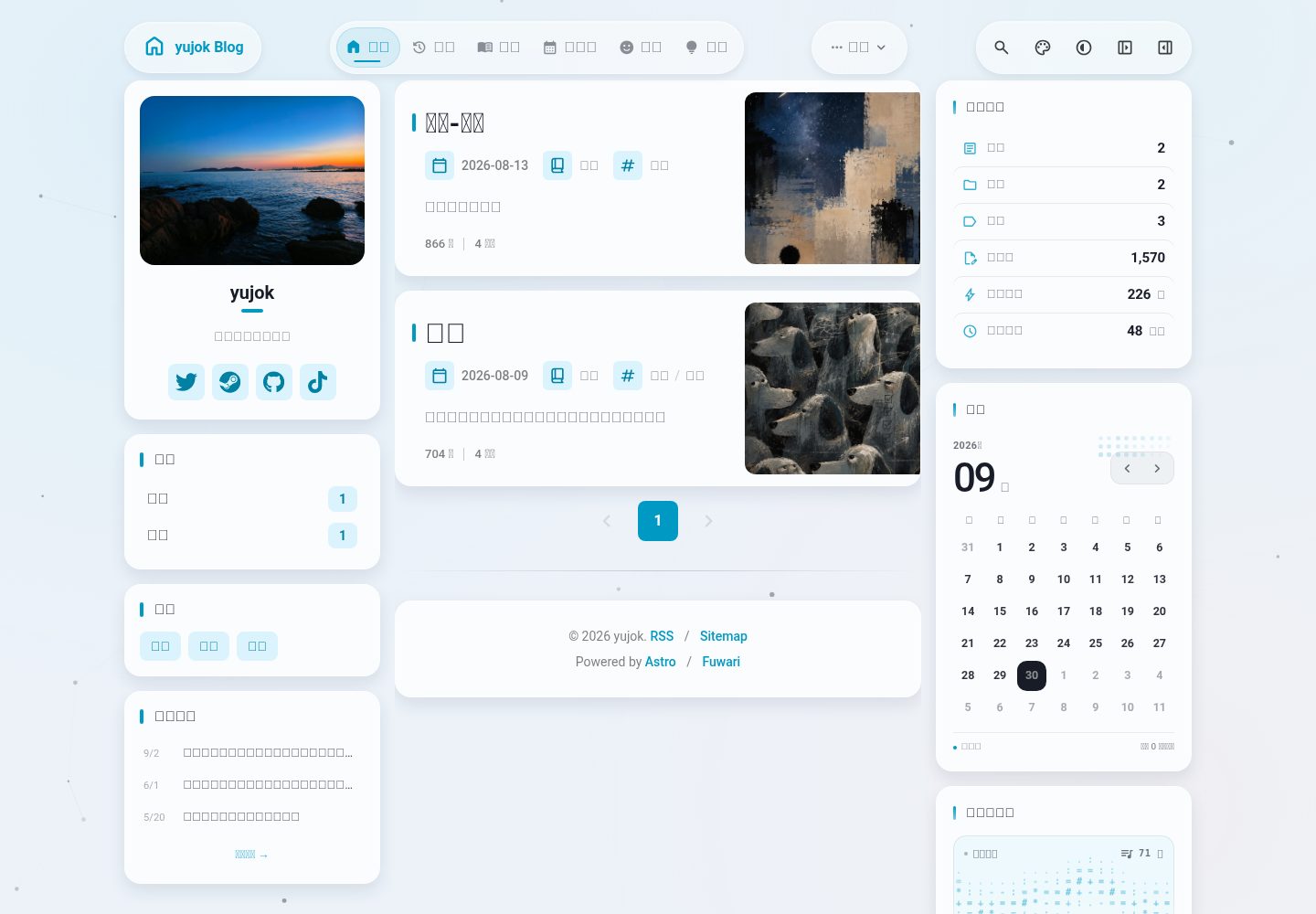
A personal blog adapted from Astro and the Fuwari theme
AstroBlog
yujok-s-blog — Astro Blog Template
By yx-l147
A personal blog built on Astro and adapted from the Fuwari theme, including posts, thoughts, bangumi, a WeRead bookshelf, and local book reviews.
Explore the design
Compare the page layouts and mobile experience. Open any screenshot for a closer look.
Desktop homepage1 / 3
Desktop captureTop of page
Actual screenshot captured by the server browser.
All pages & views 3
Screenshots show visual appearance; interactive behavior may differ.
Recorded 2026-09-30View source
What stands out
A quick read of the recorded project description.
Supports Markdown / MDX content and Frontmatter metadata
Built-in content creation scripts such as new-post and new-thought
A WeRead bookshelf page that can sync the public shelf, reading progress, and selected highlights
Local book reviews linked to bookshelf data via bookId, with draft preview support
Includes page modules such as thoughts, bangumi, class schedule, and archives
Template Details
This is a personal blog project built with Astro and adapted from the upstream Fuwari theme. Content is written in Markdown or MDX: posts go in src/content/posts/, thoughts in src/content/thoughts/, and local book reviews in src/content/book-reviews/, linked to bookshelf data via the bookId in Frontmatter. The project provides scripts such as new-post, new-thought, fetch-weread, and draft-book-reviews for creating content, syncing WeRead data, and generating book review drafts.
Site pages include post archives, thoughts, a WeRead bookshelf, bangumi records, a class schedule, and an about page. The bookshelf page is at /book, with data sourced from src/data/weread/shelf.json generated by the fetch-weread command, including the public shelf, reading progress, statistics, and selected highlights; when real data is not configured, it falls back to the sample data in src/data/mock-shelf.ts. Private books are filtered out during the fetch stage.
Before use, Node.js 18+ and pnpm 9+ are required. Use pnpm install, pnpm dev, pnpm build, and pnpm preview for installation, development, build, and preview. Build output is in the dist/ directory and can be deployed to static hosting platforms. The WeRead bookshelf feature requires configuring WEREAD_API_KEY in .env.local. The project is under the MIT license; third-party assets must be checked against their respective licenses.
AstroBlog
Is it right for your project?
Use Cases
- Building a personal blog focused on posts and thoughts
- Displaying a WeRead bookshelf, reading progress, and highlights on the blog
- Writing local book reviews for books read and linking them to bookshelf entries
- Recording bangumi viewing status and a class schedule
- Deploying the built static files to a static hosting platform
Suitable For
- Developers familiar with Astro or willing to use Astro
- Personal bloggers who need a Markdown / MDX writing workflow
- Users who want to display WeRead data
- Personal sites that need extended pages such as thoughts, bangumi, and class schedule
Getting started & customization
Use these recorded setup notes alongside the repository instructions for your chosen version.
- 1
Requires Node.js 18+ and pnpm 9+; install dependencies with pnpm install
- 2
Use pnpm dev, pnpm build, and pnpm preview for development, build, and preview respectively
- 3
For the WeRead bookshelf, copy .env.example to .env.local and fill in WEREAD_API_KEY, then run pnpm fetch-weread
- 4
When real data is not configured, the bookshelf falls back to the sample data in src/data/mock-shelf.ts
- 5
Book review drafts are generated by pnpm draft-book-reviews; production builds hide content with draft: true
License & source material
Usage conditions & limitations
Free to use · keep license noticeThis entry covers the free version under the MIT license in the public repository; the free scope is the code of this version and does not mean external services or third-party assets are free.
Must comply with when using
- Free use, modification, commercial use, and distribution of this version's code are allowed.
- When distributing copies or substantial portions of the code, retain the original author's copyright notice and the full MIT license notice.
- The code is provided as is; warranties and limitations of liability are governed by the original license and applicable law.
Additional costs & items to verify
- The WeRead bookshelf feature requires applying for and configuring the WEREAD_API_KEY environment variable, which is an external service credential requirement; without it, the page falls back to sample data.
- Without a configured WeRead API key, the bookshelf only shows built-in sample data and cannot display real bookshelf content.
- Demo images, fonts, icons, and other third-party assets must be checked against their respective licenses; the code's MIT license alone cannot be used to judge them.
- External services such as domains, hosting, databases, payments, or AI may incur separate charges.
View Original Text Basis
Permission is hereby granted, free of charge
Original License Text
在 `.env.local` 中填入 `WEREAD_API_KEY`
Original README
https://github.com/yx-l147/yujok-s-blog/blob/main/LICENSEhttps://github.com/yx-l147/yujok-s-blog/blob/main/README.md如果没有配置真实数据,书架页面会自动回退到 `src/data/mock-shelf.ts` 中的示例数据。
Original README
Compiled by DeepSeek based on repository license and README ·2026-10-01. Results only cover the materials read; dependencies, images, fonts, and subsequent term changes are subject to their respective original texts.
Project checks & description sources
Template Information
- Source platforms
- GitHub
- Documentation and maintenance reference score
- More documented · 80 / 100
- Technologies
- Astro
- Website type
- Blog
How this score is calculated
Our heuristic uses license records (up to 30), a demo link (12), a preview (10), stars (15), recorded maintenance (15), description completeness (8), feature records (5) and classification data (5). It is not a code, security or performance test, or a Google score. A link does not establish tested functionality.
What to verify for this project
- Repository update recorded
- 2026-09-29
- Screenshot last checked
- 2026-10-01
A demo link is listed. Check it with your own content and viewport sizes; its presence does not confirm that forms, authentication or payments work.
The catalog identifies Astro as the primary stack. Check the actual dependency manifest and lockfile for versions and hosting requirements. These notes use recorded metadata, not a code audit or a deployment test.
Use a selection guide →How this description was prepared
AI-assisted description based on catalog records and repository material. Repository authors are not automatically the reviewers of this description.
Automatically checked against source and license rules; no manual editorial review.
Inspect the recorded source material
SHA-256: 7e05abc385eada673736191ca7b7fe6da32e621ed01bef9e123dfc8a331298d7
2026-10-01T14:27:39.114Z
Source file / repository# Yujok's Blog 基于 Astro / Fuwari 改造的个人博客,包含文章、随想、番组、微信读书书架和本地书评。 ## 技术栈 - 框架: Astro - 交互:Svelte - 样式:Tailwind CSS - 开发语言:TypeScript - 内容格式:Markdown / MDX - 包管理:pnpm ### 🚀 快速开始 ### 环境要求 - Node.js 18+ - pnpm 9+ ### 安装依赖 ```bash pnpm install ``` ### 开发模式 ```bash pnpm dev ``` ### 构建生产版本 ```bash pnpm build ``` ### 预览构建结果 ```bash pnpm preview ``` ## 📝 使用指南 ### 创建新文章 使用内置脚本快速创建文章: ```bash pnpm new-post hello-world ``` 文章默认存放在 `src/content/posts/` 目录下。 ### 创建新随想 使用内置脚本快速创建随想: ```bash pnpm new-thought my-first-thought ``` 随想默认存放在 `src/content/thoughts/` 目录下。 ### 文章格式 文章使用 Markdown 或 MDX 格式,并支持以下 Frontmatter: ```markdown --- title: 文章标题 published: 2026-01-01 description: 文章描述 image: '' tags: [] category: '' draft: false lang: zh_CN --- # 文章内容 这里是文章正文。 ``` ### 微信读书书架 书架页面位于 `/book`,使用本地数据展示书籍、阅读进度、阅读统计和精选划线。 首次使用: 1. 复制 `.env.example` 为 `.env.local`。 2. 在 `.env.local` 中填入 `WEREAD_API_KEY`。 3. 运行数据同步命令: ```bash pnpm fetch-weread ``` 如果没有配置真实数据,书架页面会自动回退到 `src/data/mock-shelf.ts` 中的示例数据。 ### 本地书评 本地书评存放在 `src/content/book-reviews/` 目录下,并通过 Frontmatter 中的 `bookId` 与书架数据关联。 生成书评草稿: ```bash pnpm draft-book-reviews ``` 预览将要生成的草稿,但不写入文件: ```bash pnpm draft-book-reviews -- --dry-run ``` 本地开发时,`draft: true` 的书评也会显示在书架和书籍详情页中。生产构建会自动隐藏草稿,完成书评后将 `draft` 改为 `false` 即可正式发布。 ### 其他页面 - `/thoughts`:随想 - `/book`:微信读书书架 - `/bangumi`:番组记录 - `/schedule`:课程表 - `/archive`:文章归档 - `/about`:关于页面 ## 📁 项目结构 ```text ├── public/ # 静态资源 ├── scripts/ # 内容管理和数据同步脚本 ├── src/ │ ├── assets/images/ # 图片资源 │ ├── components/ # Astro 和 Svelte 组件 │ │ ├── book/ # 书架和书评相关组件 │ │ ├── bangumi/ # 番组相关组件 │ │ ├── schedule/ # 课程表相关组件 │ │ └── widget/ # 侧边栏和页面小组件 │ ├── content/ # Markdown / MDX 内容 │ │ ├── posts/ # 博客文章 │ │ ├── thoughts/ # 随想 │ │ ├── book-reviews/ # 本地书评 │ │ └── spec/ # 关于等特殊页面 │ ├── data/ # 本地数据和示例数据 │ │ ├── weread/ # 微信读书数据 │ │ ├── mock-shelf.ts # 书架示例数据 │ │ └── schedule.ts # 课程表数据 │ ├── layouts/ # 页面布局 │ ├── pages/ # 页面路由 │ ├── styles/ # 全局和主题样式 │ ├── config.ts # 站点配置 │ └── content.config.ts # 内容集合配置 ├── .env.example # 环境变量模板 ├── astro.config.mjs # Astro 配置 ├── package.json # 项目配置和命令 └── pnpm-lock.yaml # 依赖版本锁定文件 ``` ## 常用命令 ```bash pnpm install pnpm dev pnpm build pnpm preview ``` ## 内容命令 ```bash pnpm new-post <slug> pnpm fetch-weread pnpm draft-book-reviews pnpm new-thought -- "我的新想法" ``` ## 微信读书书架 书架页面使用 `src/data/weread/shelf.json` 作为本地数据源。它由 `pnpm fetch-weread` 生成,包含公开书架、阅读进度、统计、精选划线等信息。私密书籍会在拉取阶段过滤,不会写入 `shelf.json`。 首次使用: 1. 复制 `.env.example` 为 `.env.local`。 2. 在 `.env.local` 填入 `WEREAD_API_KEY`。 3. 运行 `pnpm fetch-weread`。 4. 运行 `pnpm dev` 查看 `/book`。 如果没有真实数据,页面会回退到 `src/data/mock-shelf.ts`。 ## 本地书评草稿 本地书评存放在 `src/content/book-reviews/*.md`,通过 frontmatter 里的 `bookId` 和书架数据关联。重新运行 `pnpm fetch-weread` 不会覆盖这里的内容。 生成草稿: ```bash pnpm draft-book-reviews ``` 脚本会读取 `src/data/weread/shelf.json`,为满足任一条件的书生成草稿: - 有划线:`bookmarkCount > 0`,或 `shelf.notes` 中存在对应 `bookId`。 - 有评分:存在 `rating`、`userRating`、`personalRating` 或 `publicRating`。 - 已读完:`finishReading === 1` 或 `status === "finished"`。 为了避免覆盖已经写过的书评,脚本会扫描 `src/content/book-reviews/**/*.md(x)` 的 frontmatter。只要发现相同 `bookId`,就会跳过该书。 草稿会自动填入: - `bookId` - 标题 - `summary` 占位 - `topics` 占位 - `quotes` 占位,若书架里已有精选划线,会优先带入最多 3 条 - `draft: true` 预览将要生成的草稿但不写入文件: ```bash pnpm draft-book-reviews -- --dry-run ``` 本地开发时,`pnpm dev` 会把草稿也关联到 `/book` 书架和书籍详情页,并显示“草稿”标识,方便边看边补。生产构建会隐藏 `draft: true` 的书评;写完后把 frontmatter 里的 `draft` 改成 `false`,并补完 `summary`、`topics`、`quotes` 和正文,即可在正式站点中展示。 ## 📦 部署 构建后的静态文件位于 dist/ 目录,可部署到任何静态托管平台。 ## 🤝 贡献 欢迎提交 Issue 和 Pull Request! ## 📄 许可证 [MIT License](https://github.com/chuzouX/fuwari/blob/main/LICENSE) 🙏 致谢 感谢所有为这个项目做出贡献的开发者们!尤其感谢[上游仓库](https://github.com/saicaca/fuwari)
Explore similar templates
Compare previews and descriptions within the same stack and category.

astrowind
AstroWind is a free, open-source Astro starter theme using Astro and Tailwind CSS, released under the MIT license.
Astro · Blog

astro-paper
AstroPaper is a minimal, responsive, accessible, and SEO-friendly Astro blog theme. Articles are stored as Markdown/MDX in src/content/posts/, with subdirectories affecting URLs.
Astro · Blog

fuwari
Fuwari is a static blog template built with Astro and Tailwind CSS for personal blogs. It manages posts as Markdown files in src/content/posts/, with frontmatter for title, date, description, cover, tags, categories, draft status, and language.
Astro · Blog

Firefly
Firefly is a clean personal blog theme forked from Astro and Fuwari, offering four background modes, single/double sidebar and list/grid layouts, Pagefind client-side full-text search, and a six-language UI.
Astro · Blog

astro-theme-cactus
Astro Cactus is an Astro-based blog and portfolio theme that uses Markdown/MDX content collections to manage posts, notes, and tags, with frontmatter type-checked by a schema.
Astro · Portfolio

astrofy
Astrofy is a free and open-source personal portfolio website template built with Astro and TailwindCSS, with built-in blog, CV timeline, project showcase, store, and RSS feed modules.
Astro · Portfolio