Ported from Tania Rascia's Oblate theme of the same name, minimalistic style, aimed at blog writing
HugoBlog
hugo-oblate-theme — Hugo Blog Template
By zapatran
A Hugo minimalistic blog theme ported from Tania Rascia's Oblate theme of the same name, supporting RSS, code highlighting, Disqus comments, and multiple shortcodes.
Explore the design
Compare the page layouts and mobile experience. Open any screenshot for a closer look.
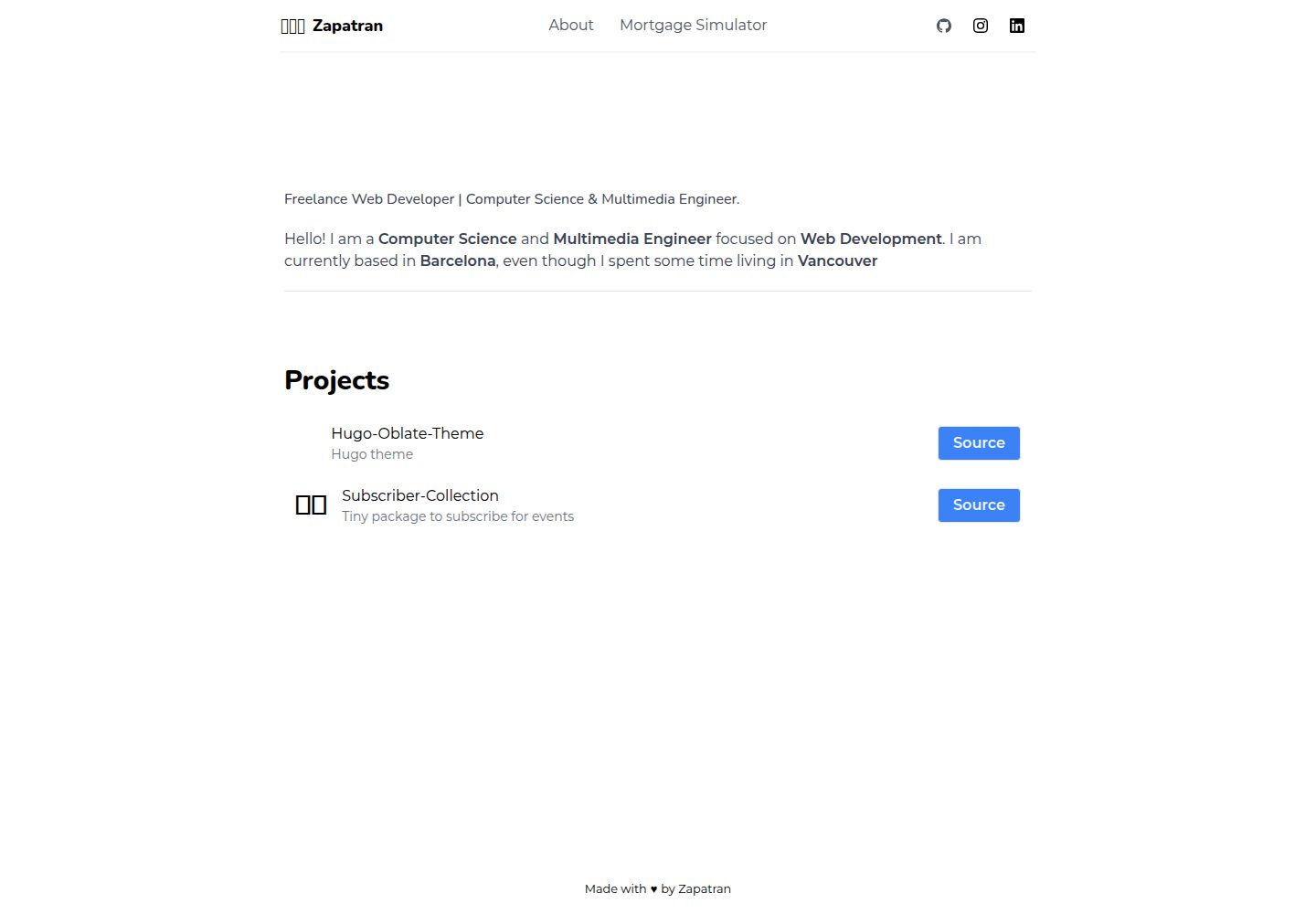
Desktop homepage1 / 3
Desktop captureTop of page
Actual screenshot captured by the server browser.
All pages & views 3
Screenshots show visual appearance; interactive behavior may differ.
Recorded 2026-10-02View source
What stands out
A quick read of the recorded project description.
Supports RSS subscription and source code syntax highlighting
Built-in Disqus comments, with optional emojicon feedback via configuration
Provides three shortcode types: alert, filename, and mermaid, for formatting alerts, labeling code filenames, and drawing diagrams
Navigation bar social icons based on Font Awesome, configured via the social section in config.toml
Project list defined by projects.json, can display project names, emojis, descriptions, and links
Template Details
This is a Hugo theme for blogs, ported from Tania Rascia's Oblate theme of the same name, with an overall minimalistic style. The repository provides an exampleSite sample site, including a config.toml configuration file, which can be copied to the Hugo site root and modified as needed.
In terms of features, the theme supports RSS subscription and source code syntax highlighting, includes built-in Disqus comments (enable by filling in the shortname in config.toml), and integrates emojicon feedback (requires configuring a key). The navigation bar can add social link icons via the social section in config.toml, using the Font Awesome icon font.
For content organization, it provides an about page for self-introduction; other standalone pages can be created via hugo new --kind page, and posts via hugo new post/<name>.md. The project list is defined by projects.json, with fields including name, emoji, description, project, and source.
The theme provides three types of shortcodes: blockquote supports five alert styles: alert, info, note, details, and success; filename is used to label the filename above a code block; mermaid is used to embed Mermaid diagrams.
Installation is done by git clone in the site's themes directory, or by adding as a git submodule; local preview uses hugo server, with the default address localhost:1313. Before use, confirm that themesDir in config.toml points to the correct theme directory. The theme is released under the MIT license; third-party assets such as demo images, fonts, and icons require separate license verification.
HugoBlog
Is it right for your project?
Use Cases
- Building a text-focused personal blog and publishing posts
- Adding code examples to blog posts and enabling syntax highlighting
- Using alert boxes, filename labels, or Mermaid diagrams in articles to aid explanation
- Enabling reader comments on blog posts via Disqus
- Displaying a personal project list and social links on the site
Suitable For
- Developers building static blogs with Hugo
- Writers who prefer minimalistic typography and text-focused content
- Bloggers who need to display code and technical diagrams in articles
- Personal sites looking to quickly integrate Disqus comments and social links
Getting started & customization
Use these recorded setup notes alongside the repository instructions for your chosen version.
- 1
Run git clone in the Hugo site's themes directory, or add the theme as a submodule using git submodule add
- 2
Copy config.toml from exampleSite to the site root, and confirm themesDir points to the correct theme directory
- 3
Fill in the Disqus shortname in config.toml to enable comments, and fill in the emojicon key to enable feedback
- 4
Use hugo new post/<name>.md to create posts, and hugo new --kind page <name>.md to create standalone pages
- 5
Run hugo server to preview the site locally at localhost:1313
License & source material
Usage conditions & limitations
Free to use · keep license noticeThis entry covers the free version under the MIT license in the public repository; the free scope is the code of this version and does not imply that external services or third-party assets are free.
Must comply with when using
- Free use, modification, commercial use, and distribution of this version's code are permitted.
- When distributing copies or substantial portions of the code, retain the original author's copyright notice and the full MIT license notice.
- The code is provided as-is; warranties and limitations of liability are governed by the original license and applicable law.
Additional costs & items to verify
- Disqus comments are an optional feature; you must register a Disqus account and enter the shortname in config.toml to enable them; the comment service is provided by a third party and may be subject to its own terms and fees.
- emojicon feedback is an optional feature; you must obtain and enter an emojicon key to use it; this service is provided by an external third party, and its license and fees should be verified before use.
- The navigation bar social icons rely on the Font Awesome icon font, which is a third-party asset; its license and usage conditions must be verified separately and are not granted along with the theme's MIT license.
- Screenshots and other demo images in the repository are third-party assets; their license is not stated in the README and must be verified separately before use on a production site.
- Demo images, fonts, icons, and other third-party assets must be checked against their respective licenses and cannot be judged solely by the code's MIT license.
- External services such as domain, hosting, database, payment, or AI may incur additional charges.
View Original Text Basis
Permission is hereby granted, free of charge
Original License Text
Just add your Disqus-shortname to the [`config.toml`](//github.com/zapatran/hugo-oblate-theme/blob/dev/exampleSite/config.toml) and let readers respond to your blog posts.
Original README
Just add your key to [`config.toml`](//github.com/zapatran/hugo-oblate-theme/blob/dev/exampleSite/config.toml) and get feedback from your visitors 😃.
Original README
the theme is using the icon fonts [Font awesome](https://fortawesome.github.io/Font-Awesome/)
Original README
https://github.com/zapatran/hugo-oblate-theme/blob/master/LICENSEhttps://github.com/zapatran/hugo-oblate-theme/blob/master/README.md
Original README
Compiled by DeepSeek based on repository license and README ·2026-10-02. Results only cover the materials read; dependencies, images, fonts, and subsequent term changes are subject to their respective original texts.
Project checks & description sources
Template Information
- Source platforms
- GitHub
- Documentation and maintenance reference score
- Partly documented · 68 / 100
- Technologies
- Hugo
- Website type
- Blog
How this score is calculated
Our heuristic uses license records (up to 30), a demo link (12), a preview (10), stars (15), recorded maintenance (15), description completeness (8), feature records (5) and classification data (5). It is not a code, security or performance test, or a Google score. A link does not establish tested functionality.
What to verify for this project
- Repository update recorded
- 2022-12-03
- Screenshot last checked
- 2026-10-02
A demo link is listed. Check it with your own content and viewport sizes; its presence does not confirm that forms, authentication or payments work.
The catalog identifies Hugo as the primary stack. Check the actual dependency manifest and lockfile for versions and hosting requirements. These notes use recorded metadata, not a code audit or a deployment test.
Use a selection guide →How this description was prepared
AI-assisted description based on catalog records and repository material. Repository authors are not automatically the reviewers of this description.
Automatically checked against source and license rules; no manual editorial review.
Inspect the recorded source material
SHA-256: cd175352627687a2e88574f9c062dd908ecd865990ec7ed9c1a3f35de45573d4
2026-10-02T17:16:34.850Z
Source file / repository[](https://github.com/semantic-release/semantic-release)
# Oblate Theme
Oblate theme for hugo is a minimalistic theme for bloggers based on the theme of the same-named Oblate from [Tania Rascia](//github.com/taniarascia). Noteworthy features of this Hugo theme are the support for RSS feeds, syntax highlighting for source code.

## Installation
Inside the folder of your Hugo site, run:
```bash
$ cd themes
$ git clone https://github.com/zapatran/hugo-oblate-theme
```
or also you can add it as a submodule
```bash
$ git submodule add https://github.com/zapatran/hugo-oblate-theme themes/hugo-oblate-theme
```
For more information, please read Hugo's official [setup guide](//gohugo.io/overview/installing/).
### The config file
Take a look inside the [`exampleSite`](//github.com/zapatran/hugo-oblate-theme/tree/master/exampleSite) folder of this theme. You'll find a file called [`config.toml`](//github.com/zapatran/hugo-oblate-theme/blob/dev/exampleSite/config.toml).
To use it, copy the [`config.toml`](//github.com/zapatran/hugo-oblate-theme/blob/dev/exampleSite/config.toml) file to the root folder of your Hugo site. Feel free to change the strings as you like to customize your website.
Make sure to update the `themesDir` property in the config file to point to your site's theme folder, otherwise an error will be thrown indicating the themes folder is unable to be found.
## About page
Use the about page to introduce yourself to your visitors. You can customize the content as you like in the [`about.md`](https://github.com/zapatran/hugo-oblate-theme/tree/master/exampleSite/content).
## Pages
You can create others pages using
```bash
$ hugo new --kind page <new-page>.md
```
## Posts
In order to generate new entry
```bash
$ hugo new post/<new-entry>.md
```
## Projects
You can add your own projects creating a file `projects.json` with the following structure:
```json
[
{
"name": "name of your project",
"emoji": "🖍",
"description": "Description of your project",
"project": "https://zapatran.dev",
"source": "https://github.com/zapatran/hugo-oblate-theme"
}
]
```
## Shortcodes
There are threes kind of shortcodes `alerts` y `filename headers` and `mermaid`
### Alerts
types of alerts `alert`, `info`, `note`, `details`, `success` in order to place an alert you need to
```go
{{< blockquote <type> />}}
this is my alert
{{< /blockquote }}
```
example
{{< blockquote alert />}}
remember not no commit node_modules
{{< /blockquote }}
### Filenames headers
Now you can add filename headers in a block code
{{< filename "main.js" />}}
```javascript
console.log('Welcome to the party pal!')
```
### Mermaid
check the [official documentation](https://mermaidjs.github.io)
```go
{{<mermaid>}}
sequenceDiagram
participant Alice
participant Bob
Alice->>John: Hello John, how are you?
loop Healthcheck
John->John: Fight against hypochondria
end
Note right of John: Rational thoughts <br/>prevail...
John-->Alice: Great!
John->Bob: How about you?
Bob-->John: Jolly good!
{{< /mermaid >}}
```
## Disqus
This theme features a comment system powered by Disqus too. Just add your Disqus-shortname to the [`config.toml`](//github.com/zapatran/hugo-oblate-theme/blob/dev/exampleSite/config.toml) and let readers respond to your blog posts.
## Emojicon
This theme also add support to [emojicon](https://emojicom.io). Just add your key to [`config.toml`](//github.com/zapatran/hugo-oblate-theme/blob/dev/exampleSite/config.toml) and get feedback from your visitors 😃.
## Social link icons
You can add a social link panel in the navbar by adding entries to the `social` block in the [`config.toml`](//github.com/zapatran/hugo-oblate-theme/blob/dev/exampleSite/config.toml). the theme is using the icon fonts [Font awesome](https://fortawesome.github.io/Font-Awesome/)
## Almost done
To see your site in action, run Hugo's built-in local server.
$ hugo server
Now enter [`localhost:1313`](http://localhost:1313) in the address bar of your browser.
## Contributing
Found a bug or got an idea for a new feature? Feel free to use the [issue tracker](https://github.com/zapatran/hugo-oblate-theme/issues) to let me know. Or directly make a [pull request](https://github.com/zapatran/hugo-oblate-theme/pulls).
Please create a separate branch for your pull request.
## License
This theme is released under the MIT license. For more information read the [license](https://github.com/zapatran/hugo-oblate-theme/blob/master/LICENSE).
## Acknowledgements
Thanks to
- [Tania Rascia](//github.com/taniarascia) for creating the original theme
Explore similar templates
Compare previews and descriptions within the same stack and category.

hugo-PaperMod
A fast, clean, responsive Hugo theme for blogs and lightweight portfolios, with three layout modes (Regular, Home-Info, Profile), automatic and manual light/dark themes, Fuse.js client-side search, multilingual support, and built-in Open Graph, Twitter Cards, and Schema.org data.
Hugo · Portfolio

LoveIt
LoveIt is a clean, elegant, and feature-rich Hugo blog theme derived from LeaveIt and KeepIt, MIT-licensed. It offers light/dark modes, responsive layout, multilingual support, and search via Lunr.js or Algolia.
Hugo · Blog

hugo-coder
hugo-coder is a minimalist Hugo blog theme maintained by luizdepra under the MIT license. It provides a clean, text-focused blog appearance, configuration documentation in the docs directory, and a complete exampleSite with hugo.toml.
Hugo · Blog

blowfish
Blowfish is a Hugo personal website and blog theme built with Tailwind CSS 4, focused on lightness, simplicity, and content-first presentation.
Hugo · Blog

hugo-paper
hugo-paper is a simple, clean, and customizable Hugo blog theme configured through config.toml or hugo.toml.
Hugo · Blog

hextra
Hextra is a Hugo theme for documentation and blog sites, built on Hugo and Tailwind CSS with design referencing Nextra.
Hugo · Documentation