Zero dependencies: plain HTML, CSS, and JavaScript, with no framework or package manager
HTMLPortfolio
forma-portfolio-template — HTML Portfolio Template
By zhijun-yin
Forma is a zero-dependency bilingual personal portfolio template built with plain HTML, CSS, and JavaScript, featuring built-in light and dark themes, original illustrations, and a GitHub Pages deployment workflow.
Explore the design
Compare the page layouts and mobile experience. Open any screenshot for a closer look.
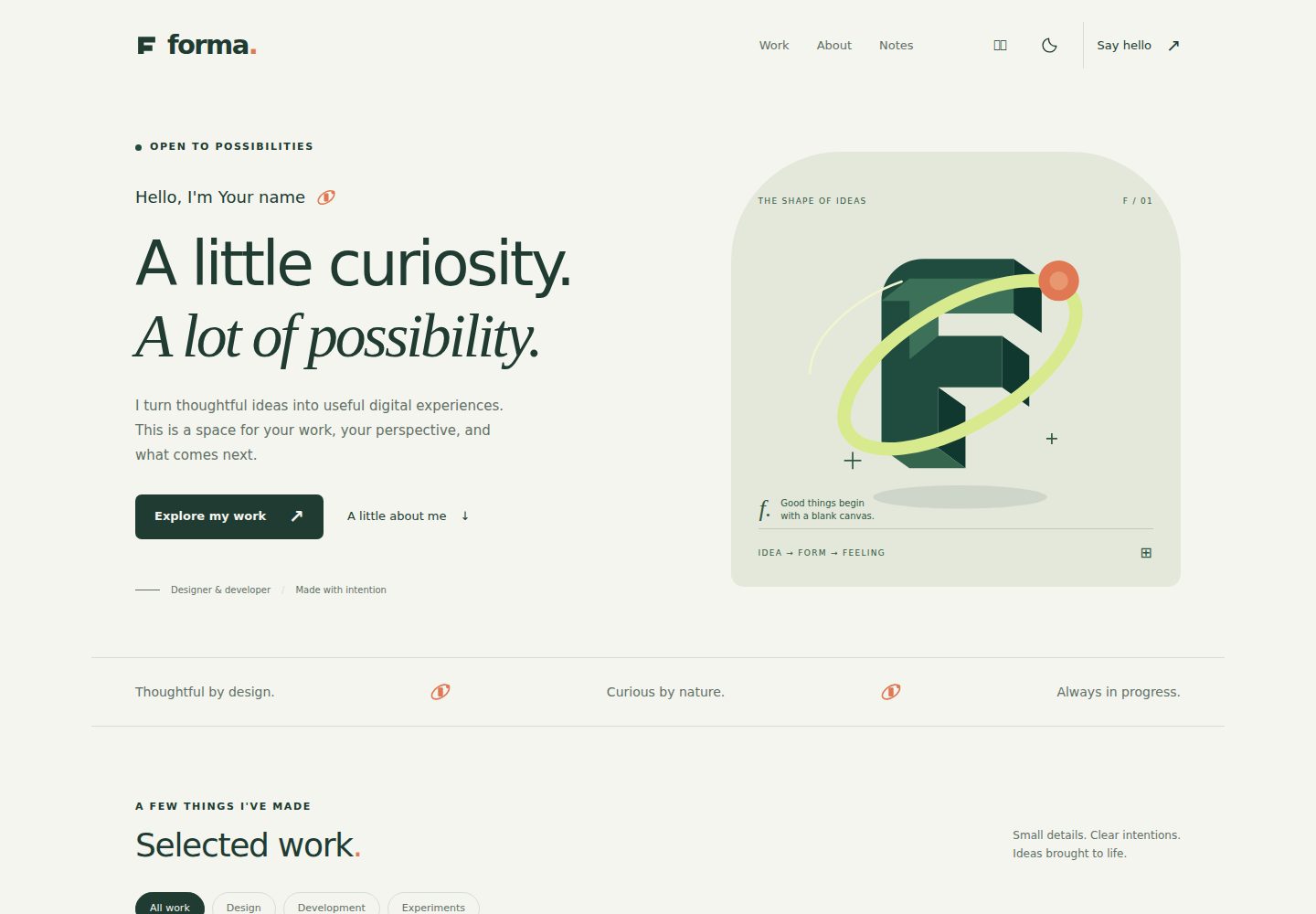
Desktop homepage1 / 2
Desktop captureTop of page
Actual screenshot captured by the server browser.
All pages & views 2
Screenshots show visual appearance; interactive behavior may differ.
Recorded 2026-10-02View source
What stands out
A quick read of the recorded project description.
Content centralized in a single configuration file, assets/config.js
Built-in Chinese/English switching and light/dark themes with saved preferences
Includes work filtering, project modals, skills, timeline, articles, and contact sections
All illustrations and icons are local original SVG/CSS assets; no external fonts are requested by default
Comes with a GitHub Actions workflow to deploy static files to GitHub Pages
Template Details
Forma is an open-source portfolio template for designers, developers, and others who need to showcase personal work. It does not rely on any framework or npm package; you can preview it by opening index.html directly. All configurable content is centralized in assets/config.js, including name, bio, projects, experience, notes, and optional email, resume, and social links. The template provides Chinese and English by default; language and light/dark theme preferences are saved, and it can follow the system theme. The page includes sections for introduction, a filterable work list, project detail modals, skills, timeline, articles, and contact, while also handling interaction details such as the mobile menu, keyboard navigation, focus states, and reduced motion.
All visual assets in the template are local files; the default page includes no analytics tools, trackers, third-party embeds, or external fonts. The people, organizations, projects, dates, and articles in the repository are placeholders or fictional examples; no real contact address or social accounts are configured, and the contact button in the demo only shows an explanation rather than sending a message.
For deployment, the template includes a GitHub Actions workflow that packages index.html and the assets/ directory and publishes them to GitHub Pages; the same static files can also be hosted on other static website services. The repository also provides optional check and build scripts to validate JavaScript syntax, configuration structure, local asset paths, page anchors, and URL protocols, but these require Node.js 22 or newer and do not require installing npm dependencies.
HTMLPortfolio
Is it right for your project?
Use Cases
- Designers or developers building a personal portfolio website
- Needing to present a personal introduction and projects in both Chinese and English
- Wanting to deploy pure static files to GitHub Pages or other static hosting services
- Using it as a front-end exercise or teaching example to learn framework-free interactions and theme switching
Suitable For
- Personal portfolios that need quick content replacement and launch
- Users who prefer no build step and direct editing of HTML/CSS/JS
- Showcase websites that need light/dark themes and a bilingual interface
- Users who want to keep source code on GitHub and publish automatically via Actions
Getting started & customization
Use these recorded setup notes alongside the repository instructions for your chosen version.
- 1
Click GitHub's Use this template to create a repository, or download the source ZIP
- 2
Open index.html directly to preview, or use python -m http.server 8080 to start a local HTTP preview
- 3
Replace name, bio, projects, experience, notes, and optional links in assets/config.js
- 4
After replacing the demo content, set showTemplateHints to false to hide template hints
- 5
When deploying, set Source to GitHub Actions in the repository Settings → Pages, then push a commit or manually run the workflow
License & source material
Usage conditions & limitations
Free to use · keep license noticeThis entry covers the free version under the MIT license in the public repository; the free scope is the code of that version and does not mean external services or third-party assets are free.
Must comply with when using
- You may use, modify, commercialize, and distribute the code of this version for free.
- When distributing copies or substantial portions of the code, retain the original author's copyright notice and the full MIT license notice.
- The code is provided as is; warranties and limitations of liability are governed by the original license and applicable law.
Additional costs & items to verify
- Demo images, fonts, icons, and other third-party assets must be checked against their respective licenses and cannot be judged solely by the code's MIT license.
- External services such as domains, hosting, databases, payments, or AI may incur separate charges.
View Original Text Basis
https://github.com/zhijun-yin/forma-portfolio-template/blob/main/LICENSEhttps://github.com/zhijun-yin/forma-portfolio-template/blob/main/README.mdPermission is hereby granted, free of charge
Original License Text
Compiled by DeepSeek based on repository license and README ·2026-10-02. Results only cover the materials read; dependencies, images, fonts, and subsequent term changes are subject to their respective original texts.
Project checks & description sources
Template Information
- Source platforms
- GitHub
- Documentation and maintenance reference score
- More documented · 83 / 100
- Technologies
- HTML
- Website type
- Portfolio
How this score is calculated
Our heuristic uses license records (up to 30), a demo link (12), a preview (10), stars (15), recorded maintenance (15), description completeness (8), feature records (5) and classification data (5). It is not a code, security or performance test, or a Google score. A link does not establish tested functionality.
What to verify for this project
- Repository update recorded
- 2026-10-02
- Screenshot last checked
- 2026-10-02
A demo link is listed. Check it with your own content and viewport sizes; its presence does not confirm that forms, authentication or payments work.
The catalog identifies HTML as the primary stack. Check the actual dependency manifest and lockfile for versions and hosting requirements. These notes use recorded metadata, not a code audit or a deployment test.
Use a selection guide →How this description was prepared
AI-assisted description based on catalog records and repository material. Repository authors are not automatically the reviewers of this description.
Automatically checked against source and license rules; no manual editorial review.
Inspect the recorded source material
SHA-256: c6408cb6b1970fff4e9b902b854a4bd9d88476fb0be7c81d3bd69002d58659bf
2026-10-02T21:29:26.736Z
Source file / repository<div align="center">
# Forma
**A little curiosity. A lot of possibility.**
A considered portfolio template for designers, developers, and curious people.
Plain HTML · CSS · JavaScript · English / 中文 · MIT
[Quick start](#quick-start) · [Customization](#make-it-yours) · [Deploy](#deploy-to-github-pages) · [中文说明](#中文说明)
</div>

**Your work deserves a little room to breathe.** Forma pairs forest green, warm paper, editorial type, and locally drawn illustrations with a practical, easily editable portfolio. No framework setup. No package installation. No remote font requests.
## Why Forma?
- **One content file.** Change your name, story, projects, notes, and optional links in `assets/config.js`.
- **Two languages.** English and Chinese, with persisted language preferences and fallback translations.
- **Two themes.** Light and dark, with saved preferences and optional system theme matching.
- **A complete portfolio.** Intro, filterable work, project dialogs, skills, timeline, writing, and contact.
- **Thoughtful interactions.** Mobile menu, keyboard navigation, native modal dialogs, visible focus states, and reduced motion support.
- **Local assets only.** No analytics, trackers, embedded third-party services, or external fonts in the default page.
- **Made to fork.** Relative asset paths work on GitHub project Pages; a small workflow checks and publishes the site.
All identities, organizations, projects, dates, and articles in this repository are **placeholders or fictional examples**. No real contact address or social profile is configured. The demo contact button opens an explanation rather than sending a message.
<details>
<summary>Mobile and dark theme previews</summary>
| Mobile | Dark theme |
| --- | --- |
|  |  |
</details>
## Quick start
1. Click **Use this template → Create a new repository** on GitHub, or download the source ZIP.
2. Open `index.html` in a modern browser. That's the entire setup.
3. Edit `assets/config.js` and refresh.
For a local HTTP preview, with Python installed:
```sh
python -m http.server 8080
```
Open `http://localhost:8080`. Serving files locally is optional; no installation or server is required to use the template.
## Make it yours
Start with `assets/config.js`:
```js
// Text can be a plain string, or a bilingual object.
name: { en: 'Your name', zh: '你的名字' },
role: { en: 'Your role', zh: '你的角色' },
// Leave these empty until you want them to be public.
email: '',
resumeUrl: '',
socials: [],
```
| What to change | Where |
| --- | --- |
| Name, headline, bio, skills, optional contact links | `assets/config.js` → `profile` |
| Browser title and search description | `assets/config.js` → `siteTitle`, `siteDescription` |
| Project cards, categories, details, links | `assets/config.js` → `projects` |
| Experience entries | `assets/config.js` → `experience` |
| Articles and reading times | `assets/config.js` → `notes` |
| Initial language and theme | `defaultLanguage`, `defaultTheme` |
| Hide fictional-content hints after customization | `showTemplateHints: false` |
| Colors, typography, spacing, responsive layout | `assets/styles.css` |
| Interface translations | `assets/app.js` → `ui` |
| Structure, illustration, wordmark, favicon | `index.html`, `assets/favicon.svg` |
For projects, use `category: 'design'`, `'development'`, or `'experiment'`. Choose `art: 'atlas'`, `'ground'`, `'hours'`, or `'generic'` for the included illustrations. Add or remove project objects as needed. The filters adapt to the categories present.
Use `notes: []` to hide the writing section and its navigation links. Use `experience: []` to hide the timeline. Social and résumé links remain hidden while empty.
After replacing the demo content, set `showTemplateHints: false` to hide the demo disclaimer and sample-timeline label.
Project and article URLs must start with `https://` or `http://`. Résumé URLs can also use a relative path such as `./assets/resume.pdf`. Configurable copy is rendered as text, so HTML in a title or description is not executed.
## Deploy to GitHub Pages
1. Create your copy using **Use this template**.
2. In your repository, open **Settings → Pages** and set **Source** to **GitHub Actions**.
3. Push a commit to `main`, or run **Actions → Check and deploy Forma → Run workflow**.
4. When deployment succeeds, find your site link in **Settings → Pages**.
The workflow runs the checks, copies `index.html` and `assets/` into `_site/`, and deploys only that directory. Repository docs, Git history, and local development files are not part of the website artifact. Assets placed in `assets/` are public, including any résumé you choose to add.
GitHub's [custom workflow documentation](https://docs.github.com/en/pages/getting-started-with-github-pages/using-custom-workflows-with-github-pages) describes the Pages publishing steps. The same static files can also be hosted on any static web host.
## Optional checks
With Node.js 22 or newer installed:
```sh
npm run check
npm run build
```
There are no npm dependencies to install. Checks validate JavaScript syntax, config structure, local asset paths, page anchors, URL schemes, and common credential patterns. These automated checks help catch mistakes; review everything you intentionally make public.
## File map
```text
index.html Page structure and hero illustration
assets/config.js Your content and optional public links
assets/app.js Interactions and interface translations
assets/styles.css Visual system and responsive styles
assets/favicon.svg Local vector icon
scripts/check.mjs Dependency-free source checks
scripts/build.mjs Static site packaging
.github/workflows/pages.yml Check and deploy to GitHub Pages
docs/ Screenshots and Chinese guide
```
## 中文说明
Forma 是一个可直接使用的个人主页开源模板,适合设计师、开发者,以及希望展示作品的人。默认的人物、项目、经历、日期与文章均为占位或虚构示例,未配置真实邮箱、简历或社交账号。
点击 **Use this template** 创建你的仓库,打开 `index.html` 即可预览。修改 `assets/config.js` 就能替换个人介绍、作品、技能与手记;点击右上角切换中英文和明暗主题。
部署时在 **Settings → Pages** 将 Source 设为 **GitHub Actions**,再提交修改或手动运行工作流。无需安装框架或 npm 依赖。
更详细的自定义说明见 [中文使用指南](docs/README.zh-CN.md)。
## License
[MIT](LICENSE). Use it for personal or commercial projects. Keep the license notice with redistributed source. All included illustrations are original SVG/CSS artwork; there are no stock photos or third-party image assets.
If Forma helps you build something, a star is a lovely way to help others find it.
Explore similar templates
Compare previews and descriptions within the same stack and category.

simplefolio
Simplefolio is a minimal single-page portfolio template for developers, built with HTML, Bootstrap, SCSS, and Parcel under the MIT license. It includes Hero, About, Projects, Contact, and Footer sections, with content edited in /src/index.html and theme colors controlled by two SCSS variables.
HTML · Portfolio

Freelancer
A bright, single-page Bootstrap portfolio template for freelancers, designers, and small studios. It includes a responsive portfolio grid with modal detail windows and an SB Forms contact form that requires an API token.
HTML · Portfolio

Resume
A single-page resume and CV template from Start Bootstrap, built on Bootstrap with a fixed sidebar and content sections.
HTML · Portfolio

Creative
A single-page marketing template by Start Bootstrap for creative agencies and product services, built on Bootstrap with SCSS, featuring a portfolio grid and call-to-action sections. It includes pre-set SB Forms markers for form integration and npm build scripts for source customization.
HTML · Corporate Website

Grayscale
A dark single-page Bootstrap template from Start Bootstrap for photography, events and brand storytelling, with a large hero and clearly separated sections.
HTML · Corporate Website

startbootstrap-stylish-portfolio
A one-page Bootstrap portfolio theme from Start Bootstrap with multiple content sections and an off-canvas navigation menu. Basic use means editing HTML/CSS under dist and opening index.html; advanced use relies on npm with Pug and SCSS build scripts.
HTML · Portfolio