A GitHub Pages template based on Jekyll and Markdown for personal and professional portfolio websites
HTMLPortfolio
academic — HTML Portfolio Template
By zilongwang123
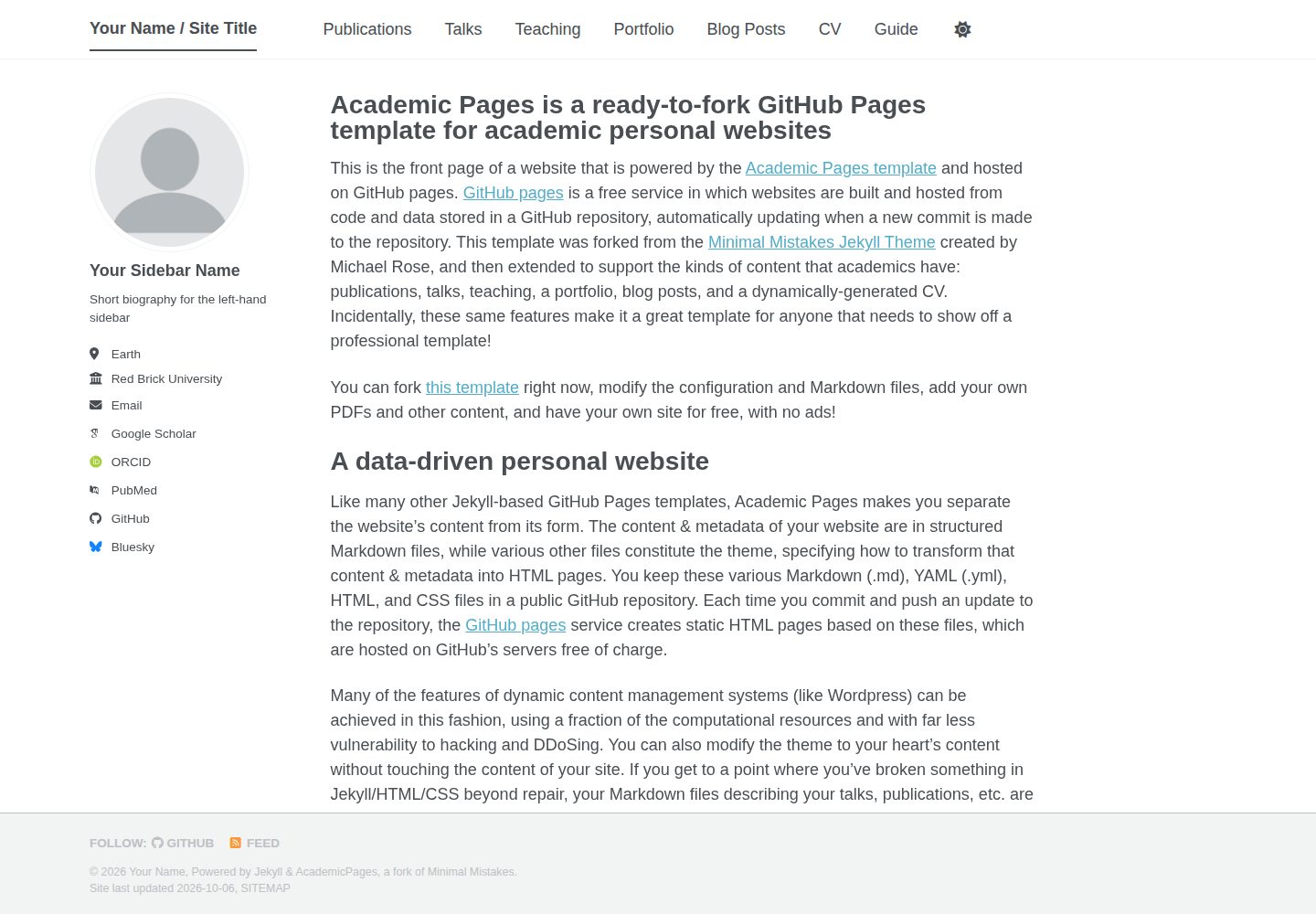
A GitHub Pages personal academic portfolio template based on Jekyll and Markdown, used to build a personal homepage and display papers, talks, and similar content.
Explore the design
Compare the page layouts and mobile experience. Open any screenshot for a closer look.
Desktop homepage1 / 3
Desktop captureTop of page
Actual screenshot captured by the server browser.
All pages & views 3
Screenshots show visual appearance; interactive behavior may differ.
Recorded 2026-10-07View source
What stands out
A quick read of the recorded project description.
After setting the repository name to [username].github.io, it serves as the website address, and status can be viewed in the GitHub Pages section of the repository settings
PDFs, zip files, and similar files in the files/ directory are made publicly accessible at corresponding paths
Provides Jupyter notebooks or Python scripts under the markdown_generator directory that can generate Markdown files for papers and talks from TSV files
Supports local preview: after installing Ruby, bundler, and Node.js, run jekyll serve to automatically rebuild and refresh at localhost:4000
Provides a Dockerfile, and docker compose up can be used to start a container to run the site
Template Details
This template is aimed at personal and professional portfolio websites, uses HTML and Markdown to organize content, and can be deployed on GitHub Pages. The usage flow given in the repository description is: after registering and confirming a GitHub account, click "Use this template" to create a new repository, set the repository name to "[your GitHub username].github.io", which also determines the website address; then set the site-wide configuration and add content.
For content management, the template supports placing PDFs, zip files, and similar files into the files/ directory, and the files are made publicly accessible at paths such as https://[username].github.io/files/example.pdf. The repository also provides Jupyter notebooks or Python scripts under the markdown_generator directory that can generate Markdown files for papers and talks from TSV files; this step is marked as optional in the description.
Local preview requires a Ruby development environment, bundler, and Node.js. After installing dependencies, run jekyll serve to view the result at localhost:4000, and page changes are automatically rebuilt and refreshed; the repository also provides a Dockerfile, and docker compose up can be used to start a container and access the same port. The template was derived by Stuart Geiger from the Minimal Mistakes Jekyll theme and is currently maintained by Robert Zupko and others; because it is a template-type theme, attempting to sync upstream updates after customization can easily cause merge conflicts, and the repository recommends deleting and re-forking or manually applying patches.
HTMLPortfolio
Is it right for your project?
Use Cases
- Build a personal academic homepage to centrally display portfolio content such as papers and talks
- Place attachments such as PDFs into the files/ directory and share them externally through fixed paths
- Use TSV together with markdown_generator scripts to batch-generate paper and talk pages
- Preview changes through a local Jekyll server or Docker container before pushing to GitHub
Suitable For
- Users who need to publish a personal portfolio or academic homepage based on GitHub Pages
- Users who are used to maintaining content in Markdown and want to retain room for HTML customization
- Developers who already have or are willing to configure a local Ruby, bundler, and Node.js environment
- Users who want to use Docker to avoid installing dependencies locally
Getting started & customization
Use these recorded setup notes alongside the repository instructions for your chosen version.
- 1
On GitHub, click "Use this template" to create a repository, and fill in the repository name as "[your GitHub username].github.io"
- 2
Set the site-wide configuration and add content, placing attachments into the files/ directory
- 3
Local preview requires installing ruby-dev, bundler, and nodejs; after running bundle install, execute jekyll serve -l -H localhost
- 4
If a gem write permission error occurs, run bundle config set --local path 'vendor/bundle' and retry, and add vendor to .gitignore
- 5
Alternatively, run docker compose up directly and access the site through localhost:4000
License & source material
Usage conditions & limitations
Free to use · keep license noticeThis entry covers the free version under the MIT license in the public repository; the free scope is the code of that version and does not mean that external services or third-party assets are free.
Must comply with when using
- Allows free use, modification, commercial use, and distribution of that version of the code.
- When distributing copies or substantial portions of the code, retain the original author's copyright notice and the complete MIT license notice.
- The code is provided as is; warranties and limitations of liability are governed by the original license and applicable law.
Additional costs & items to verify
- Demo images, fonts, icons, and other third-party assets must be checked against their respective licenses and cannot be judged solely by the code's MIT license.
- External services such as domains, hosting, databases, payments, or AI may incur separate charges.
- Using this template requires first registering a GitHub account and confirming the email, which is a mandatory prerequisite of the usage flow.
- The repository name must be set to [username].github.io, which also determines the website access address, so the naming method is restricted.
- Local preview requires installing external dependency environments such as ruby-dev, bundler, and nodejs yourself.
- Running locally on Linux may also require installing additional system dependencies such as build-essential, gcc, and make.
- Running the site with Docker requires Docker to be installed in advance as an external tool.
- After customizing the template, attempting to sync upstream updates is very likely to cause merge conflicts, requiring deletion and re-forking or manual patching.
View Original Text Basis
Permission is hereby granted, free of charge
Original License Text
1. Register a GitHub account if you don't have one and confirm your e-mail (required!)
Original README
On the "New repository" page, enter your repository name as "[your GitHub username].github.io", which will also be your website's URL.
Original README
Make sure you have ruby-dev, bundler, and nodejs installed
Original README
If you are running on Linux it may be necessary to install some additional dependencies prior to being able to run locally: `sudo apt install build-essential gcc make`
Original README
Working from a different OS, or just want to avoid installing dependencies? You can use the provided `Dockerfile` to build a container that will run the site for you if you have [Docker](https://www.docker.com/) installed.
Original README
https://github.com/zilongwang123/academic/blob/master/LICENSEhttps://github.com/zilongwang123/academic/blob/master/README.mdIf you use this template and customize it, you will probably get merge conflicts if you attempt to synchronize.
Original README
Compiled by DeepSeek based on repository license and README ·2026-10-07. Results only cover the materials read; dependencies, images, fonts, and subsequent term changes are subject to their respective original texts.
Project checks & description sources
Template Information
- Source platforms
- GitHub
- Documentation and maintenance reference score
- More documented · 80 / 100
- Technologies
- HTML
- Website type
- Portfolio
How this score is calculated
Our heuristic uses license records (up to 30), a demo link (12), a preview (10), stars (15), recorded maintenance (15), description completeness (8), feature records (5) and classification data (5). It is not a code, security or performance test, or a Google score. A link does not establish tested functionality.
What to verify for this project
- Repository update recorded
- 2026-10-07
- Screenshot last checked
- 2026-10-07
A demo link is listed. Check it with your own content and viewport sizes; its presence does not confirm that forms, authentication or payments work.
The catalog identifies HTML as the primary stack. Check the actual dependency manifest and lockfile for versions and hosting requirements. These notes use recorded metadata, not a code audit or a deployment test.
Use a selection guide →How this description was prepared
AI-assisted description based on catalog records and repository material. Repository authors are not automatically the reviewers of this description.
Review declaration: [email protected] · 2026-10-08
Inspect the recorded source material
SHA-256: 4d9e286daec06dfbb4a5ebbf3cfeb53b500c82643289cbeb78522e687ef6f6b6
2026-10-07T13:48:24.402Z
Source file / repository# Academic Pages
**Academic Pages is a GitHub Pages template for personal and professional portfolio-oriented websites.**

# Getting Started
1. Register a GitHub account if you don't have one and confirm your e-mail (required!)
1. Click the "Use this template" button in the top right.
1. On the "New repository" page, enter your repository name as "[your GitHub username].github.io", which will also be your website's URL.
1. Set site-wide configuration and add your content.
1. Upload any files (like PDFs, .zip files, etc.) to the `files/` directory. They will appear at https://[your GitHub username].github.io/files/example.pdf.
1. Check status by going to the repository settings, in the "GitHub pages" section
1. (Optional) Use the Jupyter notebooks or python scripts in the `markdown_generator` folder to generate markdown files for publications and talks from a TSV file.
See more info at https://academicpages.github.io/
## Running locally
When you are initially working on your website, it is very useful to be able to preview the changes locally before pushing them to GitHub. To work locally you will need to:
1. Clone the repository and made updates as detailed above.
1. Make sure you have ruby-dev, bundler, and nodejs installed
On most Linux distribution and [Windows Subsystem Linux](https://learn.microsoft.com/en-us/windows/wsl/about) the command is:
```bash
sudo apt install ruby-dev ruby-bundler nodejs
```
If you see error `Unable to locate package ruby-bundler`, `Unable to locate package nodejs `, run the following:
```bash
sudo apt update && sudo apt upgrade -y
```
then try run `sudo apt install ruby-dev ruby-bundler nodejs` again.
On MacOS the commands are:
```bash
brew install ruby
brew install node
gem install bundler
```
1. Run `bundle install` to install ruby dependencies. If you get errors, delete Gemfile.lock and try again.
If you see file permission error like `Fetching bundler-2.6.3.gem ERROR: While executing gem (Gem::FilePermissionError) You don't have write permissions for the /var/lib/gems/3.2.0 directory.` or `Bundler::PermissionError: There was an error while trying to write to /usr/local/bin.`
Install Gems Locally (Recommended):
```bash
bundle config set --local path 'vendor/bundle'
```
then try run `bundle install` again. If succeeded, you should see a folder called `vendor` and open `.gitignore` then add `vendor` inside it.
1. Run `jekyll serve -l -H localhost` to generate the HTML and serve it from `localhost:4000` the local server will automatically rebuild and refresh the pages on change.
You may also try `bundle exec jekyll serve -l -H localhost` to ensure jekyll to use specific dependencies on your own local machine.
If you are running on Linux it may be necessary to install some additional dependencies prior to being able to run locally: `sudo apt install build-essential gcc make`
## Using Docker
Working from a different OS, or just want to avoid installing dependencies? You can use the provided `Dockerfile` to build a container that will run the site for you if you have [Docker](https://www.docker.com/) installed.
You can build and execute the container by running the following command in the repository:
```bash
docker compose up
```
You should now be able to access the website from `localhost:4000`.
# Maintenance
Bug reports and feature requests to the template should be [submitted via GitHub](https://github.com/academicpages/academicpages.github.io/issues/new/choose). For questions concerning how to style the template, please feel free to start a [new discussion on GitHub](https://github.com/academicpages/academicpages.github.io/discussions).
This repository was forked (then detached) by [Stuart Geiger](https://github.com/staeiou) from the [Minimal Mistakes Jekyll Theme](https://mmistakes.github.io/minimal-mistakes/), which is © 2016 Michael Rose and released under the MIT License (see LICENSE.md). It is currently being maintained by [Robert Zupko](https://github.com/rjzupkoii) and additional maintainers would be welcomed.
## Bugfixes and enhancements
If you have bugfixes and enhancements that you would like to submit as a pull request, you will need to [fork](https://docs.github.com/en/pull-requests/collaborating-with-pull-requests/working-with-forks/fork-a-repo) this repository as opposed to using it as a template. This will also allow you to [synchronize your copy](https://docs.github.com/en/pull-requests/collaborating-with-pull-requests/working-with-forks/syncing-a-fork) of template to your fork as well.
Unfortunately, one logistical issue with a template theme like Academic Pages that makes it a little tricky to get bug fixes and updates to the core theme. If you use this template and customize it, you will probably get merge conflicts if you attempt to synchronize. If you want to save your various .yml configuration files and markdown files, you can delete the repository and fork it again. Or you can manually patch.
---
<div align="center">

[](https://github.com/academicpages/academicpages.github.io/graphs/contributors)
[](https://github.com/academicpages/academicpages.github.io/releases/latest)
[](https://github.com/academicpages/academicpages.github.io/blob/master/LICENSE)
[](https://github.com/academicpages/academicpages.github.io)
[](https://github.com/academicpages/academicpages.github.io/fork)
</div>
Explore similar templates
Compare previews and descriptions within the same stack and category.

simplefolio
Simplefolio is a minimal single-page portfolio template for developers, built with HTML, Bootstrap, SCSS, and Parcel under the MIT license. It includes Hero, About, Projects, Contact, and Footer sections, with content edited in /src/index.html and theme colors controlled by two SCSS variables.
HTML · Portfolio

Freelancer
A bright, single-page Bootstrap portfolio template for freelancers, designers, and small studios. It includes a responsive portfolio grid with modal detail windows and an SB Forms contact form that requires an API token.
HTML · Portfolio

Resume
A single-page resume and CV template from Start Bootstrap, built on Bootstrap with a fixed sidebar and content sections.
HTML · Portfolio

Creative
A single-page marketing template by Start Bootstrap for creative agencies and product services, built on Bootstrap with SCSS, featuring a portfolio grid and call-to-action sections. It includes pre-set SB Forms markers for form integration and npm build scripts for source customization.
HTML · Corporate Website

Grayscale
A dark single-page Bootstrap template from Start Bootstrap for photography, events and brand storytelling, with a large hero and clearly separated sections.
HTML · Corporate Website

startbootstrap-stylish-portfolio
A one-page Bootstrap portfolio theme from Start Bootstrap with multiple content sections and an off-canvas navigation menu. Basic use means editing HTML/CSS under dist and opening index.html; advanced use relies on npm with Pug and SCSS build scripts.
HTML · Portfolio