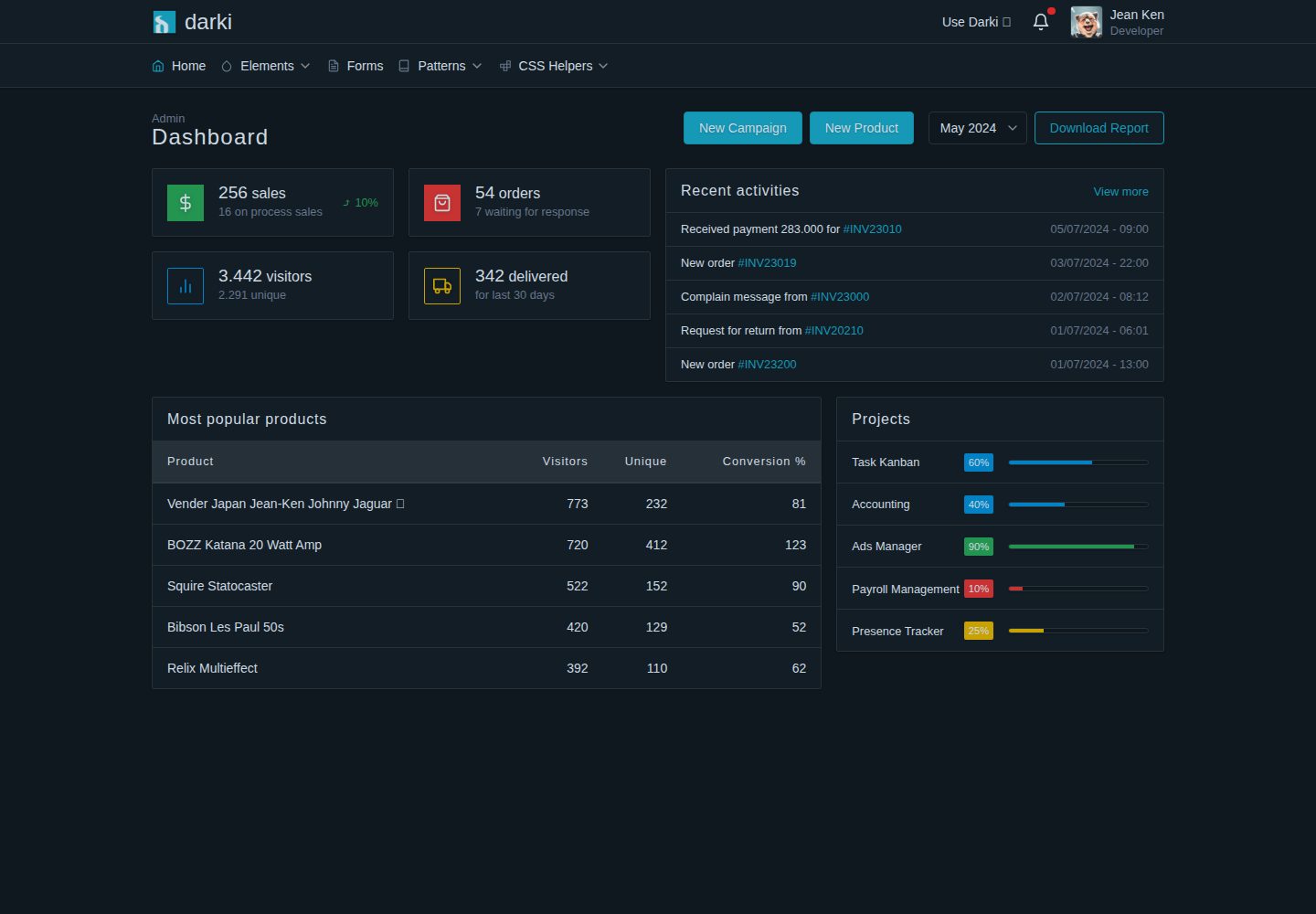
Dark-themed desktop HTML dashboard template, marked in the README as non-responsive
HTMLAdmin dashboard
darki — HTML Admin dashboard Template
By zizlfz
Darki is a dark-themed desktop HTML dashboard template. The README states it was originally built for the admin management interface of a Phoenix full-stack project, and it includes elements, forms, page patterns and CSS helper classes, but does not include charts or icon sets.
Explore the design
Compare the page layouts and mobile experience. Open any screenshot for a closer look.
Desktop homepage1 / 3
Desktop captureTop of page
Actual screenshot captured by the server browser.
All pages & views 3
Screenshots show visual appearance; interactive behavior may differ.
Recorded 2026-10-14View source
What stands out
A quick read of the recorded project description.
Originally built for the admin dashboard of a Phoenix full-stack project
Provides four categories of content: elements, forms, page patterns and CSS helper classes
Explicitly does not include charts or icon sets; the README recommends ApexCharts and Heroicons
Can be used by copying darki.css and main.js and including them in the page
Template Details
Darki is a dark-themed HTML dashboard UI template, explicitly marked in the README as desktop-oriented and non-responsive. It was originally built as a template for a Phoenix full-stack project admin dashboard, and the author made it public for others to use.
The template content is divided into four categories: elements (alerts, articles/content, cards, dropdowns, badges, lists, buttons, modals, breadcrumbs, tables), forms (inputs, selects, checkboxes, radio buttons, input groups, selectbox, selectrow, date picker, date range picker), patterns/pages (authentication pages such as login, registration, forgot password, as well as card lists, table lists, user profiles, single forms, key-value forms) and CSS helper classes (colors, spacing, typography, visibility, layout, etc.). The README explicitly states that charts and icon sets are not included, and recommends ApexCharts and Heroicons as alternative libraries.
To use it, copy darki.css and main.js from the dist-assets directory into the project asset directory, include the CSS in the head, and include the JS at the end of the body. Development commands include npm install, npm run dev (the local development server runs at localhost:4321) and npm run build (build output goes to ./dist/). The README TODO lists documentation for layout CSS helper classes (grid, container, level) that is not yet complete. The README does not provide information on browser compatibility, accessibility support or production environment suitability.
HTMLAdmin
Is it right for your project?
Use Cases
- Building an admin dashboard interface for a Phoenix full-stack project
- Creating desktop dark-themed admin backend page prototypes
- Reusing interface elements from the template such as form controls, tables, cards and modals
- Referencing authentication page layouts such as login, registration and forgot password
Suitable For
- Phoenix project developers who need a desktop dark-themed admin interface
- Developers who want to build an admin backend directly using ready-made HTML/CSS components
- Projects that accept a non-responsive layout and desktop-oriented use
Getting started & customization
Use these recorded setup notes alongside the repository instructions for your chosen version.
- 1
Copy dist-assets/darki.css and dist-assets/main.js into the project asset directory
- 2
Include darki.css in the head via a link tag
- 3
Include main.js before the end of the body via a script tag
- 4
During development, run npm install to install dependencies, npm run dev to start the local server (localhost:4321), and npm run build to build to ./dist/
- 5
The README TODO notes that documentation for layout CSS helper classes (grid, container, level) is not yet complete
License & source material
Usage conditions & limitations
Free to use · keep license noticeThis listing covers the free version under the MIT license in the public repository; the free scope is the code of this version and does not mean that external services or third-party assets are free.
Must comply with when using
- Free use, modification, commercial use and distribution of this version's code are permitted.
- When distributing copies or substantial portions of the code, retain the original author's copyright notice and the complete MIT license notice.
- The code is provided as is; warranties and limitations of liability are governed by the original license and applicable law.
Additional costs & items to verify
- Demo images, fonts, icons and other third-party assets must be checked against their respective licenses and cannot be judged solely by the code's MIT license.
- External services such as domains, hosting, databases, payments or AI may incur additional charges.
View Original Text Basis
https://github.com/zizlfz/darki/blob/main/LICENSEhttps://github.com/zizlfz/darki/blob/main/README.mdPermission is hereby granted, free of charge
Original License Text
Compiled by DeepSeek based on repository license and README ·2026-10-14. Results only cover the materials read; dependencies, images, fonts, and subsequent term changes are subject to their respective original texts.
Project checks & description sources
Template Information
- Source platforms
- GitHub
- Documentation and maintenance reference score
- Partly documented · 65 / 100
- Technologies
- HTML
- Website type
- Admin dashboard
How this score is calculated
Our heuristic uses license records (up to 30), a demo link (12), a preview (10), stars (15), recorded maintenance (15), description completeness (8), feature records (5) and classification data (5). It is not a code, security or performance test, or a Google score. A link does not establish tested functionality.
What to verify for this project
- Repository update recorded
- 2024-08-05
- Screenshot last checked
- 2026-10-14
A demo link is listed. Check it with your own content and viewport sizes; its presence does not confirm that forms, authentication or payments work.
The catalog identifies HTML as the primary stack. Check the actual dependency manifest and lockfile for versions and hosting requirements. These notes use recorded metadata, not a code audit or a deployment test.
Use a selection guide →How this description was prepared
AI-assisted description based on catalog records and repository material. Repository authors are not automatically the reviewers of this description.
Review declaration: codex-user-requested-batch-review-20261017 · 2026-10-16
Inspect the recorded source material
SHA-256: 17c552fb1402876be79a843b0fbf47b11ea2d189c2f50802891d7c1e68aebd91
2026-10-14T03:30:20.406Z
Source file / repository# Darki HTML Dashboard UI Kit A dark-themed html dashboard template for desktop (not-responsive). ## Use Darki To use darki, copy `dist-assets/darki.css` and `dist-assets/main.js` to your project assets directory, then: - Include css in head element. ```html <head> ... <link rel="stylesheet" href="/darki.css"> </head> ``` - Include js at the end of body element. ```html ... <script src="/main.js"> </body> ``` ## Preview <a href="https://darki.pages.dev" target="_blank"><img src="https://raw.githubusercontent.com/enjinil/darki/main/public/preview.png" alt="Darki preview"></a> ## Features Darki is initially build as template for Phoenix full-stack project admin dashboard that is easy on the eye (dark theme). Sharing the template publicly for everyone to use. The template includes the following features: - **Elements**: alerts, article/content, cards, dropdowns, badges, lists, buttons, modals, breadcrumbs, tables. - **Forms**: input, select, checkbox, radio, input group, selectbox, selectrow, datepicker, daterangepicker. - **Patterns/Pages**: auth (login, register, forgot password), card list, table list, user profile, single form, key-value form. - **CSS Helpers**: color, spacing, typography, visibility, layout, etc. The features that will not be included: - Charts - Icons colletion ## Recommended libraries - Chart - https://apexcharts.com/ - Icons - https://heroicons.com/ ## TODO - [ ] Document layout css helpers - grid, container, level ## 🧞 Development | Command | Action | | :------------------------ | :----------------------------------------------- | | `npm install` | Installs dependencies | | `npm run dev` | Starts local dev server at `localhost:4321` | | `npm run build` | Build your production site to `./dist/` |
Explore similar templates
Compare previews and descriptions within the same stack and category.

AdminLTE
An HTML admin dashboard built with Bootstrap 5 and vanilla JavaScript. Astro builds the documentation; React, Vue and Angular editions live in separate repositories.
HTML · Admin dashboard

gentelella
Gentelella v4 is a free, open-source admin dashboard template maintained by Colorlib, built with vanilla JavaScript, SCSS, and Vite 8 without Bootstrap or jQuery.
HTML · Admin dashboard

coreui-free-bootstrap-admin-template
A free Bootstrap admin template maintained by CoreUI, built on CoreUI's own UI component library. It provides compiled HTML pages and Pug template source code, covering dashboards, authentication, forms, components, icons, and error pages.
HTML · Admin dashboard

dashboards
A collection of responsive dashboard HTML templates open-sourced by Keen IO, built on CSS Grid, offering multiple prebuilt admin data interface layouts.
HTML · Admin dashboard

SB Admin 2
SB Admin 2 is a classic Bootstrap admin template from Start Bootstrap, offering dashboards, charts, tables, and common management pages.
HTML · Admin dashboard

Adminator-admin-dashboard
Adminator 4 is a vanilla HTML, CSS and JavaScript admin dashboard template with a CSS-variable token design system, built-in light and dark themes, no jQuery or Bootstrap dependency, and 18 pages covering dashboards, mail, calendar, charts, forms, tables and error pages.
HTML · Admin dashboard