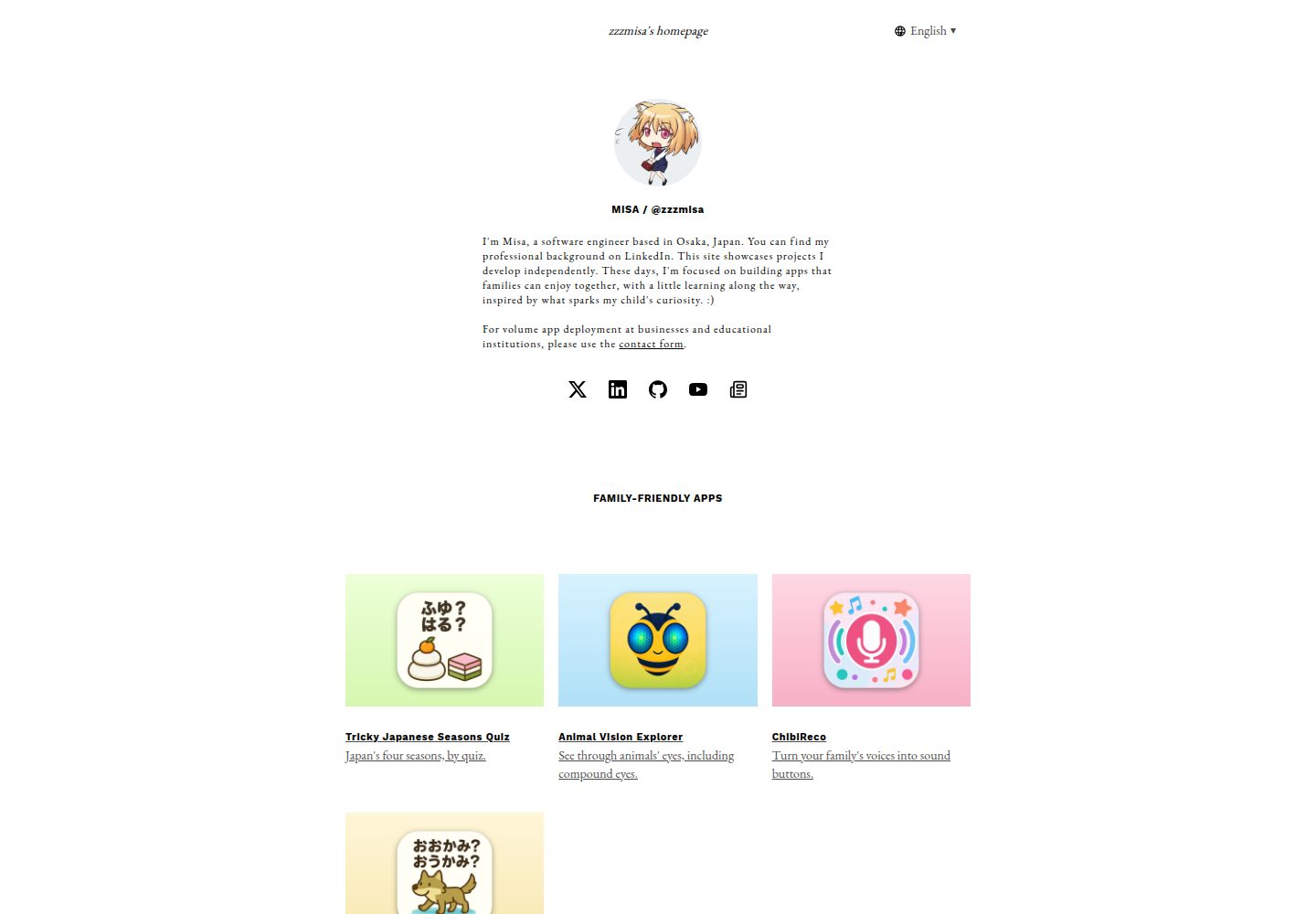
Single-page portfolio layout with featured and secondary project cards displayed in tiers
HugoPortfolio
hugo-theme-doors — Hugo Portfolio Template
By zzzmisa
Doors is a Hugo-based single-page portfolio theme that displays projects and links as cards, with support for multilingual sites, social links, and Open Graph metadata.
Explore the design
Compare the page layouts and mobile experience. Open any screenshot for a closer look.
Desktop homepage1 / 2
Desktop captureTop of page
Actual screenshot captured by the server browser.
All pages & views 2
Screenshots show visual appearance; interactive behavior may differ.
Recorded 2026-10-03View source
What stands out
A quick read of the recorded project description.
Project cards support grouped display, with each group having a title and divider
Built-in language switcher supporting multilingual sites and root-path language selection
Configure profile, contact copy, and ordered social links via site parameters
Outputs Open Graph and Twitter Card metadata, with optional Google Tag Manager integration
CSS is fingerprinted and minified via Hugo Pipes; spacing and text colors use CSS custom properties
Template Details
Doors is a single-page theme for Hugo, primarily intended to present the works and project links of an individual or team on one page. The page is driven by site parameters; projects are divided into two card types—featured (projects) and secondary (subprojects)—and both support grouped display, with each group having a title and divider. When not grouped, a list format can be used directly. Profile, contact copy, and social links are configured via the contact parameter. Built-in social icons include x, twitter, facebook, instagram, linkedin, github, youtube, note, and email; other services can use custom images with a site-relative path specified. The footer can include text links such as contact, terms, and privacy.
The theme supports multilingual sites and provides a language switcher. When defaultContentLanguageInSubdir is set to true, each language has its own URL, with the root path serving as a language selection entry that redirects based on browser language. A user's manually selected language is written to localStorage and takes precedence on subsequent visits to the root path; directly visiting a language URL is not redirected. For metadata, the theme outputs Open Graph and Twitter Card information, allows configuration of a social share image and X/Twitter account, and optionally integrates Google Tag Manager. Styles are fingerprinted and minified via Hugo Pipes, and spacing and text colors are defined using CSS custom properties.
Usage limitations: The theme is single-page; the README does not describe how to organize multi-page content. Project and profile content must be maintained in the site parameters in config.toml rather than in separate content files. The README states the theme was tested with Hugo v0.164.0 and does not mention compatibility with other versions. The theme retains the visual design origin of the AMP Start "The Scenic" template and related notices; third-party assets must be checked for licensing independently.
HugoPortfolio
Is it right for your project?
Use Cases
- Personal portfolio page listing projects and external links in one place
- Team or studio showcasing featured and secondary projects
- Personal site needing multilingual entry points such as Chinese, English, and Japanese
- Hugo sites where the project list is maintained via site parameters rather than content files
Suitable For
- Developers building a personal portfolio or link aggregation page with Hugo
- Sites needing a multilingual portfolio page with a language switcher
- Users who want to display projects in grouped cards with configuration centralized in config.toml
Getting started & customization
Use these recorded setup notes alongside the repository instructions for your chosen version.
- 1
The theme was tested with Hugo v0.164.0; confirm your local Hugo version before use
- 2
Run hugo server --source exampleSite --themesDir ../.. from the repository root to preview the example site
- 3
After creating a new site, clone the theme into the themes directory and copy exampleSite/config.toml as a starting point for configuration
- 4
Projects, profile, footer links, and metadata are all configured in site parameters; for multilingual sites, place them under the corresponding languages.<language>.params
- 5
In addition to built-in social icon names, you can place images in the static directory and specify the icon using a site-relative path
License & source material
Usage conditions & limitations
Free to use · keep license noticeThis entry covers the free version under the MIT license in the public repository; the free scope applies to that version's code and does not imply that external services or third-party assets are free.
Must comply with when using
- You may use, modify, commercially use, and distribute this version's code for free.
- When distributing copies or substantial portions of the code, retain the original author's copyright notice and the full MIT license notice.
- The code is provided as is; warranties and limitations of liability are governed by the original license and applicable law.
Additional costs & items to verify
- The theme retains the visual design origin of the AMP Start "The Scenic" template and must retain related third-party notices; these notices are located in baseof.html, social-icon.html, and newspaper.svg and must not be removed when using or modifying the theme.
- Google Tag Manager is an optional integration and requires you to provide a container ID; when enabled, the page loads Google's external script, which may involve third-party terms of service and data collection.
- The theme was tested only with Hugo v0.164.0; the README does not state compatibility with other versions, and using other Hugo versions may cause incompatibilities.
- Submitting contributions to the project (such as a pull request) indicates agreement to license the contribution under the MIT license.
- Demo images, fonts, icons, and other third-party assets must be checked against their respective licenses; the code's MIT license alone is not sufficient to determine this.
- External services such as domains, hosting, databases, payments, or AI may incur additional fees.
View Original Text Basis
Permission is hereby granted, free of charge
Original License Text
Doors retains the visual design lineage and required notices from AMP Start's The Scenic template.
Original README
Optional Google Tag Manager integration
Original README
Doors is tested with Hugo `v0.164.0`.
Original README
https://github.com/zzzmisa/hugo-theme-doors/blob/master/LICENSEhttps://github.com/zzzmisa/hugo-theme-doors/blob/master/README.mdBy submitting a pull request, you agree to license your contribution under the MIT License.
Original README
Compiled by DeepSeek based on repository license and README ·2026-10-03. Results only cover the materials read; dependencies, images, fonts, and subsequent term changes are subject to their respective original texts.
Project checks & description sources
Template Information
- Source platforms
- Hugo Themes
- Documentation and maintenance reference score
- More documented · 87 / 100
- Technologies
- Hugo
- Website type
- Portfolio
How this score is calculated
Our heuristic uses license records (up to 30), a demo link (12), a preview (10), stars (15), recorded maintenance (15), description completeness (8), feature records (5) and classification data (5). It is not a code, security or performance test, or a Google score. A link does not establish tested functionality.
What to verify for this project
- Repository update recorded
- 2026-08-23
- Screenshot last checked
- 2026-10-03
A demo link is listed. Check it with your own content and viewport sizes; its presence does not confirm that forms, authentication or payments work.
The catalog identifies Hugo as the primary stack. Check the actual dependency manifest and lockfile for versions and hosting requirements. These notes use recorded metadata, not a code audit or a deployment test.
Use a selection guide →How this description was prepared
AI-assisted description based on catalog records and repository material. Repository authors are not automatically the reviewers of this description.
Review declaration: [email protected] · 2026-10-04
Inspect the recorded source material
SHA-256: b22840c06dae7daf4841190528f8cf7219305880a49c0a6198c10fcc8b2b30f0
2026-10-03T21:43:59.287Z
Source file / repository# Hugo Theme Doors Doors is a responsive, single-page Hugo theme for showcasing projects and links. See it in use at [zzzmisa.com](https://zzzmisa.com/). 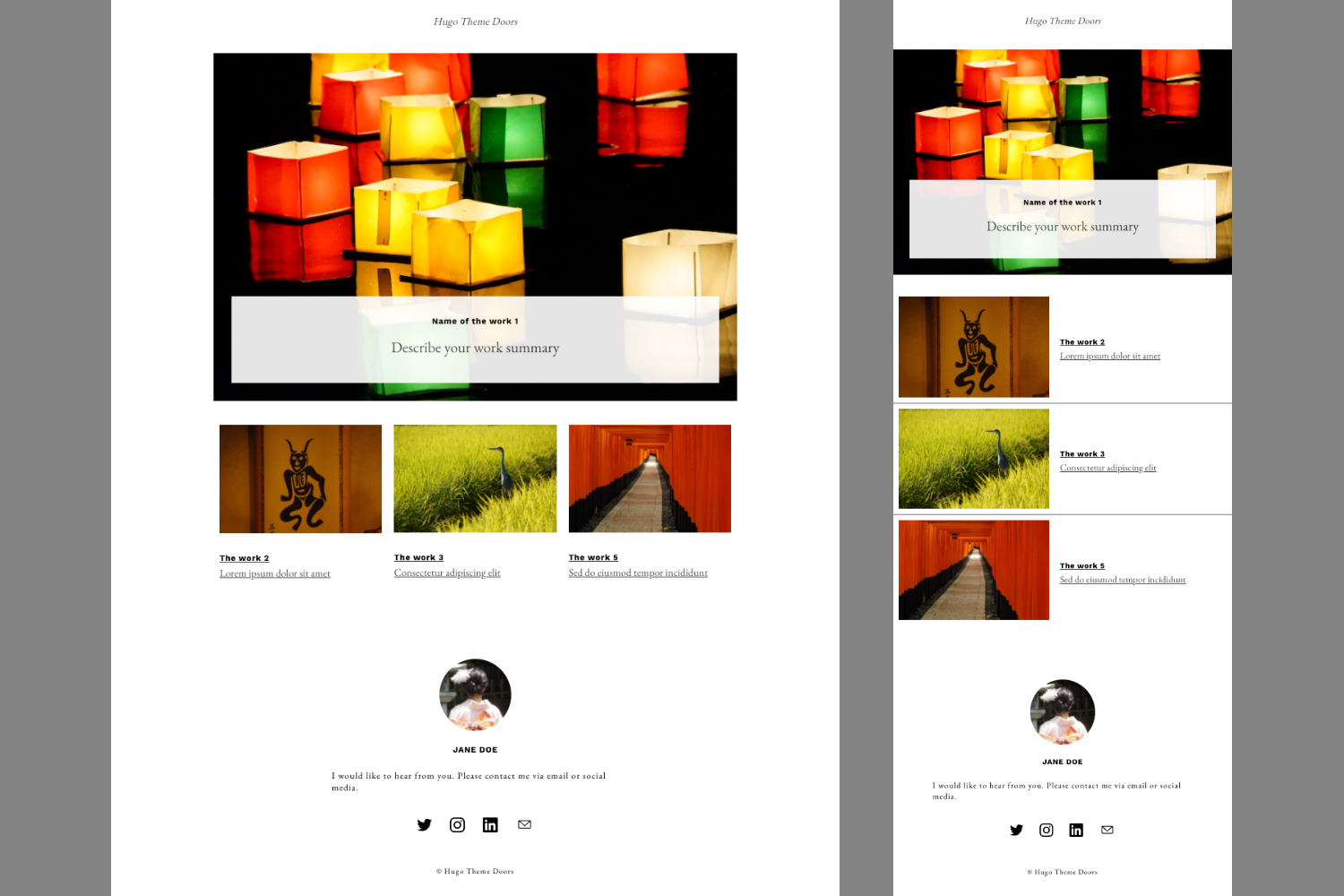 ## Features - Featured and secondary project cards - Responsive desktop and mobile layouts - Multilingual sites with a language switcher - Contact profile and social links - Open Graph and Twitter Card metadata - Optional Google Tag Manager integration - Fingerprinted and minified CSS through Hugo Pipes ## Requirements Doors is tested with Hugo `v0.164.0`. ## Run the example site From the theme repository root, run: ```sh hugo server --source exampleSite --themesDir ../.. ``` Then open <http://localhost:1313/>. To build the example into a temporary output directory: ```sh ./scripts/verify.sh ``` The verification script builds both configured languages and checks the generated metadata, language switcher, project content, Google Tag Manager markup, CSS asset, and absence of AMP markup. ## Use the theme Create a Hugo site, then clone Doors into its `themes` directory: ```sh hugo new site my-site cd my-site git clone https://github.com/zzzmisa/hugo-theme-doors.git themes/hugo-theme-doors cp themes/hugo-theme-doors/exampleSite/config.toml config.toml hugo server ``` Project and profile content is configured through site parameters: - `params.description`: site description shown on the page; use a string for one line or an array of strings for multiple lines - `params.projects.list`: featured project cards - `params.projects.groups`: grouped featured project cards - `params.subprojects.list`: secondary project cards - `params.subprojects.groups`: grouped secondary project cards - `params.contact`: profile, contact text, and ordered social links - `params.contact.position`: set to `"top"` to place the profile directly below the title and language selector; omit it to keep the profile in the footer - `params.footer.links`: ordered text links shown above the copyright notice, such as contact, terms, and privacy pages Site integrations and metadata are configured separately: - `params.googleTagManager`: optional Google Tag Manager container ID - `params.metadata.description`: plain-text site description used in HTML, Open Graph, and X/Twitter metadata - `params.metadata.ogImage`: social sharing image and Apple touch icon - `params.metadata.twitterSite`: optional X/Twitter account Secondary project groups are defined with `params.subprojects.groups`. Each group has a `title` and `list` and is displayed with a labeled divider. Keep using `params.subprojects.list` when grouping is not needed. Featured project groups use the same structure and divider design. Define them with `params.projects.groups`, or keep using `params.projects.list` when grouping is not needed. Social links are defined with `params.contact.links`. Built-in icon names are `x`, `twitter`, `facebook`, `instagram`, `linkedin`, `github`, `youtube`, `note`, and `email`. For other services, place an image below the site's `static` directory and set `icon` to its site-relative path. See [`exampleSite/config.toml`](exampleSite/config.toml) for built-in and custom icon examples. The legacy social fields below `params.contact` remain supported when `params.contact.links` is not defined. Footer links are defined with `params.footer.links`. Each link has a `label` and `url`, and opens in the current tab. Omit the list to keep the footer unchanged. See [`exampleSite/config.toml`](exampleSite/config.toml) for multilingual contact, terms, and privacy link examples. Layout spacing uses the CSS custom properties `--space-2xs` through `--space-3xl` in [`assets/css/main.css`](assets/css/main.css). The scale is based on 4, 8, 16, 24, 32, 40, 48, and 80 pixel steps so component spacing shares a consistent rhythm. Text colors follow The Scenic's palette through semantic CSS custom properties: `--color-text-primary` for body copy, `--color-text-emphasis` for prominent labels and headings, and `--color-text-secondary` for captions and supporting navigation text. For multilingual sites, define these parameters below each `languages.<language>.params` table, as shown in [`exampleSite/config.toml`](exampleSite/config.toml). Set `defaultContentLanguageInSubdir` to `true` to give every language a stable URL such as `/en/` and `/ja/`. Doors then uses the root URL as a language selection entry point, choosing from the visitor's browser language. A language selected from the language switcher is stored in `localStorage` and takes precedence on later root URL visits. Direct visits to language URLs are never redirected. Metadata shared by every language can be defined below `params.metadata`. Language-specific metadata can be defined below `languages.<language>.params.metadata`; Hugo merges it with the shared metadata. The legacy `params.ogimage`, `params.twitterSite`, and plain-text `params.description` metadata fields remain supported as fallbacks. ## Contributing Bug reports and pull requests are welcome. By submitting a pull request, you agree to license your contribution under the MIT License. ## Attribution notices Doors retains the visual design lineage and required notices from AMP Start's The Scenic template. Third-party notices are kept next to the relevant implementation in [`layouts/_default/baseof.html`](layouts/_default/baseof.html), [`layouts/partials/social-icon.html`](layouts/partials/social-icon.html), and [`exampleSite/static/images/icons/newspaper.svg`](exampleSite/static/images/icons/newspaper.svg).
Explore similar templates
Compare previews and descriptions within the same stack and category.

hugo-PaperMod
A fast, clean, responsive Hugo theme for blogs and lightweight portfolios, with three layout modes (Regular, Home-Info, Profile), automatic and manual light/dark themes, Fuse.js client-side search, multilingual support, and built-in Open Graph, Twitter Cards, and Schema.org data.
Hugo · Portfolio

Congo
Congo is a minimal Hugo content theme built on Tailwind CSS 3.0, designed for blogs, portfolios, and lightweight content sites. It offers multiple homepage layouts, customizable dark mode, multilingual support including RTL, and built-in client-side search, Mermaid, Chart.js, and KaTeX.
Hugo · Blog

toha
Toha is a Hugo theme for personal portfolios, featuring a minimalist, responsive design with configurable homepage sections such as about, experience timeline, and achievements gallery.
Hugo · Portfolio

hugo-profile
hugo-profile is a mobile-first Hugo theme for personal portfolios and blogs, with multilingual support, light/dark themes, categories and tags, Google Analytics, Disqus comments, and Formspree contact forms.
Hugo · Portfolio

hugo-theme-introduction
Introduction is a minimal Hugo theme that can be configured as a single-page site or a full site with multiple sections. Homepage sections are generated from Markdown files under content/home/, with weight sorting and optional images.
Hugo · Portfolio

hugo-theme-console
A minimalist, responsive Hugo theme inspired by the system terminal and built on Terminal CSS. It includes blog posts, photo galleries, and custom pages, with light/dark theming and style overrides via CSS variables.
Hugo · Portfolio