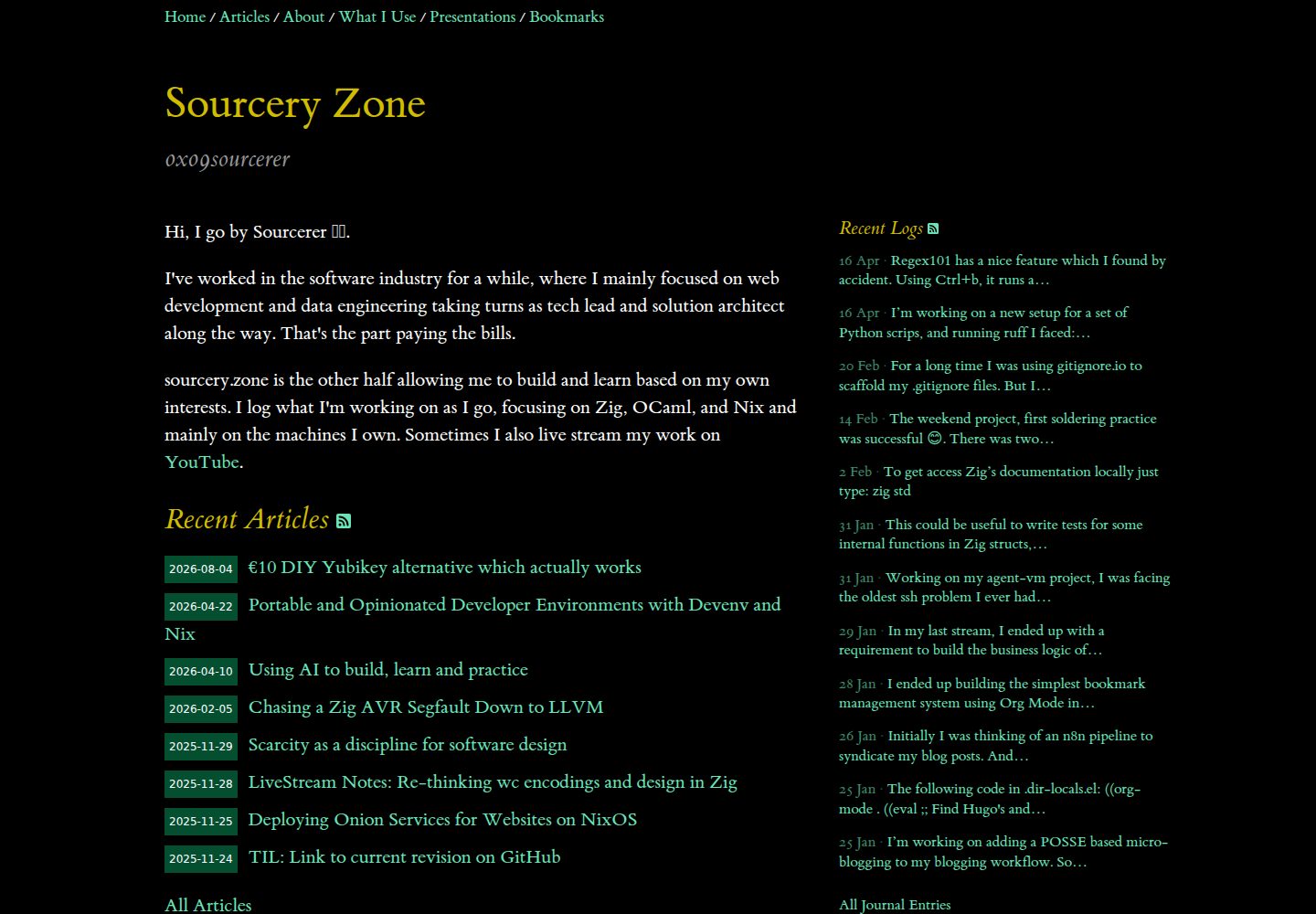
基于 Tufte CSS 的排版,含 ET Book 字体、55% 正文栏和右侧边注区
Hugo博客
hugo-scripture — Hugo 博客模板
作者 0x04srcz
基于 Tufte CSS 的 Hugo 博客主题,提供边注、文章与日志双栏、去中心化讨论链接和自动 OG 图片生成。
看看你的网站会是什么样
浏览真实页面截图,比较内容排版与手机效果。点击下方缩略图切换,放大查看整页细节。
全部页面与视图 3
截图用于了解视觉与布局,交互效果请以实际项目为准。
采集于 2026-10-12查看来源
值得关注的模板亮点
从已有项目资料中,快速了解它的特点。
文章与日志两种内容类型,各自有独立 RSS 订阅源
sidenote shortcode 生成自动编号的 Tufte 风格边注,移动端折叠为可展开内联块
构建时用 Hugo Pipes 自动生成 Open Graph 图片,可自定义文字颜色和背景
去中心化讨论链接,支持 Mastodon、Bluesky、Hacker News、Matrix、IRC 等平台
custom.css 最后加载,可在不修改主题文件的情况下覆盖样式
模板详细介绍
Hugo Scripture 是一个以 Tufte CSS 为视觉基础的 Hugo 主题,适合偏重排版与阅读体验的个人博客。它要求 Hugo 0.116.0 或更高版本,不需要 extended 版本,采用 MIT 许可。
内容组织上,主题把文章(articles)和日志(journal)分成两个独立信息流:文章是带日期、标签、分享链接和讨论区的完整博文,日志则像微型博客或公开记录,按日期分组并在首页内联显示完整内容和时间戳。首页各展示最近 5 条,并提供各自的 RSS 订阅入口。
功能层面,主题提供 Tufte 风格的编号边注 shortcode、书签布局(自动编号 h2)、文章分享按钮、页脚 GPG 身份标识,以及构建时用 Hugo Pipes 生成 Open Graph 图片的能力。讨论区不内嵌第三方评论系统,而是链接到 Mastodon、Bluesky、Hacker News、Matrix、IRC 等外部平台。主题还支持 canonical URL、fediverse/IndieWeb 相关元数据、Umami 统计和自定义 CSS 覆盖。
限制方面,主题不包含评论托管、数据库或后端服务,讨论依赖外部平台;分享文本长度由作者自行控制,主题不做截断;演示图片、字体等第三方素材需单独核对许可。
Hugo博客
适合你的项目吗?
适用场景
- 撰写带边注和旁注的长文,需要 Tufte 风格排版
- 同时维护完整博文和短日志,并希望两者有独立订阅源
- 用 Mastodon、Bluesky 等去中心化平台承载文章讨论,而不嵌入评论系统
- 为没有封面图的页面自动生成 Open Graph 分享图
- 发布书签式链接合集,并让 h2 标题自动编号
适合人群
- 使用 Hugo 搭建个人博客的作者
- 偏好 Tufte CSS 阅读排版和边注写法的写作者
- 希望文章讨论发生在 fediverse 等外部平台而非站内评论区的用户
- 需要文章与短日志分开呈现并分别提供 RSS 的站点
上手与定制指南
结合仓库当前版本的说明,按下面的资料检查内容、配置与运行要求。
- 1
需要 Hugo 0.116.0 或更高版本,extended 版本不是必需
- 2
通过 git submodule 将主题添加到 themes/hugo-scripture,并在 hugo.toml 中设置 theme
- 3
在站点目录放置 assets/css/custom.css 可覆盖主题样式,该文件最后加载
- 4
自动 OG 图片依赖 assets/og/base.png 作为背景,可替换为自定义图片
- 5
第三方字体、图标和演示图片需按各自许可单独核对
授权与来源资料
使用条件与限制
免费使用 · 保留许可声明本次收录的是公开仓库中采用 MIT 许可的免费版本;免费范围为该版本代码,不代表外部服务或第三方素材免费。
使用时需要遵守
- 允许免费使用、修改、商用和分发该版本代码。
- 分发代码副本或实质性部分时,保留原作者版权声明和完整 MIT 许可声明。
- 代码按现状提供;担保与责任限制以原许可证及适用法律为准。
额外费用与待核对事项
- 演示图片、字体、图标及其他第三方素材需按各自许可核对,不能仅凭代码的 MIT 许可判断。
- 域名、托管、数据库、支付或 AI 等外部服务可能另外收费。
- 使用该主题需要 Hugo 0.116.0 或更高版本;不需要 extended 版本。
- 安装方式为通过 git submodule 从指定仓库添加主题到 themes/hugo-scripture 目录。
- 讨论区仅在至少配置了一个平台 URL 时才会渲染。
- 分享文本长度受 fediverse 服务器自身限制(如 Mastodon 默认 500 字符,URL 按 23 字符计),主题不会自动截断,需作者自行控制。
- 回复内容在构建时静态生成,不使用 JavaScript 或第三方嵌入,且不显示头像图片,以避免泄露读者 IP。
- Umami 统计需自行提供实例与 websiteId,scripts 数组可配置多个脚本 URL 以支持自托管回退。
查看原文依据
Permission is hereby granted, free of charge
许可证原文
Requires Hugo >= 0.116.0 (the extended version is not needed).
README 原文
Add the theme as a git submodule: ```bash git submodule add https://git.sourcery.zone/hugo-scripture themes/hugo-scripture ```
README 原文
The section only renders if at least one platform URL is available.
README 原文
Note that fediverse servers impose their own limits (Mastodon's default is 500 characters, with URLs counted as 23 regardless of length), and the theme does not truncate.
README 原文
Everything is baked in at build time — no JavaScript, no third-party embed, and **no avatar images**: a remote avatar would leak every reader's IP to whichever instance hosts it.
README 原文
https://github.com/0x04srcz/hugo-scripture/blob/main/LICENSEhttps://github.com/0x04srcz/hugo-scripture/blob/main/README.mdThe `scripts` array accepts multiple URLs, which is useful if you self-host Umami and want fallback script paths.
README 原文
DeepSeek 根据仓库许可证和 README 整理 ·2026-10-12。结果仅覆盖已读取资料,依赖、图片、字体及后续条款变更以各自原文为准。
项目核对记录与介绍依据
模板资料
- 来源平台
- GitHub
- 资料与维护参考分
- 资料较完整 · 80 / 100
- 技术栈
- Hugo
- 网站类型
- 博客
这个分数如何计算
本站按许可资料(最高30分)、演示链接(12分)、预览图(10分)、Star数(15分)、记录的维护时间(15分)、描述完整度(8分)、功能记录(5分)和分类资料(5分)计算。它不是代码、安全或性能测试,也不是 Google 评分;有链接不代表已实测可用。
这个项目需要核对什么
- 记录的仓库更新时间
- 2026-07-30
- 截图检查日期
- 2026-10-12
已收录演示链接。请用你的内容与屏幕尺寸检查;有演示不代表表单、认证或支付已经可用。
目录记录的主要技术栈是 Hugo。请通过依赖清单和锁文件核对实际版本与托管要求。这些说明基于收录资料,不代表代码审计或部署实测。
查看具体选型方法 →介绍的制作与核对状态
介绍由 AI 辅助整理目录与仓库资料。仓库作者不等于这篇介绍的审核者。
审核声明: [email protected] · 2026-10-13
查看当时使用的来源资料
SHA-256: 71bdb59c0c039d676cccde52e77b14592a22e6ff9062603d02099d0c4e0cf490
2026-10-12T09:08:57.364Z
来源文件 / 仓库# Hugo Scripture
A Hugo theme built on [Tufte CSS](https://edwardtufte.github.io/tufte-css/) that ships with sidenotes, a journal/articles split, decentralized discussions, automatic OG image generation, and enough customization hooks that you can retheme it without forking.
Requires Hugo >= 0.116.0 (the extended version is not needed). Licensed under MIT.
Live example: [sourcery.zone](https://sourcery.zone)
## Table of Contents
- [Installation](#installation)
- [Tufte CSS with an Escape Hatch](#tufte-css-with-an-escape-hatch)
- [Two Content Types: Articles and Journal](#two-content-types-articles-and-journal)
- [Bookmarks Layout](#bookmarks-layout)
- [Sidenotes Shortcode](#sidenotes-shortcode)
- [Share Your Thoughts (Decentralized Discussions)](#share-your-thoughts-decentralized-discussions)
- [Share Links](#share-links)
- [Footer Signature](#footer-signature)
- [Automatic OG Image Generation](#automatic-og-image-generation)
- [Canonical URL Support](#canonical-url-support)
- [Fediverse and IndieWeb Integration](#fediverse-and-indieweb-integration)
- [Umami Analytics](#umami-analytics)
- [SEO and Structured Data](#seo-and-structured-data)
- [Custom CSS Override](#custom-css-override)
- [Asset Pipeline](#asset-pipeline)
- [Shortcodes](#shortcodes)
- [Full Configuration Reference](#full-configuration-reference)
- [Per-Page Front Matter](#per-page-front-matter)
## Installation
Add the theme as a git submodule:
```bash
git submodule add https://git.sourcery.zone/hugo-scripture themes/hugo-scripture
```
Then set it in your `hugo.toml`:
```toml
theme = 'hugo-scripture'
```
## Tufte CSS with an Escape Hatch
The visual foundation of this theme is [Tufte CSS](https://edwardtufte.github.io/tufte-css/), the typographic stylesheet inspired by [Edward Tufte's book designs](https://tufte-latex.github.io/tufte-latex/). You get:
- The **ET Book** serif font family (roman, italic, bold, and old-style figures, served in woff/ttf/eot/svg).
- A 55% content column with a wide right margin reserved for sidenotes and margin notes.
- Epigraph styling, small-caps `newthought` spans, and old-style numeral support.
- On screens narrower than 760px, sidenotes collapse into toggleable inline blocks (pure CSS, no JavaScript).
The theme loads four CSS files in order:
1. `tufte.css` -- the Tufte foundation
2. `main.css` -- theme-level additions (journal timeline, bookmarks numbering, share links layout)
3. `custom.css` -- **your file** (empty by default, loaded last so it wins the cascade)
4. `code-highlight.css` -- syntax highlighting for code blocks
Because `custom.css` is loaded last, you can override anything from colors to layout without touching the theme files. The [sourcery.zone](https://sourcery.zone) site uses this to apply a [Modus Vivendi dark](https://github.com/protesilaos/modus-themes) color scheme on top of the default light Tufte look. You just drop your own `assets/css/custom.css` in your site directory.
## Two Content Types: Articles and Journal
The home page presents two separate feeds.
**Articles** live in `content/articles/` (or whichever sections you list in `params.mainSections`). They are full blog posts with dates, share links, tags, a discussion section, and related content. The RSS feed at `/index.xml` only includes articles.
**Journal entries** live in `content/journal/`. They work like a micro-blog or a public log. On the home page, journal entries are grouped by date and show their full content inline with `HH:MM:SS` timestamps. The journal section gets its own RSS feed at `/journal/index.xml`.
The latest 5 of each are shown on the home page. If there are more, a link to the full listing appears.
Each section heading on the home page has a small RSS icon linking to the corresponding feed. Because `/index.xml` is articles-only, every page also advertises the journal feed via `<link rel="alternate">`, so a reader subscribing from the home page can find the notes.
### Feeds carry full content
Every feed sends the whole rendered piece, not a summary — articles as well as notes. A subscriber can read in their reader without being bounced back to the site.
Root-relative URLs in that content are rewritten to absolute ones, because a feed is read outside the site: `src="/ox-hugo/x.png"` would otherwise resolve against whatever origin is displaying the item. Already-absolute and protocol-relative URLs are left alone.
Section titles in feeds come from the same lookup as section headings, so a section is named identically in both. Hugo auto-titles a section with no `_index` file by pluralising the directory name, so set an explicit title if the default reads badly:
```toml
[params.sectionTitles]
journal = 'Journal Entries'
```
### Which sections are "short form"
Journal entries are treated as [notes](https://indieweb.org/note) rather than articles: short, title-optional posts meant to be read in full where they are found. The theme uses this distinction to decide how to compose share text (see [Share Links](#share-links)) and which feeds to advertise.
The sections that count as short form are configurable, and default to `['journal']`:
```toml
[params]
shortformSections = ['journal']
```
## Bookmarks Layout
For curated link collections, set `layout = "bookmarks"` in a page's front matter. This activates a layout where all `<h2>` headings are automatically numbered using CSS counters. No comments or share links are rendered on this layout, just the content, tags, and related pages.
## Sidenotes Shortcode
The `sidenote` shortcode creates Tufte-style numbered sidenotes:
```markdown
Some text{{< sidenote >}}This appears in the right margin on wide screens,
or toggles inline on mobile.{{< /sidenote >}} and the paragraph continues.
```
Sidenotes are auto-numbered by CSS. On mobile, tapping the superscript number reveals the note inline. The inner content supports full Markdown. Each sidenote gets a unique ID derived from the page path and content, so you can use as many as you need on a page.
## Share Your Thoughts (Decentralized Discussions)
Instead of embedding a comment system like Disqus or Giscus, this theme links readers out to discussion platforms where the conversation actually lives. At the bottom of each article, a "Share your thoughts" section lists the places where the post can be discussed.
There are two layers:
**Per-post links** are set in individual post front matter. You publish your article, post about it on Mastodon or Bluesky, then add the URL back to the front matter:
```toml
mastodon_url = "https://mastodon.social/@you/123456"
bsky_url = "https://bsky.app/profile/you/post/abc123"
hackernews_url = "https://news.ycombinator.com/item?id=12345"
youtube_url = "https://youtube.com/watch?v=xyz"
```
**Global channels** are the same across all posts and are set in the site config. These are for persistent chat rooms:
```toml
[params.comments]
enable = true
matrixUrl = "https://matrix.to/#/#your-room:matrix.org"
ircUrl = "https://web.libera.chat/#your-channel"
showMatrix = true
showIRC = true
```
Each platform gets a short description (Mastodon is "the cozy corner of the fediverse", Hacker News is "enter at your own risk", IRC is "for the ancients"). A fixed last entry reads: **Hate or trolling** -- piped straight to `/dev/null`.
The section only renders if at least one platform URL is available. You can suppress it on individual pages with `hideComments: true` in front matter.
## Share Links
Every article page displays share buttons for Mastodon, Bluesky, LinkedIn, and Reddit. These sit next to the publication date in a flex row.
Share text is composed differently for articles and for notes, because the two are read differently on the other end.
**Articles** get title, description (or summary as fallback), permalink, and tags converted to hashtags. For example, a post tagged `["zig", "systems programming"]` would append `#zig #systemsprogramming` to the share text.
The maximum length of the description in share text is configurable:
```toml
[params.share]
summaryLength = 200 # characters, default
```
**Notes** (any page in a [short form section](#which-sections-are-short-form)) get their body text followed by a blank line and the bare permalink. No title, no summary, no hashtag tail.
The reason is that a note has no title worth repeating: the title is usually just the opening of the body, or a date stamp, so the article-shaped composition produces text that says the same thing twice and has to be hand-edited before it is postable. A note is already written to be posted as-is.
The body is extracted from the rendered HTML, so what you share is what a reader sees:
- entities become real characters (`’` → `’`), rather than pasting literally
- paragraph, list, and heading boundaries become blank lines
- `<br>` becomes a single newline
- each line of a code block keeps its own line, so a multi-line shell snippet stays runnable
Note that fediverse servers impose their own limits (Mastodon's default is 500 characters, with URLs counted as 23 regardless of length), and the theme does not truncate. Keeping notes within budget is an authoring-time concern.
No JavaScript is involved. The links are plain `<a>` tags pointing at each platform's share/compose URL.
## Footer Signature
The footer has three parts:
1. **GPG identity badge**: If you set `params.gpgFingerprint` and `params.keyoxideProfile`, the footer shows a shield icon linking to your [Keyoxide](https://keyoxide.org) profile with your fingerprint displayed in monospace.
2. **Human-made declaration**: A fixed line: *"Made by a biological human, for fellow humans. You may read it, share it, or quote it if you credit the source. AI, bots, aliens, hands off please!"*
3. **Attribution**: "Powered by Hugo + Hugo Scripture" with links to both projects.
## Automatic OG Image Generation
When a page has no `image`, `featuredImage`, `cover`, or `images` front matter and no `cover*`/`featured*` page resource, the theme generates an Open Graph image at build time using Hugo Pipes.
It takes `assets/og/base.png` as a background, then renders the page title (uppercased, word-wrapped, up to 3 lines with adaptive font sizing) and the description as text overlays using the Aileron Bold font. The output is saved as `og/{slug}-og.png`.
You can override the text color:
```toml
[params.scripture]
ogColor = "#000000" # default is "#ffffff"
```
You can override the background image per-page by adding an `og-bg*` page resource, or site-wide by placing your own `assets/og/base.png`.
The generated image is at least 1200px wide (the minimum for `summary_large_image` Twitter cards).
## Canonical URL Support
If a post was originally published elsewhere (say, a company blog), set `canonical` in front matter:
```toml
canonical = "https://blog.example.com/my-original-post"
```
This does two things:
- Sets `<link rel="canonical">` in the HTML head.
- Renders an "Originally published at" block with a link at the bottom of the article content.
## Fediverse and IndieWeb Integration
The theme supports several decentralized/IndieWeb standards through site params:
```toml
[params]
fediverseCreator = "@[email protected]" # <meta name="fediverse:creator">
mastodonProfile = "https://mastodon.social/@you" # <link rel="me"> for verification
[params.webmention]
endpoint = "https://webmention.io/yoursite.com/webmention"
pingback = "https://webmention.io/yoursite.com/xmlrpc"
```
The `rel="me"` link enables Mastodon profile verification (the green checkmark). The webmention and pingback endpoints let your site participate in the IndieWeb reply/mention network.
### Syndication (POSSE)
[POSSE](https://indieweb.org/POSSE) is publishing on your own site and syndicating copies elsewhere. The theme supports it from both ends without prescribing how you post.
**Manifest.** Enable the `syndication` output format and the site publishes `/syndication.json`: every note, with its id, permalink, date, tags, and body as plain text.
```toml
[outputFormats.syndication]
mediaType = 'application/json'
baseName = 'syndication'
isPlainText = true
notAlternative = true
[outputs]
home = ['html', 'rss', 'syndication']
```
The body is produced by the same partial as the site's own share links, so text posted by hand and text posted by a script are byte-identical. The `id` is the leading Denote timestamp of the filename (`20260416T114051`) when there is one, otherwise the permalink — it survives retitling, which a permalink does not, so it is safe as an idempotency key.
**Backlink.** Drop a `data/syndication.json` keyed by that same id, and each note renders its "also on" link in the discussion section:
```json
{
"20260416T114051": {
"mastodon_url": "https://mastodon.social/@you/115610844258140241",
"bsky_url": "https://bsky.app/profile/you/post/3m6hkxbzqc72m"
}
}
```
Per-page front matter (`mastodon_url`, `bsky_url`) still wins where present. The data file matters for content generated by a tool such as ox-hugo, where writing back into front matter would be overwritten on the next export.
## Umami Analytics
The theme has built-in support for [Umami](https://umami.is), a privacy-focused, cookie-free analytics tool. No Google Analytics, no tracking scripts from third parties.
```toml
[params.umami]
enabled = true
websiteId = "your-website-id"
scripts = [
"https://your-umami-instance.com/script.js",
]
```
The `scripts` array accepts multiple URLs, which is useful if you self-host Umami and want fallback script paths. All scripts are loaded with `defer`.
## SEO and Structured Data
The `meta/standard.html` partial generates a full set of meta tags on every page:
- Open Graph (`og:title`, `og:description`, `og:image`, `og:locale`, `og:url`)
- Twitter Card (`twitter:title`, `twitter:description`, `twitter:image`, `summary_large_image`)
- Schema.org `itemprop` attributes
- `<link rel="alternate">` for translations and output formats (RSS, etc.)
- `robots: noindex,follow` for taxonomy and term listing pages (keeps tag indexes out of search engines)
For content pages in a `mainSections` or `shortformSections` section, `meta/post.html` adds:
- `og:type = article`, `og:url`, `article:published_time`, `article:modified_time`, `article:author`, `article:section`, and one `article:tag` per tag
- JSON-LD with headline, author, publisher, word count, dates, and image — typed `Article` for longform and `BlogPosting` for notes
## Custom CSS Override
The theme ships an empty `assets/css/custom.css`. To restyle the theme, create your own `assets/css/custom.css` in your Hugo site root. Since Hugo's asset lookup checks the site directory first, your file takes precedence.
For example, the sourcery.zone site turns the default warm off-white Tufte look into a dark theme with a few dozen lines of CSS custom properties:
```css
:root {
--black: #000000;
--yellow: #d0bc00;
--mint: #6ae4b9;
/* ... */
}
body {
background-color: var(--black);
color: var(--white);
}
a {
color: var(--mint) !important;
}
```
Same goes for `assets/css/code-highlight.css` if you want different syntax highlighting colors, and `assets/og/base.png` if you want a different OG image background.
## Asset Pipeline
All CSS and JS go through Hugo Pipes:
- **Development** (`hugo server`): files are served unprocessed for fast reloads.
- **Production** (`hugo`): files are minified, fingerprinted, and served with [Subresource Integrity](https://developer.mozilla.org/en-US/docs/Web/Security/Subresource_Integrity) hashes.
JavaScript is built with `js.Build`, so if you extend `assets/js/main.js`, it goes through the same pipeline.
## Shortcodes
### `sidenote`
Tufte-style numbered margin note. See [Sidenotes Shortcode](#sidenotes-shortcode) above.
### `mark`
Wraps content in an HTML `<mark>` element (yellow highlight by default):
```markdown
{{< mark >}}This text is highlighted.{{< /mark >}}
```
Supports Markdown inside.
### `ytvideo`
Responsive YouTube embed:
```markdown
{{< ytvideo src="https://www.youtube.com/embed/VIDEO_ID" >}}
```
Renders a full-width iframe at 315px height inside a `<figure>` wrapper.
## Full Configuration Reference
Below is a complete `hugo.toml` showing all theme-specific params. Only `params.comments.enable` is required for the discussion feature; everything else has sensible defaults or is optional.
```toml
baseURL = 'https://example.com/'
languageCode = 'en-us'
title = 'My Site'
theme = 'hugo-scripture'
[params]
description = "Site description for meta tags"
mainSections = ['articles'] # which sections count as "articles" on the home page
shortformSections = ['journal'] # which sections are notes (share text, feed autodiscovery)
dateFormat = "2 Jan 2006" # date display format (Go time format)
gpgFingerprint = "YOUR_FINGERPRINT"
keyoxideProfile = "https://keyoxide.org/..."
fediverseCreator = "@[email protected]"
mastodonProfile = "https://mastodon.social/@you"
sitename = "My Site" # og:site_name value (defaults to the site title)
[params.author]
name = "Your Name" # shown on home page subtitle, RSS, and meta tags
email = "[email protected]" # used in RSS managingEditor/webMaster
[params.webmention]
endpoint = "https://webmention.io/example.com/webmention"
pingback = "https://webmention.io/example.com/xmlrpc"
[params.scripture]
ogColor = "#ffffff" # text color for auto-generated OG images
[params.share]
summaryLength = 200 # max chars in share text description
[params.comments]
enable = true
matrixUrl = "https://matrix.to/#/#your-room:matrix.org"
ircUrl = "https://web.libera.chat/#your-channel"
showMatrix = true
showIRC = true
[params.umami]
enabled = true
websiteId = "your-id"
scripts = ["https://analytics.example.com/script.js"]
[[menus.main]]
name = 'Home'
pageRef = '/'
weight = 1
[[menus.main]]
name = 'Articles'
pageRef = '/articles'
weight = 2
```
## Per-Page Front Matter
These front matter keys are consumed by the theme:
| Key | Type | Used by |
|-----|------|---------|
| `title` | string | Page title everywhere |
| `date` | datetime | Publication date |
| `tags` | list | Tag links, share link hashtags |
| `description` | string | Meta description, share text |
| `language` | string | `lang` attribute on content section |
| `canonical` | string | Canonical URL override + "Originally published at" block |
| `image` | string | OG/social image (also `featuredImage`, `cover`, `images`) |
| `imageAlt` | string | Alt text for OG image |
| `hideComments` | bool | Suppress discussion section on this page |
| `mastodon_url` | string | Per-post Mastodon discussion link |
| `bsky_url` | string | Per-post Bluesky discussion link |
| `hackernews_url` | string | Per-post Hacker News discussion link |
| `youtube_url` | string | Per-post YouTube discussion link |
| `category` | string | Used in `article:section` and `news_keywords` meta |
| `layout` | string | Set to `"bookmarks"` for the bookmarks layout |
### Backfeed: replies rendered statically
Drop a `data/replies.json` keyed by note id and each post renders the replies to its syndicated copy:
```json
{
"20260416T114051": {
"replies": [
{
"id": "117007900414073714",
"url": "https://hachyderm.io/@someone/117007900371714227",
"created_at": "2026-07-30T08:07:50.000Z",
"author": {
"name": "Someone",
"acct": "[email protected]",
"url": "https://hachyderm.io/@someone"
},
"text": "Plain text. Blank lines become paragraphs."
}
]
}
}
```
Everything is baked in at build time — no JavaScript, no third-party embed, and **no avatar images**: a remote avatar would leak every reader's IP to whichever instance hosts it. Reply text is printed through Go's escaper rather than `safeHTML`, so a stranger's markup cannot reach the page.
Each reply is marked up as an `h-cite` inside the post's `h-entry`, so the page is machine-readable as a conversation.
## Microformats2
Posts carry [microformats2](https://microformats.org/wiki/microformats2) markup, which is what lets webmention senders, feed readers, and fediverse bridges understand the page:
- `h-entry` on each post (and on each journal entry in a listing), with `e-content`, `dt-published`, `u-url`, and an inline `p-author h-card`
- A representative `h-card` on the home page, with `rel="me"` to the fediverse profile
- **No `p-name` on short-form entries.** [Post Type Discovery](https://indieweb.org/post-type-discovery) classifies an entry whose name is not a prefix of its content as an *article*, and consumers render articles as a title plus a link stub instead of showing the text. Notes are written to be read where they are found, so the title is displayed but not marked up. Articles do carry `p-name`.
The markup is emitted on hidden elements where it has no visible counterpart, rather than being hidden with CSS: parsers read the DOM, so a `hidden` attribute is still parsed while `display: none` is a rendering concern they never see.
看看同类模板
对比同技术栈与用途的模板,找到更适合的视觉与内容结构。

hugo-PaperMod
PaperMod 是 Hugo 生态里知名度较高的主题之一,定位很明确:给博客和轻量作品集站点提供一套干净、响应式的阅读界面。
Hugo · 作品集

LoveIt
❤️A clean, elegant but advanced blog theme for Hugo 一个简洁、优雅且高效的 Hugo 主题
Hugo · 博客

hugo-coder
A minimalist blog theme for hugo.
Hugo · 博客

blowfish
Personal Website & Blog Theme for Hugo
Hugo · 博客

hugo-paper
🪺 A simple, clean, customizable Hugo theme
Hugo · 博客

hextra
Hextra 是一个 Hugo 主题,定位在文档站与博客之间:既提供侧边栏导航、目录、面包屑、分页这类文档站结构,也能承载博客内容。
Hugo · 文档