使用 StatiCrypt 对单页 HTML 做密码加密,访客输入密码后才能查看内容
HTML启动器
password-protected-website-template — HTML 启动器模板
作者 a-nau
基于 StatiCrypt 与 GitHub Pages 的静态单页网站模板,通过 GitHub Actions 在构建时用密码加密 index.html,访客需输入密码才能查看内容。
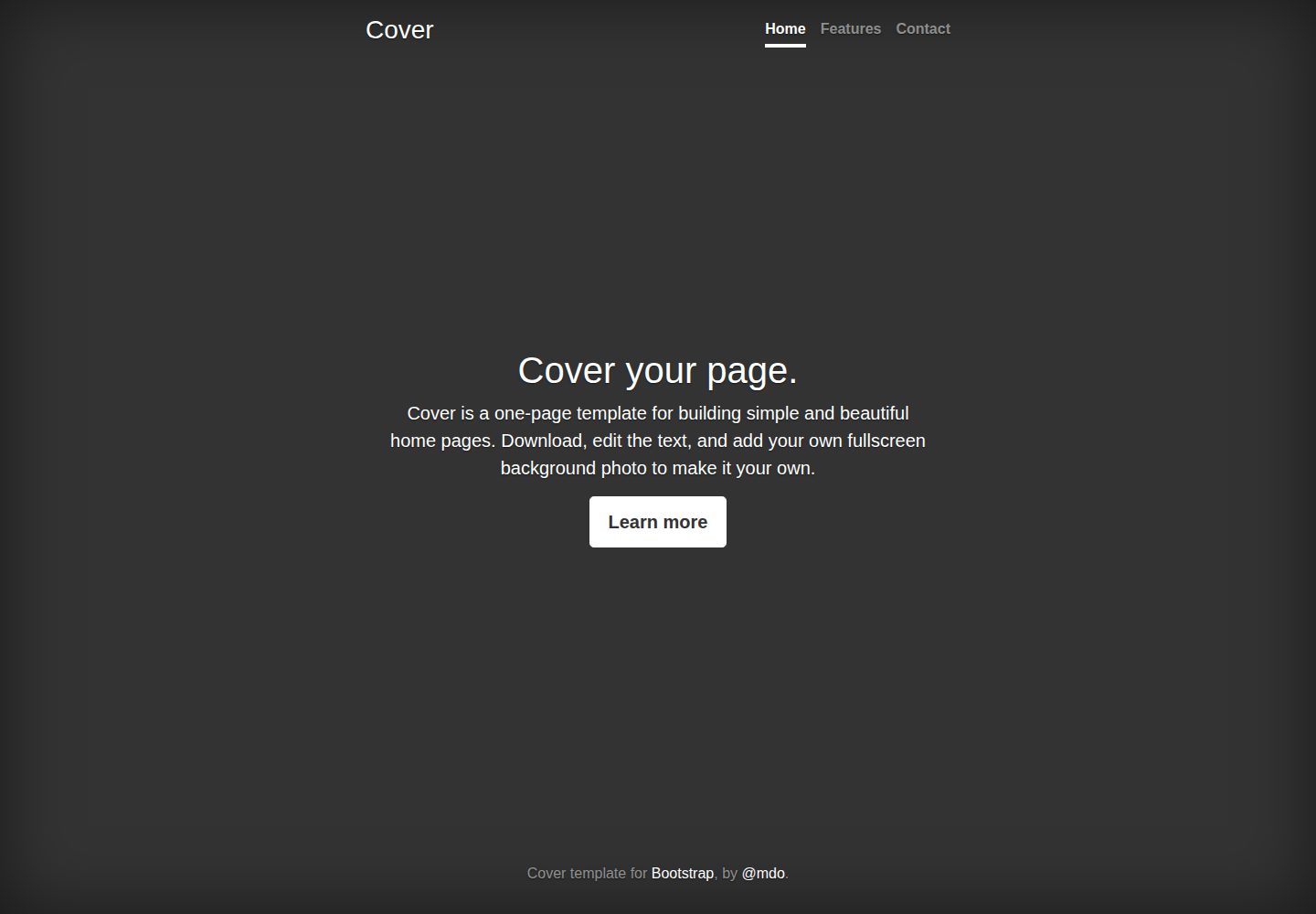
看看你的网站会是什么样
浏览真实页面截图,比较内容排版与手机效果。点击下方缩略图切换,放大查看整页细节。
全部页面与视图 2
截图用于了解视觉与布局,交互效果请以实际项目为准。
采集于 2026-10-02查看来源
值得关注的模板亮点
从已有项目资料中,快速了解它的特点。
通过 GitHub Actions 在构建阶段自动加密并发布到 GitHub Pages
登录页的标题、说明、按钮文字和主色可在工作流中配置
默认将 HTML 中直接引用的图片、CSS、JavaScript 内联为 base64 一并加密
支持用 Docker 在本地完成加密,只上传生成的 index.html
模板详细介绍
该模板用于在 GitHub Pages 上发布一个需要密码才能访问的简单单页网站,适合生日、婚礼或公司活动等只应让特定人群看到的信息页面。加密由 StatiCrypt 完成:仓库中的 main.html 是明文源文件,GitHub Actions 工作流在构建时用仓库 Secret 中的密码将其加密为 index.html 并发布,访客打开页面时先看到登录页,输入正确密码后才解密显示内容。
使用方式是从模板创建仓库,将发布源设为 main 分支,并创建名为 DECRYPTION_PASSPHRASE 的 Secret 作为密码;若不想让人绕过密码访问仓库内容,可将仓库设为私有。登录页的标题、说明文字、按钮名称和主色可在工作流中调整,页面内容则编辑 main.html。
默认工作流会同时加密资源,把 HTML 中直接引用的图片、CSS 和 JavaScript 替换为内联 base64,因此这些文件之间的相对链接可能失效;如需关闭资源加密,需要调整 _config.yml 的排除项并替换工作流文件。模板也支持本地加密:用 Docker 构建镜像并运行加密,再只上传生成的 index.html,从而不把明文内容放入仓库。README 明确说明作者与依赖都可能存在疏漏,不应假定其绝对安全,不要用这种方式传递银行信息等敏感数据。
HTML启动器
适合你的项目吗?
适用场景
- 为生日、婚礼等活动发布只让受邀者查看的页面
- 发布公司内部活动信息,不希望公开可见
- 在 GitHub Pages 上托管需要简单口令保护的静态单页内容
- 不想把明文页面提交到仓库时,在本地加密后只上传 index.html
适合人群
- 需要快速搭建密码保护静态页面的个人或团队
- 使用 GitHub Pages 托管、接受构建时加密方案的开发者
- 内容为单页 HTML、对安全强度要求不高的场景
上手与定制指南
结合仓库当前版本的说明,按下面的资料检查内容、配置与运行要求。
- 1
从模板创建仓库,并将 GitHub Pages 的发布源设为 main 分支
- 2
创建名为 DECRYPTION_PASSPHRASE 的仓库 Secret 作为访问密码,否则首次 CI 会因缺少密码而失败
- 3
若不希望他人绕过密码访问仓库内容,请将仓库设为私有
- 4
页面内容编辑 main.html,登录页样式与文案在 encrypt_with_assets.yml 的加密步骤中调整
- 5
默认会加密资源并内联为 base64,可能导致文件间相对链接失效;如需关闭,需修改 _config.yml 排除项并替换工作流文件
授权与来源资料
使用条件与限制
免费使用 · 保留许可声明本次收录的是公开仓库中采用 MIT 许可的免费版本;免费范围为该版本代码,不代表外部服务或第三方素材免费。
使用时需要遵守
- 允许免费使用、修改、商用和分发该版本代码。
- 分发代码副本或实质性部分时,保留原作者版权声明和完整 MIT 许可声明。
- 代码按现状提供;担保与责任限制以原许可证及适用法律为准。
额外费用与待核对事项
- README 明确警告该加密方案可能被作者或依赖疏漏,不应假定绝对安全,不要用它传递银行信息等敏感数据。
- 若希望内容无法绕过密码被访问,必须将仓库设为私有;公开仓库下他人可直接查看明文内容。
- 使用前必须在仓库中创建名为 DECRYPTION_PASSPHRASE 的 GitHub Secret 作为访问密码,否则首次 CI 会因缺少密码而失败。
- 需将 GitHub Pages 发布源设为 main 分支才能激活托管,依赖 GitHub Pages 服务。
- 默认资源加密仅将 HTML 中直接引用的图片、CSS、JS 内联为 base64,文件间相对链接可能因此失效。
- 演示图片、字体、图标及其他第三方素材需按各自许可核对,不能仅凭代码的 MIT 许可判断。
- 域名、托管、数据库、支付或 AI 等外部服务可能另外收费。
查看原文依据
Permission is hereby granted, free of charge
许可证原文
Do not share bank information or similar this way.
README 原文
Choose the repository to be **private**, if you don't want people to be able to access the contents without the password
README 原文
Create a Github secret
README 原文
Set the publishing source
README 原文
https://github.com/a-nau/password-protected-website-template/blob/main/LICENSEhttps://github.com/a-nau/password-protected-website-template/blob/main/README.mdthis only replaces all directly linked images, CSS and JavaScript file in the HTML document with an in-place base64 representation
README 原文
DeepSeek 根据仓库许可证和 README 整理 ·2026-10-02。结果仅覆盖已读取资料,依赖、图片、字体及后续条款变更以各自原文为准。
项目核对记录与介绍依据
模板资料
- 来源平台
- GitHub
- 资料与维护参考分
- 资料较完整 · 81 / 100
- 技术栈
- HTML
- 网站类型
- 启动器
这个分数如何计算
本站按许可资料(最高30分)、演示链接(12分)、预览图(10分)、Star数(15分)、记录的维护时间(15分)、描述完整度(8分)、功能记录(5分)和分类资料(5分)计算。它不是代码、安全或性能测试,也不是 Google 评分;有链接不代表已实测可用。
这个项目需要核对什么
- 记录的仓库更新时间
- 2024-12-04
- 截图检查日期
- 2026-10-02
已收录演示链接。请用你的内容与屏幕尺寸检查;有演示不代表表单、认证或支付已经可用。
目录记录的主要技术栈是 HTML。请通过依赖清单和锁文件核对实际版本与托管要求。这些说明基于收录资料,不代表代码审计或部署实测。
查看具体选型方法 →介绍的制作与核对状态
介绍由 AI 辅助整理目录与仓库资料。仓库作者不等于这篇介绍的审核者。
已完成服务器许可规则与 AI 来源核对;未经过人工编辑审核。
查看当时使用的来源资料
SHA-256: 138730379f20a712bb8ddb34d6c2bd75d09ba5f3fa80b6697c617d07ea8a7c3a
2026-10-02T16:10:33.716Z
来源文件 / 仓库# Template for Encrypted Single Page Website
This template repository makes it easy to create a password protected page that is hosted on Github pages.
This can be useful for information or events that should not be available to everyone, e.g. for your birthday, wedding or a corporate event.
To check the [demo](https://a-nau.github.io/password-protected-website-template) use the password `test`.

**Disclaimer**: Please be aware, that I (or the dependencies) might have missed something, so do not assume this to be bullet proof. Do not share bank information or similar this way.
## Usage
- [Create a repository from a template](https://docs.github.com/en/repositories/creating-and-managing-repositories/creating-a-repository-from-a-template) by clicking the `use this template` button
- Select a repository name (your URL will be `{GITHUB-ACCOUNT-NAME}.github.io/{REPOSITORY-NAME}`)
- Choose the repository to be **private**, if you don't want people to be able to access the contents without the password
- [Create a Github secret](https://docs.github.com/en/actions/security-guides/encrypted-secrets#creating-encrypted-secrets-for-a-repository) named `DECRYPTION_PASSPHRASE` and set the `value` to your desired password (note that the CI pipeline will fail on the first attempt due to the missing password)
- [Set the publishing source](https://docs.github.com/en/pages/getting-started-with-github-pages/configuring-a-publishing-source-for-your-github-pages-site#choosing-a-publishing-source) to the `main` branch in order to activate hosting with Github Pages
To customize the website:
- You can customize the login page
- adjust the [encrypt_with_assets.yml](.github/workflows/encrypt_with_assets.yml), i.e. the "Encrypt index" step to set the title, instructions and button name
```yaml
- name: Encrypt index
run: >
staticrypt index.html -p ${{ secrets.DECRYPTION_PASSPHRASE }} --short
--template "password_template.html"
--template-title "Login"
--template-instructions "This is a test website, use the password 'test' to enter."
--template-button "Open Page"
--template-color-primary "#113e9f"
--template-color-secondary "#e4e4e4"
```
- For details and to change the full layout, see [StatiCrypt](https://github.com/robinmoisson/staticrypt)
- Edit the `main.html` which will be shown to visitors after encryption (the encrypted version, that is hosted is `index.html`)
- Assets can be used as usual and will not be encrypted
### Encrypted Assets
By default encryption of assets is enabled, since the workflow [`encrypt_with_assets.yml`](.github/workflows/encrypt_with_assets.yml) is active.
Note, this only replaces all directly linked images, CSS and JavaScript file in the HTML document with an in-place base64 representation.
Thus, your relative links in files will probably not work anymore, since their location changed.
If you do not want to encrypt assets
- remove the asset folder from the `exclude`s of the [`_config.yml`](_config.yml),
- [`encrypt_with_assets.yml`](.github/workflows/encrypt_with_assets.yml) to `encrypt_with_assets._yml`, and
- rename [`encrypt_without_assets._yml`](.github/workflows/encrypt_without_assets.yml) to `encrypt_with_assets.yml`
### Local Usage
If you don't want to have any of your data (even) in a private repository you can also convert it locally and only upload the `index.html` afterwards.
To do this, follow these steps:
- Build the image
```
docker build -t ppw .
```
- Run the encryption
```
docker run -it --rm --name ppw -e PASSWORD=test --mount type=bind,source=${PWD},target=/code ppw
```
- Ignore changes to `main.html`
```
git update-index --skip-worktree main.html
```
Optionally the same is needed for your assets.
## Credits
- The encryption is made by [StatiCrypt](https://github.com/robinmoisson/staticrypt): [MIT](https://github.com/robinmoisson/staticrypt/blob/main/LICENSE) License
- We use the [workflow](https://github.com/Jack-alope/staticrypt-github-actions/blob/main/.github/workflows/encrypt.yml) from [staticrypt-github-actions](https://github.com/Jack-alope/staticrypt-github-actions) as a basis: [MIT](https://github.com/Jack-alope/staticrypt-github-actions/blob/main/LICENSE) License
- We use [Bootstrap](https://getbootstrap.com/), including one of their [examples](https://getbootstrap.com/docs/4.0/examples/) ([demo](https://getbootstrap.com/docs/4.0/examples/cover/#)): [MIT](https://github.com/twbs/bootstrap/blob/main/LICENSE) License
- We use code from [six-four](https://github.com/chrissimpkins/six-four/tree/master) to determine image MIME types: [MIT](https://github.com/chrissimpkins/six-four/blob/master/LICENSE) License
- We use the [Github CSS Ribbon](https://github.com/simonwhitaker/github-fork-ribbon-css): [MIT ](https://github.com/simonwhitaker/github-fork-ribbon-css/blob/gh-pages/LICENSE) License
看看同类模板
对比同技术栈与用途的模板,找到更适合的视觉与内容结构。

startbootstrap-simple-sidebar
An off canvas sidebar navigation Bootstrap HTML template created by Start Bootstrap
HTML · 启动器

adminkit
AdminKit is a free & open-source HTML dashboard & admin template based on Bootstrap 5
HTML · 后台

Landing-Page
Tailwind CSS Starter Template - Landing Page
HTML · 企业官网

light-bootstrap-dashboard
Light Bootstrap Dashboard is an admin dashboard template designed to be beautiful and simple.
HTML · 后台

sing-app
💥Free and open-source admin dashboard template built with Bootstrap 4.5 💥
HTML · 后台

startbootstrap-modern-business
A multipurpose Bootstrap full website template created by Start Bootstrap
HTML · 启动器