从 Jekyll 主题 Tale 移植到 Zola 的极简博客主题
Jekyll博客
tale-zola — Jekyll 博客模板
作者 aaranxu
Tale-Zola 是一个从 Jekyll 主题 Tale 移植到 Zola 的极简博客主题,通过 config.toml 配置站点信息、菜单、SEO 与评论等选项。
看看你的网站会是什么样
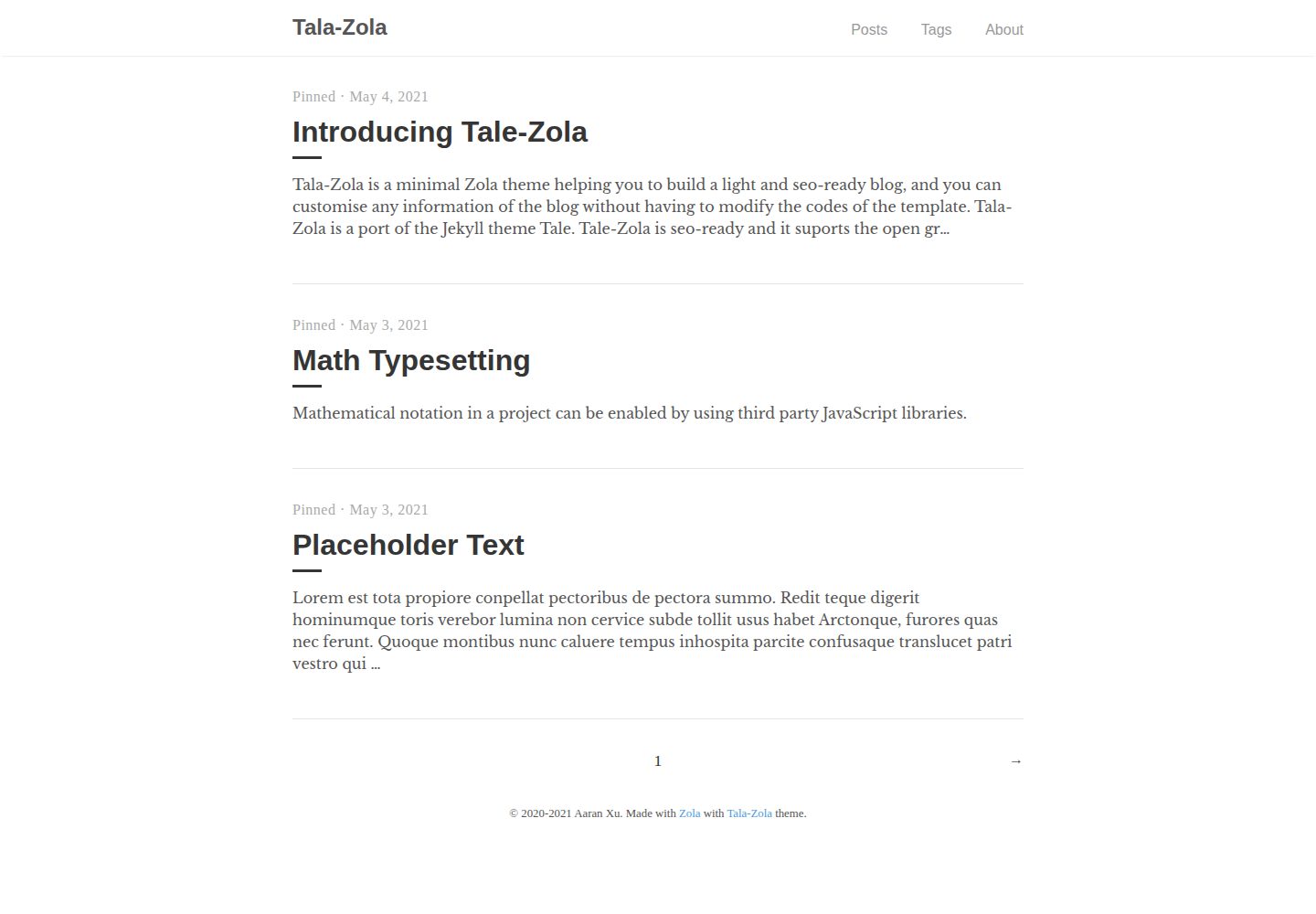
浏览真实页面截图,比较内容排版与手机效果。点击下方缩略图切换,放大查看整页细节。
全部页面与视图 3
截图用于了解视觉与布局,交互效果请以实际项目为准。
采集于 2026-09-30查看来源
值得关注的模板亮点
从已有项目资料中,快速了解它的特点。
站点信息、菜单、页脚与界面文案集中在 config.toml 中配置
内置 Open Graph 与 Twitter Cards 等 SEO 元信息设置
可选启用 Google Analytics、Disqus 评论与 KaTeX 数学公式
支持代码高亮主题配置,并可通过 sass/_custom.scss 添加自定义样式
模板详细介绍
Tale-Zola 是一个面向 Zola 静态站点生成器的极简博客主题,由 Jekyll 主题 Tale 移植而来。它提供文章列表、标签分类、关于页等博客常见页面结构,并通过配置文件集中管理站点标题、描述、菜单、页脚、作者、日期格式以及界面文案,使大部分定制无需改动模板代码。
主题包含 SEO 相关配置项,支持 Open Graph 与 Twitter Cards 的元信息设置,并可配置 Google Analytics、Disqus 评论和 KaTeX 数学公式渲染。代码高亮通过 Zola 的 markdown 配置开启,自定义样式可写入 sass/_custom.scss。
使用前需要安装 Zola 0.13.0 或更高版本。主题以 MIT 许可发布,仓库中附有演示站点;演示图片、字体、图标等第三方素材的授权需单独核对。
Jekyll博客
适合你的项目吗?
适用场景
- 使用 Zola 搭建个人博客并需要文章列表与标签分类
- 希望不改动模板代码即可调整站点文案与菜单结构
- 需要为博客配置 Open Graph、Twitter Cards 等社交分享元信息
- 在静态博客中按需开启评论、访问统计或数学公式渲染
适合人群
- 使用 Zola 0.13.0 及以上版本的个人博客作者
- 偏好通过配置文件而非修改模板来定制站点的用户
- 需要标签分类与基础 SEO 元信息配置的博客项目
上手与定制指南
结合仓库当前版本的说明,按下面的资料检查内容、配置与运行要求。
- 1
需先安装 Zola 0.13.0 或更高版本
- 2
可将主题克隆到 themes 目录,或作为 git submodule 添加
- 3
在 config.toml 中设置 theme = "tale-zola",也可复制主题的 config.toml.example
- 4
在 content 目录添加 _index.md 并设置 sort_by 与 paginate_by,再添加文章文件
- 5
运行 zola serve 启动本地开发服务器,默认地址为 http://127.0.0.1:1111
授权与来源资料
使用条件与限制
免费使用 · 保留许可声明本次收录的是公开仓库中采用 MIT 许可的免费版本;免费范围为该版本代码,不代表外部服务或第三方素材免费。
使用时需要遵守
- 允许免费使用、修改、商用和分发该版本代码。
- 分发代码副本或实质性部分时,保留原作者版权声明和完整 MIT 许可声明。
- 代码按现状提供;担保与责任限制以原许可证及适用法律为准。
额外费用与待核对事项
- 使用该主题前必须自行安装 Zola 0.13.0 或更高版本的静态站点生成器,主题本身不能独立运行。
- 启用访问统计需自行注册 Google Analytics 账号并提供自己的跟踪 ID,属于外部服务依赖。
- 启用评论功能需使用 Disqus 第三方服务并配置自己的 disqus_id,涉及外部账号。
- 数学公式渲染依赖 KaTeX 相关资源,需在配置中显式开启。
- 演示图片、字体、图标及其他第三方素材需按各自许可核对,不能仅凭代码的 MIT 许可判断。
- 域名、托管、数据库、支付或 AI 等外部服务可能另外收费。
查看原文依据
Permission is hereby granted, free of charge
许可证原文
you need to install the [Zola](https://www.getzola.org/documentation/getting-started/installation/) ≥ 0.13.0
README 原文
Use Google Analytics. Add your own Google Analytics ID.
README 原文
Whether to use Disqus globally and set to your disqus id name.
README 原文
https://github.com/aaranxu/tale-zola/blob/main/LICENSEhttps://github.com/aaranxu/tale-zola/blob/main/README.mdUse KaTeX to support the math notation
README 原文
DeepSeek 根据仓库许可证和 README 整理 ·2026-09-30。结果仅覆盖已读取资料,依赖、图片、字体及后续条款变更以各自原文为准。
项目核对记录与介绍依据
模板资料
- 来源平台
- GitHub
- 资料与维护参考分
- 资料一般 · 72 / 100
- 技术栈
- Jekyll
- 网站类型
- 博客
这个分数如何计算
本站按许可资料(最高30分)、演示链接(12分)、预览图(10分)、Star数(15分)、记录的维护时间(15分)、描述完整度(8分)、功能记录(5分)和分类资料(5分)计算。它不是代码、安全或性能测试,也不是 Google 评分;有链接不代表已实测可用。
这个项目需要核对什么
- 记录的仓库更新时间
- 2022-09-19
- 截图检查日期
- 2026-09-30
已收录演示链接。请用你的内容与屏幕尺寸检查;有演示不代表表单、认证或支付已经可用。
目录记录的主要技术栈是 Jekyll。请通过依赖清单和锁文件核对实际版本与托管要求。这些说明基于收录资料,不代表代码审计或部署实测。
查看具体选型方法 →介绍的制作与核对状态
介绍由 AI 辅助整理目录与仓库资料。仓库作者不等于这篇介绍的审核者。
已完成服务器许可规则与 AI 来源核对;未经过人工编辑审核。
查看当时使用的来源资料
SHA-256: 1bdad5a7336f28eb0920a1c7569bf2c38248d69fa6ed55c5427e2eb63c46ab5f
2026-09-30T11:34:59.207Z
来源文件 / 仓库# Tale-Zola Theme Tala-Zola is a minimal [Zola](https://www.getzola.org) theme helping you to build a light and seo-ready blog, and you can customise any information of the blog without having to modify the codes of the template. Tala-Zola is a port of the Jekyll theme [Tale](https://github.com/chesterhow/tale). ## Demo [Live Preview](https://tale-zola.netlify.app/). ## Requirements Before using the theme, you need to install the [Zola](https://www.getzola.org/documentation/getting-started/installation/) ≥ 0.13.0. ## Quick Start ```bash git clone [email protected]:aaranxu/tale-zola.git cd tale-zola zola serve # open http://127.0.0.1:1111/ in the browser ``` ## Installation Just earlier we showed you how to run the theme directly. Now we start to install the theme in an existing site step by step. ### Step 1: Create a new zola site ```bash zola init blog ``` ### Step 2: Install Tale-Zola Download this theme to your themes directory: ```bash cd blog/themes git clone [email protected]:aaranxu/tale-zola.git ``` Or install as a submodule: ```bash cd blog git init # if your project is a git repository already, ignore this command git submodule add [email protected]:aaranxu/tale-zola.git themes/tale-zola ``` ### Step 3: Configuration Enable the theme in your `config.toml` in the site derectory: ```toml theme = "tale-zola" ``` Or copy the `config.toml.example` from the theme directory to your project's root directory: ```bash cp themes/tale-zola/config.toml.example config.toml ``` ### Step 4: Add new content Add an `_index.md` file to your `content` directory with some lines as bellows. ```text +++ sort_by = "date" paginate_by = 5 +++ ``` Add a blog article file with a filename `first-post.md` (or other filenames) and input some content in it. ```text +++ title = "First Post" date = 2021-05-01T18:18:18+00:00 [taxonomies] tags = ["Post"] [extra] author = "Your Name" +++ This is my first post. ``` Or you can just copy the content from the theme directory to your project: ```bash cp -r themes/tale-zola/content . ``` ### Step 5: Run the project Just run `zola serve` in the root path of the project: ```bash zola serve ``` Tale-Zola will start the Zola development web server accessible by default at `http://127.0.0.1:1111`. Saved changes will live reload in the browser. ## Customisation You can customize your configurations, templates and content for yourself. Look at the `config.toml`, `theme.toml` and templates files in this repo for an idea. In most cases you only need to modify the content in the `config.toml` file to custom your blog, including different expressions in your speaking language. ### Necessary Configurations Add some information for your blog. ```toml title = "You Blog Title" description = "The description of your blog." ``` Set the tags for the site. ```toml taxonomies = [ {name = "tags"}, ] ``` Add menus and footer information for your blog. ``` # Menu items [[extra.menu]] name = "Posts" url = "/" [[extra.menu]] name = "Tags" url = "tags" [[extra.menu]] name = "About" url = "about" [extra.footer] start_year = "2020" # start year of the site end_year = "2021" # end year of the site info = "The information on the footer." ``` #### Option Configurations Add your name as the author name for the blog globally. ```toml [extra] author = "Your Name" ``` Use Google Analytics. Add your own Google Analytics ID. ```toml [extra] google_analytics = "UA—XXXXXXXX-X" ``` Whether to use Disqus globally and set to your disqus id name. And you can enable the disqus on per post page with `extra.disqus` option ```toml [extra] disqus = false disqus_id = "" ``` Code syntax highlighting. See also [syntax highlighting](https://www.getzola.org/documentation/getting-started/configuration/#syntax-highlighting). ```toml [markdown] highlight_code = true highlight_theme = "base16-ocean-light" ``` Use KaTeX to support the math notation ```toml [extra] katex = true ``` > Note: You can also add the `katex` option on per mardown file of the page or section. Set date format in the site ```toml [extra] timeformat = "%B %e, %Y" # e.g. June 14, 2021, and this is the default format ``` SEO settings, like Open Graph + Twitter Cards ```toml [extra.seo] # this image will be used as fallback if a page has no image of its own image = "tale.png" image_height = 50 image_width = 50 og_locale = "en_US" [extra.seo.twitter] site = "twitter_accout" creator = "twitter_accout" [extra.seo.facebook] admins = "facebook_accout" publisher = "facebook_accout" ``` Change the words in your speaking language. ```toml [extra.expressions] home = "Home" # The homepage's name pinned = "Pinned" # On the header of the post list written_by = "Written by" # Like: Written by Aaran Xu on = "on" # Like: on May 3, 2021 top = "Top" # Go to the top of the page in the post tags = "Tags" # In the page of Tags # disqus comments block disqus_discussion = "Discussion and feedback" # The contents of the 404 page p404 = "404: Page not found" p404_info = "Oops! We can't seem to find the page you are looking for." p404_back_home_start = "Let's" p404_back_home_with_link = "head back home" p404_back_home_end = "." ``` ### Custom CSS styles Just add your own styles to `sass/_custom.scss` file. ## Reporting Issues We use GitHub Issues as the official bug tracker for the **Tale-Zola**. Please search [existing issues](https://github.com/aaranxu/tale-zola/issues). It’s possible someone has already reported the same problem. If your problem or idea is not addressed yet, [open a new issue](https://github.com/aaranxu/tale-zola/issues/new). ## Contributing We'd love your help! Please see [CONTRIBUTING.md](./CONTRIBUTING.md) to learn about the kinds of contributions we're looking for. ## License Tale-Zola is distributed under the terms of the [MIT license](LICENSE).
看看同类模板
对比同技术栈与用途的模板,找到更适合的视觉与内容结构。

al-folio
al-folio 是一个面向学者与研究人员的 Jekyll 作品集主题,设计简洁、响应式,适合搭建个人学术主页。
Jekyll · 作品集

minimal-mistakes
:triangular_ruler: Jekyll theme for building a personal site, blog, project documentation, or portfolio.
Jekyll · 作品集

Beautiful Jekyll
Beautiful Jekyll 是一个在 Jekyll 生态中经过长期打磨的博客主题,由 Dean Attali 维护,自 2015 年起积累了超过 5 万用户。
Jekyll · 博客

jekyll-TeXt-theme
💎 🐳 A super customizable Jekyll theme for personal site, team site, blog, project, documentation, etc.
Jekyll · 博客

startbootstrap-clean-blog-jekyll
A Jekyll version of the Clean Blog theme by Start Bootstrap
Jekyll · 博客

So Simple
So Simple 是 Michael Rose 开发的 Jekyll 主题,定位清晰:为文字和图片提供一个干净、可读性强的展示框架。
Jekyll · 博客