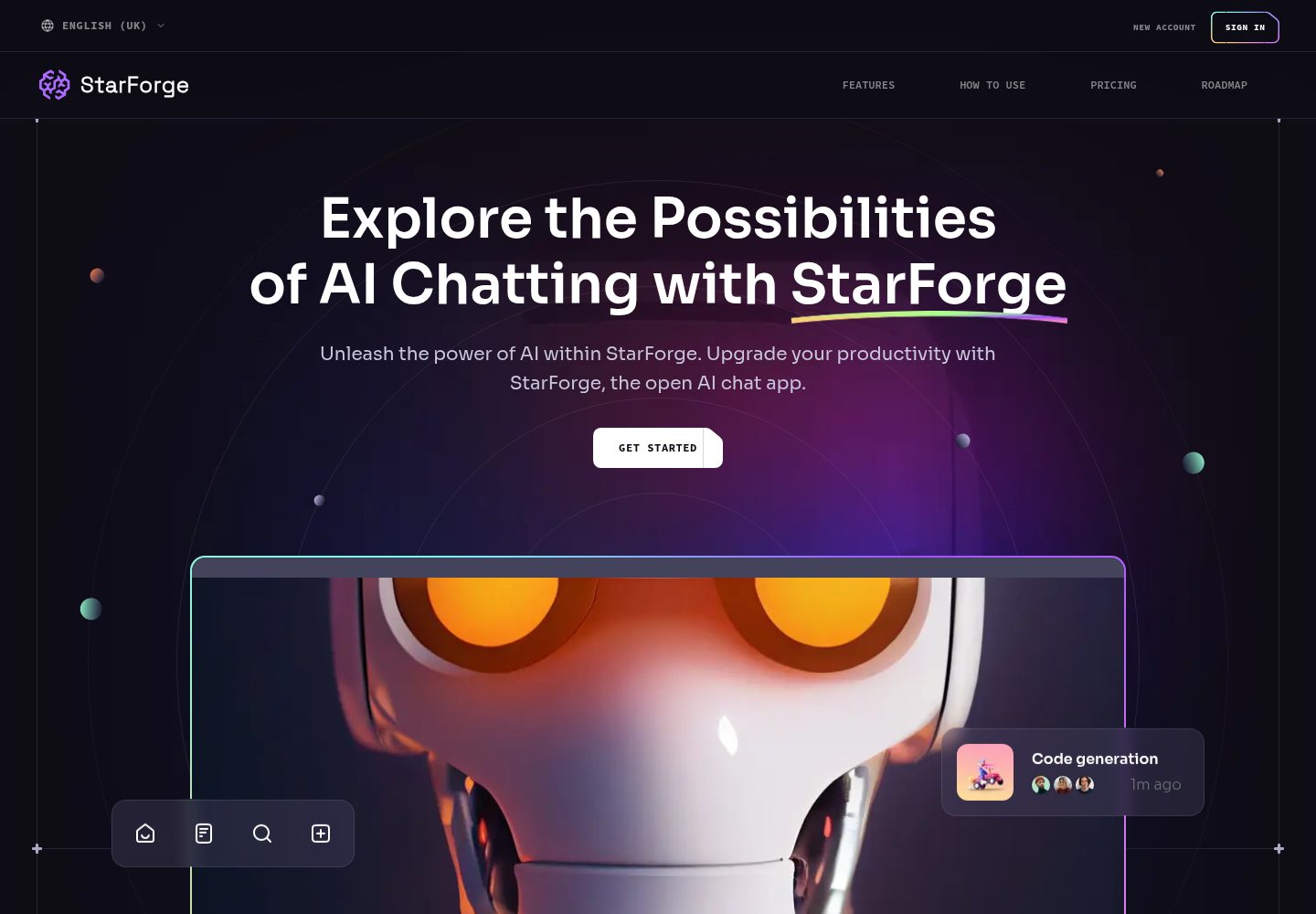
基于 Next.js、React 与 Tailwind CSS 构建的落地页模板
ReactSaaS企业官网启动器
ai-saas-landing-starter — React SaaS模板
作者 AayushBharti
StarForge 是一个基于 Next.js、React 与 Tailwind CSS 的 AI SaaS 落地页启动模板,包含视差滚动与 Bento 网格布局,采用 MIT 许可。
看看你的网站会是什么样
浏览真实页面截图,比较内容排版与手机效果。点击下方缩略图切换,放大查看整页细节。
全部页面与视图 2
截图用于了解视觉与布局,交互效果请以实际项目为准。
采集于 2026-10-02查看来源
值得关注的模板亮点
从已有项目资料中,快速了解它的特点。
Hero 区域使用 React Just Parallax 实现视差滚动效果
包含动画化的 Bento 网格布局区块
使用 TypeScript 编写,仓库顶层语言为 TypeScript
配置 ESLint 与 Prettier 作为代码检查与格式化工具
采用 MIT 许可,允许免费使用、修改、商用与分发
模板详细介绍
StarForge(仓库名 ai-saas-landing-starter)是一个面向 AI SaaS 产品的落地页模板,作者为 AayushBharti。README 将其定位为现代 UI/UX 网站,用 Next.js、React 和 Tailwind CSS 构建,可作为后续现代应用或网站的设计参考与起点。
模板的视觉重点在首页:包含带视差效果的 Hero 区域,以及动画化的 Bento 网格区块。README 的截图展示了这两部分;定价区块与网格区块的截图在 README 中被注释掉,未作为已展示内容。
技术栈方面,README 列出的依赖包括 TypeScript、Next.js、Tailwind CSS、ESLint、Prettier、React Just Parallax(用于视差组件)以及 Vercel 部署。仓库顶层语言标记为 TypeScript。
使用限制:这是纯前端落地页模板,README 未说明任何后端、数据库、支付或 AI 服务集成,也未提供内容管理方案,页面文案与素材需要自行替换。演示图片、字体、图标等第三方素材的许可需单独核对,不能仅凭代码的 MIT 许可判断。
ReactSaaS企业官网启动器
适合你的项目吗?
适用场景
- 为 AI SaaS 产品搭建单页营销落地页
- 作为 Next.js + Tailwind CSS 项目的起步脚手架
- 参考其视差滚动与 Bento 网格布局的实现方式
- 在已有 React 项目中复用其中的页面区块
适合人群
- 需要快速搭建 AI SaaS 落地页的前端开发者
- 熟悉 React、Next.js 与 Tailwind CSS 的团队
- 希望以 MIT 许可代码为起点做二次开发的个人项目
- 寻找现代落地页布局参考的设计与前端人员
上手与定制指南
结合仓库当前版本的说明,按下面的资料检查内容、配置与运行要求。
- 1
需预先安装 Git 与 Node.js
- 2
在 GitHub 上 Fork 仓库后克隆自己的副本,并进入项目目录
- 3
在项目根目录执行 pnpm install 安装依赖
- 4
使用 pnpm dev 启动开发服务器
- 5
生产构建使用 pnpm build,README 推荐部署到 Vercel,也提供 Netlify 部署入口
授权与来源资料
使用条件与限制
免费使用 · 保留许可声明本次收录的是公开仓库中采用 MIT 许可的免费版本;免费范围为该版本代码,不代表外部服务或第三方素材免费。
使用时需要遵守
- 允许免费使用、修改、商用和分发该版本代码。
- 分发代码副本或实质性部分时,保留原作者版权声明和完整 MIT 许可声明。
- 代码按现状提供;担保与责任限制以原许可证及适用法律为准。
额外费用与待核对事项
- 使用前需在 GitHub 上 Fork 该仓库并克隆自己的副本,因此需要 GitHub 账号;这是获取代码的推荐流程,非强制限制。
- 需在项目根目录执行 pnpm install 安装依赖,并预先安装 Git 与 Node.js,环境准备是使用前提。
- README 推荐部署到 Vercel,也可用 Netlify;使用这些托管平台需注册相应账号并可能受其服务条款与费用约束。
- 演示图片、字体、图标及其他第三方素材需按各自许可核对,不能仅凭代码的 MIT 许可判断。
- 域名、托管、数据库、支付或 AI 等外部服务可能另外收费。
查看原文依据
Permission is hereby granted, free of charge
许可证原文
Fork this repository on GitHub and clone **your fork** to your local machine
README 原文
Open the terminal in the project root and run `pnpm install` to install dependencies.
README 原文
https://github.com/AayushBharti/ai-saas-landing-starter/blob/main/LICENSEhttps://github.com/AayushBharti/ai-saas-landing-starter/blob/main/README.mdDeploy instantly on the Vercel platform.
README 原文
DeepSeek 根据仓库许可证和 README 整理 ·2026-10-02。结果仅覆盖已读取资料,依赖、图片、字体及后续条款变更以各自原文为准。
项目核对记录与介绍依据
模板资料
- 来源平台
- GitHub
- 资料与维护参考分
- 资料较完整 · 96 / 100
- 技术栈
- React
- 网站类型
- SaaS · 企业官网 · 启动器
这个分数如何计算
本站按许可资料(最高30分)、演示链接(12分)、预览图(10分)、Star数(15分)、记录的维护时间(15分)、描述完整度(8分)、功能记录(5分)和分类资料(5分)计算。它不是代码、安全或性能测试,也不是 Google 评分;有链接不代表已实测可用。
这个项目需要核对什么
- 记录的仓库更新时间
- 2026-08-24
- 截图检查日期
- 2026-10-02
已收录演示链接。请用你的内容与屏幕尺寸检查;有演示不代表表单、认证或支付已经可用。
目录记录的主要技术栈是 React。请通过依赖清单和锁文件核对实际版本与托管要求。这些说明基于收录资料,不代表代码审计或部署实测。
查看具体选型方法 →介绍的制作与核对状态
介绍由 AI 辅助整理目录与仓库资料。仓库作者不等于这篇介绍的审核者。
已完成服务器许可规则与 AI 来源核对;未经过人工编辑审核。
查看当时使用的来源资料
SHA-256: 15479ac3548b603d17bf0ed305ceae04dbe445dc177cd7682f39300a37674cac
2026-10-02T06:43:42.823Z
来源文件 / 仓库<a name="readme-top"></a>

<p align="center">
<h3 align="center">StarForge</h3>
<p align="center">
Ai SaaS Landing template for your next project
<br />
<a href="https://ai-saas-landing-starter.vercel.app/"><strong>Explore »</strong></a>
<br />
<br />
<a href="https://ai-saas-landing-starter.vercel.app/">Website</a>
·
<a href="https://github.com/aayushbharti/ai-saas-landing-starter/issues">Issues</a>
·
<a href="https://github.com/aayushbharti/ai-saas-landing-starter/issues/new?labels=enhancement&template=FEATURE_REQUEST_TEMPLATE.md">Request Feature</a>
</p>
</p>
<p align="center">
<a href="https://github.com/aayushbharti">
<img src="https://custom-icon-badges.demolab.com/badge/made%20by%20-aayushbharti-556bf2?logo=github&logoColor=white&labelColor=101827" alt="Made by Aayush Bharti">
</a>
<a href="https://github.com/aayushbharti/ai-saas-landing-starter/stargazers">
<img src="https://img.shields.io/github/stars/aayushbharti/ai-saas-landing-starter?style=flat&logo=github" alt="GitHub Stars">
</a>
<a href="https://github.com/aayushbharti/ai-saas-landing-starter/forks">
<img src="https://img.shields.io/github/forks/aayushbharti/ai-saas-landing-starter?style=flat" alt="GitHub Forks">
</a>
<a href="https://github.com/aayushbharti/ai-saas-landing-starter/blob/main/LICENSE">
<img src="https://img.shields.io/github/license/aayushbharti/ai-saas-landing-starter?color=dddddd&labelColor=000000" alt="License">
</a>
<a href="https://www.typescriptlang.org/">
<img src="https://img.shields.io/github/languages/top/aayushbharti/ai-saas-landing-starter?&logoColor=%23007ACC&label=TypeScript" alt="Top Language">
</a>
<a href="https://github.com/aayushbharti/ai-saas-landing-starter/graphs/contributors">
<img src="https://img.shields.io/github/contributors/aayushbharti/ai-saas-landing-starter?style=flat&color=orange&label=Contributors" alt="Contributors">
</a>
<a href="https://github.com/aayushbharti/ai-saas-landing-starter/commits/main">
<img src="https://img.shields.io/github/commit-activity/t/aayushbharti/ai-saas-landing-starter?style=flat&logo=github" alt="Commits">
</a>
<a href="https://github.com/aayushbharti/ai-saas-landing-starter/pulls">
<img src="https://img.shields.io/github/issues-pr/aayushbharti/ai-saas-landing-starter?color=brightgreen&label=PRs" alt="Pull Requests">
</a>
<img src="https://img.shields.io/github/deployments/aayushbharti/ai-saas-landing-starter/Production?logo=vercel&label=Website" alt="Deployment Status">
</p>
<!-- [](https://github.com/aayushbharti/ai-saas-landing-starter/commits)
[](https://github.com/aayushbharti/ai-saas-landing-starter/pulls) -->
<!-- [](https://github.com/aayushbharti/ai-saas-landing-starter/stargazers)
[](https://github.com/aayushbharti/ai-saas-landing-starter/forks)
[](https://github.com/aayushbharti)
[](https://github.com/aayushbharti/ai-saas-landing-starter/blob/main/LICENSE)
[](https://www.typescriptlang.org/)
[](https://github.com/aayushbharti/ai-saas-landing-starter/graphs/contributors)
 -->
<details>
<summary>Table of Contents</summary>
- [About the Project](#about-the-project)
- [Screenshots](#-screenshots)
- [Technologies Used](#-technologies-used)
- [Getting Started](#-getting-started)
- [Contributing](#-contributing)
- [Acknowledgements](#-acknowledgements)
- [Follow Me](#-follow-me)
- [Deployment](#-deployment)
- [Give A Star](#-give-a-star)
- [Star History](#-star-history)
</details>
## About the Project
**StarForge** is a Modern UI/UX website, developed using Next.js, React, and
Tailwind CSS, exemplifies modern UI/UX principles. Its sleek design, seamless
animations, and overall user experience set a high standard, serving as a
reference or inspiration for future modern applications or websites in general.
## 📷 Screenshots


<!-- 
 -->
## ✨ Technologies Used
<details><summary><b>StarForge</b> is built using the following technologies:</summary>
- [TypeScript](https://www.typescriptlang.org/): TypeScript is a typed superset
of JavaScript that compiles to plain JavaScript.
- [Next.js](https://nextjs.org/): Next.js is a React framework for building
server-side rendered and statically generated web applications.
- [Tailwind CSS](https://tailwindcss.com/): Tailwind CSS is a utility-first CSS
framework for rapidly building custom user interfaces.
- [ESLint](https://eslint.org/): ESLint is a static code analysis tool for
identifying problematic patterns found in JavaScript code.
- [Prettier](https://prettier.io/): Prettier is an opinionated code formatter.
- [React Just Parallax](https://www.npmjs.com/package/react-just-parallax):
React Just Parallax is a simple and lightweight parallax component for React.
- [Vercel](https://vercel.com/): Vercel is a cloud platform for frontend
developers, providing the frameworks, workflows, and infrastructure to build a
faster, more personalized Web.
</details><br/>
[](https://skillicons.dev)
<!-- ## :wrench: Stats
[](https://pagespeed.web.dev/analysis?url=https://ai-saas-landing-starter.vercel.app/ "Stats for StarForge") -->
## 🧰 Setup
1. Make sure [Git](https://git-scm.com/downloads) and [Node.js](https://nodejs.org/en/) are installed.
2. Fork this repository on GitHub and clone **your fork** to your local machine:
```bash
git clone https://github.com/<your-username>/ai-saas-landing-starter.git
cd ai-saas-landing-starter
```
3. Open the terminal in the project root and run `pnpm install` to install dependencies.
4. Start the development server with `pnpm dev`.
<!-- 5. Visit **[http://localhost:3000](http://localhost:3000)** in your browser to see it live 🚀. -->
## 🔧 Contributing
[](https://github.com/aayushbharti/ai-saas-landing-starter/graphs/contributors)
Contributions are what make the open source community such an amazing place to
learn, inspire, and create. Any contributions you make are **greatly
appreciated**.
To fix a bug or enhance an existing module, follow these steps:
1. Fork the repo
2. Create a new branch (`git checkout -b improve-feature`)
3. Make the appropriate changes in the files
4. Commit your changes (`git commit -am 'Improve feature'`)
5. Push to the branch (`git push origin improve-feature`)
6. Create a Pull Request 🎉
## 💎 Acknowledgements
I'd like to express my gratitude to the following people who helped me with this
project and made it possible:
- [Next.js](https://nextjs.org/)
- [Tailwind CSS](https://tailwindcss.com/)
- [Prettier](https://prettier.io/)
- [ESLint](https://eslint.org/)
- [Vercel](https://vercel.com/)
- [React Just Parallax](https://www.npmjs.com/package/react-just-parallax)
<!-- ## :coffee: Buy Me a Coffee
[<img src="https://img.shields.io/badge/Buy_Me_A_Coffee-FFDD00?style=for-the-badge&logo=buy-me-a-coffee&logoColor=black" width="200" />](https://www.buymeacoffee.com/aayushbharti "Buy me a Coffee") -->
## 🚀 Follow Me
<!-- [](https://t.me/aayushbharti) -->
[](https://github.com/aayushbharti "Follow Me")
[](https://www.linkedin.com/in/iaayushbharti)
[](https://twitter.com/intent/tweet?text=Check+out+this+amazing+app:&url=https%3A%2F%2Fgithub.com%2Faayushbharti%2Fai-saas-landing-starter "Tweet about this project")
<!-- [](https://twitter.com/intent/follow?screen_name=iaayushbharti) -->
<!-- [](https://www.instagram.com/aayushbharti) -->
## 📃 Deployment
| Method | Description | Action |
| :------------------------- | :--------------------------------------- | :------------------------------------------------------------------------------------------------------------------------------------------------------------------------------- |
| **🔧 Manual Build** | Create an optimized production build. | `pnpm build` |
| **▲ Vercel (Recommended)** | Deploy instantly on the Vercel platform. | [](https://vercel.com/new/clone?repository-url=https%3A%2F%2Fgithub.com%2Faayushbharti%2Fai-saas-landing-starter) |
| **🌐 Netlify** | Deploy easily on Netlify. | [](https://app.netlify.com/start/deploy?repository=https://github.com/aayushbharti/ai-saas-landing-starter) |
For more details, check the [Next.js deployment docs](https://nextjs.org/docs/deployment).
## ⭐ Give A Star
You can also give this repository a star to show more people and they can use this repository.
## 🌟 Star History
<a href="https://star-history.com/#aayushbharti/ai-saas-landing-starter&Timeline">
<picture>
<source media="(prefers-color-scheme: dark)" srcset="https://api.star-history.com/svg?repos=aayushbharti/ai-saas-landing-starter&type=Timeline&theme=dark" />
<source media="(prefers-color-scheme: light)" srcset="https://api.star-history.com/svg?repos=aayushbharti/ai-saas-landing-starter&type=Timeline" />
<img alt="Star History Chart" src="https://api.star-history.com/svg?repos=aayushbharti/ai-saas-landing-starter&type=Timeline" />
</picture>
</a>
<br />
<p align="right">(<a href="#readme-top">back to top</a>)</p>
看看同类模板
对比同技术栈与用途的模板,找到更适合的视觉与内容结构。
ant-design-pro
Ant Design Pro 是 Ant Design 官方推出的企业级中后台前端脚手架,基于 React 19、Umi Max 4 和 antd 6 构建,内置 TypeScript 支持。
React · 后台

react-boilerplate
react-boilerplate 是一个为有一定 React 和 Redux 经验的开发者设计的启动器,目标是快速搭建可扩展、离线优先的 Web 应用。
React · 启动器

fastapi-react
fastapi-react 是一个基于 Cookiecutter 的模板,用于快速搭建 FastAPI 与 React(TypeScript)的全栈项目。
React · 后台

shadcn-landing-page
Free Landing page template using Shadcn, React, Typescript and Tailwind
React · 企业官网

react-saas-template
🌊 Template for building an SaaS / admin website using React + Material-UI
React · 后台

start-ui-web
Start UI [web] 是 BearStudio 团队维护的一个有主见的全栈启动器,用于快速搭建 Web 应用。
React · 启动器